
elasticsearch-cn-out-of-box
elasticsearch-cn-out-of-box
https://github.com/hangxin1940/elasticsearch-cn-out-of-box
为elasticsearch集成一些实用插件以及配置的开箱即用的版本。
======
- elasticsearch 1.4.2
- servicewrapper 0.90
站点插件:
- oob
- bigdesk 2.5.0
- head
- kopf 1.2.5
- segmentspy
- inquisitor
- paramedic
- hq
分词插件
- analysis-smartcn 2.3.1
- analysis-mmseg 1.2.2
- analysis-ik 1.2.9
- analysis-stconvert 1.3.0
- analysis-pinyin 1.2.2
- analysis-ansj 1.x.1
- analysis-string2int 1.3.0
- analysis-combo 1.5.1
其他插件
- jetty oob-1.4.2
- mapper-attachments 2.4.1
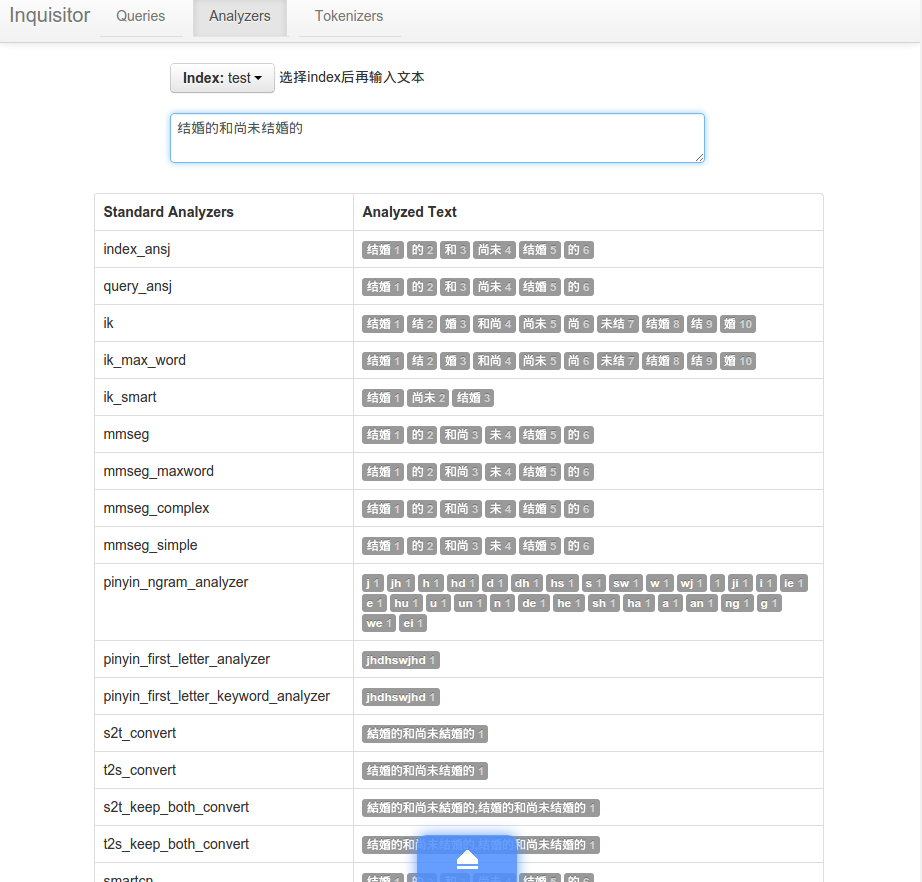
为 inquisitor 插件增加自定义分析器的预览等
使用方法
浏览器进入插件 http://localhost:9200/_plugin/oob


elasticsearch.yml
# 集群名

cluster.name: "cn-out-of-box"

# 节点名

node.name: "node1"

# 是否有资格成为主节点

node.master: true

# 是否存储索引数据

node.data: true

# 默认索引分片数

index.number_of_shards: 3

# 默认索引副本数

index.number_of_replicas: 1

# 临时文件存储路路径

#path.work: "/tmp/elasticsearch"

# 日志文件存储路路径

#path.logs:  "/var/log/elasticsearch/logs"

# tcp传输端口

transport.tcp.port: 9300

# 是否压缩tcp传输数据

transport.tcp.compress: true

# http端口

http.port: 9200

# 是否开启http服务

#http.enabled: true

# 是否打开多播发现节点

discovery.zen.ping.multicast.enabled: true

# 慢查询日志参数

#index.search.slowlog.threshold.query.warn: 10s

#index.search.slowlog.threshold.query.info: 5s

#index.search.slowlog.threshold.query.debug: 2s

#index.search.slowlog.threshold.query.trace: 500ms

#index.search.slowlog.threshold.fetch.warn: 1s

#index.search.slowlog.threshold.fetch.info: 800ms

#index.search.slowlog.threshold.fetch.debug: 500ms

#index.search.slowlog.threshold.fetch.trace: 200ms

# 启用jetty插件提供http服务

http.type: com.sonian.elasticsearch.http.jetty.JettyHttpServerTransport

# sonian.elasticsearch.http.jetty:

    # ==== 开启 https

    #ssl_port: 9443

    #config: jetty.xml,jetty-ssl.xml, jetty-gzip.xml

    #keystore_password: "OBF:1nc01vuz1w8f1w1c1rbu1rac1w261w9b1vub1ndq"

    # ==== 开启用户认证

    # config: jetty.xml,jetty-hash-auth.xml,jetty-restrict-all.xml

# 索引配置

index:

  # 分析配置

  analysis:

    # 分词器配置

    tokenizer:

      index_ansj_token:

        type: ansj_index_token

        is_name: false

        is_num: false

        is_quantifier: false

      query_ansj_token:

        type: ansj_query_token

        is_name: false

        is_num: false

        is_quantifier: false

# ======== analysis-pinyin ========

      # 完整拼音

      my_pinyin:

        type: pinyin

        first_letter: prefix

        padding_char: ' '

      # 拼音首字母

      pinyin_first_letter:

        type: pinyin

        first_letter: only

# ======== analysis-mmseg ========

      # 简单正向匹配

      #       example: 一个劲儿的说话

      #       一个

      #       一个劲

      #       一个劲儿

      #       一个劲儿的

      mmseg_simple:

        type: mmseg

        seg_type: simple

      # 匹配出所有的“三个词的词组”

      # 并使用四种规则消歧(最大匹配、最大平均词语长度、词语长度的最小变化率、所有单字词词频的自然对数之和)

      #       example: 研究生命起源

      #       研_究_生

      #       研_究_生命

      #       研究生_命_起源

      #       研究_生命_起源

      mmseg_complex:

        type: mmseg

        seg_type: complex

      # 基于complex的最多分词

      #       example: 中国人民银行

      #       中国|人民|银行

      mmseg_maxword:

        type: mmseg

        seg_type: max_word

# ======== analysis-stconvert ========

      # 简繁转换,只输出繁体

      s2t_convert:

        type: stconvert

        delimiter: ","

        convert_type: s2t

     # 繁简转换,只输出简体

      t2s_convert:

        type: stconvert

        delimiter: ","

        convert_type: t2s

     # 简繁转换,同时输出繁体简体

      s2t_keep_both_convert:

        type: stconvert

        delimiter: ","

        keep_both: 'true'

        convert_type: s2t

     # 繁简转换,同时输出简体繁体

      t2s_keep_both_convert:

        type: stconvert

        delimiter: ","

        keep_both: 'true'

        convert_type: t2s

# ======== analysis-pattern ========

     # 正则,分号分词

      semicolon_spliter:

        type: pattern

        pattern: ";"

     # 正则,%分词

      pct_spliter:

        type: pattern

        pattern: "[%]+"

 # ======== analysis-nGram ========

      # 1~2字为一词

      ngram_1_to_2:

        type: nGram

        min_gram: 1

        max_gram: 2

      # 1~3字为一词

      ngram_1_to_3:

        type: nGram

        min_gram: 1

        max_gram: 3

    # 过滤器配置

    filter:

 # ======== ngram filter ========

      ngram_min_3:

        max_gram: 10

        min_gram: 3

        type: nGram

      ngram_min_2:

        max_gram: 10

        min_gram: 2

        type: nGram

      ngram_min_1:

        max_gram: 10

        min_gram: 1

        type: nGram

 # ======== length filter ========

      min2_length:

        min: 2

        max: 4

        type: length

      min3_length:

        min: 3

        max: 4

        type: length

 # ======== string2int filter ========

#      my_string2int:

#        type: string2int

#        redis_server: 127.0.0.1

#        redis_port: 6379

#        redis_key: index1_type2_name2

 # ======== pinyin filter ========

      pinyin_first_letter:

        type: pinyin

        first_letter: only

    # 分析器配置

    analyzer:

      lowercase_keyword:

        type: custom

        filter:

        - lowercase

        tokenizer: standard

      lowercase_keyword_ngram_min_size1:

        type: custom

        filter:

        - lowercase

        - stop

        - trim

        - unique

        tokenizer: nGram

      lowercase_keyword_ngram_min_size2:

        type: custom

        filter:

        - lowercase

        - min2_length

        - stop

        - trim

        - unique

        tokenizer: nGram

      lowercase_keyword_ngram_min_size3:

        type: custom

        filter:

        - lowercase

        - min3_length

        - stop

        - trim

        - unique

        tokenizer: ngram_1_to_3

      lowercase_keyword_ngram:

        type: custom

        filter:

        - lowercase

        - stop

        - trim

        - unique

        tokenizer: ngram_1_to_3

      lowercase_keyword_without_standard:

        type: custom

        filter:

        - lowercase

        tokenizer: keyword

      lowercase_whitespace:

        type: custom

        filter:

        - lowercase

        tokenizer: whitespace

 # ======== ik  ========

       # ik分词器

      ik:

        alias:

        - ik_analyzer

        type: org.elasticsearch.index.analysis.IkAnalyzerProvider

      # ik智能切分

      ik_max_word:

        type: ik

        use_smart: false

      # ik最细粒度切分

      ik_smart:

        type: ik

        use_smart: true

 # ======== mmseg  ========

       # mmseg分词器

      mmseg:

        alias:

        - mmseg_analyzer

        type: org.elasticsearch.index.analysis.MMsegAnalyzerProvider

      mmseg_maxword:

        type: custom

        filter:

        - lowercase

        tokenizer: mmseg_maxword

      mmseg_complex:

        type: custom

        filter:

        - lowercase

        tokenizer: mmseg_complex

      mmseg_simple:

        type: custom

        filter:

        - lowercase

        tokenizer: mmseg_simple

 # ======== 正则 ========

      comma_spliter:

        type: pattern

        pattern: "[,|\\s]+"

      pct_spliter:

        type: pattern

        pattern: "[%]+"

      custom_snowball_analyzer:

        type: snowball

        language: English

      simple_english_analyzer:

        type: custome

        tokenizer: whitespace

        filter:

        - standard

        - lowercase

        - snowball

      edge_ngram:

        type: custom

        tokenizer: edgeNGram

        filter:

        - lowercase

  # ======== 拼音分析 ========

      pinyin_ngram_analyzer:

        type: custom

        tokenizer: my_pinyin

        filter:

        - lowercase

        - nGram

        - trim

        - unique

  # ======== 拼音首字母分词 ========

      pinyin_first_letter_analyzer:

        type: custom

        tokenizer: pinyin_first_letter

        filter:

        - standard

        - lowercase

   # ======== 拼音首字母分词并过滤 ========

      pinyin_first_letter_keyword_analyzer:

        alias:

        - pinyin_first_letter_analyzer_keyword

        type: custom

        tokenizer: keyword

        filter:

        - pinyin_first_letter

        - lowercase

   # ======== 简繁体 ========

      stconvert:

        alias:

        - st_analyzer

        type: org.elasticsearch.index.analysis.STConvertAnalyzerProvider

      s2t_convert:

        type: stconvert

        delimiter: ","

        convert_type: s2t

      t2s_convert:

        type: stconvert

        delimiter: ","

        convert_type: t2s

      s2t_keep_both_convert:

        type: stconvert

        delimiter: ","

        keep_both: 'true'

        convert_type: s2t

      t2s_keep_both_convert:

        type: stconvert

        delimiter: ","

        keep_both: 'true'

        convert_type: t2s

      #string2int:

        #type: org.elasticsearch.index.analysis.String2IntAnalyzerProvider

        # redis_server: 127.0.0.1

        # redis_port: 6379

        # redis_key: index1_type1_name1

      #custom_string2int:

        #type: custom

        #tokenizer: whitespace

        #filter:

        #- string2int

        #- lowercase

      # 路径分析

      path_analyzer:

        type: custom

        tokenizer: path_hierarchy

# ======== ansj ========

      index_ansj:

        alias:

        - ansj_index_analyzer

        type: ansj_index

        user_path: ansj/user

        ambiguity: ansj/ambiguity.dic

        stop_path: ansj/stopLibrary.dic

        #is_name: false

        # s_num: true

        #is_quantifier: true

        redis: false

          #pool:

            #maxactive: 20

           # maxidle: 10

            #maxwait: 100

            #testonborrow: true

          #ip: 127.0.0.1:6379

          #channel: ansj_term

      query_ansj:

        alias:

        - ansj_query_analyzer

        type: ansj_query

        user_path: ansj/user

        ambiguity: ansj/ambiguity.dic

        stop_path: ansj/stopLibrary.dic

        #is_name: false

        # is_num: true

        # is_quantifier: true

        redis: false

          #pool:

            #maxactive: 20

           # maxidle: 10

            #maxwait: 100

            #testonborrow: true

          #ip: 127.0.0.1:6379

          #channel: ansj_term

      uax_url_email:

        tokenizer: uax_url_email

        filter: [standard, lowercase, stop]

 # ======== combo ========

      combo:

        type: combo

        sub_analyzers:

         - ansj_index

         - ik_smart

         - mmseg_complex

         - uax_url_email

         - s2t_convert

         - t2s_convert

         - smartcn

         - simple_english_analyzer

# 默认分析器

index.analysis.analyzer.default.type: combo

# 线程池设置

threadpool:

    index:

        type: fixed

        size: 30

        queue: -1

        reject_policy: caller
elasticsearch-cn-out-of-box的更多相关文章
- Query DSL for elasticsearch Query
Query DSL Query DSL (资料来自: http://www.elasticsearch.cn/guide/reference/query-dsl/) http://elasticsea ...
- 可以执行全文搜索的原因 Elasticsearch full-text search Kibana RESTful API with JSON over HTTP elasticsearch_action es 模糊查询
https://www.elastic.co/guide/en/elasticsearch/guide/current/getting-started.html Elasticsearch is a ...
- 搜索引擎 ElasticSearch 之 步步为营 【主目录】
ElasticSearch 是一款著名的分布式搜索引擎框架,采用Java编写.具有搜索速度快,实时搜索等特色. 以下为官网对ElasticSearch的介绍: Elasticsearch 是一款高可伸 ...
- 【elasticsearch】python下的使用
有用链接: 最有用的:http://es.xiaoleilu.com/054_Query_DSL/70_Important_clauses.html 不错的博客:http://www.cnblogs. ...
- ElasticSearch学习笔记-01 简介、安装、配置与核心概念
一.简介 ElasticSearch是一个基于Lucene构建的开源,分布式,RESTful搜索引擎.设计用于云计算中,能够达到实时搜索,稳定,可靠,快速,安装使用方便.支持通过HTTP使用JSON进 ...
- ElasticSearch实战使用
注意:以下命令都是使用sense测试(ElasticSearch第二步-CRUD之Sense),且数据都已经使用过IK分词. 以下测试数据来源于文档(db_test/person) 需要注意的是下面的 ...
- Elasticsearch和mysql数据同步(elasticsearch-jdbc)
1.介绍 对mysql.oracle等数据库数据进行同步到ES有三种做法:一个是通过elasticsearch提供的API进行增删改查,一个就是通过中间件进行数据全量.增量的数据同步,另一个是通过收集 ...
- laravel Scout包在elasticsearch中的应用
laravel Scout包在elasticsearch中的应用 laravel的Scout包是针对自身的Eloquent模型开发的基于驱动的全文检索引擎.意思就是我们可以像使用ORM一样使用检索功能 ...
- 搜索引擎solr和elasticsearch
刚开始接触搜索引擎,网上收集了一些资料,在这里整理了一下分享给大家. 一.关于搜索引擎 搜索引擎(Search Engine)是指根据一定的策略.运用特定的计算机程序从互联网上搜集信息,在对信息进行组 ...
- 【转】Elasticsearch学习
原作者:铭毅天下,原文地址:blog.csdn.net/laoyang360 https://blog.csdn.net/wojiushiwo987/article/details/52244917 ...
随机推荐
- javascript基础知识-语句
关于javascript语句,有下面一些有趣的用法. 1.空语句的使用: 空语句只包含一个";",那在什么时候可以使用呢? 例: //初始化一个数组a for(i = 0;i &l ...
- Majority Element I&II
题号:169, 229. 思路:当要找到超过n/c的元素x时,在更新candidates时,要保证,是x时加1,不是x时消掉c-1.则最终,x一定会出现在一个candidate中.
- php socket获取数据类
<?php define("CONNECTED", true); define("DISCONNECTED", false); /** * Socket ...
- 项目启动异常java.lang.OutOfMemoryError: PermGen space
java.lang.OutOfMemoryError: PermGen space 解决办法: Eclipse-->window-->Tomcat -->JVM setting - ...
- linux tcp协议状态机
截图来自百度文库 TCP状态-有限状态机
- inotify 心得
inotify 心得 一.inotify简介 inotify是Linux内核2.6.13 (June 18, 2005)版本新增的一个子系统(API),它提供了一种监控文件系统(基于inode的)事件 ...
- centos6.4 无法进入图形界面的问题及解决
在安装了ngnix及pcre.openssl.zlib.lua等模块之后,进不了图形界面. 解决的方法如下: Ctrl+Alt+F5,输入账号和密码 vim /etc/inittab #将等级5改为等 ...
- Dynamic CRM 2013学习笔记(二十六)报表设计:Reporting Service报表 动态参数、参数多选全选、动态列、动态显示行字体颜色
上次介绍过CRM里开始报表的一些注意事项:Dynamic CRM 2013学习笔记(十五)报表入门.开发工具及注意事项,本文继续介绍报表里的一些动态效果:动态显示参数,参数是从数据库里查询出来的:参数 ...
- 设计模式之美:Proxy(代理)
索引 别名 意图 结构 参与者 适用性 效果 相关模式 实现 实现方式(一):使用相同 Subject 接口实现 Proxy. 别名 Surrogate 意图 为其他对象提供一种代理以控制对这个对象的 ...
- Wix 安装部署(二)自定义安装界面和行为
上一篇介绍了如何联合MSBuild来自动生成打包文件和对WIX的一些初步认识,http://www.cnblogs.com/stoneniqiu/p/3355086.html . 这篇会在上篇的基础上 ...