
Vuex mapGetters,mapActions
一、基本用法
1. 初始化并创建一个项目
|
1
2
3
|
vue init webpack-simple vuex-democd vuex-demonpm install |
2. 安装 vuex
|
1
|
npm install vuex -S |
3. 在 src 目录下创建 store.js 文件,并在 main.js 文件中导入并配置
store.js 中写入
|
1
2
3
4
|
import Vue from 'vue'//引入 vuex 并 useimport Vuex from 'vuex'Vue.use(Vuex) |
main.js 文件
|
1
2
3
4
5
6
7
8
9
10
|
import Vue from 'vue'import App from './App.vue'import store from './assets/store' //导入 store 对象new Vue({ //配置 store 选项,指定为 store 对象,会自动将 store 对象注入到所有子组件中,在子组件中通过 this.$store 访问该 store 对象 store, el: '#app', render: h => h(App)}) |
4. 编辑 store.js 文件
在应用 vuex 之前,我们还是需要看懂这个流程图,其实很简单。
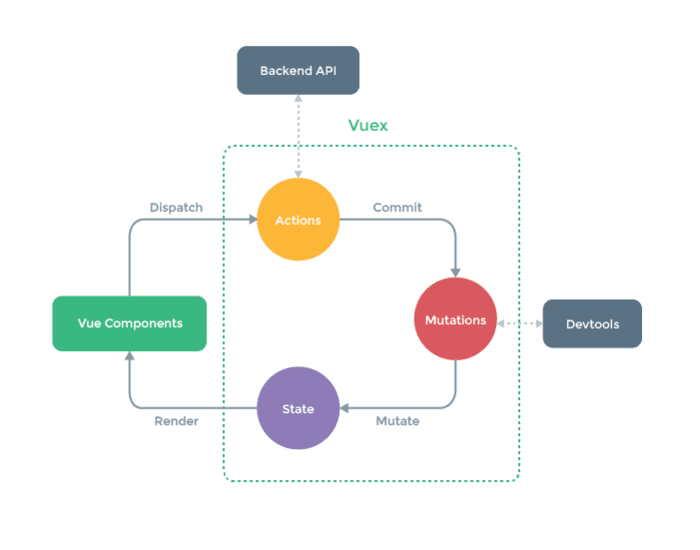
vuex
① Vue Components 是我们的 vue 组件,组件会触发(dispatch)一些事件或动作,也就是图中的 Actions;
② 我们在组件中发出的动作,肯定是想获取或者改变数据的,但是在 vuex 中,数据是集中管理的,我们不能直接去更改数据,所以会把这个动作提交(Commit)到 Mutations 中;
③ 然后 Mutations 就去改变(Mutate)State 中的数据;
④ 当 State 中的数据被改变之后,就会重新渲染(Render)到 Vue Components 中去,组件展示更新后的数据,完成一个流程。
Vuex 的核心是 Store(仓库),相当于是一个容器,一个 Store 实例中包含以下属性的方法:
state 定义属性(状态 、数据)
store.js 中写入
|
1
2
3
4
5
6
7
8
9
10
11
|
// 定义属性(数据)var state = { count:6}// 创建 store 对象const store = new Vuex.Store({ state})// 导出 store 对象export default store; |
方式1、 在 app.vue 中就能通过 this.$store 访问该 store 对象 ,获取该 count 。
|
1
2
3
4
5
6
7
8
9
10
11
12
13
14
15
16
17
18
|
<template> <div id="app"> //把 count 方法直接写入,可自己执行 <h1>{{count}}</h1> </div></template><script>export default { name: 'app', computed:{ count(){ //返回获取到的数据 return this.$store.state.count } }}</script> |
方式2、vuex 提供的 mapGetters 和 mapActions 来访问
mapGetters 用来获取属性(数据)
① 在 app.vue 中引入 mapGetters
|
1
|
import {mapGetters} from 'vuex' |
② 在 app.vue 文件的计算属性中调用 mapGetters 辅助方法,并传入一个数组,在数组中指定要获取的属性 count
|
1
2
3
4
5
6
7
8
9
10
|
<script>import {mapGetters,mapActions} from 'vuex'export default { name: 'app', computed:mapGetters([ //此处的 count 与以下 store.js 文件中 getters 内的 count 相对应 'count' ])}</script> |
③ 在 store.js 中定义 getters 方法并导出
getters 用来获取属性
|
1
2
3
4
5
6
7
8
9
10
11
12
13
14
15
16
17
18
19
20
21
22
23
|
import Vue from 'vue'import Vuex from 'vuex'Vue.use(Vuex)// 定义属性(数据)var state = { count:6}// 定义 gettersvar getters={ //需要传个形参,用来获取 state 属性 count(state){ return state.count }}// 创建 store 对象const store = new Vuex.Store({ state, getters})// 导出 store 对象export default store; |
这样页面上就会显示传过来的数据了!接下来我们来通过动作改变获取到的数据
④在 store.js 中定义 actions 和 mutations 方法并导出
actions 定义方法(动作),可以使异步的发送请求。
commit 提交变化,修改数据的唯一方式就是显示的提交 mutations
mutations 定义变化,处理状态(数据)的改变
|
1
2
3
4
5
6
7
8
9
10
11
12
13
14
15
16
17
18
19
20
21
22
23
24
25
26
27
28
29
30
31
32
33
34
35
36
37
38
39
40
41
42
43
|
import Vue from 'vue'import Vuex from 'vuex'Vue.use(Vuex)// 定义属性(数据)var state = { count:6}// 定义 gettersvar getters={ count(state){ return state.count }}// 定义 actions ,要执行的动作,如流程的判断、异步请求const actions ={ // ({commit,state}) 这种写法是 es6 中的对象解构 increment({commit,state}){ //提交一个名为 increment 的变化,名字可自定义,可以认为是类型名,与下方 mutations 中的 increment 对应 //commit 提交变化,修改数据的唯一方式就是显式的提交 mutations commit('increment') }}// 定义 mutations ,处理状态(数据) 的改变const mutations ={ //与上方 commit 中的 ‘increment' 相对应 increment(state){ state.count ++; }}// 创建 store 对象const store = new Vuex.Store({ state, getters, actions, mutations})// 导出 store 对象export default store; |
⑤ 在 app.vue 中引入 mapActions ,并调用
mapActions 用来获取方法(动作)
|
1
|
import {mapGetters,mapActions} from 'vuex' |
调用 mapActions 辅助方法,并传入一个数组,在数组中指定要获取的方法 increment
|
1
2
3
4
5
6
7
8
9
10
11
12
13
14
15
16
17
18
19
20
21
22
|
<template> <div id="app"> //这个 increment 方法与下面 methods 中的 increment 相对应 <button @click="increment">增加</button> <button>减少</button> <h1>{{count}}</h1> </div></template><script>import {mapGetters,mapActions} from 'vuex'export default { name: 'app', computed:mapGetters([ 'count' ]), methods:mapActions([ //该 increment 来自 store.js 中导出的 actions 和 mutations 中的 increment 'increment', ])}</script> |
这样就能通过 button 来改变获取到的 count 了。
看起来确实是挺绕的,需要在理解了原理的情况下,再细细琢磨,加深理解。
以上就是本文的全部内容,希望对大家的学习有所帮助,也希望大家多多支持脚本之家。
您可能感兴趣的文章:
原文链接:https://www.jianshu.com/p/b014ff74bdb6
/*getter是state的get方法,没有get页面就获取不到数据

获取页面:

import {mapGetters,mapActions} from 'vuex'

 <h1>{{count}}</h1>

computed:mapGetters([

 'count'

 ]),

store.js:

var state = {

 count:6

},

var getters={

 count(state){

  return state.count

 }

}

改变数据页面:

<button @click="increment">增加</button>

methods:mapActions([

 //该 increment 来自 store.js 中导出的 actions 和 mutations 中的 increment

 'increment',

 ])

先发给action:

const actions ={

 // ({commit,state}) 这种写法是 es6 中的对象解构

 increment({commit,state}){

  //提交一个名为 increment 的变化,名字可自定义,可以认为是类型名,与下方 mutations 中的 increment 对应

  //commit 提交变化,修改数据的唯一方式就是显式的提交 mutations

  commit('increment')

 }

}

再发给mutations:

const mutations ={

 //与上方 commit 中的 ‘increment' 相对应

 increment(state){

  state.count ++;

 }

}

*/
Vuex mapGetters,mapActions的更多相关文章
- vuex之 mapState, mapGetters, mapActions, mapMutations 的使用
一.介绍 vuex里面的四大金刚:State, Mutations,Actions,Getters (上次记得关于vuex笔记 http://www.cnblogs.com/adouwt/p/8283 ...
- vuex中的babel编译mapGetters/mapActions报错解决方法
vex使用...mapActions报错解决办法 vuex2增加了mapGetters和mapActions的方法,借助stage2的Object Rest Operator 所在通过 methods ...
- vuex中的辅助函数 mapState,mapGetters, mapActions, mapMutations
1.导入辅助函数 导入mapState可以调用vuex中state的数据 导入mapMutations可以调用vuex中mutations的方法 四个辅助函数 各自对应自己在vuex上的自己 2.ma ...
- 解决 vuex mapGetters 语法报错 (Unexpected token )
在使用vuex2的mapGetters 和 mapActions 的方法时,借助 stage2 的 Object Rest Operator 特性,可以写出下面代码: computed: { ... ...
- vuex使用mapActions报错解决办法
先贴上报错: vuex2增加了mapGetters和mapActions的方法,借助stage2的Object Rest Operator 所在通过 methods:{ ...mapActions([ ...
- vuex mapGetters
1.vuex 配置 //vuex的配置 //注意Store是大写 const store = new Vuex.Store({ //数据保存 state: { show: false, count: ...
- vuex2中使用mapGetters/mapActions报错解决方法
解决方案 可以安装整个stage2的预置器或者安装 Object Rest Operator 的babel插件 babel-plugin-transform-object-rest-spread . ...
- vuex里mapState,mapGetters使用详解
这次给大家带来vuex里mapState,mapGetters使用详解,vuex里mapState,mapGetters使用的注意事项有哪些,下面就是实战案例,一起来看一下. 一.介绍 vuex里面的 ...
- vuex mapActions
在组件中使用 this.$store.dispatch('xxx') 分发 action,或者使用 mapActions 辅助函数将组件的 methods 映射为 store.dispatch 调用( ...
随机推荐
- IOS设计模式浅析之原型模式(Prototype)
原型模式的定义 “使用原型实例指定创建对象的种类,并通过复制这个原型创建新的对象”.最初的定义出现于<设计模式>(Addison-Wesley,1994). 简单来理解就是根据这个原型创建 ...
- PHP编译configure时常见错误
PHP的安装虽然有时候很简单,可是如果应用一多,我们安装起来就很头痛了!出错最多的就是安装PHP扩展的时候了.其实不管是你是Apache类的应用还是Nginx类的,PHP的安装都不是很简单,虽然网上有 ...
- JavaBean属性
一个JavaBean对象的属性应该是可访问的.这个属性可以是任意合法的Java数据类型,包括自定义Java类. 一个JavaBean对象的属性可以是可读写,或只读,或只写.JavaBean对象的属性通 ...
- Android处理图片工具(转载)
内容来源于http://www.cnblogs.com/TerryBlog/archive/2012/01/08/2316482.html package com.wireme.activity; i ...
- Redis 在windows中启动
redis-server.exe redis.windows.conf 或 redis-server.exe redis.conf
- Android开发:《Gradle Recipes for Android》阅读笔记(翻译)2.4——更新新版本的Gradle
问题: 你需要更新应用的Gradle版本. 解决方案: 生成一个新的wrapper,或者直接修改属性文件(.properties). 讨论: Android Studio包含了一个Gradle的分发. ...
- 创建新的C++工程来调用Caffe对图片进行识别
前段时间一直在跑Caffe训练数据.之前用训练好的caffemodel对图片进行分类都是用的命令行指令,于是就想着自己新建一个工程来调用caffe,结合classification的代码来对图片进行分 ...
- linux下不错的小软件
1.Shutter截图软件 可以完成基本截图功能,而且还有图片编辑功能,可以涂鸦添加水印等. 以下的截图全部归功于shutter软件. 2.VLC media player 媒体播放器 3.Termi ...
- MVC路由自定义及视图找寻规则
这篇关于MVC路由及视图规则本来是昨天要发的,但是本人真的有点懒,终于今天忍无可忍了.初学MVC的时候比现在还菜一点(现在也很菜),想着会用就行,但是有时还是会好奇,为什么它能找到控制器?为什么控制器 ...
- EasyNVR浏览器无插件直播在Linux系统下将录像文件与EasyNVR可执行文件分离运行的方案
问题背景 在工控机上运行EasyNVR,WEB访问出现设备在线,但是视频没有快照和无法正常直播: 问题原因分析 通过上工控机发现是由于磁盘空间被占满导致的软件运行收到影响. 解决问题分析 由于录像文件 ...