
搞定thrift双向消息
thrift作为脱胎于facebook的rpc框架,各方面都非常优秀。清晰的分层设计,多语言的支持,以及不输protocolbuffer的效率(compact下优于protocolbuffer),都让thrift拥有越来越多的使用者。
作为一个RPC框架,thrift支持的是open->client--rpc-->server->close的短连接模式。在实际应用中,却经常会有客户端建立连接后,等待服务端数据的长连接模式,也可以称为双向连接。通常的方案有三种,可参考http://dongxicheng.org/search-engine/thrift-bidirectional-async-rpc/,文中提到第三种方法会修改源码,而实际操作过程中发现这其实是作者小小的理解错误,实现thrift双向通信并没有这么复杂,经过一番实验,发现只需要如下理解和实现即可轻松实现一个thrift的双向连接。
- 双向连接的service必须为oneway,否则会因为recv函数抛出remote close异常
- 客户端重用建立client的protocol,开线程使用processor.Process(protocol,protocol)监听服务端callback的消息。
- 服务端使用ProcessorFactory,使用TConnectionInfo中的transport作为向客户端发送消息的client的transport
搞定以上三步,即可实现一个thrift双向连接,这里附上实验代码,客户端使用C#(sorry for my pool C#),服务端使用C++
thrift
service HandshakeService{

    oneway void HandShake();

}

service CallbackService{

    oneway void Push(: string msg);

}
client
using System;

using System.Collections.Generic;

using System.Linq;

using System.Text;

using Thrift.Collections;

using Thrift.Protocol;

using Thrift.Server;

using Thrift.Transport;

using System.Threading;

using Thrift;

using System.IO;

namespace ThriftBidirection

{

    class Program

    {

        class CallbackServiceImply : CallbackService.Iface

        {

            int msgCount = ;

            public void Push(string msg)

            {

                Console.WriteLine("receive msg {0}: {1}", msgCount++, msg);

            }

        }

        //服务处理线程

        static void ProcessThread(TProtocol protocol)

        {

            TProcessor processor = new CallbackService.Processor(new CallbackServiceImply());

            while (true)

            {

                try

                {

                    //////////////////////////////////////////////////////////////////////////

                    ///模仿server行为,同时重用client端protocol

                    ///相当于同时重用一个连接

                    while (processor.Process(protocol, protocol)) { };

                    ///connection lost, return

                    return;

                }

                catch (IOException) //not fatal error, resume

                {

                    continue;

                }

                catch (TException) //fatal error

                {

                    return;

                }

            }

        }

        //服务器状态监听线程

        static void MonitorThread(TTransport trans, Action<string> callback)

        {

            while (true)

            {

                try

                {

                    if (!trans.Peek())

                    {

                        callback("连接中断");

                    }

                    Thread.Sleep();

                }

                catch (Thrift.TException ex)

                {

                    callback(ex.Message);

                    return;

                }

            }

        }

        static void Main(string[] args)

        {

            TTransport transport = new TBufferedTransport(new TSocket("localhost", ));

            TProtocol protocol = new TBinaryProtocol(transport);

            HandshakeService.Client client = new HandshakeService.Client(protocol);

            Action<TProtocol> processAction = new Action<TProtocol>(ProcessThread);

            Action<TTransport, Action<string>> monitorAction = new Action<TTransport, Action<string>>(MonitorThread);

            transport.Open();

            processAction.BeginInvoke(protocol, (result) =>

            {

                 processAction.EndInvoke(result);

            }, null);

            monitorAction.BeginInvoke(transport, (msg) =>

            {

                Console.WriteLine("连接中断: {0}", msg);

            }, (result) =>

            {

            }, null);

            for (int i = ; i < ; ++i)

            {

                client.HandShake();

                Thread.Sleep();

            }

            Console.Read();

            transport.Close();

        }

    }

}
server
// This autogenerated skeleton file illustrates how to build a server.

// You should copy it to another filename to avoid overwriting it.

#include "HandshakeService.h"

#include <thrift/protocol/TBinaryProtocol.h>

#include <thrift/server/TSimpleServer.h>

#include <thrift/transport/TServerSocket.h>

#include <thrift/transport/TBufferTransports.h>

#include <boost/make_shared.hpp>

#include <thrift/server/TThreadPoolServer.h>

#include <thrift/concurrency/PlatformThreadFactory.h>

#include "CallbackService.h"

using namespace ::apache::thrift;

using namespace ::apache::thrift::protocol;

using namespace ::apache::thrift::transport;

using namespace ::apache::thrift::server;

using namespace apache::thrift::concurrency;

using boost::make_shared;

using boost::shared_ptr;

class HandshakeServiceHandler : virtual public HandshakeServiceIf {

 public:

  HandshakeServiceHandler(const boost::shared_ptr<TTransport> &trans)

      : m_client(make_shared<TBinaryProtocol>(trans))

  {

      boost::once_flag flag = BOOST_ONCE_INIT;

      m_flag = flag;

  }

  virtual ~HandshakeServiceHandler()

  {

        m_thread->interrupt();

        m_thread->join();

  }

  void CallbackThread()

  {

      while(true)

      {

          try

          {

              m_client.Push("server push msg");

          }

          catch (TException)

          {

              return;

          }

          boost::this_thread::sleep_for(boost::chrono::milliseconds());

      }

  }

  void HandShake() {

    // Your implementation goes here

    printf("HandShake\n");

    boost::call_once(boost::bind(&HandshakeServiceHandler::_StartThread, this), m_flag);

  }

  void _StartThread()

  {

    m_thread.reset(new boost::thread(boost::bind(&HandshakeServiceHandler::CallbackThread, this)));

  }

boost::shared_ptr<TTransport> m_trans;

CallbackServiceClient m_client;

shared_ptr<boost::thread> m_thread;

boost::once_flag m_flag;

};

class ProcessorFactoryImply : public TProcessorFactory

{

    virtual boost::shared_ptr<TProcessor> getProcessor(

        const TConnectionInfo& connInfo)

    {

        return make_shared<HandshakeServiceProcessor>(make_shared<HandshakeServiceHandler>(connInfo.transport));

    }

};

int main(int argc, char **argv) {

  int port = ;

  shared_ptr<TProcessorFactory> processorFactory(new ProcessorFactoryImply());

  shared_ptr<TServerTransport> serverTransport(new TServerSocket(port));

  shared_ptr<TTransportFactory> transportFactory(new TBufferedTransportFactory());

  shared_ptr<TProtocolFactory> protocolFactory(new TBinaryProtocolFactory());

  shared_ptr<ThreadManager> threadMgr = ThreadManager::newSimpleThreadManager();

  boost::shared_ptr<PlatformThreadFactory> threadFactory =

      boost::shared_ptr<PlatformThreadFactory>(new PlatformThreadFactory());

  threadMgr->threadFactory(threadFactory);

  threadMgr->start();

  TThreadPoolServer server(processorFactory,serverTransport, transportFactory, protocolFactory, threadMgr);

  server.serve();

  return ;

}
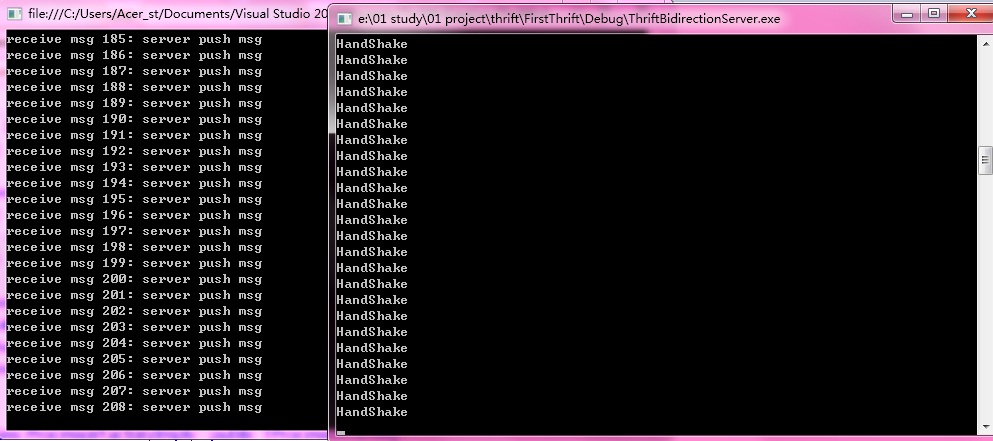
一个简单的thrift双向通信就实现了。
搞定thrift双向消息的更多相关文章
- 分分钟搞定IOS远程消息推送
一.引言 IOS中消息的推送有两种方式,分别是本地推送和远程推送,本地推送在http://my.oschina.net/u/2340880/blog/405491这篇博客中有详细的介绍,这里主要讨论远 ...
- JS组件系列——又一款MVVM组件:Vue(一:30分钟搞定前端增删改查)
前言:关于Vue框架,好几个月之前就听说过,了解一项新技术之后,总是处于观望状态,一直在犹豫要不要系统学习下.正好最近有点空,就去官网了解了下,看上去还不错的一个组件,就抽空研究了下.最近园子里vue ...
- JS组件系列——BootstrapTable+KnockoutJS实现增删改查解决方案(三):两个Viewmodel搞定增删改查
前言:之前博主分享过knockoutJS和BootstrapTable的一些基础用法,都是写基础应用,根本谈不上封装,仅仅是避免了html控件的取值和赋值,远远没有将MVVM的精妙展现出来.最近项目打 ...
- iOS基于MBProgressHUD的二次封装,一行搞定,使用超简单
MBProgressHUD的使用,临时总结了几款最常用的使用场景: 1.提示消息 用法: [YJProgressHUD showMessage:@"显示文字,1s隐藏" inVie ...
- iOS开发三步搞定百度推送
iOS开发三步搞定百度推送 百度推送很简单,准备工作:在百度云推送平台注册应用,上传证书. 步骤一: 百度云推送平台 http://push.baidu.com/sdk/push_client_s ...
- Webcast / 技术小视频制作方法——自己动手录制video轻松搞定
Webcast / 技术小视频制作方法——自己动手录制video轻松搞定 http://blog.sina.com.cn/s/blog_67d387490100wdnh.html 最近申请加入MSP的 ...
- 【微服务】之三:从零开始,轻松搞定SpringCloud微服务-配置中心
在整个微服务体系中,除了注册中心具有非常重要的意义之外,还有一个注册中心.注册中心作为管理在整个项目群的配置文件及动态参数的重要载体服务.Spring Cloud体系的子项目中,Spring Clou ...
- 多key业务,数据库水平切分架构一次搞定
数据库水平切分是一个很有意思的话题,不同业务类型,数据库水平切分的方法不同. 本篇将以"订单中心"为例,介绍"多key"类业务,随着数据量的逐步增大,数据库性能 ...
- [转] Java程序员学C#基本语法两个小时搞定(对比学习)
Java程序员学C#基本语法两个小时搞定(对比学习) 对于学习一门新的语言,关键是学习新语言和以前掌握的语言的区别,但是也不要让以前语言的东西,固定了自己的思维模式,多看一下新的语言的编程思想. ...
随机推荐
- 算法题 19 二叉平衡树检查 牛客网 CC150
算法题 19 二叉平衡树检查 牛客网 CC150 实现一个函数,检查二叉树是否平衡,平衡的定义如下,对于树中的任意一个结点,其两颗子树的高度差不超过1. 给定指向树根结点的指针TreeNode* ro ...
- 设置linux下shell显示不同颜色的字体
实例代码如下: #!/bin/bash clear echo -e "\033[1m Hello World" # bold effect echo -e "\033[5 ...
- overflow:hidden并不隐藏所有溢出的子元素
拥有overflow:hidden样式的块元素内部的元素溢出并不总是被隐藏,具体来说,需要同时满足以下条件: 拥有overflow:hidden样式的块元素不具有position:relative和p ...
- C# TreeView,递归循环数据加载到treeView1中
TblAreaBLL bll = new TblAreaBLL(); private void button1_Click(object sender, EventArgs e) { LoadData ...
- 【HackerRank】Maximizing XOR
给定两个整数:L 和 R ∀ L ≤ A ≤ B ≤ R, 找出 A xor B 的最大值. 输入格式 第一行包含 L 第一行包含 R 数据范围 1 ≤ L ≤ R ≤ 103 输出格式 输出最大的异 ...
- requestAnimationFrame 的实验性实践
记得当 requestAnimationFrame 出现时我立马就石更了,就跟初次玩耍 transition 时一样,欣喜若狂... 然后,然后特么的就懵逼了,这明明就是口挖不通的深井呀(如果是我傻, ...
- qt5.4.1的imx6编译
2.到https://download.qt.io/archive/qt/5.4/5.4.1/single/下载源码包qt-everywhere-opensource-src-5.4.1.tar.gz ...
- 快乐学习 Ionic Framework+PhoneGap 手册1-4 {登录页面}
编程的快乐和乐趣,来自于能成功运行程序并运用到项目中 有了面板然后加个登录页面,请看效果图和代码 Index HTML Code <!DOCTYPE html> <html ng-a ...
- Sublime text3装入插件Anaconda
好多人在学习编写代码的时候,会有不同的编辑器,大神们建议我使sublime,但是我在里面写代码,没有一点提示,我的天,不得烧坏我的脑子啊.学Python我用的Ananconda,但是这个spyder有 ...
- 父元素设置overflow,绝对定位的子元素会被隐藏或一起滚动
一般情况: <!DOCTYPE html> <html> <head> <meta charset="UTF-8"> <met ...