
pyspark SparkSession及dataframe基本操作
from pyspark import SparkContext, SparkConf

import os

from pyspark.sql.session import SparkSession

from pyspark.sql import Row

def CreateSparkContex():

	sparkconf = SparkConf().setAppName("MYPRO").set("spark.ui.showConsoleProgress", "false")

	sc = SparkContext(conf=sparkconf)

	print("master:" + sc.master)

	sc.setLogLevel("WARN")

	Setpath(sc)

	spark = SparkSession.builder.config(conf=sparkconf).getOrCreate()

	return sc, spark

def Setpath(sc):

	global Path

	if sc.master[:5] == "local":

		Path = "file:/C:/spark/sparkworkspace"

	else:

		Path = "hdfs://test"

if __name__ == "__main__":

	print("Here we go!\n")

	sc, spark = CreateSparkContex()

	readcsvpath = os.path.join(Path, 'iris.csv')

	dfcsv = spark.read.csv(readcsvpath, header=True,

	schema=("`Sepal.Length` DOUBLE,`Sepal.Width` DOUBLE,`Petal.Length` DOUBLE,`Petal.Width` DOUBLE,`Species` string"))

	#指定数据类型读取

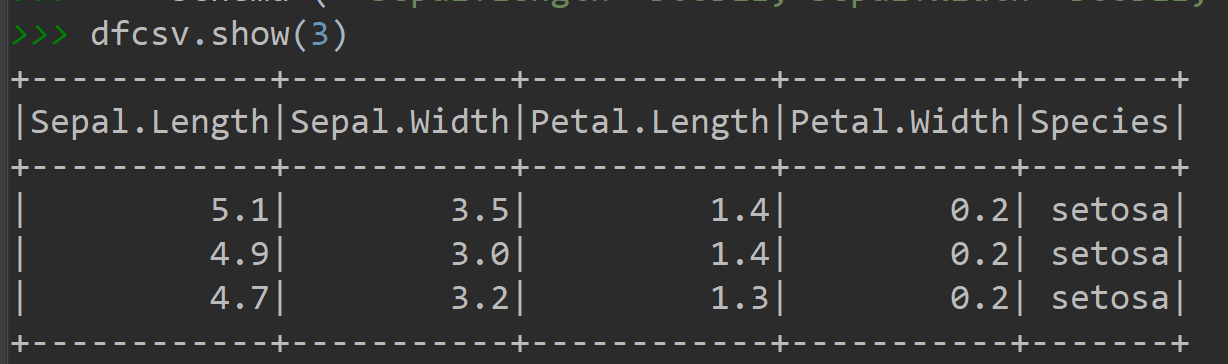
	dfcsv.show(3)

	dfcsv.registerTempTable('Iris')#创建并登陆临时表

	spark.sql("select * from Iris limit 3").show()#使用sql语句查询

	spark.sql("select Species,count(1) from Iris group by Species").show()

	df = dfcsv.alias('Iris1')#创建一个别名

	df.select('Species', '`Sepal.Width`').show(4)#因表头有特殊字符需用反引号``转义

	df.select(df.Species,df['`Sepal.Width`']).show(4)

	dfcsv.select(df.Species).show(4)#原始名、别名的组合

	df[df.Species, df['`Sepal.Width`']].show(4)

	df[['Species']]#与pandas相同

	df['Species']#注意这是一个字段名

	#########增加字段

	df[df['`Sepal.Length`'], df['`Sepal.Width`'], df['`Sepal.Length`'] - df['`Sepal.Width`']].show(4)

	df[df['`Sepal.Length`'], df['`Sepal.Width`'],

	   (df['`Sepal.Length`'] - df['`Sepal.Width`']).alias('rua')].show(4)#重命名

	#########筛选数据

	df[df.Species == 'virginica'].show(4)#与pandas筛选一样

	df[(df.Species == 'virginica') & (df['`Sepal.Width`']>1)].show(4)#多条件筛选

	df.filter(df.Species == 'virginica').show(4)#也可以用fileter方法筛选

	spark.sql("select * from Iris where Species='virginica'").show(4)#sql筛选

	##########多字段排序

	spark.sql("select * from Iris order by `Sepal.Length` asc ").show(4)#升序

	spark.sql("select * from Iris order by `Sepal.Length` desc ").show(4)#降序

	spark.sql("select * from Iris order by `Sepal.Length` asc,`Sepal.Width` desc ").show(4)#升降序

	df.select('`Sepal.Length`', '`Sepal.Width`').orderBy('`Sepal.Width`',ascending=0).show(4)#按降序

	df.select('`Sepal.Length`', '`Sepal.Width`').orderBy('`Sepal.Width`').show(4)  # 升序

	df.select('`Sepal.Length`', '`Sepal.Width`').orderBy('`Sepal.Width`', ascending=1).show(4)  # 按升序,默认的

	df.select('`Sepal.Length`', '`Sepal.Width`').orderBy(df['`Sepal.Width`'].desc()).show(4)  # 按降序

	df.select('`Sepal.Length`', '`Sepal.Width`').orderBy(

		['`Sepal.Length`','`Sepal.Width`'], ascending=[0,1]).show(4)#两个字段按先降序再升序

	df.orderBy(df['`Sepal.Length`'].desc(),df['`Sepal.Width`']).show(4)

	##########去重

	spark.sql("select distinct Species from Iris").show()

	spark.sql("select distinct Species,`Sepal.Width` from Iris").show()

	df.select('Species').distinct().show()

	df.select('Species','`Sepal.Width`').distinct().show()

	df.select('Species').drop_duplicates().show()#同上,与pandas用法相同

	df.select('Species').dropDuplicates().show()#同上

	##########分组统计

	spark.sql("select Species,count(1) from Iris group by Species").show()

	df[['Species']].groupby('Species').count().show()

	df.groupby(['Species']).agg({'`Sepal.Width`': 'sum'}).show()

	df.groupby(['Species']).agg({'`Sepal.Width`': 'sum', '`Sepal.Length`': 'mean'}).show()

	#########联结数据

	dic=[['virginica','A1'],['versicolor','A2'],['setosa','A3']]

	rrd=sc.parallelize(dic)

	df2=rrd.map(lambda p: Row(lei=p[0],al=p[1]))

	df2frame=spark.createDataFrame(df2)

	df2frame.show()

	df2frame.registerTempTable('dictable')

	spark.sql("select * from Iris u left join dictable z on u.Species=z.lei").show()

	df.join(df2frame, df.Species == df2frame.lei, 'left_outer').show()

	sc.stop()

	spark.stop()
pyspark SparkSession及dataframe基本操作的更多相关文章
- DataFrame基本操作
这些操作在网上都可以百度得到,为了便于记忆自己再根据理解总结在一起.---------励志做一个优雅的网上搬运工 1.建立dataframe (1)Dict to Dataframe df = pd. ...
- 将 数据从数据库 直接通过 pyspark 读入到dataframe
from pyspark.sql import SparkSession spark = SparkSession \ .builder \ .appName("Python Spark S ...
- [Spark SQL] SparkSession、DataFrame 和 DataSet 练习
本課主題 DataSet 实战 DataSet 实战 SparkSession 是 SparkSQL 的入口,然后可以基于 sparkSession 来获取或者是读取源数据来生存 DataFrameR ...
- python做数据分析pandas库介绍之DataFrame基本操作
怎样删除list中空字符? 最简单的方法:new_list = [ x for x in li if x != '' ] 这一部分主要学习pandas中基于前面两种数据结构的基本操作. 设有DataF ...
- 用python做数据分析pandas库介绍之DataFrame基本操作
怎样删除list中空字符? 最简单的方法:new_list = [ x for x in li if x != '' ] 这一部分主要学习pandas中基于前面两种数据结构的基本操作. 设有DataF ...
- pandas库介绍之DataFrame基本操作
怎样删除list中空字符? 最简单的方法:new_list = [ x for x in li if x != '' ] 今天是5.1号. 这一部分主要学习pandas中基于前面两种数据结构的基本操作 ...
- 用python做数据分析4|pandas库介绍之DataFrame基本操作
原文地址 怎样删除list中空字符? 最简单的方法:new_list = [ x for x in li if x != '' ] 今天是5.1号. 这一部分主要学习pandas中基于前面两种数据结构 ...
- 机器学习三剑客之Pandas中DataFrame基本操作
Pandas 是基于Numpy 的一种工具,是为了解决数据分析任务而创建的.Pandas 纳入了大量库和一些标准的数据模型,提供了高效地操作大型数据集所需的工具.Pandas提供了大量能使我们快速便捷 ...
- sparksession创建DataFrame方式
spark创建dataFrame方式有很多种,官方API也比较多 公司业务上的个别场景使用了下面两种方式 1.通过List创建dataFrame /** * Applies a schema to a ...
随机推荐
- Examining Application Startup in ASP.NET 5
By Steve Smith June 23, 2015 ASP.NET 5 differs from previous versions of ASP.NET in many ways. Gone ...
- jQuery bind() live()
<script type="text/javascript"> $(document).ready(function () { /*$('.clickme').live ...
- touchmove和touchend的使用
touchstart:当手指触摸屏幕时触发:即使已经有一个手指放在了屏幕上也会触发.touchmove:当手指在屏幕上滑动时连续的触发.在这个事件发生期间,调用preventDefault()可阻止滚 ...
- springcloud 实现微服务间调用
package com.idoipo.ibt.config; import org.apache.http.HttpException; import org.apache.http.HttpRequ ...
- LOJ#10106. 「一本通 3.7 例 2」单词游戏
题目链接:https://loj.ac/problem/10106 题目描述 来自 ICPC CERC 1999/2000,有改动. 有 NNN 个盘子,每个盘子上写着一个仅由小写字母组成的英文单词. ...
- Hibernate学习第三天(2)(多对多关系映射)
1.1.1 Hibernate多对多关系的配置 1.1.1.1 创建表 l 用户表 CREATE TABLE `sys_user` ( `user_id` bigint(32) NO ...
- React进阶篇(1) -- react-router4模块化
本篇内容: 单一的路由无嵌套 多层嵌套路由 获取路径中的参数 按需加载 单一的路由无嵌套 routers.js import Home from 'components/Home'; import N ...
- javascript点击变绿色再点击变红色
<!DOCTYPE html> <html lang="en"> <head> <meta charset="UTF-8&quo ...
- 基于CAS的单点登录实战(1)-- 搭建cas服务器
公司有几个系统想做SSO,然后开始研究cas.系统是Centos7 搭建CAS服务器 cas的版本比较多,先在网上搜了一下各种教程配置经验.本来想搭建最新的CAS版本,然而为了快速部署,选择了网上教程 ...
- python3好用的mysql.connector库
python3好用的mysql.connector库 from mysql.connector import connect #建立mysql连接,生成一个mysql.connector对象 conn ...