
vue 在路由中复用组件
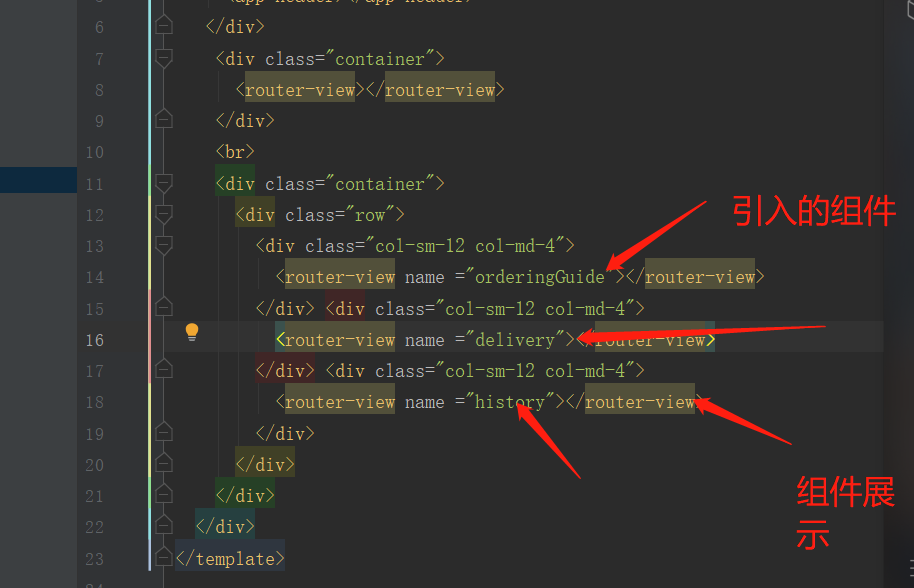
首先需要在app.vue中引入:
<template>

  <div id="app">

    <!--<app-header></app-header>-->

   <div class="container">

     <app-header></app-header>

   </div>

    <div class="container">

      <router-view></router-view>

    </div>

    <br>

    <div class="container">

      <div class="row">

        <div class="col-sm-12 col-md-4">

          <router-view name ="orderingGuide"></router-view>

        </div> <div class="col-sm-12 col-md-4">

          <router-view name ="delivery"></router-view>

        </div> <div class="col-sm-12 col-md-4">

          <router-view name ="history"></router-view>

        </div>

      </div>

    </div>

  </div>

</template>

<script>

import Header from './components/Header';

export default {

  components:{

   appHeader:Header

  }

}

</script>

<style>

</style>
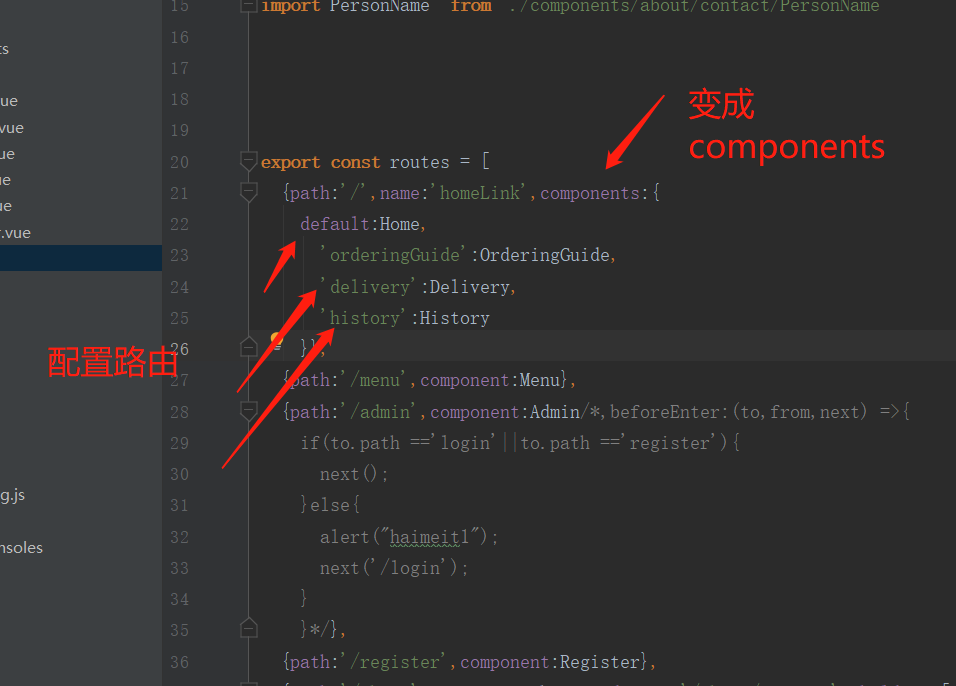
然后再main.js中引入:
import  Home from './components/Home'

import Menu from './components/Menu'

import  Login from './components/Login'

import  Register from './components/Register'

import  Admin from './components/Admin'

import About from './components/about/About'

//二级路由

import Contact from './components/about/Contact'

import History from './components/about/History'

import Delivery from './components/about/Delivery'

import OrderingGuide from './components/about/OrderingGuide'

//三级路由

import Phone from  './components/about/contact/Phone'

import PersonName  from './components/about/contact/PersonName'

export const routes = [

  {path:'/',name:'homeLink',components:{

    default:Home,

      'orderingGuide':OrderingGuide,

      'delivery':Delivery,

      'history':History

    }},

  {path:'/menu',component:Menu},

  {path:'/admin',component:Admin/*,beforeEnter:(to,from,next) =>{

    if(to.path =='login'||to.path =='register'){

      next();

    }else{

      alert("haimeit1");

      next('/login');

    }

    }*/},

  {path:'/register',component:Register},

  {path:'/about',component:About,redirect:'/about/contact',children:[

      {path:'/about/contact' ,name:"contactLink",component:Contact ,redirect:'/phone',children: [

          {path:'/phone',name:"phoneNum",component:Phone},

          {path:'/personName',name:"personName",component:PersonName}

        ]},

      {path:'/history' ,name:"historyLink",component:History},

      {path:'/about/delivery' ,name:"deliveryLink",component:Delivery},

      {path:'/about/orderingGuide' ,name:"orderingGuideLink",component:OrderingGuide}

    ]},

  {path:'/login',component:Login},

  {path:'*',redirect:Home},

]
最终展示效果:

vue 在路由中复用组件的更多相关文章
- vue获取路由中的值
vue中获取路由中的值 在vue中如何获取路由中的值呢?大家先看下面这段代码: this.$route.params && this.$route.params.id 这行代码就是在v ...
- vue.js 1中父组件跳到子组件中并传参让子组件显示不同的内容
父组件中的点击跳转: <ul class="insurance-entry clearfloat"> <li v-link="{name:'produc ...
- vue封装element中table组件
后台系统,table被用的次数比较多,所以决定提出来作为组件 1.新建一个Table.vue文件 <!--region 封装的分页 table--> <template> & ...
- vue+element ui中select组件选择失效问题原因与解决方法
codejing 2020-07-10 09:13:31 652 收藏 分类专栏: Web Vue Element UI 版权 .当表单form赋完值后,如果后续又对form中某一属性值进行操作如 ...
- 关于vue项目 路由中 使用的坑
关于vue路由重定向的时候 记得一定要先声明先声明
- vue 去掉路由中的#
在router.js中修改, const router = new VueRouter({ mode: 'history', routes: [...] })
- vue --》elementUI 中 el-table组件 如何实现点击列,让该列高亮显示 ?
在elmentui官网中,只给了让当前行高亮显示的方法,但是如何让当前列高亮显示呢? <template> <div> <el-table :data="tab ...
- script标签引入vue方式开发如何写组件
title: script标签引入vue方式开发如何写组件 date: 2020-05-08 sidebarDepth: 2 tags: vue 组件 script 标签 categories: vu ...
- vue中的组件,Component元素,自定义路由,异步数据获取
组件是Vue最强大的功能之一.组件是一组可被复用的具有一定功能,独立的完整的代码片段,这个代码片段可以渲染一个完整视图结构组件开发如何注册组件?第一步,在页面HTML标签中使用这个组件名称,像使用DO ...
随机推荐
- mysql中的自定义函数
创建不带参数的自定义函数: 使用: 创建带参数的自定义函数: 使用: 创建具有复合结构的函数体的自定义函数:
- 02.socket实现远程调用
不使用webservice使用以前的知识也可以实现远程系统之间的调用.用Socket可以.实现Socket通信. 开设一个端口.ip.
- 07-Location之正则匹配
大网站专门有自己的图片服务器,起码也得单独放一个目录里面. 淘宝网有些图片开启了防盗链(即使是小图片,也不让你下载,真小气).163新闻可以下载. 用正则匹配uri中的image,就是说你的uri中到 ...
- Linux Java Meven环境变量设置
linux中的环境变量设置,可以在两个地方设置.他们分别是: /etc/profile 在这个文件下设置表示全局的,所有用户有效. 用户工作目录,用 ls -a查看,可以看到有一个.bash_pro ...
- Android 创建项目出现No resource found that matches the given name Theme.AppCompat.Light
关于为何出现No resource found that matches the given name ‘Theme.AppCompat.Light’的原因 这边博客已经写的很清楚了 大家可以参考一下 ...
- Ubuntu 查看软件版本
Boost dpkg -S /usr/include/boost/version.hpp OpenCV pkg-config --modversion opencv
- Solidity payable 方法表现
pragma solidity ^; contract Person { string public name; uint age; uint private weight; string inter ...
- LINUX 查看CUP温度
在Linux下可以通过lm_sensors来查看CPU的温度(当然你的硬件首先要支持),要使用这个功能要有内核相关模块(比如I2C)的支持,下面说一下操作方法: 先看一下你的机器上是否安装了lm_se ...
- openvswitch安装
安装前准备软件包及版本 Gcc pkg-config autoconf automake m4 python2.X 下载OVS软件包 http://openvswitch.org/releases/o ...
- [GO]二维数组的介绍
package main import "fmt" func main() { ][]int // 有几个方括号就是几维数据 // 有几个方括号就需要几重循环 k := ; i&l ...