
富文本编辑器 - wangEditor 上传图片
效果:
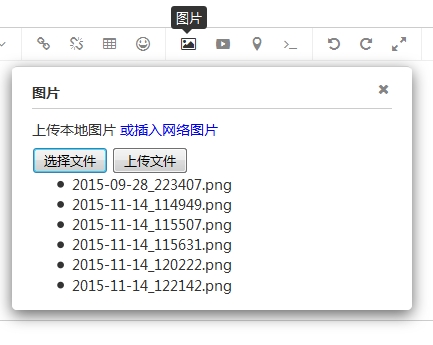 、
、
项目结构图:
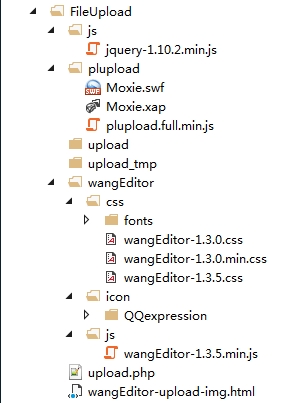
wangEditor-upload-img.html代码:
<html>

	<head>

		<title>wangEditor-图片上传</title>

		<link rel="stylesheet" href="wangEditor/css/wangEditor-1.3.0.min.css">

		<style type="text/css">

			.wrap{

				margin:30px 30px 0 30px;

			}

			#txt_wangEditor{

				width:100%;

				height:300px;

			}

		</style>

	</head>

	<body>

		<!--上传-->

		<div id="uploadContainer">

			<input type="button" value="选择文件" id="btnBrowse"/>

			<input type="button" value="上传文件" id="btnUpload">

			<ul id="fileList"></ul>

		</div>

		<!--富文本编辑器-->

		<div class="wrap">

			<textarea id="txt_wangEditor"></textarea>

			<input type="button" id="submit" value="获取内容">

		</div>

		<!-- JQuery -->

		<script type="text/javascript" src="js/jquery-1.10.2.min.js"></script>

		<!-- wangEditor-富文本编辑器 -->

		<script type="text/javascript" src="wangEditor/js/wangEditor-1.3.5.min.js"></script>

		<!-- plupload-上传组件 -->

		<script type="text/javascript" src="plupload/plupload.full.min.js"></script>

		<!-- js -->

		<script type="text/javascript">

			$(document).ready(function(){

				//获取dom节点

				var $uploadContainer = $('#uploadContainer'),

						$fileList = $('#fileList'),

						$btnUpload = $('#btnUpload');

				//实例化富文本编辑器

				var editor = $('#txt_wangEditor').wangEditor({

					//重要:传入 uploadImgComponent 参数,值为 $uploadContainer

					uploadImgComponent: $uploadContainer,

					//表情

					 'expressions':geticon()

				});

				//实例化一个上传对象

				var uploader = new plupload.Uploader({

					browse_button: 'btnBrowse',

					url: 'upload.php',

					flash_swf_url: 'plupload/Moxie.swf',

					sliverlight_xap_url: 'plupload/Moxie.xap',

					filters: {

								mime_types: [

								  //只允许上传图片文件 (注意,extensions中,逗号后面不要加空格)

								  { title: "图片文件", extensions: "jpg,gif,png,bmp" }

								]

						}

				});

				//存储多个图片的url地址

				var urls = [];

				//重要:定义 event 变量,会在下文(触发上传事件时)被赋值

				var event;

				//初始化

				uploader.init();

				//绑定文件添加到队列的事件

				uploader.bind('FilesAdded', function (uploader, files) {

						//显示添加进来的文件名

					$.each(files, function(key, value){

						var fileName = value.name,

							html = '<li>' + fileName + '</li>';

						$fileList.append(html);

					});

				});

				//单个文件上传之后

				uploader.bind('FileUploaded', function (uploader, file, responseObject) {

						//从服务器返回图片url地址

					var url = responseObject.response;

						//先将url地址存储来,待所有图片都上传完了,再统一处理

					urls.push(url);

					});

					//全部文件上传时候

				uploader.bind('UploadComplete', function (uploader, files) {

					// 用 try catch 兼容IE低版本的异常情况

					try {

						//打印出所有图片的url地址

						$.each(urls, function (key, value) {

							//重要:调用 editor.command 方法,把每一个图片的url,都插入到编辑器中

							//重要:此处的 event 即上文定义的 event 变量

							editor.command(event, 'insertHTML', '<img src="' + value + '"/>');

						});

					} catch (ex) {

						// 此处可不写代码

					} finally {

						//清空url数组

						urls = [];

						//清空显示列表

						$fileList.html('');

					}

				});

				//上传事件

				$btnUpload.click(function(e){

					//重要:将事件参数 e 赋值给 上文定义的 event 变量

					event = e;

					uploader.start();

				});

			})

		</script>

	</body>

</html>
upload.php代码:
<?php

	$targetDir = 'upload_tmp';

	$uploadDir = 'upload';

	$cleanupTargetDir = true;

	if (!file_exists($targetDir)) {

		@mkdir($targetDir);

	}

	if (!file_exists($uploadDir)) {

		@mkdir($uploadDir);

	}

	if (isset($_REQUEST["name"])) {

		$fileName = $_REQUEST["name"];

	} elseif (!empty($_FILES)) {

		$fileName = $_FILES["file"]["name"];

	} else {

		$fileName = uniqid("file_");

	}

	$fileName = iconv('UTF-8', 'GB2312', $fileName);

	$filePath = $targetDir . DIRECTORY_SEPARATOR . $fileName;

	$uploadPath = $uploadDir . DIRECTORY_SEPARATOR . $fileName;

	$imgUrl="http://localhost:8088/FileUpload/".$uploadDir."/".$fileName;

	echo $imgUrl;

	$chunk = isset($_REQUEST["chunk"]) ? intval($_REQUEST["chunk"]) : 0;

	$chunks = isset($_REQUEST["chunks"]) ? intval($_REQUEST["chunks"]) : 1;

	if ($cleanupTargetDir) {

		if (!is_dir($targetDir) || !$dir = opendir($targetDir)) {

			die('{"jsonrpc" : "2.0", "error" : {"code": 100, "message": "Failed to open temp directory."}, "id" : "id"}');

		}

		while (($file = readdir($dir)) !== false) {

			$tmpfilePath = $targetDir . DIRECTORY_SEPARATOR . $file;

			if ($tmpfilePath == "{$filePath}_{$chunk}.part" || $tmpfilePath == "{$filePath}_{$chunk}.parttmp") {

				continue;

			}

			if (preg_match('/\.(part|parttmp)$/', $file) && (@filemtime($tmpfilePath) < time() - $maxFileAge)) {

				@unlink($tmpfilePath);

			}

		}

		closedir($dir);

	}

	if (!$out = @fopen("{$filePath}_{$chunk}.parttmp", "wb")) {

		die('{"jsonrpc" : "2.0", "error" : {"code": 102, "message": "Failed to open output stream."}, "id" : "id"}');

	}

	if (!empty($_FILES)) {

		if ($_FILES["file"]["error"] || !is_uploaded_file($_FILES["file"]["tmp_name"])) {

			die('{"jsonrpc" : "2.0", "error" : {"code": 103, "message": "Failed to move uploaded file."}, "id" : "id"}');

		}

		if (!$in = @fopen($_FILES["file"]["tmp_name"], "rb")) {

			die('{"jsonrpc" : "2.0", "error" : {"code": 101, "message": "Failed to open input stream."}, "id" : "id"}');

		}

	} else {

		if (!$in = @fopen("php://input", "rb")) {

			die('{"jsonrpc" : "2.0", "error" : {"code": 101, "message": "Failed to open input stream."}, "id" : "id"}');

		}

	}

	while ($buff = fread($in, 4096)) {

		fwrite($out, $buff);

	}

	@fclose($out);

	@fclose($in);

	rename("{$filePath}_{$chunk}.parttmp", "{$filePath}_{$chunk}.part");

	$index = 0;

	$done = true;

	for( $index = 0; $index < $chunks; $index++ ) {

		if ( !file_exists("{$filePath}_{$index}.part") ) {

			$done = false;

			break;

		}

	}

	if ( $done ) {

		if (!$out = @fopen($uploadPath, "wb")) {

			die('{"jsonrpc" : "2.0", "error" : {"code": 102, "message": "Failed to open output stream."}, "id" : "id"}');

		}

		if ( flock($out, LOCK_EX) ) {

			for( $index = 0; $index < $chunks; $index++ ) {

				if (!$in = @fopen("{$filePath}_{$index}.part", "rb")) {

					break;

				}

				while ($buff = fread($in, 4096)) {

					fwrite($out, $buff);

				}

				@fclose($in);

				@unlink("{$filePath}_{$index}.part");

			}

			flock($out, LOCK_UN);

		}

		@fclose($out);

	}
原版视频及其源码:http://www.kancloud.cn/wangfupeng/wangeditor/65747
富文本编辑器 - wangEditor 上传图片的更多相关文章
- vue-quill-editor富文本编辑器,上传图片自定义为借口上传
vue-quill-editor富文本编辑器,上传图片自定义为借口上传 博客地址:https://blog.csdn.net/lyj2018gyq/article/details/82585194
- bootstrap-wysihtml5 ckeditor 修改富文本编辑器可以上传图片
bootstrap-wysihtml5 ckeditor 修改富文本编辑器可以上传图片 bootstrap-wysihtml5实际使用内核为ckeditor 故这里修改ckeditor即可 ...
- 富文本编辑器(wangEditor)
近期在产品的开发工作中遇到要使用富文本编辑器的地方.于是对比了几款编辑器, 最后选择了wangEditor. 优点:轻量.简洁.界面美观.文档齐全. 缺点: 相较于百度ueditor等编辑器功能较 ...
- 轻量级富文本编辑器wangEditor源码结构介绍
1. 引言 wangEditor——一款轻量级html富文本编辑器(开源软件) 网站:http://www.wangeditor.com/ demo演示:http://www.wangeditor.c ...
- 轻量级富文本编辑器wangEditor
开发公司一个系统的时候需要一个富文本编辑器,找了几个,最后选择这个,蛮不错的. 百度搜索wangEditor,进入官网根据所介绍的使用进行开发就可以了,很不错的一个工具.
- 前端轻量级、简单、易用的富文本编辑器 wangEditor 的基本用法
1.富文本编辑器市面上有很多,但是综合考虑之后wangEditor是最易用的框架,推荐使用 首先进入官网 http://www.wangeditor.com 基本是2中方式引入: 使用CDN://un ...
- KindEditor - 富文本编辑器 - 使用+上传图片
代码高亮:http://www.cnblogs.com/KTblog/p/5205214.html 效果: 项目结构: Extend:存放各种扩展 BlogAction.class.php:博文模块 ...
- 富文本编辑器--FCKEditor 上传图片
FCKEditor的最新版本已经更改名称为CKEditor: 1.在页面引入fckeditor目录下的fckeditor.js <script type="text/javascrip ...
- 富文本编辑器 wangEditor.js
1.引用 wangEditor 相关js 和 css 下载地址:https://files.cnblogs.com/files/kitty-blog/WangEditor.zip 3.页面: < ...
随机推荐
- B - 楼下水题(扩展欧几里德)
B - 楼下水题 Time Limit:1000MS Memory Limit:262144KB 64bit IO Format:%I64d & %I64u Submit St ...
- 基于hash的文档判重——simhash
本文环境: python3.5 ubuntu 16.04 第三方库: jieba 文件寄于github: https://github.com/w392807287/angelo_tools.git ...
- HDU 1045(质因数分解)
Time Limit:1000MS Memory Limit:32768KB 64bit IO Format:%I64d & %I64u Description Tomor ...
- 字符串匹配算法(KMP)
字符串匹配运用很广泛,举个简单例子,我们每天登QQ时输入账号和密码,大家有没有想过账号和密码是怎样匹配的呢?登录需要多长时间和匹配算法的效率有直接的关系. 首先理解一下前缀和后缀的概念: 给出一个问题 ...
- 一幅图的知识科普--Google免费DNS服务器
学习源于问题的解决 前段时间在虚拟机上安装了一个oracle软件,虚拟机和宿主机器的网络连接方式是桥接模式的,手动设置了静态ip地址,网关地址,但是发现虚拟机的浏览器不能用. 于是通过ping测试了一 ...
- /etc/group文件详解
Linux /etc/group文件与/etc/passwd和/etc/shadow文件都是有关于系统管理员对用户和用户组管理时相关的文件.linux /etc/group文件是有关于系统管理员对用户 ...
- 转:前端冷知识(~~some fun , some useful)
前端不为人知的一面——前端冷知识集锦 前端已经被玩儿坏了!像console.log()可以向控制台输出图片等炫酷的玩意已经不是什么新闻了,像用||操作符给变量赋默认值也是人尽皆知的旧闻了,今天看到Qu ...
- AutoCAD 2014简体中文版官方正式版x86 x64下载,带注册机,永久免费使用
注册机使用说明:会有部分杀毒软件报病毒,请无视.操作步骤:1.安装Autodesk AutoCAD 20142.使用以下序列号666-69696969安装.3.产品密码为001F14.安装完成后,启动 ...
- Qt Creator插件工作流程代码走读
Qt Creator有个很风骚的插件管理器PluginManager,还有个很骚包的插件说明PluginSpec.基本上,所有的Qt程序的入口都是传统的C程序一样,代码流程从main()函数开始. ...
- java实现电脑远程控制完整源代码(转)
Java JDK1.4 的Robot对象,该对象可以完成屏幕图像截取操作,控制鼠标,键盘,如此便可以轻而易举地实现远程服务器的控制.本文向大家介绍如何用Java Robot对象实现远程服务器的控制,并 ...