
jQuery EasyUI API 中文文档 - 面板(Panel)
Panel 面板
用$.fn.panel.defaults重写defaults。
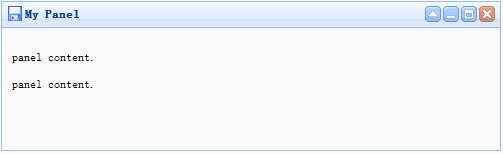
用法示例
创建Panel
1. 经由标记创建Panel
从标记创建Panel更容易。把 'easyui-panel' 类添加到<div/>标记。
1. <div id="p" class="easyui-panel" title="My Panel" style="width:500px;height:150px;padding:10px;background:#fafafa;"
2. iconCls="icon-save" closable="true"
3. collapsible="true" minimizable="true" maximizable=true>
4. <p>panel content.</p>
5. <p>panel content.</p>
6. </div>
2. 编程创建Panel
让我们创建带右上角工具栏的Panel。.
1. <div id="p" style="padding:10px;">
2. <p>panel content.</p>
3. <p>panel content.</p>
4. </div>
5.
6. $('#p').panel({
7. width:500,
8. height:150,
9. title: 'My Panel',
10. tools: [{
11. iconCls:'icon-add',
12. handler:function(){alert('new')}
13. },{
14. iconCls:'icon-save'
15. handler:function(){alert('save')}
16. }]
17. });
移动Panel
调用 'move' 方法把Panel移动到新位置。
1. $('#p').panel('move',{
2. left:100,
3. top:100
4. });
加载内容
让我们经由ajax加载panel内容并且当加载成功时显示一些信息。
1. $('#p').panel({
2. href:'content_url.php',
3. onLoad:function(){
4. alert('loaded successfully');
5. }
6. });
特性
|
名称 |
类型 |
说明 |
默认值 |
|
title |
string |
显示在Panel头部的标题文字。 |
null |
|
iconCls |
string |
在Panel里显示一个16x16图标的CSS类。 |
null |
|
width |
number |
设置Panel的宽度。 |
auto |
|
height |
number |
设置Panel的高度。 |
auto |
|
left |
number |
设置Panel的左边位置。 |
null |
|
top |
number |
设置Panel的顶部位置。 |
null |
|
cls |
string |
给Panel增加一个CSS类。 |
null |
|
headerCls |
string |
给Panel头部增加一个CSS类。 |
null |
|
bodyCls |
string |
给Panel身体增加一个CSS类。 |
null |
|
style |
object |
给Panel增加自定义格式的样式。 |
{} |
|
fit |
boolean |
当设为true时,Panel的 尺寸就适应它的父容器。 |
false |
|
border |
boolean |
定义了是否显示Panel的边框。 |
true |
|
doSize |
boolean |
设置为true,创建时Panel就调整尺寸并做成布局。 |
true |
|
noheader |
boolean |
要是设置为true,Panel的头部将不会被创建。 |
false |
|
content |
string |
Panel身体的内容。 |
null |
|
collapsible |
boolean |
定义了是否显示折叠按钮。 |
false |
|
minimizable |
boolean |
定义了是否显示最小化按钮。 |
false |
|
maximizable |
boolean |
定义了是否显示最大化按钮。 |
false |
|
closable |
boolean |
定义了是否显示关闭按钮。 |
false |
|
tools |
array |
自定义工具组,每个工具包含两个特性: iconCls和handler |
[] |
|
collapsed |
boolean |
定义了初始化Panel是不是折叠的。 |
false |
|
minimized |
boolean |
定义了初始化Panel是不是最小化的。 |
false |
|
maximized |
boolean |
定义了初始化Panel是不是最大化的。 |
false |
|
closed |
boolean |
定义了初始化Panel是不是关闭的。 |
false |
|
href |
string |
一个URL,用它加载远程数据并且显示在Panel里。 |
null |
|
cache |
boolean |
设置为true就缓存从href加载的Panel内容。 |
true |
|
loadingMessage |
string |
当加载远程数据时在Panel里显示的一条信息。 |
Loading… |
|
extractor |
function |
定义了如何从ajax响应抽出内容,返回抽出的数据。 extractor: function(data){
var pattern = /<body[^>]*>((.|[\n\r])*)<\/body>/im; var matches = pattern.exec(data); if (matches){
return matches[1]; // 只抽出 body 的内容 } else {
return data; } } |
事件
|
名称 |
参数 |
说明 |
|
onLoad |
none |
当远程数据被加载时触发。 |
|
onBeforeOpen |
none |
Panel打开前触发,返回false就停止打开。 |
|
onOpen |
none |
Panel打开后触发。 |
|
onBeforeClose |
none |
Panel关闭前触发,返回false就取消关闭。 |
|
onClose |
none |
Panel关闭后触发。 |
|
onBeforeDestroy |
none |
Panel销毁前触发,返回false就取消销毁。 |
|
onDestroy |
none |
Panel销毁后触发。 |
|
onBeforeCollapse |
none |
Panel折叠前触发,返回false就停止折叠。 |
|
onCollapse |
none |
Panel折叠后触发。 |
|
onBeforeExpand |
none |
Panel展开前触发,返回false就停止展开。 |
|
onExpand |
none |
Panel展开后触发。 |
|
onResize |
width, height |
Panel调整尺寸后触发。 |
|
onMove |
left,top |
Panel移动后触发。 Top:新的顶部位置 |
|
onMaximize |
none |
窗口最大化后触发。 |
|
onRestore |
none |
窗口还原为它的原始尺寸后触发。 |
|
onMinimize |
none |
窗口最小化后触发。 |
方法
|
名称 |
参数 |
说明 |
|
options |
none |
返回选项特性。 |
|
panel |
none |
返回Panel对象。 |
|
header |
none |
返回Panel头部对象。 |
|
body |
none |
返回Panel身体对象。 |
|
setTitle |
title |
设置头部的标题文字。 |
|
open |
forceOpen |
当forceOpen参数设为true,就绕过onBeforeOpen回调函数打开Panel。 |
|
close |
forceClose |
当forceClose参数设为true,就绕过onBeforeClose回调函数关闭Panel。 |
|
destroy |
forceDestroy |
当forceDestroy参数设为true,就绕过onBeforeDestroy回调函数销毁Panel。 |
|
refresh |
href |
当设置了href特性时,刷新Panel加载远程数据。 |
|
resize |
options |
设置Panel尺寸并做布局。Options对象包含下列特性: |
|
move |
options |
移动Panel到新位置。Options对象包含下列特性: |
|
maximize |
none |
Panel适应它的容器的尺寸。 |
|
minimize |
none |
最小化Panel。 |
|
restore |
none |
把最大化的Panel还原为它原来的尺寸和位置。 |
|
collapse |
animate |
折叠Panel身体。 |
|
expand |
animate |
展开Panel身体。 |
原文:http://www.cnblogs.com/hantianwei/archive/2012/03/19/2407047.html
jQuery EasyUI API 中文文档 - 面板(Panel)的更多相关文章
- jQuery EasyUI API 中文文档 - ComboGrid 组合表格
jQuery EasyUI API 中文文档 - ComboGrid 组合表格,需要的朋友可以参考下. 扩展自 $.fn.combo.defaults 和 $.fn.datagrid.defaults ...
- jQuery EasyUI API 中文文档 - ValidateBox验证框
jQuery EasyUI API 中文文档 - ValidateBox验证框,使用jQuery EasyUI的朋友可以参考下. 用 $.fn.validatebox.defaults 重写了 d ...
- jQuery EasyUI API 中文文档
http://www.cnblogs.com/Philoo/tag/jQuery/ 共2页: 1 2 下一页 jQuery EasyUI API 中文文档 - 树表格(TreeGrid) 风流涕淌 ...
- jQuery EasyUI API 中文文档 - Panel面板
<html> <head> <title>布局管理器--控制面板</title> <script src="jquery-easyui/ ...
- jQuery EasyUI API 中文文档 - 布局(Layout)
<html> <head> <script src="jquery-easyui/jquery.min.js"></script> ...
- jquery easyui 弹出消息框 (转载) jQuery EasyUI API 中文文档 - 消息框(Messager) http://www.cnblogs.com/hantianwei/archive/2012/03/19/2407113.html
<html> <head> <!-- 导入easyui插件的js和css样式; --> <link rel="stylesheet" ty ...
- jQuery EasyUI API 中文文档 - 分隔按钮(splitbutton)
<html> <head> <script src="jquery-easyui/jquery.min.js"></script> ...
- jQuery EasyUI API 中文文档 - 菜单按钮(menubutton)
<html> <head> <script src="jquery-easyui/jquery.min.js"></script> ...
- jQuery EasyUI API 中文文档 - 链接按钮(linkbutton)
<html> <head> <script src="jquery-easyui/jquery.min.js"></script> ...
随机推荐
- JQuery中阻止事件冒泡的两种方式及其区别
JQuery 提供了两种方式来阻止事件冒泡. 方式一:event.stopPropagation(); $("#div1").mousedown(function(event){ ...
- Python之路第十二天,高级(5)-Python操作Mysql,SqlAlchemy
Mysql基础 一.安装 Windows: 1.下载 http://dev.mysql.com/get/Downloads/MySQL-5.6/mysql-5.6.31-winx64.zip 2.解压 ...
- How Many Tables(POJ 1213 求连通分量)
How Many Tables Time Limit: 2000/1000 MS (Java/Others) Memory Limit: 65536/32768 K (Java/Others)T ...
- mysql 创建外键引用时眼瞎了,然而mysql 报的错也是认人摸不着头脑
问题描述: 在创建外键约束时mysql 报 Create table 'tempdb/student' with foreign key constraint failed. There is no ...
- phalcon
phalcon 代码内在sql 内用Ad去取数据库内的ad表. osx上没问题, centos报找不到表. 应该是centos上mysql区分大小写,可改写mysql的配置.
- SPOJDIVCNT2: Counting Divisors(莫比乌斯反演)
http://acm.tzc.edu.cn/acmhome/vProblemList.do?method=problemdetail&oj=SPOJ&pid=DIVCNT2 给出n求 ...
- DeflateStream类
DeflateStream是另外一种压缩与解压缩流,使用方法与GZipStream类似,而且压缩之后的带下也差不多. 一.属性 BaseStream 获取对基础流的引用. CanRead 获取一个值 ...
- C# 根据URL返回HTML_根据URL获取图片信息/缩略图
/// <summary> /// 根据URL 返回HTML /// </summary> private List<string> GetHtmlByUrl(st ...
- Jquery时间验证和转换工具
var TimeObjectUtil; /** * @title 时间工具类 * @note 本类一律违规验证返回false * @author {boonyachengdu@gmail.com} * ...
- 哥德尔,图灵和康托尔 part 1 哥德尔编号
在看计算理论相关的书的时候,偶然看到这个blog,http://skibinsky.com/godel-turing-and-cantor-the-math/,写的很好.我觉得用自动机的方式讲计算理论 ...