
element-ui实现table表格的嵌套(table表格嵌套)功能实现
最近在做电商类型的官网,希望实现的布局如下:有表头和表身,所以我首先想到的就是table表格组件。
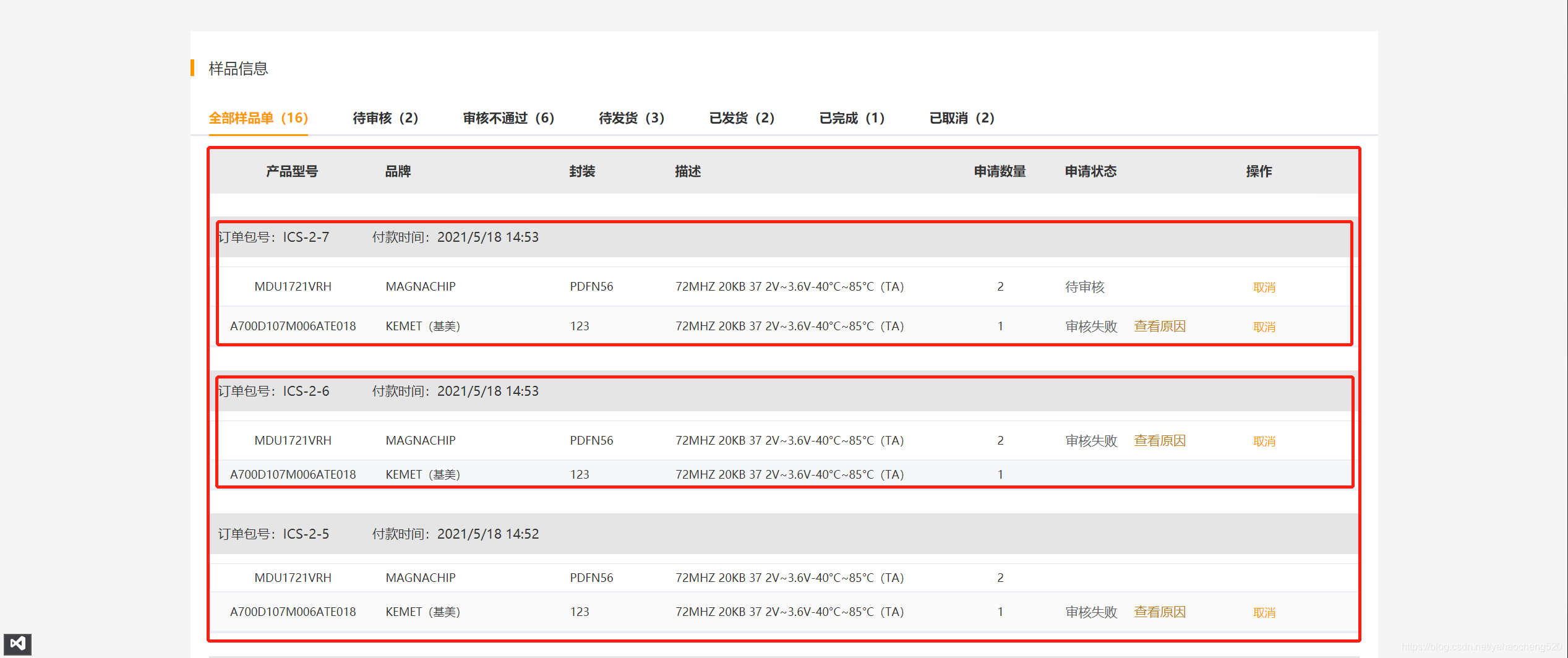
表格组件中常见的就是:标题和内容一一对应: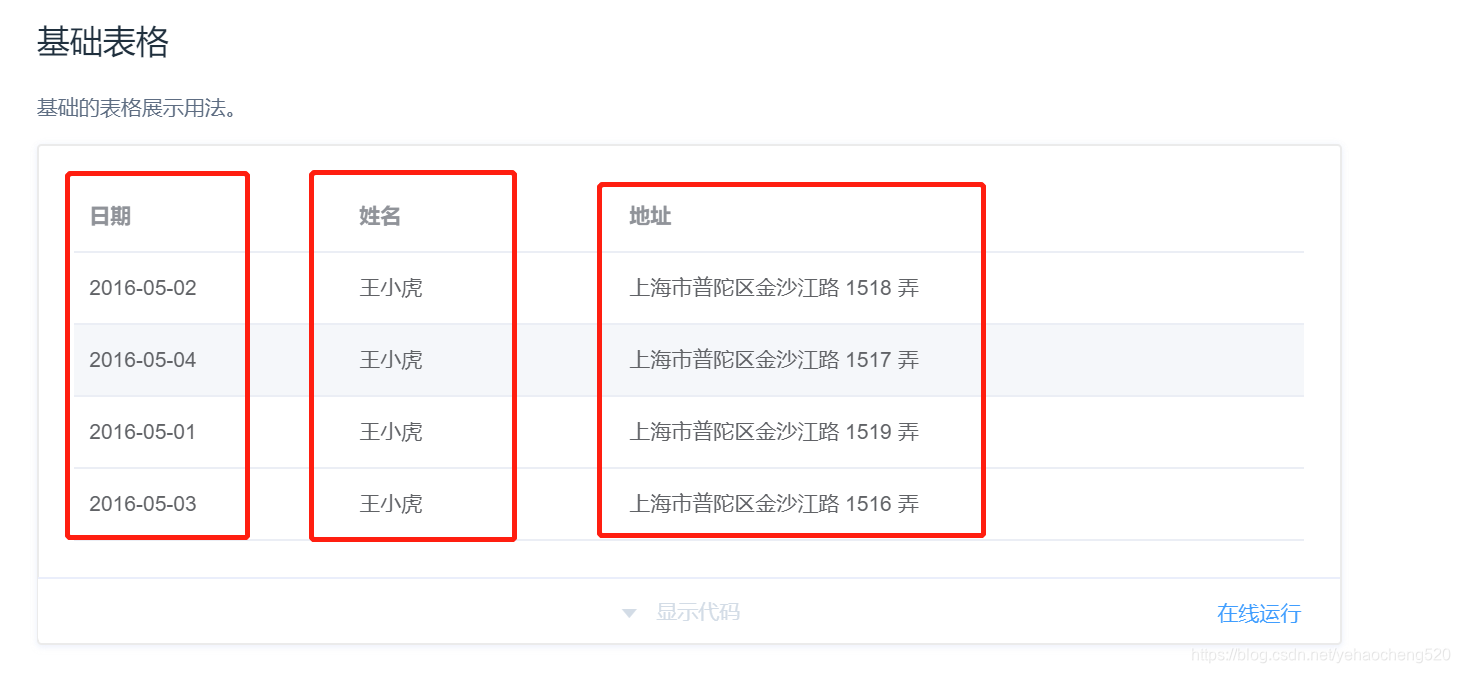
像效果图中的效果,只用基础的表格布局是不行的,因此我想到了table表格中的展开功能: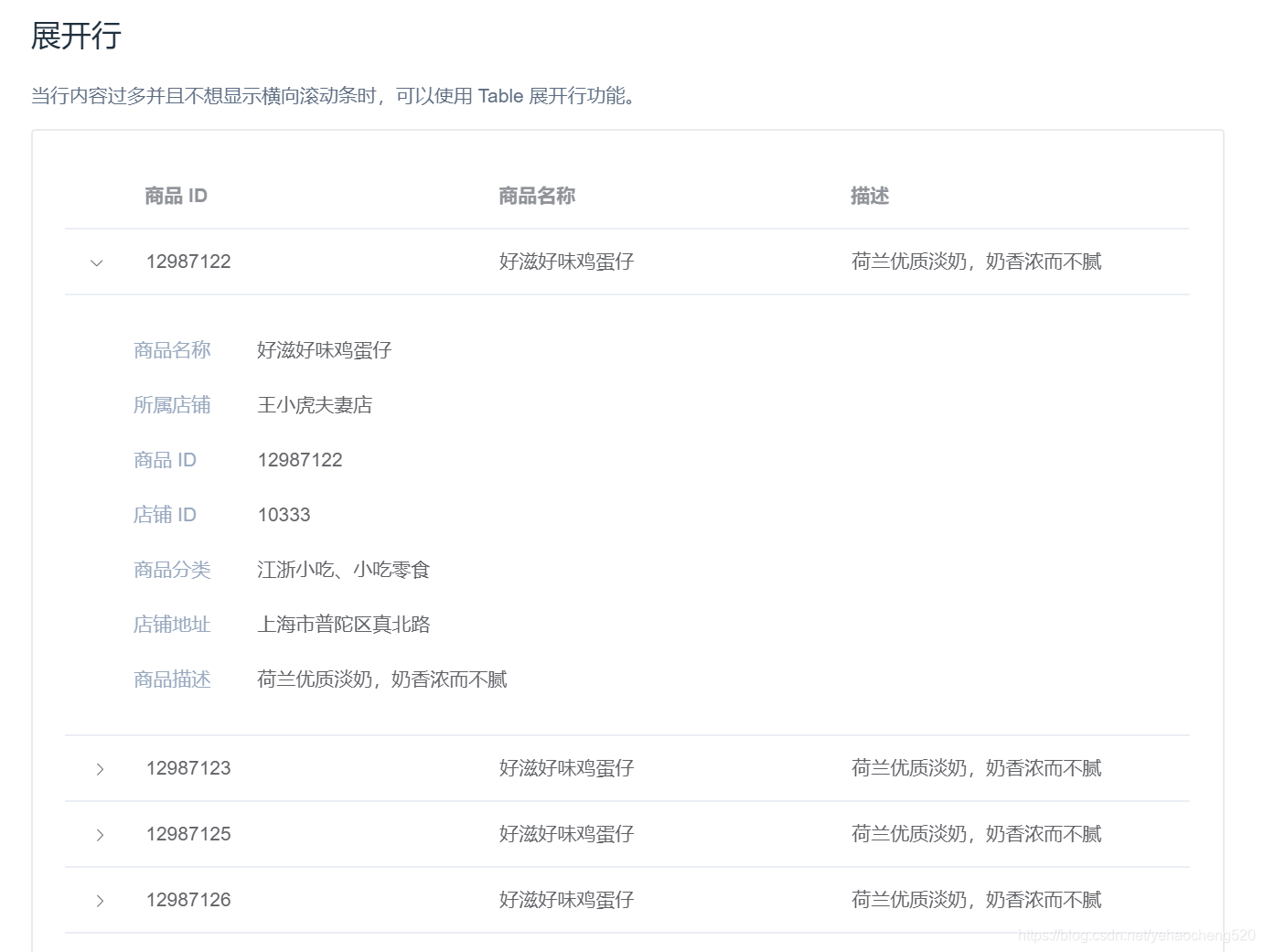
然后通过:默认展开所有行
然后在里面的表格table中默认隐藏表头:
其他的则需要通过样式进行实现了
element-ui中table表格的嵌套(代码部分)
 <el-table v-bind:data="tableData" :default-expand-all="true" class="parentTable"

       ref="multipleTable"

       v-loading="loading"

       element-loading-text="拼命加载中">

 <el-table-column type="expand">

     <template slot-scope="props">

         <div class="conWrap" style="text-align: left;line-height: 16px;font-size: 14px;position: relative;top: -10px;">

             <span>订单包号:{{props.row.OrderNo}}</span>

             <span style="margin-left:42px;">付款时间:{{props.row.CreateTime}}</span>

         </div>

         <el-table v-bind:data="props.row.OrderDetails" :default-expand-all="true" stripe :show-header="false" class="childTable">

             <el-table-column prop="PartNo" align="center"

                              label="产品型号"

                              width="180">

                 <template slot-scope="scope">

                     <div class="name-b">{{scope.row.PartNo}}</div>

                 </template>

             </el-table-column>

             <el-table-column prop="Mfg"

                              label="品牌" width="199">

                 <template slot-scope="scope">

                     <div class="name-b">{{scope.row.Mfg}}</div>

                 </template>

             </el-table-column>

             <el-table-column prop="Package"

                              label="封装" width="114">

                 <template slot-scope="scope">

                     <div class="name-b">{{scope.row.Package}}</div>

                 </template>

             </el-table-column>

             <el-table-column prop="miaoshu"

                              label="描述" width="300">

                 <template slot-scope="scope">

                     <div class="name-b" style="width:100%;">72MHZ 20KB 37 2V~3.6V-40°C~85°C(TA)</div>

                 </template>

             </el-table-column>

             <el-table-column prop="ProductNum" align="center" width="120"

                              label="申请数量">

                 <template slot-scope="scope">

                     <div class="name-b">{{scope.row.ProductNum}}</div>

                 </template>

             </el-table-column>

             <el-table-column prop="maxNum"

                              label="申请状态">

                 <template slot-scope="scope">

                     <div>

                         <el-popover trigger="hover" placement="right" v-if="scope.row.State==20||scope.row.State==40">

                             <p v-if="scope.row.State==20">失败原因: {{ scope.row.FailReason }}</p>

                             <p v-if="scope.row.State==40">物流信息: {{ scope.row.ExpressNo }}</p>

                             <div slot="reference" class="name-wrapper">

                                 {{scope.row.State |fiterState(stateMenu)}}

                                 <span v-if="scope.row.State==40" style="margin-left:14px;color:#B77C20;">物流信息</span>

                                 <span v-if="scope.row.State==20" style="margin-left:14px;color:#B77C20;">查看原因</span>

                             </div>

                         </el-popover>

                         <div v-else>

                             {{scope.row.State |fiterState(stateMenu)}}

                         </div>

                     </div>

                 </template>

             </el-table-column>

             <el-table-column label="操作" width="162">

                 <template slot-scope="scope">

                     <div style="display:flex;">

                         <el-button type="text" size="small" v-on:click="cancel(scope.row)" v-if="scope.row.State==10||scope.row.State==20">取消</el-button>

                         <el-button type="text" size="small" v-on:click="sureHave(scope.row)" v-if="scope.row.State==40">确认收货</el-button>

                     </div>

                 </template>

             </el-table-column>

         </el-table>

     </template>

 </el-table-column>

 <el-table-column label="产品型号" align="center" width="180"></el-table-column>

 <el-table-column label="品牌" width="199"></el-table-column>

 <el-table-column label="封装" width="114"></el-table-column>

 <el-table-column label="描述"  width="300"></el-table-column>

 <el-table-column label="申请数量" align="center" width="120"></el-table-column>

 <el-table-column label="申请状态"></el-table-column>

 <el-table-column label="操作" align="center" width="118"></el-table-column>

</el-table>
最终效果图: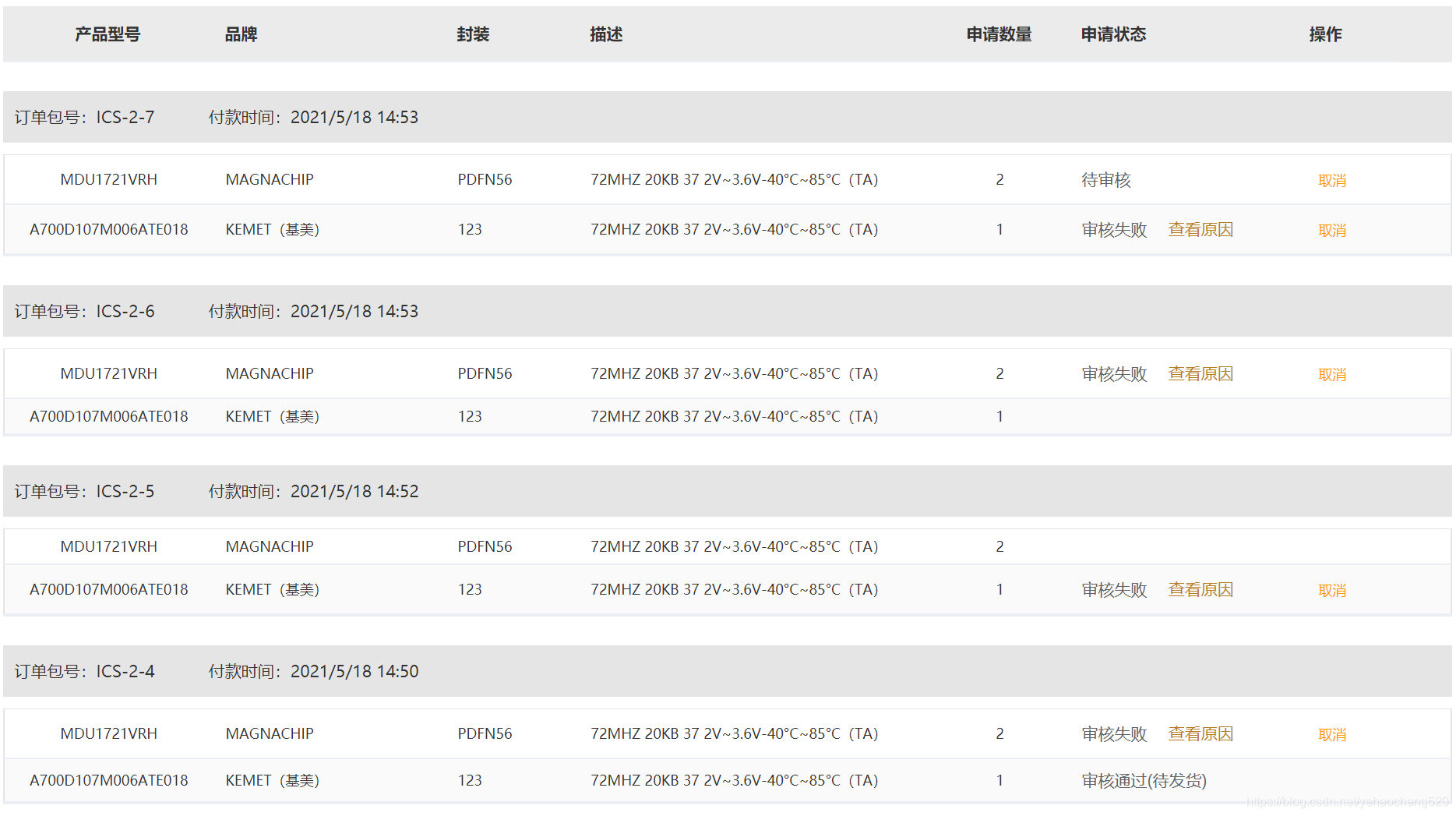
样式部分:
.el-table {

            border-top: none !important;

        }

        .el-table__expanded-cell {

            padding: 0 !important;

        }

        .tableWrap {

            width: 100%;

        }

        .el-tabs__nav-scroll {

            padding: 0 20px;

            box-sizing: border-box;

        }

        .tableWrap .el-table {

            width: 1240px;

            margin: 0 auto;

        }

        .el-icon.el-icon-arrow-right {

            color: #fff;

        }

        .el-table__row.expanded {

            background: #fff !important;

            position: relative !important;

            top: -100px !important;

            border: 1px solid red;

        }

        .el-tabs__content {

            display: none;

        }

        .el-table__row.expanded > td {

            padding: 7px 0;

        }

        .el-table__row.expanded {

            border: 1px solid #E5E5E5;

        }

            .el-table__row.expanded:first-child {

                border-bottom: none;

            }

        .childTable .el-table__body {

            border-top: 1px solid #E5E5E5;

        }

        .childTable .el-table__row.expanded > td:first-child {

            border-left: 1px solid #E5E5E5;

        }

        .childTable .el-table__row.expanded > td:last-child {

            border-right: 1px solid #E5E5E5;

        }

        .el-tabs__header.is-top {

            border-bottom: none;

        }

        .childTable .el-table__header-wrapper {

            display: none;

        }

        .conWrap {

            height: 44px;

            background: #E5E5E5;

            line-height: 44px;

            padding-left: 10px;

            font-size: 14px;

            font-family: Microsoft YaHei;

            line-height: 19px;

            color: #333333;

        }

            .conWrap > span {

                line-height: 44px;

            }

        .el-table .has-gutter .is-leaf {

            position: relative !important;

            left: -48px !important;

        }

            .el-table .has-gutter .is-leaf:last-child {

                position: relative !important;

                left: 0px !important;

            }

        .el-table__header-wrapper {

            background: #EBEBEB;

        }

        .el-table .has-gutter > tr > th {

            background: #EBEBEB;

            font-size: 14px;

            font-family: Microsoft YaHei;

            font-weight: bold;

            line-height: 19px;

            color: #333333;

        }
数据结构
{

    "Items":[

        {

            "OrderNo":"ICS-10390-1",

            "ProductIds":"[646,309118,331385,331393,331394]",

            "UserId":10390,

            "Applicant":"( ̄▽ ̄*)b",

            "ApplicantMobile":"18458192430",

            "Receiver":"123",

            "CompanyName":"卡卡卡卡卡12 32  26",

            "Post":"高管",

            "Industry":"工业设计",

            "Purpose":"332",

            "Province":"广东省",

            "City":"广州市",

            "Address":"123",

            "ContactMobile":"18458192430",

            "CreateTime":"2021/9/7 8:51",

            "OrderDetails":[

                {

                    "Id":1309,

                    "OrderNo":"ICS-10390-1",

                    "SupplierId":2,

                    "ProductId":331393,

                    "ProductNum":1,

                    "ExpressNo":null,

                    "SendTime":"",

                    "ReceiveTime":"",

                    "JpSkuNo":"JPC47B1332N331393",

                    "PartNo":"cs-454",

                    "Package":"21",

                    "Mfg":"Samsung(三星)",

                    "ProPics":"https://test-jpfile1.oss-cn-shenzhen.aliyuncs.com//IcMall/icmall/2021/4/30/2021043014452714515931.JPG",

                    "CreateTime":"2021/9/7 8:51",

                    "UpdateTime":"2021/9/7 8:51",

                    "IsDeleted":false,

                    "State":10,

                    "CheckTime":null,

                    "FailReason":null,

                    "SupplierName":"深圳前海宝利士科技有限公司",

                    "ExpressCompany":null,

                    "Ship":1

                }

            ]

        }

    ],

    "Queryable":null,

    "TotalCount":1,

    "Msg":null

}
element-ui实现table表格的嵌套(table表格嵌套)功能实现的更多相关文章
- Element ui 2.8版本中的table树不能默认全展开解决方法
方案一:这个方案有问题 <el-table ref="tableTreeRef" :data="tableDate" ...... </el-tab ...
- element ui table 导出excel表格
https://blog.csdn.net/u010427666/article/details/79208145 vue2.0 + element UI 中 el-table 数据导出Excel1. ...
- element ui table(表格)点击一行展开
element ui是一个非常不错的vue的UI框架,element对table进行了封装,简化了vue对表格的渲染. element ui表格中有一个功能是展开行,在2.0版本官网例子中,只可以点击 ...
- element UI table 过滤 筛选问题
一.问提描述 使用elementUI table 官方筛选案例,发现筛选不是服务器端筛选,而是浏览器端对每一页进行单独筛选. 如何在服务器端筛选? 二.查询Element UI 官网table组 ...
- Vue+element ui table 导出到excel
需求: Vue+element UI table下的根据搜索条件导出当前所有数据 参考: https://blog.csdn.net/u010427666/article/details/792081 ...
- Element UI table组件源码分析
本文章从如下图所示的最基本的table入手,分析table组件源代码.本人已经对table组件原来的源码进行削减,源码点击这里下载.本文只对重要的代码片段进行讲解,推荐下载代码把项目运行起来,跟着文章 ...
- (Element UI 组件 Table)去除单元格底部的横线
Element UI 组件 Table 有一个属性 border,添加它可以增加纵向边框,但是无法控制横线边框,因此即使是最简单的 el-table,也会包含一个底部横线. 这个底部横线其实是一个 b ...
- 普通element ui table组件的使用
1.使用基础的element ui 的table的基础使用 首先,使用前要先引用element库到项目中,可以直接引入element的js和css或者在vue项目下按需加载不同的组件 废话不多说,直接 ...
- VUE -- 对 Element UI table中数据进行二次处理
时间——日期 后台经常给我们返回的是 时间戳 (例如:1535620671) 这时候我们页面展现的时候需要将时间戳转换为我们要的格式 例如 (YYYY-MM-DD HH:mm:ss) 如果是在Elem ...
- 开源 UI 库中,唯一同时实现了大表格虚拟化和树表格的 Table 组件
背景 有这样一个需求,一位 React Suite(以下简称 rsuite)的用户,他需要一个 Table 组件能够像 Jira Portfolio 一样,支持树形数据,同时需要支持大数据渲染. 截止 ...
随机推荐
- 【Amadeus原创】域密码到期发送提醒邮件的超简单方法
1,AD服务器下载安装免费的卓豪AD管理工具 https://www.manageengine.cn/products/self-service-password/free-password-expi ...
- 中电金信:亚洲TOP1 霸榜15年
近日,国际权威语言服务研究机构CSA Research公布了<2022年全球语言服务提供商100强>和<亚太地区TOP 30语言服务商>排名报告. 中电金信凭借卓越的品质管控. ...
- d2js 中实现 memcached 共享 session 的过程
https://github.com/inshua/d2js/blob/master/WebContent/guide/memcached-session.md 基于 https://github.c ...
- [MySQL]数据库修复(Example:1146 Error )
删除数据库自带的表,导致的异常问题修复方法如下 运行cmd,查询MYSQL所在位置 where mysql cd到MySQL安装目录的bin目录下 执行命令 mysql_upgrade -u root ...
- Qt音视频开发12-mpv解码播放
一.前言 之前玩了vlc解码和ffmpeg解码,前阵子有个客户需要换成mpv解码,于是研究了下mpv的使用方法,自从用了mpv以后发现爱不释手,这玩意天生适合极客和程序员啊,居然将各种处理封装成了命令 ...
- Qt编写安防视频监控系统28-摄像机点位
一.前言 摄像机点位的功能主要是在图片地图和在线离线地图上设置对应摄像机的位置,然后双击可以实时预览对应摄像机的视频,在图片地图上拖动摄像机图标到对应位置,系统会自动保存位置信息,在网页地图上的摄像机 ...
- opencv中 在特征点匹配代码举例,以及queryIdx和trainIdx的用法
一.用法 在特征点匹配中,queryIdx和trainIdx是匹配对中的两个索引,用于指示匹配点在不同图像或特征向量中的位置.1.假设我们有两幅图像A和B,并使用特征点提取算法(如SIFT)从它们中提 ...
- 使用Redis防止重复发送RabbitMQ消息
问题 今天遇到一个问题,发送MQ消息的时候需要保证不会重复发送,注意不是可靠到达(可靠到达可以通过消息确认机制和回调接口保证),这里保证的是不会生产多条一样的消息. 方法 综合讨论下来决定使用Redi ...
- Android 稳定性(二):治理思路篇
本文同步发布于公众号:移动开发那些事:Android 稳定性(二):治理思路篇 一般来讲Android稳定性包括crash和ANR,本文主要围绕crash(应用的crash率)来讲述如何来做Andro ...
- biancheng-Python爬虫教程
http://c.biancheng.net/python_spider/ 网络爬虫又称网络蜘蛛.网络机器人,它是一种按照一定的规则自动浏览.检索网页信息的程序或者脚本.网络爬虫能够自动请求网页,并将 ...