
ICEE-Microchip-MPLAB® X IDE-Microchip-MPLAB-Harmony extension + MHC(**Harmony Configurator)
Microchip-MPLAB-Harmony:
- Developer Sources: https://microchipdeveloper.com/xwiki/bin/view/software-tools/32-bit-harmony-v3/
- Wiki: https://github.com/Microchip-MPLAB-Harmony/Microchip-MPLAB-Harmony.github.io/wiki
- Github: https://github.com/Microchip-MPLAB-Harmony
- Project: https://www.microchip.com/en-us/tools-resources/configure/mplab-harmony
- MHC site: https://github.com/Microchip-MPLAB-Harmony/mhc
- MPLAB Harmony 3 User’s Guide: https://microchip-mplab-harmony.github.io
Getting Started with MPLAB Harmony 3
The following list describes the easiest way to get started developing embedded firmware with MPLAB Harmony 3.
- Obtain a development board with a supported Microchip 32-bit microcontroller.
- Install the XC32 Compiler Suite.
- Install the MPLAB X IDE
- Install the MPLAB Harmony 3 Configurator (MHC) plug-in.
- Download the minimum required packages. The MHC provides a convenient downloader, shown in the following image, for cloning MPLAB Harmony 3 packages.
- Use the MHC to create, configure, and generate a new project for your selected processor.
- Program, debug, and execute your embedded software.
The following tutorials will guide you through the process of creating, configuring, generating, and developing your first projects.
MPLAB Harmony 3 Configurator
Creating Your First Peripheral Library Project
Afterwards, refer to the following section to download and explore MPLAB Harmony 3 middleware packages.
Explore MPLAB Harmony 3 Middleware
Once you have created your first MPLAB Harmony core project, you’re ready to begin exploring MPLAB Harmony 3 middleware. Refer to the Wiki for the middleware from supported devices page:
Supported Device Families
Getting Help
Users of Microchip products can receive assistance through the following channels.
Distributor or Representative
Local Sales Office
Technical Support
Or, join the discussion in the MPLAB Harmony forum in the Microchip community.
www.microchip.com/forums
MPLAB Harmony 3 User’s Guide
This document describes what MPLAB Harmony 3 is, explains its key architectural concepts, and provides instructions for its use.
What is MPLAB Harmony 3?
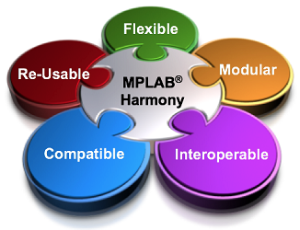
MPLAB Harmony 3 is an extension of the MPLAB ecosystem for developing embedded software solutions for Microchip 32-bit devices.
It is comprised of a set of tools, libraries, and example applications that extend the MPLAB ecosystem to simplify development of embedded software for Microchip 32-bit SAM and PIC microcontroller and microprocessor devices.
MPLAB Harmony 3 provides the MPLAB Harmony Configurator (MHC) tool, a set of modular device and middleware libraries, and numerous example applications, all of which are designed to help developers to quickly and easily develop powerful and efficient embedded software for Microchip 32-bit SAM and PIC devices.
**MHC(MPLAB Harmony Configurator)
The MHC is an easy to use development tool with a GUI(Graphical User Interface) that
simplifies device setup, library selection and configuration, and application development.
- The **MHC is available:
- as a plugin that directly integrates with the MPLAB X IDE.
- as a separate Java executable for standalone use with other IDE.
- MHC downloader(MHC included): reads an online catalog of library packages and facilitates selection and downloading of any libraries in which the developer is interested.
- MHC configurator: provides convenient and powerful development tools for **choosing library components from downloaded packages and configuring them for the developer’s application.
- MHC built-in CodeGenerator produces library and application starter code (usually in source form), based on the options chosen by the developer.
- MHC Library Packages provided by MPLAB Harmony 3 are distributed in separate GIT repositories containing C-language source-code (and/or templates for generating it) for components that are normally used together or that are parts of a “stack" of related library components.
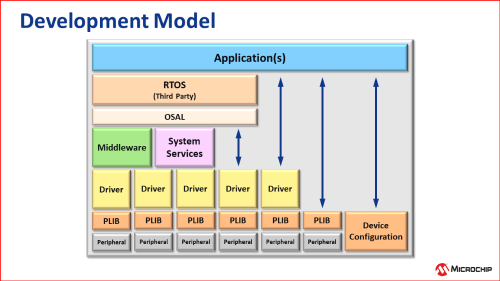
- CSP(Chip Support Package) contains device startup code and independent low-level Peripheral Libraries (PLIBs) that consist of simple functions to initialize and control peripherals and basic device features.
- Core package provides** device driver and system service libraries** that use PLIBs and that abstract hardware and Real Time Operating System (RTOS) details away from middleware and applications.
- Middleware libraries use drivers and system services for device independence in order to provide reusable implementations of each module. Middleware modules are available that support displaying graphics, networking capabilities, USB connectivity, audio playback and recording, Bluetooth connectivity, cryptography, and other powerful capabilities often required by today’s embedded devices.
- By default, Core and middleware libraries utilize FreeRTOS through an OSAL(Operating System Abstraction Layer). But, the OSAL can easily support nearly any RTOS or even systems with no RTOS at all.
Numerous example applications are available for MPLAB Harmony 3 that demonstrate each supported technology and that show common usage models for targeted markets. The following images show just a few examples.
MPLAB Harmony 3 Wiki
MHC User’s Guide Wiki
Create Your First Peripheral Library Project
Get Started with Harmony 3 on the SAMA5D2
MPLAB Harmony 3 Provides
· Example Applications
· Modular Libraries
o Peripheral Libraries
o Drivers & Services
o Middleware
· Graphical Developer Tools for
downloading, configuring, and generating the libraries.
ICEE-Microchip-MPLAB® X IDE-Microchip-MPLAB-Harmony extension + MHC(**Harmony Configurator)的更多相关文章
- 【PIC单片机】MPLAB X IDE快速入门指南
引言:近期由于项目实践需要,开始动手学习相关硬件知识.从PIC单片机入手. 单片机学习核心要点:查数据手册 配置寄存器 一.基于MPLAB X IDE配置位设置 MPLAB X IDE和MPLAB I ...
- 基于MPLAB X IDE配置位设置讲解
http://blog.csdn.net/superanters/article/details/8541171 在讲基于MPLAB X IDE 配置位配置前我先讲讲如何配置配置位. 比如PICLF1 ...
- MPLAB X IDE V4.15 创建工程,编译,问题处理
初步接触,有错误的地方还请大神们务必提出来,防止误导他人 硬件环境:MCU--PIC18F67K22 仿真下载器--ICD 3 编译环境:MPLAB X IDE V4.15 中文版 工作需要接触到了P ...
- Mplab X IDE 安装DMCI
DMCI在Mplab 8中是默认安装的,在 Mplab X IDE中是作为插件,默认不安装. 找到 勾选前面的复选框,点击安装
- MPLAB X IDE调试仿真功能简单入门
仿真分为硬件仿真和软件仿真,这里的硬件仿真和软件仿真的区别,就不多说了,相信大家都听说过这两个概念. 我这里想给大家介绍的是“Set PC at Cursor”--“设置PC到光标处”这个功能,这个功 ...
- 新的微芯片MCU增加了来自外部闪存的安全引导保护
新的微芯片MCU增加了来自外部闪存的安全引导保护 New Microchip MCU Adds Secure Boot Protection from External Flash 对于从外部SPI闪 ...
- Microchip编译器产品线—MPLAB XC简介
以下为Microchip最新编译器产品线—MPLAB-XC简介 MPLAB-XC:适合所有PIC单片机和项目的编译器解决方案 Microchip最新编译器产品线—MPLAB-XC为项目开发的软件需求提 ...
- [PIC32--IDE]Microchip PIC32开发环境的搭建
问题描写叙述 PIC32是Microchip推出的32 bit MCU,其内核是MIPS架构的,MIPS也是属于RISC指令集的,好像ARM的指令集还在RISC指令集中做了一些扩充,而MIPS应当是更 ...
- 动态IL织入框架Harmony简单入手
Harmony是一个开放源代码库,旨在在运行时替换.修饰或修改任何现有C#方法.它的主要用在用Mono语言编写的游戏和插件,但是该技术可以与任何.NET版本一起使用.它还照顾对同一方法的多次更改(它们 ...
- PIC32MZ 通过USB在线升级 -- USB CDC bootloader
了解bootloader 的实现,请加QQ: 1273623966 (验证填 bootloader):欢迎咨询或定制bootloader:我的博客主页www.cnblogs.com/geekygeek ...
随机推荐
- WPF封装一个懒加载下拉列表控件(支持搜索)
因为项目中PC端前端针对基础数据选择时的下拉列表做了懒加载控件,PC端使用现成的组件,为保持两端的选择方式统一,WPF客户端上也需要使用懒加载的下拉选择. WPF这种懒加载的控件未找到现成可用的组件, ...
- 【经验】VMware|虚拟机只能使用鼠标无法使用键盘、装不了或装了VMware-Tools无法复制粘贴的可能解决办法
2024/04/24说明:这篇暂时修改为粉丝可见,因为正在冲粉丝量,等到我弄完了粉丝量的要求,我就改回来!不方便看到全文的小伙伴不好意思!! VMware Workstation Pro版本:16.2 ...
- vue3 基础-CompositionAPI - setup
之前介绍的是一些关于代码复用的问题, 如 mixin, plugin 等. 从本篇开始呢, 就将来学习一波 vue3 的新特性, 即 Composition API 咱之前的写法, 即把各种逻辑, 方 ...
- TensorFlow 基础 (04)
最近都面临一个问题是, 要用纯 sql 来实现所有的逻辑, 其实 union 呀, 嵌套, 子查询呀, 这些都还好, 但那带有逻辑判断的, 这就整不好整了, 就多分支的, 再分支这种... 也不知为啥 ...
- Pandas 批量处理文本表
就是一个批量读取文件, 然后计算指标的过程. 难度到是没啥, 只是想记录一把, 毕竟这类的需求, 其实还是蛮多的. 但涉及一些数据的安全, 和指标这块也是不能透露的, 因此只能是贴上代码, 目的还是给 ...
- K8s新手系列之Pod的基本存储
概念 官方文档:https://kubernetes.io/zh-cn/docs/tasks/configure-pod-container/configure-volume-storage/ 卷:h ...
- 网络编程:使用poll单线程处理所有I/O事件
事件驱动模型 事件驱动的好处:占用资源少,效率高,可扩展性强,是支持高性能高并发的不二之选. 事件驱动模型也叫作反应堆模型(reactor),或者是Event loop模型,该模型的核心有两点: 1. ...
- 又一版 A+B
Description 输入两个不超过整型定义的非负10进制整数A和B(<=231-1),输出A+B的m (1 < m <10)进制数. Input 输入格式:测试输入包含若干测试用 ...
- 自己做的linux动态壁纸软件
自己做的linux动态壁纸软件 https://github.com/dependon/fantascene-dynamic-wallpaper
- stm32cubemx+freertos+中断实现IIC从机
最近做一个项目需要将stm32配置为iic的从机模式来响应总线的读写需求,看了网上的大部分资料讲解的都不是很全面,因此这里做一个小分享. iic通信流程 要编写iic从机模式的代码,就得对iic得整个 ...