
微信支付功能的设计实现与关键实践(UniApp+Java)全代码
感觉本篇对你有帮助可以关注一下我的微信公众号(深入浅出谈java),会不定期更新知识和面试资料、技巧!!!
温馨提醒:阅读时可打开导航栏
概述
在移动互联网时代,支付功能已成为应用开发的核心能力之一。本文将以 UniApp前端+Java后端技术栈为例,系统解析微信支付功能的设计实现与关键实践,为开发者提供从技术架构到安全防护的全景视角。
微信支付功能是跨平台应用(UniApp前端 + Java后端)与微信支付系统对接的核心模块,实现用户从下单到支付完成的闭环流程。支持多种支付场景(如APP支付、小程序支付、H5支付),确保交易安全、实时性和数据一致性
对于支付系统,公司一般会对其进行独立,确保服务的安全、可靠、稳定。因此支付系统是现代互联网的关键核心系统。本篇实现基本功能,提供思路,部分代码不严谨,可以自行优化
微信支付流程图
大致如下:流程图中和流程步骤 描述的2、3 步进行了调换,不受影响,但是建议可以先创建订单
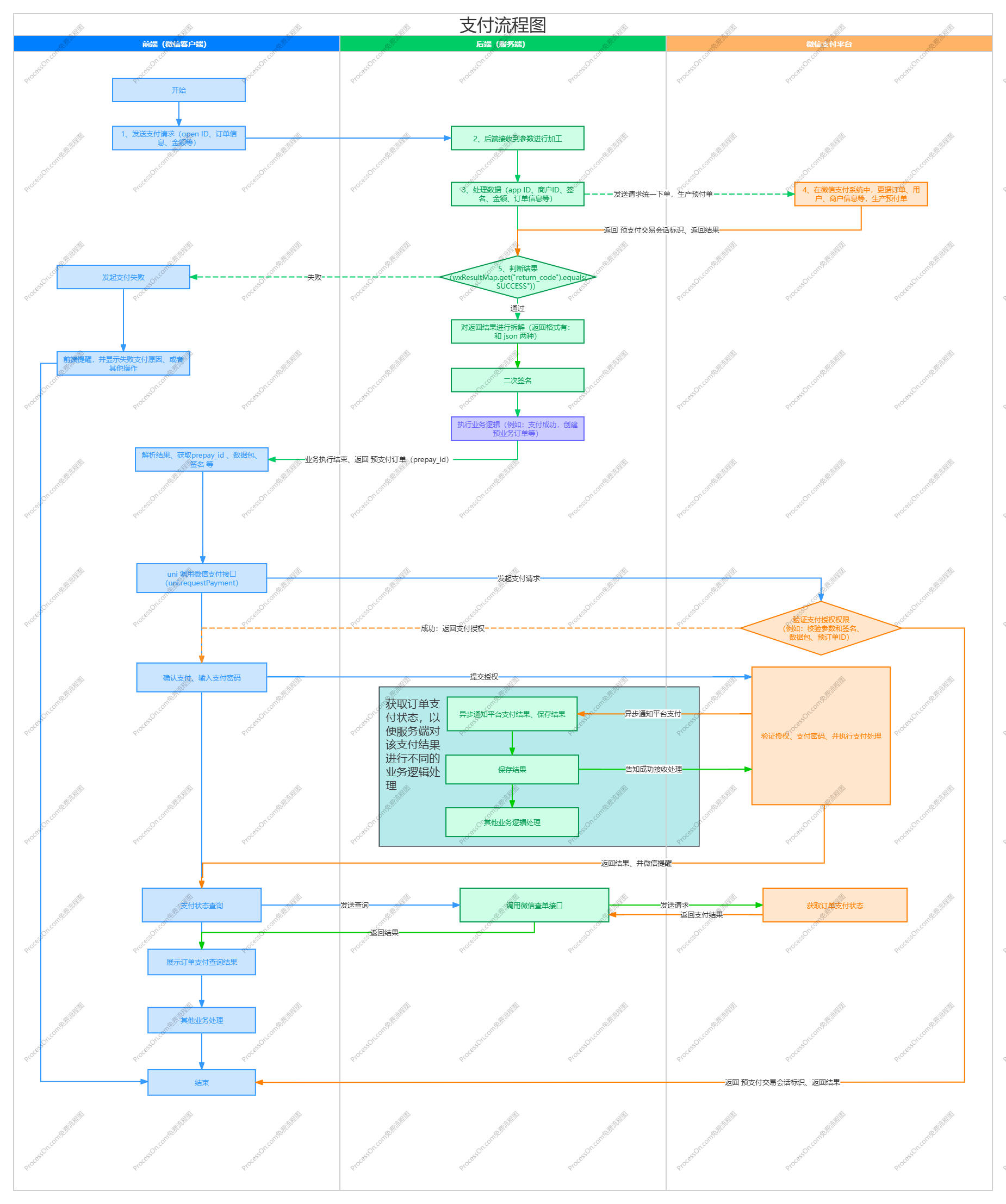
流程步骤
1、用户提交订单请求
行为主体:用户(通过UniApp前端操作)
动作描述:用户在UniApp中选择商品或服务,点击支付按钮,前端将订单信息(如商品ID、数量、金额等)发送至Java后端。
2、生成业务订单
行为主体:Java后端
动作描述:
后端接收订单请求后,验证数据合法性(如金额、商品库存等)。
在数据库中生成唯一业务订单号(
out_trade_no),并记录订单状态为「待支付」
3、调用微信统一下单API
行为主体:Java后端 → 微信支付平台
动作描述:
后端构造统一下单请求参数(包括商户号、订单号、金额、回调地址等)。
使用商户API密钥生成签名(保障请求安全性)。
向微信支付平台发送HTTP请求,调用统一下单接口(URL:
https://api.mch.weixin.qq.com/pay/unifiedorder)。
4、接收预支付交易单响应
行为主体:微信支付平台 → Java后端
动作描述:
微信验证请求参数和签名,确认无误后生成预支付交易单。
返回XML格式响应数据,包含关键字段:
prepay_id(预支付交易标识,用于后续支付)return_code(通信状态码,如SUCCESS/FAIL)result_code(业务结果码,如SUCCESS/FAIL)
5、返回支付参数至前端
- 行为主体:Java后端 → UniApp前端
- 动作描述:
- 后端解析微信返回的
prepay_id,重新构造前端支付参数(需二次签名)。 - 返回JSON数据给UniApp,包含:
appId(微信应用ID)timeStamp(时间戳)nonceStr(随机字符串)package(固定值Sign=WXPay)signType(签名类型,通常为MD5或HMAC-SHA256)paySign(最终支付签名)
- 后端解析微信返回的
6、调起微信支付界面
行为主体:用户(UniApp前端) → 微信客户端
动作描述:
UniApp通过
uni.requestPaymentAPI,传入后端返回的支付参数。微信客户端(APP/小程序)根据参数拉起支付界面,用户确认金额并输入密码。
7、用户完成支付
- 行为主体:微信支付平台 → 用户
- 动作描述:
- 微信验证支付密码和账户余额,扣款成功后,向用户展示支付结果页面(成功/失败)。
8、异步通知支付结果
- 行为主体:微信支付平台 → Java后端
- 动作描述:
- 微信通过POST请求调用后端预设的
notify_url(需公网可访问)。 - 推送XML格式回调数据,包含:
out_trade_no(商户订单号)transaction_id(微信支付单号)total_fee(实际支付金额)result_code(支付结果,如SUCCESS/FAIL)
- 微信通过POST请求调用后端预设的
9、处理回调并响应微信
- 行为主体:Java后端 → 微信支付平台
- 动作描述:
- 后端接收回调数据后:
- 验证签名防止伪造请求
- 检查订单金额与业务系统是否一致
- 更新订单状态为「已支付」(需做幂等处理,避免重复更新)
- 返回XML响应(必须包含
<return_code><![CDATA[SUCCESS]]></return_code>),告知微信已正确处理。
- 后端接收回调数据后:
10、通知前端最终结果
- 行为主体:Java后端 → UniApp前端
- 动作描述:
- 若前端未实时感知支付结果(如用户关闭页面),可通过两种方式同步:
- 轮询查询:前端定期请求后端订单状态接口
- WebSocket推送:后端主动推送支付结果
- 更新前端界面显示支付成功/失败状态。
- 若前端未实时感知支付结果(如用户关闭页面),可通过两种方式同步:
账号准备工作
申请微信小程序账号
1、开发小程序的第一步,你需要拥有一个小程序账号,因此先申请小程序账号
小程序注册地址:小程序
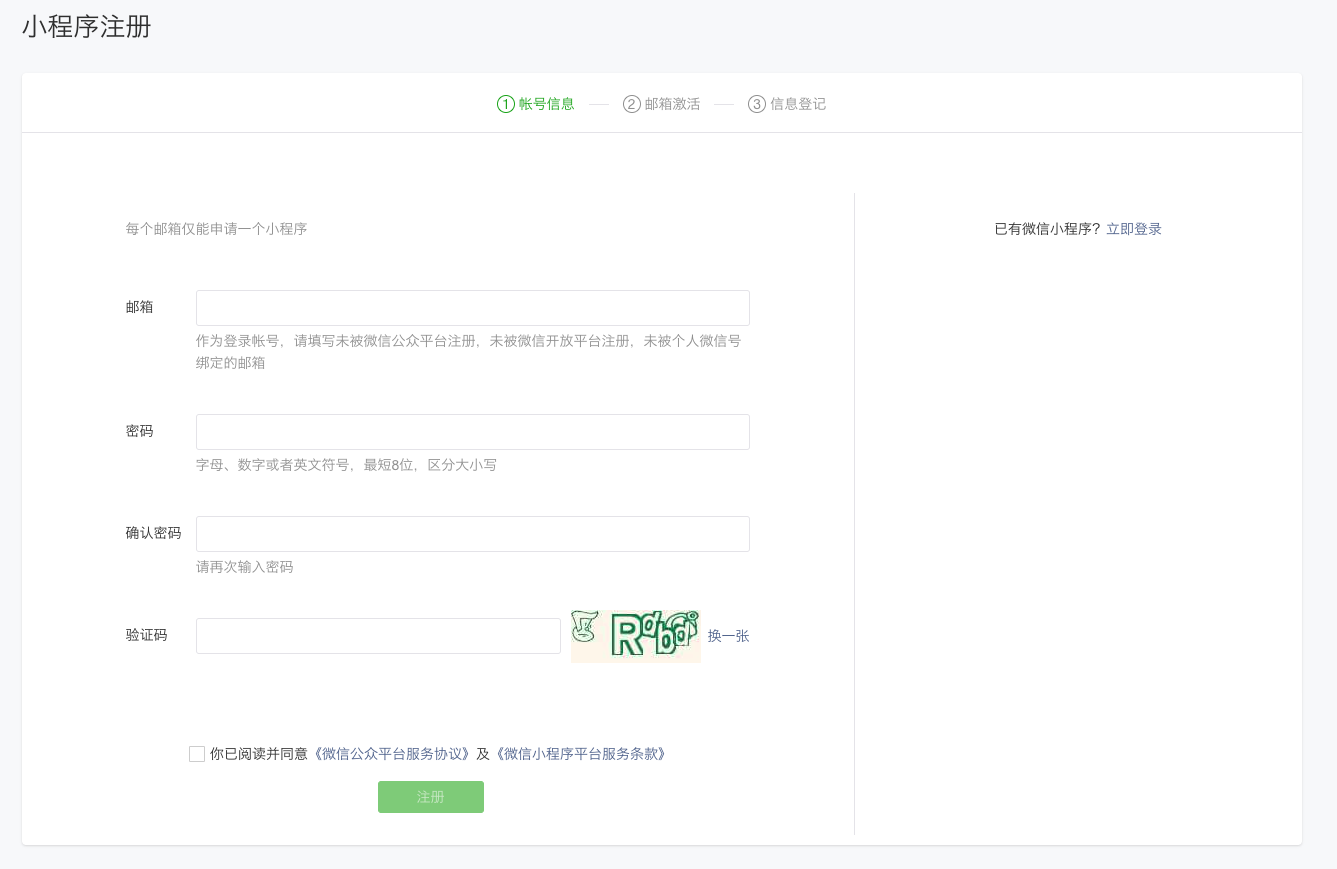
2、信息填好,进行注册,就会产生AppID、AppSecret
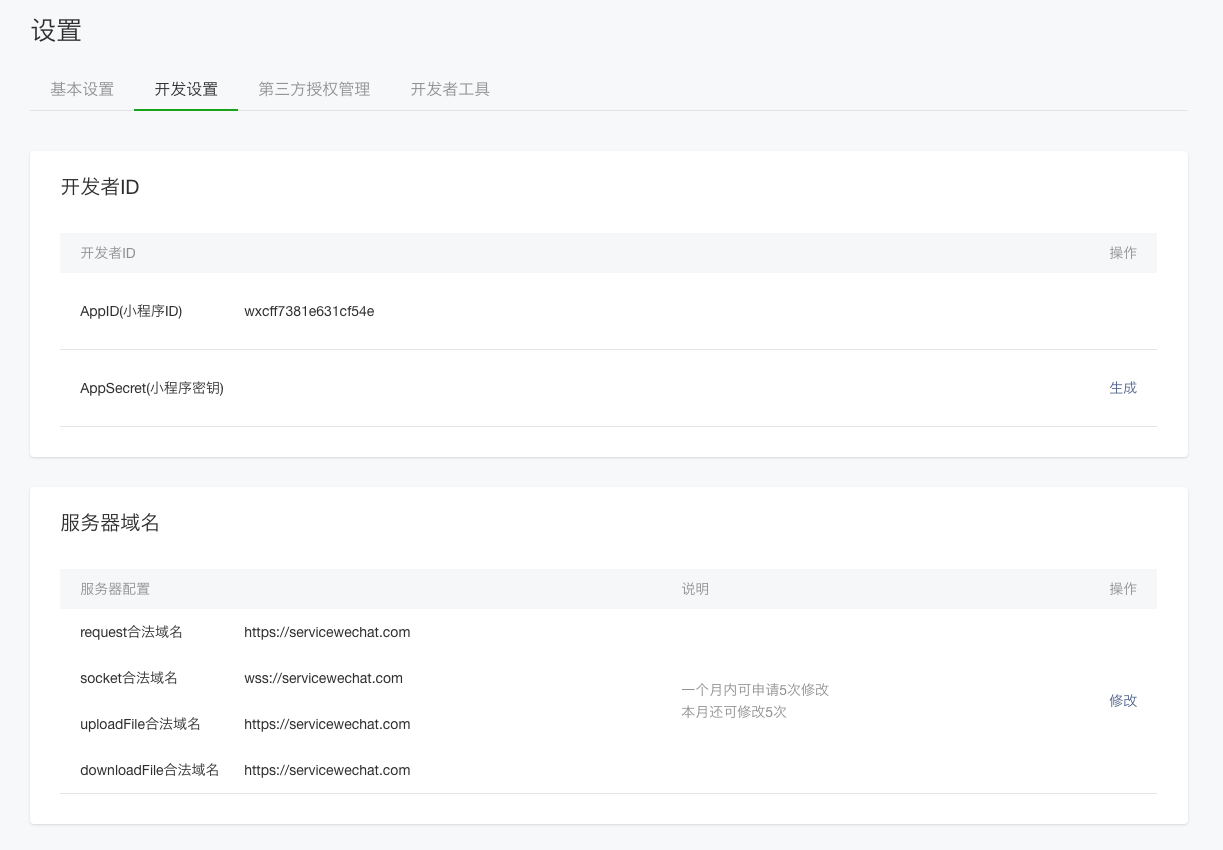
小程序的 AppID 相当于小程序平台的一个身份证,后续你会在很多地方要用到 AppID (注意这里要区别于服务号或订阅号的 AppID)
微信支付 官网开通商户支付能力
微信支付官网:微信支付 - 中国领先的第三方支付平台 | 微信支付提供安全快捷的支付方式
1、找到接入微信支付,进行绑定注册
注册需要营业执照、法人信息,按照要求填写即可
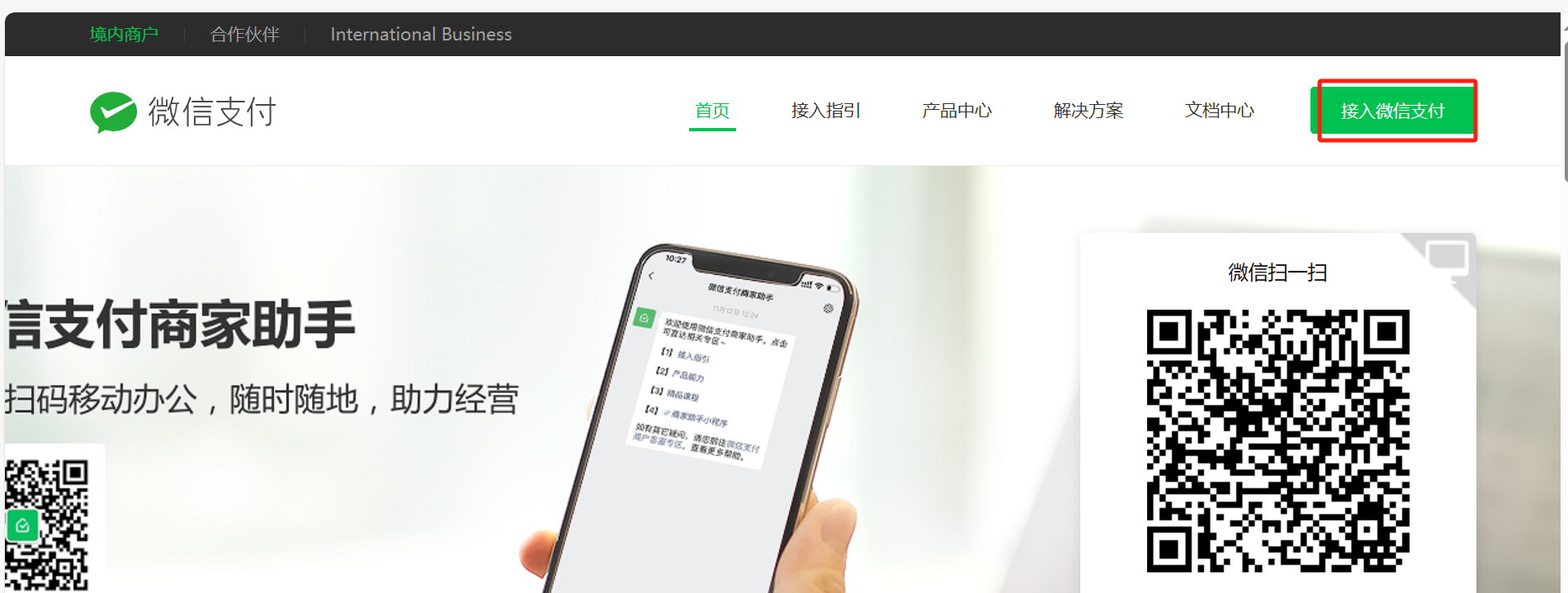
2、注册微信支付商户号
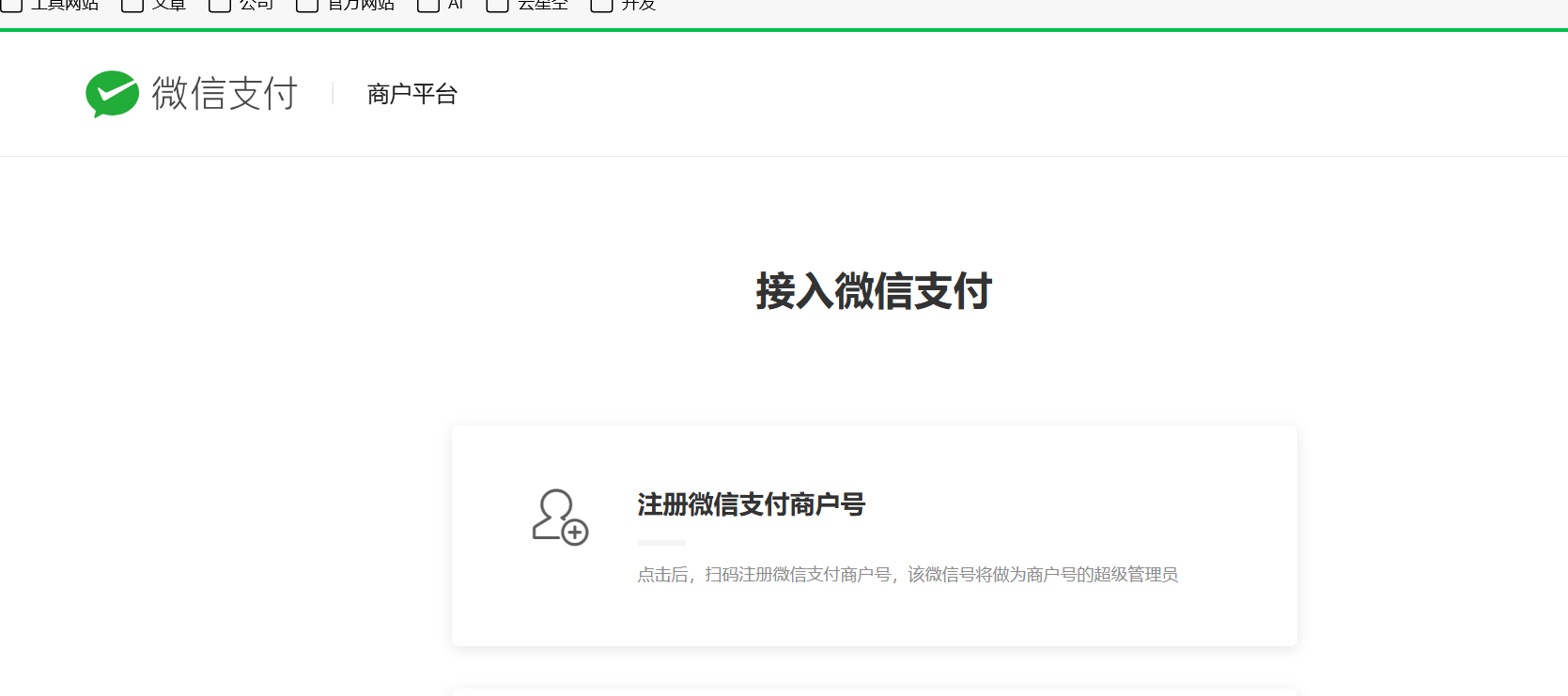
3、填写必要信息进行注册
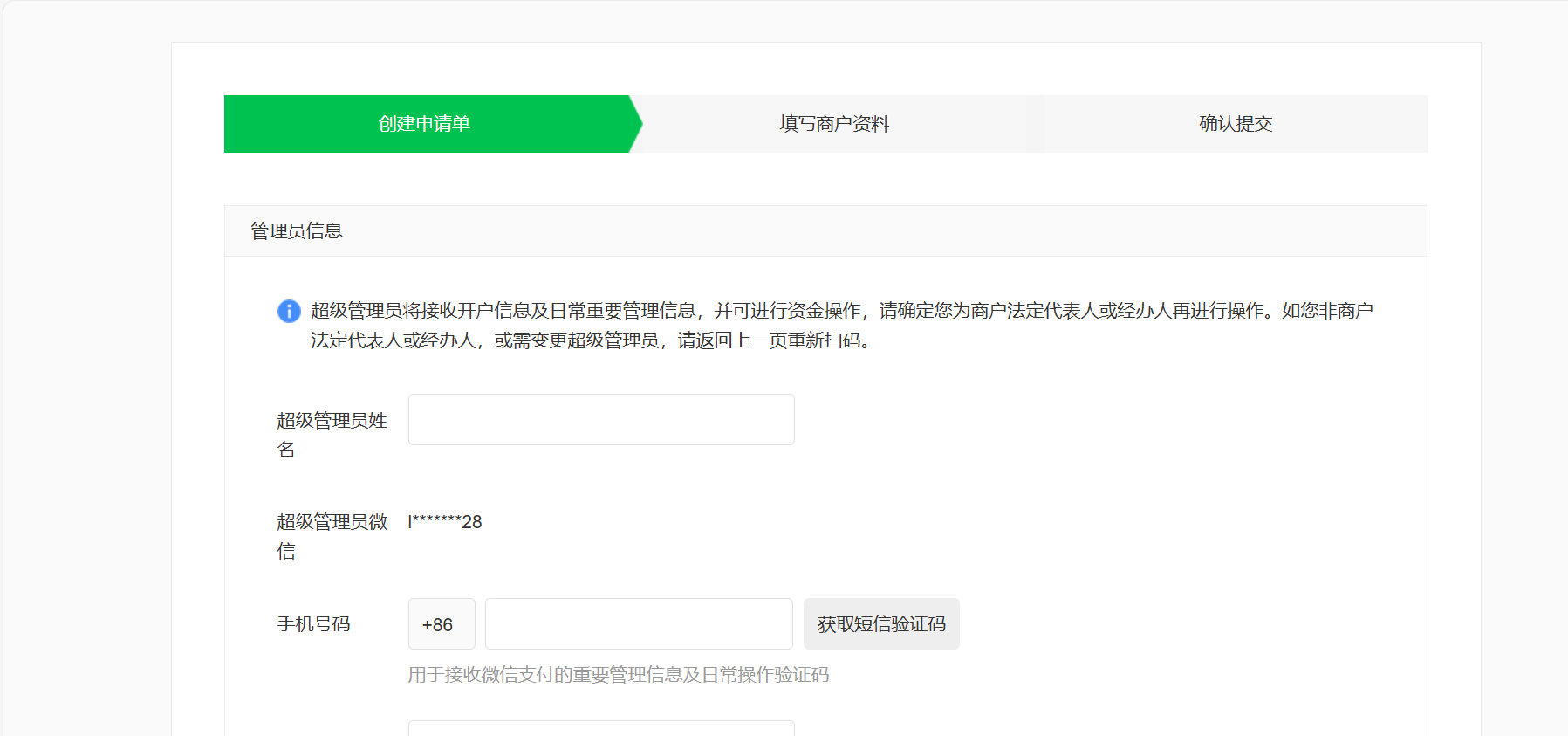
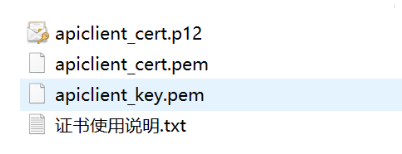
4、申请证书和AIPv3秘钥,v2现在有淘汰趋势,不需要申请v2,直接v3走起。
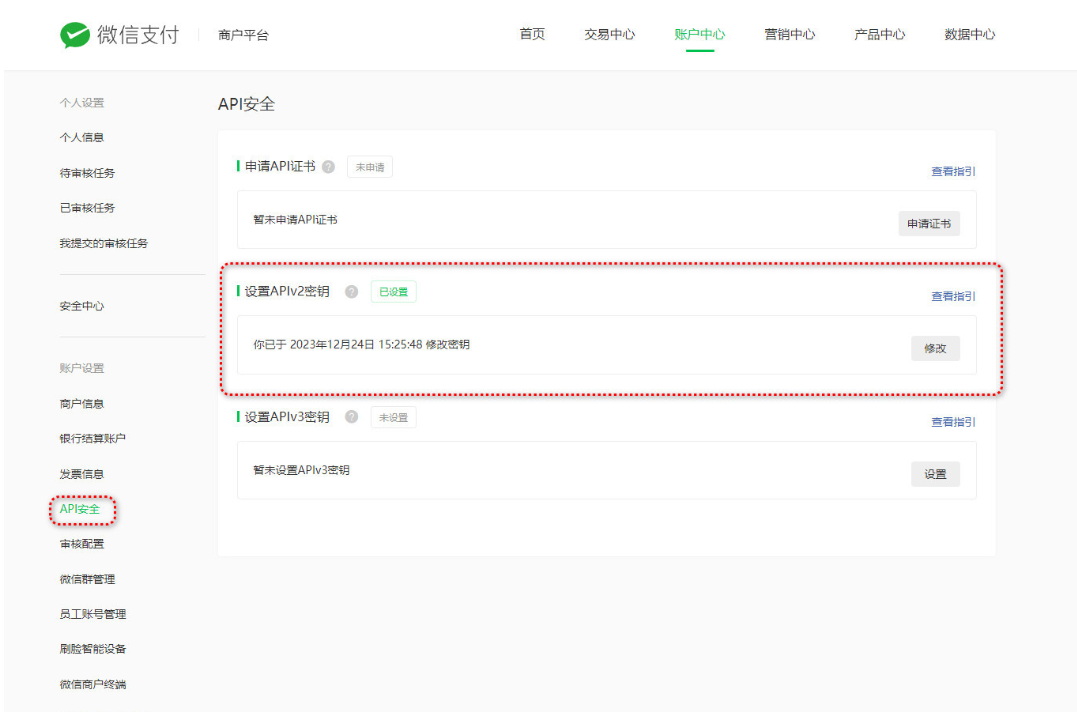
5、下载和保存好 秘钥及证书(PS:一定要好好保存)
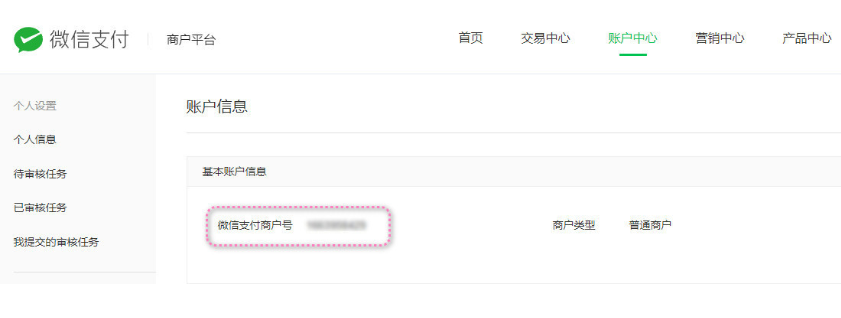
6、获取商户号
接入实现
服务端代码
1、导入maven依赖
        <!-- 微信支付API -->

        <dependency>

            <groupId>com.github.wxpay</groupId>

            <artifactId>wxpay-sdk</artifactId>

            <version>0.0.3</version>

        </dependency>

        <dependency>

            <groupId>com.thoughtworks.xstream</groupId>

            <artifactId>xstream</artifactId>

            <version>1.4.20</version>

            <scope>compile</scope>

        </dependency>

<!-- 微信支付SDK(官方或第三方封装) -->

<dependency>

    <groupId>com.github.wechatpay-apiv3</groupId>

    <artifactId>wechatpay-apache-httpclient</artifactId>

    <version>0.4.7</version>

</dependency>
2、配置商户信息
# 微信支付配置

pay:

  appId: xxx #应用id

  mchId: xxx #商户id

  notifyUrl: https://服务器ip或对应域名/wxpay/weixin/callback #支付回调地址
3、实体类代码
这个部分是需要用到的实体类代码
WeChatPay:微信支付预下单实体类
@Data

@Accessors(chain = true)

public class WeChatPay {

    /**

     * 返回状态码  此字段是通信标识,非交易标识,交易是否成功需要查看result_code来判断

     */

    public String return_code;

    /**

     * 返回信息 当return_code为FAIL时返回信息为错误原因 ,例如 签名失败 参数格式校验错误

     */

    private String return_msg;

    /**

     * 公众账号ID 调用接口提交的公众账号ID

     */

    private String appid;

    /**

     * 商户号 调用接口提交的商户号

     */

    private String mch_id;

    /**

     * api密钥 详见:https://pay.weixin.qq.com/index.php/extend/employee

     */

    private String api_key;

    /**

     * 设备号  自定义参数,可以为请求支付的终端设备号等

     */

    private String device_info;

    /**

     * 随机字符串    5K8264ILTKCH16CQ2502SI8ZNMTM67VS   微信返回的随机字符串

     */

    private String nonce_str;

    /**

     * 签名 微信返回的签名值,详见签名算法:https://pay.weixin.qq.com/wiki/doc/api/native.php?chapter=4_3

     */

    private String sign;

    /**

     * 签名类型

     */

    private String sign_type;

    /**

     * 业务结果 SUCCESS SUCCESS/FAIL

     */

    private String result_code;

    /**

     * 错误代码 当result_code为FAIL时返回错误代码,详细参见下文错误列表

     */

    private String err_code;

    /**

     * 错误代码描述 当result_code为FAIL时返回错误描述,详细参见下文错误列表

     */

    private String err_code_des;

    /**

     * 交易类型 JSAPI JSAPI -JSAPI支付 NATIVE -Native支付 APP -APP支付 说明详见;https://pay.weixin.qq.com/wiki/doc/api/native.php?chapter=4_2

     */

    private String trade_type;

    /**

     * 预支付交易会话标识 微信生成的预支付会话标识,用于后续接口调用中使用,该值有效期为2小时

     */

    private String prepay_id;

    /**

     * 二维码链接     weixin://wxpay/bizpayurl/up?pr=NwY5Mz9&groupid=00 trade_type=NATIVE时有返回,此url用于生成支付二维码,然后提供给用户进行扫码支付。注意:code_url的值并非固定,使用时按照URL格式转成二维码即可

     */

    private String code_url;

    /**

     * 商品描述  商品简单描述,该字段请按照规范传递,具体请见 https://pay.weixin.qq.com/wiki/doc/api/native.php?chapter=4_2

     */

    private String body;

    /**

     * 商家订单号 商户系统内部订单号,要求32个字符内,只能是数字、大小写字母_-|* 且在同一个商户号下唯一。详见商户订单号 https://pay.weixin.qq.com/wiki/doc/api/native.php?chapter=4_2

     */

    private String out_trade_no;

    /**

     * 标价金额 订单总金额,单位为分,详见支付金额 https://pay.weixin.qq.com/wiki/doc/api/native.php?chapter=4_2

     */

    private String total_fee;

    /**

     * 终端IP 支持IPV4和IPV6两种格式的IP地址。用户的客户端IP

     */

    private String spbill_create_ip;

    /**

     * 通知地址 异步接收微信支付结果通知的回调地址,通知url必须为外网可访问的url,不能携带参数。公网域名必须为https,如果是走专线接入,使用专线NAT IP或者私有回调域名可使用http

     */

    private String notify_url;

    /**

     * 子商户号 sub_mch_id 非必填(商户不需要传入,服务商模式才需要传入) 微信支付分配的子商户号

     */

    private String sub_mch_id;

    /**

     * 附加数据,在查询API和支付通知中原样返回,该字段主要用于商户携带订单的自定义数据

     */

    private String attach;

    /**

     * 商户系统内部的退款单号,商户系统内部唯一,只能是数字、大小写字母_-|*@ ,同一退款单号多次请求只退一笔。

     */

    private String out_refund_no;

    /**

     * 退款总金额,单位为分,只能为整数,可部分退款。详见支付金额 https://pay.weixin.qq.com/wiki/doc/api/native_sl.php?chapter=4_2

     */

    private String refund_fee;

    /**

     * 退款原因 若商户传入,会在下发给用户的退款消息中体现退款原因 注意:若订单退款金额≤1元,且属于部分退款,则不会在退款消息中体现退款原因

     */

    private String refund_desc;

    /**

     * 交易结束时间 订单失效时间,格式为yyyyMMddHHmmss,如2009年12月27日9点10分10秒表示为20091227091010。其他详见时间规则 注意:最短失效时间间隔必须大于5分钟

     */

    private String time_expire;

    /**

     * 用户标识 trade_type=JSAPI,此参数必传,用户在主商户appid下的唯一标识。openid和sub_openid可以选传其中之一,如果选择传sub_openid,则必须传sub_appid。下单前需要调用【网页授权获取用户信息: https://developers.weixin.qq.com/doc/offiaccount/OA_Web_Apps/Wechat_webpage_authorization.html 】接口获取到用户的Openid。

     */

    private String openid;

    /**

     * 时间戳

     */

    private String time_stamp;

    /**

     * 会员类型

     */

    private String memberShipType;

}
PayParameterVO:微信支付,商品信息对象
@Data

public class PayParameterVO {

    /** 商品价格(单位:分) */

    private String price;

    /** 微信openId */

    private String wxOpenId;

    /** 商品描述 */

    private String goodsTitle;

}
OrderReturnInfo:预下单成功之后返回结果对象
@Data

public class OrderReturnInfo {

        /** 返回状态码 */

        private String return_code;

        /** 返回信息 */

        private String return_msg;

        /** 业务结果 */

        private String result_code;

        /** 小程序appID */

        private String appid;

        /** 商户号 */

        private String mch_id;

        /** 随机字符串 */

        private String nonce_str;

        /** 签名 */

        private String sign;

        /**  预支付交易会话标识。用于后续接口调用中使用,该值有效期为2小时 */

        private String prepay_id;

        /** 交易类型 */

        private String trade_type;

}
QueryReturnInfo:查询订单返回实体类
@Data

public class QueryReturnInfo {

    /** 返回状态码 */

    private String return_code;

    /** 返回信息 */

    private String return_msg;

    /** 业务结果 */

    private String result_code;

    /** 错误代码 */

    private String err_code;

    /** 错误代码描述 */

    private String err_code_des;

    /** 小程序appID */

    private String appid;

    /** 商户号 */

    private String mch_id;

    /** 随机字符串 */

    private String nonce_str;

    /** 签名 */

    private String sign;

    /** 签名类型 */

    private String sign_type;

    private String prepay_id;

    /** 交易类型 */

    private String trade_type;

    /** 设备号 */

    private String device_info;

    /** 用户标识 */

    private String openid;

    /** 是否关注公众账号 */

    private String is_subscribe;

    private String trade_state;

    /** 付款银行 */

    private String bank_type;

    /** 订单金额 */

    private int total_fee;

    /** 应结订单金额 */

    private int settlement_total_fee;

    /** 货币种类 */

    private String fee_type;

    /** 现金支付金额 */

    private int cash_fee;

    /** 现金支付货币类型 */

    private String cash_fee_type;

    /** 总代金券金额 */

    private int coupon_fee;

    /** 代金券使用数量 */

    private int coupon_count;

    /** 代金券类型 */

    private String coupon_type_$n;

    /** 代金券ID */

    private String coupon_id_$n;

    /** 单个代金券支付金额 */

    private String coupon_fee_$n;

    /** 微信支付订单号 */

    private String transaction_id;

    /** 商户订单号 */

    private String out_trade_no;

    /** 支付完成时间 */

    private String time_end;

    private String trade_state_desc;

    /** 商家数据包 */

    private String attach;

}
SignInfo:签名实体类
@Data

public class SignInfo {

    private String appId;//小程序ID

    private String timeStamp;//时间戳

    private String nonceStr;//随机串

    @XStreamAlias("package")

    private String repay_id;

    private String signType;//签名方式

    public void setSignType(String signType) {

        this.signType = signType;

    }

}
4、工具类代码
SignUtils:签名工具类
@Slf4j

public class SignUtils {

        /**

         * 签名算法

         *

         * @param o 要参与签名的数据对象

         * @return 签名

         * @throws IllegalAccessException

         */

        public static String getSign(Object o) throws IllegalAccessException {

            ArrayList<String> list = new ArrayList<String>();

            Class cls = o.getClass();

            Field[] fields = cls.getDeclaredFields();

            for (Field f : fields) {

                f.setAccessible(true);

                if (f.get(o) != null && f.get(o) != "") {

                    String name = f.getName();

                    XStreamAlias anno = f.getAnnotation(XStreamAlias.class);

                    if (anno != null) {

                        name = anno.value();

                    }

                    list.add(name + "=" + f.get(o) + "&");

                }

            }

            int size = list.size();

            String[] arrayToSort = list.toArray(new String[size]);

            Arrays.sort(arrayToSort, String.CASE_INSENSITIVE_ORDER);

            StringBuilder sb = new StringBuilder();

            for (int i = 0; i < size; i++) {

                sb.append(arrayToSort[i]);

            }

            String result = sb.toString();

            result += "key=" + Configure.getKey();

            log.info("签名数据:" + result);

            result = MD5.MD5Encode(result).toUpperCase();

            return result;

        }

        public static String getSign(Map<String, Object> map) {

            ArrayList<String> list = new ArrayList<String>();

            for (Map.Entry<String, Object> entry : map.entrySet()) {

                if (entry.getValue() != "") {

                    list.add(entry.getKey() + "=" + entry.getValue() + "&");

                }

            }

            int size = list.size();

            String[] arrayToSort = list.toArray(new String[size]);

            Arrays.sort(arrayToSort, String.CASE_INSENSITIVE_ORDER);

            StringBuilder sb = new StringBuilder();

            for (int i = 0; i < size; i++) {

                sb.append(arrayToSort[i]);

            }

            String result = sb.toString();

            result += "key=" + Configure.getKey();

            //Util.log("Sign Before MD5:" + result);

            result = MD5.MD5Encode(result).toUpperCase();

            //Util.log("Sign Result:" + result);

            return result;

        }

    }
MD5:MD5 加密工具类
public class MD5 {

    private final static String[] hexDigits = {"0", "1", "2", "3", "4", "5", "6", "7",

            "8", "9", "a", "b", "c", "d", "e", "f"};

    /**

     * 转换字节数组为16进制字串

     *

     * @param b 字节数组

     * @return 16进制字串

     */

    public static String byteArrayToHexString(byte[] b) {

        StringBuilder resultSb = new StringBuilder();

        for (byte aB : b) {

            resultSb.append(byteToHexString(aB));

        }

        return resultSb.toString();

    }

    /**

     * 转换byte到16进制

     *

     * @param b 要转换的byte

     * @return 16进制格式

     */

    private static String byteToHexString(byte b) {

        int n = b;

        if (n < 0) {

            n = 256 + n;

        }

        int d1 = n / 16;

        int d2 = n % 16;

        return hexDigits[d1] + hexDigits[d2];

    }

    /**

     * MD5编码

     *

     * @param origin 原始字符串

     * @return 经过MD5加密之后的结果

     */

    public static String MD5Encode(String origin) {

        String resultString = null;

        try {

            resultString = origin;

            MessageDigest md = MessageDigest.getInstance("MD5");

            resultString = byteArrayToHexString(md.digest(resultString.getBytes()));

        } catch (Exception e) {

            e.printStackTrace();

        }

        return resultString;

    }

}
MapToObject:map 转化对象工具类
public class MapToObject {

    /**

     * Map数据转为java对象

     * @param map map数据

     * @param targetType 对象类型

     * @return

     * @param <T>

     * @throws IllegalAccessException

     * @throws InstantiationException

     */

    public static <T> T convertMapToObject(Map<String, String> map, Class<T> targetType) throws IllegalAccessException, InstantiationException {

        T targetObject = targetType.newInstance();

        for (Map.Entry<String, String> entry : map.entrySet()) {

            String key = entry.getKey();

            String value = entry.getValue();

            try {

                // 使用反射获取字段

                Field field = targetType.getDeclaredField(key);

                // 设置字段可访问(如果是私有字段)

                field.setAccessible(true);

                // 获取字段的类型

                Class<?> fieldType = field.getType();

                // 将字符串值转换为字段类型

                Object convertedValue = convertStringToType(value, fieldType);

                // 设置字段的值

                field.set(targetObject, convertedValue);

            } catch (NoSuchFieldException e) {

                // 处理字段不存在的异常

                e.printStackTrace();

            }

        }

        return targetObject;

    }

    private static Object convertStringToType(String value, Class<?> targetType) {

        if (targetType == int.class || targetType == Integer.class) {

            return Integer.parseInt(value);

        }

        // 添加其他可能的类型转换逻辑,例如 double、float、Date 等

        // 默认情况下,返回字符串值

        return value;

    }

}
HttpRequest:请求工具类
public class HttpRequest {

    //连接超时时间,默认10秒

    private static final int socketTimeout = 10000;

    //传输超时时间,默认30秒

    private static final int connectTimeout = 30000;

    /**

     * post请求

     *

     * @throws IOException

     * @throws ClientProtocolException

     * @throws NoSuchAlgorithmException

     * @throws KeyStoreException

     * @throws KeyManagementException

     * @throws UnrecoverableKeyException

     */

    public static String sendPost(String url, Object xmlObj) throws ClientProtocolException, IOException, UnrecoverableKeyException, KeyManagementException, KeyStoreException, NoSuchAlgorithmException {

        HttpPost httpPost = new HttpPost(url);

        //解决XStream对出现双下划线的bug

        XStream xStreamForRequestPostData = new XStream(new DomDriver("UTF-8", new XmlFriendlyNameCoder("-_", "_")));

        xStreamForRequestPostData.alias("xml", xmlObj.getClass());

        //将要提交给API的数据对象转换成XML格式数据Post给API

        String postDataXML = xStreamForRequestPostData.toXML(xmlObj);

        //得指明使用UTF-8编码,否则到API服务器XML的中文不能被成功识别

        StringEntity postEntity = new StringEntity(postDataXML, "UTF-8");

        httpPost.addHeader("Content-Type", "text/xml");

        httpPost.setEntity(postEntity);

        //设置请求器的配置

        RequestConfig requestConfig = RequestConfig.custom().setSocketTimeout(socketTimeout).setConnectTimeout(connectTimeout).build();

        httpPost.setConfig(requestConfig);

        HttpClient httpClient = HttpClients.createDefault();

        HttpResponse response = httpClient.execute(httpPost);

        HttpEntity entity = response.getEntity();

        String result = EntityUtils.toString(entity, "UTF-8");

        return result;

    }

    /**

     * 自定义证书管理器,信任所有证书

     *

     * @author pc

     */

    public static class MyX509TrustManager implements X509TrustManager {

        @Override

        public void checkClientTrusted(

                java.security.cert.X509Certificate[] arg0, String arg1)

                throws CertificateException {

        }

        @Override

        public void checkServerTrusted(

                java.security.cert.X509Certificate[] arg0, String arg1)

                throws CertificateException {

        }

        @Override

        public java.security.cert.X509Certificate[] getAcceptedIssuers() {

            return null;

        }

    }

}
5、配置类代码
WxPayConfig:微信支付配置
@Data

@Component

@Configuration

@ConfigurationProperties(prefix = "pay")

public class WxPayConfig {

    /**

     * 微信小程序appid

     */

    private String appId;

    /**

     * 小程序设置的API v2密钥

     */

    private String apiKey;

    /**

     * 微信商户平台 商户id

     */

    private String mchId;

    /**

     *小程序密钥

     */

    private String appSecret;

    /**

     * 小程序支付异步回调地址

     */

    private String notifyUrl;

}
Configure:商户支付秘钥
public class Configure {

    /**

     * 商户支付秘钥

     */

    @Getter

    private static String key = "此处填写秘钥";

    public static void setKey(String key) {

        Configure.key = key;

    }

}
6、常量类代码
WeChatPayUrlConstants:微信支付API地址常量
public class WeChatPayUrlConstants {

    /**

     * 统一下单预下单接口url

     */

    public static final String Uifiedorder = "https://api.mch.weixin.qq.com/pay/unifiedorder";

    /**

     * 订单状态查询接口URL

     */

    public static final String Orderquery = "https://api.mch.weixin.qq.com/pay/orderquery";

    /**

     * 订单申请退款

     */

    public static final String Refund = "https://api.mch.weixin.qq.com/secapi/pay/refund";

    /**

     * 付款码 支付

     */

    public static final String MicroPay = "https://api.mch.weixin.qq.com/pay/micropay";

    /**

     * 微信网页授权 获取“code”请求地址

     */

    public static final String GainCodeUrl = "https://open.weixin.qq.com/connect/oauth2/authorize";

    /**

     * 微信网页授权 获取“code” 回调地址

     */

    public static final String GainCodeRedirect_uri = "http://i5jmxe.natappfree.cc/boss/WeChatPayMobile/SkipPage.html";

}
7、业务实现类代码
Controller 层
@Slf4j

@RestController

@RequestMapping("/system/wxpay")

public class WxPayController {

    @Autowired

    private WxPayInfoService wxPayInfoService;

    /**

     * 小程序支付下单接口

     *

     * @return 返回结果

     */

    @ApiOperation("小程序支付功能")

    @PostMapping("/pay")

    public InvokeResult wxPay(@RequestBody PayParameterVO payParameterVO) {

        PayParameterVO parameterVO = new PayParameterVO();

        parameterVO.setWxOpenId(payParameterVO.getWxOpenId());

        parameterVO.setPrice("1");

        parameterVO.setGoodsTitle("测试支付商品");

        HashMap<String, String> payHistory = wxPayInfoService.insertPayRecord(parameterVO);

        return InvokeResultBuilder.success(payHistory);

    }

    /**

     * 查询订单

     */

    @ApiOperation("订单查询")

    @PostMapping("/wx/query")

    public InvokeResult orderQuery(@RequestParam("out_trade_no") String out_trade_no) {

        QueryReturnInfo queryReturnInfo = wxPayInfoService.orderQuery(out_trade_no);

//        return InvokeResultBuilder.success(queryReturnInfo.getTrade_state_desc(), queryReturnInfo);

        return InvokeResultBuilder.success(queryReturnInfo);

    }

    /**

     * 微信小程序支付成功回调

     *

     * @param request  请求

     * @param response 响应

     * @return 返回结果

     * @throws Exception 异常处理

     */

    @RequestMapping("/weixin/callback")

    public String callBack(HttpServletRequest request, HttpServletResponse response) throws Exception {

        log.info("接收到微信支付回调信息");

        String notifyXml = IOUtils.toString(request.getInputStream(), StandardCharsets.UTF_8);

        // 解析返回结果

        Map<String, String> notifyMap = WXPayUtil.xmlToMap(notifyXml);

        // 判断支付是否成功

        if ("SUCCESS".equals(notifyMap.get("result_code"))) {

            //支付成功时候,处理业务逻辑

            wxPayInfoService.payCallbackSuccess(notifyMap);

            //返回处理成功的格式数据,避免微信重复回调

            return "<xml>" + "<return_code><![CDATA[SUCCESS]]></return_code>"

                    + "<return_msg><![CDATA[OK]]></return_msg>" + "</xml> ";

        }

        // 创建响应对象:微信接收到校验失败的结果后,会反复的调用当前回调函数

        Map<String, String> returnMap = new HashMap<>();

        returnMap.put("return_code", "FAIL");

        returnMap.put("return_msg", "");

        String returnXml = WXPayUtil.mapToXml(returnMap);

        response.setContentType("text/xml");

        System.out.println("校验失败");

        return returnXml;

    }

、

}
接口层
public interface  WxPayInfoService {

    /**

     * 创建统一支付订单

     */

    HashMap<String, String> insertPayRecord(PayParameterVO payParameterVO);

    /**

     * 查询订单

     * @param out_trade_no 订单号

     * @return 返回结果

     */

    QueryReturnInfo orderQuery(String out_trade_no);

    /**

     * 微信小程序支付成功回调

     * @param notifyMap

     */

    void payCallbackSuccess(Map<String, String> notifyMap);

}
实现层
@Slf4j

@Service

public class WxPayInfoServiceImpl implements WxPayInfoService {

    //这是注入的业务处理类

//    @Autowired

//    private IFPayOrderService ifPayOrderService;

    @Resource

    private WxPayConfig payProperties;

    private static final DecimalFormat df = new DecimalFormat("#");

    /**

     * 创建统一支付订单

     *

     * @param payParameterVO 商品信息

     * @return 返回结果

     */

    @Override

    @Transactional

    public HashMap<String, String> insertPayRecord(PayParameterVO payParameterVO) {

        String title = payParameterVO.getGoodsTitle();

        //金额 * 100 以分为单位

        BigDecimal fee = BigDecimal.valueOf(1);

        BigDecimal RMB = new BigDecimal(payParameterVO.getPrice());

        BigDecimal totalFee = fee.multiply(RMB);

        try {

            WeChatPay weChatPay = new WeChatPay();

            weChatPay.setAppid(payProperties.getAppId());

            weChatPay.setMch_id(payProperties.getMchId());

            weChatPay.setNonce_str(getRandomStringByLength(32));

            weChatPay.setBody(title);

            weChatPay.setOut_trade_no(getRandomStringByLength(32));

            weChatPay.setTotal_fee(df.format(Double.parseDouble(String.valueOf(totalFee))));

            // 获取当前服务器IP地址

//            weChatPay.setSpbill_create_ip(IpUtils());

            weChatPay.setNotify_url(payProperties.getNotifyUrl());

            weChatPay.setTrade_type("JSAPI");

            //这里直接使用当前用户的openid

            weChatPay.setOpenid(payParameterVO.getWxOpenId());

            weChatPay.setSign_type("MD5");

            //生成签名

            String sign = SignUtils.getSign(weChatPay);

            weChatPay.setSign(sign);

            log.info("订单号:" + weChatPay.getOut_trade_no());

            //向微信发送下单请求

            String result = HttpRequest.sendPost(WeChatPayUrlConstants.Uifiedorder, weChatPay);

            //将返回结果从xml格式转换为map格式

            Map<String, String> wxResultMap = WXPayUtil.xmlToMap(result);

            if (StringUtils.isNotEmpty(wxResultMap.get("return_code")) && wxResultMap.get("return_code").equals("SUCCESS")) {

                if (wxResultMap.get("result_code").equals("FAIL")) {

                    log.error("微信统一下单失败!");

                    return null;

                }

            }

            OrderReturnInfo returnInfo = MapToObject.convertMapToObject(wxResultMap, OrderReturnInfo.class);

            // 二次签名

            if ("SUCCESS".equals(returnInfo.getReturn_code()) && returnInfo.getReturn_code().equals(returnInfo.getResult_code())) {

                SignInfo signInfo = new SignInfo();

                signInfo.setAppId(payProperties.getAppId());

                long time = System.currentTimeMillis() / 1000;

                signInfo.setTimeStamp(String.valueOf(time));

                signInfo.setNonceStr(WXPayUtil.generateNonceStr());

                signInfo.setRepay_id("prepay_id=" + returnInfo.getPrepay_id());

                signInfo.setSignType("MD5");

                //生成签名

                String sign1 = SignUtils.getSign(signInfo);

                HashMap<String, String> payInfo = new HashMap<>();

                payInfo.put("timeStamp", signInfo.getTimeStamp());

                payInfo.put("nonceStr", signInfo.getNonceStr());

                payInfo.put("package", signInfo.getRepay_id());

                payInfo.put("signType", signInfo.getSignType());

                payInfo.put("paySign", sign1);

                payInfo.put("placeOrderJsonMsg", JSON.toJSONString(weChatPay));

                payInfo.put("orderNum", weChatPay.getOut_trade_no());

                // 业务逻辑结束 回传给小程序端唤起支付

                return payInfo;

            }

            return null;

        } catch (Exception e) {

            log.error(e.getMessage());

        }

        return null;

    }

    /**

     * 查询订单

     *

     * @param out_trade_no 订单号

     * @return 返回结果

     */

    @Override

    public QueryReturnInfo orderQuery(String out_trade_no) {

        try {

            WeChatPay weChatPay = new WeChatPay();

            weChatPay.setAppid(payProperties.getAppId());

            weChatPay.setMch_id(payProperties.getMchId());

            weChatPay.setNonce_str(WXPayUtil.generateNonceStr());

            weChatPay.setOut_trade_no(out_trade_no);

            //order.setSign_type("MD5");

            //生成签名

            String sign = SignUtils.getSign(weChatPay);

            weChatPay.setSign(sign);

            //向微信发送查询订单详情请求

            String result = HttpRequest.sendPost(WXPayConstants.ORDERQUERY_URL, weChatPay);

            Map<String, String> xmlToMap = WXPayUtil.xmlToMap(result);

            // 将 Map 转换为对象

            return MapToObject.convertMapToObject(xmlToMap, QueryReturnInfo.class);

        } catch (Exception e) {

            log.error("查询支付订单失败:[{}]", e.getMessage());

        }

        return null;

    }

    /**

     * 微信小程序支付成功回调

     *

     * @param notifyMap 回调Map数据

     */

    @Override

    public void payCallbackSuccess(Map<String, String> notifyMap) {

        //保存相关支付数据

        try {

            QueryReturnInfo queryReturnInfo = MapToObject.convertMapToObject(notifyMap, QueryReturnInfo.class);

            log.info("支付回调信息:" + queryReturnInfo);

            //处理回调信息,此处根据自己的项目业务进行处理

//            ifPayOrderService.receivePayCallback(queryReturnInfo);

        } catch (Exception e) {

            throw new RuntimeException(e);

        }

    }

    /**

     * 获取一定长度的随机字符串

     *

     * @param length 指定字符串长度

     * @return 一定长度的字符串

     */

    public static String getRandomStringByLength(int length) {

        String base = "abcdefghijklmnopqrstuvwxyz0123456789";

        Random random = new Random();

        StringBuilder sb = new StringBuilder();

        for (int i = 0; i < length; i++) {

            int number = random.nextInt(base.length());

            sb.append(base.charAt(number));

        }

        return sb.toString();

    }

}
前端核心代码
支付方法
goPay () {

      console.log('goPay');

      const that = this

      //向服务器发送下单请求(服务端会返回预下单信息)

      uni.request({

        url: common.api_base_url + "/system/wxpay/pay",

        header: {

          "Content-Type": "application/json",

          "Authorization": "Bearer " + uni.getStorageSync('token'),

        },

        method: 'POST',

        data: {

          goodsId: that.nowGoodsId,

        },

        success(res) {

          console.log("下单信息结果",res)

          if (res.data.code == 200){

            //成功,调用微信支付接口进行支付()

            uni.requestPayment({

              provider: 'wxpay',

              timeStamp: res.data.data.timeStamp,

              nonceStr:  res.data.data.nonceStr,

              package:  res.data.data.package,

              signType: res.data.data.signType,

              paySign:  res.data.data.paySign,

              // appId: app.globalData.appid,

              success: function (ress) {

                console.log("支付完成:",ress)

                //支付成功后,查询订单情况,或者2 秒自动跳转到其他页面

                uni.showToast({

                  title: '支付成功',

                  duration: 2000

                });

              },

              fail: function (err) {

                uni.showToast({

                  title: '支付失败!',err,

                  icon:"none",

                  duration: 2000

                });

              }

            });

          }else {

            //弹出下单失败的提示

            uni.showToast({

              title:res.data.msg,

              icon:"none"

            });

          }

        }

      })

    },
效果图
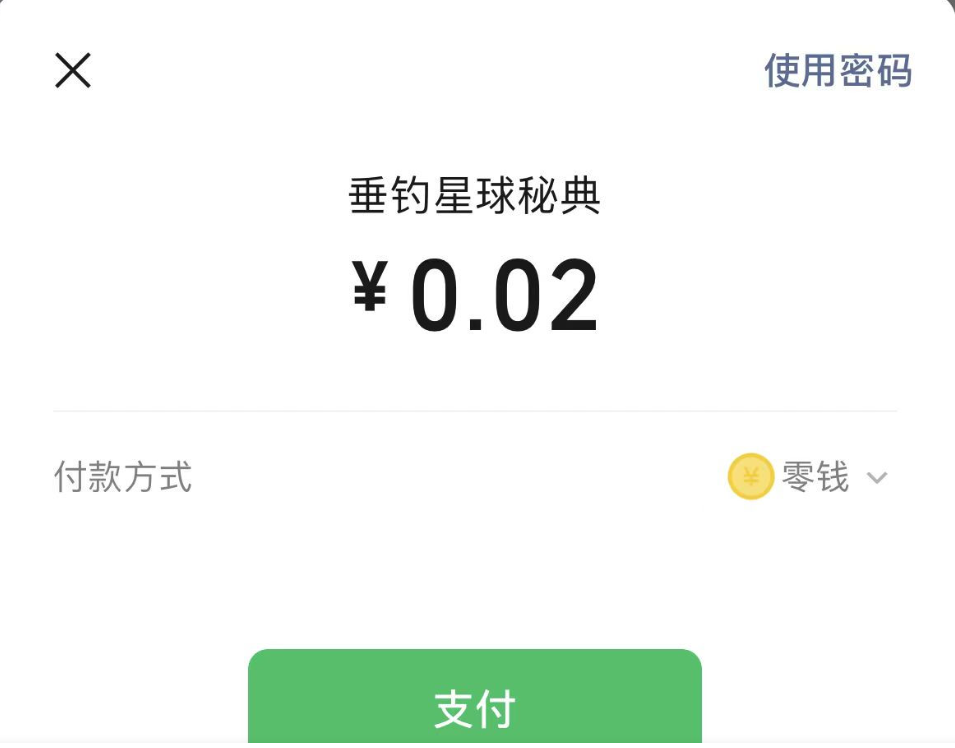
前端传递参数,后端生成预订单,返回前端,前端唤醒支付页面,随后支付即可,再调用订单状态查询接口,对不同状态的订单进行自己的业务逻辑判断。
最后文章有啥不对,欢迎大佬在评论区指点!!!
如果感觉对你有帮助就点赞推荐或者关注一下吧!!!
 ****
****
微信支付功能的设计实现与关键实践(UniApp+Java)全代码的更多相关文章
- C#开发微信门户及应用(40)--使用微信JSAPI实现微信支付功能
在我前面的几篇博客,有介绍了微信支付.微信红包.企业付款等各种和支付相关的操作,不过上面都是基于微信普通API的封装,本篇随笔继续微信支付这一主题,继续介绍基于微信网页JSAPI的方式发起的微信支付功 ...
- ecshop增加pc扫描二维码微信支付功能代码
ecshop开发网站,如果没有手机版,又想通过微信支付,可以加入pc二维码扫描微信支付功能 工具/原料 ecshop商城系统,phpqrcode,WxPayPubHelper 公众号已申请微信支付 方 ...
- [5] 微信公众号开发 - 微信支付功能开发(网页JSAPI调用)
1.微信支付的流程 如下三张手机截图,我们在微信网页端看到的支付,表面上看到的是 "点击支付按钮 - 弹出支付框 - 支付成功后出现提示页面",实际上的核心处理过程是: 点击支付按 ...
- 微信公众号开发 [05] 微信支付功能开发(网页JSAPI调用)
1.微信支付的流程 如下三张手机截图,我们在微信网页端看到的支付,表面上看到的是 "点击支付按钮 - 弹出支付框 - 支付成功后出现提示页面",实际上的核心处理过程是: 点击支付按 ...
- ThinkPHP5.0 实现 app微信支付功能
相对于之前随笔写的<ThinkPHP5.0实现app支付宝支付功能>来说,php对接app微信支付功能就相对简单的多了,最近有加我的朋友问到app微信支付,所以我把app微信支付的demo ...
- 微信小程序 使用微信支付功能实现在线订单支付
以前做过PC页面微信支付,但是这次在小程序 直接调用微信支付功能还是方便很多 先放个微信官方API链接:https://pay.weixin.qq.com/wiki/doc/api/wxa/wxa_a ...
- h5内嵌微信小程序,调用微信支付功能
在小程序中不能使用之前在浏览器中配置的支付功能,只能调用小程序专属的api进行支付. 因为需要在现在实现的基础上,再添加在小程序中调用微信支付功能,所以我的思路是这样的 1.在点击支付按钮时,判断是不 ...
- 新版微信小程序即将上线 新增微信支付功能
<经济参考报>消息,新版微信小程序正在测试中,有可能将在近期正式上线.新版小程序增加了“附近门店”功能的接口,微信用户可以通过定位功能,查看提供线下服务的各类门店,并直接利用小程序实现包括 ...
- android开发之微信支付功能的实现
移动开发中,支付类的App越来越多,对于开发者来说也是不可少的,不可不会的:下面就来说一说支付开发的流程 1.申请你的AppID 请到 开发者应用登记页面 进行登记,登记并选择移动应用进行设置后,将该 ...
- 微信支付之02------整个微信支付功能----------Java实现
先来看下微信支付官方文档: 1.在官方文档上有很多种支付方式,由于目前我只做过JSAPI和微信扫码支付二种,其他的就不说了. >>>>>第一种微信扫码支付>> ...
随机推荐
- 腾讯云 TI 平台部署与调用DeepSeek-R1大模型的实战指南
今天我们将继续探讨如何部署一个私有化的 DeepSeek-R1 大模型,具体的部署过程我们将利用腾讯云的 TI 平台进行操作.当前,腾讯云 TI 平台为用户提供了免费体验的满血版 DeepSeek-R ...
- Idea无法下载插件或下载插件报错
Plugin Python was not installed: Cannot download 'https://plugins.jetbrains. file -> settings -& ...
- [HAOI2018] 染色 题解
第一眼肯定想到容斥.设 \(G(k)\) 表示至少有 \(k\) 种颜色符合要求,\(F(k)\) 表示恰好有 \(k\) 种颜色符合要求.显然 \(k\) 的上界 \(t=\min(m,\lfloo ...
- STC15F104E的外部中断工作异常
STC15F104E使用了外部中断,发现中断工作有时会失效,必需重新上电才能恢复,使用中不时会失效. 1 /********************************************** ...
- JUC并发—13.Future模式和异步编程简介
大纲 1.Runnable接口与Callable接口 (1)Runnable接口实现异步任务 (2)Callable接口实现异步任务 2.Future模式 (1)Future模式的概念 (2)Futu ...
- 浅谈Tox之一
本文分享自天翼云开发者社区<浅谈Tox之一>,作者:Moonriver What is tox? tox是通用的virtualenv管理和测试命令行工具,可用于: 使用不同的Python版 ...
- AI 核心能力与开发框架工程能力的共生关系解析
一.本质定位:能力层与载体层的互补 1. AI 能力:突破性认知的"大脑" - 定义:AI 的核心能力(如大语言模型的泛化推理.多模态感知)源于算法创新.海量数据与算力突破,其本质 ...
- CSRF的理解及Flask和Django的解决方案
CSRF 攻击的原理 1. 用户正常登录 网站A 2. 网站A 向用户浏览器写入cookies(包含登录信息) 3. 用户在没有登出的情况下,访问了网站B(攻击网站) 4. 网站B 伪造了一个 网站A ...
- Netty基础—8.Netty实现私有协议栈
大纲 1.私有协议介绍 2.私有协议的通信模型 3.私有协议栈的消息定义 4.私有协议栈链路的建立 5.私有协议栈链路的关闭 6.私有协议栈的心跳机制 7.私有协议栈的重连机制 8.私有协议栈的重复登 ...
- centos7下扩展根分区(图文详解)
df -h 查看当前系统磁盘使用状况 fdisk -l 可以看见,我新添加了一块硬盘,大小为10G,新磁盘/dev/sdb fdisk /dev/sdb 对新的磁盘进行分区 在交互模 ...