
Android一个大众化的设置界面
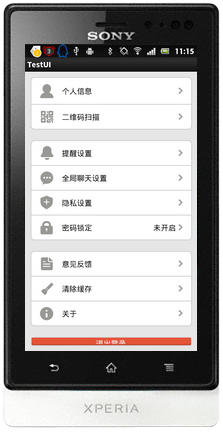
布局代码如下:
<?xml version="1.0" encoding="utf-8"?>

<RelativeLayout xmlns:android="http://schemas.android.com/apk/res/android"

    android:layout_width="match_parent"

    android:layout_height="match_parent"

    android:background="@drawable/android_layout_bg" >

    <LinearLayout

        android:id="@+id/ll_top"

        android:layout_width="match_parent"

        android:layout_height="wrap_content"

        android:background="@color/transparent"

        android:orientation="vertical" >

        <LinearLayout

            android:layout_width="match_parent"

            android:layout_height="wrap_content"

            android:background="@drawable/android_layout_bg"

            android:orientation="vertical" >

            <LinearLayout style="@style/PersonalMainLayoutStyle" >

                <RelativeLayout style="@style/PersonalTopStyle" >

                    <ImageView

                        android:id="@+id/personal_icon_01"

                        style="@style/PersonalIconStyle"

                        android:layout_width="36dp"

                        android:layout_height="38dp"

                        android:src="@drawable/ic_setting_account" />

                    <TextView

                        style="@style/PersonalTextStyle"

                        android:layout_toRightOf="@id/personal_icon_01"

                        android:text="个人信息" />

                    <ImageView

                        style="@style/PersonalRightIconStyle"

                        android:src="@drawable/mail_arrow" />

                </RelativeLayout>

                <View style="@style/PersonalLine" />

                <RelativeLayout style="@style/PersonalBottomStyle" >

                    <ImageView

                        android:id="@+id/personal_icon_03"

                        style="@style/PersonalIconStyle"

                        android:src="@drawable/ic_scan_qr_icon" />

                    <TextView

                        style="@style/PersonalTextStyle"

                        android:layout_toRightOf="@id/personal_icon_03"

                        android:text="二维码扫描" />

                    <ImageView

                        style="@style/PersonalRightIconStyle"

                        android:src="@drawable/mail_arrow" />

                </RelativeLayout>

            </LinearLayout>

            <LinearLayout style="@style/PersonalMainLayoutStyle" >

                <RelativeLayout style="@style/PersonalTopStyle" >

                    <ImageView

                        android:id="@+id/personal_icon_04"

                        style="@style/PersonalIconStyle"

                        android:src="@drawable/ic_setting_msg_notification" />

                    <TextView

                        style="@style/PersonalTextStyle"

                        android:layout_toRightOf="@id/personal_icon_04"

                        android:text="提醒设置" />

                    <ImageView

                        style="@style/PersonalRightIconStyle"

                        android:src="@drawable/mail_arrow" />

                </RelativeLayout>

                <View style="@style/PersonalLine" />

                <RelativeLayout style="@style/PersonalNormalStyle" >

                    <ImageView

                        android:id="@+id/personal_icon_05"

                        style="@style/PersonalIconStyle"

                        android:src="@drawable/ic_setting_chat_bkgnd" />

                    <TextView

                        style="@style/PersonalTextStyle"

                        android:layout_toRightOf="@id/personal_icon_05"

                        android:text="全局聊天设置" />

                    <ImageView

                        style="@style/PersonalRightIconStyle"

                        android:src="@drawable/mail_arrow" />

                </RelativeLayout>

                <View style="@style/PersonalLine" />

                <RelativeLayout style="@style/PersonalBottomStyle" >

                    <ImageView

                        android:id="@+id/personal_icon_06"

                        style="@style/PersonalIconStyle"

                        android:src="@drawable/ic_setting_privacy" />

                    <TextView

                        style="@style/PersonalTextStyle"

                        android:layout_toRightOf="@id/personal_icon_06"

                        android:text="隐私设置" />

                    <ImageView

                        style="@style/PersonalRightIconStyle"

                        android:src="@drawable/mail_arrow" />

                </RelativeLayout>

                <View style="@style/PersonalLine" />

                <RelativeLayout style="@style/PersonalBottomStyle" >

                    <ImageView

                        android:id="@+id/personal_icon_07"

                        style="@style/PersonalIconStyle"

                        android:src="@drawable/ic_setting_applock" />

                    <TextView

                        android:id="@+id/tv_key"

                        style="@style/PersonalTextStyle"

                        android:layout_toRightOf="@id/personal_icon_07"

                        android:text="密码锁定" />

                    <TextView

                        style="@style/PersonalTextStyle1"

                        android:layout_toRightOf="@id/personal_icon_07"

                        android:text="未开启" />

                    <ImageView

                        style="@style/PersonalRightIconStyle"

                        android:src="@drawable/mail_arrow" />

                </RelativeLayout>

            </LinearLayout>

            <LinearLayout style="@style/PersonalMainLayoutStyle" >

                <RelativeLayout

                    style="@style/PersonalCenterStyle"

                    android:layout_marginBottom="10dp" >

                    <ImageView

                        android:id="@+id/personal_icon_12"

                        style="@style/PersonalIconStyle"

                        android:src="@drawable/ic_setting_feedback" />

                    <TextView

                        style="@style/PersonalTextStyle"

                        android:layout_toRightOf="@id/personal_icon_12"

                        android:text="意见反馈" />

                    <ImageView

                        style="@style/PersonalRightIconStyle"

                        android:src="@drawable/mail_arrow" />

                </RelativeLayout>

                <View style="@style/PersonalLine" />

                <RelativeLayout

                    style="@style/PersonalCenterStyle"

                    android:layout_marginBottom="10dp" >

                    <ImageView

                        android:id="@+id/personal_icon_12"

                        style="@style/PersonalIconStyle"

                        android:src="@drawable/ic_clean_cache" />

                    <TextView

                        style="@style/PersonalTextStyle"

                        android:layout_toRightOf="@id/personal_icon_12"

                        android:text="清除缓存" />

                    <ImageView

                        style="@style/PersonalRightIconStyle"

                        android:src="@drawable/mail_arrow" />

                </RelativeLayout>

                <View style="@style/PersonalLine" />

                <RelativeLayout

                    style="@style/PersonalCenterStyle"

                    android:layout_marginBottom="10dp" >

                    <ImageView

                        android:id="@+id/personal_icon_13"

                        style="@style/PersonalIconStyle"

                        android:src="@drawable/ic_setting_about" />

                    <TextView

                        style="@style/PersonalTextStyle"

                        android:layout_toRightOf="@id/personal_icon_13"

                        android:text="关于" />

                    <ImageView

                        style="@style/PersonalRightIconStyle"

                        android:src="@drawable/mail_arrow" />

                </RelativeLayout>

            </LinearLayout>

            <LinearLayout style="@style/PersonalMainLayoutStyle" >

                <Button

                    android:layout_width="match_parent"

                    android:layout_height="wrap_content"

                    android:background="@drawable/selector_login_out"

                    android:text="退出登录"

                    android:textColor="@color/whiteSmoke" />

            </LinearLayout>

        </LinearLayout>

    </LinearLayout>

</RelativeLayout>
Android一个大众化的设置界面的更多相关文章
- Android 手机卫士--实现设置界面的一个条目布局结构
本文地址:http://www.cnblogs.com/wuyudong/p/5908986.html,转载请注明源地址. 本文以及后续文章,将一步步完善功能列表: 要点击九宫格中的条目,需要注册点击 ...
- Android 跳转权限设置界面的终极方案
转载请标明出处,维权必究:https://www.cnblogs.com/tangZH/p/10338377.html 有时候APP需要获取某些权限,要让用户手动打开,那么问题来了,若是直接提醒用户出 ...
- 用PreferenceActivity做一个标准的设置界面
最后接触到一个任务,做一个工厂设置,在我看来工厂设置不需要多美观,但是一定要方便修改,添加功能,再就是使用方便,我就想到了用PreferenceActivity,android系统的settings就 ...
- Android 一个TextView中设置多种不同大小的字体,设置超链接
以前项目中要是遇到这样的UI设计,都是傻不拉唧的分为三个TextView来实现,今天在微信中无意中看了一篇公众号文章,发现原来只要一个TextView就可以搞定啦,人生最悲哀的事情莫过于工作了这么久啦 ...
- 【OpenWRT之旅】如何自定义一个配置文件的设置界面
作者:gnuhpc 出处:http://www.cnblogs.com/gnuhpc/ 1. 引言 OpenWRT中采用LuCI作为它的Web interface界面框架,采用Lua语言.在本文中将以 ...
- android --一个简单的登录界面
MainActivity.java package com.example.empty_project; import androidx.appcompat.app.AppCompatActivity ...
- Android常用控件之Fragment仿Android4.0设置界面
Fragment是Android3.0新增的概念,是碎片的意思,它和Activity很相像,用来在一个Activity中描述一些行为或部分用户界面:使用多个Fragment可以在一个单独的Activi ...
- Android开发——设置界面的创建
前言: 最近忙着搞项目,难得有时间,便来整理搞项目中学习到的知识 使用之前,先介绍一下android这种的五种数据储存方式,分别为文件储存,SharePrefence,SQL,使用ContentPro ...
- 这才是Android设置界面的正确做法👌👌👌
话不多说,先上效果图 本文参考简书博客:<这才是Android设置界面的正确做法>一文写成,在其基础上删改并增加了一些内容.建议新窗口打开原文,在本文讲述不清楚的地方参考原文去寻找答案. ...
随机推荐
- iOSQuartz2D-01-核心要点
简介 作用 绘制 绘制图形 : 线条\三角形\矩形\圆\弧等 绘制文字 绘制\生成图片(图像) 读取\生成PDF 截图\裁剪图片 自定义UI控件(通常为内部结构较复杂的控件) UIKit中的绝大部分控 ...
- iOS开发 -- 为本地文件添加自定义属性的工具类
前言:实际开发,我们可能会有这样的需求,就是为文件添加自定义的属性,或者是可以将文件的相关信息添加进该文件的属性中,这样可以以备下次读取利用. 那么本文就是要介绍"拓展文件属性的工具类&qu ...
- 定制Asp.NET 5 MVC内建身份验证机制 - 基于自建SQL Server用户/角色数据表的表单身份验证
背景 在需要进行表单认证的Asp.NET 5 MVC项目被创建后,往往需要根据项目的实际需求做一系列的工作对MVC 5内建的身份验证机制(Asp.NET Identity)进行扩展和定制: Asp.N ...
- 一个初学者对于MVC架构的理解
我很早之前就开始接触.NET开发,一直都在2.0的框架下,所以对于MVC这种架构,听说过,但没有具体使用过,近期和外部朋友接触时,有了解到他们公司在使用MVC这种架构,所以自己就找来相关资料了解一下M ...
- cnblogs美化及插件
1.vp计数 http://www.amazingcounters.com 2.来源地图 http://clustrmaps.com 2.1来源地图 http://www.flagcounter.co ...
- Hadoop_YARN框架
Hadoop学习笔记总结 01. YARN框架 1. 新一代的框架介绍 YARN的职能就是将资源调度和任务调度分开.资源管理器ResourceManager全局管理所有应用程序计算资源的分配,每一个j ...
- 《TCP/IP详解 卷一》读书笔记-----TCP数据流
1.Delayed Acknowledgements:TCP通常不会在收到数据之后立即返回一个ACK,而是会有一个延时,希望能ACK报文段中带上一些数据,通常这个延时为200ms 2.Nagle Al ...
- DP+单调队列 codevs 1748 瑰丽华尔兹(还不是很懂具体的代码实现)
codevs 1748 瑰丽华尔兹 2005年NOI全国竞赛 时间限制: 1 s 空间限制: 128000 KB 题目等级 : 大师 Master 题解 题目描述 Descripti ...
- hdu 1028 Ignatius and the Princess III 简单dp
题目链接:hdu 1028 Ignatius and the Princess III 题意:对于给定的n,问有多少种组成方式 思路:dp[i][j],i表示要求的数,j表示组成i的最大值,最后答案是 ...
- ZOJ 3829 Known Notation --贪心+找规律
题意:给出一个字符串,有两种操作: 1.插入一个数字 2.交换两个字符 问最少多少步可以把该字符串变为一个后缀表达式(操作符只有*). 解法:仔细观察,发现如果数字够的话根本不用插入,数字够的最 ...