
未能正确加载“Microsoft.VisualStudio.Editor.Implementation.EditorPackage“提示信息
在安装过vs2015之后出现未能正确加载“Microsoft.VisualStudio.Editor.Implementation.EditorPackage“提示信息在VS的安装目录下,找到ActivityLog.xml
打开vs2012加载项目的时候报如下的错误:
未能正确加载“Microsoft.VisualStudio.Editor.Implementation.EditorPackage”包。
此问题可能是由配置更改或安装另一个扩展导致的。可以通过查看文件“C:\Users\zhanggj.PDOMAIN\AppData\Roaming\Microsoft\VisualStudio\11.0\ActivityLog.xml”来获取详细信息。
然而在重装系统之后VS中就再次出现了如题的问题。解决的办法有两种。
第一:在VS自带的命令行输入下面内容:devenv/resetuerdata 。 即:开始-输入(devenv /resetuerdata)打开运行即可。
第二:先关闭vs2012然后打开开始菜单里面的Developer Command Prompt for VS2012 这个命令行工具
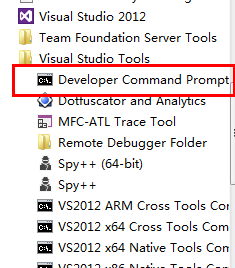
然后运行”devenv /resetuserdata“这条语句,再打开vs2012就好了
未能正确加载“Microsoft.VisualStudio.Editor.Implementation.EditorPackage“提示信息的更多相关文章
- 未能正确加载“Microsoft.VisualStudio.Editor.Implementation.EditorPackage”包。
最近在升级 Visual Studio 2015 Update 3 的过程中,等了很长时间都没一点进展,于是就强行终止了升级程序,但VS也因此出了问题. 后来经过修复,不行,卸载再重装,仍然提示这个错 ...
- 未能正确加载“Microsoft.VisualStudio.Editor.Implementation.EditorPackage,
未能正确加载“Microsoft.VisualStudio.Editor.Implementation.EditorPackage, Microsoft.VisualStudio.Editor.Imp ...
- 未能正确加载“Microsoft.VisualStudio.Editor.Implementation.EditorPackage”
VS2012启动/加载项目出问题 未能正确加载“Microsoft.VisualStudio.Editor.Implementation.EditorPackage, Microsoft.Visual ...
- Visual studio 2017 未能正确加载“Microsoft.VisualStudio.Editor.Implementation.EditorPackage”包
装完win10更新 发现vs杯具了… 提示 未能正确加载“Microsoft.VisualStudio.Editor.Implementation.EditorPackage”包 可以尝试在vs命令行 ...
- vs2012 怎样解决 未能正确加载“Microsoft.VisualStudio.Editor.Implementation.EditorPackage”包的问题
今天用vs2012打开项目总是报这个错误,在网上找到解决方法 1.问题描述: 未能正确加载“Microsoft.VisualStudio.Editor.Implementation.EditorPac ...
- vs未能正确加载CSharpPackage包,未能正确加载“Microsoft.VisualStudio.Editor.Implementation.EditorPackage”包
VS2017打开项目时提示未能正确加载CSharpPackage包, 可以使用 devenv命令工具来解决,操作如下 打开vs2017开发人员命令提示符(请使用管理员身份运行),如图 敲入 deve ...
- 未能正确加载“Microsoft.VisualStudio.Editor.Implementation.EditorPackage”包
解决方案: 关掉VS2012... "Microsoft Visual Studio 2012"->"Visual Studio Tools"->& ...
- 未能正确加载 ”Microsoft.VisualStudio.Editor.Implementation.EditorPackate“包错误解决方法
今天新来一个同事,帮他搭建开发环境.发现他的vs2012一打开就报错. 错误提示: 未能正确加载 "Microsoft.VisualStudio.Editor.Implementation. ...
- VS未能正确加载 ”Microsoft.VisualStudio.Editor.Implementation.EditorPackate“包错误解决方法
很久没用VS了,打开后出现未能正确加载 ”Microsoft.VisualStudio.Editor.Implementation.EditorPackate“包的错误,经过一番上网查阅错误得以解决. ...
随机推荐
- 第2章 开始入手 —— 01 创建第一个 Android 应用程序
创建一个新的 Android 项目 操作步骤: (1) 选择 File | New | Android Application Project ,弹出 New Android Application ...
- 如何在CMD下运用管理员权限
方法一:鼠标右键 这个方法比较比较普通, 点开开始找到cmd,右击鼠标“以管理员身份运行(A)”这样调用就是管理员的权限: 方法二:快捷模式 在点开win+R后,选择“以管理员身份运行”,然后确定:可 ...
- crontab 定时的陷阱
crontab 任务不执行,首先要查询一下cron任务的宿主和语法: (1). /etc/cron.d/cron_zengtai 这个文件必须是 root:root 否则cron_zengta ...
- ViewCompat.animate(view) floatEval.evaluate() argbEval.evaluate()
ViewCompat.animate(ivHead) .translationX(60)// .setInterpolator(new CycleInterpolator(4))//循环执行// .s ...
- Ubuntu 16.04 搭建Android开发环境
1.Installing Java sudo add-apt-repository ppa:webupd8team/java sudo apt-get update sudo apt-get inst ...
- STM32 Keil查看程序占用ROM和RAM
1. 编译生成的map文件中code , RO ,RW, ZI 表示内容 Code为程序代码部分 RO-data 表示 程序定义的常量const temp; RW-data 表示 已初始化的全局变量 ...
- C# 利用ajax实现局部刷新
C#所有runat="server"的控件都会造成整个界面的刷新,如果想实现局部刷新,可以利用ajax. 需要加入的控件有ScriptManager和UpdatePanel,可以实 ...
- Tomcat禁止外网访问
Tomcat中某个应用禁止外网访问 Tomcat中有多个应用,由于权限需要,将某一个主机禁止外网访问.在config/server.xml中设置: <Host name="172.16 ...
- <video>和<audio>标签,对视频和音频的支持
H5新增了<video>和<audio>标签,提供对视频和音频的支持 <audio>的属性与<video>属性相同 <video> vide ...
- 提示找不到xml配置文件
ClassPathXmlApplicationContext("applicationContext.xml")默认文件夹是resouerces,所以要把xml文件放在这个下面.