
MySQL 乱码问题解决
修改 配置文件
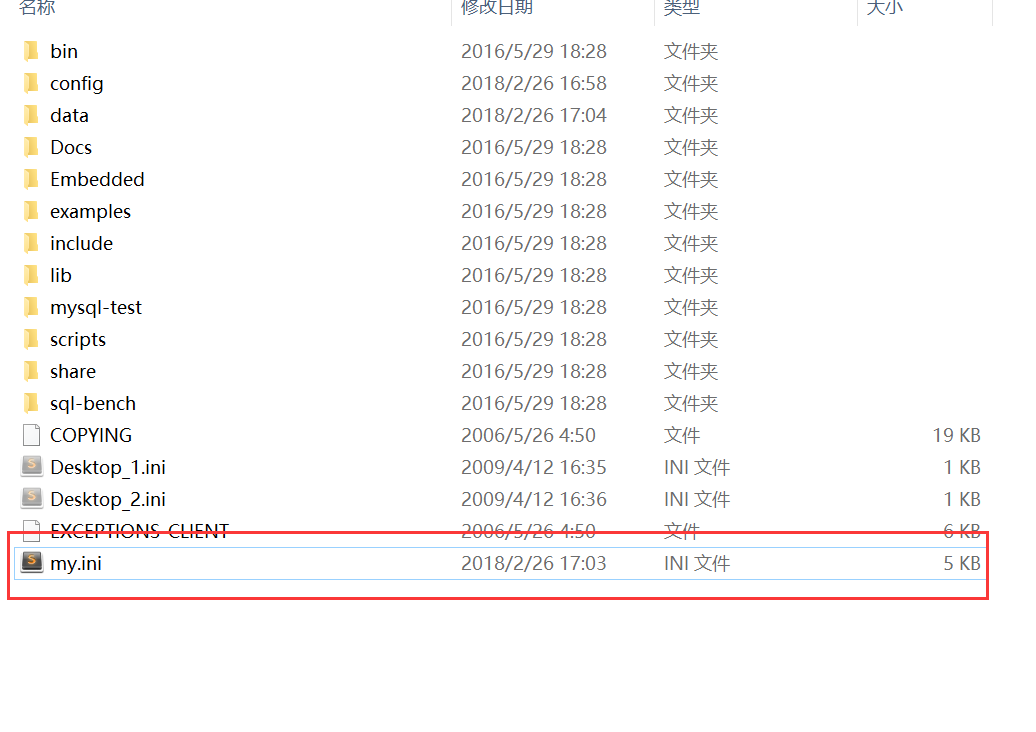
只需留下 my.ini文件,然后修改其编码配置。
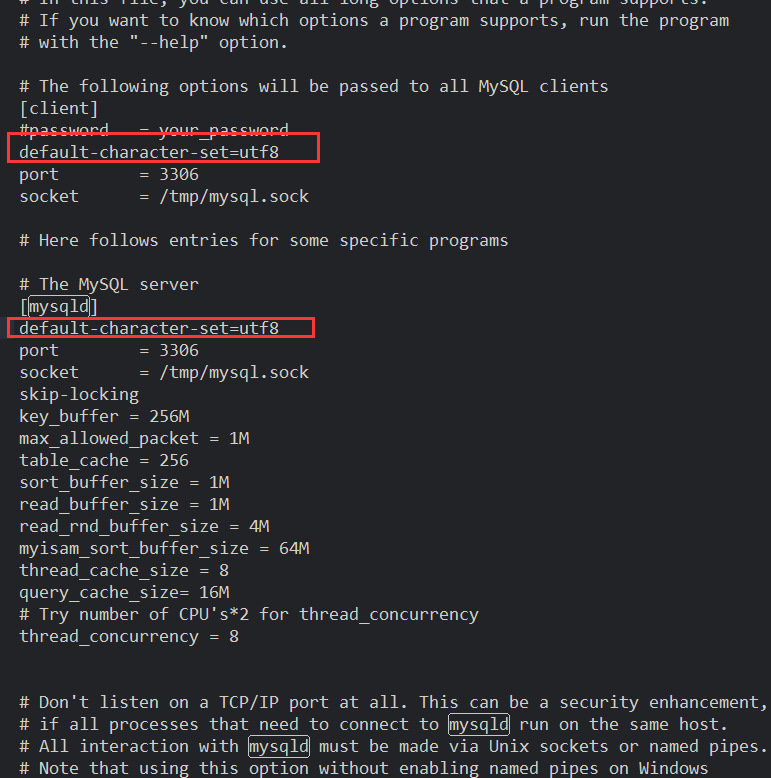
配置如下
# Example MySQL config file for large systems.

#

# This is for a large system with memory = 512M where the system runs mainly

# MySQL.

#

# You can copy this file to

# /etc/my.cnf to set global options,

# mysql-data-dir/my.cnf to set server-specific options (in this

# installation this directory is /usr/local/var) or

# ~/.my.cnf to set user-specific options.

#

# In this file, you can use all long options that a program supports.

# If you want to know which options a program supports, run the program

# with the "--help" option.

# The following options will be passed to all MySQL clients

[client]

#password	= your_password

default-character-set=utf8

port		= 3306

socket		= /tmp/mysql.sock

# Here follows entries for some specific programs

# The MySQL server

[mysqld]

default-character-set=utf8

port		= 3306

socket		= /tmp/mysql.sock

skip-locking

key_buffer = 256M

max_allowed_packet = 1M

table_cache = 256

sort_buffer_size = 1M

read_buffer_size = 1M

read_rnd_buffer_size = 4M

myisam_sort_buffer_size = 64M

thread_cache_size = 8

query_cache_size= 16M

# Try number of CPU's*2 for thread_concurrency

thread_concurrency = 8

# Don't listen on a TCP/IP port at all. This can be a security enhancement,

# if all processes that need to connect to mysqld run on the same host.

# All interaction with mysqld must be made via Unix sockets or named pipes.

# Note that using this option without enabling named pipes on Windows

# (via the "enable-named-pipe" option) will render mysqld useless!

#

#skip-networking

# Replication Master Server (default)

# binary logging is required for replication

log-bin=mysql-bin

# required unique id between 1 and 2^32 - 1

# defaults to 1 if master-host is not set

# but will not function as a master if omitted

server-id	= 1

# Replication Slave (comment out master section to use this)

#

# To configure this host as a replication slave, you can choose between

# two methods :

#

# 1) Use the CHANGE MASTER TO command (fully described in our manual) -

#    the syntax is:

#

#    CHANGE MASTER TO MASTER_HOST=<host>, MASTER_PORT=<port>,

#    MASTER_USER=<user>, MASTER_PASSWORD=<password> ;

#

#    where you replace <host>, <user>, <password> by quoted strings and

#    <port> by the master's port number (3306 by default).

#

#    Example:

#

#    CHANGE MASTER TO MASTER_HOST='125.564.12.1', MASTER_PORT=3306,

#    MASTER_USER='joe', MASTER_PASSWORD='secret';

#

# OR

#

# 2) Set the variables below. However, in case you choose this method, then

#    start replication for the first time (even unsuccessfully, for example

#    if you mistyped the password in master-password and the slave fails to

#    connect), the slave will create a master.info file, and any later

#    change in this file to the variables' values below will be ignored and

#    overridden by the content of the master.info file, unless you shutdown

#    the slave server, delete master.info and restart the slaver server.

#    For that reason, you may want to leave the lines below untouched

#    (commented) and instead use CHANGE MASTER TO (see above)

#

# required unique id between 2 and 2^32 - 1

# (and different from the master)

# defaults to 2 if master-host is set

# but will not function as a slave if omitted

#server-id       = 2

#

# The replication master for this slave - required

#master-host     =   <hostname>

#

# The username the slave will use for authentication when connecting

# to the master - required

#master-user     =   <username>

#

# The password the slave will authenticate with when connecting to

# the master - required

#master-password =   <password>

#

# The port the master is listening on.

# optional - defaults to 3306

#master-port     =  <port>

#

# binary logging - not required for slaves, but recommended

#log-bin=mysql-bin

# Point the following paths to different dedicated disks

#tmpdir		= /tmp/

#log-update 	= /path-to-dedicated-directory/hostname

# Uncomment the following if you are using BDB tables

#bdb_cache_size = 64M

#bdb_max_lock = 100000

# Uncomment the following if you are using InnoDB tables

#innodb_data_home_dir = /usr/local/var/

#innodb_data_file_path = ibdata1:10M:autoextend

#innodb_log_group_home_dir = /usr/local/var/

#innodb_log_arch_dir = /usr/local/var/

# You can set .._buffer_pool_size up to 50 - 80 %

# of RAM but beware of setting memory usage too high

#innodb_buffer_pool_size = 256M

#innodb_additional_mem_pool_size = 20M

# Set .._log_file_size to 25 % of buffer pool size

#innodb_log_file_size = 64M

#innodb_log_buffer_size = 8M

#innodb_flush_log_at_trx_commit = 1

#innodb_lock_wait_timeout = 50

[mysqldump]

quick

max_allowed_packet = 16M

[mysql]

no-auto-rehash

# Remove the next comment character if you are not familiar with SQL

#safe-updates

[isamchk]

key_buffer = 128M

sort_buffer_size = 128M

read_buffer = 2M

write_buffer = 2M

[myisamchk]

key_buffer = 128M

sort_buffer_size = 128M

read_buffer = 2M

write_buffer = 2M

[mysqlhotcopy]

interactive-timeout
修改后效果

MySQL 乱码问题解决的更多相关文章
- mac上mysql乱码问题解决
一.mysql出现乱码问题: 出现的问题是下图这样的乱码问题,我是使用java在做练习的时候发现出现字符集编码问题的: 当时是使用jdbc来添加的数据,我的jdbc包括web前端后端的编码都是设置的是 ...
- mysql乱码问题解决办法
最近开发一下小项目,遇到了最常见的乱码问题. 1.数据库使用utf-8 utf-8_generic_ci编码,使用csv上传并导入数据,插入数据的时候出现了问题,有很大部分数据没有被导入,所以使用m ...
- Mysql乱码问题解决历程
可能是因为看了太多网上的关于这个问题的解决办法,可能当时是我自己没有看明白也或许是情况不一样,反正都没有解决我当初遇到的问题,现在想想可能是自己当初太无知了,第二个原因是原来大多数情况下是在windo ...
- [转]mysql 乱码问题解决终结
http://www.th7.cn/db/mysql/2011-07-07/9217.shtml 查看 MYSQL的字符设置,在SQL查询界面输入 SHOW VARIABLES LIKE 'chara ...
- ubuntu mysql emma中文乱码问题解决
ubuntu mysql emma中文乱码问题解决 emma默认用apt-get 安装的话,emma是不支持中文的,配置文件或直接修改emma程序源文件(python). apt-get安装emma ...
- MySQL之乱码问题解决详解
今天在写一个项目的时候,在数据库中手动插入数据不会产生中文乱码,但是通过javaWeb却出现乱码,把提交表单和响应中的乱码问题解决后,还是乱码.所以我锁定一定是我的mysql数据库中出现了乱码的现象.
- linux下的mysql乱码问题
1,承接上一随笔,因为我用的是rmp的两种反式. rpm -ivh MySQL-server-4.0.14-0.i386.rpm rpm -ivh MySQL-client-4.0.14-0.i386 ...
- Linux中mysql乱码问题
注意: 关于utf8和gbk的区别详细见:linux中文乱码问题解决办法 http://www.linuxidc.com/Linux/2010-04/25757.htm ,下面的配置中根据自己要求选择 ...
- CentOS(Linux)中解决MySQL乱码
环境:CentOS 6.3.mysql5.1 Centos 6.3在上安装mysql client和server之后,出现乱码,不得不修改编码. 注意: 关于utf8和gbk的区别详细见:linux中 ...
随机推荐
- [原]将BITMAPINFO保存成bmp文件,以及渲染到设备
/* class Image { public: Image() = delete; Image(const uint32_t& _w, const uint32_t& _h) :w( ...
- 009-Spring Boot全局配置跨域请求支持
1.Spring Boot 2.0以前全局配置跨域主要是继承WebMvcConfigurerAdapter @Configuration public class CorsConfig extends ...
- SAP标准屏幕中字段描述增强
转自:https://www.cnblogs.com/sap-ronny/p/7921817.html如果想要改变标准屏幕中的字段名称,如把物料主数据基本数据元素的名字改为我们想要的名字 . 1.首先 ...
- 如何发布自己的APP到Google Play上
如何发布自己的APP到Google Play上 参考链接: https://justforuse.github.io/blog/zh-cn/2019/08/publish-your-own-app-t ...
- 给APK签名,修改签名
简介: 本来是不需要签名的,但是我有个android的专用设备,限制安装,但是售后给我通过了一个证书的验证. 那么我想装什么软件,就需要这个证书验证. 现在记录一下签名的主要过程,还有修改签名的方法. ...
- 容器版jenkins安装并且实现使用宿主机docker命令,采用的是docker outside deocker,带jdk、添加maven、git
docker版jekins使用宿主机docker命令 docker版jekins安装,实现CI/CD,也就是实现在容器里面使用宿主机docker命令,这样方式为:docker outside deoc ...
- docker ubuntu桌面
docker run -it --rm -p 8080:80 dorowu/ubuntu-desktop-lxde-vnc
- Appium移动自动化测试-----(一)Appium介绍
1.特点 appium 是一个自动化测试开源工具,支持 iOS 平台和 Android 平台上的原生应用,web应用和混合应用. “移动原生应用”是指那些用iOS或者 Android SDK 写的应用 ...
- FutureTask源码阅读
FutureTask功能用法 类结构 源码中详细说明了FutureTask生命周期状态及变化 /** * The run state of this task, initially NEW. The ...
- java当中请给出一个oracle的helloworld例子
[学习笔记] 2.oracle的helloworld例子: import java.sql.*;public class OracleHello{ public static void main ...