
vue文件夹上传插件选哪个好?
文件夹数据库处理逻辑
public class DbFolder
{
JSONObject root;
public DbFolder()
{
this.root = new JSONObject();
this.root.put("f_id", "");
this.root.put("f_nameLoc", "根目录");
this.root.put("f_pid", "");
this.root.put("f_pidRoot", "");
}
/**
* 将JSONArray转换成map
* @param folders
* @return
*/
public Map<String, JSONObject> toDic(JSONArray folders)
{
Map<String, JSONObject> dt = new HashMap<String, JSONObject>();
for(int i = 0 , l = folders.size();i<l;++i)
{
JSONObject o = folders.getJSONObject(i);
String id = o.getString("f_id");
dt.put(id, o);
}
return dt;
}
public Map<String, JSONObject> foldersToDic(String pidRoot)
{
//默认加载根目录
String sql = String.format("select f_id,f_nameLoc,f_pid,f_pidRoot from up6_folders where f_pidRoot='%s'", pidRoot);
SqlExec se = new SqlExec();
JSONArray folders = se.exec("up6_folders", sql, "f_id,f_nameLoc,f_pid,f_pidRoot","");
return this.toDic(folders);
}
public ArrayList<JSONObject> sortByPid( Map<String, JSONObject> dt, String idCur, ArrayList<JSONObject> psort) {
String cur = idCur;
while (true)
{
//key不存在
if (!dt.containsKey(cur)) break;
JSONObject d = dt.get(cur);//查父ID
psort.add(0, d);//将父节点排在前面
cur = d.getString("f_pid").trim();//取父级ID
if (cur.trim() == "0") break;
if ( StringUtils.isBlank(cur) ) break;
}
return psort;
}
public JSONArray build_path_by_id(JSONObject fdCur) {
String id = fdCur.getString("f_id").trim();//
String pidRoot = fdCur.getString("f_pidRoot").trim();//
//根目录
ArrayList<JSONObject> psort = new ArrayList<JSONObject>();
if (StringUtils.isBlank(id))
{
psort.add(0, this.root);
return JSONArray.fromObject(psort);
}
//构建目录映射表(id,folder)
Map<String, JSONObject> dt = this.foldersToDic(pidRoot);
//按层级顺序排列目录
psort = this.sortByPid(dt, id, psort);
SqlExec se = new SqlExec();
//是子目录->添加根目录
if (!StringUtils.isBlank(pidRoot))
{
JSONObject root = se.read("up6_files"
, "f_id,f_nameLoc,f_pid,f_pidRoot"
, new SqlParam[] { new SqlParam("f_id", pidRoot) });
psort.add(0, root);
}//是根目录->添加根目录
else if (!StringUtils.isBlank(id) && StringUtils.isBlank(pidRoot))
{
JSONObject root = se.read("up6_files"
, "f_id,f_nameLoc,f_pid,f_pidRoot"
, new SqlParam[] { new SqlParam("f_id", id) });
psort.add(0, root);
}
psort.add(0, this.root);
return JSONArray.fromObject(psort);
}
public FileInf read(String id) {
SqlExec se = new SqlExec();
String sql = String.format("select f_pid,f_pidRoot,f_pathSvr from up6_files where f_id='%s' union select f_pid,f_pidRoot,f_pathSvr from up6_folders where f_id='%s'", id,id);
JSONArray data = se.exec("up6_files", sql, "f_pid,f_pidRoot,f_pathSvr","");
JSONObject o = (JSONObject)data.get(0);
FileInf file = new FileInf();
file.id = id;
file.pid = o.getString("f_pid").trim();
file.pidRoot = o.getString("f_pidRoot").trim();
file.pathSvr = o.getString("f_pathSvr").trim();
return file;
}
public Boolean exist_same_file(String name,String pid)
{
SqlWhereMerge swm = new SqlWhereMerge();
swm.equal("f_nameLoc", name.trim());
swm.equal("f_pid", pid.trim());
swm.equal("f_deleted", 0);
String sql = String.format("select f_id from up6_files where %s ", swm.to_sql());
SqlExec se = new SqlExec();
JSONArray arr = se.exec("up6_files", sql, "f_id", "");
return arr.size() > 0;
}
/**
* 检查是否存在同名目录
* @param name
* @param pid
* @return
*/
public Boolean exist_same_folder(String name,String pid)
{
SqlWhereMerge swm = new SqlWhereMerge();
swm.equal("f_nameLoc", name.trim());
swm.equal("f_deleted", 0);
swm.equal("LTRIM (f_pid)", pid.trim());
String where = swm.to_sql();
String sql = String.format("(select f_id from up6_files where %s ) union (select f_id from up6_folders where %s)", where,where);
SqlExec se = new SqlExec();
JSONArray fid = se.exec("up6_files", sql, "f_id", "");
return fid.size() > 0;
}
public Boolean rename_file_check(String newName,String pid)
{
SqlExec se = new SqlExec();
JSONArray res = se.select("up6_files"
, "f_id"
,new SqlParam[] {
new SqlParam("f_nameLoc",newName)
,new SqlParam("f_pid",pid)
},"");
return res.size() > 0;
}
public Boolean rename_folder_check(String newName, String pid)
{
SqlExec se = new SqlExec();
JSONArray res = se.select("up6_folders"
, "f_id"
, new SqlParam[] {
new SqlParam("f_nameLoc",newName)
,new SqlParam("f_pid",pid)
},"");
return res.size() > 0;
}
public void rename_file(String name,String id) {
SqlExec se = new SqlExec();
se.update("up6_files"
, new SqlParam[] { new SqlParam("f_nameLoc", name) }
, new SqlParam[] { new SqlParam("f_id", id) });
}
public void rename_folder(String name, String id, String pid) {
SqlExec se = new SqlExec();
se.update("up6_folders"
, new SqlParam[] { new SqlParam("f_nameLoc", name) }
, new SqlParam[] { new SqlParam("f_id", id) });
}
}
1.在webuploader.js大概4880行代码左右,在动态生成的input组件的下面(也可以直接搜索input),增加webkitdirectory属性。
function FileUploader(fileLoc, mgr)
{
var _this = this;
this.id = fileLoc.id;
this.ui = { msg: null, process: null, percent: null, btn: { del: null, cancel: null,post:null,stop:null }, div: null};
this.isFolder = false; //不是文件夹
this.app = mgr.app;
this.Manager = mgr; //上传管理器指针
this.event = mgr.event;
this.Config = mgr.Config;
this.fields = jQuery.extend({}, mgr.Config.Fields, fileLoc.fields);//每一个对象自带一个fields幅本
this.State = this.Config.state.None;
this.uid = this.fields.uid;
this.fileSvr = {
pid: ""
, id: ""
, pidRoot: ""
, f_fdTask: false
, f_fdChild: false
, uid: 0
, nameLoc: ""
, nameSvr: ""
, pathLoc: ""
, pathSvr: ""
, pathRel: ""
, md5: ""
, lenLoc: "0"
, sizeLoc: ""
, FilePos: "0"
, lenSvr: "0"
, perSvr: "0%"
, complete: false
, deleted: false
};//json obj,服务器文件信息
this.fileSvr = jQuery.extend(this.fileSvr, fileLoc);
2.可以获取路径
this.open_files = function (json)
{
for (var i = 0, l = json.files.length; i < l; ++i)
{
this.addFileLoc(json.files[i]);
}
setTimeout(function () { _this.PostFirst(); },500);
};
this.open_folders = function (json)
{
for (var i = 0, l = json.folders.length; i < l; ++i) {
this.addFolderLoc(json.folders[i]);
}
setTimeout(function () { _this.PostFirst(); }, 500);
};
this.paste_files = function (json)
{
for (var i = 0, l = json.files.length; i < l; ++i)
{
this.addFileLoc(json.files[i]);
}
};
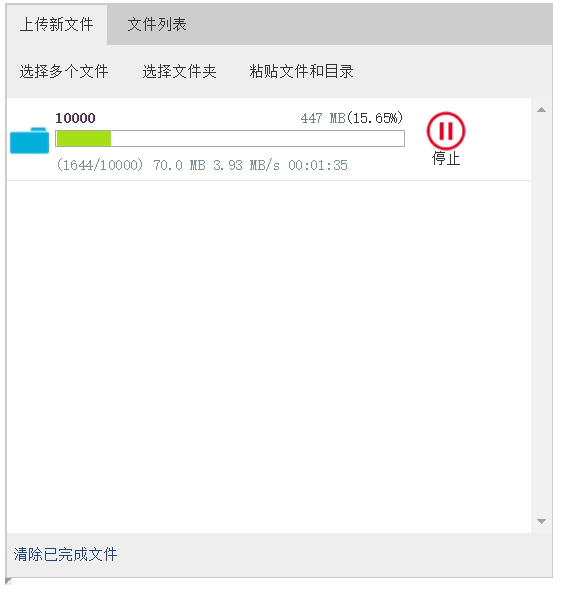
后端代码逻辑大部分是相同的,目前能够支持MySQL,Oracle,SQL。在使用前需要配置一下数据库,可以参考我写的这篇文章:http://blog.ncmem.com/wordpress/2019/08/07/java超大文件上传与下载/
vue文件夹上传插件选哪个好?的更多相关文章
- vue文件夹上传组件选哪个好?
一. 功能性需求与非功能性需求 要求操作便利,一次选择多个文件和文件夹进行上传:支持PC端全平台操作系统,Windows,Linux,Mac 支持文件和文件夹的批量下载,断点续传.刷新页面后继续传输. ...
- 文件夹上传插件webupload插件
在Web应用系统开发中,文件上传和下载功能是非常常用的功能,今天来讲一下JavaWeb中的文件上传和下载功能的实现. 先说下要求: PC端全平台支持,要求支持Windows,Mac,Linux 支持所 ...
- vue文件夹上传源码
一. 功能性需求与非功能性需求 要求操作便利,一次选择多个文件和文件夹进行上传:支持PC端全平台操作系统,Windows,Linux,Mac 支持文件和文件夹的批量下载,断点续传.刷新页面后继续传输. ...
- 文件夹上传控件webupload插件
我们平时经常做的是上传文件,上传文件夹与上传文件类似,但也有一些不同之处,这次做了上传文件夹就记录下以备后用. 这次项目的需求: 支持大文件的上传和续传,要求续传支持所有浏览器,包括ie6,ie7,i ...
- js文件夹上传
文件夹上传:从前端到后端 文件上传是 Web 开发肯定会碰到的问题,而文件夹上传则更加难缠.网上关于文件夹上传的资料多集中在前端,缺少对于后端的关注,然后讲某个后端框架文件上传的文章又不会涉及文件夹. ...
- WebUploader文件图片上传插件的使用
最近在项目中用到了百度的文件图片上传插件WebUploader.分享给大家 需要在http://fex.baidu.com/webuploader/download.html点击打开链接下载WebUp ...
- Web大文件(夹)上传(断点续传)控件发布-Xproer.HttpUploader6
版权所有 2009-2017荆门泽优软件有限公司 保留所有权利 官方网站:http://www.ncmem.com/ 产品首页:http://www.ncmem.com/webapp/up6.2/in ...
- Web大文件(夹)上传(断点续传)控件-Xproer.HttpUploader6
版权所有 2009-2017荆门泽优软件有限公司 保留所有权利 官方网站:http://www.ncmem.com/ 产品首页:http://www.ncmem.com/webapp/up6.2/in ...
- php文件夹上传下载控件分享
用过浏览器的开发人员都对大文件上传与下载比较困扰,之前遇到了一个php文件夹上传下载的问题,无奈之下自己开发了一套文件上传控件,在这里分享一下.希望能对你有所帮助. 以下是实例的部分脚本文件 这里我先 ...
随机推荐
- windows使用sqlpus连接oracle 数据库
1.先安装好Instant Client程序. 2.打开cmd 执行sqlplus命令,如果出现如下图 2.说明需要把oracle install 的bin目类 添加系统环境path中,如下图添加环境 ...
- springcloud超简单的入门3--负载均衡
上个文章的末尾说到,当有多个服务实例的时候,怎样来获取服务实例.但是,只是简单的通过get(0)来获取列表中的第一个实例来使用. 现实场景中,还需要写一个算法来实现负载均衡来决定每次使用的服务实例,而 ...
- MySQL忘记密码解决
1.设置管理员root密码为123 开启MySQL服务后 PS C:\WINDOWS\system32> mysqladmin -uroot -p password "123" ...
- c语言 c++程序运行过程
我们写好的 .c .cpp 文件在计算机中如何运行. 一个.c 文件 .cpp 文件 首先经过 预编译形成 . i 文件 在这个过程中 主要处理程序中的# 以及进行宏替换 然后编译 ...
- Map 集合遍历的4种方法
Map 集合初始化时,指定集合初始值大小. 说明:HashMap 使用 HashMap(int initialCapacity) 初始化. 正例:initialCapacity = (需要存储的元素个 ...
- C# DateTime Subtract
DateTime start = DateTime.Now.AddDays(-20); DateTime end = DateTime.Now; TimeSpan ts = end.Subtract( ...
- opencv-02--图像的邻域操作
图像的邻域操作 很多时候,我们对图像处理时,要考虑它的邻域,比如3*3是我们常用的,这在图像滤波.去噪中最为常见,下面我们介绍如果在一次图像遍历过程中进行邻域的运算. 下面我们进行一个简单的滤波操作, ...
- centos 随机启动脚本编写
先说下问题背景 目前手上开发的产品是springboot微服务的,我们用jenkins来做的部署,部署脚本如下: 1.build脚本 负责从git服务器拉脚本 2.微服务脚本: #!/bin/shap ...
- 两个重叠的div做前后翻转
当需要做一个翻转卡片式的div时候,需要两个div的大小等大例如: 画出两个等大的div后,将他们重叠 图中的两个div做了重叠,做重叠时候用的属性是 position: absolute; 并且需要 ...
- Trie 树(字典树)
[动画]看动画轻松理解「Trie树」 读音 Trie这个名字取自“retrieval”,检索,因为Trie可以只用一个前缀便可以在一部字典中找到想要的单词. 虽然发音与「Tree」一致,但为了将这种 ...