
iOS实现页面既显示WebView,WebView下显示TableView,动态计算WebView内容高度
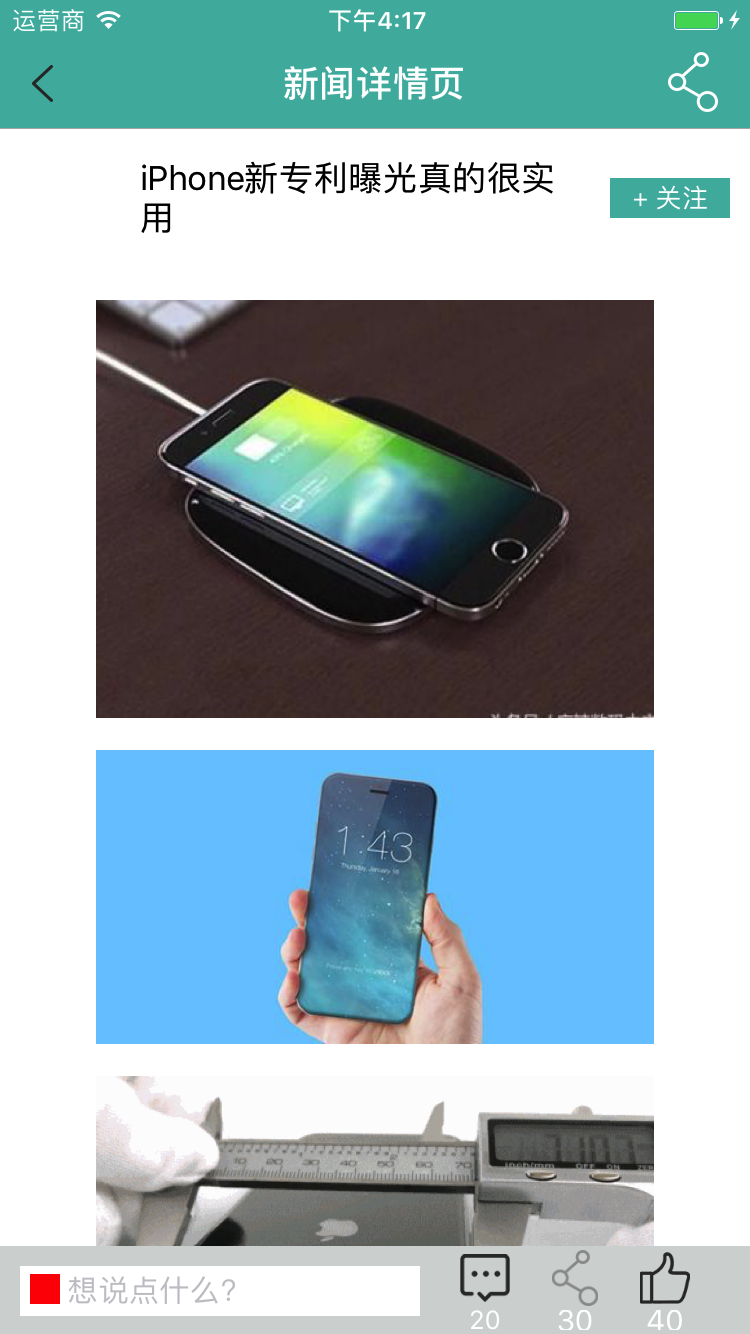
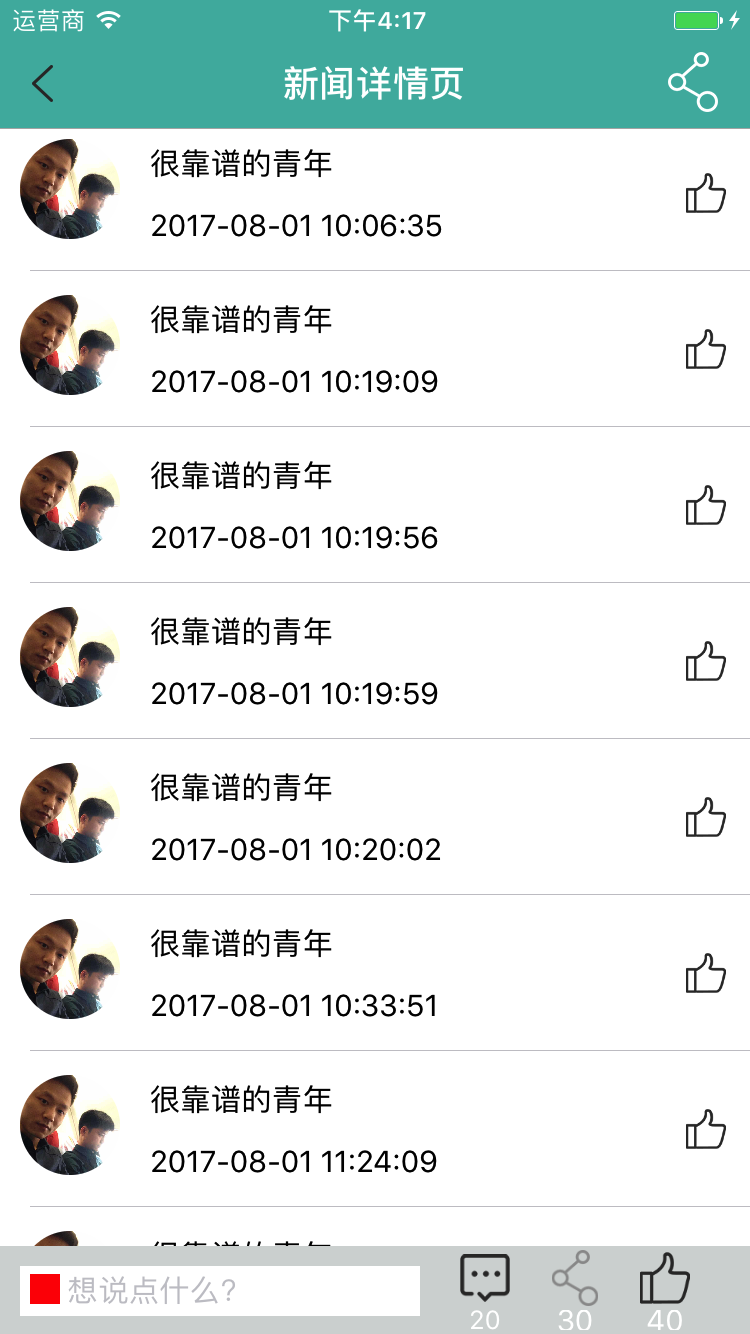
实现效果如下:
忽略底部的评论视图,太丑了,待完善......
实现思路:
1>页面布局采用TableView实现,顶部"关注"模块的View是TableView的tableHeaderView;
2>采用两个cell,webViewCell和CommentCell,indexPath.row == 0使用webViewCell,其余使用CommentCell;
3>在webViewCell的webView的代理方法中webViewDidFinishLoad计算webView内容的实际高度,block回调控制器刷新indexPath.row == 0的cell即可.
4>tableView代理返回cell直接返回cell里计算的cell.
代码实现如下:
WebViewCell:
#import <UIKit/UIKit.h>

typedef void (^ReloadBlock)();

@interface WebviewCell : UITableViewCell

@property(nonatomic, copy) NSString *htmlString;

@property(nonatomic, copy) ReloadBlock reloadBlock;

+(CGFloat)cellHeight;

@end
#import "WebviewCell.h"

@interface WebviewCell()<UIWebViewDelegate>

@property(nonatomic,strong)UIWebView *webview;

@end

static CGFloat staticheight = ;

@implementation WebviewCell

+(CGFloat)cellHeight

{

    return staticheight;

}

-(instancetype)initWithStyle:(UITableViewCellStyle)style reuseIdentifier:(NSString *)reuseIdentifier

{

    if (self = [super initWithStyle: style reuseIdentifier:reuseIdentifier]) {

//        self.webview.scrollView.backgroundColor =[UIColor redColor];

        [self.contentView addSubview:self.webview];

    }

    return self;

}

-(void)setHtmlString:(NSString *)htmlString

{

    _htmlString = htmlString;

    self.webview.delegate = self;

    // 否则导致网页下方留出了多余的空白

    // 手动改变图片适配问题,拼接html代码后,再加载html代码

    NSString *myStr = [NSString stringWithFormat:@"<head><style>img{max-    width:%f !important;}</style></head>", [UIScreen mainScreen].bounds.size.width - ];

    NSString *str = [NSString stringWithFormat:@"%@%@",myStr, htmlString];

    [self.webview loadHTMLString:str baseURL:nil];

}

-(void)webViewDidFinishLoad:(UIWebView *)webView

{

    CGFloat height = [[webView stringByEvaluatingJavaScriptFromString:@"document.body.offsetHeight"] floatValue]+ ;

    self.webview.frame = CGRectMake(, , K_SCREEN_WIDTH, height);

    self.webview.hidden = NO;

    if (staticheight != height+) {

        staticheight = height+;

        if (staticheight > ) {

            if (_reloadBlock) {

                _reloadBlock();

            }

        }

    }

}

-(UIWebView *)webview {

    if (!_webview) {

        _webview =[[UIWebView alloc]initWithFrame:CGRectMake(, , K_SCREEN_WIDTH, )];

        _webview.userInteractionEnabled = NO;

        _webview.hidden = YES;

    }

    return _webview;

}

@end
评论cell和tableHeaderView这里就不贴代码了,很简单的....
控制器代码: 这里都贴上了...自己找重点哟!!!
#import "NewDetailViewController.h"

#import "NewDetailHeaderView.h"

#import "CommentBottomView.h"

#import "HTTPTool.h"

#import "HDNewsDetailModel.h"

#import "News.h"

#import "UIColor+HexColor.h"

#import "NewDetailCommentModel.h"

#import "WebviewCell.h"

#import "DetailCommentCell.h"

@interface NewDetailViewController ()<UITableViewDelegate, UITableViewDataSource, UIWebViewDelegate>

@property (nonatomic, strong) UIWebView *webView;

@property (nonatomic, strong) NewDetailHeaderView *headerView;

@property (nonatomic, strong) CommentBottomView *bottomView;

@property (nonatomic, assign) CGFloat keyBoardHeight;

@property (nonatomic, assign) CGFloat currentTextViewHeight;

@property (nonatomic,strong) NSMutableArray *array;

@property (nonatomic, strong) NSArray *commentArray; // 评论model数组

@property (nonatomic, strong) UITableView *commnetTableView;

@property (nonatomic, strong) HDNewsDetailModel *detailModel;

@end

@implementation NewDetailViewController

- (void)viewDidLoad {

    [super viewDidLoad];

    self.navigationItem.title = @"新闻详情页";

    self.navigationController.navigationBar.titleTextAttributes = @{NSForegroundColorAttributeName: [UIColor whiteColor], NSFontAttributeName : [UIFont boldSystemFontOfSize:]};

    self.navigationController.navigationBar.barTintColor = [UIColor colorWithHex:@"#4bb6ac"];

    self.automaticallyAdjustsScrollViewInsets = NO;

    self.navigationController.navigationBar.translucent = NO;

    self.currentTextViewHeight = ;

    [self addNotification];

    [self setupHeaderView];

    [self setupBottomView];

    [self setupUI];

    [self addNavShareItem];

    [self requestData];

    [self requestCommentData];

}

- (void)addNavShareItem {

    self.navigationItem.rightBarButtonItem = [[UIBarButtonItem alloc]initWithImage:[UIImage imageNamed:@"1x_fenxiang"] style:UIBarButtonItemStylePlain target:self action:@selector(shareAction:)];

    self.navigationItem.rightBarButtonItem.tintColor = [UIColor whiteColor];

}

#pragma mark - 键盘通知

- (void)addNotification {

    // 监听键盘的弹出

    [[NSNotificationCenter defaultCenter] addObserver:self selector:@selector(keyboardWillShow:) name:UIKeyboardWillShowNotification object:nil];

    [[NSNotificationCenter defaultCenter] addObserver:self selector:@selector(keyboardWillHide:) name:UIKeyboardWillHideNotification object:nil];

    [[NSNotificationCenter defaultCenter] addObserver:self selector:@selector(changeHeight:) name:@"changeHeight" object:nil];

}

- (void)keyboardWillShow:(NSNotification *) notification {

    float animationDuration = [[[notification userInfo] valueForKey:UIKeyboardAnimationDurationUserInfoKey] floatValue];

    CGFloat height = [[[notification userInfo]objectForKey:UIKeyboardFrameBeginUserInfoKey] CGRectValue].size.height;

    self.keyBoardHeight = height;

    // 没有弹出键盘 使用这种动画比较顺畅一点

    [UIView animateWithDuration:animationDuration animations:^{

        CGRect bottomBarFrame = self.bottomView.frame;

        bottomBarFrame.origin.y = [UIScreen mainScreen].bounds.size.height - height - self.currentTextViewHeight - ;

        //    CGRect rc = [self.view convertRect: self.bottomView.frame toView:self.view];

        [self.bottomView setFrame:bottomBarFrame];

        // 这里注意: 需要把底部view移动到最前面显示

        [self.view bringSubviewToFront:self.bottomView];

    }];

}

- (void)keyboardWillHide:(NSNotification *) notification {

    float animationDuration = [[[notification userInfo] valueForKey:UIKeyboardAnimationDurationUserInfoKey] floatValue];

    CGFloat height = [[[notification userInfo]objectForKey:UIKeyboardFrameEndUserInfoKey] CGRectValue].size.height;

    self.keyBoardHeight = height;

    [UIView animateWithDuration:animationDuration animations:^{

        CGRect bottomBarFrame = self.bottomView.frame;

        bottomBarFrame.origin.y = self.view.bounds.size.height - self.currentTextViewHeight;

        [self.bottomView setFrame:bottomBarFrame];

    }];

}

- (void)changeHeight: (NSNotification *)notifi {

    CGFloat height = [notifi.userInfo[@"height"] floatValue];

    if (height > ) {

        self.currentTextViewHeight = height;

    }

    NSLog(@"height --- %f",height);

    [UIView animateWithDuration:0.2 animations:^{

        CGRect bottomBarFrame = self.bottomView.frame;

        bottomBarFrame.origin.y = self.view.bounds.size.height - height - self.keyBoardHeight;

        bottomBarFrame.size.height = height + ;

        [self.bottomView setFrame:bottomBarFrame];

    }];

}

#pragma mark - 设置界面

- (void)setupUI {

    [self.view addSubview:self.commnetTableView];

    self.commnetTableView.frame = CGRectMake(, , K_SCREEN_WIDTH, K_SCREEN_HEIGHT -  - );

}

- (void)setupHeaderView {

    self.headerView = [[NewDetailHeaderView alloc]initWithFrame:CGRectMake(, , [UIScreen mainScreen].bounds.size.width, )];

    self.headerView.focusButtonBlock = ^(BOOL flag) {

        NSLog(@"flag -- %d",flag);

    };

    [self.commnetTableView setTableHeaderView:self.headerView];

}

- (void)setupBottomView {

    self.bottomView = [[CommentBottomView alloc]initWithFrame:CGRectMake(, [UIScreen mainScreen].bounds.size.height -  - , [UIScreen mainScreen].bounds.size.width, )];

    [self.view addSubview:self.bottomView];

}

#pragma mark - 数据请求

- (void)requestData {

    NSString *url = [NSString stringWithFormat:@"http://huidu.zhonghuilv.net/Index/newslist?newsid=%@",@(self.model.id)];

   [HTTPTool postWithURL:url headers:nil params:nil success:^(id json) {

       NSLog(@"json = %@",json);

       self.detailModel = [[HDNewsDetailModel alloc]init];

       [self.detailModel setValuesForKeysWithDictionary:json];

//       self.headerView.model = self.detailModel;

       [self.headerView configureHeaderAvaterWithImage:json[@"thumb"] title:json[@"title"]];

   } failure:^(NSError *error) {

       [CombancHUD showInfoWithStatus:@"加载失败"];

   }];

}

- (NSInteger)tableView:(UITableView *)tableView numberOfRowsInSection:(NSInteger)section {

    return self.commentArray.count + ;

}

- (UITableViewCell *)tableView:(UITableView *)tableView cellForRowAtIndexPath:(NSIndexPath *)indexPath {

    if (indexPath.row == ) {

        WebviewCell *cell = [tableView dequeueReusableCellWithIdentifier:@"WebviewCell" forIndexPath:indexPath];

        cell.htmlString = self.detailModel.content;

        __weak NewDetailViewController *weakSelf = self;

        cell.reloadBlock =^()

        {   // 刷新webViewCell

            [weakSelf.commnetTableView reloadRowsAtIndexPaths:@[indexPath] withRowAnimation:UITableViewRowAnimationNone];

        };

        return cell;

    }

    DetailCommentCell *cell = [tableView dequeueReusableCellWithIdentifier:@"CommentCell" forIndexPath:indexPath];

    cell.model = self.commentArray[indexPath.row - ];

    return cell;

}

- (CGFloat)tableView:(UITableView *)tableView heightForRowAtIndexPath:(NSIndexPath *)indexPath {

    if (indexPath.row == ) {

        NSLog(@"cellHeight---%f",[WebviewCell cellHeight]);

        return [WebviewCell cellHeight];

    } else {

        return ;

    }

}

- (CGFloat)tableView:(UITableView *)tableView heightForFooterInSection:(NSInteger)section {

    return 0.001f;

}

- (CGFloat)tableView:(UITableView *)tableView heightForHeaderInSection:(NSInteger)section {

    return 0.001f;

}

- (void)requestCommentData {

    // index/Articlepl

    NSString *url = [NSString stringWithFormat:@"http://huidu.zhonghuilv.net/index/Articlepl?newsid=%@",@(self.model.id)];

    [HTTPTool postWithURL:url headers:nil params:nil success:^(id json) {

        NSLog(@"json = %@",json);

        self.commentArray = [NewDetailCommentModel mj_objectArrayWithKeyValuesArray:json];

        [self.commnetTableView reloadData];

    } failure:^(NSError *error) {

        [CombancHUD showInfoWithStatus:@"加载失败"];

    }];

}

#pragma mark - Private Method

- (void)shareAction: (UIBarButtonItem *)item {

    NSLog(@"分享");

}

- (UITableView *)commnetTableView {

    if (!_commnetTableView) {

        _commnetTableView = [[UITableView alloc]initWithFrame:CGRectZero style:UITableViewStylePlain];

        _commnetTableView.delegate = self;

        _commnetTableView.dataSource = self;

        [_commnetTableView registerNib:[UINib nibWithNibName:@"DetailCommentCell" bundle:nil] forCellReuseIdentifier:@"CommentCell"];

        [_commnetTableView registerClass:[WebviewCell class] forCellReuseIdentifier:@"WebviewCell"];

        _commnetTableView.tableHeaderView = [UIView new];

        _commnetTableView.tableFooterView = [UIView new];

    }

    return _commnetTableView;

}

@end
iOS实现页面既显示WebView,WebView下显示TableView,动态计算WebView内容高度的更多相关文章
- iOS View自定义窍门——UIButton实现上显示图片,下显示文字
“UIButton实现上显示图片,下显示文字”这个需求相信大家在开发中都或多或少会遇见.比如自定义分享View的时候.当然,也可以封装一个item,上边imageView,下边一个label.但是既然 ...
- iOS 动态计算文本内容的高度
关于ios 下动态计算文本内容的高度,经过查阅和网上搜素,现在看到的有以下几种方法: 1. // 获取字符串的大小 ios6 - (CGSize)getStringRect_:(NSString* ...
- nodejs之获取客户端真实的ip地址+动态页面中引用静态路径下的文件及图片等内容
1.nodejs获取客户端真实的IP地址: 在一般的管理网站中,尝尝会需要将用户的一些操作记录下来,并记住是哪个用户进行操作的,这时需要用户的ip地址,但是往往当这些应用部署在服务器上后,都使用了ng ...
- iOS开发总结-UITableView 自定义cell和动态计算cell的高度
UITableView cell自定义头文件:shopCell.h#import <UIKit/UIKit.h>@interface shopCell : UITableViewCell@ ...
- iOS学习之根据文本内容动态计算文本框高度的步骤
在视图加载的过程中,是先计算出frame,再根据frame加载视图的,所以在设计计算高度的方法的时候,设计成加号方法; //首先给外界提供计算cell高度的方法 + (CGFloat)heightFo ...
- iOS问题处理:如何在Mac下显示Finder中的所有文件
摘自:http://www.cnblogs.com/elfsundae/archive/2010/11/30/1892544.html 在Unix下工作,你可能需要处理一些“特殊“文件或文件夹,例如/ ...
- Ionic+AngularJS 开发的页面在微信公众号下显示不出来原因查究
ionic 页面 微信浏览器遇到的坑 公司的微信公众号一部分页面是用AngularJS+Ioinc开发,发现在本地浏览器测试的时候都没问题,传到服务器在微信公众号下跑就出问题来,经查是: index- ...
- iOS之动态计算文字的高度
+ (CGSize)boundingALLRectWithSize:(NSString *)txt Font:(UIFont *)font Size:(CGSize)size { NSMutableA ...
- iOS中动态计算不同颜色、字体的文字高度
在改项目bug的时候,有一个问题动态计算label的高度,前开发者竟然用字符串长度除以14.16这样的常量来计算是否换行,结果cell的高度问题非常严重. 因为label内容里有部分关键字是要另一种颜 ...
随机推荐
- (转)再过半小时,你就能明白kafka的工作原理了
为什么需要消息队列 周末无聊刷着手机,某宝网APP突然蹦出来一条消息“为了回馈老客户,女朋友买一送一,活动仅限今天!”.买一送一还有这种好事,那我可不能错过!忍不住立马点了去.于是选了两个最新款,下单 ...
- 01windows7下安装rabbitmq
1.直接双击rabbitmq-server-3.6.10.exe,会提示你缺少Erlang安装包,问你是否下载,点击是就可以了,因为我自己下载,我就直接先安装otp_win64_20.0.exe,直 ...
- P5074 Eat the Trees
思路 同样是插头DP,但是这题因为可以形成多个回路,所以左右括号是没有区别的,只需要01就可以表示了 注意if的嵌套关系 注意全零矩阵也要输出1 代码 #include <cstdio> ...
- win10 LTSC 2019 激活
win 10 打开终端 1.slmgr -ipk M7XTQ-FN8P6-TTKYV-9D4CC-J462D 2.slmgr -skms kms.03k.org 3.slmgr -ato 4. slm ...
- 一文学会redis从零到入门
本文参照视屏学习整理:https://www.bilibili.com/video/av16841549/?p=9 相关软件.资料: 基本条件:有虚拟机或相关linux系统,熟悉基本linux操作 本 ...
- PHP多维数组去重
自己写了一个实现多维数组去重的方法, 只是实现了功能, 至于性能没多管~ 可以保留key, 这个方法是针对最终的一维数组元素去重, 如果是多维数组的两个子元素是相同的数组, 是不能去重的 prote ...
- java读取 xml文件
java读取xml文件的四种方法 转自https://www.cnblogs.com/lingyao/p/5708929.html Xml代码 1 <?xml version="1. ...
- (二)一个MFC程序,消息映射,纯代码
1.应用程序类 CWinApp https://docs.microsoft.com/zh-cn/cpp/mfc/reference/cwinapp-class?f1url=https%3A%2F%2 ...
- luogu P2585 [ZJOI2006]三色二叉树
P2585 [ZJOI2006]三色二叉树 题目描述 输入输出格式 输入格式: 输入文件名:TRO.IN 输入文件仅有一行,不超过10000个字符,表示一个二叉树序列. 输出格式: 输出文件名:TRO ...
- 数据结构实验之链表二:逆序建立链表(SDUT 2117)
题目链接 #include <bits/stdc++.h> using namespace std; struct node { int data; struct node *next; ...