
tornado框架学习
tornado是一个非阻塞的web服务器框架,每秒可以处理上千个客户端连接(都是在一个线程中,不需要为每个客户端创建线程,资源消耗少),适合用来开发web长连接应用,如long polling(轮询),WebSocket协议等(http协议为短连接)。
1,简单使用
#coding:utf-8

import tornado.ioloop

import tornado.web

from controllers.login import LoginHandler

class HomeHandler(tornado.web.RequestHandler):   #处理'/index'的请求,若是get请求,即调用get方法

    def get(self, *args, **kwargs):

        self.write('home page')

settings = {

    'template_path':'views'   #配置html文件的目录,即html文件存储在views文件夹路径下
  'static_path':'statics', # 配置静态url路径,用来存放css,js文件等

}

app = tornado.web.Application([

    (r'/index',HomeHandler),   # 路由分发器,HomeHandler为该路由的处理类

    (r'/login',LoginHandler),

],**settings)  #加入配置文件

if __name__ == '__main__':

    app.listen(8080)        #监听端口号

    tornado.ioloop.IOLoop.instance().start()  #开启服务器
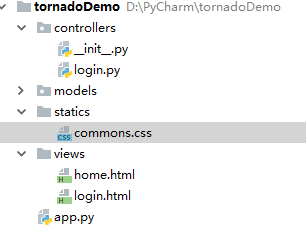
上面代码即建立起一个web服务器,在浏览器输入127.0.0.1:8080/index, 就会得到包含‘home page’字符的网页。另外,上面将所有代码写在了有个代码文件中,也可以利用MVC的设计方式分开来写,如下面的的架构和代码:将处理‘/login’请求的类LoginHandler放在controllers文件夹下,将视图文件login.html放在views文件夹下(需要配置‘template_path’),而models文件夹下可以存放和数据库处理相关的代码,statics中存放静态文件,如css,js等,需要配置路径:'static_path':'statics'。
#coding:utf-8

import tornado.ioloop

import tornado.web

from controllers.login import LoginHandler

class HomeHandler(tornado.web.RequestHandler):   #处理'/index'的请求,若是get请求,即调用get方法

    def get(self, *args, **kwargs):

        self.write('home page')

settings = {

    'template_path':'views'   #配置html文件的目录,即html文件存储在views文件夹路径下

}

app = tornado.web.Application([

    (r'/index',HomeHandler),   # 路由分发器,HomeHandler为该路由的处理类

    (r'/login',LoginHandler),

],**settings)  #加入配置文件

if __name__ == '__main__':

    app.listen(8080)        #监听端口号

    tornado.ioloop.IOLoop.instance().start()  #开启服务器
app.py
#coding:utf-8

import tornado

class LoginHandler(tornado.web.RequestHandler):

    def get(self):

        self.render('login.html')
login.py
2.模板
tornado也支持和django类似的模板引擎语言,表达语句用{{ item[0] }},控制语句{% if %}。。。。 {% end %},tornado支持if,while,for,try等,但都是以{% end %}结束,不同于django。tornado也支持模板继承,{% extends 'index.html' %} 和 {% block body%}。。。。{% end %}(也是以{% end %}结尾)。
http://www.tornadoweb.org/en/stable/template.html
https://github.com/tornadoweb/tornado/blob/master/tornado/template.py
Tornado默认提供的这些功能其实本质上就是 UIMethod 和 UIModule,我们也可以自定义从而实现类似于Django的simple_tag的功能:
定义:
#coding:utf-8

from tornado import escape

def mytag(request,value):  #默认会传递一个参数(HomeHandler object),前端需要传值时需要再加一个参数value

    #print request

    return '<h3>我是tag%s</h3>'%value     # 前端默认会对和h3进行转义,需要不转义时前端使用raw 关键字
uimethods.py
#coding:utf-8

from tornado import escape

from tornado.web import UIModule

class CustomUIModule(UIModule):

    def embedded_javascript(self):   # render执行时,会在html文件中加入javascript

        return "console.log(123);"

    def javascript_files(self):  ## render执行时,会在html文件中引入javascript文件

        return 'commons.js'

    def embedded_css(self):

        return '.but{color:red}'

    def css_files(self):

        return 'commons.css'

    def render(self, value):

        v = '<h3>我是一个UIModule tag%s</h3>'%value  #默认不转义</h3>,前端显示我是一个UIModule tag3

        #v = escape.xhtml_escape(v)                 #  转义</h3>,前端显示<h3>我是一个UIModule tag3</h3>

        return v
uimodules.py
设置:
#coding:utf-8

import tornado.ioloop

import tornado.web

from controllers.login import LoginHandler

import uimethods

import uimodules

class HomeHandler(tornado.web.RequestHandler):   #处理'/index'的请求,若是get请求,即调用get方法

    def get(self, *args, **kwargs):

        #self.write('home page')

        self.render('home.html')

settings = {

    'template_path':'views', #配置html文件的目录,即html文件存储在views文件夹路径下

    'static_path':'statics',  # 配置静态url路径,用来存放css,js文件等

    'ui_methods':uimethods,

    'ui_modules':uimodules,

}

app = tornado.web.Application([

    (r'/index',HomeHandler),   # 路由分发器,HomeHandler为该路由的处理类

    (r'/login',LoginHandler),

],**settings)  #加入配置文件

if __name__ == '__main__':

    app.listen(8080)        #监听端口号

    tornado.ioloop.IOLoop.instance().start()  #开启服务器
app.py
使用
<!DOCTYPE html>

<html lang="zh-CN">

<head>

    <meta charset="UTF-8">

    <meta http-equiv="X-UA-Compatible" content="IE=edge">

    <meta name="viewport" content="width=device-width, initial-scale=1">

    <title>主页</title>

</head>

<body>

{{ mytag(1)}}

{% raw mytag(2) %}

{% module CustomUIModule(3) %}

<p class="but">验证css代码</p>

<p class="but2">验证css文件</p>

</body>

</html>
home.html
网页效果:
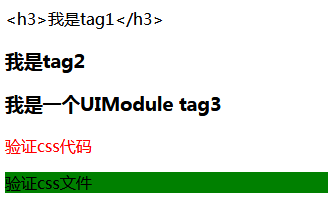
注意的是在UIModule中可以向html文件中加入css,js代码及文件。
3,静态文件设置
app配置
settings = {

    'static_path':'statics',  # 配置静态url路径,用来存放css,js文件等

    'static_url_prefix':'/statics/',  #href中的起始路径

}
html
<link rel="stylesheet" href="/statics/commons.css"> #statics目录下的commons.css
4. 跨站请求伪造(cross site request forgery)
https://www.tornadoweb.org/en/stable/guide/security.html?highlight=ajax
app设置
settings = {

    "xsrf_cookies": True,

}
表单使用
<form action="/new_message" method="post">

  {% module xsrf_form_html() %}

  <input type="text" name="message"/>

  <input type="submit" value="Post"/>

</form>
ajax使用:
本质上去cookie中获取_xsrf,再携带_xsrf值提交数据(document.cookie:_xsrf=2|160fb996|ce7f56d73e0cbe6c89a74cb0f92db4b2|1541324310)
function getCookie(name) {

    var r = document.cookie.match("\\b" + name + "=([^;]*)\\b");

    return r ? r[1] : undefined;

}

jQuery.postJSON = function(url, args, callback) {

    args._xsrf = getCookie("_xsrf");

    $.ajax({url: url, data: $.param(args), dataType: "text", type: "POST",

        success: function(response) {

        callback(eval("(" + response + ")"));

    }});

};
function getCookie(name) {

        var r = document.cookie.match("\\b" + name + "=([^;]*)\\b");

        return r ? r[1] : undefined;

    }

    $('#send').click(function () {

        var _xsrf = getCookie('_xsrf')

        var msg = $('#msg').val();

        $.ajax({

            url:'/login',

            data:{

                '_xsrf':_xsrf,

                'msg':msg,

            },

            type:"POST",

            success:function (callback) {

                console.log(callback);

            }

        });

    });
5,ajax上传文件
不用ajax前端
<!DOCTYPE html>

<html lang="zh-CN">

<head>

    <meta charset="UTF-8">

    <meta http-equiv="X-UA-Compatible" content="IE=edge">

    <meta name="viewport" content="width=device-width, initial-scale=1">

    <title>Title</title>

</head>

<body>

    <div>

        <input type="file" id="img"/>

        <button onclick="upload();">上传</button>

    </div>

</body>

<script src="/statics/jquery-3.3.1.min.js"></script>

<script>

    function upload() {

        var file = document.getElementById('img').files[0];

        var form = new FormData();

        //form.append('k1','v1');

        form.append('fileobj',file);

        var request = new XMLHttpRequest();

        request.open('post','/index',true);

        request.send(form);

    }

</script>

</html>
ajax前端
<!DOCTYPE html>

<html lang="zh-CN">

<head>

    <meta charset="UTF-8">

    <meta http-equiv="X-UA-Compatible" content="IE=edge">

    <meta name="viewport" content="width=device-width, initial-scale=1">

    <title>Title</title>

</head>

<body>

    <div>

        <input type="file" id="img"/>

        <button onclick="upload();">上传</button>

    </div>

</body>

<script src="/statics/jquery-3.3.1.min.js"></script>

<script>

    function upload() {

        var file = document.getElementById('img').files[0];

        var form = new FormData();

        //form.append('k1','v1');

        form.append('fileobj',file);

        //var request = new XMLHttpRequest();

        //request.open('post','/index',true);

        //request.send(form);

        $.ajax({

            url:'/index',

            type:'POST',

            data:form,

            processData:false,  //让jquery不处理数据

            contentType:false,    // 让jquery不设置contentType

            success:function (callback) {

                console.log(callback);

            }

        });

    }

</script>

</html>
后端
#coding:utf-8

import tornado.web

class HomeHandler(tornado.web.RequestHandler):

    def get(self):

        self.render('LoadFile.html')

    def post(self):

        fileobjs = self.request.files['fileobj']  #fileobjs为一个列表

        for file in fileobjs:

            file_name = file['filename']  #fileobjs[0]['filename']

            print type(file_name)

            with open(file_name,'wb') as f:

                f.write(file['body'])

settings={

    'template_path':'views',

    'static_path':'statics',

    'static_url_prefix':'/statics/',

}

application = tornado.web.Application([

    (r'/index', HomeHandler)

],**settings)

if __name__ == '__main__':

    application.listen(8888)

    tornado.ioloop.IOLoop.instance().start()
6,cookie
获取和设置cookie(不加密):
get_cookie(self, name, default=None): 未取到时返回默认值
def set_cookie(self, name, value, domain=None, expires=None, path="/",expires_days=None, **kwargs):
class HomeHandler(tornado.web.RequestHandler):   #处理'/index'的请求,若是get请求,即调用get方法

    def get(self, *args, **kwargs):

        #self.write('home page')

        if self.get_cookie(name='id'):

            print self.get_cookie(name='id')

        else:

            self.set_cookie(name='id',value='asdfg')

        self.render('home.html')
获取和设置cookie(加密):需要在配置中设置秘钥:'cookie_secret'
get_secure_cookie(self, name, value=None, max_age_days=31, min_version=None): 对于加密后的cookie,get_secure_cookie拿到的为解密后的cookie值,get_cookie拿到的为加密的值
set_secure_cookie(self, name, value, expires_days=30, version=None, **kwargs):
class HomeHandler(tornado.web.RequestHandler):   #处理'/index'的请求,若是get请求,即调用get方法

    def get(self, *args, **kwargs):

        if self.get_secure_cookie(name='secret_id'):

            print self.get_secure_cookie(name='secret_id')  ##前端显示的为加密后,拿到的为明文

        else:

            self.set_secure_cookie(name='secret_id',value='message')

        self.render('home.html')

settings = {

    'template_path':'views', #配置html文件的目录,即html文件存储在views文件夹路径下

    'static_path':'statics',  # 配置静态url路径,用来存放css,js文件等

    'static_url_prefix':'/statics/',

    'ui_methods':uimethods,

    'ui_modules':uimodules,

    'xsrf_cookies':True,

    'cookie_secret':'asdfghhj',

}
cookie两个版本的加密算法:
def _create_signature_v1(secret, *parts):

    hash = hmac.new(utf8(secret), digestmod=hashlib.sha1)

    for part in parts:

        hash.update(utf8(part))

    return utf8(hash.hexdigest())

def _create_signature_v2(secret, s):

    hash = hmac.new(utf8(secret), digestmod=hashlib.sha256)

    hash.update(utf8(s))

    return utf8(hash.hexdigest())
#加密

def create_signed_value(secret, name, value, version=None, clock=None,

                        key_version=None):

    if version is None:

        version = DEFAULT_SIGNED_VALUE_VERSION

    if clock is None:

        clock = time.time

    timestamp = utf8(str(int(clock())))

    value = base64.b64encode(utf8(value))

    if version == 1:

        signature = _create_signature_v1(secret, name, value, timestamp)

        value = b"|".join([value, timestamp, signature])

        return value

    elif version == 2:

        # The v2 format consists of a version number and a series of

        # length-prefixed fields "%d:%s", the last of which is a

        # signature, all separated by pipes.  All numbers are in

        # decimal format with no leading zeros.  The signature is an

        # HMAC-SHA256 of the whole string up to that point, including

        # the final pipe.

        #

        # The fields are:

        # - format version (i.e. 2; no length prefix)

        # - key version (integer, default is 0)

        # - timestamp (integer seconds since epoch)

        # - name (not encoded; assumed to be ~alphanumeric)

        # - value (base64-encoded)

        # - signature (hex-encoded; no length prefix)

        def format_field(s):

            return utf8("%d:" % len(s)) + utf8(s)

        to_sign = b"|".join([

            b"",

            format_field(str(key_version or 0)),

            format_field(timestamp),

            format_field(name),

            format_field(value),

            b''])

        if isinstance(secret, dict):

            assert key_version is not None, 'Key version must be set when sign key dict is used'

            assert version >= 2, 'Version must be at least 2 for key version support'

            secret = secret[key_version]

        signature = _create_signature_v2(secret, to_sign)

        return to_sign + signature

    else:

        raise ValueError("Unsupported version %d" % version)

#解密:

def _decode_signed_value_v1(secret, name, value, max_age_days, clock):

    parts = utf8(value).split(b"|")

    if len(parts) != 3:

        return None

    signature = _create_signature_v1(secret, name, parts[0], parts[1])

    if not _time_independent_equals(parts[2], signature):

        gen_log.warning("Invalid cookie signature %r", value)

        return None

    timestamp = int(parts[1])

    if timestamp < clock() - max_age_days * 86400:

        gen_log.warning("Expired cookie %r", value)

        return None

    if timestamp > clock() + 31 * 86400:

        # _cookie_signature does not hash a delimiter between the

        # parts of the cookie, so an attacker could transfer trailing

        # digits from the payload to the timestamp without altering the

        # signature.  For backwards compatibility, sanity-check timestamp

        # here instead of modifying _cookie_signature.

        gen_log.warning("Cookie timestamp in future; possible tampering %r",

                        value)

        return None

    if parts[1].startswith(b""):

        gen_log.warning("Tampered cookie %r", value)

        return None

    try:

        return base64.b64decode(parts[0])

    except Exception:

        return None

def _decode_fields_v2(value):

    def _consume_field(s):

        length, _, rest = s.partition(b':')

        n = int(length)

        field_value = rest[:n]

        # In python 3, indexing bytes returns small integers; we must

        # use a slice to get a byte string as in python 2.

        if rest[n:n + 1] != b'|':

            raise ValueError("malformed v2 signed value field")

        rest = rest[n + 1:]

        return field_value, rest

    rest = value[2:]  # remove version number

    key_version, rest = _consume_field(rest)

    timestamp, rest = _consume_field(rest)

    name_field, rest = _consume_field(rest)

    value_field, passed_sig = _consume_field(rest)

    return int(key_version), timestamp, name_field, value_field, passed_sig

def _decode_signed_value_v2(secret, name, value, max_age_days, clock):

    try:

        key_version, timestamp, name_field, value_field, passed_sig = _decode_fields_v2(value)

    except ValueError:

        return None

    signed_string = value[:-len(passed_sig)]

    if isinstance(secret, dict):

        try:

            secret = secret[key_version]

        except KeyError:

            return None

    expected_sig = _create_signature_v2(secret, signed_string)

    if not _time_independent_equals(passed_sig, expected_sig):

        return None

    if name_field != utf8(name):

        return None

    timestamp = int(timestamp)

    if timestamp < clock() - max_age_days * 86400:

        # The signature has expired.

        return None

    try:

        return base64.b64decode(value_field)

    except Exception:

        return None

def get_signature_key_version(value):

    value = utf8(value)

    version = _get_version(value)

    if version < 2:

        return None

    try:

        key_version, _, _, _, _ = _decode_fields_v2(value)

    except ValueError:

        return None

    return key_version
加密和解密算法
tornado自带的基于cookie的验证机制:
必须重写方法get_current_user(self):,self.current_user()会调用该方法,拿到当前用户
@tornado.web.authenticated,装饰器修饰的请求会要求验证,self.current_user()中拿到值时,能进行访问,无值时跳转到登录页面(必须进行配置:'login_url':'/login')
#!/usr/bin/env python

# -*- coding:utf-8 -*-

import tornado.ioloop

import tornado.web

class BaseHandler(tornado.web.RequestHandler):

    def get_current_user(self):

        return self.get_secure_cookie("login_user")

class MainHandler(BaseHandler):

    @tornado.web.authenticated    #需要登录后才能访问(self.current_user()拿到当前用户),否则跳转到登录页面

    def get(self):

        login_user = self.current_user

        self.write(login_user)

class LoginHandler(tornado.web.RequestHandler):

    def get(self):

        self.current_user()

        self.render('login.html', **{'status': ''})

    def post(self, *args, **kwargs):

        username = self.get_argument('name')

        password = self.get_argument('pwd')

        if username == 'wupeiqi' and password == '':

            self.set_secure_cookie('login_user', 'zack')

            self.redirect('/')

        else:

            self.render('login.html', **{'status': '用户名或密码错误'})

settings = {

    'template_path': 'template',

    'static_path': 'static',

    'static_url_prefix': '/static/',

    'cookie_secret': 'aiuasdhflashjdfoiuashdfiuh',

    'login_url': '/login'

}

application = tornado.web.Application([

    (r"/index", MainHandler),

    (r"/login", LoginHandler),

], **settings)

if __name__ == "__main__":

    application.listen(8888)

    tornado.ioloop.IOLoop.instance().start()
7, 自定义session框架
预备知识一:字典
任何类实现了__getitem__(), __setitem__(), __delitem__()方法,就能向字典一样存取,删除数据
class Adict(object):

    def __init__(self):

        self.container = {}

    def __getitem__(self, key):

        print 'get'

        if key in self.container:

            return self.container[key]

        else:

            return None

    def __setitem__(self, key, value):

        print 'set'

        self.container[key]=value

    def __delitem__(self, key):

        print 'del'

        del self.container[key]

D = Adict()

D['user']='zack'  #调用 __setitem__方法

D['user']  #调用 __getitem__方法

del D['user']  # 调用 __delitem__方法
预备知识二:类继承
#coding:utf-8

#C实例化时,先调用A的实例化方法,而其会调用self.initialize()时会只执行B的initialize()方法

class A(object):

    def __init__(self):

        print 'A'

        self.initialize()

    def initialize(self):

        print 'A初始化'

class B(A):

    def initialize(self):

        print 'B初始化'

class C(B):

    pass

c = C()
单继承
#coding:utf-8

#C实例化时,先调用A的实例化方法,而其会调用self.initialize()时会只调用B的initialize()方法,而B的initialize()方法又调用了A的initialize方法

class A(object):

    def __init__(self):

        print 'A'

        self.initialize()

    def initialize(self):

        print 'A初始化'

class B(object):

    def initialize(self):

        print 'B初始化'

        super(B,self).initialize()  #此处super先寻找其父类,没找到,再找A的initialize方法,(先深度,后广度)

class C(B,A):

    pass

c = C()
多继承
预备知识三:在RequestHandler的源码中,__init__()函数调用了self.initialize()函数
class RequestHandler(object):

    """Base class for HTTP request handlers.

    Subclasses must define at least one of the methods defined in the

    "Entry points" section below.

    """

    SUPPORTED_METHODS = ("GET", "HEAD", "POST", "DELETE", "PATCH", "PUT",

                         "OPTIONS")

    _template_loaders = {}  # type: typing.Dict[str, template.BaseLoader]

    _template_loader_lock = threading.Lock()

    _remove_control_chars_regex = re.compile(r"[\x00-\x08\x0e-\x1f]")

    def __init__(self, application, request, **kwargs):

        super(RequestHandler, self).__init__()

        self.application = application

        self.request = request

        self._headers_written = False

        self._finished = False

        self._auto_finish = True

        self._transforms = None  # will be set in _execute

        self._prepared_future = None

        self._headers = None  # type: httputil.HTTPHeaders

        self.path_args = None

        self.path_kwargs = None

        self.ui = ObjectDict((n, self._ui_method(m)) for n, m in

                             application.ui_methods.items())

        # UIModules are available as both `modules` and `_tt_modules` in the

        # template namespace.  Historically only `modules` was available

        # but could be clobbered by user additions to the namespace.

        # The template {% module %} directive looks in `_tt_modules` to avoid

        # possible conflicts.

        self.ui["_tt_modules"] = _UIModuleNamespace(self,

                                                    application.ui_modules)

        self.ui["modules"] = self.ui["_tt_modules"]

        self.clear()

        self.request.connection.set_close_callback(self.on_connection_close)

        self.initialize(**kwargs)

    def initialize(self):

        """Hook for subclass initialization. Called for each request.

        A dictionary passed as the third argument of a url spec will be

        supplied as keyword arguments to initialize().

        Example::

            class ProfileHandler(RequestHandler):

                def initialize(self, database):

                    self.database = database

                def get(self, username):

                    ...

            app = Application([

                (r'/user/(.*)', ProfileHandler, dict(database=database)),

                ])

        """

        pass
源码
自定义session框架
#coding:utf-8

import tornado.ioloop

import tornado.web

from hashlib import sha1

import time

import os

container={}

create_session_id = lambda: sha1('%s%s' % (os.urandom(16), time.time())).hexdigest()

class Session(object):  #一个类实现了__setitem__,__getitem__就可以向字典一样读取和存取数据

    session_id='session_id'

    def __init__(self,request):

        session_value = request.get_cookie(Session.session_id,None)

        if not session_value:

            self._id = create_session_id()

        else:

            if session_value in container:

                self._id=session_value

            else:

                self._id = create_session_id()

        request.set_cookie(Session.session_id,self._id)

        if self._id not in container:

            container[self._id]={}

    def __setitem__(self, key, value):

        container[self._id][key]=value

        print container

    def __getitem__(self, key):

        if key in container[self._id]:

            return container[self._id][key]

        else:

            return None

    def __delitem__(self, key):

        del container[self._id][key]

    def clear(self):

        del container[self._id]

# class BaseHandler(object):

#     def initialize(self):

#         self.session = Session(self)

#             super(BaseHandler,self).initialize()  #不会覆盖tornado.web.RequestHandler的initialiaze方法

#

# class HomeHandler(BaseHandler,tornado.web.RequestHandler):

#

class BaseHandler(tornado.web.RequestHandler):

    def initialize(self):          # 覆盖tornado.web.RequestHandler的initialiaze方法,初始化时父类中会调用该方法

        self.session = Session(self)

class HomeHandler(BaseHandler):

    def get(self):

        user = self.session['user']

        if user:

            self.write(user)

        else:

            self.redirect('/login')

class LoginHandler(BaseHandler):

    def get(self):

        self.render('login.html')

    def post(self):

        username = self.get_body_argument('username')

        password = self.get_body_argument('password')

        if username=='zack' and password=='':

            self.session['user']='zack'

            self.session['pwd']=''

            self.redirect('/index')

        else:

            self.render('login.html')

settings={

    'template_path':'views'

}

application = tornado.web.Application([

    (r'/index', HomeHandler),

    (r'/login', LoginHandler),

],**settings)

if __name__ == '__main__':

    application.listen(9999)

    tornado.ioloop.IOLoop.instance().start()
session框架
8,异步非阻塞
http://www.tornadoweb.org/en/stable/guide/async.html
上面都是利用tornado的同步访问请求,当一个请求被阻塞时,下一个请求访问时不能被处理。如下面代码,当先访问‘/mani’时,由于MainHandler中,get方法sleep会阻塞在此处,此时若访问‘/page’,也会阻塞,等待MainHandler中get方法执行完成后,才会执行PageHandler中的get方法。
#coding:utf-8

import tornado.web

import tornado.ioloop

from tornado.concurrent import Future

import time

class MainHandler(tornado.web.RequestHandler):

    def get(self):

        time.sleep(10)

        self.write('main')

class PageHandler(tornado.web.RequestHandler):

    def get(self):

        self.write('page')

application = tornado.web.Application([

    (r'/main',MainHandler),

    (r'/page',PageHandler)

])

if __name__ == '__main__':

    application.listen(8888)

    tornado.ioloop.IOLoop.instance().start()
同步阻塞
tornado中,利用装饰器@gen.coroutine +yield Future对象,来支持异步非阻塞。如下面代码,当给MainHandler中get方法加上装饰器@gen.coroutine,并返回Future对象时,就变成了异步非阻塞,也就是说,当我们先访问‘/mani’时,MainHandler中get方法会阻塞在这里,但当我们此时去访问访问‘/page’,PageHandler中的get方法会立即执行,而不会阻塞。
#coding:utf-8

import tornado.web

import tornado.ioloop

from tornado import gen

from tornado.concurrent import Future

import time

class MainHandler(tornado.web.RequestHandler):

    @gen.coroutine

    def get(self):

        future = Future()

        yield future

        self.write('main')

class PageHandler(tornado.web.RequestHandler):

    def get(self):

        self.write('page')

application = tornado.web.Application([

    (r'/main',MainHandler),

    (r'/page',PageHandler)

])

if __name__ == '__main__':

    application.listen(8888)

    tornado.ioloop.IOLoop.instance().start()
异步非阻塞
上面写的异步非阻塞并没实际用途,下面是它的一个应用场景,在代码中,MainHandler的get方法中,fetch()比较耗时,但其返回一Future对象,当我们先访问‘/mani’时,MainHandler中get方法会阻塞在这里,但当我们此时去访问访问‘/page’,PageHandler中的get方法会立即执行
#coding:utf-8

import tornado.web

import tornado.ioloop

from tornado import gen, httpclient

from tornado.concurrent import Future

class MainHandler(tornado.web.RequestHandler):

    @gen.coroutine

    def get(self):

        http = httpclient.AsyncHTTPClient()  #发送异步请求

        data = yield http.fetch('https://www.youtube.com/',raise_error=False)  #其源码中可以看到return future,即返回future对象

        print 'done',data

        self.write('main')

        self.finish('dd')

    # 加入回调函数处理

    # @gen.coroutine

    # def get(self):

    #     http = httpclient.AsyncHTTPClient()  #发送异步请求

    #     yield http.fetch('https://www.youtube.com/',callback=self.done,raise_error=False)  #其源码中可以看到return future,即返回future对象

    #

    # def done(self,response):

    #     print 'done',response

    #     self.write('main')

    #     self.finish('dd')

class PageHandler(tornado.web.RequestHandler):

    def get(self):

        self.write('page')

application = tornado.web.Application([

    (r'/main',MainHandler),

    (r'/page',PageHandler)

])

if __name__ == '__main__':

    application.listen(8888)

    tornado.ioloop.IOLoop.instance().start()
从python 3.5 开始,关键字async 和 await可以用来代替@gen.coroutine +yield,代码如下:
http://www.tornadoweb.org/en/stable/guide/coroutines.html
async def fetch_coroutine(url):

    http_client = AsyncHTTPClient()

    response = await http_client.fetch(url)

    return response.body

'''

# Decorated:                    # Native:

# Normal function declaration

# with decorator                # "async def" keywords

@gen.coroutine

def a():                        async def a():

    # "yield" all async funcs       # "await" all async funcs

    b = yield c()                   b = await c()

    # "return" and "yield"

    # cannot be mixed in

    # Python 2, so raise a

    # special exception.            # Return normally

    raise gen.Return(b)             return b

'''
其实现异步阻塞的关键在于Future对象,下面是其部分源码,可以看到其_result属性初始化没有值,tornado内部会监听每一个Future对象的_result属性值,若没有值时,继续阻塞,若有值时,若某个Future对象的_result属性值有值了,处理该请求,结束阻塞,继续监听其他Future对象。
关于Future类可以参考:https://www.cnblogs.com/silence-cho/p/9867499.html
class Future(object):

    """Represents the result of an asynchronous computation."""

    def __init__(self):

        """Initializes the future. Should not be called by clients."""

        self._condition = threading.Condition()

        self._state = PENDING

        self._result = None

        self._exception = None

        self._traceback = None

        self._waiters = []

        self._done_callbacks = []
参考文章:
官方文档:http://www.tornadoweb.org/en/stable/index.html
http://www.cnblogs.com/wupeiqi/articles/5341480.html
http://www.cnblogs.com/wupeiqi/articles/5702910.html
http://www.cnblogs.com/wupeiqi/p/6536518.html
tornado框架学习的更多相关文章
- tornado框架学习及借用有道翻译api做自动翻译页面
趁着这几天有时间,就简单的学了一下tornado框架,简单做了个自动翻译的页面 仅为自己学习参考,不作其他用途 文件夹目录结构如下: . ├── server.py ├── static │ └─ ...
- 小白学习tornado框架第一站-环境设置
首先建立一个虚拟环境 mkvirtualenv -p /usr/bin/python3 tornado_1 安装tornado框架 pip install tornado pycham中建立同步 创 ...
- tornado框架基础10-websocket
websocket 01 长轮询 在网页,我们经常扫码登录,结合之前的学习的知识点,来思考下,前端是如何知道用户在手机上扫码登录了呢? 长轮询:客户端不断的向服务器发送请求 缺点: \1. 开销大 \ ...
- tornado框架基础01-路由简介
tornado 小而精 Django 大而全 Web框架 Tornado是一个由Python开发的Web框架 Web服务 利用Tornado,可以快速搭建和一个高性能的Web服务 非阻塞 Tornad ...
- Beego框架学习--(核心:数据交互)
Beego框架学习记录 1.beego简介 beego 是一个快速开发 Go 应用的 HTTP 框架,他可以用来快速开发 API.Web 及后端服务等各种应用,是一个 RESTful 的框架,主要设计 ...
- 说什么也要脱单——Python WEB开发:用Tornado框架制作简易【表白墙】网站
先来哔哔两句:(https://jq.qq.com/?_wv=1027&k=QgGWqAVF) 今天我们要用Python做Web开发,做一个简单的[表白墙]网站.众所周知表白墙的功能普遍更多的 ...
- IdentityServer4 ASP.NET Core的OpenID Connect OAuth 2.0框架学习保护API
IdentityServer4 ASP.NET Core的OpenID Connect OAuth 2.0框架学习之保护API. 使用IdentityServer4 来实现使用客户端凭据保护ASP.N ...
- Hadoop学习笔记—18.Sqoop框架学习
一.Sqoop基础:连接关系型数据库与Hadoop的桥梁 1.1 Sqoop的基本概念 Hadoop正成为企业用于大数据分析的最热门选择,但想将你的数据移植过去并不容易.Apache Sqoop正在加 ...
- Spring框架学习一
Spring框架学习,转自http://blog.csdn.net/lishuangzhe7047/article/details/20740209 Spring框架学习(一) 1.什么是Spring ...
随机推荐
- Node.js学习(3)-用express改写留言本
安装 cnpm i -S express cnpm i -S express-art-template cnpm i -S art-template var express = require(' ...
- vue学习(10)-vue-resource
下载:cnpm i vue-resource --save 在main.js导入包:import VueResource from 'vue-resource' 安装:Vue.use(VueResou ...
- struts-2.5.14.1 中web.xml的基本配置
<?xml version="1.0" encoding="UTF-8"?> <web-app xmlns:xsi="http:// ...
- 如何上传HTML5应用到SAP云平台的Cloud Foundry环境下
先使用WebIDE创建一个HTML5应用.New->Project from Template: 从可选模板里选择SAPUI5 Application: 创建一个HTML5 Module,取名为 ...
- CI/CD持续集成小结
一.概念 什么是devops,基于Gitlab从零开始搭建自己的持续集成流水线(Pipeline) https://blog.csdn.net/chengzi_comm/article/details ...
- JAVA语言程序设计课后习题----第八单元解析(仅供参考)
1 本题主要考的是方法的克隆,与c++里面的拷贝有点相似,具体看书本p147 import java.util.Objects; public class Square implements Clon ...
- Linux内核移植主要过程
- java.io.IOException: Broken pipe
最近项目虽然已经在正常运行,但是偶尔会有一些不知名的错误冒出来,比如时不时报一个数据库主键重复或者某些时候会有null的异常报出来.看看代码写完能跑起来还只是开始而已,需要不断精进重构,才能让代码运行 ...
- 面试题——SSM面试题
树木丛生红火火 树木丛生红火火 微信公众号:Java全栈开发大联盟 原文地址:https://note.youdao.com/ynoteshare1/index.html?id=3f81baea7 ...
- string::begin
iterator begin() noexcept; const_iterator begin() const noexcept; iterator end() noexcept; const_ite ...