
运维之利器--Ansible
一、简介
Ansible是新出现的自动化运维工具,基于Python开发,集合了众多运维工具(puppet、cfengine、chef、func、fabric)的优点,实现了批量系统配置、批量程序部署、批量运行命令等功能。
二、安装
yum -y install ansible
三、配置ssh-key(可选)
ssh-keygen  //生成秘钥

# 将秘钥拷贝到被管理服务器上

ssh-copy-id  -i ~/.ssh/id_rsa.pub -p  root@192.168.182.129
四、ansible基础
4.1、ansibel主配置文件(/etc/ansible/ansible.cfg)
4.2、主要的默认配置
[defaults]

# some basic default values...

#inventory      = /etc/ansible/hosts

#library        = /usr/share/my_modules/

#module_utils   = /usr/share/my_module_utils/

#remote_tmp     = ~/.ansible/tmp

#local_tmp      = ~/.ansible/tmp

#plugin_filters_cfg = /etc/ansible/plugin_filters.yml

#forks          =

#poll_interval  =

#sudo_user      = root

#ask_sudo_pass = True

#ask_pass      = True

#transport      = smart

#remote_port    =

#module_lang    = C

#module_set_locale = False
4.3、开启记录日志
# 去掉前面的'#'号

#log_path = /var/log/ansible.log ==> log_path = /var/log/ansible.log
4.4、去掉第一次连接ssh ask确认(两种方法)
# 第一种(推荐)

vi /etc/ansible/ansible.cfg

# 其实就是把#去掉

# host_key_checking = False  ==> host_key_checking = False

# 第二种

vi /etc/ssh/ssh_config

StrictHostKeyChecking ask  ==> StrictHostKeyChecking no
4.5、以配置文件中配置的:#sudo_user = root,去执行命令
# -u:当前执行的用户,-k(小k):与-u用户对应的密码口令,-b 与配置文件的sudo_user对应,sudo提权到这个用户去执行,-K(大k):sudo_user用户的密码口令

# 前提是要在被控制端主机上配置'liuguoping'这个用户的sudo权限(但是如果输入sudo用户的密码,这个可以不用配置了sudo),可以把用户加到【%wheel  ALL=(ALL)       ALL】组里,即

[root@centos7- ~]# usermod -aG wheel liuguoping

[root@centos7- ~]# id liuguoping

uid=(liuguoping) gid=(liuguoping) groups=(liuguoping),(wheel)

ansible web -m command -a 'ls /root' -u liuguoping -k -b -K
4.6、列出某个分组下的清单
ansible web --list-host

ansible web --list-hosts

ansible web --list
4.7、常用执行操作
# 1、通配符

ansible 192.168..* -m ping

# 、逻辑或(:)

ansible web:mysql -m ping

# 3、逻辑与(用':&'号),并且关系,注意需要加单引号,双引号可能有问题,因为'&'符号在命令行是后台执行。

ansible 'web:&mysql' -m ping

# 、逻辑非,注意需要加单引号

ansible 'nfs:!mysql' -m ping

# 、综合逻辑

ansible 'nfs:!mysql:&web' -m ping

# 6、正则表达式,必须使用'~'开头

ansible "~(web|my).*sql" -m ping
4.8、指定主机清单文件(-i)
ansible -i ~/hosts 192.168.182.129 -m ping
4.9、命令执行过程
步骤一、加载自己的配置文件,默认/etc/ansible/ansible.cfg

步骤二、加载自己对应的模块文件(默认为command)

步骤三、通过ansible将模块或命令生成临时py文件,将该文件传输至远程服务器的对应执行用户$HOME/.ansible/tmp/ansible-tmp-数字/xxx.py文件

步骤四、给文件+x执行权限

步骤五、执行并返回结果

步骤六、删除临时文件xxx.py文件,sleep 0退出
4.10、执行状态
绿色:执行成功并且不需要做改变的操作

黄色:执行成功并且对目标主机做变更

红色:执行失败
5、Inventory-主机清单
5.1、含义
主机清单配置(默认配置文件:/etc/ansible/hosts)
5.2、增加主机组
# 定义webservers组

[webservers]

192.168.182.130

192.168.182.128

192.168.182.129
5.3、增加用户名密码
[webservers]

192.168.182.130 ansible_ssh_user=root ansible_ssh_pass=
5.4、增加端口
[webservers]

192.168.182.130 ansible_ssh_user=root ansible_ssh_pass= ansible_ssh_port=
5.5、变量

5.6、子分组
[web]

192.168.182.130 ansible_ssh_user=root ansible_ssh_pass= ansible_ssh_port=

192.168.182.128

[mysql]

192.168.182.129

# 子分组

[nfs:children]

web

mysql

# 对分组统一定义变量

[nfs:vars]

ansible_ssh_user=root

ansible_ssh_pass=

ansible_ssh_port=
5.7、自定义主机列表
# vim hostlist

[web]

192.168.182.130

192.168.182.128

[mysql]

192.168.182.129

# 子分组

[nfs:children]

web

mysql

# 对分组统一定义变量

[nfs:vars]

ansible_ssh_user=root

ansible_ssh_pass=

ansible_ssh_port=
# ansible -i hostlist nfs -m ping -o
6、Ad-Hoc-点对点模式
6.1、简介
ad-hoc 命令是一种可以快速输入的命令,而且不需要保存起来的命令。就相当于bash中的一句话shell。这也是一个好的地方,在学习ansible playbooks时可以先了解另外一种ansible基本的快速用法,不一定非要写一个palybook文件;ad-hoc简而言之,就是"临时命令"
6.2、常用模块
6.2.1、shell模块
# 帮助

ansible-doc shell

ansible-doc shell -s(推荐)

# 简介

shell模块 [执行远程主机的shell/python等脚本]

# 查看主机名(-o:一行显示)

ansible web -m shell -a 'hostname' -o

# -f:并行任务数。FORKS被指定为一个整数,默认是5

ansible web -m shell -a 'hostname' -o -f


# 示例
# 安装httpd

ansible web -m shell -a 'yum -y install httpd' -o

# 查看时间

ansible web -m shell -a 'uptime' -o
6.2.2、script模块
# 帮助

ansible-doc script -s(推荐)

# 简介

script模块 [在远程主机执行主控端的shell/python等脚本 ]

# 参数简介
free_form参数 :必须参数,指定需要执行的脚本,脚本位于 ansible 管理主机本地,并没有具体的一个参数名叫 free_form,具体解释请参考 command 模块。

chdir参数 : 此参数的作用就是指定一个远程主机中的目录,在执行对应的脚本之前,会先进入到 chdir 参数指定的目录中。

creates参数 :使用此参数指定一个远程主机中的文件,当指定的文件存在时,就不执行对应脚本,可参考 command 模块中的解释。

removes参数 :使用此参数指定一个远程主机中的文件,当指定的文件不存在时,就不执行对应脚本,可参考 command 模块中的解释。
# 示例
# 下面命令表示 ansible 主机中的 /testdir/testscript.sh 脚本将在 web 主机中执行,执行此脚本之前,会先进入到 web 主机中的 /opt 目录

ansible web -m script -a "chdir=/opt /testdir/testscript.sh"

# 下面命令表示,web主机中的 /testdir/testfile1文件已经存在,ansible 主机中的 /testdir/testscript.sh 脚本将不会在 web 主机中执行。

ansible web -m script -a "creates=/testdir/testfile1 /testdir/testscript.sh"

# 下面命令表示,web 主机中的 /testdir/testfile1 文件存在,ansible 主机中的 /testdir/testscript.sh 脚本则会在 web 主机中执行。

ansible ansible-demo3 -m script -a "removes=/testdir/testfile1 /testdir/testscript.sh"
6.2.3、command模块(默认模块)
# 帮助

ansible-doc command -s(推荐)

# 简介

command模块 [执行远程命令]

# 默认模块,没有shell强大,基本上shell模块都可以支持command模块的功能

# 常用参数
free_form参数 :必须参数,指定需要远程执行的命令。需要说明一点,free_form 参数与其他参数(如果想要使用一个参数,那么则需要为这个参数赋值,也就是name=value模式)并不相同。比如,当我们想要在远程主机上执行 ls 命令时,我们并不需要写成”free_form=ls” ,这样写反而是错误的,因为并没有任何参数的名字是 free_form,当我们想要在远程主机中执行 ls 命令时,直接写成 ls 即可。因为 command 模块的作用是执行命令,所以,任何一个可以在远程主机上执行的命令都可以被称为 free_form。

chdir参数 : 此参数的作用就是指定一个目录,在执行对应的命令之前,会先进入到 chdir 参数指定的目录中。

creates参数 :看到 creates,你可能会从字面上理解这个参数,但是使用这个参数并不会帮助我们创建文件,它的作用是当指定的文件存在时,就不执行对应命令,比如,如果 /testdir/test文件存在,就不执行我们指定的命令。

removes参数 :与 creates 参数的作用正好相反,它的作用是当指定的文件不存在时,就不执行对应命令,比如,如果 /testdir/tests 文件不存在,就不执行我们指定的命令,此参数并不会帮助我们删除文件。
# 示例
# 上面命令表示在 web 主机上执行 ls 命令,因为使用的是 root 用户,所以默认情况下,ls 出的结果是 web 主机中 root 用户家目录中的文件列表。

ansible web -m command -a "ls"

# chdir 参数表示执行命令之前,会先进入到指定的目录中,所以上面命令表示查看 web 主机上 /testdir 目录中的文件列表,返回显示有2个文件。

ansible web -m command -a "chdir=/testdir ls"

# 下面命令表示 /testdir/testfile1 文件存在于远程主机中,则不执行对应命令。/testdir/testfile3 不存在,才执行”echo test”命令。

ansible web -m command -a "creates=/testdir/testfile1 echo test"

# 下面命令表示 /testdir/testfile3 文件不存在于远程主机中,则不执行对应命令。/testdir/testfile1 存在,才执行”echo test”命令。

ansible web -m command -a "removes=/testdir/testfile1 echo test"
6.2.4、raw模块
# 帮助

ansible-doc raw -s (推荐)

# 简介

raw模块 [类似于command模块、支持管道传递]

# 示例

ansible web -m raw -a "ifconfig eth0 |sed -n 2p |awk '{print \$2}' |awk -F: '{print \$2}'"
6.2.5、copy模块
# 帮助

ansible-doc copy -s (推荐)

# 示例
# -a,--args:后面接参数

ansible web -m copy -a 'src=/etc/ansible/hosts dest=/tmp/hosts owner=root group=bin mode=777'

# backup=yes/no:文件存在且文件内容不一样是否备份,默认不备份

ansible web -m copy -a 'src=/etc/ansible/hosts dest=/tmp/hosts owner=root group=bin mode=777 backup=yes'
6.2.6、fetch模块
# 帮助

ansible-doc fetch -s (推荐)

# 示例

# 跟copy支持的参数差不多,src:远端主机的目录,dest:主控端目录,其实真正存放的目录在:/tmp/192.168.182.129/tmp/up.sh,会按每台主机分组存放

#  This `must' be a file, not a directory:只支持单个文件获取

ansible 192.168.182.129 -m fetch -a "src=/etc/fstab dest=/testdir/ansible/"
6.2.7、unarchive模块(解包模块)
# 帮助

ansible-doc unarchive -s

# 参数
copy:默认为yes,当copy=yes,那么拷贝的文件是从ansible主机复制到远程主机上的,如果设置为copy=no,那么会在远程主机上寻找src源文件

src:源路径,可以是ansible主机上的路径,也可以是远程主机上的路径,如果是远程主机上的路径,则需要设置copy=no

dest:远程主机上的目标路径

mode:设置解压缩后的文件权限
# 示例

ansible 192.168.182.129 -m unarchive -a 'src=/testdir/ansible/data.tar.gz dest=/tmp/tmp/'
6.2.8、archive模块(打包模块)
# 帮助

ansible-doc unarchive -s

# 示例

# path:主控端目录,format:压缩格式,dest:被控端目录文件'

ansible 192.168.182.129 -m archive -a 'path=/tmp/ format=gz dest=/tmp/tmp/t.tar.gz'
6.2.9、user模块
# 帮助

ansible-doc user -s (推荐)

# 创建用户(present:默认,可以不写)

ansible web -m user -a 'name=test state=present'

# 删除用户(absent)

ansible web -m user -a 'name=test state=absent'

# 修改密码

# 步骤一、生成加密密码

echo ''|openssl passwd - -stdin

# 步骤二、修改秘密

ansible web -m user -a 'name=test password="$1$Jo5FD9Jr$2QB.BuybbtR35ga4O5o8N."'

# 修改shell

ansible web -m user -a 'name=test shell=/sbin/noglogin append=yes'
6.2.10、group模块
# 说明

ansible-doc group -s

# 示例
# 创建

ansible 192.168.182.129 -m group -a 'name=testgroup system=yes'

# 删除

ansible 192.168.182.129 -m group -a 'name=testgroup state=absent'
6.2.11、yum模块
# 帮助

ansible-doc yum -s (推荐)

# 示例
# 升级所有包

ansible web -m yum -a 'name="*" state=latest'

# 安装apache

ansible web -m yum -a 'name="httpd" state=latest'
6.2.12、service模块
# 帮助

ansible-doc service -s (推荐)

# 示例

ansible web -m service -a 'name=httpd state=started'

ansible web -m service -a 'name=httpd state=started enabled=yes'

ansible web -m service -a 'name=httpd state=stopped'

ansible web -m service -a 'name=httpd state=restarted'

ansible web -m service -a 'name=httpd state=started enabled=no'
6.2.13、file模块
# 帮助

ansible-doc file -s (推荐)

# 示例
# 创建文件

ansible web -m file -a 'path=/tmp/88.txt mode=777 state=touch'

# 创建目录

ansible web -m file -a 'path=/tmp/99 mode=777 state=directory'

# 删除

ansible web -m file -a 'path=/tmp/99 state=absent'
6.2.14、setup模块
# 帮助

ansible-doc setup -s (推荐)

# 示例

ansible web -m setup

ansible web -m setup -a 'filter=ansible_all_ipv4_addresses'
6.2.15、cron模块
# 帮助

ansible-doc cron -s

# 示例
# 创建定时任务

ansible 192.168.182.129 -m cron -a 'minute=* weekday=1,3,5,6,7 job="/usr/bin/wall FBI warning" name=warningcron'

# 关闭定时任务

ansible 192.168.182.129 -m cron -a 'disabled=true job="/usr/bin/wall FBI warning" name=warningcron'

# 删除定时任务

ansible 192.168.182.129 -m cron -a ' job="/usr/bin/wall FBI warning" name=warningcron state=absent'
6.2.16、hostname模块
# 帮助

ansible-doc hostname -s

# 示例

ansible 192.168.182.129 -m hostname -a 'name=192.168.182.129'
6.3、ansible-galaxy
# 说明

、ansible-galaxy命令与Ansible捆绑在一起,您可以使用它从Galaxy或直接从基于git的SCM【安装角色】

、默认情况下,命令行工具使用服务器地址【https://galaxy.ansible.com】与Galaxy网站API通信

# 示例
# 展示已安装的角色

ansible-galaxy list

# 删除角色

ansible-galaxy remove geerlingguy.nginx
6.4、ansible-vault
# 说明

管理加密解密yml文件

# 语法

ansible-vault [create|decrypt|edit|encrypt|rekey|view]

# 示例
# 加密

ansible-vault encrypt hello.yml

# 解密

ansible-vault decrypt hello.yml

# 查看

ansible-vault view hello.yml

# 编辑

ansible-vault edit hello.yml

# 修改

ansible-vault rekey hello.yml

# 创建

ansible-vault create hello.yml
6.5、ansible-console
# 查看帮助(?问好)

root@all ()[f:]$ ?

# 示例
# 切换操作列表

cd 192.168.182.129

cd web

# 查看hostname

command hostname

# 修改

hostname name='test'
七、YAML-YAML Ain't Markup Language非标记语言
7.1、官方网站:https://yaml.org/
7.2、什么是playbook?
playbook 翻译过来就是"剧本"
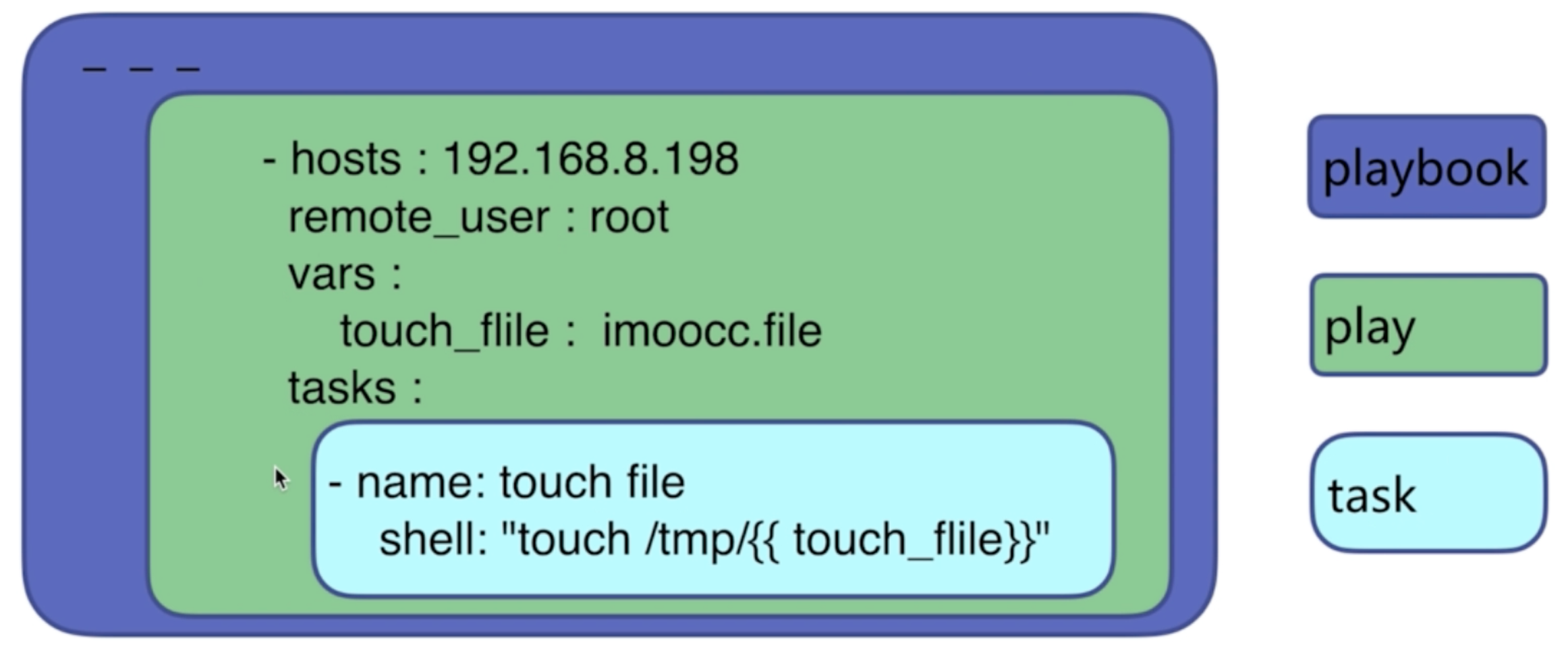
7.3、playbook的组成
play:定义的是主机的角色

task:定义的是具体执行的任务

playbook:由一个或多个play组成,一个play可以包含多个task
7.4、playbook的优势
、功能比adhoc更全

、控制好依赖

、展现更直观

、持久使用
7.5、yaml语法和变量
7.5.1、yaml语法
注意格式:
大小写敏感

使用缩进表示层级关系(只能空格不能使用tab)

yaml文件"---"作为文档的开始
7.5.2、yaml支持的数据结构

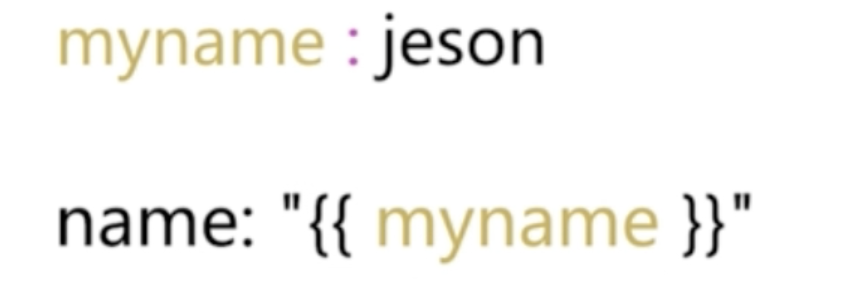
7.5.3、yaml变量的应用
7.5.4、tasks:任务列表
7.5.4.1、格式
第一种:action: module arguments

# 建议使用

第二种:module: arguments
7.5.4.2、注意
)shell和command 模块后面跟命令,而非key=value

)某任务的状态运行后为changed时,可通过"notify"通知给相应的handlers

)任务可以通过"tags"打标签,而后可在ansible-playbook命令上使用-t指定进行调用

)如果命令或者脚本退出码不为零,可以使用如下方式替代
tasks:

   - name: run this command and ignore the result

      shell: /usr/bin/somecommand || /bin/true
)或者使用ignore_errors来忽略错误信息
tasks:

   - name: run this command and ignore the result

      shell: /usr/bin/somecommand

      ignore_errors: True
7.5.5、运行playbook的方式
ansible-playbook <filename.yml> ... [options]
7.5.6、常见选项
--check/-C:只检查可能会发生的改变,单不真正执行操作

--list-hosts:列出运行任务的主机

--limit:主机列表,只针对主机列表中的主机执行

-v:显示过程 -vv,-vvv更详细

# 示例
ansible-playbook file.yml --check 只检测

ansible-playbook file.yml

ansible-playbook file.yml --limit web
7.5.7、handlers和notify结合使用触发条件
7.5.7.1、handlers
是task列表,这些task与前述的task并没有本质上的不同,用于当关注的资源发生时,才会采取一定的操作
7.5.7.2、notify
notify此action可用于在每个play的最后被触发,这样可避免多次有改变发生时每次都执行指定的操作,仅在所有的变化发生完成后一次性地执行指定操作,在notify列出的操作称为handler,也即notify中调用handler中定义的操作
7.5.7.3、示例
---

- hosts: 192.168.182.129

  remote_user: root

  tasks:

    - name: install httpd package

      yum: name=httpd

    - name: copy conf file

      copy: src=files/httpd.conf dest=/etc/httpd/conf/ backup=yes

      notify: restart servie

    - name: start service

      service: name=httpd state=started enabled=yes

  handlers:

    - name: restart servie

      service: name=httpd state=restarted
7.5.5、tags
---

- hosts: 192.168.182.129

  remote_user: root

  tasks:

    - name: install httpd package

      yum: name=httpd

      tags: inshttpd

    - name: copy conf file

      copy: src=files/httpd.conf dest=/etc/httpd/conf/ backup=yes

      notify: restart servie

    - name: start service

      service: name=httpd state=started enabled=yes

      tags: rshttpd

  handlers:

    - name: restart servie

      service: name=httpd state=restarted
7.6、模板template
7.6.1、说明
文本文件,嵌套有脚本(使用模板编程语言编写)

只能通过playbook调用
7.6.2、Jinja2语言
7.6.2.1、字面量形式
字符串:使用单引号或双引号

数字:整数,浮点数

列表:[item1,item2,...]

元祖:(item1,item2,...)

字典:{key1:value1,key2:value2,...}

布尔值:true/false
7.6.2.2、算术运算
# //:除取整

+,-,*,/,//,%,**
7.6.2.3、比较操作
==,!=,>,>=,<,<=
7.6.2.4、逻辑操作
and,or,not
7.6.2.5、流表达式
1)when
# 说明

在task后添加when子句即可使用条件测试;when语句支持jinja2表达式语法

# 示例
---

- hosts: test

  remote_user: root

  tasks:

    - name: test when

      command: ls /tmp

      when: ansible_os_family == 'RedHat'
2)with_items
# 说明

遍历列表

# 示例
---

- hosts: test

  remote_user: root

  tasks:

    - name: touch file

      file: name=/tmp/tmp/{{ item }} state=touch

      with_items:

        - file1

        - file2

        - file3

    - name: install software

      yum: name={{ item }} state=present

      with_items:

        - htop

        - sl

        - hping3
3)template for if
# cat test_for.yml

---

- hosts: test

  remote_user: root

  vars:

    ports:

      - web1:

        port:

        name: web1.com

        rootdir: /data/website1

      - web2:

        port:

        #name: web2.com

        rootdir: /data/website2

      - web3:

        port:

        name: web3.com

        rootdir: /data/website3

  tasks:

    - name: copy conf

      template: src=for1.conf.j2 dest=/tmp/tmp/for1.conf

# cat templates/for1.conf.j2

{% for p in ports %}

server{

       listen {{ p.port }}

   {% if p.name is defined %}

       servername {{ p.name }}

   {% endif %}

       documentroot {{ p.rootdir }}

}

{% endfor %}
4)示例
---

- hosts: test

  remote_user: root

  tasks:

    - name: install package

      yum: name=nginx

    - name: copy template

      # src:默认会在当前目录templates

      template: src=nginx.conf.j2 dest=/etc/nginx/nginx.conf

      notify: restart service

    - name: start service

      service: name=nginx state=started

  handlers:

    - name: restart service

      service: name=nginx state=restarted
7.7、roles角色和场景演练
7.7.1、说明
roles就是通过分别将变量、文件、任务、模块及处理器放置于单独的目录中、并可以便捷地include他们的一种机制

例如:下面的场景演练的层次目录结构
7.7.2、为什么需要用到roles
# 什么是roles?

是一种利用在大型playbook中的剧本配置模式,有这自己特定结构

# 为什么需要用到roles?

和面向对象开发思想相似

利用大型的项目任务中,尽可能的将公共的任务、变量等内容独立
7.7.3、角色简单使用
# )创建roles目录,所以得角色都放在这个目录下
7.7.3.2、示例
1)安装nginx
# 目录结构

.

├── httpd

├── memcache

├── mysql

├── nginx

│   ├── tasks

│   │   ├── group.yml

│   │   ├── install.yml

│   │   ├── main.yml

│   │   ├── restart.yml

│   │   ├── start.yml

│   │   ├── templ.yml

│   │   └── user.yml

│   └── templates

│       └── nginx.conf.j2

└── nginx_role.yml

# nginx_role.yml
[root@bogon roles]# cat nginx_role.yml

- hosts: test

  remote_user: root

  roles:

    - role: nginx
# 调用
ansible-playbook nginx_role.yml
2)综合案例
# 目录结构

[root@bogon roles]# tree app

app

├── files

│   └── hosts

├── handlers

│   └── main.yml

├── tasks

│   ├── copyfile.yml

│   ├── group.yml

│   ├── main.yml

│   ├── start.yml

│   ├── templ.yml

│   ├── user.yml

│   └── yum.yml

├── templates

│   └── httpd.conf.j2

└── vars

    └── main.yml

# app_role.yml
[root@bogon roles]# cat app_role.yml

- hosts: test

  remote_user: root

  roles:

    - role: app
# 执行
ansible-playbook app_role.yml
相关文件的代码
1)app/files/hosts就是/etc/hosts
2)app/tasks/main.yml
- name: restart service

  service: name=httpd state=restarted
3)app/tasks/copyfile.yml
- name: copy file

  copy: src=hosts dest=/tmp/tmp/ backup=yes
4)app/tasks/group.yml
- name: create group

  group: name=app
5)app/tasks/main.yml
- include: group.yml

- include: user.yml

- include: yum.yml

- include: templ.yml

- include: copyfile.yml

- include: start.yml
6)app/tasks/start.yml
- name: start httpd

  service: name=httpd state=started enabled=yes
7)app/tasks/templ.yml
- name: copy template

  template: src=httpd.conf.j2 dest=/etc/httpd/conf/httpd.conf owner={{ user }}

  notify: restart service
8)app/tasks/user.yml
- name: create user

  user: name=app group=app system=yes shell=/sbin/nologin
10)app/tasks/yum.yml
- name: install apache

  yum: name=httpd state=present
11)app/templates/httpd.conf.j2
#

# This is the main Apache HTTP server configuration file.  It contains the

# configuration directives that give the server its instructions.

# See <URL:http://httpd.apache.org/docs/2.4/> for detailed information.

# In particular, see

# <URL:http://httpd.apache.org/docs/2.4/mod/directives.html>

# for a discussion of each configuration directive.

#

# Do NOT simply read the instructions in here without understanding

# what they do.  They're here only as hints or reminders.  If you are unsure

# consult the online docs. You have been warned.

#

# Configuration and logfile names: If the filenames you specify for many

# of the server's control files begin with "/" (or "drive:/" for Win32), the

# server will use that explicit path.  If the filenames do *not* begin

# with "/", the value of ServerRoot is prepended -- so 'log/access_log'

# with ServerRoot set to '/www' will be interpreted by the

# server as '/www/log/access_log', where as '/log/access_log' will be

# interpreted as '/log/access_log'.

#

# ServerRoot: The top of the directory tree under which the server's

# configuration, error, and log files are kept.

#

# Do not add a slash at the end of the directory path.  If you point

# ServerRoot at a non-local disk, be sure to specify a local disk on the

# Mutex directive, if file-based mutexes are used.  If you wish to share the

# same ServerRoot for multiple httpd daemons, you will need to change at

# least PidFile.

#

ServerRoot "/etc/httpd"

#

# Listen: Allows you to bind Apache to specific IP addresses and/or

# ports, instead of the default. See also the <VirtualHost>

# directive.

#

# Change this to Listen on specific IP addresses as shown below to

# prevent Apache from glomming onto all bound IP addresses.

#

#Listen 12.34.56.78:

Listen {{ port_number }}

#

# Dynamic Shared Object (DSO) Support

#

# To be able to use the functionality of a module which was built as a DSO you

# have to place corresponding `LoadModule' lines at this location so the

# directives contained in it are actually available _before_ they are used.

# Statically compiled modules (those listed by `httpd -l') do not need

# to be loaded here.

#

# Example:

# LoadModule foo_module modules/mod_foo.so

#

Include conf.modules.d/*.conf

#

# If you wish httpd to run as a different user or group, you must run

# httpd as root initially and it will switch.

#

# User/Group: The name (or #number) of the user/group to run httpd as.

# It is usually good practice to create a dedicated user and group for

# running httpd, as with most system services.

#

User {{ user }}

Group {{ group}}

# 'Main' server configuration

#

# The directives in this section set up the values used by the 'main'

# server, which responds to any requests that aren't handled by a

# <VirtualHost> definition.  These values also provide defaults for

# any <VirtualHost> containers you may define later in the file.

#

# All of these directives may appear inside <VirtualHost> containers,

# in which case these default settings will be overridden for the

# virtual host being defined.

#

#

# ServerAdmin: Your address, where problems with the server should be

# e-mailed.  This address appears on some server-generated pages, such

# as error documents.  e.g. admin@your-domain.com

#

ServerAdmin root@localhost

#

# ServerName gives the name and port that the server uses to identify itself.

# This can often be determined automatically, but we recommend you specify

# it explicitly to prevent problems during startup.

#

# If your host doesn't have a registered DNS name, enter its IP address here.

#

#ServerName www.example.com:80

#

# Deny access to the entirety of your server's filesystem. You must

# explicitly permit access to web content directories in other

# <Directory> blocks below.

#

<Directory />

    AllowOverride none

    Require all denied

</Directory>

#

# Note that from this point forward you must specifically allow

# particular features to be enabled - so if something's not working as

# you might expect, make sure that you have specifically enabled it

# below.

#

#

# DocumentRoot: The directory out of which you will serve your

# documents. By default, all requests are taken from this directory, but

# symbolic links and aliases may be used to point to other locations.

#

DocumentRoot "/var/www/html"

#

# Relax access to content within /var/www.

#

<Directory "/var/www">

    AllowOverride None

    # Allow open access:

    Require all granted

</Directory>

# Further relax access to the default document root:

<Directory "/var/www/html">

    #

    # Possible values for the Options directive are "None", "All",

    # or any combination of:

    #   Indexes Includes FollowSymLinks SymLinksifOwnerMatch ExecCGI MultiViews

    #

    # Note that "MultiViews" must be named *explicitly* --- "Options All"

    # doesn't give it to you.

    #

    # The Options directive is both complicated and important.  Please see

    # http://httpd.apache.org/docs/2.4/mod/core.html#options

    # for more information.

    #

    Options Indexes FollowSymLinks

    #

    # AllowOverride controls what directives may be placed in .htaccess files.

    # It can be "All", "None", or any combination of the keywords:

    #   Options FileInfo AuthConfig Limit

    #

    AllowOverride None

    #

    # Controls who can get stuff from this server.

    #

    Require all granted

</Directory>

#

# DirectoryIndex: sets the file that Apache will serve if a directory

# is requested.

#

<IfModule dir_module>

    DirectoryIndex index.html

</IfModule>

#

# The following lines prevent .htaccess and .htpasswd files from being

# viewed by Web clients.

#

<Files ".ht*">

    Require all denied

</Files>

#

# ErrorLog: The location of the error log file.

# If you do not specify an ErrorLog directive within a <VirtualHost>

# container, error messages relating to that virtual host will be

# logged here.  If you *do* define an error logfile for a <VirtualHost>

# container, that host's errors will be logged there and not here.

#

ErrorLog "logs/error_log"

#

# LogLevel: Control the number of messages logged to the error_log.

# Possible values include: debug, info, notice, warn, error, crit,

# alert, emerg.

#

LogLevel warn

<IfModule log_config_module>

    #

    # The following directives define some format nicknames for use with

    # a CustomLog directive (see below).

    #

    LogFormat "%h %l %u %t \"%r\" %>s %b \"%{Referer}i\" \"%{User-Agent}i\"" combined

    LogFormat "%h %l %u %t \"%r\" %>s %b" common

    <IfModule logio_module>

      # You need to enable mod_logio.c to use %I and %O

      LogFormat "%h %l %u %t \"%r\" %>s %b \"%{Referer}i\" \"%{User-Agent}i\" %I %O" combinedio

    </IfModule>

    #

    # The location and format of the access logfile (Common Logfile Format).

    # If you do not define any access logfiles within a <VirtualHost>

    # container, they will be logged here.  Contrariwise, if you *do*

    # define per-<VirtualHost> access logfiles, transactions will be

    # logged therein and *not* in this file.

    #

    #CustomLog "logs/access_log" common

    #

    # If you prefer a logfile with access, agent, and referer information

    # (Combined Logfile Format) you can use the following directive.

    #

    CustomLog "logs/access_log" combined

</IfModule>

<IfModule alias_module>

    #

    # Redirect: Allows you to tell clients about documents that used to

    # exist in your server's namespace, but do not anymore. The client

    # will make a new request for the document at its new location.

    # Example:

    # Redirect permanent /foo http://www.example.com/bar

    #

    # Alias: Maps web paths into filesystem paths and is used to

    # access content that does not live under the DocumentRoot.

    # Example:

    # Alias /webpath /full/filesystem/path

    #

    # If you include a trailing / on /webpath then the server will

    # require it to be present in the URL.  You will also likely

    # need to provide a <Directory> section to allow access to

    # the filesystem path.

    #

    # ScriptAlias: This controls which directories contain server scripts.

    # ScriptAliases are essentially the same as Aliases, except that

    # documents in the target directory are treated as applications and

    # run by the server when requested rather than as documents sent to the

    # client.  The same rules about trailing "/" apply to ScriptAlias

    # directives as to Alias.

    #

    ScriptAlias /cgi-bin/ "/var/www/cgi-bin/"

</IfModule>

#

# "/var/www/cgi-bin" should be changed to whatever your ScriptAliased

# CGI directory exists, if you have that configured.

#

<Directory "/var/www/cgi-bin">

    AllowOverride None

    Options None

    Require all granted

</Directory>

<IfModule mime_module>

    #

    # TypesConfig points to the file containing the list of mappings from

    # filename extension to MIME-type.

    #

    TypesConfig /etc/mime.types

    #

    # AddType allows you to add to or override the MIME configuration

    # file specified in TypesConfig for specific file types.

    #

    #AddType application/x-gzip .tgz

    #

    # AddEncoding allows you to have certain browsers uncompress

    # information on the fly. Note: Not all browsers support this.

    #

    #AddEncoding x-compress .Z

    #AddEncoding x-gzip .gz .tgz

    #

    # If the AddEncoding directives above are commented-out, then you

    # probably should define those extensions to indicate media types:

    #

    AddType application/x-compress .Z

    AddType application/x-gzip .gz .tgz

    #

    # AddHandler allows you to map certain file extensions to "handlers":

    # actions unrelated to filetype. These can be either built into the server

    # or added with the Action directive (see below)

    #

    # To use CGI scripts outside of ScriptAliased directories:

    # (You will also need to add "ExecCGI" to the "Options" directive.)

    #

    #AddHandler cgi-script .cgi

    # For type maps (negotiated resources):

    #AddHandler type-map var

    #

    # Filters allow you to process content before it is sent to the client.

    #

    # To parse .shtml files for server-side includes (SSI):

    # (You will also need to add "Includes" to the "Options" directive.)

    #

    AddType text/html .shtml

    AddOutputFilter INCLUDES .shtml

</IfModule>

#

# Specify a default charset for all content served; this enables

# interpretation of all content as UTF-8 by default.  To use the

# default browser choice (ISO-8859-1), or to allow the META tags

# in HTML content to override this choice, comment out this

# directive:

#

AddDefaultCharset UTF-8

<IfModule mime_magic_module>

    #

    # The mod_mime_magic module allows the server to use various hints from the

    # contents of the file itself to determine its type.  The MIMEMagicFile

    # directive tells the module where the hint definitions are located.

    #

    MIMEMagicFile conf/magic

</IfModule>

#

# Customizable error responses come in three flavors:

# 1) plain text 2) local redirects 3) external redirects

#

# Some examples:

#ErrorDocument 500 "The server made a boo boo."

#ErrorDocument 404 /missing.html

#ErrorDocument 404 "/cgi-bin/missing_handler.pl"

#ErrorDocument 402 http://www.example.com/subscription_info.html

#

#

# EnableMMAP and EnableSendfile: On systems that support it,

# memory-mapping or the sendfile syscall may be used to deliver

# files.  This usually improves server performance, but must

# be turned off when serving from networked-mounted

# filesystems or if support for these functions is otherwise

# broken on your system.

# Defaults if commented: EnableMMAP On, EnableSendfile Off

#

#EnableMMAP off

EnableSendfile on

# Supplemental configuration

#

# Load config files in the "/etc/httpd/conf.d" directory, if any.

IncludeOptional conf.d/*.conf
12)app/vars/main.yml
port_number:

user: app

group: app
最后说一下ansibel的缺点:
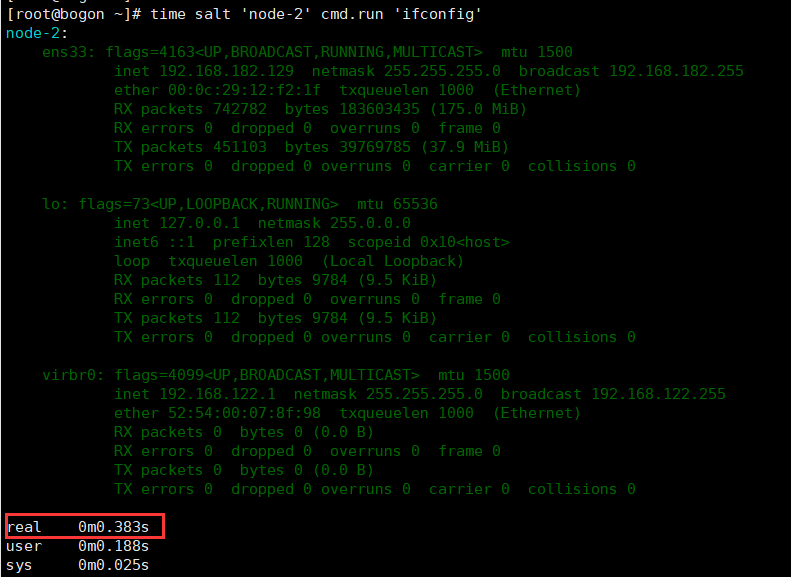
1、ansible毕竟是基于ssh操作,所以执行效率并不高,但是对于一两百机子还是够用的,再多的机子,可以考虑用saltstack,或者puppet
2、安全性不高,所以特别注意一些危险的操作(如:rm -f 之类的命令),可以通过创建特定的用户禁用一些危险操作
这里稍微对比一下ansible和saltstack速度,一目了然。

到此为止~~~
运维之利器--Ansible的更多相关文章
- 自动化运维工具之 Ansible 介绍及安装使用
一.初识Ansible 介绍: Absible 使用 模块(Modules)来定义配置任务.模块可以用标准脚本语言(Python,Bash,Ruby,等等)编写,这是一个很好的做法,使每个模块幂等.A ...
- 自动化运维工具之ansible
自动化运维工具之ansible 一,ansible简介 ansible是新出现的自动化运维工具,基于Python开发,集合了众多运维工具(puppet.cfengine.chef.func.fab ...
- 运维自动化神器ansible之user模块
运维自动化神器ansible之user模块 一.概述 user模块 可管理远程主机上的 用户,比如创建用户.修改用户.删除用户.为用户创建密钥对等操作. 二.参数介绍 name: 用于指定操作 ...
- 运维自动化之ansible的安装与使用 转
运维自动化之ansible的安装与使用 随着服务器数量的增长,我们需要一个批量工具去提高工作效率,之前用的是puppet,ansible的简单,适用让我眼前一亮,决定写一篇ansible从安装到基本配 ...
- 自动化运维工具:ansible
自动化运维工具:ansible Ansible(1):简介和基本概念 Ansible(2):安装配置 Ansible(3):ansible资源清单管理 Ansible(4):常用模块
- Linux实战教学笔记25:自动化运维工具之ansible (一)
第二十五节 ansible之文件的批量分发 标签(空格分隔): Linux实战教学笔记-陈思齐 ---本教学笔记是本人学习和工作生涯中的摘记整理而成,此为初稿(尚有诸多不完善之处),为原创作品,允许转 ...
- 运维自动化工具ansible
企业级自动化运维工具应用实战ansible 公司计划在年底做一次大型市场促销活动,全面冲刺下交易额,为明年的上市做准备.公司要求各业务组对年底大促做准备,运维部要求所有业务容量进行三倍的扩容,并搭建出 ...
- 自动化运维工之Ansible(1)
1.1 ansible简介 1.1.1 .Ansible软件介绍: Ansible提供一种最简单的方式用于发布.管理和编排计算机系统的工具,可在数分钟内搞定.Ansible由Python语言开发, 默 ...
- python自动化运维八:Ansible
Ansible是新出现的自动化运维工具,基于Python研发.糅合了众多老牌运维工具的优点实现了批量操作系统配置.批量程序的部署.批量运行命令等功能.仅需在管理工作站上安装ansible程序配置被管控 ...
随机推荐
- Educational Codeforces Round 41 (Rated for Div. 2) D. Pair Of Lines (几何,随机)
D. Pair Of Lines time limit per test 2 seconds memory limit per test 256 megabytes input standard in ...
- P2161 [SHOI2009]会场预约[线段树/树状数组+二分/STL]
题目描述 PP大厦有一间空的礼堂,可以为企业或者单位提供会议场地.这些会议中的大多数都需要连续几天的时间(个别的可能只需要一天),不过场地只有一个,所以不同的会议的时间申请不能够冲突.也就是说,前一个 ...
- kafka读书笔记《kafka并不难学》
======第一章 1 在高并发场景,如大量插入.更新数据库会导致锁表,导致连接数过多的异常,此时需要消息队列来缓冲一下.消息队列通过异步处理请求来缓解压力 2 消息队列采用异步通信机制消息队列拥有先 ...
- stm32 HardFault_Handler调试及问题查找方法——飞思卡尔
看到有朋友遇到Hard Fault 异常错误,特地找到一篇飞思卡尔工程师写的一片经验帖,定位Hard Fault 异常. Kinetis MCU 采用 Cortex-M4 的内核,该内核的 Fault ...
- 【MySQL】explicit_defaults_for_timestamp 参数详解
简介:explicit_defaults_for_timestamp 系统变量决定MySQL服务端对timestamp列中的默认值和NULL值的不同处理方法. 此变量自MySQL 5.6.6 版本引入 ...
- 杭电2019多校第八场 Acesrc and Good Numbers——思维打表&&oeis
题意 给定 $d,x$,$f(d,k)$ 表示 $1 \sim k$ 中 $d$ 出现的次数, $k$ 满足 $f(d,k) = k$,求小于 $x$ 的最大的 $k$. 分析 正解不会...,学习了 ...
- 使用开发IDE生成一个springboot工程。
说实话,没办法,大势所趋. 当今天下,大企业,还是小公司,只要有想要更高效率的提高开发效率,能频繁迭代,又影响最小,那么只有使用分布式工程开发. 使用它就因为他快,加载东西,插件快,jar包引入方便. ...
- Mysql开启慢查询命令
; 查询: SHOW VARIABLES LIKE '%slow_query_log%'; 结果:
- oracle查询数据库连接数相关
select username,count(username) from v$session where username is not null group by username;--查询各个用户 ...
- bootstrap-wysihtml5 ckeditor 修改富文本编辑器可以上传图片
bootstrap-wysihtml5 ckeditor 修改富文本编辑器可以上传图片 bootstrap-wysihtml5实际使用内核为ckeditor 故这里修改ckeditor即可 ...