
apache CXF Service 简单使用
cxf介绍
框架官网:cxf.apache.org
支持多种协议:
SOAP1.1,1.2
XML/HTTP
CORBA(Common Object Request Broker Architecture公共对象请求代理体系结构,早期语言使用的WS。C,c++,C#)
并可以与Spring进行快速无缝的整合
灵活的部署:可以运行在Tomcat,Jboss,Jetty(内置),IBMWS,BeaWL上面。
入门案例(服务端)
第一步:创建动态web项目
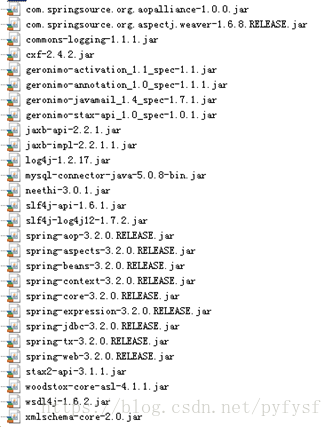
第二步:导入CXF相关jar包
第三步:在web.xml中配置CXF框架提供的一个Servlet
 <!-- 配置CXF框架提供的Servlet -->

  <servlet>

    <servlet-name>cxf</servlet-name>

    <servlet-class>org.apache.cxf.transport.servlet.CXFServlet</servlet-class>

    <!-- 通过初始化参数指定CXF框架的配置文件位置 -->

    <init-param>

        <param-name>config-location</param-name>

        <param-value>classpath:cxf.xml</param-value>

    </init-param>

  </servlet>

  <servlet-mapping>

    <servlet-name>cxf</servlet-name>

    <url-pattern>/service/*</url-pattern>

  </servlet-mapping>
第四步:在类路径下提供cxf.xml
<?xml version="1.0" encoding="UTF-8"?>

<beans xmlns="http://www.springframework.org/schema/beans"

xmlns:xsi="http://www.w3.org/2001/XMLSchema-instance"

xmlns:jaxws="http://cxf.apache.org/jaxws"

xmlns:soap="http://cxf.apache.org/bindings/soap"

xsi:schemaLocation="http://www.springframework.org/schema/beans

                    http://www.springframework.org/schema/beans/spring-beans.xsd

                    http://cxf.apache.org/bindings/soap

                    http://cxf.apache.org/schemas/configuration/soap.xsd

                    http://cxf.apache.org/jaxws

                    http://cxf.apache.org/schemas/jaxws.xsd">

    <!-- 引入CXF Bean定义如下,早期的版本中使用 -->

    <import resource="classpath:META-INF/cxf/cxf.xml" />

    <import resource="classpath:META-INF/cxf/cxf-extension-soap.xml" />

    <import resource="classpath:META-INF/cxf/cxf-servlet.xml" />

</beans>
第五步:开发一个接口和实现类
import javax.jws.WebService;

@WebService

public interface HelloService {

    public String sayHello(String name);

}
public class HelloServiceImpl implements HelloService{

    public String sayHello(String name) {

        System.out.println("基于CXF开发的服务端sayHello方法被调用了。。。。");

        return "hello " + name;

    }

}
第六步:注册服务
<?xml version="1.0" encoding="UTF-8"?>

<beans xmlns="http://www.springframework.org/schema/beans"

xmlns:xsi="http://www.w3.org/2001/XMLSchema-instance"

xmlns:jaxws="http://cxf.apache.org/jaxws"

xmlns:soap="http://cxf.apache.org/bindings/soap"

xsi:schemaLocation="http://www.springframework.org/schema/beans

                    http://www.springframework.org/schema/beans/spring-beans.xsd

                    http://cxf.apache.org/bindings/soap

                    http://cxf.apache.org/schemas/configuration/soap.xsd

                    http://cxf.apache.org/jaxws

                    http://cxf.apache.org/schemas/jaxws.xsd">

    <!-- 引入CXF Bean定义如下,早期的版本中使用 -->

    <import resource="classpath:META-INF/cxf/cxf.xml" />

    <import resource="classpath:META-INF/cxf/cxf-extension-soap.xml" />

    <import resource="classpath:META-INF/cxf/cxf-servlet.xml" />

    <bean id="helloService" class="com.itheima.service.HelloServiceImpl"/>

    <!-- 注册服务 -->

    <jaxws:server id="myService" address="/cxfService">

        <jaxws:serviceBean>

            <ref bean="helloService"/>

        </jaxws:serviceBean>

    </jaxws:server>

</beans>
入门案例(客户端)
方式一:使用jdk提供的wsimport命令生成本地代码完成调用
方式二:使用CXF提供的方式
第一步:创建Java项目并导入CXF相关jar包

第二步:使用wsimport或者CXF提供wsdl2java生成本地代码,只需要生成接口文件

第三步:将接口文件复制到项目中

第四步:提供spring配置文件,注册客户端代理对象
<?xml version="1.0" encoding="UTF-8"?>

<beans xmlns="http://www.springframework.org/schema/beans"

xmlns:xsi="http://www.w3.org/2001/XMLSchema-instance"

xmlns:jaxws="http://cxf.apache.org/jaxws"

xmlns:soap="http://cxf.apache.org/bindings/soap"

xsi:schemaLocation="http://www.springframework.org/schema/beans

                    http://www.springframework.org/schema/beans/spring-beans.xsd

                    http://cxf.apache.org/bindings/soap

                    http://cxf.apache.org/schemas/configuration/soap.xsd

                    http://cxf.apache.org/jaxws

                    http://cxf.apache.org/schemas/jaxws.xsd">

    <!-- 引入CXF Bean定义如下,早期的版本中使用 -->

    <import resource="classpath:META-INF/cxf/cxf.xml" />

    <import resource="classpath:META-INF/cxf/cxf-extension-soap.xml" />

    <import resource="classpath:META-INF/cxf/cxf-servlet.xml" />

    <!-- 注册CXF客户端代理对象,通过spring框架创建这个代理对象,使用代理对象实现远程调用 -->

    <jaxws:client id="myClient"

                address="http://192.168.115.87:8080/cxf_service/service/cxfService"

                serviceClass="cn.itcast.client.HelloService">

    </jaxws:client>

</beans>
第五步:读取spring配置文件,创建spring工厂,从工厂中获取代理对象,实现远程调用
import org.springframework.context.ApplicationContext;

import org.springframework.context.support.ClassPathXmlApplicationContext;

public class App {

    public static void main(String[] args) {

        ApplicationContext ctx = new ClassPathXmlApplicationContext("cxf.xml");

        HelloService proxy = (HelloService) ctx.getBean("myClient");

        String ret = proxy.sayHello("test");

        System.out.println(ret);

    }

}
apache CXF Service 简单使用的更多相关文章
- Apache CXF实现Web Service(1)——不借助重量级Web容器和Spring实现一个纯的JAX-WS web service
废话少说,先在Eclipse中新建一个Java Project (可以不是WTP的Dynamic Web Project) 选择Java Project 再看pom.xml 我们使用cxf 3.1.4 ...
- Apache CXF实现Web Service(4)——Tomcat容器和Spring实现JAX-RS(RESTful) web service
准备 我们仍然使用 Apache CXF实现Web Service(2)——不借助重量级Web容器和Spring实现一个纯的JAX-RS(RESTful) web service 中的代码作为基础,并 ...
- Apache CXF 103 CXF Basics - partial
本Spike记录中内容,如无特别指出,均引用[1]. 0 引言 0.1 基本的Web服务术语 XML 业界的结构化交换信息表示的事实上的标准. XML namespace是在XML文档中提供唯一的命名 ...
- Spring 4 集成Apache CXF开发JAX-RS Web Service
什么是JAX-RS 在JSR-311规范中定义,即Java API for RESTful Web Services,一套Java API,用于开发 RESTful风格的Webservice. 工程概 ...
- Web Service与Apache CXF 框架
一.WebService简介 为了支持跨网络的机器间相互操作交互而设计,用于开发分布式的互操作的应用程序组件. Web Service服务通常被定义为一组模块化的API,它们可以通过网络进行调用,来执 ...
- Apache CXF实现Web Service(5)—— GZIP使用
Apache CXF实现Web Service(5)-- GZIP使用 参考来源: CXF WebService整合Spring Apache CXF实现Web Service(1)--不借助重量级W ...
- Apache CXF实现Web Service(3)——Tomcat容器和不借助Spring的普通Servlet实现JAX-RS(RESTful) web service
起步 参照这一系列的另外一篇文章: Apache CXF实现Web Service(2)——不借助重量级Web容器和Spring实现一个纯的JAX-RS(RESTful) web service 首先 ...
- Apache CXF实现Web Service(2)——不借助重量级Web容器和Spring实现一个纯的JAX-RS(RESTful) web service
实现目标 http://localhost:9000/rs/roomservice 为入口, http://localhost:9000/rs/roomservice/room为房间列表, http: ...
- 使用Apache CXF和Spring集成创建Web Service(zz)
使用Apache CXF和Spring集成创建Web Service 您的评价: 还行 收藏该经验 1.创建HelloWorld 接口类 查看源码 打印? 1 package ...
随机推荐
- Ring3下无驱动移除winlogon.exe进程ctrl+alt+del,win+u,win+l三个系统热键,非屏蔽热键(子类化SAS 窗口)
随手而作,纯粹技术研究,没什么实际意义. 打开xuetr,正常情况下.winlogon.exe注册了三个热键.ctrl+alt+del,win+u,win+l三个. 这三个键用SetWindowsHo ...
- ajax,文件上传,分页器
一.Ajax简介 AJAX(Asynchronous Javascript And XML)翻译成中文就是“异步Javascript和XML”.即使用Javascript语言与服务器进行异步交互,传输 ...
- SYN6101型 RS485子钟
SYN6101型 RS485子钟 产品概述 SYN6101型RS485子钟是由西安同步电子科技有限公司精心设计.自行研发生产的一套以通过RS485总线复接或串行与母钟连接的子钟,接收母钟发送来的时间 ...
- 使用Gson封装和解析JSON
案例:判断用户名是否存在 在jsp页面使用ajax $("#username").change(function(){ var username = $(this).val(); ...
- React性能优化之PureComponent 和 memo使用分析
前言 关于react性能优化,在react 16这个版本,官方推出fiber,在框架层面优化了react性能上面的问题.由于这个太过于庞大,我们今天围绕子自组件更新策略,从两个及其微小的方面来谈rea ...
- 10 jQuery的事件绑定和解绑
1.绑定事件 语法: bind(type,data,fn) 描述:为每一个匹配元素的特定事件(像click)绑定一个事件处理器函数. 参数解释: type (String) : 事件类型 data ( ...
- 03 Javascript的数据类型
数据类型包括:基本数据类型和引用数据类型 基本数据类型指的是简单的数据段,引用数据类型指的是有多个值构成的对象. 当我们把变量赋值给一个变量时,解析器首先要确认的就是这个值是基本类型值还是引用类型值 ...
- Hive 学习之路(四)—— Hive 常用DDL操作
一.Database 1.1 查看数据列表 show databases; 1.2 使用数据库 USE database_name; 1.3 新建数据库 语法: CREATE (DATABASE|SC ...
- Akka-CQRS(14)- Http标准安全解决方案:OAuth2-资源使用授权
上一篇讨论了SSL/TLS安全连接,主要是一套在通信层面的数据加密解决方案.但我们更需要一套方案来验证客户端.要把不能通过验证的网络请求过滤掉. OAuth2是一套行业标准的网络资源使用授权协议,也就 ...
- (持续更新)Qt3D 学习资源
目录 一.前言 1.1 什么是Qt3D 1.2 Qt3D 的利与弊 利:原生支持 弊处:资料过少 二.学习建议 2.1 OpenGL 学习资料 2.2 Qt3D 资料 2.2.1 视频资料 2.2.4 ...