
spring-boot-plus是易于使用,快速,高效,功能丰富,开源的spring boot 脚手架.

Everyone can develop projects independently, quickly and efficiently!



spring-boot-plus是一套集成spring boot常用开发组件的后台快速开发框架
Spring-Boot-Plus是易于使用,快速,高效,功能丰富,开源的spring boot 脚手架.
前后端分离,专注于后端服务
目标
每个人都可以独立、快速、高效地开发项目!
版本库
GITHUB | GITEE
官网
springboot.plus
主要特性
- 集成spring boot 常用开发组件集、公共配置、AOP日志等
- 集成mybatis plus快速dao操作
- 快速生成后台代码: entity/param/vo/controller/service/mapper/xml
- 集成swagger2,可自动生成api文档
- 集成jwt、shiro/spring security权限控制
- 集成redis、spring cache、ehcache缓存
- 集成rabbit/rocket/kafka mq消息队列
- 集成druid连接池,JDBC性能和慢查询检测
- 集成spring boot admin,实时检测项目运行情况
- 使用assembly maven插件进行不同环境打包部署,包含启动、重启命令,配置文件提取到外部config目录
项目架构
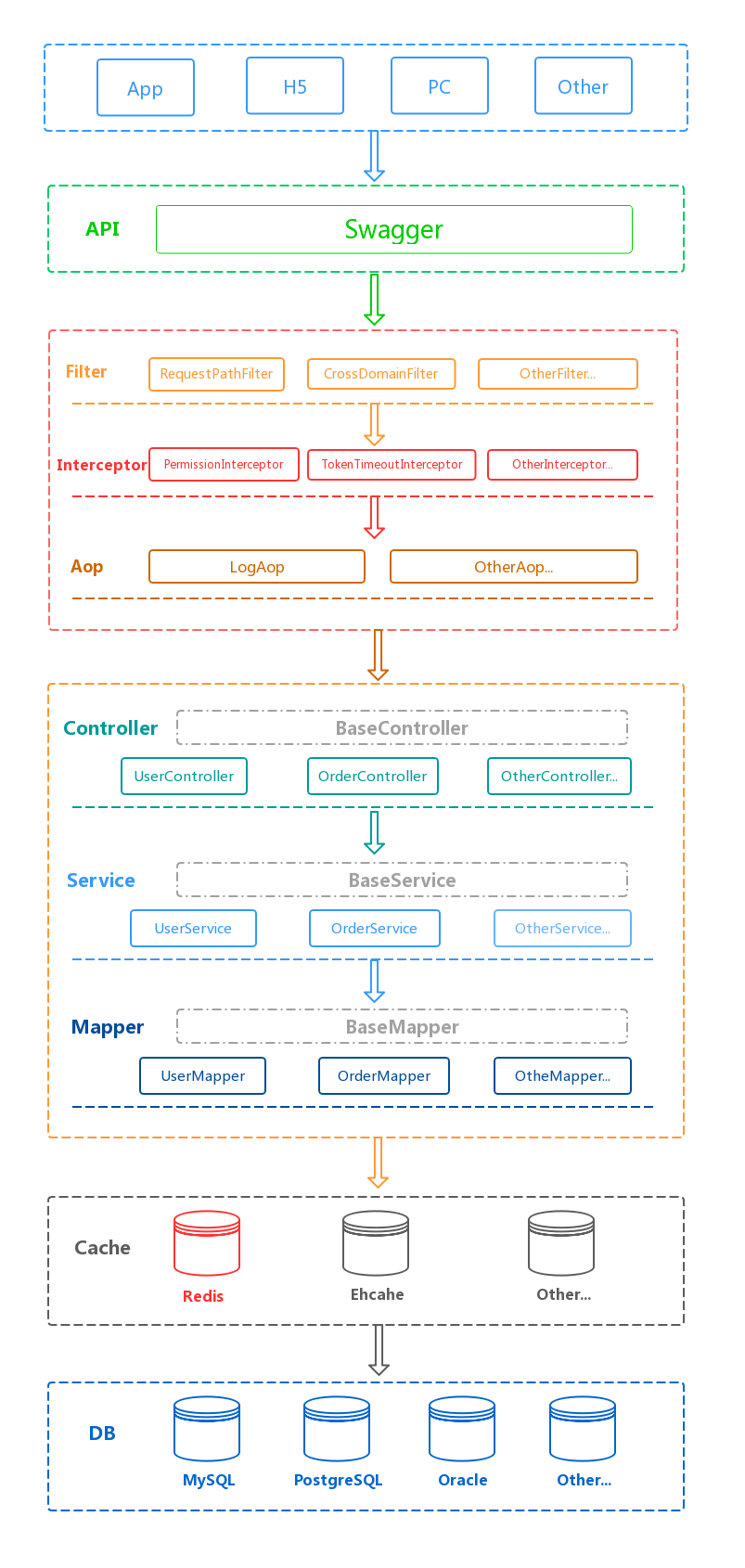
项目环境
| 中间件 | 版本 | 备注 |
|---|---|---|
| JDK | 1.8+ | JDK1.8及以上 |
| MySQL | 5.7+ | 5.7及以上 |
| Redis | 3.2+ |
技术选型
| 技术 | 版本 | 备注 |
|---|---|---|
| Spring Boot | 2.2.0.RELEASE | 最新发布稳定版 |
| Spring Framework | 5.2.0.RELEASE | 最新发布稳定版 |
| Mybatis | 3.5.2 | 持久层框架 |
| Mybatis Plus | 3.2.0 | mybatis增强框架 |
| Alibaba Druid | 1.1.20 | 数据源 |
| Fastjson | 1.2.62 | JSON处理工具集 |
| swagger2 | 2.6.1 | api文档生成工具 |
| commons-lang3 | 3.9 | 常用工具包 |
| commons-io | 2.6 | IO工具包 |
| commons-codec | 1.13 | 加密解密等工具包 |
| commons-collections4 | 4.4 | 集合工具包 |
| reflections | 0.9.11 | 反射工具包 |
| hibernate-validator | 6.0.17.Final | 后台参数校验注解 |
| Shiro | 1.4.1 | 权限控制 |
| JWT | 3.8.3 | JSON WEB TOKEN |
| hutool-all | 5.0.3 | 常用工具集 |
| lombok | 1.18.10 | 注解生成Java Bean等工具 |
| mapstruct | 1.3.1.Final | 对象属性复制工具 |
CHANGELOG
CHANGELOG.md
Java Docs
Java Api Docs
使用
克隆 spring-boot-plus
git clone https://github.com/geekidea/spring-boot-plus.git

cd spring-boot-plus
Maven 构建
默认使用local环境,对应配置文件:application-local.yml
mvn clean package -Plocal
5分钟完成增删改查
1. 创建数据库表
-- ----------------------------

-- Table structure for foo_bar

-- ----------------------------

DROP TABLE IF EXISTS `foo_bar`;

CREATE TABLE `foo_bar`

(

    `id`            bigint(20)  NOT NULL COMMENT '主键',

    `name`          varchar(20) NOT NULL COMMENT '名称',

    `foo`           varchar(20)          DEFAULT NULL COMMENT 'Foo',

    `bar`           varchar(20) NOT NULL COMMENT 'Bar',

    `remark`        varchar(200)         DEFAULT NULL COMMENT '备注',

    `state`         int(11)     NOT NULL DEFAULT '1' COMMENT '状态,0:禁用,1:启用',

    `version`       int(11)     NOT NULL DEFAULT '0' COMMENT '版本',

    `create_time`   timestamp   NULL     DEFAULT CURRENT_TIMESTAMP COMMENT '创建时间',

    `update_time`   timestamp   NULL     DEFAULT NULL COMMENT '修改时间',

    PRIMARY KEY (`id`)

) ENGINE = InnoDB

  DEFAULT CHARSET = utf8mb4

  COLLATE = utf8mb4_general_ci COMMENT ='FooBar';

-- ----------------------------

-- Records of foo_bar

-- ----------------------------

INSERT INTO foo_bar (id, name, foo, bar, remark, state, version, create_time, update_time)

    VALUES (1, 'FooBar', 'foo', 'bar', 'remark...', 1, 0, '2019-11-01 14:05:14', null);

INSERT INTO foo_bar (id, name, foo, bar, remark, state, version, create_time, update_time)

    VALUES (2, 'HelloWorld', 'hello', 'world', null, 1, 0, '2019-11-01 14:05:14', null);
2.使用代码生成器生成增删改查代码
修改数据库信息
修改组件名称/作者/数据库表名称/主键id
/src/test/java/io/geekidea/springbootplus/test/SpringBootPlusGenerator.java
/**

 * spring-boot-plus代码生成器入口类

 *

 * @author geekidea

 * @date 2019-10-22

 **/

public class SpringBootPlusGenerator {

    public static void main(String[] args) {

        CodeGenerator codeGenerator = new CodeGenerator();

        // 公共配置

        // 数据库配置

        codeGenerator

                .setUserName("root")

                .setPassword("root")

                .setDriverName("com.mysql.jdbc.Driver")

                .setDriverUrl("jdbc:mysql://localhost:3306/spring_boot_plus?useUnicode=true&characterEncoding=UTF-8&useSSL=false");

        // 包信息

        codeGenerator

                .setProjectPackagePath("io/geekidea/springbootplus")

                .setParentPackage("io.geekidea.springbootplus");

        // 组件作者等配置

        codeGenerator

                .setModuleName("foobar")

                .setAuthor("geekidea")

                .setPkIdColumnName("id");

        // 生成策略

        codeGenerator

                .setGeneratorStrategy(CodeGenerator.GeneratorStrategy.ALL)

                .setPageListOrder(true)

                .setParamValidation(true);

        // 生成实体映射相关代码,可用于数据库字段更新

        // 当数据库字段更新时,可自定义自动生成哪些那文件

        codeGenerator

                .setGeneratorEntity(true)

                .setGeneratorQueryParam(true)

                .setGeneratorQueryVo(true);

        // 生成业务相关代码

        codeGenerator

                .setGeneratorController(true)

                .setGeneratorService(true)

                .setGeneratorServiceImpl(true)

                .setGeneratorMapper(true)

                .setGeneratorMapperXml(true);

        // 是否生成Shiro RequiresPermissions注解

        codeGenerator.setRequiresPermissions(false);

        // 是否覆盖已有文件

        codeGenerator.setFileOverride(true);

        // 初始化公共变量

        codeGenerator.init();

        // 需要生成的表数组

        // xxx,yyy,zzz为需要生成代码的表名称

        String[] tables = {

                "foo_bar"

        };

        // 循环生成

        for (String table : tables) {

            // 设置需要生成的表名称

            codeGenerator.setTableName(table);

            // 生成代码

            codeGenerator.generator();

        }

    }

}
生成的代码结构
/src/main/java/io/geekidea/springbootplus/foobar
└── foobar

    ├── controller

    │   └── FooBarController.java

    ├── entity

    │   └── FooBar.java

    ├── mapper

    │   └── FooBarMapper.java

    ├── param

    │   └── FooBarQueryParam.java

    ├── service

    │   ├── FooBarService.java

    │   └── impl

    │       └── FooBarServiceImpl.java

    └── vo

        └── FooBarQueryVo.java
Mapper XML
/src/main/resources/mapper/foobar/FooBarMapper.xml
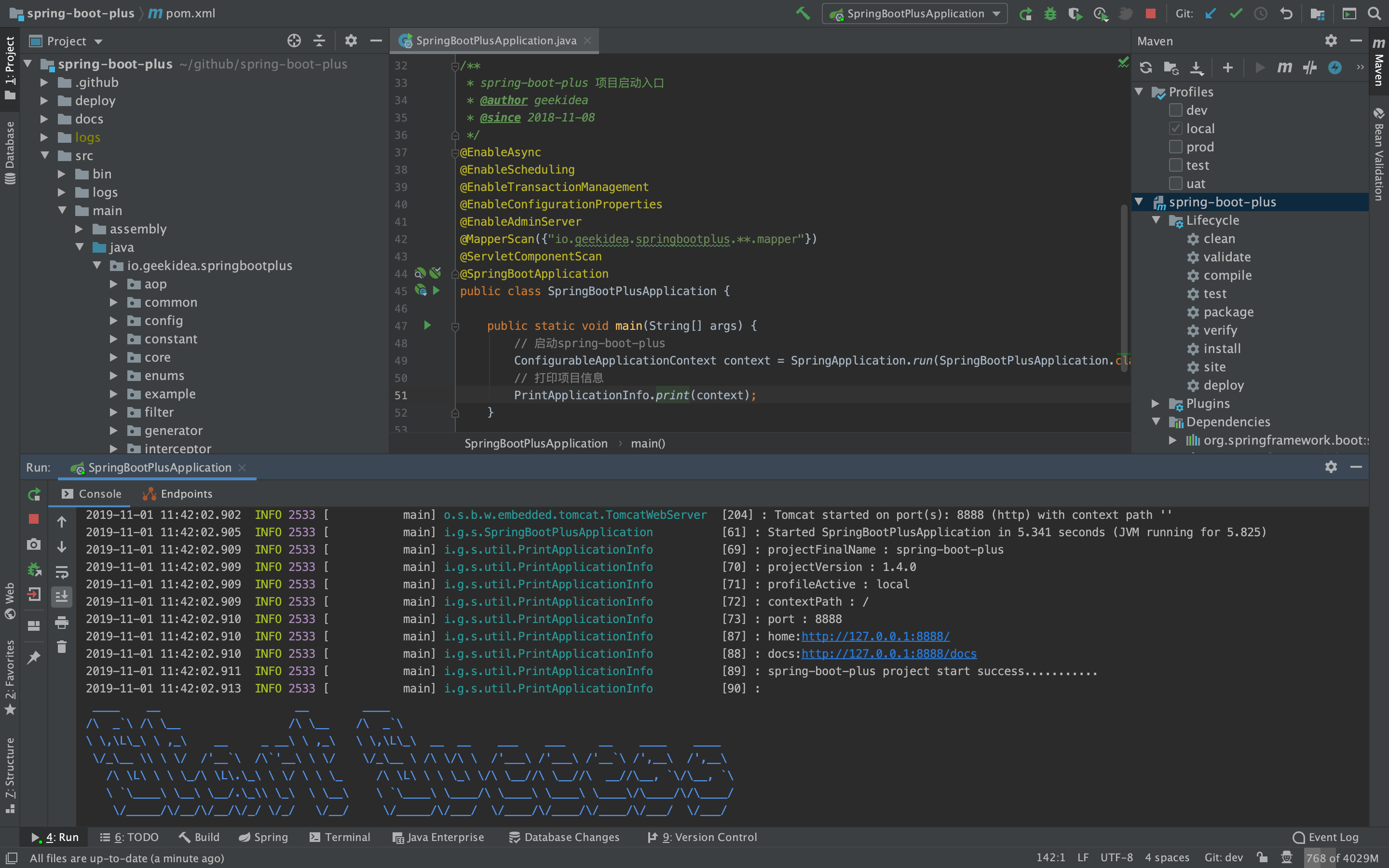
3. 启动项目
项目入口类
/src/main/java/io/geekidea/springbootplus/SpringBootPlusApplication.java
/**

 * spring-boot-plus 项目启动入口

 * @author geekidea

 * @since 2018-11-08

 */

@EnableAsync

@EnableScheduling

@EnableTransactionManagement

@EnableConfigurationProperties

@EnableAdminServer

@MapperScan({"io.geekidea.springbootplus.**.mapper"})

@SpringBootApplication

public class SpringBootPlusApplication {

    public static void main(String[] args) {

        // 启动spring-boot-plus

        ConfigurableApplicationContext context = SpringApplication.run(SpringBootPlusApplication.class, args);

        // 打印项目信息

        PrintApplicationInfo.print(context);

    }

}
4. 访问项目swagger文档
http://127.0.0.1:8888/swagger-ui.html
5. 系统用户 增删改查分页Swagger
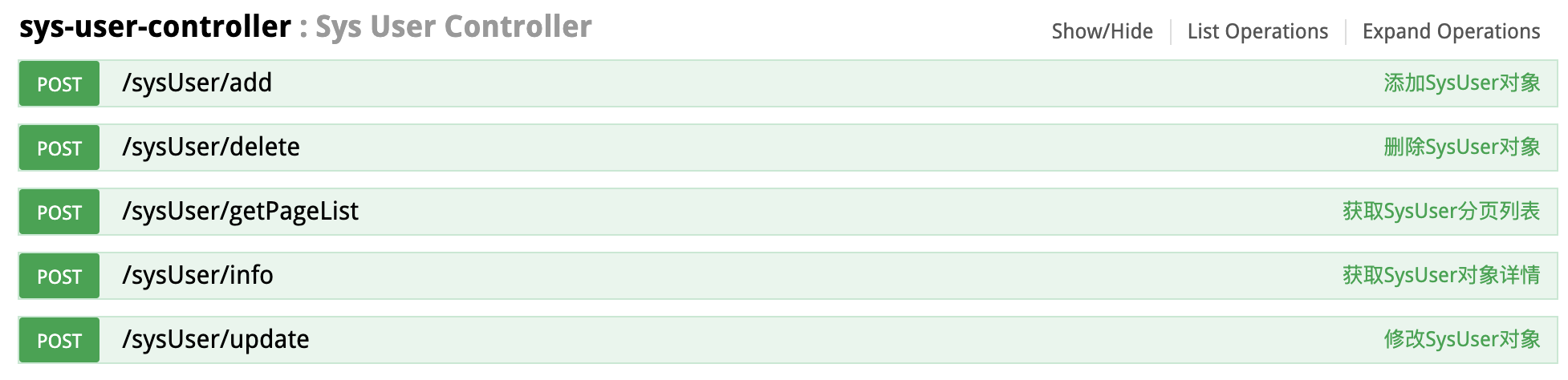
快速开始
详细文档
CentOS快速安装环境/构建/部署/启动spring-boot-plus项目
1. 下载安装脚本
安装
jdk,git,maven,redis,mysql
wget -O download-install-all.sh https://springboot.plus/bin/download-install-all.sh
2. 运行安装脚本
sh download-install-all.sh
3. 修改MySQL密码
ALTER USER 'root'@'localhost' IDENTIFIED BY 'Springbootplus666!';

exit

mysql -uroot -pSpringbootplus666!
4. 导入MySQL脚本
create database if not exists spring_boot_plus character set utf8mb4;

use spring_boot_plus;

source /root/mysql_spring_boot_plus.sql;

show tables;

exit
5. 下载部署脚本 deploy.sh
wget -O deploy.sh https://springboot.plus/bin/deploy.sh
6. 执行脚本
sh deploy.sh
7.访问项目
SpringBootAdmin管理页面
spring-boot-plus Swagger文档页面
http://47.105.159.10:8888/docs
8. 查看项目运行日志
tail -f -n 1000 /root/spring-boot-plus-server/logs/spring-boot-plus.log
spring-boot-plus Views
spring-boot-plus IDEA Sources Views
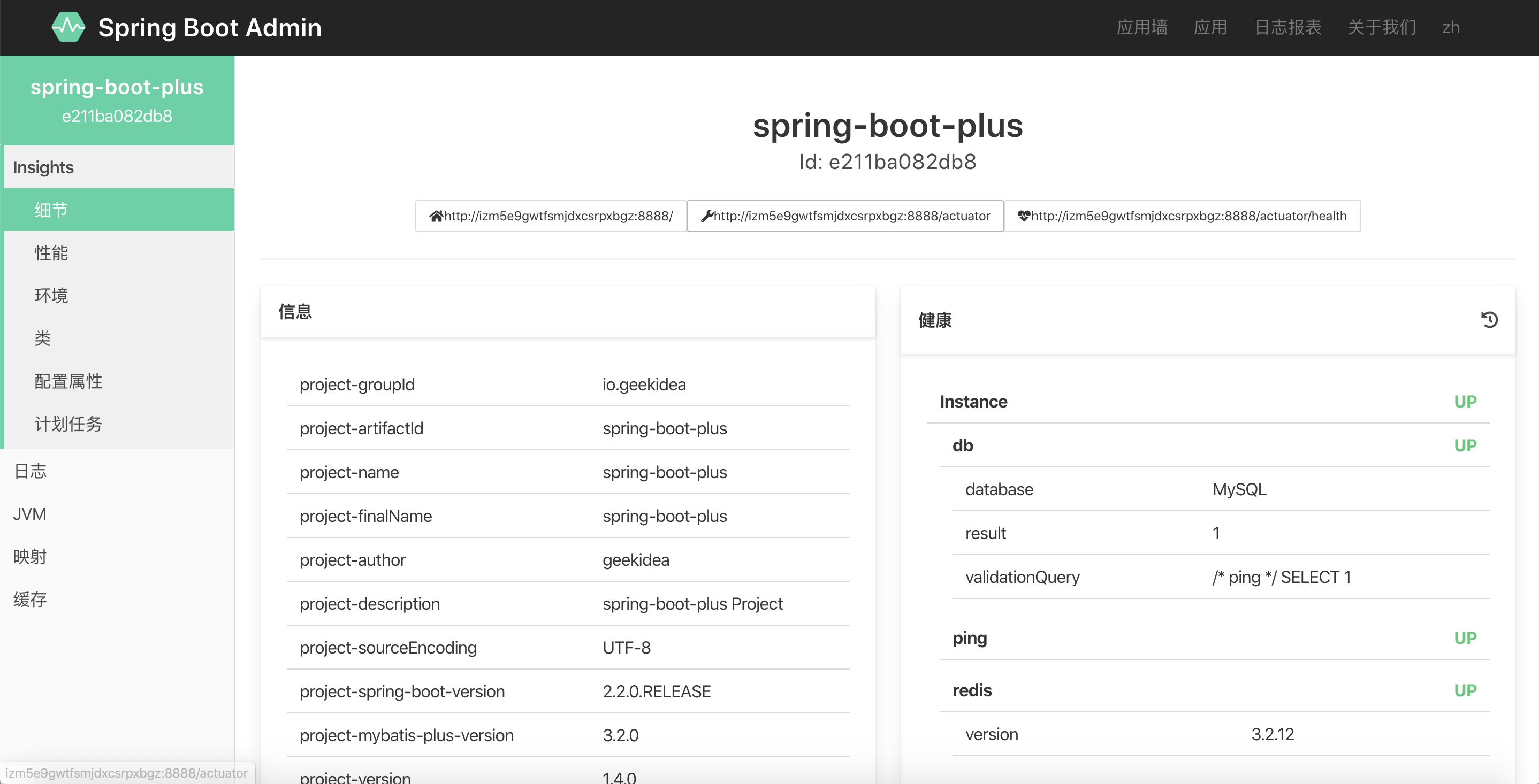
Spring Boot Admin Instances
Spring Boot Admin Statistics

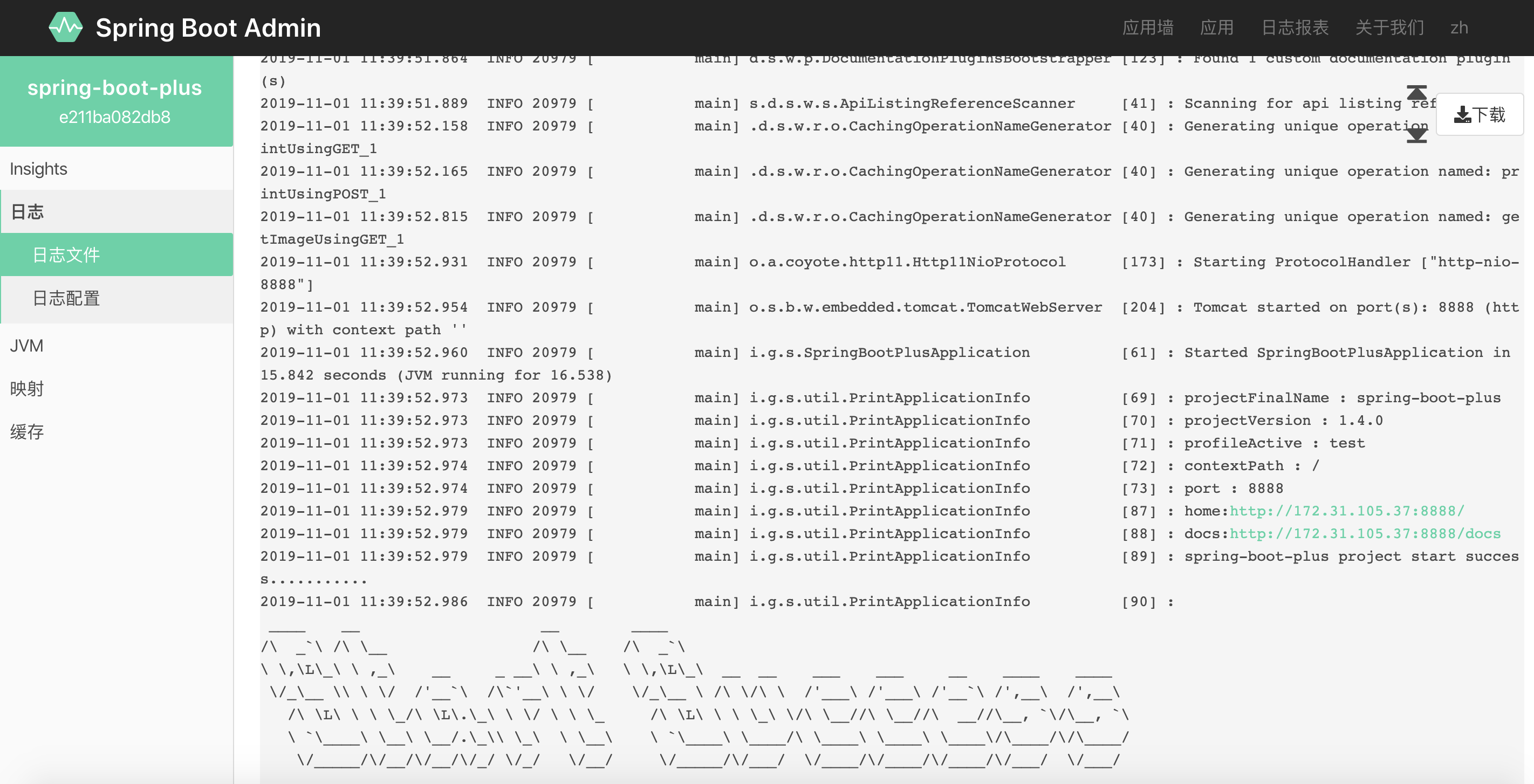
Spring Boot Admin Log
spring-boot-plus Swagger文档

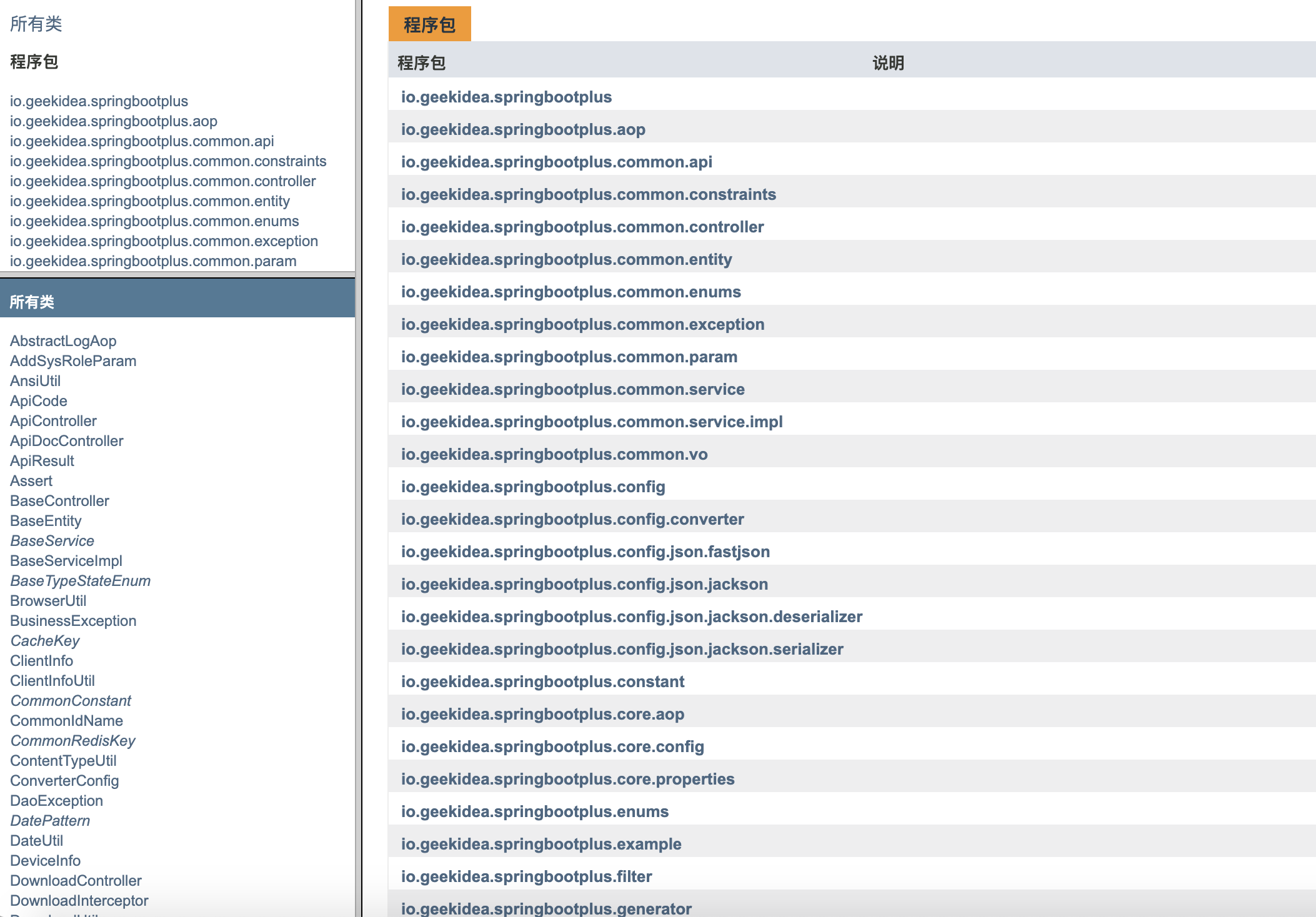
spring-boot-plus Java Api Docs
spring-boot-plus 视频
spring-boot-plus是易于使用,快速,高效,功能丰富,开源的spring boot 脚手架.的更多相关文章
- Spring Boot 系列(一)快速入门
简介 Spring Boot是由Pivotal团队提供的全新框架,其设计目的是用来简化新Spring应用的初始搭建以及开发过程.该框架使用了特定的方式来进行配置,从而使开发人员不再需要定义样板化的配置 ...
- Spring Boot(一):快速开始
Spring Boot(一):快速开始 本系列文章旨在使用最小依赖.最简单配置,帮助初学者快速掌握Spring Boot各组件使用,达到快速入门的目的.全部文章所使用示例代码均同步Github仓库和G ...
- 快速创建你的第一个Spring Boot项目
1. 创建工程 打开idea,利用Spring Boot搭建一个web工程,切身体会一下Spring Boot所带来的魅力!看看SpringBoot是如何快速搭建一个web项目. New-->P ...
- 读懂这些spring boot的核心注解,快速配置完成项目搭建
在spring boot中,摒弃了spring以往项目中大量繁琐的配置,遵循约定大于配置的原则,通过自身默认配置,极大的降低了项目搭建的复杂度.同样在spring boot中,大量注解的使用,使得代码 ...
- Spring Boot 成长之路(一) 快速上手
1.创建工程 利用IntelliJ IDEA新建一个Spring Boot项目的Web工程 2.查看初始化的spring boot项目 工程建好之后会出现如下的目录结构: 值得注意的第一件事是,整个项 ...
- 【译】快速高效学习Java编程在线资源Top 20
想要加强你的编程能力吗?想要提升你的 Java 编程技巧和效率吗? 不用担心.本文将会提供快速高效学习 Java 编程的 50 多个网站资源: 开始探索吧: 1.MKyong:许多开发者在这里可以找到 ...
- Spring Boot的学习之路(02):和你一起阅读Spring Boot官网
官网是我们学习的第一手资料,我们不能忽视它.却往往因为是英文版的,我们选择了逃避它,打开了又关闭. 我们平常开发学习中,很少去官网上看.也许学完以后,我们连官网长什么样子,都不是很清楚.所以,我们在开 ...
- 快速高效学习Java编程在线资源Top 20(转载)
想要加强你的编程能力吗?想要提升你的 Java 编程技巧和效率吗? 不用担心.本文将会提供快速高效学习 Java 编程的 50 多个网站资源: 开始探索吧: 1.MKyong:许多开发者在这里可以找到 ...
- Spring Boot从入门到精通(一)搭建第一个Spring Boot程序
Spring Boot是由Pivotal团队提供的全新框架,其设计目的是用来简化新Spring应用的初始搭建以及开发过程.该框架使用了特定的方式来进行配置,从而使开发人员不再需要定义样板化的配置.通过 ...
随机推荐
- 【JVM 知识体系框架总结】
JVM 内存分布 线程共享数据区: 方法区->类信息,静态变量 堆->数组对象 线程隔离区 虚拟机栈-> 方法 本地方法栈->本地方法库 native 堆.程序计数器 JVM ...
- Kotlin学习系列(三)
类声明 Kotlin使用class关键字声明类: class Invoice{ } Kotlin类声明基本包括header与body: [<Modifier>] <class> ...
- jenkins构建项目时报错缺少com.sun.image.codec.jpeg包解决方案
错误日志:error: package com.sun.image.codec.jpeg does not exist 网上找的一个项目,使用的是jdk1.7,除此之外其他服务器配置或是环境配置都是j ...
- 【爬虫小程序:爬取斗鱼所有房间信息】Xpath
# 本程序亲测有效,用于理解爬虫相关的基础知识,不足之处希望大家批评指正from selenium import webdriver import time class Douyu: "&q ...
- 如何让谷歌浏览器支持小于12px的字体
CSS3有个新的属性transform,而我们用到的就是transform:scale() 书写一段代码 <body> <p>我是一个小于12PX的字体</p> & ...
- eShopOnContainers学习系列(三):RabbitMQ消息总线实践
今天研究了下eShopOnContainers里的RabbitMQ的使用,在项目里是以封装成消息总线的方式使用的,但是仍然是以其发布.订阅两个方法作为基础封装的,我们今天就来实际使用一下. 为了简单起 ...
- pyinstaller 打包exe程序读不到配置文件No such file
挺久没更新博客的,一来之前是觉得才疏学浅,记录下来的太简单没人看.二来时间上不是很充裕(不是借口,有时间打游戏,没时间总结) 偶然有一次发现同事在搜索解决问题的时候正在看我博客的解决思路,很奇妙的感觉 ...
- 基于SpringBoot+WebSocket搭建一个简单的多人聊天系统
前言 今天闲来无事,就来了解一下WebSocket协议.来简单了解一下吧. WebSocket是什么 首先了解一下WebSocket是什么?WebSocket是一种在单个TCP连接上进行全双工 ...
- .NET成人礼 | 还记得20年前一起拖过的控件吗?
本文是MVP Ediwang写的回忆一个80后的拖控件的感悟,与君共勉: 每一代人都有记忆里的味道.煤球炉.黑白电视机是属于父母的记忆.而“拖控件”式编程,启蒙了无数像我这样的80后(嗯,89也算80 ...
- Spring Boot 2.x 基础案例:整合Dubbo 2.7.3+Nacos1.1.3(配置中心)
本文原创首发于公众号:Java技术干货 1.概述 本文将Nacos作为配置中心,实现配置外部化,动态更新.这样做的优点:不需要重启应用,便可以动态更新应用里的配置信息.在如今流行的微服务应用下,将应用 ...
简介 Spring Boot是由Pivotal团队提供的全新框架,其设计目的是用来简化新Spring应用的初始搭建以及开发过程.该框架使用了特定的方式来进行配置,从而使开发人员不再需要定义样板化的配置 ...
Spring Boot(一):快速开始 本系列文章旨在使用最小依赖.最简单配置,帮助初学者快速掌握Spring Boot各组件使用,达到快速入门的目的.全部文章所使用示例代码均同步Github仓库和G ...
1. 创建工程 打开idea,利用Spring Boot搭建一个web工程,切身体会一下Spring Boot所带来的魅力!看看SpringBoot是如何快速搭建一个web项目. New-->P ...
在spring boot中,摒弃了spring以往项目中大量繁琐的配置,遵循约定大于配置的原则,通过自身默认配置,极大的降低了项目搭建的复杂度.同样在spring boot中,大量注解的使用,使得代码 ...
1.创建工程 利用IntelliJ IDEA新建一个Spring Boot项目的Web工程 2.查看初始化的spring boot项目 工程建好之后会出现如下的目录结构: 值得注意的第一件事是,整个项 ...
想要加强你的编程能力吗?想要提升你的 Java 编程技巧和效率吗? 不用担心.本文将会提供快速高效学习 Java 编程的 50 多个网站资源: 开始探索吧: 1.MKyong:许多开发者在这里可以找到 ...
官网是我们学习的第一手资料,我们不能忽视它.却往往因为是英文版的,我们选择了逃避它,打开了又关闭. 我们平常开发学习中,很少去官网上看.也许学完以后,我们连官网长什么样子,都不是很清楚.所以,我们在开 ...
想要加强你的编程能力吗?想要提升你的 Java 编程技巧和效率吗? 不用担心.本文将会提供快速高效学习 Java 编程的 50 多个网站资源: 开始探索吧: 1.MKyong:许多开发者在这里可以找到 ...
Spring Boot是由Pivotal团队提供的全新框架,其设计目的是用来简化新Spring应用的初始搭建以及开发过程.该框架使用了特定的方式来进行配置,从而使开发人员不再需要定义样板化的配置.通过 ...
JVM 内存分布 线程共享数据区: 方法区->类信息,静态变量 堆->数组对象 线程隔离区 虚拟机栈-> 方法 本地方法栈->本地方法库 native 堆.程序计数器 JVM ...
类声明 Kotlin使用class关键字声明类: class Invoice{ } Kotlin类声明基本包括header与body: [<Modifier>] <class> ...
错误日志:error: package com.sun.image.codec.jpeg does not exist 网上找的一个项目,使用的是jdk1.7,除此之外其他服务器配置或是环境配置都是j ...
# 本程序亲测有效,用于理解爬虫相关的基础知识,不足之处希望大家批评指正from selenium import webdriver import time class Douyu: "&q ...
CSS3有个新的属性transform,而我们用到的就是transform:scale() 书写一段代码 <body> <p>我是一个小于12PX的字体</p> & ...
今天研究了下eShopOnContainers里的RabbitMQ的使用,在项目里是以封装成消息总线的方式使用的,但是仍然是以其发布.订阅两个方法作为基础封装的,我们今天就来实际使用一下. 为了简单起 ...
挺久没更新博客的,一来之前是觉得才疏学浅,记录下来的太简单没人看.二来时间上不是很充裕(不是借口,有时间打游戏,没时间总结) 偶然有一次发现同事在搜索解决问题的时候正在看我博客的解决思路,很奇妙的感觉 ...
前言 今天闲来无事,就来了解一下WebSocket协议.来简单了解一下吧. WebSocket是什么 首先了解一下WebSocket是什么?WebSocket是一种在单个TCP连接上进行全双工 ...
本文是MVP Ediwang写的回忆一个80后的拖控件的感悟,与君共勉: 每一代人都有记忆里的味道.煤球炉.黑白电视机是属于父母的记忆.而“拖控件”式编程,启蒙了无数像我这样的80后(嗯,89也算80 ...
本文原创首发于公众号:Java技术干货 1.概述 本文将Nacos作为配置中心,实现配置外部化,动态更新.这样做的优点:不需要重启应用,便可以动态更新应用里的配置信息.在如今流行的微服务应用下,将应用 ...