
30分钟连接树莓派到微软云 Azure IoT Hub,并将数据进行可视化
更多内容,关注公众号:

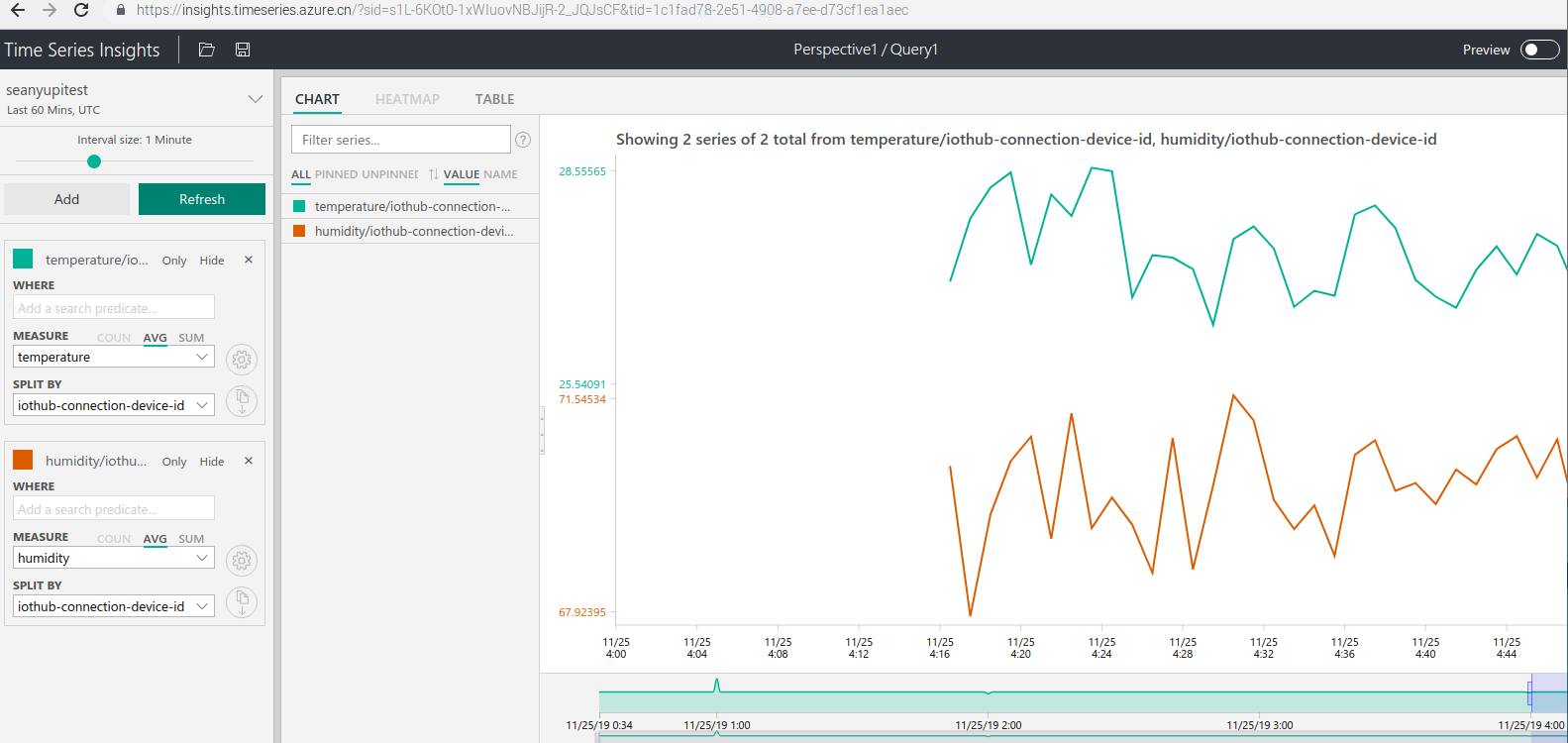
树莓派是很多动手达人必备的小玩具,本节内容,让我们拿出树莓派,在30分钟内,将树莓派连接到微软云Azure的IoT Hub,然后将温湿度曲线可视化。
(本节内容完整视频在文章末尾。)
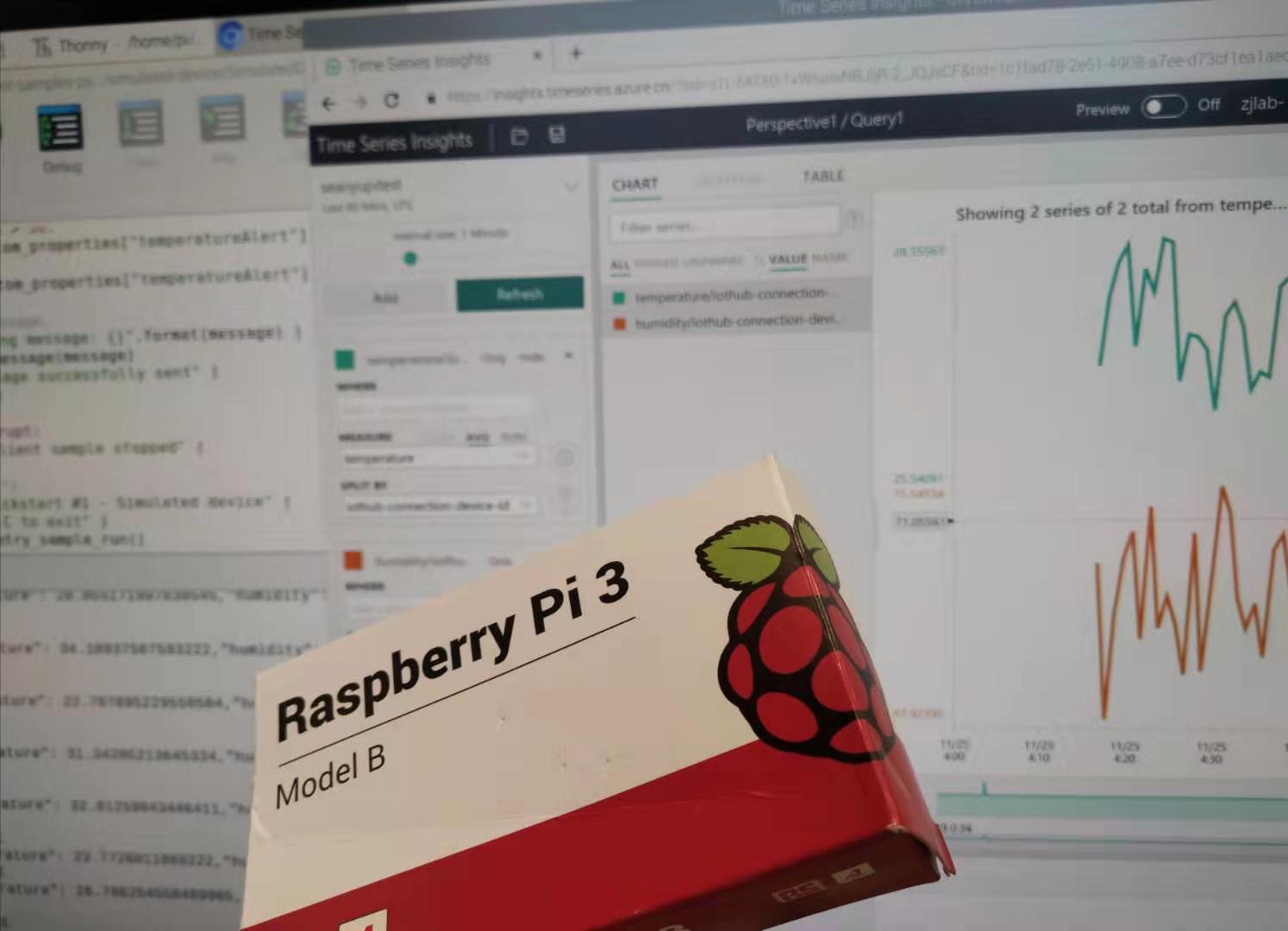
本节内容中,树莓派发送的数据是模拟出来的,并没有真实的连接到传感器,您可以选购不同的传感器来采集真实的环境信息。
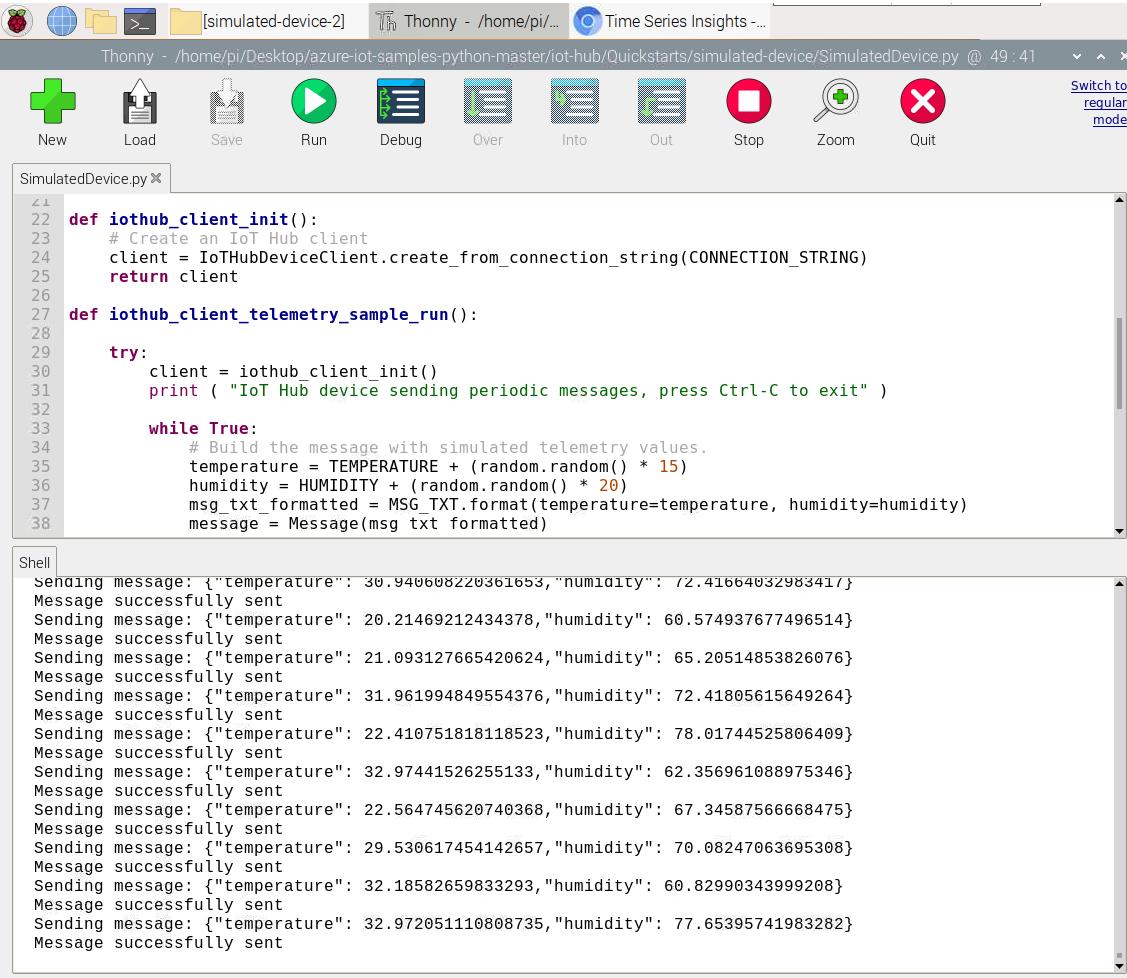
Azure IoT Hub 为我们提供了设备与云双向通讯的能力,通过多种语言的SDK,我们能轻松快速的将树莓派接入到云。本案例使用微软官方代码,示例代码一共约70行,非常简单。
关于IoT Hub的更多内容,请参考:
时序见解(Azure Time Series Insights)用来存储时间序列的值,同时提供UI,将数据可视化。
关于时序见解的更多内容,请参考:
时序见解和IoT Hub可以无缝连接,无需写代码即可将上传到IoT Hub的数据进行可视化。
树莓派上传数据的代码:
import random

import time

# Using the Python Device SDK for IoT Hub:

#   https://github.com/Azure/azure-iot-sdk-python

# The sample connects to a device-specific MQTT endpoint on your IoT Hub.

from azure.iot.device import IoTHubDeviceClient, Message

# The device connection string to authenticate the device with your IoT hub.

# Using the Azure CLI:

# az iot hub device-identity show-connection-string --hub-name {YourIoTHubName} --device-id MyNodeDevice --output table

CONNECTION_STRING = "{your string}"

# Define the JSON message to send to IoT Hub.

TEMPERATURE = 20.0

HUMIDITY = 60

MSG_TXT = '{{"temperature": {temperature},"humidity": {humidity}}}'

def iothub_client_init():

    # Create an IoT Hub client

    client = IoTHubDeviceClient.create_from_connection_string(CONNECTION_STRING)

    return client

def iothub_client_telemetry_sample_run():

    try:

        client = iothub_client_init()

        print ( "IoT Hub device sending periodic messages, press Ctrl-C to exit" )

        while True:

            # Build the message with simulated telemetry values.

            temperature = TEMPERATURE + (random.random() * 15)

            humidity = HUMIDITY + (random.random() * 20)

            msg_txt_formatted = MSG_TXT.format(temperature=temperature, humidity=humidity)

            message = Message(msg_txt_formatted)

            # Add a custom application property to the message.

            # An IoT hub can filter on these properties without access to the message body.

            if temperature > 30:

              message.custom_properties["temperatureAlert"] = "true"

            else:

              message.custom_properties["temperatureAlert"] = "false"

            # Send the message.

            print( "Sending message: {}".format(message) )

            client.send_message(message)

            print ( "Message successfully sent" )

            time.sleep(1)

    except KeyboardInterrupt:

        print ( "IoTHubClient sample stopped" )

if __name__ == '__main__':

    print ( "IoT Hub Quickstart #1 - Simulated device" )

    print ( "Press Ctrl-C to exit" )

    iothub_client_telemetry_sample_run()
IoT Hub 接入文档,请参考:
https://docs.azure.cn/zh-cn/iot-hub/quickstart-send-telemetry-python
树莓派系统下载:
https://www.raspberrypi.org/downloads/
Micro SD卡格式化工具:
https://www.sdcard.org/downloads/index.html
树莓派系统写入Micro SD卡工具:
https://sourceforge.net/projects/win32diskimager/
完整实战视频如下:
https://v.qq.com/x/page/f3025q4e75x.html
30分钟连接树莓派到微软云 Azure IoT Hub,并将数据进行可视化的更多相关文章
- 微软云 azure 数据迁移之oracle11g dataguard
背景,将本地的oracle数据迁移到微软云azure云上面的oracleserver. 1.复制本地的rman备份集到微软云azure的oracleserver上 scp -r -P56922 201 ...
- 微软云Azure Website 远程调试
微软云Azure Website 远程调试 是可以的 但是只有48小时,要在后台开启,所以还是很麻烦的啊! 但是安全性提高了,不得不承认哦
- 本号讯 | 永不消失的协作“空间站”开课;微软推出微软云Azure文档网站
8月29日,针对企业常面临的“协同办公”困难,开展以“还有这种操作?永不消失的协作'空间站'”为主题的协同办公培训课. 课程内容包含:在Office 365环境中,如何利用Teams与Groups等功 ...
- 【物联网云端对接-1】 通过HTTP协议与微软Azure IoT hub进行云端通信
在2015年曾写过一篇文章<从微软build 2015,展望微软未来发展>,提到了微软的Azure和Windows 10 IoT,那算是初次接触微软物联网技术.比较幸运的是在后续的时间里, ...
- 【物联网云端对接-3】通过MQTT协议与微软Azure IoT Hub进行云端通信
在上一篇文章<通过MQTT协议与阿里云物联网套件进行云端通信>中,我们介绍了通过MQTT对接阿里云的物联网套件.其实同样的代码,稍加调整也可以对接到微软Azure IoT hub上,不过需 ...
- Azure IoT Hub 十分钟入门系列 (3)- 使用消息路由将原始设备数据记录存档
本文主要分享一个案例: 10分钟使用消息路由将原始设备数据记录存档 B站视频讲解:https://www.bilibili.com/video/av90223893/ 本文主要有如下内容: 1.理解什 ...
- Azure IoT Hub 十分钟入门系列 (1)- 10分钟带你了解Azure IoT Hub 并创建IoT Hub
建议您先对<Azure 上 IoT 整体解决方案概览 >进行了解. 本文主要分享一个案例: 10分钟-了解Azure IoT Hub并创建Azure IoT Hub 本文主要有如下内容: ...
- Azure IoT Hub 十分钟入门系列 (4)- 实现从设备上传日志文件/图片到 Azure Storage
本文主要分享一个案例: 10分钟内通过Device SDK上传文件到IoTHub B站视频:https://www.bilibili.com/video/av90224073/ 本文主要有如下内容: ...
- Azure IoT 技术研究系列2-起步示例之设备注册到Azure IoT Hub
上篇博文中,我们主要介绍了Azure IoT Hub的基本概念.架构.特性: Azure IoT 技术研究系列1-入门篇 本文中,我们继续深入研究,做一个起步示例程序:模拟设备注册到Azure IoT ...
随机推荐
- ef6+mysql的bug
entityFramework6在mysql数据库下,用linq进行排序会出现一个bug. Expression<Func<blog, bool>> expr_filter=p ...
- png兼容IE6的方法
1.通过CSS滤镜使背景图的PNG对IE6进行兼容 定义一个样式,给某个div应用这个样式后,div的透明png背景图片自动透明了. <style> body{background: li ...
- luogu P1832 A+B Problem
题目背景 ·题目名称是吸引你点进来的 ·实际上该题还是很水的 题目描述 ·1+1=? 显然是2 ·a+b=? 1001回看不谢 ·哥德巴赫猜想 似乎已呈泛滥趋势 ·以上纯属个人吐槽 ·给定一个正整数n ...
- mac版 sublime快捷键大全
按这几大类分类:文件 编辑 选择 查找 视图 去往 工具 项目 窗口 帮组一.文件cmd + N 新建文件cmd + S 保存文件cmd + shift + S 文件另存为cmd + alt + S ...
- HDU1561 The more ,The better (树形背包Dp)
ACboy很喜欢玩一种战略游戏,在一个地图上,有N座城堡,每座城堡都有一定的宝物,在每次游戏中ACboy允许攻克M个城堡并获得里面的宝物.但由于地理位置原因,有些城堡不能直接攻克,要攻克这些城堡必须先 ...
- 这些C++常用内置函数你会几个??
前言 本文的文字及图片来源于网络,仅供学习.交流使用,不具有任何商业用途,版权归原作者所有,如有问题请及时联系我们以作处理.作者:Regina520 新手注意:如果你C++学的不好,可以去拿我的C+ ...
- ORACLE存储过程详解
1.定义 所谓存储过程(Stored Procedure),就是一组用于完成特定数据库功能的SQL语句集,该SQL语句集经过编译后存储在数据库系统中.在使用时候,用户通过指定已经定义的存储过程名字并给 ...
- 一个非常美的FlutterUI组件扩展集:FLUI
项目地址 FLUI 官网 下载 Demo APK 体验 这是一个群内的网友写的,感觉里面的组件风格非常美,封装的挺到位的,在此推荐给大家,具体可以参考学习. 可以学到的知识还是挺多的,组件UI封装可以 ...
- 谈谈redis的特性以及使用场景
ok?先从String开始讲: String: 这是最简单的类型,就是普通的get和set,做简单的KV缓存. 但是在真实的开发环境中,很多men可能会吧很多复杂的结构也统一转成String去储存使用 ...
- Test1016
T1 kom (容斥 \((1s32M)\) 给出\(N\)个互不相同的正整数,统计共有多少对数,它们有公共的一个数字(不一定在同一位置上) 输入 第一行一个正整数 \(N (1 ≤ N ≤ 1 00 ...