
selenium和AutoIt工具辅助下载和上传
上传
根据AutoIt Windows Info 所识别到的控件信息打开SciTE Script Editor编辑器,编写脚本。

;ControlFocus("title","text",controlID) Edit1=Edit instance 1

ControlFocus("选择要加载的文件", "","Edit1")

; Wait 10 seconds for the Upload window to appear

  WinWait("[CLASS:#32770]","",10)

; Set the File name text on the Edit field

//要上传的文件

  ControlSetText("选择要加载的文件", "", "Edit1", "D:\\upload_file.txt")

  Sleep(2000)

; Click on the Open button

  ControlClick("选择要加载的文件", "","Button1");
ControlFocus()方法用于识别Window窗口。WinWait()设置10秒钟用于等待窗口的显示,其用法与WebDriver 所提供的implicitly_wait()类似。ControlSetText()用于向“文件名”输入框内输入本地文件的路径。这里的Sleep()方法与Python中time模块提供的Sleep()方法用法一样,不过它是以毫秒为单位,Sleep(2000)表示固定休眠2000毫秒。ControlClick()用于点击上传窗口中的“打开”按钮。
AutoIt的脚本已经写好了,可以通过菜单栏“Tools”-->“Go” (或按键盘F5)来运行一个脚本吧!注意在运行时上传窗口当前处于打开状态。
3、脚本运行正常,将其保存为upfile.au3,这里保存的脚本可以通过Run Script 工具将其打开运行,但我们的目的是希望这个脚本被Python程序调用,那么就需要将其生成exe程序。打开Compile Script to.exe工具,将其生成为exe可执行文件。如图4.16,
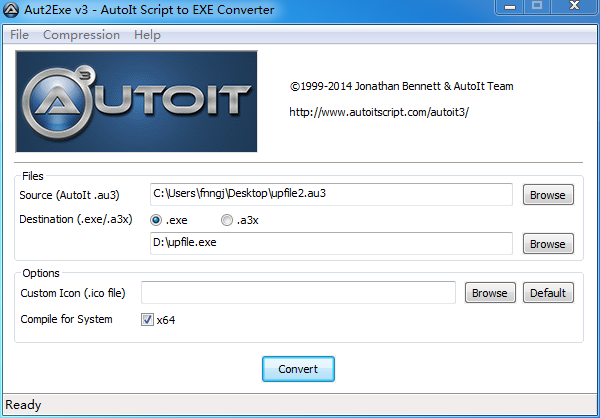
图4.16 Compile Script to.exe生成exe程序
点击“Browse”选择upfile.au3文件,点击“Convert”按钮将其生成为upfile.exe程序。
4、下面就是通过自动化测试脚本调用upfile.exe程序实现上传了。
#coding=utf-8

from selenium import webdriver

import os

driver = webdriver.Firefox()

#打开上传功能页面

file_path =  'file:///' + os.path.abspath('upfile.html')

driver.get(file_path)

#点击打开上传窗口

driver.find_element_by_name("file").click()

#调用upfile.exe上传程序

os.system("D:\\upfile.exe")

driver.quit()
; Wait 10 seconds for the Upload window to appear
WinWait("[CLASS:#32770]","",10)
; Set input focus to the edit control of Upload window using the handle returned by WinWait
ControlFocus("另存为","","Edit1")
Sleep(2000)
; Set the File name text on the Edit field
//下载的保存路径
ControlSetText("另存为", "", "Edit1", "d:\autoit-v3-setup")
Sleep(2000)
; Click on the Open button
ControlClick("另存为", "","Button1");
ControlFocus("另存为", "","Edit1");ControlFocus("title","text",controlID) Edit1=Edit instance 1
; Wait 10 seconds for the Upload window to appear
WinWait("[CLASS:#32770]","",10)
; Set input focus to the edit control of Upload window using the handle returned by WinWait
ControlFocus("另存为","","Edit1")
Sleep(2000)
; Set the File name text on the Edit field
ControlSetText("另存为", "", "Edit1", "d:\autoit-v3-setup")
Sleep(2000)
; Click on the Open button
ControlClick("另存为", "","Button1");
selenium和AutoIt工具辅助下载和上传的更多相关文章
- 重新想象 Windows 8 Store Apps (66) - 后台任务: 下载和上传
[源码下载] 重新想象 Windows 8 Store Apps (66) - 后台任务: 下载和上传 作者:webabcd 介绍重新想象 Windows 8 Store Apps 之 后台任务 后台 ...
- 重新想象 Windows 8.1 Store Apps (91) - 后台任务的新特性: 下载和上传的新特性, 程序启动前预下载网络资源, 后台任务的其它新特性
[源码下载] 重新想象 Windows 8.1 Store Apps (91) - 后台任务的新特性: 下载和上传的新特性, 程序启动前预下载网络资源, 后台任务的其它新特性 作者:webabcd 介 ...
- github下载和上传项目
git下载和上传项目 下载: git clone +地址 上传: 1.git init 在当前项目的目录中生成本地的git管理(多一个.git文件夹,为隐藏文件) 2.git add .(注意最后面有 ...
- python+selenium下载和上传文件
操作浏览器上传文件,先看代码 1 """ 2 * send_keys() 指定文件上传路径. 3 """ 4 from selenium i ...
- 在XShell中使用sz和rz命令下载和上传文件
借助XShell,使用linux命令sz可以很方便的将服务器上的文件下载到本地,使用rz命令则是把本地文件上传到服务器 工具/原料 XShell CentOS 6.5 使用sz下载文件 1 输 ...
- 使用MFC提供的Http类下载和上传文件
1.下载文件 Download(const CString& strFileURLInServer, //待下载文件的URL const CString & strFileLocalF ...
- 2.4 利用FTP服务器下载和上传目录
利用FTP服务器下载目录 import os,sys from ftplib import FTP from mimetypes import guess_type nonpassive = Fals ...
- 2.3 利用FTP服务器下载和上传文件
二.利用FTP服务器的下载文件 from ftplib import FTP from os.path import exists def getfile(file,site,dir,user=(), ...
- 从Nexus私服下载和上传资源(一)
从私服中下载资源 首先要明确将资源下载到哪里 找到maven 配置文件settings.xml 文件,添加如下配置:1.添加镜像配置:将所有访问外网仓库的请求指向私服: <mirror> ...
随机推荐
- MongoDB安装调试
1:安装 去mongodb的官网http://www.mongodb.org/downloads下载32bit的包 解压后会出现以下文件 在安装的盘C:下建立mongodb文件夹,拷贝bin文件夹到该 ...
- VS2019专业版和企业版激活密钥
Visual Studio 2019 Professional NYWVH-HT4XC-R2WYW-9Y3CM-X4V3Y Visual Studio 2019 EnterpriseBF8Y8-GN2 ...
- AtCoder Beginner Contest 145
传送门 A - Circle 签到. B - Echo 签到到. C - Average Length 要卡下精度,可用二分或者long double来搞. Code /* * Author: hey ...
- luoguP1972 [SDOI2009]HH的项链
经典颜色问题推荐博文 https://www.cnblogs.com/tyner/p/11519506.html https://www.cnblogs.com/tyner/p/11616770.ht ...
- Html学习之十(CSS选择器的使用--伪类选择器)
伪类选择器 一.基于a标签. 1.:hover 选择鼠标滑过的超链接元素 2.:active 选择鼠标单击中的超链接元素 3.:link 选择未被访问的超链接元素 4.:visited 选择已经被访问 ...
- Java基本数据类型转换一
public class TestConvert { /**容量小的类型自动转化为容量大的类型数据类型按容量大小排列 * byte,short,char -> int ->long-> ...
- Jsoup获取部分页面数据失败 Unhandled content type. Must be text/*, application/xml, or application/xhtml+xml
用Jsoup在获取一些网站的数据时,起初获取很顺利,但是在访问某浪的数据是Jsoup报错,应该是请求头里面的请求类型(ContextType)不符合要求. 请求代码如下: private static ...
- INVERSION包
1.安装该包 if (!requireNamespace("BiocManager", quietly = TRUE))install.packages("BiocMan ...
- 【正则】day01
正则表达式一.概述 验证 网络爬虫. 概念: 具有语法格式的字符串. 函数 PCRE 1.perl语言正则语法兼容.(java c) 2.速度快,效率高. P ...
- pytest 常见用法
前言 之前一篇文章简单介绍了 pytest 以及 fixture :https://www.cnblogs.com/shenh/p/11572657.html .实际在写自动化测试脚本中,还会有一些很 ...