
(3)安装elastic6.1.3及插件kibana,x-pack,essql,head,bigdesk,cerebro,ik
- 6安装nginx
6.1安装nginx
安装 pcre,zlib,openssl,nginx
6.2生成web访问用户密码
htpasswd –c –b /usr/local/nginx/conf/passwd/kibana.passwd user pass123
6.3 配置代理转发
vim /usr/local/nginx/conf/nginx.conf

#在配置文件末尾追加如下配置

#kibana

server {

    listen       ;

    root         /usr/local/nginx/html;

    auth_basic "Kibana Auth";

    auth_basic_user_file /usr/local/nginx/conf/passwd/kibana.passwd;

    location / {

        proxy_pass http://192.168.1.1:5601;

        proxy_redirect off;

    }

    error_page  /.html;

        location = /40x.html {

    }

    error_page     /50x.html;

        location = /50x.html {

    }

}

#cerebro

server {

    listen       ;

    root         /usr/local/nginx/html;

    auth_basic "Kibana Auth";

    auth_basic_user_file /usr/local/nginx/conf/passwd/kibana.passwd;

    location / {

        proxy_pass http://192.168.1.1:9109;

        proxy_redirect off;

    }

    error_page  /.html;

        location = /40x.html {

    }

    error_page     /50x.html;

        location = /50x.html {

    }

}

#bigdesk

server {

    listen

    root         /usr/local/nginx/html;

    auth_basic "Kibana Auth";

    auth_basic_user_file /usr/local/nginx/conf/passwd/kibana.passwd;

    location / {

        proxy_pass http://192.168.1.1:9106;

        proxy_redirect off;

    }

    error_page  /.html;

        location = /40x.html {

    }

    error_page     /50x.html;

        location = /50x.html {

    }

}

#head

server {

    listen       ;

    root         /usr/local/nginx/html;

    auth_basic "Kibana Auth";

    auth_basic_user_file /usr/local/nginx/conf/passwd/kibana.passwd;

    location / {

        proxy_pass http://192.168.1.1:9107;

        proxy_redirect off;

    }

    error_page  /.html;

        location = /40x.html {

    }

    error_page     /50x.html;

        location = /50x.html {

    }

}

#es-sql

server {

    listen       ;

    root         /usr/local/nginx/html;

    auth_basic "Kibana Auth";

    auth_basic_user_file /usr/local/nginx/conf/passwd/kibana.passwd;

    location / {

        proxy_pass http://192.168.1.1:9108;

        proxy_redirect off;

    }

    error_page  /.html;

        location = /40x.html {

    }

    error_page     /50x.html;

        location = /50x.html {

    }

}
6.4配置首页
由于每个插件的端口都不同,不方便访问。自己做了一个首页来访问插件。
修改index.html
vim /usr/local/nginx/html/index.html
<!DOCTYPE html>

<html>

<head>

<title>Elastic-Plugins</title>

<style>

    body {

        width: 35em;

        margin:  auto;

        font-family: Tahoma, Verdana, Arial, sans-serif;

    }

</style>

</head>

<body>

<h1>Welcome!</h1>

<p>

<a href="http://10.16.29.202:8890">kibana</a>.<br/>

<p>

<a href="http://10.16.29.202:8889">cerebro</a>.<br/>

<p>

<a href="http://10.16.29.202:8888">es-sql</a>.<br/>

<p>

<a href="http://10.16.29.202:8887">head</a>.<br/>

<p>

<a href="http://10.16.29.202:8886">bigdesk</a>.<br/>

<p>

<a href="http://10.16.29.202:8885">HQ</a>.<br/>

</body>

</html>
6.5启动nginx
/usr/local/nginx/sbin/nginx -c /usr/local/nginx/conf/nginx.conf
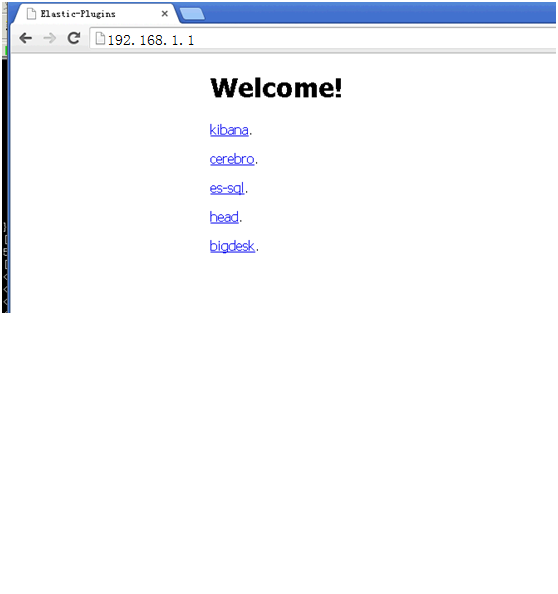
6.6访问nginx主页,使用插件。密码验证:用户user密码pass123
6.7安装遇到问题:
Nginx: error while loading shared libraries: libpcre.so.1解决
解决办法:
http://blog.csdn.net/ystyaoshengting/article/details/50504746
问题分析:
在redhat 64位机器上, nginx可能读取的pcre文件为/lib64/libpcre.so.1文件.
所以需要在/lib64/下建立软连接:
ln -s /usr/local/lib/libpcre.so. /lib64/
- 7x-pack破解
7.1创建LicenseVerifier.java文件
package org.elasticsearch.license;

    import java.nio.*;

    import java.util.*;

    import java.security.*;

    import org.elasticsearch.common.xcontent.*;

    import org.apache.lucene.util.*;

    import org.elasticsearch.common.io.*;

    import java.io.*;

    public class LicenseVerifier

    {

    public static boolean verifyLicense(final License license, final byte[] encryptedPublicKeyData) {

        return true;

        }

    public static boolean verifyLicense(final License license) {

        return true;

        }

    }
7.2编译LicenseVerifier.class
javac -cp "/home/ilog/elasticsearch-6.1.3/lib/elasticsearch-6.1.3.jar:/home/ilog/elasticsearch-6.1.3/lib/lucene-core-7.1.0.jar:/home/ilog/elasticsearch-6.1.3/plugins/x-pack/x-pack-6.1.3.jar" LicenseVerifier.java
7.3重新打包x-pack- 6.1.3.jar
解压x-pack/x-pack-6.1.3.jar包,替换jar包中的LicenseVerifier.class文件,重新打包
#创建temp-dir临时目录,解压jar包到临时目录
mkdir temp-jar

cp /home/ilog/elasticsearch-6.1./plugins/x-pack/x-pack-6.1..jar temp-jar

cd temp-jar

jar -xvf x-pack-6.1..jar

rm -rf x-pack-6.1..jar

#拷贝自己创建的class文件到org/elasticsearch/license/目录

cp LicenseVerifier.class org/elasticsearch/license/

#重新打包

jar -cvf x-pack-6.1..jar ./*

#将jar包覆盖到原目录

cp x-pack-6.1.3.jar /home/ilog/elasticsearch-6.1.3/plugins/x-pack/x-pack-6.1.3.jar
7.4重启elastic和kibana
bin/elasticsearch -d

bin/kibana &
7.5创建license文件,并上传(白金版,license到2050年)
vim platimum.json

{"license":{"uid":"e77971c5-c37e-42c8-b622-c22a9f9ee51c","type":"platinum","issue_date_in_millis":,"expiry_date_in_millis":,"max_nodes":,"issued_to":"user123","issuer":"Web Form","signature":"abcdef","start_date_in_millis":}}
7.6登录kibana上传license页面,上传license文件。
license上传地址:http://192.168.1.1:5601/app/kibana#/management/elasticsearch/license_management/upload_license
- 8生产环境没有互联网如何安装elastic插件
遇到的问题:安装npm,grunt需要联网,x-pack安装需要联网。其他都可以离线安装。
解决问题前提条件:有可以上网的测试机器。在测试环境上按以上步骤安装完所有插件
解决办法:
8.1在测试环境安装x-pack后,打包安装x-pack后的elastic目录,放到生产环境使用即可
8.2在测试环境安装node后,打包整个node目录,拷贝到生产环境,配置环境变量,即可使用node和grunt来启动essql和head
(3)安装elastic6.1.3及插件kibana,x-pack,essql,head,bigdesk,cerebro,ik的更多相关文章
- (1)安装elastic6.1.3及插件kibana,x-pack,essql,head,bigdesk,cerebro,ik
1.安装环境及程序版本 操作系统: centos6.7 jdk: 1.8.0_102 elastic: 1.6.3 kibana: 1.6.3 x-pack: 1.6.3 es-sql: 1.6.3 ...
- (2)安装elastic6.1.3及插件kibana,x-pack,essql,head,bigdesk,cerebro,ik
5.2kibana安装 5.2.1解压kibana安装包,修改config/kibana.yml中端口,服务器地址,elastic连接地址 -linux-x86_64.tar.gz cd kibana ...
- aws ec2 安装Elastic search 7.2.0 kibana 并配置 hanlp 分词插件
文章大纲 Elastic search & kibana & 分词器 安装 版本控制 下载地址 Elastic search安装 kibana 安装 分词器配置 Elastic sea ...
- ELK安装和配置及常用插件安装
环境 CentOS 7.3 root 用户 JDK 版本:1.8(最低要求),主推:JDK 1.8.0_121 以上 关闭 firewall systemctl stop firewalld.serv ...
- Sublime Text 2安装汉化破解、插件包安装教程
原文地址: Sublime Text 2安装汉化破解.插件包安装教程_百度经验 http://jingyan.baidu.com/article/ff4116259b057c12e48237b8.ht ...
- eclipse安装Veloeclipse(Velocity编辑插件)
eclipse安装Veloeclipse(Velocity编辑插件) Help-->install new software-->Add 增加 Name:Veloeclipse Value ...
- Windows 10环境安装VIM代码补全插件YouCompleteMe
Windows 10环境安装VIM代码补全插件YouCompleteMe 折腾一周也没搞定Windows下安装VIM代码补全插件YouCompleteMe,今天在家折腾一天总算搞定了.关键问题是在于P ...
- 安装freemarker模板的ftl插件
安装freemarker模板的ftl插件 同意协议 等待运行完成 重新启动eclipse 查看是否生效
- 【工具篇】Sublime Text 2 安装汉化破解、插件包安装教程详解
Sublime Text概述: Sublime Text是一个代码编辑器,也是HTML和散文先进的文本编辑器. 漂亮的用户界面和非凡的功能,例如:迷你地图,多选择,Python插件,代码段等等. 完全 ...
随机推荐
- 简单架构:反射实现抽象工厂+IDAL接口完全独立DAL
一.普通架构中存在的问题 StudentDB数据库,包含一张StudentInfoTB表,结构如下: s_id int primary key identity(1,1), s_name Nvarch ...
- 以后可得记住了--Python笔试面试题小结
1.字符串处理 将字符串中的数字替换成其两倍的值,例如: 修改前:"AS7G123m (d)F77k" 修改后:"AS14G246m (d)F154k" 个 ...
- 小白专场-多项式乘法与加法运算-c语言实现
目录 一.题意理解 二.求解思路 三.多项式的表示 3.1 数组 3.2 链表 四.程序框架搭建 五.如何读入多项式 六.如何将两个多项式相加 七.如何将两个多项式相乘 八.如何将多项式输出 一.题意 ...
- springboot事务中的一些坑
springboot开启声明式事务方式 在Application启动类中加入注解@EnableTransactionManagement(mode = AdviceMode.PROXY) 在需要加入事 ...
- redis 原理系列之--字符串存储的实现原理(1)
背景 redis功能强大,几乎已经成了现代大中型服务必备的缓存技术了. 除了十分给力的缓存功能,redis当做消息队列,数据库也有着不错的表现. 我们都知道,redis 有五种数据类型,string, ...
- Foxmail管理多个邮箱
使用Foxmail管理邮箱还是很方便的. 1. 下载Foxmail. 2. 双击,输入想关联的邮箱名称和密码,收取邮件即可. 3. 如果想关联多个账号,可点击Foxmail右上角的菜单栏,选择账户管理 ...
- codeforces E. Phone Talks(dp)
题目链接:http://codeforces.com/contest/158/problem/E 题意:给出一些电话,有打进来的时间和持续的时间,如果人在打电话,那么新打进来的电话入队,如果人没有打电 ...
- framework7 picker 具体使用
官网地址:https://framework7.io/docs/picker.html#dom-events <meta charset="UTF-8"> <me ...
- 【Offer】[31] 【栈的压入、弹出序列】
题目描述 思路分析 测试用例 Java代码 代码链接 题目描述 输入两个整数序列,第一个序列表示栈的压入顺序,请判断第二个序列是否为该栈的弹出顺序.假设压入栈的所有数字均不相等.例如,序列{1,2,3 ...
- 实现一个简易版的vuex持久化工具
背景 最近用uni-app开发小程序项目时,部分需要持久化的内容直接使用vue中的持久化插件貌似不太行,所以想着自己实现一下类似vuex-persistedstate插件的功能,想着功能不多,代码量应 ...