
MySQL系统变量auto_increment_increment与auto_increment_offset学习总结
在MySQL中,系统变量auto_increment_increment与auto_increment_offset是与自增列相关的两个参数变量。在官方文档中,将其划分为Replication Master Options and Variables 。具体参考官方文档17.1.6.2 Replication Master Options and Variables
auto_increment_offset : AUTO_INCREMENT列值的起点,也就是初始值。取值范围是1 .. 65535
auto_increment_increment : 控制列中的值的增量值,也就是步长。其默认值是1,取值范围是1 .. 65535
系统变量auto_increment_increment与auto_increment_offset 都有会话级别和全局级别两个值(注意:设置全局系统变量时,对当前连接或已存在的连接不生效,只对新的连接有效)。它们的取值范围为1 ..65535, 如果设置的时候超过这个范围的话,会是什么情况? 如下所示:
mysql> show variables like 'auto_increment%';
+--------------------------+-------+
| Variable_name | Value |
+--------------------------+-------+
| auto_increment_increment | 1 |
| auto_increment_offset | 1 |
+--------------------------+-------+
4 rows in set (0.00 sec)
mysql> set session auto_increment_increment=0;
Query OK, 0 rows affected, 1 warning (0.01 sec)
mysql> show variables like 'auto_increment%';
+--------------------------+-------+
| Variable_name | Value |
+--------------------------+-------+
| auto_increment_increment | 1 |
| auto_increment_offset | 1 |
+--------------------------+-------+
2 rows in set (0.00 sec)
mysql> set session auto_increment_increment=65536;
Query OK, 0 rows affected, 1 warning (0.00 sec)
mysql> show variables like 'auto_increment%';
+--------------------------+-------+
| Variable_name | Value |
+--------------------------+-------+
| auto_increment_increment | 65535 |
| auto_increment_offset | 1 |
+--------------------------+-------+
2 rows in set (0.00 sec)
mysql>
mysql> set session auto_increment_offset=-1;
Query OK, 0 rows affected, 1 warning (0.04 sec)
mysql> show variables like 'auto_increment%';
+--------------------------+-------+
| Variable_name | Value |
+--------------------------+-------+
| auto_increment_increment | 65535 |
| auto_increment_offset | 1 |
+--------------------------+-------+
2 rows in set (0.00 sec)
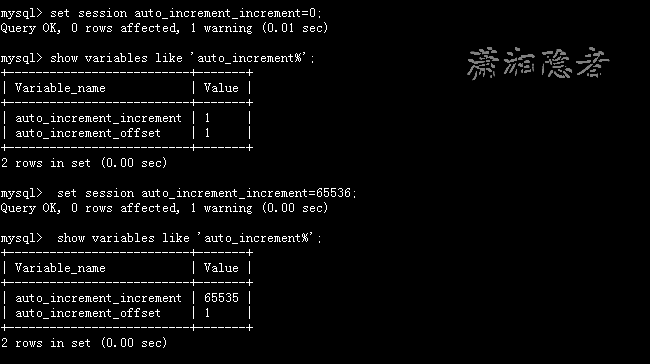
如上所示,如果系统变量设置其值小于1(0或负数),MySQL会默认设置为1 ,如果大于65535,MySQL会默认设置为65535. 也就是说这两个系统变量的取值范围为 1 ... 65535.
系统变量auto_increment_increment修改后,自增列的变化规律
如果我们想知道系统变量auto_increment_increment变化后,自增列的变化规律,最简单、有效的方式就是实验测试,如下所示:
mysql> drop table if exists test;
Query OK, 0 rows affected, 1 warning (0.00 sec)
mysql> create table test(id int auto_increment primary key, name varchar(32));
Query OK, 0 rows affected (0.03 sec)
mysql> insert into test(name) value('kerry1');
Query OK, 1 row affected (0.00 sec)
mysql> insert into test(name) value('kerry2');
Query OK, 1 row affected (0.01 sec)
mysql> select * from test;
+----+--------+
| id | name |
+----+--------+
| 1 | kerry1 |
| 2 | kerry2 |
+----+--------+
2 rows in set (0.01 sec)
mysql> show variables like 'auto_increment%';
+--------------------------+-------+
| Variable_name | Value |
+--------------------------+-------+
| auto_increment_increment | 1 |
| auto_increment_offset | 1 |
+--------------------------+-------+
2 rows in set (0.00 sec)
mysql> set session auto_increment_increment=3;
Query OK, 0 rows affected (0.00 sec)
mysql> insert into test(name) value('kerry3');
Query OK, 1 row affected (0.01 sec)
mysql> select * from test;
+----+--------+
| id | name |
+----+--------+
| 1 | kerry1 |
| 2 | kerry2 |
| 4 | kerry3 |
+----+--------+
3 rows in set (0.00 sec)
mysql>
mysql> set session auto_increment_increment=1;
Query OK, 0 rows affected (0.00 sec)
mysql> show variables like 'auto_increment%';
+--------------------------+-------+
| Variable_name | Value |
+--------------------------+-------+
| auto_increment_increment | 1 |
| auto_increment_offset | 1 |
+--------------------------+-------+
2 rows in set (0.00 sec)
mysql> truncate table test;
Query OK, 0 rows affected (0.05 sec)
mysql> insert into test(name) value('kerry1');
Query OK, 1 row affected (0.00 sec)
mysql> insert into test(name) value('kerry2');
Query OK, 1 row affected (0.00 sec)
mysql> insert into test(name) value('kerry3');
Query OK, 1 row affected (0.00 sec)
mysql> set session auto_increment_increment=3;
Query OK, 0 rows affected (0.00 sec)
mysql> show variables like 'auto_increment%';
+--------------------------+-------+
| Variable_name | Value |
+--------------------------+-------+
| auto_increment_increment | 3 |
| auto_increment_offset | 1 |
+--------------------------+-------+
2 rows in set (0.00 sec)
mysql> insert into test(name) value('kerry4');
Query OK, 1 row affected (0.03 sec)
mysql> select * from test;
+----+--------+
| id | name |
+----+--------+
| 1 | kerry1 |
| 2 | kerry2 |
| 3 | kerry3 |
| 4 | kerry4 |
+----+--------+
4 rows in set (0.00 sec)
mysql>
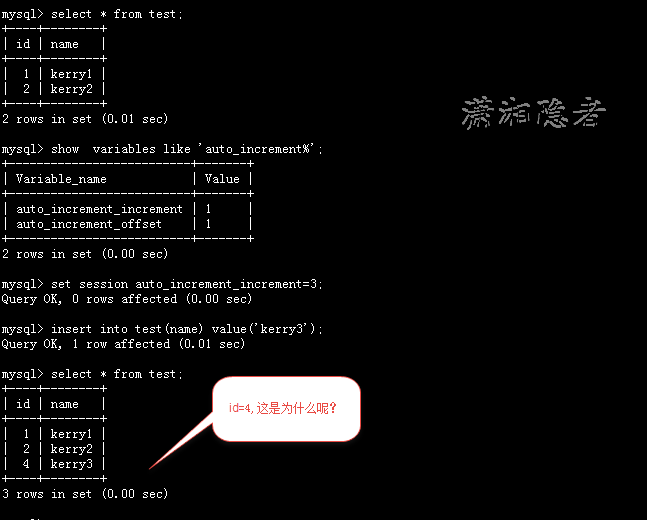
为什么修改auto_increment_increment=3后,新增的数据id=4呢? 其实这个是因为自增列的计算逻辑为 auto_increment_offset + N × auto_increment_increment N表示第几次,从1开始计算(auto_increment_offset=1),并且计算值必须大于自增列的最大值(Max(ID)),
对于第一种情况: id 1、2, 因为最大值为2,而自增列的取值为1+1*3= 4, 所以自增列取值为4
对于第二种情况: id= 1、2、3. 因为最大值为3,而自增列的取值为1+1*3= 4, 所以自增列取值为4
官方文档的描述如下所示:
If either of these variables is changed, and then new rows inserted into a table containing an AUTO_INCREMENT column, the results may seem counterintuitive because the series of AUTO_INCREMENT values is calculated without regard to any values already present in the column, and the next value inserted is the least value in the series that is greater than the maximum existing value in the AUTO_INCREMENT column. The series is calculated like this:
auto_increment_offset + N × auto_increment_increment
where N is a positive integer value in the series [1, 2, 3, ...].
注意:如果表没有值,自增列第一个值为auto_increment_offset
如下所示对于这种情况,新增列的值为1+2*3=7 ,因为已有1、4这样的取值。
mysql> set session auto_increment_increment=1;
Query OK, 0 rows affected (0.00 sec)
mysql> show variables like 'auto_increment%';
+--------------------------+-------+
| Variable_name | Value |
+--------------------------+-------+
| auto_increment_increment | 1 |
| auto_increment_offset | 1 |
+--------------------------+-------+
2 rows in set (0.00 sec)
mysql> truncate table test;
Query OK, 0 rows affected (0.02 sec)
mysql> insert into test(name) value('kerry1');
Query OK, 1 row affected (0.01 sec)
mysql> insert into test(name) value('kerry2');
Query OK, 1 row affected (0.02 sec)
mysql> insert into test(name) value('kerry3');
Query OK, 1 row affected (0.00 sec)
mysql> insert into test(name) value('kerry4');
Query OK, 1 row affected (0.00 sec)
mysql> select * from test;
+----+--------+
| id | name |
+----+--------+
| 1 | kerry1 |
| 2 | kerry2 |
| 3 | kerry3 |
| 4 | kerry4 |
+----+--------+
4 rows in set (0.00 sec)
mysql> set session auto_increment_increment=3;
Query OK, 0 rows affected (0.00 sec)
mysql> insert into test(name) value('kerry5');
Query OK, 1 row affected (0.03 sec)
mysql> select * from test;
+----+--------+
| id | name |
+----+--------+
| 1 | kerry1 |
| 2 | kerry2 |
| 3 | kerry3 |
| 4 | kerry4 |
| 7 | kerry5 |
+----+--------+
5 rows in set (0.00 sec)
auto_increment_offset修改后,自增列的变化规律
换个测试方法,如果修改系统变量auto_increment_offset的话,自增列会怎么变化呢?且看下面实验
mysql> select * from test;
+----+--------+
| id | name |
+----+--------+
| 1 | kerry1 |
| 2 | kerry2 |
| 3 | kerry3 |
| 4 | kerry4 |
| 7 | kerry5 |
+----+--------+
5 rows in set (0.00 sec)
mysql> show variables like 'auto_increment%';
+--------------------------+-------+
| Variable_name | Value |
+--------------------------+-------+
| auto_increment_increment | 3 |
| auto_increment_offset | 1 |
+--------------------------+-------+
2 rows in set (0.00 sec)
mysql> set auto_increment_offset=2;
Query OK, 0 rows affected (0.00 sec)
mysql> insert into test(name) value('kerry6');
Query OK, 1 row affected (0.01 sec)
mysql> select * from test;
+----+--------+
| id | name |
+----+--------+
| 1 | kerry1 |
| 2 | kerry2 |
| 3 | kerry3 |
| 4 | kerry4 |
| 7 | kerry5 |
| 11 | kerry6 |
+----+--------+
6 rows in set (0.00 sec)
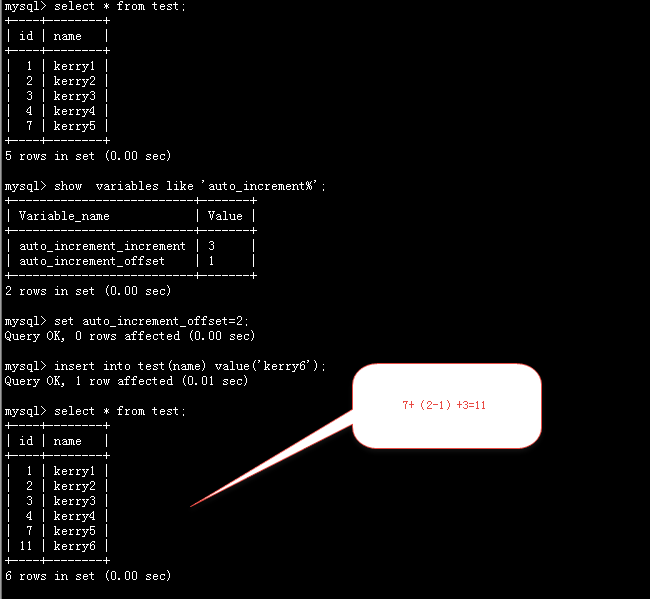
其实这个按下面这个公式来计算的:max(id)+(new_offset-old_offset)+increment ,也就是说变化auto_increment_offset后的第一个值为max(id)+(new_offset-old_offset)+increment之后再按步长递增。
max(id) =7
new_offset =2
old_offset =1
increment =3
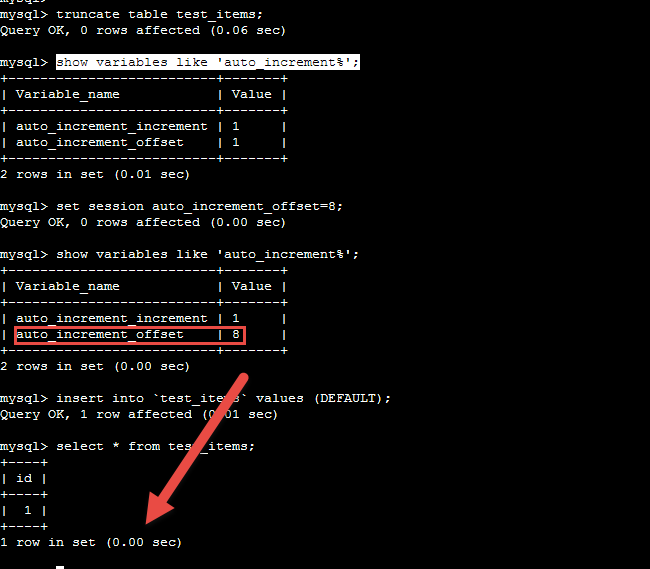
另外,需要注意的是: 如果设置auto_increment_offset的值远远大于auto_increment_increment, MySQL会忽略系统变量auto_increment_offset的值。
When the value of auto_increment_offset is greater than that of auto_increment_increment, the value of auto_increment_offset is ignored.(如果auto_increment_offset的值大于auto_increment_increment的值,则auto_increment_offset的值会被忽略)
另外,关于系统变量auto_increment_increment,在一些MySQL版本中存在一个Bug:”Bug 15851528 : DUPLICATE KEY ERROR ON AUTO-INC PK WITH MIXED AUTO_INCREMENT_INCREMENT CLIENTS“, 下面演示一下这个Bug。更多详细信息,参考下面摘抄的官方资料:
1: 如下所示,首先准备好测速所需的相关表和存储过程。
mysql> select version();
+------------+
| version() |
+------------+
| 5.6.23-log |
+------------+
1 row in set (0.00 sec)
mysql> show variables like 'innodb_autoinc_lock_mode';
+--------------------------+-------+
| Variable_name | Value |
+--------------------------+-------+
| innodb_autoinc_lock_mode | 1 |
+--------------------------+-------+
1 row in set (0.00 sec)
mysql> drop table if exists test_items;
Query OK, 0 rows affected (0.09 sec)
mysql> create table test_items (id int(11) auto_increment primary key);
Query OK, 0 rows affected (0.01 sec)
mysql> delimiter &&
mysql> drop procedure if exists prc_insert;
->
-> create procedure prc_insert(in cnt int)
-> begin
-> declare i int;
-> set i=1;
-> while i < cnt do
-> insert into `test_items` values (DEFAULT);
->
-> set i = i+1;
->
-> end while;
-> end &&
Query OK, 0 rows affected (0.00 sec)
Query OK, 0 rows affected (0.00 sec)
mysql> delimiter ;
2:在连接A中,设置系统变量:auto_increment_increment=1
mysql> select connection_id();
+-----------------+
| connection_id() |
+-----------------+
| 16 |
+-----------------+
1 row in set (0.00 sec)
mysql> set auto_increment_increment=1;
Query OK, 0 rows affected (0.00 sec)
mysql> show variables like 'auto_increment%';
+--------------------------+-------+
| Variable_name | Value |
+--------------------------+-------+
| auto_increment_increment | 1 |
| auto_increment_offset | 1 |
+--------------------------+-------+
2 rows in set (0.01 sec)
3:在连接B中,设置系统变量:auto_increment_increment=2
mysql> select connection_id();
+-----------------+
| connection_id() |
+-----------------+
| 14 |
+-----------------+
1 row in set (0.00 sec)
mysql> set auto_increment_increment=2;
Query OK, 0 rows affected (0.00 sec)
mysql> show variables like 'auto_increment%';
+--------------------------+-------+
| Variable_name | Value |
+--------------------------+-------+
| auto_increment_increment | 2 |
| auto_increment_offset | 1 |
+--------------------------+-------+
2 rows in set (0.00 sec)
4:在两个连接中同时执行存储过程call prc_insert(100000); 构造并发插入的场景,就能构造出这个Bug。 如下所示:
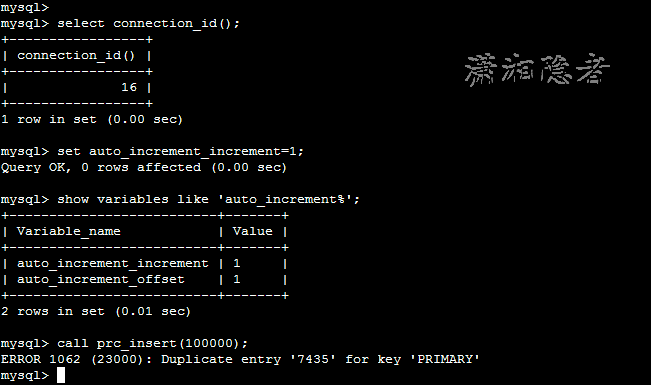
其实,其它场景也能构造出这样的错误
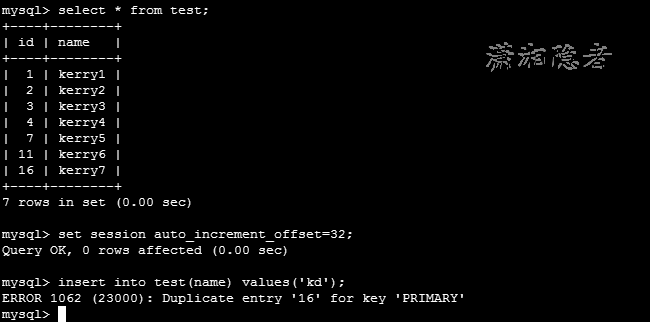
注意:在官方文档中:Error Duplicate Entry ' ' For Key 'PRIMARY' on Auto-Increment Primary Key when changing AUTO_INCREMENT_INCREMENT (文档 ID 2498911.1),提示这个Bug在下面版本中已经fix掉
This BUG is fixed in 5.5.65, 5.6.45, 5.7.27, 8.0.17 releases.
For older versions than the above versions, workaround is to use the same AUTO_INCREMENT_INCREMENT for all sessions and do not try to set different values in the sessions running in parallel.
Bug 15851528 : DUPLICATE KEY ERROR ON AUTO-INC PK WITH MIXED AUTO_INCREMENT_INCREMENT CLIENTS
|
产品线 |
Oracle Database Products |
系列 |
MySQL |
|
区域 |
MySQL Server |
产品 |
8478 - MySQL Server |
Hdr: 15851528 N/A ENINNODB 5.5.28 PRODID-8478 PORTID-289 14049391
Abstract: DUPLICATE KEY ERROR ON AUTO-INC PK WITH MIXED AUTO_INCREMENT_INCREMENT CLIENTS
*** 11/08/12 12:19 pm ***
* Originally logged as bug 67526 in the MySQL bug system
by: Rob Linewewaver on 08-Nov-2012 19:51:14
- See http://bugs.mysql.com/bug.php?id=67526
- Reporter email is: rlineweaver@rosettastone.com
- Bug was reported against version(s): 5.5.28, 5.5.29, 5.7.0
Description:
On MySQL 5.5 with innodb_autoinc_lock_mode=1, with connected clients that
have different values for auto_increment_increment (some with 1 and some with
2) doing concurrent inserts onto an InnoDB table with an auto-increment
primary key, we see duplicate key errors like the following:
Duplicate entry '21211440' for key 'PRIMARY'
No value was specified for the auto-increment column in the insert queries.
I expect to never see a duplicate key error for an auto-increment PK in this
case.
Scenarios tested:
1. MySQL 5.1.66 + innodb_autoinc_lock_mode=1: no problem
2. MySQL 5.5.28 + innodb_autoinc_lock_mode=1: duplicate key error reliably
produced within a few seconds
2a. with both clients using auto_increment_increment = 1: no problem
2b. with both clients using auto_increment_increment = 2: no problem
3. MySQL 5.5.28 + innodb_autoinc_lock_mode=0: no problem
How To Repeat:
1. Set up a MySQL 5.5.28 server with innodb_autoinc_lock_mode=1
2. Create a simple InnoDB table with an auto-increment PK:
create table test_items (id int(11) auto_increment primary key);
3. Connect client 1 and set auto_increment_increment to 1:
set auto_increment_increment=1;
4. Connect client 2 and set auto_increment_increment to 2:
set auto_increment_increment=2;
5. Perform repeated inserts from both clients at the same time:
insert into `test_items` values (DEFAULT);
6. Watch for "Duplicate entry ... for key 'PRIMARY'" errors
Suggested Fix:
(none)
* Original bug verified in the MySQL bug system by: Sveta Smirnova.
*** 11/08/12 12:19 pm ***
* Original entry logged in the MySQL bug system by: Sveta Smirnova
on 08-Nov-2012 21:18:40
Thank you for the report.
Verified as described.
Test case for MTR:
--source include/have_innodb.inc
create table test_items (id int(11) auto_increment primary key)
engine=innodb;
set auto_increment_increment=1;
delimiter |;
create procedure bug67526(iterations int) begin while iterations > 0 do set
iterations = iterations -1; insert into `test_items` values (DEFAULT); end
while; end;|
delimiter ;|
connect(con1, localhost, root,,);
connection con1;
set auto_increment_increment=2;
connection default;
--send call bug67526(10000);
connection con1;
call bug67526(10000);
connection default;
--reap
select max(id) from test_items;
*** 11/08/12 12:20 pm *** (CHG: Sta->11)
*** 11/08/12 01:42 pm ***
* Original entry logged in the MySQL bug system by: Rob Lineweaver
on 08-Nov-2012 22:01:22
fixing typo in tag
*** 11/21/12 12:41 pm ***
*** 03/01/13 02:27 pm ***
*** 03/01/13 02:27 pm ***
*** 05/13/13 12:10 am ***
*** 05/13/13 12:10 am ***
*** 11/19/13 04:42 am ***
* Original entry logged in the MySQL bug system by: Sam Butler
on 19-Nov-2013 13:08:42
We're seeing the same bug reproduced on 5.5.33 (Linux) with two replicating
servers that have the same auto_increment_increment value, but a different
offset. A single client is connected and trying to insert into the table that
throws the duplicate PK error on an auto inc field.
*** 02/11/14 09:44 pm ***
*** 08/20/15 06:42 am ***
* Original entry logged in the MySQL bug system by: Rolf Martin-Hoster
on 20-Aug-2015 14:49:51
As noticed by Sam this is occurring with same auto_increment_increment and
is similar if not the same as http://bugs.mysql.com/bug.php?id=76872
*** 01/20/18 05:03 pm ***
*** 01/20/18 05:03 pm ***
*** 12/28/18 05:59 am ***
*** 12/28/18 06:03 am ***
*** 02/28/19 03:42 am ***
*** 02/28/19 09:11 am ***
*** 02/28/19 09:20 am ***
*** 02/28/19 09:20 am ***
*** 02/28/19 08:52 pm ***
*** 03/11/19 02:25 am ***
I was able to reproduce with
create table t(a serial,name varchar(200),primary key(a))engine=innodb;
set SESSION auto_increment_increment=2;
insert into t(name) values("vijay"),( "rohan"),("deepak"),("parakh");
--connect(con1,localhost,root,,)
--connection con1
set auto_increment_increment=2 ;
insert into t(name) values("rahul");
--connection default
set auto_increment_increment=1;
insert into t(name) values("vijay"),( "rohan"),("deepak"),("parakh");
--connection con1
set auto_increment_increment=1;
insert into t(name) values("rahul");
will post my analysis further
*** 04/08/19 02:42 am ***
* Original entry logged in the MySQL bug system by: Pavel Katiushyn
on 08-Apr-2019 08:47:31
I had the same issue on 5.7.25.
*** 05/01/19 08:35 pm ***
*** 05/01/19 08:35 pm *** (CHG: Base Bug-> NULL -> 14049391 [OTHER])
*** 05/01/19 10:22 pm ***
Pushed into repo mysql branch mysql-5.5 5.5.65
(hash:87d8fb242134b8d1d97734b2ad6023d36d814067
committer:rahul.m.malik@oracle.com)
(merge vers:5.5.65)
Bug#15851528 DUPLICATE KEY ERROR ON AUTO-INC PK WITH MIXED
AUTO_INCREMENT_INCREMENT CLIENTS Problem: Clients running different values
for auto_increment_increment and doing concurrent inserts leads
*** 05/01/19 10:22 pm ***
*** 05/01/19 10:22 pm *** (CHG: Sta->80)
Pushed into repo mysql branch mysql-5.6 5.6.45
(hash:87d8fb242134b8d1d97734b2ad6023d36d814067
committer:rahul.m.malik@oracle.com)
(merge vers:5.6.45)
Bug#15851528 DUPLICATE KEY ERROR ON AUTO-INC PK WITH MIXED
AUTO_INCREMENT_INCREMENT CLIENTS Problem: Clients running different values
for auto_increment_increment and doing concurrent inserts leads
*** 05/01/19 10:22 pm ***
Pushed into repo mysql branch mysql-5.7 5.7.27
(hash:87d8fb242134b8d1d97734b2ad6023d36d814067
committer:rahul.m.malik@oracle.com)
(merge vers:5.7.27)
Bug#15851528 DUPLICATE KEY ERROR ON AUTO-INC PK WITH MIXED
AUTO_INCREMENT_INCREMENT CLIENTS Problem: Clients running different values
for auto_increment_increment and doing concurrent inserts leads
*** 05/01/19 10:22 pm ***
Pushed into repo mysql branch mysql-8.0 8.0.17
(hash:87d8fb242134b8d1d97734b2ad6023d36d814067
committer:rahul.m.malik@oracle.com)
(merge vers:8.0.17)
Bug#15851528 DUPLICATE KEY ERROR ON AUTO-INC PK WITH MIXED
AUTO_INCREMENT_INCREMENT CLIENTS Problem: Clients running different values
for auto_increment_increment and doing concurrent inserts leads
*** 05/01/19 10:22 pm ***
Pushed into repo mysql branch mysql-trunk 8.0.18-tr
(hash:87d8fb242134b8d1d97734b2ad6023d36d814067
committer:rahul.m.malik@oracle.com)
(merge vers:8.0.18-tr)
Bug#15851528 DUPLICATE KEY ERROR ON AUTO-INC PK WITH MIXED
AUTO_INCREMENT_INCREMENT CLIENTS Problem: Clients running different values
for auto_increment_increment and doing concurrent inserts leads
*** 05/01/19 10:22 pm ***
*** 05/03/19 02:12 am ***
Pushed into repo mysql branch mysql-5.7 5.7.27
(hash:847254dd0d79ef6b1bed429883ec47e72447ffd2
committer:rahul.m.malik@oracle.com)
(merge vers:5.7.27)
Bug#15851528 DUPLICATE KEY ERROR ON AUTO-INC PK WITH MIXED
AUTO_INCREMENT_INCREMENT CLIENTS
Pushed into repo mysql branch mysql-8.0 8.0.17
(hash:847254dd0d79ef6b1bed429883ec47e72447ffd2
committer:rahul.m.malik@oracle.com)
(merge vers:8.0.17)
Bug#15851528 DUPLICATE KEY ERROR ON AUTO-INC PK WITH MIXED
AUTO_INCREMENT_INCREMENT CLIENTS
Pushed into repo mysql branch mysql-trunk 8.0.18-tr
(hash:847254dd0d79ef6b1bed429883ec47e72447ffd2
committer:rahul.m.malik@oracle.com)
(merge vers:8.0.18-tr)
Bug#15851528 DUPLICATE KEY ERROR ON AUTO-INC PK WITH MIXED
AUTO_INCREMENT_INCREMENT CLIENTS
*** 05/07/19 02:13 pm ***
Bug#15851528 DUPLICATE KEY ERROR ON AUTO-INC PK WITH MIXED
AUTO_INCREMENT_INCREMENT CLIENTS
Problem:
Clients running different values for auto_increment_increment
and doing concurrent inserts leads to "Duplicate key error" in one of them.
Analysis:
When Autoinc_increment value is reduced in a session,
InnoDB uses last autoinc_increment value
to recalculate the autoinc value.
In case, some other session has inserted a value
with different autoinc_increment, InnoDB recalculate
autoinc values based on current session previous autoinc_increment
instead of considering the autoinc_increment used for last insert
across all session
Fix:
revert 1d4494d93c2f as it causing the current bug.
*** 05/07/19 02:37 pm ***
Fixed as of the upcoming 5.5.65, 5.6.45, 5.7.27, 8.0.17 releases, and here's
the changelog entry:
Client sessions using different auto_increment_increment values while
performing concurrent insert operations could cause a duplicate key error.
*** 05/07/19 02:37 pm *** (CHG: Sta->74)
*** 05/29/19 07:12 am ***
Pushed into repo mysql branch mysql-5.5-cluster-7.2 5.5.65-ndb-7.2.38
(hash:87d8fb242134b8d1d97734b2ad6023d36d814067
committer:rahul.m.malik@oracle.com)
(merge vers:7.2.38)
Bug#15851528 DUPLICATE KEY ERROR ON AUTO-INC PK WITH MIXED
AUTO_INCREMENT_INCREMENT CLIENTS Problem: Clients running different values
for auto_increment_increment and doing concurrent inserts leads
*** 05/29/19 07:12 am ***
*** 05/29/19 07:12 am *** (CHG: Sta->80)
*** 05/29/19 10:24 am ***
*** 05/29/19 10:24 am *** (CHG: Sta->74)
参考资料
https://dev.mysql.com/doc/refman/8.0/en/replication-options-master.html
Bug 15851528 : DUPLICATE KEY ERROR ON AUTO-INC PK WITH MIXED AUTO_INCREMENT_INCREMENT CLIENTS
MySQL系统变量auto_increment_increment与auto_increment_offset学习总结的更多相关文章
- MySQL系统变量sql_safe_updates总结
MySQL系统变量sql_safe_updates总结 在MySQL中,系统变量sql_safe_updates是个非常有意思的系统变量,在Oracle和SQL Server中都没有见过这样的参数 ...
- mysql系统变量查询
mysql系统变量包括全局变量(global)和会话变量(session),global变量对所有session生效,session变量包括global变量.mysql调优必然会涉及这些系统变量的调整 ...
- mysql 系统变量和session变量
mysql系统变量包括全局变量(global)和会话变量(session),global变量对所有session生效,session变量包括global变量.mysql调优必然会涉及这些系统变量的调整 ...
- 查看MySQL系统变量的命令
用了好长时间mysql,却没有用心记住一些有用的东西,加油! mysql> SHOW VARIABLES; +---------------------------------+-------- ...
- mysql 系统变量
show variables; ---------------------------------+-------------------------------------------------- ...
- mysql系统变量与状态变量
一.系统变量分为全局系统变量和会话系统变量:有些变量既是全局系统变量,有些变量只有全局的,有些变量只有会话的. .变量的查询: show global variables like 'log' \G; ...
- mysql系统变量
http://dev.mysql.com/doc/refman/5.5/en/server-system-variables.html Table 5.2 System Variable Summar ...
- MySQL系统变量 sql_mode 详解
转载自:http://tech.it168.com/a2012/0822/1388/000001388401_all.shtml MySQL数据类型:SQL_MODE设置不容忽视 SQL_MODE可能 ...
- 可遇不可求的Question之MySQL系统变量interactive_timeout 与 wait_timeout 篇
mysql>show variables like '%timeout'; 打印结果如下: +----------------------------+-------+ | Variable_n ...
随机推荐
- CPU的物理数、核心数、线程数
最近了解下CPU的参数,主要是对常见的CPU参数指标:物理数.核心数以及线程数做了下了解.增长了点自己的见识,方便自己回忆和分享,记录下来.参考了网上的一些说明并加以整理,形成该随笔.主要参考链接如下 ...
- 无法导入要素类到SDE中
我遇到的原因的表空间不足(并且表空间没有设置为自动增长) 首先通过SELECT FILE_NAME, TABLESPACE_NAME, AUTOEXTENSIBLE FROM DBA_DATA_FIL ...
- 【Java】Java 单文件下载及重命名
代码(仅供参考): /* * 另存为 */ @RequestMapping("/saveAs.do") public @ResponseBody void saveAs(Strin ...
- spring5 源码深度解析----- Spring事务 是怎么通过AOP实现的?(100%理解Spring事务)
此篇文章需要有SpringAOP基础,知道AOP底层原理可以更好的理解Spring的事务处理. 自定义标签 对于Spring中事务功能的代码分析,我们首先从配置文件开始人手,在配置文件中有这样一个配置 ...
- JDK-基于Windows环境搭建
JDK安装: 毋庸置疑你要跑java程序,肯定少不了JDK,如jemter还有还有~ 下载jdk地址1:https://pan.baidu.com/s/1FIvGNvZSy0EpCBxHCz07nA ...
- drf 框架
一. drf简介 drf框架,全程: django-rest framework , rest是插件名字,django插件的名字叫rest,framework是框架的意思 二. 接口 在平时生活 ...
- Spring Security 学习记录
一.核心拦截器详细说明 1.WebAsyncManagerIntegrationFilter 根据请求封装获取WebAsyncManager 从WebAsyncManager获取/注册Security ...
- 乱七八糟的学习资料汇总(python3.x,pyqt,svn,git)
入门涉猎资料: python3.6.3中文文档:https://www.runoob.com/manual/pythontutorial3/docs/html/interpreter.html pyt ...
- 重新整理django中Auth模块
0907自我总结 重新整理django中Auth模块 from django.contrib import auth 一.设置 默认Auth表单 auth默认是使用自带的user表单 自定义Auth表 ...
- Flask的请求扩展
from flask import Flask,request app = Flask(__name__) 一.请求前 before_request 用法 @app.before_request de ...