
Spark 系列(十五)—— Spark Streaming 整合 Flume
一、简介
Apache Flume 是一个分布式,高可用的数据收集系统,可以从不同的数据源收集数据,经过聚合后发送到分布式计算框架或者存储系统中。Spark Straming 提供了以下两种方式用于 Flume 的整合。
二、推送式方法
在推送式方法 (Flume-style Push-based Approach) 中,Spark Streaming 程序需要对某台服务器的某个端口进行监听,Flume 通过 avro Sink 将数据源源不断推送到该端口。这里以监听日志文件为例,具体整合方式如下:
2.1 配置日志收集Flume
新建配置 netcat-memory-avro.properties,使用 tail 命令监听文件内容变化,然后将新的文件内容通过 avro sink 发送到 hadoop001 这台服务器的 8888 端口:
#指定agent的sources,sinks,channels
a1.sources = s1
a1.sinks = k1
a1.channels = c1

#配置sources属性
a1.sources.s1.type = exec
a1.sources.s1.command = tail -F /tmp/log.txt
a1.sources.s1.shell = /bin/bash -c
a1.sources.s1.channels = c1

#配置sink
a1.sinks.k1.type = avro
a1.sinks.k1.hostname = hadoop001
a1.sinks.k1.port = 8888
a1.sinks.k1.batch-size = 1
a1.sinks.k1.channel = c1

#配置channel类型
a1.channels.c1.type = memory
a1.channels.c1.capacity = 1000
a1.channels.c1.transactionCapacity = 100
2.2 项目依赖
项目采用 Maven 工程进行构建,主要依赖为 spark-streaming 和 spark-streaming-flume。
<properties>
    <scala.version>2.11</scala.version>
    <spark.version>2.4.0</spark.version>
</properties>

<dependencies>
    <!-- Spark Streaming-->
    <dependency>
        <groupId>org.apache.spark</groupId>
        <artifactId>spark-streaming_${scala.version}</artifactId>
        <version>${spark.version}</version>
    </dependency>
    <!-- Spark Streaming 整合 Flume 依赖-->
    <dependency>
        <groupId>org.apache.spark</groupId>
        <artifactId>spark-streaming-flume_${scala.version}</artifactId>
        <version>2.4.3</version>
    </dependency>
</dependencies>
2.3 Spark Streaming接收日志数据
调用 FlumeUtils 工具类的 createStream 方法,对 hadoop001 的 8888 端口进行监听,获取到流数据并进行打印:
import org.apache.spark.SparkConf
import org.apache.spark.streaming.{Seconds, StreamingContext}
import org.apache.spark.streaming.flume.FlumeUtils

object PushBasedWordCount {

  def main(args: Array[String]): Unit = {
    val sparkConf = new SparkConf()
    val ssc = new StreamingContext(sparkConf, Seconds(5))
    // 1.获取输入流
    val flumeStream = FlumeUtils.createStream(ssc, "hadoop001", 8888)
    // 2.打印输入流的数据
    flumeStream.map(line => new String(line.event.getBody.array()).trim).print()

    ssc.start()
    ssc.awaitTermination()
  }
}
2.4 项目打包
因为 Spark 安装目录下是不含有 spark-streaming-flume 依赖包的,所以在提交到集群运行时候必须提供该依赖包,你可以在提交命令中使用 --jar 指定上传到服务器的该依赖包,或者使用 --packages org.apache.spark:spark-streaming-flume_2.12:2.4.3 指定依赖包的完整名称,这样程序在启动时会先去中央仓库进行下载。
这里我采用的是第三种方式:使用 maven-shade-plugin 插件进行 ALL IN ONE 打包,把所有依赖的 Jar 一并打入最终包中。需要注意的是 spark-streaming 包在 Spark 安装目录的 jars 目录中已经提供,所以不需要打入。插件配置如下:
<build>
    <plugins>
        <plugin>
            <groupId>org.apache.maven.plugins</groupId>
            <artifactId>maven-compiler-plugin</artifactId>
            <configuration>
                <source>8</source>
                <target>8</target>
            </configuration>
        </plugin>
        <!--使用 shade 进行打包-->
        <plugin>
            <groupId>org.apache.maven.plugins</groupId>
            <artifactId>maven-shade-plugin</artifactId>
            <configuration>
                <createDependencyReducedPom>true</createDependencyReducedPom>
                <filters>
                    <filter>
                        <artifact>*:*</artifact>
                        <excludes>
                            <exclude>META-INF/*.SF</exclude>
                            <exclude>META-INF/*.sf</exclude>
                            <exclude>META-INF/*.DSA</exclude>
                            <exclude>META-INF/*.dsa</exclude>
                            <exclude>META-INF/*.RSA</exclude>
                            <exclude>META-INF/*.rsa</exclude>
                            <exclude>META-INF/*.EC</exclude>
                            <exclude>META-INF/*.ec</exclude>
                            <exclude>META-INF/MSFTSIG.SF</exclude>
                            <exclude>META-INF/MSFTSIG.RSA</exclude>
                        </excludes>
                    </filter>
                </filters>
                <artifactSet>
                    <excludes>
                        <exclude>org.apache.spark:spark-streaming_${scala.version}</exclude>
                        <exclude>org.scala-lang:scala-library</exclude>
                        <exclude>org.apache.commons:commons-lang3</exclude>
                    </excludes>
                </artifactSet>
            </configuration>
            <executions>
                <execution>
                    <phase>package</phase>
                    <goals>
                        <goal>shade</goal>
                    </goals>
                    <configuration>
                        <transformers>
                            <transformer
                              implementation="org.apache.maven.plugins.shade.resource.ServicesResourceTransformer"/>
                            <transformer
                              implementation="org.apache.maven.plugins.shade.resource.ManifestResourceTransformer">
                            </transformer>
                        </transformers>
                    </configuration>
                </execution>
            </executions>
        </plugin>
        <!--打包.scala 文件需要配置此插件-->
        <plugin>
            <groupId>org.scala-tools</groupId>
            <artifactId>maven-scala-plugin</artifactId>
            <version>2.15.1</version>
            <executions>
                <execution>
                    <id>scala-compile</id>
                    <goals>
                        <goal>compile</goal>
                    </goals>
                    <configuration>
                        <includes>
                            <include>**/*.scala</include>
                        </includes>
                    </configuration>
                </execution>
                <execution>
                    <id>scala-test-compile</id>
                    <goals>
                        <goal>testCompile</goal>
                    </goals>
                </execution>
            </executions>
        </plugin>
    </plugins>
</build>本项目完整源码见:spark-streaming-flume
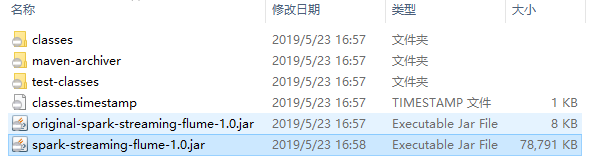
使用 mvn clean package 命令打包后会生产以下两个 Jar 包,提交 非 original 开头的 Jar 即可。
2.5 启动服务和提交作业
启动 Flume 服务:
flume-ng agent \
--conf conf \
--conf-file /usr/app/apache-flume-1.6.0-cdh5.15.2-bin/examples/netcat-memory-avro.properties \
--name a1 -Dflume.root.logger=INFO,console
提交 Spark Streaming 作业:
spark-submit \
--class com.heibaiying.flume.PushBasedWordCount \
--master local[4] \
/usr/appjar/spark-streaming-flume-1.0.jar
2.6 测试
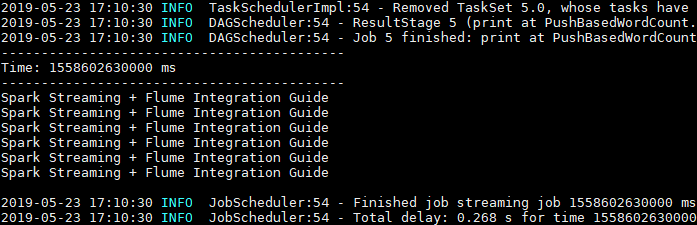
这里使用 echo 命令模拟日志产生的场景,往日志文件中追加数据,然后查看程序的输出:

Spark Streaming 程序成功接收到数据并打印输出:
2.7 注意事项
1. 启动顺序
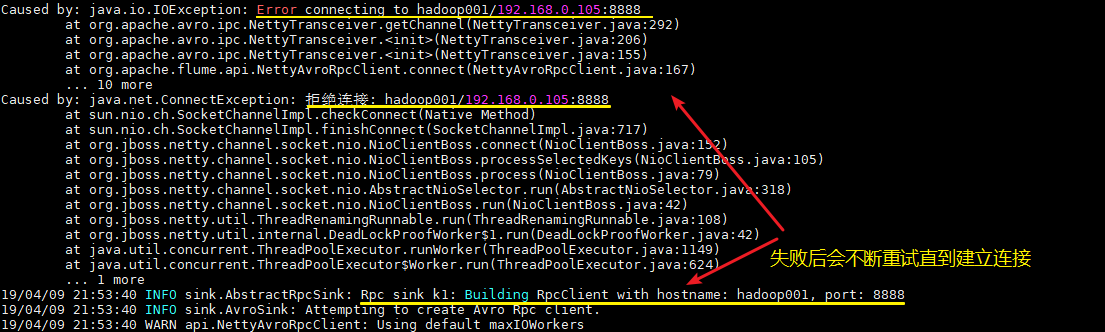
这里需要注意的,不论你先启动 Spark 程序还是 Flume 程序,由于两者的启动都需要一定的时间,此时先启动的程序会短暂地抛出端口拒绝连接的异常,此时不需要进行任何操作,等待两个程序都启动完成即可。
2. 版本一致
最好保证用于本地开发和编译的 Scala 版本和 Spark 的 Scala 版本一致,至少保证大版本一致,如都是 2.11。
三、拉取式方法
拉取式方法 (Pull-based Approach using a Custom Sink) 是将数据推送到 SparkSink 接收器中,此时数据会保持缓冲状态,Spark Streaming 定时从接收器中拉取数据。这种方式是基于事务的,即只有在 Spark Streaming 接收和复制数据完成后,才会删除缓存的数据。与第一种方式相比,具有更强的可靠性和容错保证。整合步骤如下:
3.1 配置日志收集Flume
新建 Flume 配置文件 netcat-memory-sparkSink.properties,配置和上面基本一致,只是把 a1.sinks.k1.type 的属性修改为 org.apache.spark.streaming.flume.sink.SparkSink,即采用 Spark 接收器。
#指定agent的sources,sinks,channels
a1.sources = s1
a1.sinks = k1
a1.channels = c1

#配置sources属性
a1.sources.s1.type = exec
a1.sources.s1.command = tail -F /tmp/log.txt
a1.sources.s1.shell = /bin/bash -c
a1.sources.s1.channels = c1

#配置sink
a1.sinks.k1.type = org.apache.spark.streaming.flume.sink.SparkSink
a1.sinks.k1.hostname = hadoop001
a1.sinks.k1.port = 8888
a1.sinks.k1.batch-size = 1
a1.sinks.k1.channel = c1

#配置channel类型
a1.channels.c1.type = memory
a1.channels.c1.capacity = 1000
a1.channels.c1.transactionCapacity = 100
2.2 新增依赖
使用拉取式方法需要额外添加以下两个依赖:
<dependency>
    <groupId>org.scala-lang</groupId>
    <artifactId>scala-library</artifactId>
    <version>2.12.8</version>
</dependency>
<dependency>
    <groupId>org.apache.commons</groupId>
    <artifactId>commons-lang3</artifactId>
    <version>3.5</version>
</dependency>
注意:添加这两个依赖只是为了本地测试,Spark 的安装目录下已经提供了这两个依赖,所以在最终打包时需要进行排除。
2.3 Spark Streaming接收日志数据
这里和上面推送式方法的代码基本相同,只是将调用方法改为 createPollingStream。
import org.apache.spark.SparkConf
import org.apache.spark.streaming.{Seconds, StreamingContext}
import org.apache.spark.streaming.flume.FlumeUtils

object PullBasedWordCount {

  def main(args: Array[String]): Unit = {

    val sparkConf = new SparkConf()
    val ssc = new StreamingContext(sparkConf, Seconds(5))
    // 1.获取输入流
    val flumeStream = FlumeUtils.createPollingStream(ssc, "hadoop001", 8888)
    // 2.打印输入流中的数据
    flumeStream.map(line => new String(line.event.getBody.array()).trim).print()
    ssc.start()
    ssc.awaitTermination()
  }
}
2.4 启动测试
启动和提交作业流程与上面相同,这里给出执行脚本,过程不再赘述。
启动 Flume 进行日志收集:
flume-ng agent \
--conf conf \
--conf-file /usr/app/apache-flume-1.6.0-cdh5.15.2-bin/examples/netcat-memory-sparkSink.properties \
--name a1 -Dflume.root.logger=INFO,console
提交 Spark Streaming 作业:
spark-submit \
--class com.heibaiying.flume.PullBasedWordCount \
--master local[4] \
/usr/appjar/spark-streaming-flume-1.0.jar
参考资料
- streaming-flume-integration
- 关于大数据应用常用的打包方式可以参见:大数据应用常用打包方式
更多大数据系列文章可以参见 GitHub 开源项目: 大数据入门指南
Spark 系列(十五)—— Spark Streaming 整合 Flume的更多相关文章
- Spark学习之路(十五)—— Spark Streaming 整合 Flume
一.简介 Apache Flume是一个分布式,高可用的数据收集系统,可以从不同的数据源收集数据,经过聚合后发送到分布式计算框架或者存储系统中.Spark Straming提供了以下两种方式用于Flu ...
- Spark Streaming 整合 Flume
Spark Streaming 整合 Flume 一.简介二.推送式方法 2.1 配置日志收集Flume 2.2 项目依赖 2.3 Spark Strea ...
- SpringBoot系列(五)Mybatis整合完整详细版
SpringBoot系列(五)Mybatis整合 目录 mybatis简介 项目创建 entity dao service serviceImpl mapper controller 1. Mybat ...
- spark 源码分析之十五 -- Spark内存管理剖析
本篇文章主要剖析Spark的内存管理体系. 在上篇文章 spark 源码分析之十四 -- broadcast 是如何实现的?中对存储相关的内容没有做过多的剖析,下面计划先剖析Spark的内存机制,进而 ...
- Spark 系列(五)—— Spark 运行模式与作业提交
一.作业提交 1.1 spark-submit Spark 所有模式均使用 spark-submit 命令提交作业,其格式如下: ./bin/spark-submit \ --class <ma ...
- spark系列-7、spark调优
官网说明:http://spark.apache.org/docs/2.1.1/tuning.html#data-serialization 一.JVM调优 1.1.Java虚拟机垃圾回收调优的背景 ...
- spark系列-2、Spark 核心数据结构:弹性分布式数据集 RDD
一.RDD(弹性分布式数据集) RDD 是 Spark 最核心的数据结构,RDD(Resilient Distributed Dataset)全称为弹性分布式数据集,是 Spark 对数据的核心抽象, ...
- 学习ASP.NET Core Razor 编程系列十五——文件上传功能(三)
学习ASP.NET Core Razor 编程系列目录 学习ASP.NET Core Razor 编程系列一 学习ASP.NET Core Razor 编程系列二——添加一个实体 学习ASP.NET ...
- 聊聊MySQL的加锁规则《死磕MySQL系列 十五》
大家好,我是咔咔 不期速成,日拱一卒 本期来聊聊MySQL的加锁规则,知道这些规则后可以判断SQL语句的加锁范围,同时也可以写出更好的SQL语句,防止幻读问题的产生,在能力范围内最大程度的提升MySQ ...
随机推荐
- Innovus教程 - Flow系列 - MMMC分析环境的配置概述(理论+实践+命令)
本文转自:自己的微信公众号<集成电路设计及EDA教程> <Innovus教程 - Flow系列 - MMMC分析环境的配置概述(理论+实践+命令)> 轻轻走过,悄悄看过,无 ...
- Bean property 'transactionManagerBeanName' is not writable or has an invalid set
[2017-02-07 11:38:48,458]-[localhost-startStop-1]-[org.springframework.beans.factory.support.Default ...
- Vue快速学习_第三节
过滤器 局部过滤器(组件内部使用的过滤器,跟django的很像, filters: {过滤器的名字: {function(val, a,b){}}} 全局过滤器(全局过滤器,只要过滤器一创建,在任何组 ...
- Unity3D 学习笔记一
安装Unity3D 环境 1 进入Unity3D 官网 http://unity3d.com/cn/ 找到获取 Unity 进去之后点击下载 2.下载完成之后进行安装,由于新的版本采用在线安装方式所以 ...
- 爬虫的盗亦有道Robots协议
爬虫的规定 Robots协议 网站开发者对于网络爬虫的规范的公告,你可以不遵守可能存在法律风险,但尽量去遵守 Robots协议:在网页的根目录+robots.txt Robots协议的基本语法: #注 ...
- JQuery开始
JQuery jq的选择器 等等(网页的连接:http://www.runoob.com/jquery/jquery-ref-selectors.html) 事件: hover中有俩参数(mousee ...
- [leetcode] 72. Edit Distance (hard)
原题 dp 利用二维数组dp[i][j]存储状态: 从字符串A的0~i位子字符串 到 字符串B的0~j位子字符串,最少需要几步.(每一次删增改都算1步) 所以可得边界状态dp[i][0]=i,dp[0 ...
- Oracle RAC运维所遇问题记录一
Oracle11gR2,版本11.2.0.4集群测试环境运行正常 主机名:rac1,rac2 hosts文件: # Public172.17.188.12 rac1172.17.188.13 rac2 ...
- GitLab与Git的结合
作为一名刚入职的大数据初级开发工程师,来到公司后发现代码是部署在GItLab上,之前一直认为代码可以放在码云.github上面,然后就很迷惑就对GitLab进行了了解,将git 和gitlab结合起来 ...
- HelloDjango 系列教程:创建 Django 博客的数据库模型
文中涉及的示例代码,已同步更新到 HelloGitHub-Team 仓库 设计博客的数据库表结构 博客最主要的功能就是展示我们写的文章,它需要从某个地方获取博客文章数据才能把文章展示出来,通常来说这个 ...