
Spring 事件监听
Spring 的核心是 ApplicationContext,它负责管理 Bean的完整生命周期;当加载 Bean 时,ApplicationContext 发布某些类型的事件;例如,当上下文启动时,ContextStartedEvent 发布消息,当上下文停止时,ContextStoppedEvent 发布消息;
通过 ApplicationEvent 类和 ApplicationListener 接口来提供在 ApplicationContext 中处理事件;如果一个 Bean 实现 ApplicationListener 接口,那么每次 ApplicationEvent 被发布到 ApplicationContext 上,那个 Bean实例会被通知;类似MQ的发布订阅;
ApplicationEvent UML图如下:
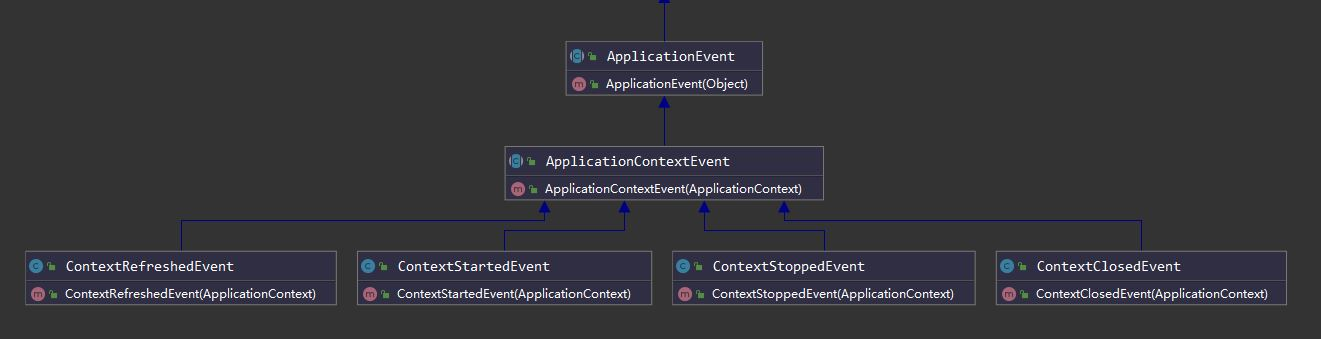
Spring常用事件
| 序号 | Spring 事件 |
|---|---|
| 1 | ContextRefreshedEvent:ApplicationContext 被初始化或刷新时,该事件被发布;这也可以在 ConfigurableApplicationContext 接口中使用 refresh() 方法来发生;容器刷新完成(所有bean都完全创建)会发布这个事件; |
| 2 | ContextStartedEvent:当使用 ConfigurableApplicationContext 接口中的 start() 方法启动 ApplicationContext 时,该事件被发布; |
| 3 | ContextStoppedEvent:当使用 ConfigurableApplicationContext 接口中的 stop() 方法停止 ApplicationContext 时,发布这个事件; |
| 4 | ContextClosedEvent:当使用 ConfigurableApplicationContext 接口中的 close() 方法关闭 ApplicationContext 时,该事件被发布; |
| 5 | RequestHandledEvent:在Web应用中,当一个http请求结束触发该事件; |
ApplicationContext
ApplicationContext即应用上下文,继承自BeanFactory接口,可用于获取Spring 管理的Bean对象实例;
ApplicationContextAware:Aware是属性注入,ApplicationContextAware与ApplicationContext不同的是,当Spring容器初始化的时候,实现了 ApplicationContextAware 接口的 Bean会自动注入ApplicationContext;
使用如下:
自定义ApplicationContextAware
@Component

public class ApplicationContextProvider implements ApplicationContextAware {

    private ApplicationContext applicationContext;

    /**

     * 上下文实例

     * @param applicationContext

     * @throws BeansException

     */

    @Override

    public void setApplicationContext(ApplicationContext applicationContext) throws BeansException {

        this.applicationContext = applicationContext;

    }

    /**

     * 获取上下文

     * @return

     */

    public ApplicationContext getApplicationContext() {

        return this.applicationContext;

    }

    /**

     * 通过类名获取Bean实例

     * @param name

     * @return

     */

    public Object getBean(String name) {

        return this.applicationContext.getBean(name);

    }

    /**

     * 通过字节码获取Bean实例

     * @param clazz

     * @param <T>

     * @return

     */

    public <T> T getBean(Class<T> clazz) {

        return this.applicationContext.getBean(clazz);

    }

}
自定义监听器
@Slf4j

@Component

public class MyListener implements ApplicationListener {

    @Override

    public void onApplicationEvent(ApplicationEvent event) {

        if (event instanceof MyApplicationEvent) {

            log.info("recv:" + event);

        } else {

            log.info("recv 容器本身:" + event);

        }

    }

}
自定义事件
public class MyApplicationEvent extends ApplicationEvent {

    private Person person;

    public Person getPerson() {

        return person;

    }

    public void setPerson(Person person) {

        this.person = person;

    }

    public MyApplicationEvent(Object source, Person person) {

        super(source);

        this.person = person;

    }

    /**

     * Create a new ApplicationEvent.

     *

     * @param source the object on which the event initially occurred (never {@code null})

     */

    public MyApplicationEvent(Object source) {

        super(source);

    }

}
在controller添加一个发布事件的方法
@Autowired

private ApplicationContextProvider provider;

@GetMapping("/publish")

public String publish() {

    ApplicationContext applicationContext = provider.getApplicationContext();

    Person person = new Person();

    person.setId(1);

    person.setAddress("chn");

    person.setName("test");

    person.setPhone("123");

    applicationContext.publishEvent(new MyApplicationEvent(person) {

    });

    log.info("applicationContext:{}", applicationContext);

    return "applicationContext: " + applicationContext;

}
当往/publish这个映射发请求的时候,publishEvent方法会发送事件;监听器就会就会接收;
ApplicationListener
public interface ApplicationListener<E extends ApplicationEvent> extends EventListener {

	/**

	 * Handle an application event.

	 * @param event the event to respond to

	 */

	void onApplicationEvent(E event);

}
ApplicationListener监听ApplicationEvent及其子类的事件;
AbstractApplicationContext.java
public abstract class AbstractApplicationContext extends DefaultResourceLoader

		implements ConfigurableApplicationContext {

    ...

}
ConfigurableApplicationContext:SPI接口将由大多数应用程序上下文实现;除了提供中的应用程序上下文客户端方法外,还提供了配置应用程序上下文的功能在ApplicationContext接口;
refresh方法执行容器的加载
public void refresh() throws BeansException, IllegalStateException {

    ...

    // Initialize event multicaster for this context.

    initApplicationEventMulticaster();

    ...

    // Last step: publish corresponding event.

	finishRefresh();

    ...

}

protected void initApplicationEventMulticaster() {

    ConfigurableListableBeanFactory beanFactory = getBeanFactory();

    //查找容器中是否存在"applicationEventMulticaster"的组件

    if (beanFactory.containsLocalBean(APPLICATION_EVENT_MULTICASTER_BEAN_NAME)) {

        this.applicationEventMulticaster =

            beanFactory.getBean(APPLICATION_EVENT_MULTICASTER_BEAN_NAME, ApplicationEventMulticaster.class);

        if (logger.isDebugEnabled()) {

            logger.debug("Using ApplicationEventMulticaster [" + this.applicationEventMulticaster + "]");

        }

    }

    else {

        //没有则new "applicationEventMulticaster"的组件,并加入到容器中,注入到"applicationEventMulticaster",registerSingleton会在存储所有注册的监听器map中查找监听器是否存在,不存在则往map中执行put操作

        this.applicationEventMulticaster = new SimpleApplicationEventMulticaster(beanFactory);

        beanFactory.registerSingleton(APPLICATION_EVENT_MULTICASTER_BEAN_NAME, this.applicationEventMulticaster);

        if (logger.isDebugEnabled()) {

            logger.debug("Unable to locate ApplicationEventMulticaster with name '" +

                         APPLICATION_EVENT_MULTICASTER_BEAN_NAME +

                         "': using default [" + this.applicationEventMulticaster + "]");

        }

    }

}
finshRefresh方法
protected void finishRefresh() {

    // Clear context-level resource caches (such as ASM metadata from scanning).

    clearResourceCaches();

    // Initialize lifecycle processor for this context.

    initLifecycleProcessor();

    // Propagate refresh to lifecycle processor first.

    getLifecycleProcessor().onRefresh();

    // Publish the final event.

    publishEvent(new ContextRefreshedEvent(this));

    // Participate in LiveBeansView MBean, if active.

    LiveBeansView.registerApplicationContext(this);

}
publishEvent方法 发布事件
@Override

public void publishEvent(ApplicationEvent event) {

    publishEvent(event, null);

}

protected void publishEvent(Object event, @Nullable ResolvableType eventType) {

    Assert.notNull(event, "Event must not be null");

    if (logger.isTraceEnabled()) {

        logger.trace("Publishing event in " + getDisplayName() + ": " + event);

    }

    // Decorate event as an ApplicationEvent if necessary

    ApplicationEvent applicationEvent;

    if (event instanceof ApplicationEvent) {

        applicationEvent = (ApplicationEvent) event;

    }

    else {

        applicationEvent = new PayloadApplicationEvent<>(this, event);

        if (eventType == null) {

            eventType = ((PayloadApplicationEvent) applicationEvent).getResolvableType();

        }

    }

    // Multicast right now if possible - or lazily once the multicaster is initialized

    if (this.earlyApplicationEvents != null) {

        this.earlyApplicationEvents.add(applicationEvent);

    }

    else {

        getApplicationEventMulticaster().multicastEvent(applicationEvent, eventType);

    }

    // Publish event via parent context as well...

    // 判断当前ApplicationContext有没有父级ApplicationContext

    if (this.parent != null) {

        if (this.parent instanceof AbstractApplicationContext) {

            ((AbstractApplicationContext) this.parent).publishEvent(event, eventType);

        }

        else {

            this.parent.publishEvent(event);

        }

    }

}
AbstractApplicationEventMulticaster提供基本的监听器注册功能
public class SimpleApplicationEventMulticaster extends AbstractApplicationEventMulticaster {

}
SimpleApplicationEventMulticaster.java
//将给定的应用程序事件分发到对应的监听器

@Override

public void multicastEvent(final ApplicationEvent event, @Nullable ResolvableType eventType) {

    ResolvableType type = (eventType != null ? eventType : resolveDefaultEventType(event));

    for (final ApplicationListener<?> listener : getApplicationListeners(event, type)) {

        Executor executor = getTaskExecutor();

        if (executor != null) {

            executor.execute(() -> invokeListener(listener, event));

        }

        else {

            invokeListener(listener, event);

        }

    }

}

//调用给定事件的监听器

protected void invokeListener(ApplicationListener<?> listener, ApplicationEvent event) {

    ErrorHandler errorHandler = getErrorHandler();

    if (errorHandler != null) {

        try {

            doInvokeListener(listener, event);

        }

        catch (Throwable err) {

            errorHandler.handleError(err);

        }

    }

    else {

        doInvokeListener(listener, event);

    }

}

private void doInvokeListener(ApplicationListener listener, ApplicationEvent event) {

    try {

        //调用实现ApplicationListener接口的onApplicationEvent方法

        listener.onApplicationEvent(event);

    }

    catch (ClassCastException ex) {

        String msg = ex.getMessage();

        if (msg == null || matchesClassCastMessage(msg, event.getClass())) {

            // Possibly a lambda-defined listener which we could not resolve the generic event type for

            // -> let's suppress the exception and just log a debug message.

            Log logger = LogFactory.getLog(getClass());

            if (logger.isDebugEnabled()) {

                logger.debug("Non-matching event type for listener: " + listener, ex);

            }

        }

        else {

            throw ex;

        }

    }

}
Spring 事件监听的更多相关文章
- Spring事件监听Demo
Spring事件监听实现了观察者模式.本Demo在junit4测试环境中实现 主要有三个类事件类.监听器类.事件发布类(入口) 事件类必须继承 ApplicationEvent,代码如下: impor ...
- Spring事件监听机制源码解析
Spring事件监听器使用 1.Spring事件监听体系包括三个组件:事件.事件监听器,事件广播器. 事件:定义事件类型和事件源,需要继承ApplicationEvent. package com.y ...
- spring事件监听(eventListener)
原理:观察者模式 spring的事件监听有三个部分组成,事件(ApplicationEvent).监听器(ApplicationListener)和事件发布操作. 事件 事件类需要继承Applicat ...
- Spring 事件监听机制及原理分析
简介 在JAVA体系中,有支持实现事件监听机制,在Spring 中也专门提供了一套事件机制的接口,方便我们实现.比如我们可以实现当用户注册后,给他发送一封邮件告诉他注册成功的一些信息,比如用户订阅的主 ...
- Spring事件监听机制
前言 Spring中的事件机制其实就是设计模式中的观察者模式,主要由以下角色构成: 事件 事件监听器(监听并处理事件) 事件发布者(发布事件) 首先看一下监听器和发布者的接口定义 public int ...
- Spring事件监听ApplicationListener源码流程分析
spring的事件机制是基于观察者设计模式的,ApplicationListener#onApplicationEvent(Event)方法,用于对事件的处理 .在容器初始化的时候执行注册到容器中的L ...
- Spring之事件监听(观察者模型)
目录 Spring事件监听 一.事件监听案例 1.事件类 2.事件监听类 3.事件发布者 4.配置文件中注册 5.测试 二.Spring中事件监听分析 1. Spring中事件监听的结构 2. 核心角 ...
- Spring的事件监听机制
最近公司在重构广告系统,其中核心的打包功能由广告系统调用,即对apk打包的调用和打包完成之后的回调,需要提供相应的接口给广告系统.因此,为了将apk打包的核心流程和对接广告系统的业务解耦,利用了spr ...
- SpringBoot事件监听机制及观察者模式/发布订阅模式
目录 本篇要点 什么是观察者模式? 发布订阅模式是什么? Spring事件监听机制概述 SpringBoot事件监听 定义注册事件 注解方式 @EventListener定义监听器 实现Applica ...
随机推荐
- Linux实战(13):Ubuntu被远程
此方法采用的xrdp原生方案,优点兼容性比较好. 安装xrdp sudo apt install xrdp #最高权限安装xrdp 修改配置 nano /etc/xrdp/startwm.sh #使用 ...
- 云计算openstack——云计算、大数据、人工智能(16)
一.互联网行业及云计算 在互联网时代,技术是推动社会发展的驱动,云计算则是一个包罗万象的技术栈集合,通过网络提供IAAS.PAAS.SAAS等资源,涵盖从数据中心底层的硬件设置到最上层客户的应用.给我 ...
- 趣图:这是拿offer极高的面试经验
扩展阅读 趣图:面试谈薪资就要这种底气 趣图:IT培训出来找工作 趣图:这是招聘超神级别的程序员?
- Flutter中如何方便的获取音视频的长度
此次主要是flutter集成im,在发送视频时需要加上时长,但是用视频controller只能在初始化时具备路径才可以可以使用:just_audio插件中的方法进行获取 详情看官方文档:https:/ ...
- pwnable.kr-mistake-witeup
阅读代码后思路: 实践: 1111111111 其异或值:0000000000 欧克,愉快的结束. 需要经常多看代码,对代码的书写习惯有了解,比如这一块17行一般人书写时都会习惯性加括号的.
- Processing 高效控制管理图形方法(二)
之前在CSDN上发表过: https://blog.csdn.net/fddxsyf123/article/details/70992924
- 【小白学PyTorch】15 TF2实现一个简单的服装分类任务
[新闻]:机器学习炼丹术的粉丝的人工智能交流群已经建立,目前有目标检测.医学图像.时间序列等多个目标为技术学习的分群和水群唠嗑的总群,欢迎大家加炼丹兄为好友,加入炼丹协会.微信:cyx64501661 ...
- oracle中插入一条记录后,重新登录查找不到数据
你插入了数据,但是没有提交.其他Session也就是你再次登录后自然就看不到了(但是在当前回话可以看到插入的数据),但是你用SQLPLUS EXIT之后再次登录就可以看到插入的数据了,因为ORACLE ...
- C/C++ 条件编译
条件编译就是指有条件的编译,即根据条件去编译代码,在编译阶段时就对代码做出取舍,有的编译,有的不编译,这样比写成一个个判断函数更有效率,比如工程代码大部分的地方都类似,只有个别语句因为使用的硬件版本不 ...
- rustup命令速度慢
通过以下命令更换镜像: $ENV:RUSTUP_DIST_SERVER='https://mirrors.ustc.edu.cn/rust-static' $ENV:RUSTUP_UPDATE_ROO ...