
Spring 事件监听
Spring 的核心是 ApplicationContext,它负责管理 Bean的完整生命周期;当加载 Bean 时,ApplicationContext 发布某些类型的事件;例如,当上下文启动时,ContextStartedEvent 发布消息,当上下文停止时,ContextStoppedEvent 发布消息;
通过 ApplicationEvent 类和 ApplicationListener 接口来提供在 ApplicationContext 中处理事件;如果一个 Bean 实现 ApplicationListener 接口,那么每次 ApplicationEvent 被发布到 ApplicationContext 上,那个 Bean实例会被通知;类似MQ的发布订阅;
ApplicationEvent UML图如下:
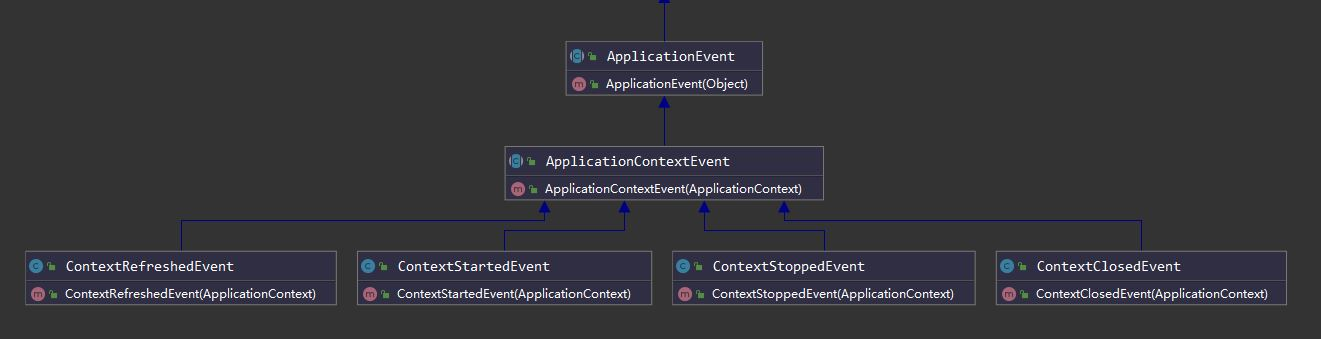
Spring常用事件
| 序号 | Spring 事件 |
|---|---|
| 1 | ContextRefreshedEvent:ApplicationContext 被初始化或刷新时,该事件被发布;这也可以在 ConfigurableApplicationContext 接口中使用 refresh() 方法来发生;容器刷新完成(所有bean都完全创建)会发布这个事件; |
| 2 | ContextStartedEvent:当使用 ConfigurableApplicationContext 接口中的 start() 方法启动 ApplicationContext 时,该事件被发布; |
| 3 | ContextStoppedEvent:当使用 ConfigurableApplicationContext 接口中的 stop() 方法停止 ApplicationContext 时,发布这个事件; |
| 4 | ContextClosedEvent:当使用 ConfigurableApplicationContext 接口中的 close() 方法关闭 ApplicationContext 时,该事件被发布; |
| 5 | RequestHandledEvent:在Web应用中,当一个http请求结束触发该事件; |
ApplicationContext
ApplicationContext即应用上下文,继承自BeanFactory接口,可用于获取Spring 管理的Bean对象实例;
ApplicationContextAware:Aware是属性注入,ApplicationContextAware与ApplicationContext不同的是,当Spring容器初始化的时候,实现了 ApplicationContextAware 接口的 Bean会自动注入ApplicationContext;
使用如下:
自定义ApplicationContextAware
@Component

public class ApplicationContextProvider implements ApplicationContextAware {

    private ApplicationContext applicationContext;

    /**

     * 上下文实例

     * @param applicationContext

     * @throws BeansException

     */

    @Override

    public void setApplicationContext(ApplicationContext applicationContext) throws BeansException {

        this.applicationContext = applicationContext;

    }

    /**

     * 获取上下文

     * @return

     */

    public ApplicationContext getApplicationContext() {

        return this.applicationContext;

    }

    /**

     * 通过类名获取Bean实例

     * @param name

     * @return

     */

    public Object getBean(String name) {

        return this.applicationContext.getBean(name);

    }

    /**

     * 通过字节码获取Bean实例

     * @param clazz

     * @param <T>

     * @return

     */

    public <T> T getBean(Class<T> clazz) {

        return this.applicationContext.getBean(clazz);

    }

}
自定义监听器
@Slf4j

@Component

public class MyListener implements ApplicationListener {

    @Override

    public void onApplicationEvent(ApplicationEvent event) {

        if (event instanceof MyApplicationEvent) {

            log.info("recv:" + event);

        } else {

            log.info("recv 容器本身:" + event);

        }

    }

}
自定义事件
public class MyApplicationEvent extends ApplicationEvent {

    private Person person;

    public Person getPerson() {

        return person;

    }

    public void setPerson(Person person) {

        this.person = person;

    }

    public MyApplicationEvent(Object source, Person person) {

        super(source);

        this.person = person;

    }

    /**

     * Create a new ApplicationEvent.

     *

     * @param source the object on which the event initially occurred (never {@code null})

     */

    public MyApplicationEvent(Object source) {

        super(source);

    }

}
在controller添加一个发布事件的方法
@Autowired

private ApplicationContextProvider provider;

@GetMapping("/publish")

public String publish() {

    ApplicationContext applicationContext = provider.getApplicationContext();

    Person person = new Person();

    person.setId(1);

    person.setAddress("chn");

    person.setName("test");

    person.setPhone("123");

    applicationContext.publishEvent(new MyApplicationEvent(person) {

    });

    log.info("applicationContext:{}", applicationContext);

    return "applicationContext: " + applicationContext;

}
当往/publish这个映射发请求的时候,publishEvent方法会发送事件;监听器就会就会接收;
ApplicationListener
public interface ApplicationListener<E extends ApplicationEvent> extends EventListener {

	/**

	 * Handle an application event.

	 * @param event the event to respond to

	 */

	void onApplicationEvent(E event);

}
ApplicationListener监听ApplicationEvent及其子类的事件;
AbstractApplicationContext.java
public abstract class AbstractApplicationContext extends DefaultResourceLoader

		implements ConfigurableApplicationContext {

    ...

}
ConfigurableApplicationContext:SPI接口将由大多数应用程序上下文实现;除了提供中的应用程序上下文客户端方法外,还提供了配置应用程序上下文的功能在ApplicationContext接口;
refresh方法执行容器的加载
public void refresh() throws BeansException, IllegalStateException {

    ...

    // Initialize event multicaster for this context.

    initApplicationEventMulticaster();

    ...

    // Last step: publish corresponding event.

	finishRefresh();

    ...

}

protected void initApplicationEventMulticaster() {

    ConfigurableListableBeanFactory beanFactory = getBeanFactory();

    //查找容器中是否存在"applicationEventMulticaster"的组件

    if (beanFactory.containsLocalBean(APPLICATION_EVENT_MULTICASTER_BEAN_NAME)) {

        this.applicationEventMulticaster =

            beanFactory.getBean(APPLICATION_EVENT_MULTICASTER_BEAN_NAME, ApplicationEventMulticaster.class);

        if (logger.isDebugEnabled()) {

            logger.debug("Using ApplicationEventMulticaster [" + this.applicationEventMulticaster + "]");

        }

    }

    else {

        //没有则new "applicationEventMulticaster"的组件,并加入到容器中,注入到"applicationEventMulticaster",registerSingleton会在存储所有注册的监听器map中查找监听器是否存在,不存在则往map中执行put操作

        this.applicationEventMulticaster = new SimpleApplicationEventMulticaster(beanFactory);

        beanFactory.registerSingleton(APPLICATION_EVENT_MULTICASTER_BEAN_NAME, this.applicationEventMulticaster);

        if (logger.isDebugEnabled()) {

            logger.debug("Unable to locate ApplicationEventMulticaster with name '" +

                         APPLICATION_EVENT_MULTICASTER_BEAN_NAME +

                         "': using default [" + this.applicationEventMulticaster + "]");

        }

    }

}
finshRefresh方法
protected void finishRefresh() {

    // Clear context-level resource caches (such as ASM metadata from scanning).

    clearResourceCaches();

    // Initialize lifecycle processor for this context.

    initLifecycleProcessor();

    // Propagate refresh to lifecycle processor first.

    getLifecycleProcessor().onRefresh();

    // Publish the final event.

    publishEvent(new ContextRefreshedEvent(this));

    // Participate in LiveBeansView MBean, if active.

    LiveBeansView.registerApplicationContext(this);

}
publishEvent方法 发布事件
@Override

public void publishEvent(ApplicationEvent event) {

    publishEvent(event, null);

}

protected void publishEvent(Object event, @Nullable ResolvableType eventType) {

    Assert.notNull(event, "Event must not be null");

    if (logger.isTraceEnabled()) {

        logger.trace("Publishing event in " + getDisplayName() + ": " + event);

    }

    // Decorate event as an ApplicationEvent if necessary

    ApplicationEvent applicationEvent;

    if (event instanceof ApplicationEvent) {

        applicationEvent = (ApplicationEvent) event;

    }

    else {

        applicationEvent = new PayloadApplicationEvent<>(this, event);

        if (eventType == null) {

            eventType = ((PayloadApplicationEvent) applicationEvent).getResolvableType();

        }

    }

    // Multicast right now if possible - or lazily once the multicaster is initialized

    if (this.earlyApplicationEvents != null) {

        this.earlyApplicationEvents.add(applicationEvent);

    }

    else {

        getApplicationEventMulticaster().multicastEvent(applicationEvent, eventType);

    }

    // Publish event via parent context as well...

    // 判断当前ApplicationContext有没有父级ApplicationContext

    if (this.parent != null) {

        if (this.parent instanceof AbstractApplicationContext) {

            ((AbstractApplicationContext) this.parent).publishEvent(event, eventType);

        }

        else {

            this.parent.publishEvent(event);

        }

    }

}
AbstractApplicationEventMulticaster提供基本的监听器注册功能
public class SimpleApplicationEventMulticaster extends AbstractApplicationEventMulticaster {

}
SimpleApplicationEventMulticaster.java
//将给定的应用程序事件分发到对应的监听器

@Override

public void multicastEvent(final ApplicationEvent event, @Nullable ResolvableType eventType) {

    ResolvableType type = (eventType != null ? eventType : resolveDefaultEventType(event));

    for (final ApplicationListener<?> listener : getApplicationListeners(event, type)) {

        Executor executor = getTaskExecutor();

        if (executor != null) {

            executor.execute(() -> invokeListener(listener, event));

        }

        else {

            invokeListener(listener, event);

        }

    }

}

//调用给定事件的监听器

protected void invokeListener(ApplicationListener<?> listener, ApplicationEvent event) {

    ErrorHandler errorHandler = getErrorHandler();

    if (errorHandler != null) {

        try {

            doInvokeListener(listener, event);

        }

        catch (Throwable err) {

            errorHandler.handleError(err);

        }

    }

    else {

        doInvokeListener(listener, event);

    }

}

private void doInvokeListener(ApplicationListener listener, ApplicationEvent event) {

    try {

        //调用实现ApplicationListener接口的onApplicationEvent方法

        listener.onApplicationEvent(event);

    }

    catch (ClassCastException ex) {

        String msg = ex.getMessage();

        if (msg == null || matchesClassCastMessage(msg, event.getClass())) {

            // Possibly a lambda-defined listener which we could not resolve the generic event type for

            // -> let's suppress the exception and just log a debug message.

            Log logger = LogFactory.getLog(getClass());

            if (logger.isDebugEnabled()) {

                logger.debug("Non-matching event type for listener: " + listener, ex);

            }

        }

        else {

            throw ex;

        }

    }

}
Spring 事件监听的更多相关文章
- Spring事件监听Demo
Spring事件监听实现了观察者模式.本Demo在junit4测试环境中实现 主要有三个类事件类.监听器类.事件发布类(入口) 事件类必须继承 ApplicationEvent,代码如下: impor ...
- Spring事件监听机制源码解析
Spring事件监听器使用 1.Spring事件监听体系包括三个组件:事件.事件监听器,事件广播器. 事件:定义事件类型和事件源,需要继承ApplicationEvent. package com.y ...
- spring事件监听(eventListener)
原理:观察者模式 spring的事件监听有三个部分组成,事件(ApplicationEvent).监听器(ApplicationListener)和事件发布操作. 事件 事件类需要继承Applicat ...
- Spring 事件监听机制及原理分析
简介 在JAVA体系中,有支持实现事件监听机制,在Spring 中也专门提供了一套事件机制的接口,方便我们实现.比如我们可以实现当用户注册后,给他发送一封邮件告诉他注册成功的一些信息,比如用户订阅的主 ...
- Spring事件监听机制
前言 Spring中的事件机制其实就是设计模式中的观察者模式,主要由以下角色构成: 事件 事件监听器(监听并处理事件) 事件发布者(发布事件) 首先看一下监听器和发布者的接口定义 public int ...
- Spring事件监听ApplicationListener源码流程分析
spring的事件机制是基于观察者设计模式的,ApplicationListener#onApplicationEvent(Event)方法,用于对事件的处理 .在容器初始化的时候执行注册到容器中的L ...
- Spring之事件监听(观察者模型)
目录 Spring事件监听 一.事件监听案例 1.事件类 2.事件监听类 3.事件发布者 4.配置文件中注册 5.测试 二.Spring中事件监听分析 1. Spring中事件监听的结构 2. 核心角 ...
- Spring的事件监听机制
最近公司在重构广告系统,其中核心的打包功能由广告系统调用,即对apk打包的调用和打包完成之后的回调,需要提供相应的接口给广告系统.因此,为了将apk打包的核心流程和对接广告系统的业务解耦,利用了spr ...
- SpringBoot事件监听机制及观察者模式/发布订阅模式
目录 本篇要点 什么是观察者模式? 发布订阅模式是什么? Spring事件监听机制概述 SpringBoot事件监听 定义注册事件 注解方式 @EventListener定义监听器 实现Applica ...
随机推荐
- JVM字符串常量池StringTable
String的基本特性 String:字符串,使用一对""引起来表示. String sl = "hello"://字面量的定义方式: String s2 = ...
- 软件工程与UML作业3(互评作业)
博客班级 https://edu.cnblogs.com/campus/fzzcxy/2018SE1/ 作业要求 https://edu.cnblogs.com/campus/fzzcxy/2018S ...
- 9.Lock-锁
- Jmeter引用外部jar包的几种方法
总结记录下jmeter引用外部jar包的3种方法及其优缺点: 一.测试计划中添加目录或jar包到Classpath 操作:测试计划->添加目录或jar包到Classpath-->浏览导入j ...
- 《Java并发编程的艺术》笔记
第1章 并发编程的挑战 1.1 上下文切换 CPU通过时间片分配算法来循环执行任务,任务从保存到再加载的过程就是一次上下文切换. 减少上下文切换的方法有4种:无锁并发编程.CAS算法.使用最少线程.使 ...
- 关于TCP建立连接
TCP大家大多称之为"三次握手".今天看了一篇文章,学到了"三步握手". TCP建立连接,客户端发送SYN给服务端,服务端接收到请求回应ACK.服务端发送SYN ...
- 使用jsonify返回json数据
from flask import Flask, jsonify app = Flask(__name__) json_data = [ {"name":"json&qu ...
- echarts配置进度池
近日,使用dataV中的配置,完成了进度池图表,但是有有一个缺点,就是官方没有动画方面的配置.如下图: 为了给这个进度池添加动画效果,我反向的在进度池上面铺一层由一格一格与进度池中相同的块状组成的与背 ...
- 【Python】Python日志无延迟实时写入
我在用python生成日志时,发现无论怎么flush(),文件内容总是不能实时写入,导致程序意外中断时一无所获. 以下是查到的解决方案(亲测可行): open 函数中有一个bufferin的参数,默认 ...
- Laravel Event的分析和使用
Laravel Event的分析和使用 第一部分 概念解释 请自行查看观察者模式 第二部分 源码分析 (逻辑较长,不喜欢追代码可以直接看使用部分) 第三部分 使用 第一部分 解释 当一个用户阅读了一篇 ...