
基于websocket的netty demo
前面2文
讲了netty在http和socket的使用,下面讲讲netty如何使用websocket
websocket是html5提出来的一个东西,功能很强大,可以支持长连接,实现服务器向客户端的通信,这里不做过多的介绍,只说说netty如何使用websocket作为协议来通信
这里采用表单提交的时候,使用websocket的方式提交,具体请看代码:
ps:我这里的代码架构是这样的
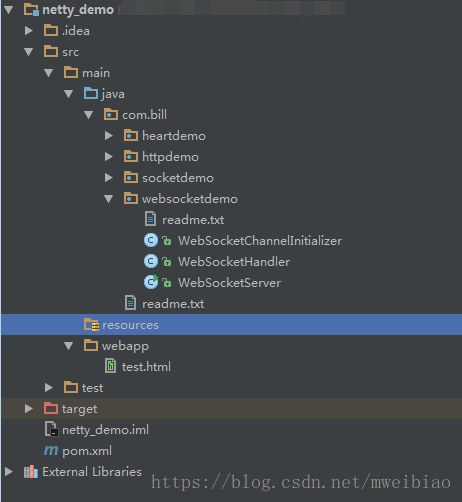
服务器代码:
 1 package com.bill.websocketdemo;

 2

 3

 4 import io.netty.bootstrap.ServerBootstrap;

 5 import io.netty.channel.ChannelFuture;

 6 import io.netty.channel.EventLoopGroup;

 7 import io.netty.channel.nio.NioEventLoopGroup;

 8 import io.netty.channel.socket.nio.NioServerSocketChannel;

 9 import io.netty.handler.logging.LogLevel;

10 import io.netty.handler.logging.LoggingHandler;

11

12 public class WebSocketServer {

13

14     public static void main(String[] args) throws Exception {

15         EventLoopGroup bossGroup = new NioEventLoopGroup();

16         EventLoopGroup workerGroup = new NioEventLoopGroup();

17

18         try{

19             ServerBootstrap serverBootstrap = new ServerBootstrap();

20             serverBootstrap.group(bossGroup, workerGroup).channel(NioServerSocketChannel.class).

21                     handler(new LoggingHandler(LogLevel.INFO)).childHandler(new WebSocketChannelInitializer());

22

23             ChannelFuture channelFuture = serverBootstrap.bind(8899).sync();

24             channelFuture.channel().closeFuture().sync();

25         } finally {

26             bossGroup.shutdownGracefully();

27             workerGroup.shutdownGracefully();

28         }

29     }

30 }

31

32 package com.bill.websocketdemo;

33

34

35 import io.netty.channel.ChannelHandlerContext;

36 import io.netty.channel.SimpleChannelInboundHandler;

37 import io.netty.handler.codec.http.websocketx.TextWebSocketFrame;

38

39 public class WebSocketHandler extends SimpleChannelInboundHandler<TextWebSocketFrame> {

40

41     @Override

42     protected void channelRead0(ChannelHandlerContext channelHandlerContext, TextWebSocketFrame textWebSocketFrame) throws Exception {

43         System.out.println("收到消息:" + textWebSocketFrame.text());

44         channelHandlerContext.channel().writeAndFlush(new TextWebSocketFrame("服务器随机数:" + Math.random()));

45     }

46

47     @Override

48     public void handlerAdded(ChannelHandlerContext ctx) throws Exception {

49         System.out.println("handlerAdded!!!");

50     }

51

52     @Override

53     public void handlerRemoved(ChannelHandlerContext ctx) throws Exception {

54         System.out.println("handlerRemoved!!!");

55     }

56 }

57

58 package com.bill.websocketdemo;

59

60

61 import io.netty.channel.ChannelInitializer;

62 import io.netty.channel.ChannelPipeline;

63 import io.netty.channel.socket.SocketChannel;

64 import io.netty.handler.codec.http.HttpObjectAggregator;

65 import io.netty.handler.codec.http.HttpServerCodec;

66 import io.netty.handler.codec.http.websocketx.WebSocketServerProtocolHandler;

67 import io.netty.handler.stream.ChunkedWriteHandler;

68

69 public class WebSocketChannelInitializer extends ChannelInitializer<SocketChannel> {

70

71     @Override

72     protected void initChannel(SocketChannel socketChannel) throws Exception {

73

74         ChannelPipeline pipeline = socketChannel.pipeline();

75

76         pipeline.addLast(new HttpServerCodec());

77         pipeline.addLast(new ChunkedWriteHandler());

78         pipeline.addLast(new HttpObjectAggregator(8192));

79         pipeline.addLast(new WebSocketServerProtocolHandler("/hello"));

80

81         pipeline.addLast(new WebSocketHandler());

82

83     }

84 }
HTML代码:
 1 <!DOCTYPE html>

 2 <html lang="en">

 3 <head>

 4     <meta charset="UTF-8">

 5     <title>websocket</title>

 6 </head>

 7 <body>

 8

 9 <script type="text/javascript">

10     var socket;

11     if(window.WebSocket) {

12         socket = new WebSocket("ws://localhost:8899/hello");

13         socket.onmessage = function (event) {

14             var ta = document.getElementById("resp");

15             ta.value = ta.value + "\n" + event.data;

16         }

17

18         socket.onopen = function (event) {

19             var ta = document.getElementById("resp");

20             ta.value = "连接接开启!";

21         }

22

23         socket.onclose = function (event) {

24             var ta = document.getElementById("resp");

25             ta.value = ta.value + "\n" + "连接关闭!";

26         }

27     } else {

28         alert("浏览器不支持websocket");

29     }

30

31     function send(msg) {

32         if(!window.WebSocket) {

33             return;

34         }

35

36         if(socket.readyState == WebSocket.OPEN) {

37             socket.send(msg);

38         } else {

39             alert("连接未开启!")

40         }

41     }

42

43 </script>

44

45 <form onsubmit="return false;">

46

47     <textarea id="message" style="width: 400px; height: 200px"></textarea>

48     <input type="button" value="发送数据" onclick="send(this.form.message.value)">

49

50     <h3> 服务器输出:</h3>

51

52     <textarea id="resp" style="width: 400px; height: 300px"></textarea>

53     <input type="button" onclick="javascript: document.getElementById('resp').value = ''" value="清空内容">

54 </form>

55

56

57 </body>

58 </html>
请注意:
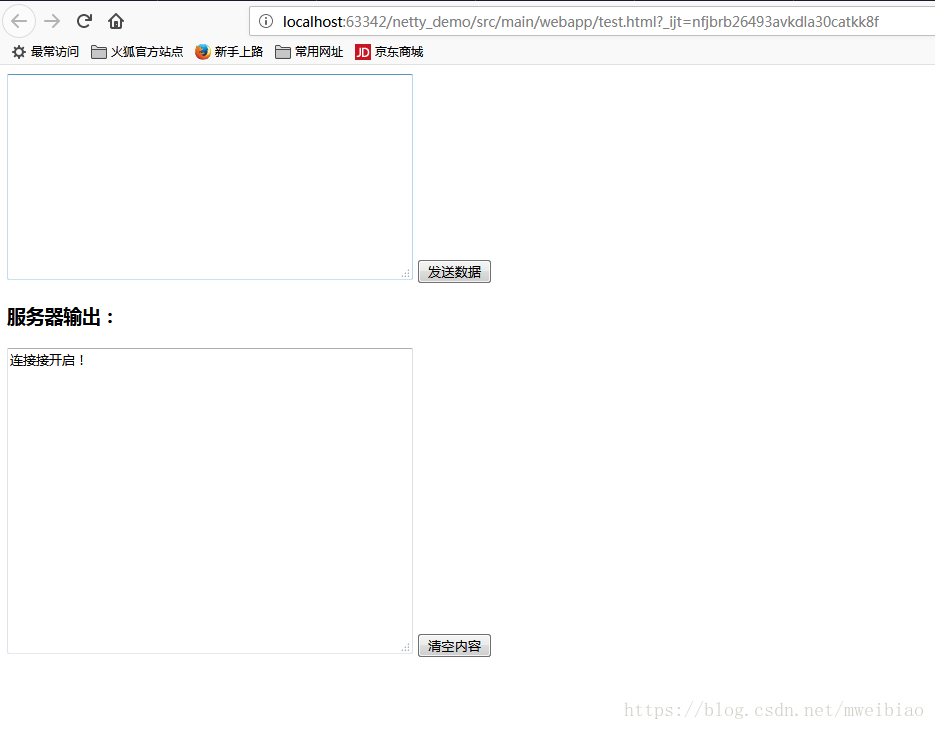
运行的时候,先执行WebSocketServer的main方法,然后再run src/main/webapp/test.html ,这样 idea会自动启动一个页面
启动完服务器后,会在浏览器上看到页面:
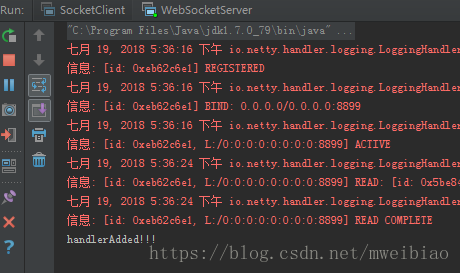
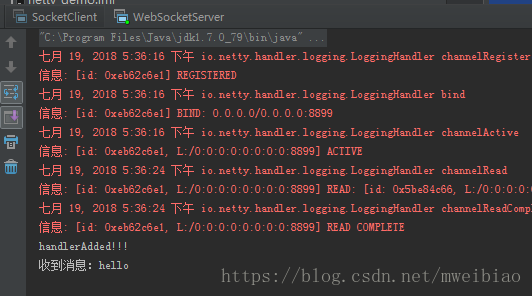
服务器出现信息:
发送数据:
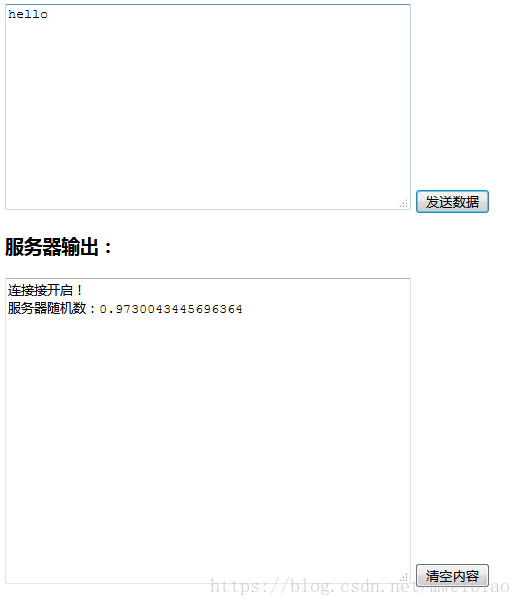
服务器:
完整代码下载:
https://download.csdn.net/download/mweibiao/10551574
基于websocket的netty demo的更多相关文章
- 基于socket的netty demo
前面一文说了 基于http的netty demo 和http不一样,http可以用浏览器来充当客户端调用,所以基于socket的netty,必须要编写客户端和服务器的代码 实现功能: 客户端给服务器发 ...
- 基于websocket vue 聊天demo 解决方案
基于websocket vue 聊天demo 解决方案 demo 背景 电商后台管理的客服 相关技术 vuex axios vue websocket 聊天几种模型 一对一模型 一对一 消息只一个客户 ...
- 基于http的netty demo
1.引入netty的pom <dependency> <groupId>io.netty</groupId> <artifactId>netty-all ...
- Netty 系列八(基于 WebSocket 的简单聊天室).
一.前言 之前写过一篇 Spring 集成 WebSocket 协议的文章 —— Spring消息之WebSocket ,所以对于 WebSocket 协议的介绍就不多说了,可以参考这篇文章.这里只做 ...
- 第一节:.Net版基于WebSocket的聊天室样例
一. 说在前面的话 该篇文章为实时通讯系列的第一节,基于WebSocket编写了一个简易版聊天样例,主要作用是为引出后面SignalR系列的用法及其强大方便之处,通过这个样例与后续的SignalR对比 ...
- Ext JS学习第十六天 事件机制event(一) DotNet进阶系列(持续更新) 第一节:.Net版基于WebSocket的聊天室样例 第十五节:深入理解async和await的作用及各种适用场景和用法 第十五节:深入理解async和await的作用及各种适用场景和用法 前端自动化准备和详细配置(NVM、NPM/CNPM、NodeJs、NRM、WebPack、Gulp/Grunt、G
code&monkey Ext JS学习第十六天 事件机制event(一) 此文用来记录学习笔记: 休息了好几天,从今天开始继续保持更新,鞭策自己学习 今天我们来说一说什么是事件,对于事件 ...
- 基于WebSocket和SpringBoot的群聊天室
引入 普通请求-响应方式:例如Servlet中HttpServletRequest和HttpServletResponse相互配合先接受请求.解析数据,再发出响应,处理完成后连接便断开了,没有数据的实 ...
- workerman-chat(PHP开发的基于Websocket协议的聊天室框架)(thinkphp也是支持socket聊天的)
workerman-chat(PHP开发的基于Websocket协议的聊天室框架)(thinkphp也是支持socket聊天的) 一.总结 1.下面链接里面还有一个来聊的php聊天室源码可以学习 2. ...
- 基于 WebSocket 实现 WebGL 3D 拓扑图实时数据通讯同步(二)
我们上一篇<基于 WebSocket 实现 WebGL 3D 拓扑图实时数据通讯同步(一)>主要讲解了如何搭建一个实时数据通讯服务器,客户端与服务端是如何通讯的,相信通过上一篇的讲解,再配 ...
随机推荐
- 一条 SQL 语句在 MySQL 中如何执行的
一 MySQL 基础架构分析 1.1 MySQL 基本架构概览 下图是 MySQL 的一个简要架构图,从下图你可以很清晰的看到用户的 SQL 语句在 MySQL 内部是如何执行的. 先简单介绍一下下图 ...
- 图像处理术语解释:灰度、色相、饱和度、亮度、明度、阿尔法通道、HSL、HSV、RGBA、ARGB和PRGBA以及Premultiplied Alpha(Alpha预乘)等基础概念详解
☞ ░ 前往老猿Python博文目录 ░ 一.引言 由于老猿以前没接触过图像处理,在阅读moviepy代码时,对类的有些处理方法代码看不懂是什么含义,为此花了4天时间查阅了大量资料,并加以自己的理解和 ...
- web安全漏洞
1.什么是Web漏洞 WEB漏洞通常是指网站程序上的漏洞,可能是由于代码编写者在编写代码时考虑不周全等原因而造成的漏洞.如果网站存在WEB漏洞并被黑客攻击者利用,攻击者可以轻易控制整个网站,并可进一步 ...
- Python 常用方法和模块的使用(time & datetime & os &random &sys &shutil)-(六)
1 比较常用的一些方法 1.eval()方法:执行字符串表达式,并返回到字符串. 2.序列化:变量从内存中变成可存储或传输到文件或变量的过程,可以保存当时对象的状态,实现其生命周期的延长,并且需要时可 ...
- Python接口测试-使用requests模块发送GET请求
本篇主要记录下使用python的requests模块发送GET请求的实现代码. 向服务器发送get请求:无参数时:r = requests.get(url)带params时:r = requests. ...
- DVWA SQL Injection Medium
Mdeium 基本的步骤及知识点在上节已经提到过这里不再赘述:https://blog.csdn.net/WQ_BCJ/article/details/84554777 1)与low级别不同,本次采用 ...
- 基于gin的golang web开发:服务间调用
微服务开发中服务间调用的主流方式有两种HTTP.RPC,HTTP相对来说比较简单.本文将使用 Resty 包来实现基于HTTP的微服务调用. Resty简介 Resty 是一个简单的HTTP和REST ...
- 百度前端技术学院-基础-day1
2020.9.14 今天我开始在百度前端技术学院学习基础课程. 先立一个Flag,希望我能在30天之内学完前四十天的课程,后续课程再一天一节. 第一天的内容主要是提供了很多基础学习的网页,比如W3sc ...
- web移动端点击穿透问题
在移动端开发的时候,我们有时候会遇到这样一个bug:点击关闭遮罩层的时候,遮罩层下面的带有点击的元素也会被触发,给人一种击穿了页面的感觉,这是为什么呢?主要是因为用户touch事件关闭按钮的时候,触发 ...
- 题解-[国家集训队]Crash的数字表格 / JZPTAB
题解-[国家集训队]Crash的数字表格 / JZPTAB 前置知识: 莫比乌斯反演 </> [国家集训队]Crash的数字表格 / JZPTAB 单组测试数据,给定 \(n,m\) ,求 ...