
基于websocket的netty demo
前面2文
讲了netty在http和socket的使用,下面讲讲netty如何使用websocket
websocket是html5提出来的一个东西,功能很强大,可以支持长连接,实现服务器向客户端的通信,这里不做过多的介绍,只说说netty如何使用websocket作为协议来通信
这里采用表单提交的时候,使用websocket的方式提交,具体请看代码:
ps:我这里的代码架构是这样的
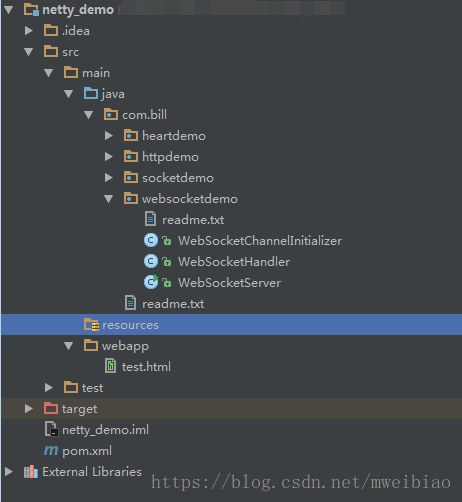
服务器代码:
 1 package com.bill.websocketdemo;

 2

 3

 4 import io.netty.bootstrap.ServerBootstrap;

 5 import io.netty.channel.ChannelFuture;

 6 import io.netty.channel.EventLoopGroup;

 7 import io.netty.channel.nio.NioEventLoopGroup;

 8 import io.netty.channel.socket.nio.NioServerSocketChannel;

 9 import io.netty.handler.logging.LogLevel;

10 import io.netty.handler.logging.LoggingHandler;

11

12 public class WebSocketServer {

13

14     public static void main(String[] args) throws Exception {

15         EventLoopGroup bossGroup = new NioEventLoopGroup();

16         EventLoopGroup workerGroup = new NioEventLoopGroup();

17

18         try{

19             ServerBootstrap serverBootstrap = new ServerBootstrap();

20             serverBootstrap.group(bossGroup, workerGroup).channel(NioServerSocketChannel.class).

21                     handler(new LoggingHandler(LogLevel.INFO)).childHandler(new WebSocketChannelInitializer());

22

23             ChannelFuture channelFuture = serverBootstrap.bind(8899).sync();

24             channelFuture.channel().closeFuture().sync();

25         } finally {

26             bossGroup.shutdownGracefully();

27             workerGroup.shutdownGracefully();

28         }

29     }

30 }

31

32 package com.bill.websocketdemo;

33

34

35 import io.netty.channel.ChannelHandlerContext;

36 import io.netty.channel.SimpleChannelInboundHandler;

37 import io.netty.handler.codec.http.websocketx.TextWebSocketFrame;

38

39 public class WebSocketHandler extends SimpleChannelInboundHandler<TextWebSocketFrame> {

40

41     @Override

42     protected void channelRead0(ChannelHandlerContext channelHandlerContext, TextWebSocketFrame textWebSocketFrame) throws Exception {

43         System.out.println("收到消息:" + textWebSocketFrame.text());

44         channelHandlerContext.channel().writeAndFlush(new TextWebSocketFrame("服务器随机数:" + Math.random()));

45     }

46

47     @Override

48     public void handlerAdded(ChannelHandlerContext ctx) throws Exception {

49         System.out.println("handlerAdded!!!");

50     }

51

52     @Override

53     public void handlerRemoved(ChannelHandlerContext ctx) throws Exception {

54         System.out.println("handlerRemoved!!!");

55     }

56 }

57

58 package com.bill.websocketdemo;

59

60

61 import io.netty.channel.ChannelInitializer;

62 import io.netty.channel.ChannelPipeline;

63 import io.netty.channel.socket.SocketChannel;

64 import io.netty.handler.codec.http.HttpObjectAggregator;

65 import io.netty.handler.codec.http.HttpServerCodec;

66 import io.netty.handler.codec.http.websocketx.WebSocketServerProtocolHandler;

67 import io.netty.handler.stream.ChunkedWriteHandler;

68

69 public class WebSocketChannelInitializer extends ChannelInitializer<SocketChannel> {

70

71     @Override

72     protected void initChannel(SocketChannel socketChannel) throws Exception {

73

74         ChannelPipeline pipeline = socketChannel.pipeline();

75

76         pipeline.addLast(new HttpServerCodec());

77         pipeline.addLast(new ChunkedWriteHandler());

78         pipeline.addLast(new HttpObjectAggregator(8192));

79         pipeline.addLast(new WebSocketServerProtocolHandler("/hello"));

80

81         pipeline.addLast(new WebSocketHandler());

82

83     }

84 }
HTML代码:
 1 <!DOCTYPE html>

 2 <html lang="en">

 3 <head>

 4     <meta charset="UTF-8">

 5     <title>websocket</title>

 6 </head>

 7 <body>

 8

 9 <script type="text/javascript">

10     var socket;

11     if(window.WebSocket) {

12         socket = new WebSocket("ws://localhost:8899/hello");

13         socket.onmessage = function (event) {

14             var ta = document.getElementById("resp");

15             ta.value = ta.value + "\n" + event.data;

16         }

17

18         socket.onopen = function (event) {

19             var ta = document.getElementById("resp");

20             ta.value = "连接接开启!";

21         }

22

23         socket.onclose = function (event) {

24             var ta = document.getElementById("resp");

25             ta.value = ta.value + "\n" + "连接关闭!";

26         }

27     } else {

28         alert("浏览器不支持websocket");

29     }

30

31     function send(msg) {

32         if(!window.WebSocket) {

33             return;

34         }

35

36         if(socket.readyState == WebSocket.OPEN) {

37             socket.send(msg);

38         } else {

39             alert("连接未开启!")

40         }

41     }

42

43 </script>

44

45 <form onsubmit="return false;">

46

47     <textarea id="message" style="width: 400px; height: 200px"></textarea>

48     <input type="button" value="发送数据" onclick="send(this.form.message.value)">

49

50     <h3> 服务器输出:</h3>

51

52     <textarea id="resp" style="width: 400px; height: 300px"></textarea>

53     <input type="button" onclick="javascript: document.getElementById('resp').value = ''" value="清空内容">

54 </form>

55

56

57 </body>

58 </html>
请注意:
运行的时候,先执行WebSocketServer的main方法,然后再run src/main/webapp/test.html ,这样 idea会自动启动一个页面
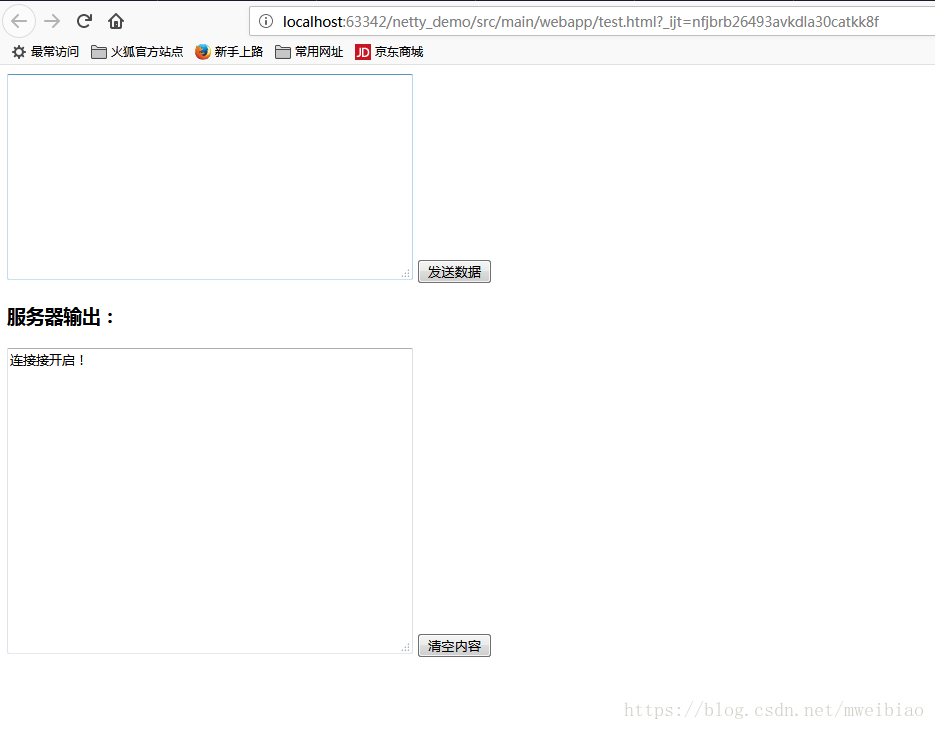
启动完服务器后,会在浏览器上看到页面:
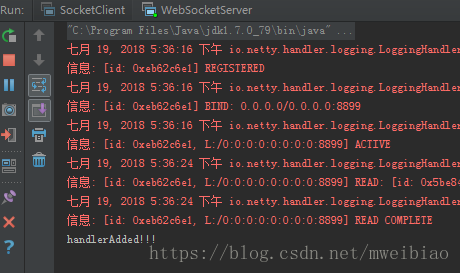
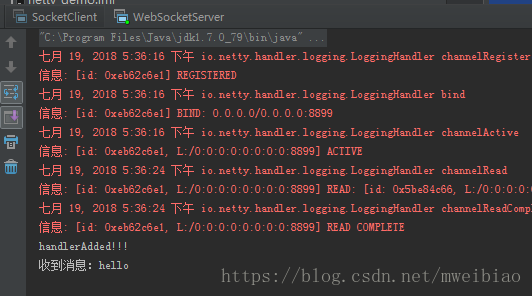
服务器出现信息:
发送数据:
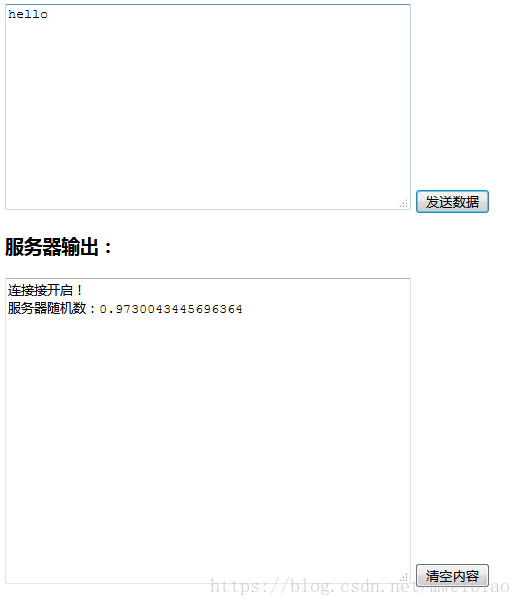
服务器:
完整代码下载:
https://download.csdn.net/download/mweibiao/10551574
基于websocket的netty demo的更多相关文章
- 基于socket的netty demo
前面一文说了 基于http的netty demo 和http不一样,http可以用浏览器来充当客户端调用,所以基于socket的netty,必须要编写客户端和服务器的代码 实现功能: 客户端给服务器发 ...
- 基于websocket vue 聊天demo 解决方案
基于websocket vue 聊天demo 解决方案 demo 背景 电商后台管理的客服 相关技术 vuex axios vue websocket 聊天几种模型 一对一模型 一对一 消息只一个客户 ...
- 基于http的netty demo
1.引入netty的pom <dependency> <groupId>io.netty</groupId> <artifactId>netty-all ...
- Netty 系列八(基于 WebSocket 的简单聊天室).
一.前言 之前写过一篇 Spring 集成 WebSocket 协议的文章 —— Spring消息之WebSocket ,所以对于 WebSocket 协议的介绍就不多说了,可以参考这篇文章.这里只做 ...
- 第一节:.Net版基于WebSocket的聊天室样例
一. 说在前面的话 该篇文章为实时通讯系列的第一节,基于WebSocket编写了一个简易版聊天样例,主要作用是为引出后面SignalR系列的用法及其强大方便之处,通过这个样例与后续的SignalR对比 ...
- Ext JS学习第十六天 事件机制event(一) DotNet进阶系列(持续更新) 第一节:.Net版基于WebSocket的聊天室样例 第十五节:深入理解async和await的作用及各种适用场景和用法 第十五节:深入理解async和await的作用及各种适用场景和用法 前端自动化准备和详细配置(NVM、NPM/CNPM、NodeJs、NRM、WebPack、Gulp/Grunt、G
code&monkey Ext JS学习第十六天 事件机制event(一) 此文用来记录学习笔记: 休息了好几天,从今天开始继续保持更新,鞭策自己学习 今天我们来说一说什么是事件,对于事件 ...
- 基于WebSocket和SpringBoot的群聊天室
引入 普通请求-响应方式:例如Servlet中HttpServletRequest和HttpServletResponse相互配合先接受请求.解析数据,再发出响应,处理完成后连接便断开了,没有数据的实 ...
- workerman-chat(PHP开发的基于Websocket协议的聊天室框架)(thinkphp也是支持socket聊天的)
workerman-chat(PHP开发的基于Websocket协议的聊天室框架)(thinkphp也是支持socket聊天的) 一.总结 1.下面链接里面还有一个来聊的php聊天室源码可以学习 2. ...
- 基于 WebSocket 实现 WebGL 3D 拓扑图实时数据通讯同步(二)
我们上一篇<基于 WebSocket 实现 WebGL 3D 拓扑图实时数据通讯同步(一)>主要讲解了如何搭建一个实时数据通讯服务器,客户端与服务端是如何通讯的,相信通过上一篇的讲解,再配 ...
随机推荐
- Docker实战 | 第二篇:IDEA集成Docker插件实现一键自动打包部署微服务项目,一劳永逸的技术手段值得一试
一. 前言 大家在自己玩微服务项目的时候,动辄十几个服务,每次修改逐一部署繁琐不说也会浪费越来越多时间,所以本篇整理通过一次性配置实现一键部署微服务,实现真正所谓的一劳永逸. 二. 配置服务器 1. ...
- 5、Spring Cloud Ribbon
1.Ribbon简介 (1).Ribbon介绍 Spring Cloud Ribbon是基于Netflix Ribbon实现的一套客户端负载均衡的工具. Ribbon是Netflix发布的开源项目,主 ...
- git 常用命令 command
git config --list //查看配置信息 git config user.name //查看用户名 git config user.email //查看用户邮箱 从远程克隆到本地仓库 ...
- Hangfire&Autofac与ASP.NET CORE注入失败
Hangfire.Autofac与ASP.NET CORE注入失败 项目里面使用了Hangfire,因为之前没用过吧,遇到了个问题,就是使用了ico容器后,再用Hangfire总是注入不上对象,总是后 ...
- .NET 面试题汇总(带答案)
1.维护数据库的完整性.一致性.你喜欢用触发器还是自写业务逻辑?为什么? 答:尽可能用约束(包括CHECK.主键.唯一键.外键.非空字段)实现,这种方式的效率最好:其次用触发器,这种方式可以保证无论何 ...
- Algorithm homework 1
一.已知下列递推式: \[C(n)= \begin{cases} 1 & , & n = 1 \\ 2C(n/2) + n - 1& , & n \geq 2 \end ...
- AcWing 332. 股票交易
大型补档计划 题目链接 \(f[i][j]\) 表示前 \(i\) 天,手里有 \(j\) 个股票挣得最多钱 买股票.枚举 \(u < i - W\) \(f[i][j] = max(f[u][ ...
- AcWing 329. 围栏障碍训练场
大型补档计划 题目链接 考虑模拟这个过程. \(f[i][0 / 1]\) 表示从第 \(i\) 个围栏的 左/右端点开始往下走,走到原点的最小花费. 转移很容易想到,就是考虑找到一个往下走第一个碰到 ...
- 题解-Reachable Strings
题解-Reachable Strings 前置知识: \(\texttt{Hash}\) Reachable Strings 给一个长度为 \(n\) 的 \(\texttt{01}\) 串 \(s\ ...
- CentOS 6.8内核版本升级
1.查看当前版本 [root@www.linuxidc.com docker]# cat /etc/issue CentOS release 6.8 (Final) Kernel \r on an ...