
使用 DD 命令制作 USB 启动盘
Windows 下有很多很好用的 USB 启动盘制作工具,比如 Rufus,但是 MacOS 下这个类型的工具就少了很多,这里记录下在 MacOS 中用 DD 命令制作 Linux USB 启动盘的操作步骤。
操作步骤
查看磁盘挂载分区
使用命令diskutil list查看所在 U 盘的分区,找到 U 盘的挂载点,此处挂载点为/dev/disk2
$ diskutil list

/dev/disk2 (external, physical):

   #:                       TYPE NAME                    SIZE       IDENTIFIER

   0:     FDisk\_partition\_scheme                        \*31.0 GB    disk2

   1:                 DOS\_FAT\_32 UNTITLED                31.0 GB    disk2s1
卸载 U 盘挂载
使用diskutil unmountDisk命令,卸载 U 盘的挂载。
$ diskutil unmountDisk /dev/disk2

Unmount of all volumes on disk2 was successful
如果不卸载挂载点就写入启动盘,则会提示dd: /dev/disk2: Resource busy。
使用 dd 来来写入 iso
使用 dd 命令来将 CentOS 写入启动盘,
sudo dd if=~/carl\_workSpace/software/os/CentOS-7-x86\_64-DVD-1810.iso of=/dev/rdisk2 bs=1m
注意:
- 此处
~/carl_workSpace/software/os/CentOS-7-x86_64-DVD-1810.iso是我本地 CentOS 的路径,需要替换成实际的路径 /dev/rdisk2就是上面diskutil list列出的 U 盘挂载点, 并且注意,此处磁盘前面多了个 r,是rdisk2,而不是disk2,rdisk2是disk2的原始盘,目的是可以更快速的写入。
写入需要花费几分钟时间,期间可以使用 CTRL + T 来查看写入进度,显示如下:
109+0 records in

108+0 records out

113246208 bytes transferred in 7.430910 secs (15239884 bytes/sec)
也可以使用iostat来查看磁盘写入进度
$ iostat -w 5

              disk0               disk2       cpu    load average

    KB/t  tps  MB/s     KB/t  tps  MB/s  us sy id   1m   5m   15m

   42.68   14  0.58   849.97    0  0.00   7  4 89  3.84 3.42 2.67

  450.16   15  6.50  1024.00    7  7.19   3  3 94  3.70 3.39 2.67

   85.34  124 10.33  1024.00    9  8.80   6  4 90  3.64 3.39 2.67

$
最终完成后,dd 命令输出:
4376+0 records in

4376+0 records out

4588568576 bytes transferred in 539.126637 secs (8511115 bytes/sec)
写入完成后,Macos 会有一个提示框,提示 “此电脑不能读取您插入的磁盘。”
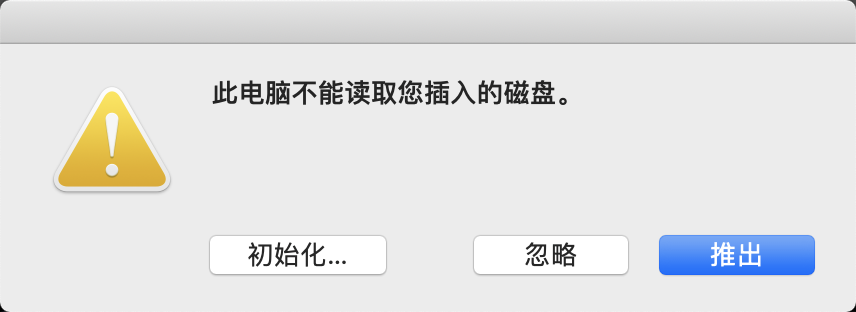
USB 启动盘不能被 Macos 正常读取,但是可以用来被当作启动盘安装 CentOS。
使用diskutil list可以查看到此时 U 盘的分区信息。
$ diskutil list

...

/dev/disk2 (external, physical):

   #:                       TYPE NAME                    SIZE       IDENTIFIER

   0:     FDisk\_partition\_scheme                        \*31.0 GB    disk2

   1:                       0xEF                         8.9 MB     disk2s2

$
弹出 U 盘
使用 “磁盘工具”APP 或者命令diskutil eject弹出 U 盘。
diskutil eject /dev/disk2
延伸
Macos 中 / dev/disk 和 / dev/rdisk 的区别
首先查看man hdiutil的描述:
Since any /dev entry can be treated as a raw disk image, it is worth noting which devices can be accessed when and how. /dev/rdisk nodes are character-special devices, but are “raw” in the BSD sense and force block-aligned I/O. They are closer to the physical disk than the buffer cache. /dev/disk nodes, on the other hand, are buffered block-special devices and are used primarily by the kernel’s filesystem code.
/dev/rdisk是原始读取模式,没有经过文件系统的文件缓存机制,因此速度比/dev/disk速度更快。
下面以 918M 大小的CentOS-7-x86_64-Minimal-1810.iso为例来比较/dev/rdisk和/dev/disk的写入速度。两者的命令分别为
# 写入/dev/rdisk的速度

$ sudo dd if=CentOS-7-x86\_64-Minimal-1810.iso of=/dev/rdisk2 bs=1m

918+0 records in

918+0 records out

962592768 bytes transferred in 106.192945 secs (9064564 bytes/sec)

# 写入/dev/disk的速度

sudo dd if=CentOS-7-x86\_64-Minimal-1810.iso of=/dev/disk2 bs=1m

918+0 records in

918+0 records out

962592768 bytes transferred in 3016.605565 secs (319098 bytes/sec)
可以看到写入/dev/rdisk花费了 106 秒,而写入/dev/disk花费了 3016 秒, 差别巨大。
Reference
- CREATE CENTOS 7 BOOTABLE USB ON OSX
- Why is “/dev/rdisk” about 20 times faster than “/dev/disk” in Mac OS X
使用 DD 命令制作 USB 启动盘的更多相关文章
- Rufus 制作 USB 启动盘简单教程
制作 Windows 10 启动盘 U盘 / USB 安装盘图文教程 http://rufus.akeo.ie/downloads/rufus-2.2p.exe 1.将U盘连接到电脑,以管理员身份运 ...
- 在Mac OS X苹果lion系统上制作USB启动盘
本文翻译自:http://evan.borgstrom.ca/post/1314205955/osx-bootable-usb-from-iso 我也就不按照原文上一句句的翻译了,只说几个比较重要的步 ...
- ubuntu制作usb启动盘
准备: u盘 iso镜像文件--ubuntu-12.04.2-desktop-amd64.iso 烧盘软件--unetbootin-linux-583 步骤: 格式化u盘 查看u盘信息 #mount/ ...
- [administrative] windows 下制作USB启动盘的工具
arch魔教的文档: https://wiki.archlinux.org/index.php/USB_flash_installation_media windows 下的 dd: https:/ ...
- 【转载】在Linux系统下用dd命令制作ISO镜像U盘启动盘
#### 将U盘插入USB接口 #umount /dev/sdb* #dd if=/iso存放路径/XXX.iso of=/dev/sdb bs=1M ##### [转载]在Linux系统下用dd命令 ...
- dd usb 启动盘制作 成功版本
在linux系统中,使用dd命令制作启动盘成功.方法是在终端中输入命令: dd if=/root/opensuse.iso of=/dev/sdb bs=4M 说明: 1.o ...
- linux/OSX中“DD”命令制作ISO镜像操作系统安装U盘
linux或者OS X系统中,使用“dd”命令可以直接在终端命令行模式下,制作ISO镜像的系统安装盘. 一.linux系统以centOS7为例. sudo dd if=镜像路径 of=USB设备路径 ...
- 制作win10 usb 启动盘
Rufus 是一个开源的USB启动盘制作程序.其特点就是快速,且支持各种系统,包括各种windows系统,linux系统,使用也很简单. Rufus主页: http://rufus.akeo.ie/ ...
- 用U盘与移动硬盘制作WIN7启动盘(亲自实践)
昨晚帮一个娃娃用移动硬盘里面的一个分区帮他制作成一个win7系统盘,为了以后万一换系统的时候方便.我自己有一个U盘坐的启动盘,移动硬盘没有倒腾过,看网上N多都是相互抄,制作都是WINPE系统的,相当蛋 ...
随机推荐
- SCSS variable for loop All In One
SCSS variable for loop All In One @each $r: red; $g: green; $b: blue; $colors: ( 1: $r, 2: $g, 3: $b ...
- ES6 Map All In One
ES6 Map All In One Map 字典/地图 Set 集合 https://developer.mozilla.org/en-US/docs/Web/JavaScript/Referenc ...
- no code form generator
no code form generator 无代码,表单生成器 H5 Drag & Drop UI => codes click copy demo https://www.forms ...
- CSS Layout All In One
CSS Layout All In One CSS2 position float % px , rem, em CSS3 flex grid multi column vw / vh 常见布局模式 ...
- c++ 使用PID获取可执行文件路径
注意看备注 https://docs.microsoft.com/en-us/windows/win32/api/psapi/nf-psapi-getmodulefilenameexa #includ ...
- 「NGK每日快讯」2021.2.3日NGK公链第92期官方快讯!
- Baccarat如何点燃DEFI市场?
目前DeFi是成为了各大生态的"兵家必争之地",与此同时DeFi的高收益也成为吸引散户入局的一个利器.而虽然流动性挖矿板块近期的温度有所下降,但是这其中不乏还是有很多收益颇丰的De ...
- BGV币与YFI币、YFII币存在着怎样的相关性?
大多数的玩家并没有长期的打算,而是更倾向于关注短期利好的币种.比如最近在圈内赚足眼球的YFI,之所以能够成为明星角色,并非它的技术和平台,而是因为它在短期就创造了86倍的暴涨.YFI币的暴涨在某种程度 ...
- Java审计之CMS中的那些反序列化漏洞
Java审计之CMS中的那些反序列化漏洞 0x00 前言 过年这段时间比较无聊,找了一套源码审计了一下,发现几个有意思的点拿出来给分享一下. 0x01 XStream 反序列化漏洞 下载源码下来发现并 ...
- keepalived-1.3.5+MHA部署mysql集群
MHA: MHA工作原理总结为以下几条: 从宕机崩溃的master保存二进制日志事件(binlog events): 识别含有最新更新的slave: 应用差异的中继日志(relay log)到其他sl ...