
【Git】4、创建代码仓库,HTTP、SSH拉取远端代码
拉取远端代码:使用Git命令下载远程仓库到本地
文章目录
简单复习 - 专栏 Git原理详解与实操指南
学习如何获取一个远程仓库的代码。
我们这就以代码托管平台Github为例;https://github.com/。
1、创建远程代码仓库
注册个账号
代码托管平台码云 、Github、Gitlab等我们选个一个注册账号,
我们这选择Github吧 官网:https://github.com/
注册:https://github.com/join?source=header-home

2、创建仓库
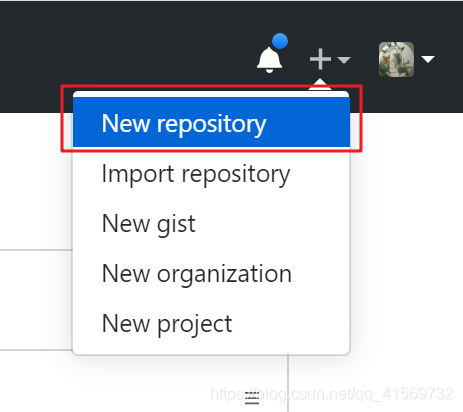
登录之后,右上角有一个New repository选择,我们点击新建一个仓库。
进入创建仓库的页面,我们简单填写一下仓库名称等信息就行了。
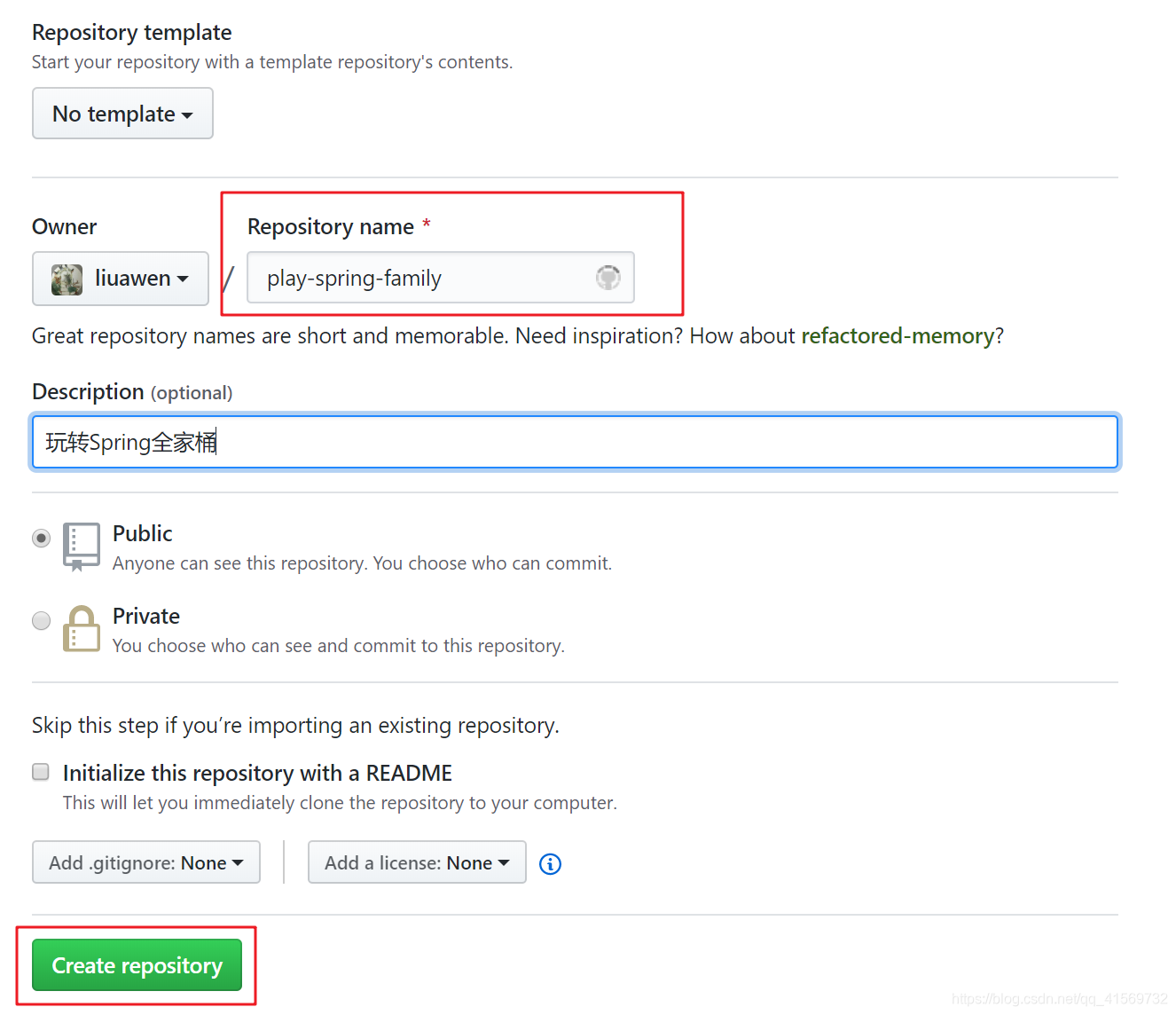
点击“Create repository”,我们就成功建立了一个远程仓库了。
3、进入仓库
创建完毕后,就进入仓库。
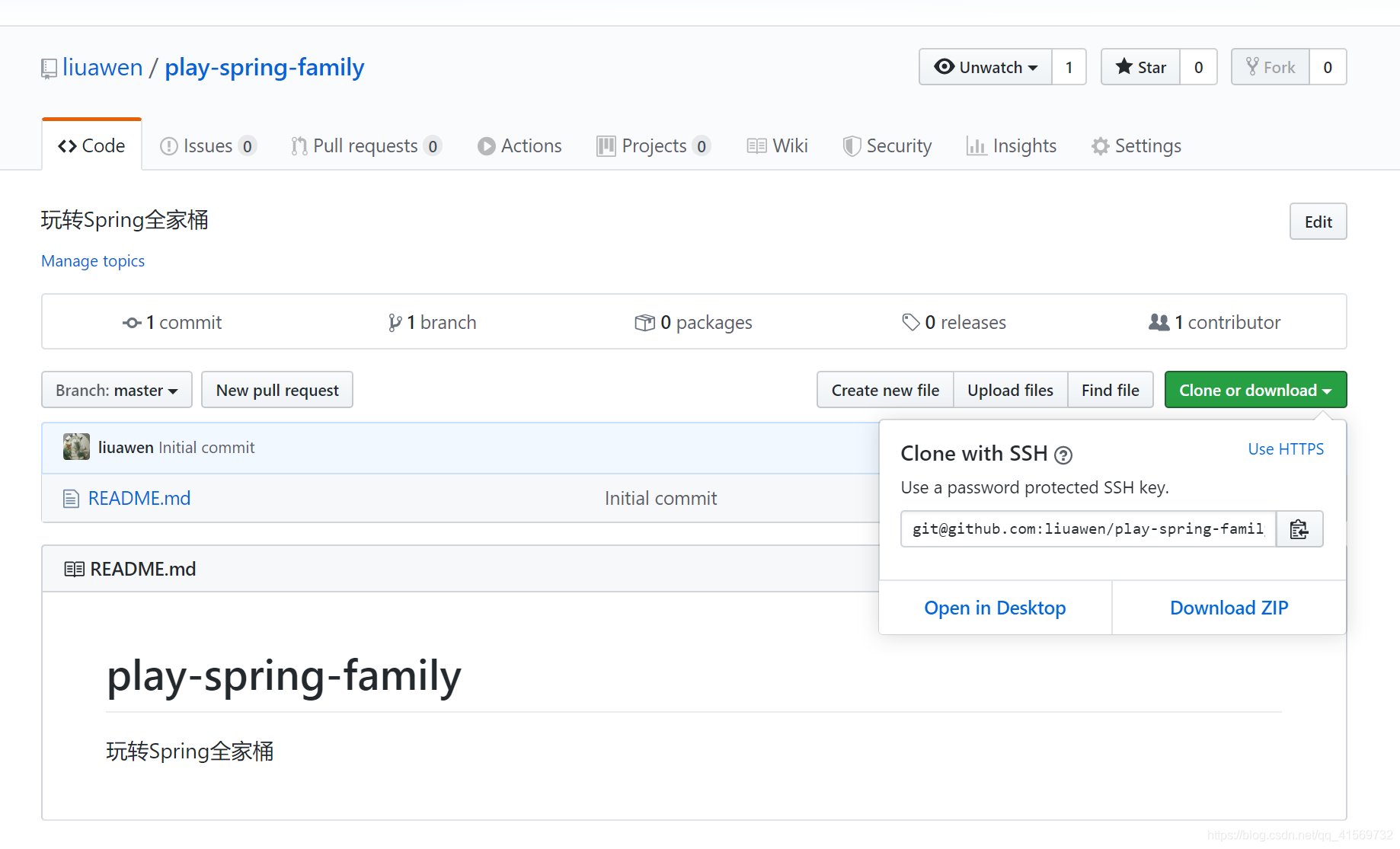
我们可以通过 git 的命令将远程仓库拉取到本地,一般会提供 HTTPS 协议和 SSH 两种协议提供管理。
4、HTTP(S)获取远程仓库
HTTP 协议方式拉取代码(远程仓库)是比较简单的,直接执行 git 的 clone 命令即可,不需要额外的配置操作,但相对 SSH协议来说安全性较低。
首次拉取
HTTP 协议首次拉取代码的命令格式如下所示:
git clone 版本库地址 [本地文件夹名称]
我要把刚才新建的仓库代码拉取到本地,并且本地的文件夹名称叫play-spring-family(也可以不指定本地文件夹名称,默认名字为远程仓库名字),参考命令如下所示
git clone https://github.com/liuawen/play-spring-family.git play-spring-family
那我去操作一下,先复制版本库地址吧
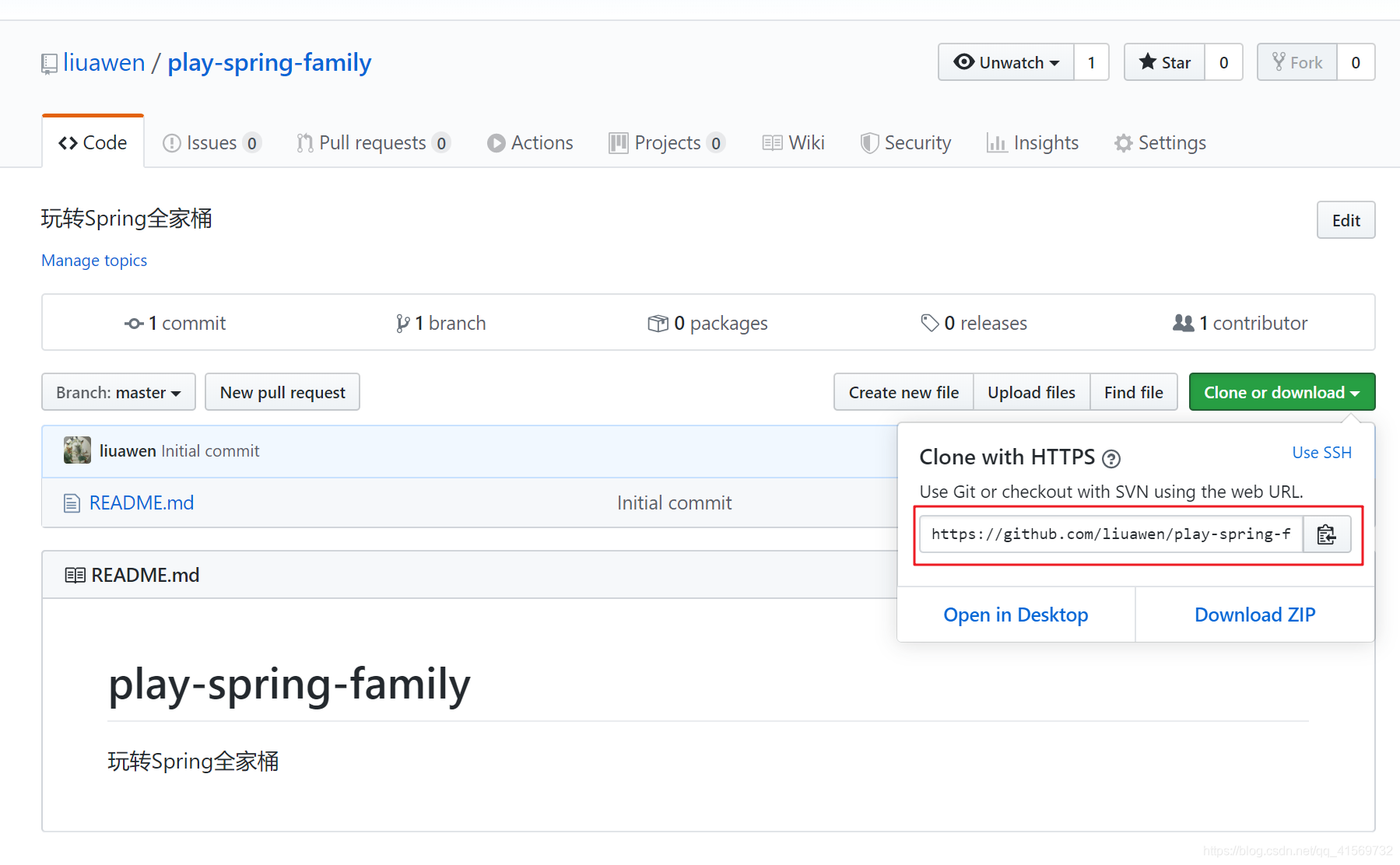
https://github.com/liuawen/play-spring-family.git
创建文件夹play-spring-family,执行命令git clone https://github.com/liuawen/play-spring-family.git play-spring-family即可把远程仓库拉取到本地。
命令执行完成后,会要求你输入用户名和密码,只有当你输入正确的用户名和密码之后代码才能正常拉取。应该是会出现这个。
Username for 'https://github.com': liuawen

Password for 'https://liuawen@github.com':
操作如下:
liuawen@DESKTOP-HVI7SH0:~$ su root

Password:

➜  liuawen pwd

/home/liuawen

➜  liuawen mkdir play_spring_family

➜  liuawen ls

git  play_spring_family  sources.list

➜  liuawen git clone https://github.com/liuawen/play-spring-family.git   play-spring-family

Cloning into 'play-spring-family'...

remote: Enumerating objects: 3, done.

remote: Counting objects: 100% (3/3), done.

Unpacking objects: 100% (3/3), done.

remote: Total 3 (delta 0), reused 0 (delta 0), pack-reused 0

➜  liuawen cd play-spring-family

➜  play-spring-family git:(master) ls

README.md

➜  play-spring-family git:(master) ls -al

total 0

drwxr-xr-x 1 root    root    4096 Mar 21 19:24 .

drwxr-xr-x 1 liuawen liuawen 4096 Mar 21 19:24 ..

drwxr-xr-x 1 root    root    4096 Mar 21 19:25 .git

-rw-r--r-- 1 root    root      44 Mar 21 19:24 README.md

➜  play-spring-family git:(master)
更新代码
假设远程代码有变更,我想本地代码也更新一波时,我应该怎么做呢?
我可以在本地的版本库目录下通过git pull命令更新,不需要再指定远程地址,
命令如下
git pull
默认情况下会再次提示输入密码,因为 git 默认没有缓存 HTTP 认证权限。我是设置了
➜  play-spring-family git:(master) git pull

Already up to date.

➜  play-spring-family git:(master)
临时记住密码
如果不想每次都输入 git 的认证信息,可以设置缓存认证数据,默认记住 15 分钟,如下命令所示:
git config --global credential.helper cache
当然也可以指定缓存时长,比如下面是自定义配置记住 1 分钟的命令:
git config credential.helper ‘cache –timeout=60’
credential n. 证书;凭据
timeout的单位为秒。
永久记住密码
感觉很麻烦啦,频繁输入用户名、密码。
我不想每次提交代码都要输入用户名密码,我要让 Git 永久记住密码,那怎么操作呢?
git config --global credential.helper store
命令执行完毕之后,会在当前用户主目录的.gitconfig文件中新增一项配置,执行命令查看
➜ .git git:(master) vim ~/.gitconfig
配置如下所示
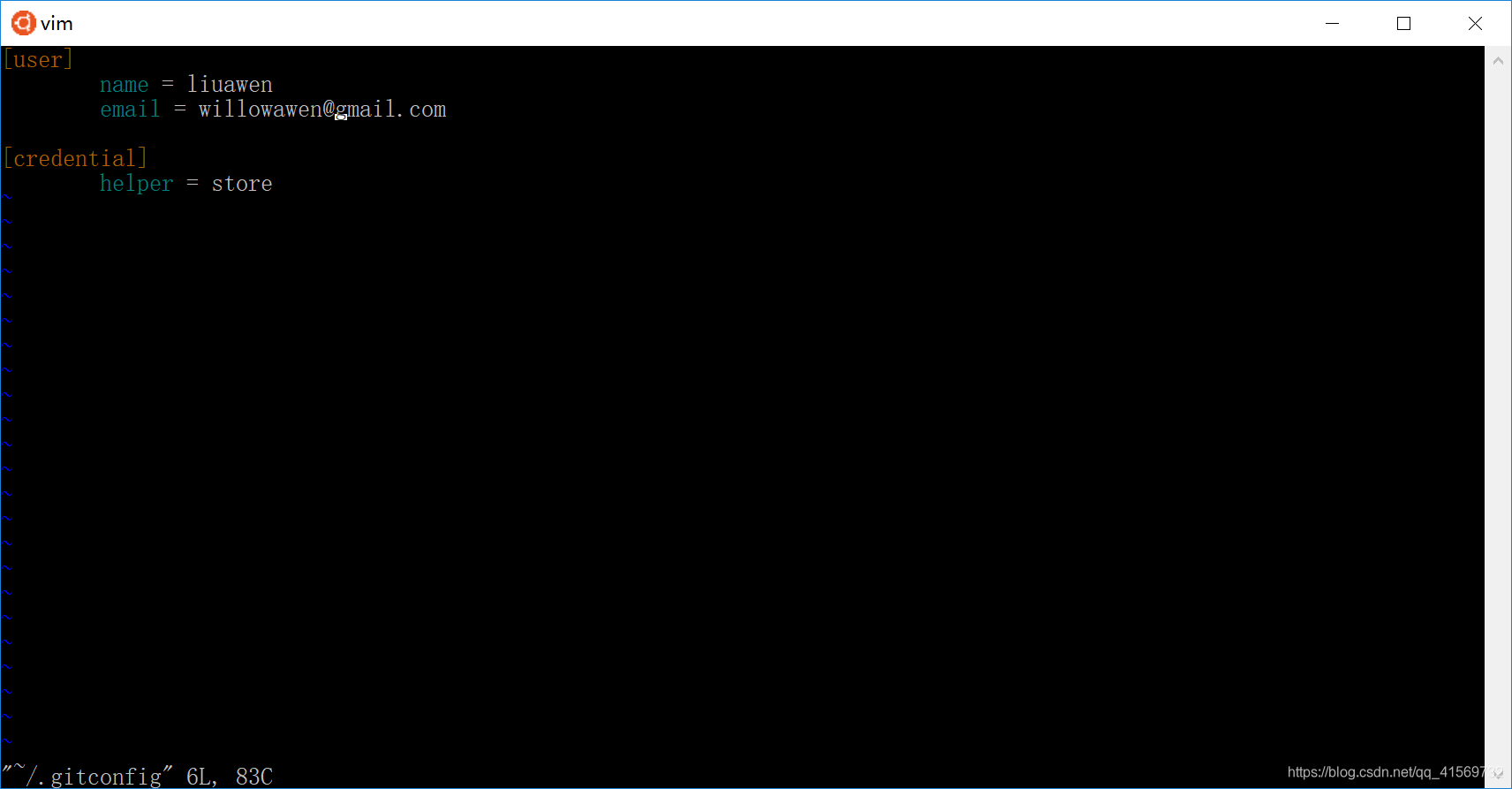
上面是设计全局的,也可以设计局部的,那我设置下本地当前仓库的。
git config credential.helper store
我去当前仓库.config文件查看下,是否设置好了
config
[core]

        repositoryformatversion = 0

        filemode = true

        bare = false

        logallrefupdates = true

[remote "origin"]

        url = https://github.com/liuawen/play-spring-family.git

        fetch = +refs/heads/*:refs/remotes/origin/*

[branch "master"]

        remote = origin

        merge = refs/heads/master

[credential]

        helper = store

~
执行过的命令:
➜  play-spring-family git:(master) git config  credential.helper store

➜  play-spring-family git:(master) pwd

/home/liuawen/play-spring-family

➜  play-spring-family git:(master) ls -al

total 0

drwxr-xr-x 1 root    root    4096 Mar 21 19:24 .

drwxr-xr-x 1 liuawen liuawen 4096 Mar 21 19:24 ..

drwxr-xr-x 1 root    root    4096 Mar 21 20:34 .git

-rw-r--r-- 1 root    root      44 Mar 21 19:24 README.md

➜  play-spring-family git:(master) ls al

ls: cannot access 'al': No such file or directory

➜  play-spring-family git:(master) cd .git

➜  .git git:(master) ls -al

total 0

drwxr-xr-x 1 root root 4096 Mar 21 20:34 .

drwxr-xr-x 1 root root 4096 Mar 21 19:24 ..

-rw-r--r-- 1 root root  107 Mar 21 20:22 FETCH_HEAD

-rw-r--r-- 1 root root   23 Mar 21 19:24 HEAD

-rw-r--r-- 1 root root   41 Mar 21 20:22 ORIG_HEAD

drwxr-xr-x 1 root root 4096 Mar 21 19:24 branches

-rw-r--r-- 1 root root  304 Mar 21 20:33 config

-rw-r--r-- 1 root root   73 Mar 21 19:24 description

drwxr-xr-x 1 root root 4096 Mar 21 19:24 hooks

-rw-r--r-- 1 root root  137 Mar 21 19:25 index

drwxr-xr-x 1 root root 4096 Mar 21 19:24 info

drwxr-xr-x 1 root root 4096 Mar 21 19:24 logs

drwxr-xr-x 1 root root 4096 Mar 21 19:24 objects

-rw-r--r-- 1 root root  114 Mar 21 19:24 packed-refs

drwxr-xr-x 1 root root 4096 Mar 21 19:24 refs

➜  .git git:(master) vim config
如果没有加上--global,则会在当前项目下的.git/config文件增加配置
[credential]

        helper = store
git 永久记住密码是根据配置文件所决定,我也可以直接复制配置文件。
https拉取远程仓库每次都要输用户名密码,用了git config --global credential.helper store,这样会把账号和密码明文保存在.gitconfig-credentials里。
5、 SSH拉取
SSH( Secure Shell )方式拉取代码,相比HTTP(S)来说更加安全。
为什么呢更安全呢?因为SSH方式使用的是非对称加密,采用公钥与私钥的方式。
相对来说配置起来会麻烦一些;好处是一次配置之后,后续不需要每次都进行认证,也更加安全效率也高点吧。
拉取代码
SSH
git clone git@github.com:liuawen/play-spring-family.git play-spring-family-ssh
SSH地址:
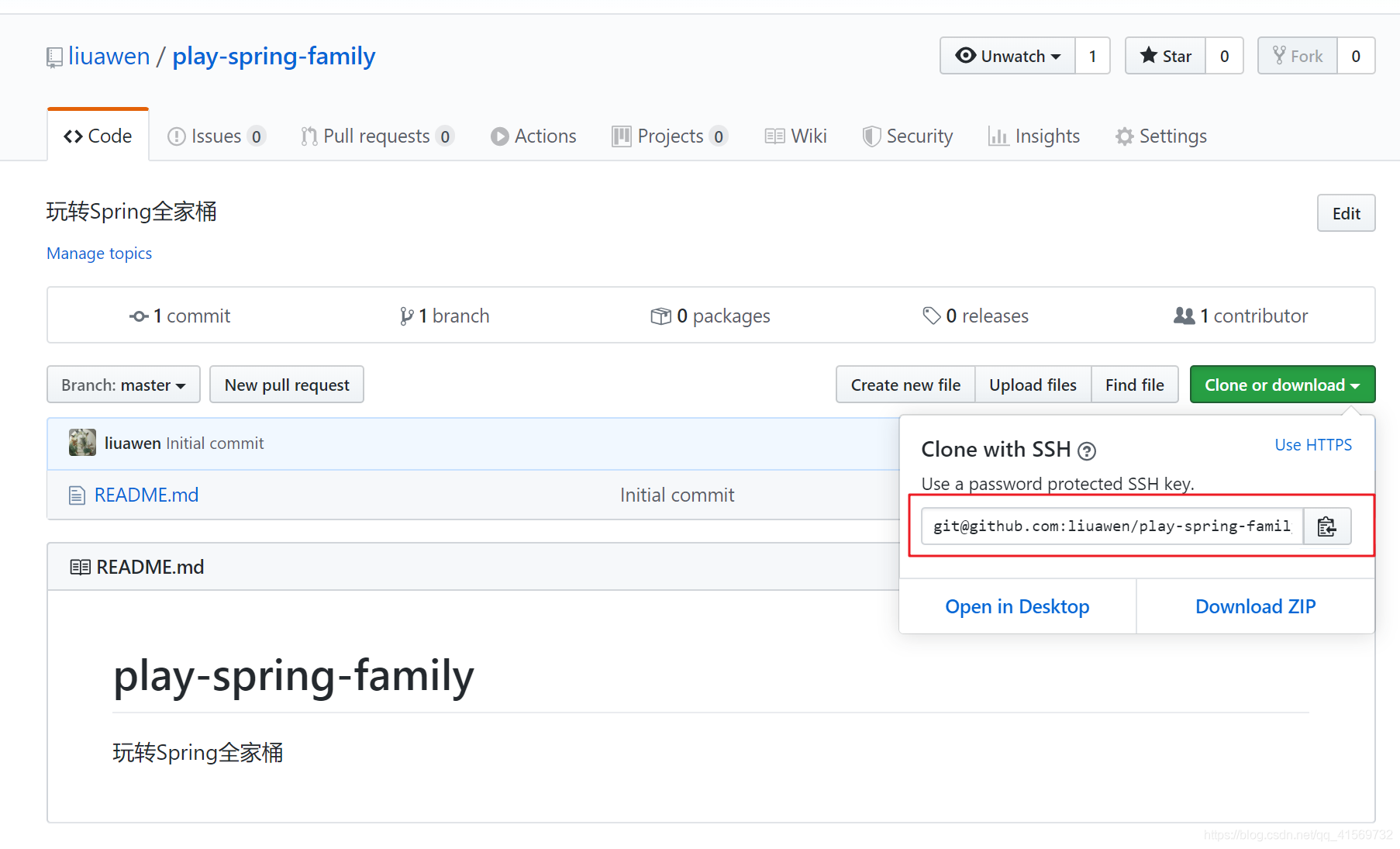
执行git clone git@github.com:liuawen/play-spring-family.git play-spring-family-ssh命令,提示需要权限验证。
➜  liuawen ls

git  play-spring-family  play_spring_family  sources.list

➜  liuawen git clone git@github.com:liuawen/play-spring-family.git play-spring-family-ssh

Cloning into 'play-spring-family-ssh'...

The authenticity of host 'github.com (13.250.177.223)' can't be established.

RSA key fingerprint is SHA256:nThbg6kXUpJWGl7E1IGOCspRomTxdCARLviKw6E5SY8.

Are you sure you want to continue connecting (yes/no)?
没有配置公钥与私钥,所以我们这第一次拉取代码失败了。
➜  liuawen git clone git@github.com:liuawen/play-spring-family.git play-spring-family-ssh

Cloning into 'play-spring-family-ssh'...

The authenticity of host 'github.com (13.250.177.223)' can't be established.

RSA key fingerprint is SHA256:nThbg6kXUpJWGl7E1IGOCspRomTxdCARLviKw6E5SY8.

Are you sure you want to continue connecting (yes/no)? yes

Warning: Permanently added 'github.com,13.250.177.223' (RSA) to the list of known hosts.

git@github.com: Permission denied (publickey).

fatal: Could not read from remote repository.

Please make sure you have the correct access rights

and the repository exists.

➜  liuawen
怎么办呢?看下面吧。
创建一个ssh key
通过 ssh 协议拉取代码要保证当前用户的主目录存在一个.ssh的文件夹,并且里面已经存在私钥文件,如果没有的话我们可以通过ssh-keygen,生成一份公钥与私钥。
➜  liuawen ssh-keygen

Generating public/private rsa key pair.

Enter file in which to save the key (/root/.ssh/id_rsa):

Enter passphrase (empty for no passphrase):

Enter same passphrase again:

Your identification has been saved in /root/.ssh/id_rsa.

Your public key has been saved in /root/.ssh/id_rsa.pub.

The key fingerprint is:

SHA256:z5hcJzLsnISUNxjOFeZz9R1PPsWk8SirFwoRyWYe0VE root@DESKTOP-HVI7SH0

The key's randomart image is:

+---[RSA 2048]----+

|      ..*=.oE .++|

|     o B*... . O=|

|      *+*.. . +.=|

|     . +.=   o  .|

|      . S o +    |

|       = @ = .   |

|        B = .    |

|           .     |

|                 |

+----[SHA256]-----+

➜  liuawen cat ~/.ssh/id_rsa.pub

ssh-rsa AAAAB3NzaC1yc2EAAAADAQABAAABAQDRaxJM1CAl0u+ImEVhC2P2iiGloo1Bx4NQ2bOjQxgy96ncTwUbrG3QmUmX86Oyfl49DRgpnwYe3wBA2wy7fxrqz2sYJAPdhqVlyJpL9SiKdOAw9Vu8aA1IVzDBhKN4W2bHJ7xQ6X7OnQ5tTz3Mcjdyk8cbwVIg1zYI56ABQZaEewt3deTlU24rAaqb+0voA/RrzoaBqtv6XHXpef/s4QIWQZ21m2IyppUkQERC28xVaAwJGLedIrjQ6AyLLxAkgd5BZkhCv02PPDYWT2ixlHK2DDpX45BEgUNDbi6kqKMglK0G67kLFiFssmDwF2vLDGjlKIyWYPwgwNYyvR73d7SF root@DESKTOP-HVI7SH0

➜  liuawen
ssh-keygen,最终会在当前用户目录下生成公钥和私钥,查看生成的公钥的命令为cat ~/.ssh/id_rsa.pub
要保存好私钥哦。
添加公钥到服务器
ssh-keygen

cat ~/.ssh/id_rsa.pub
当我们确认公钥和私钥生成完毕之后,我们还需要将公钥放到远程的 Github 仓库中去。
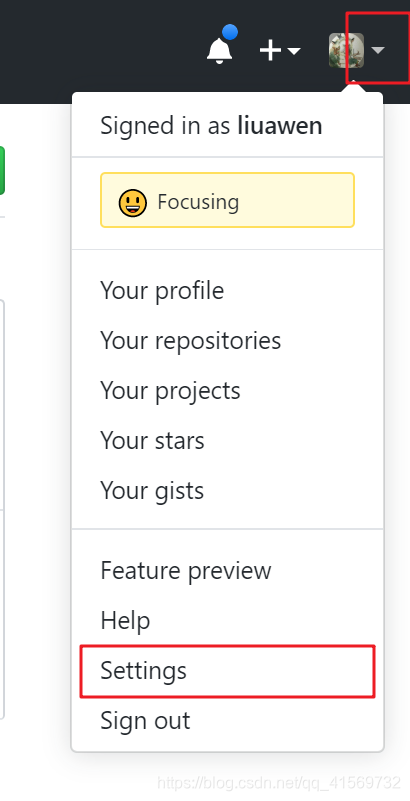

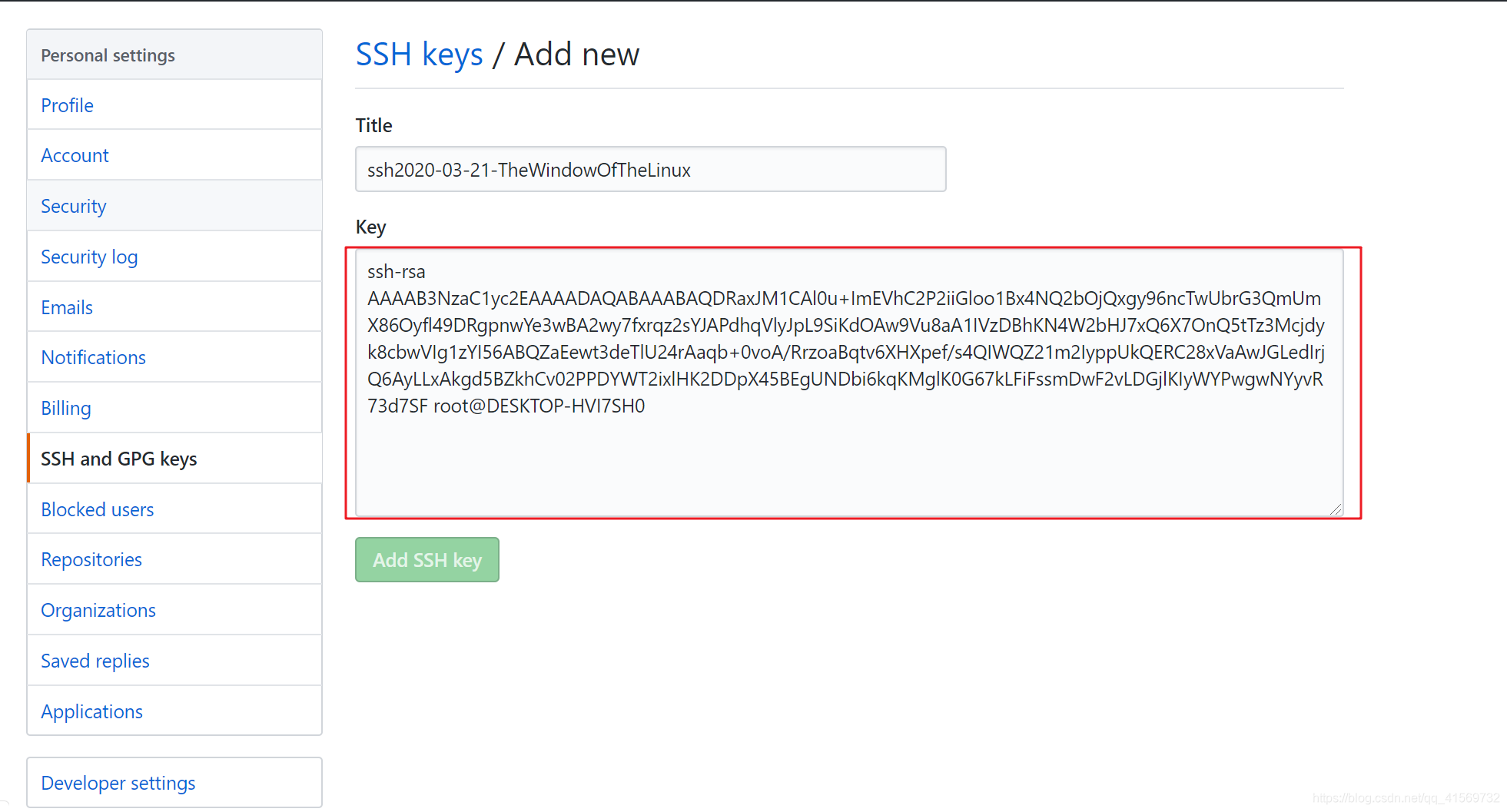
把上面的cat ~/.ssh/id_rsa.pub命令查看到的密钥复制过来,点击"Add SSH key"。
再次拉取代码
当我们把公钥添加到Github版本库进去之后,就已经完成了权限配置。
我们再次使用ssh方式拉取代码,就不会提示没有权限。
➜  liuawen git clone git@github.com:liuawen/play-spring-family.git play-spring-family-ssh

Cloning into 'play-spring-family-ssh'...

remote: Enumerating objects: 3, done.

remote: Counting objects: 100% (3/3), done.

remote: Total 3 (delta 0), reused 0 (delta 0), pack-reused 0

Receiving objects: 100% (3/3), done.

➜  liuawen ls

git  play-spring-family  play-spring-family-ssh  play_spring_family  sources.list

➜  liuawen cd play-spring-family-ssh

➜  play-spring-family-ssh git:(master) ls -al

total 0

drwxr-xr-x 1 root    root    4096 Mar 21 21:04 .

drwxr-xr-x 1 liuawen liuawen 4096 Mar 21 21:04 ..

drwxr-xr-x 1 root    root    4096 Mar 21 21:06 .git

-rw-r--r-- 1 root    root      44 Mar 21 21:04 README.md

➜  play-spring-family-ssh git:(master)
执行git clone git@github.com:liuawen/play-spring-family.git play-spring-family-ssh命令之后,代码已经成功拉取咯。
我们来更新一波代码
更新代码
ssh 方式更新代码命令和上面的 http 方式拉取代码命令一致,同样需要在 目录play-spring-family-ssh下执行命令:git pull,然后可以看到git成功的拉取到了代码
➜  play-spring-family-ssh git:(master) git pull

Warning: Permanently added the RSA host key for IP address '13.229.188.59' to the list of known hosts.

Already up to date.

➜  play-spring-family-ssh git:(master)
6、小结
使用过的命令
git clone 版本库地址	[本地文件夹名称]

git pull

git config  --global credential.helper cache

git config credential.helper ‘cache –timeout=60’

git config --global credential.helper store

vim ~/.gitconfig

git clone git@github.com:liuawen/play-spring-family.git play-spring-family-ssh

ssh-keygen

cat ~/.ssh/id_rsa.pub
学习了如何在Github创建一个远程仓库,以及两种方式拉取远程仓库代码拉取到本地。
HTTP(S)和SSH协议方式拉取代码。
HTTP拉取
git clone https://github.com/liuawen/play-spring-family.git   play-spring-family

git pull

git config  --global credential.helper cache

git config credential.helper ‘cache –timeout=60’

git config --global credential.helper store
Q:HTTP(S)协议默认每次需要输入账号密码,那我不想每次输入账号密码怎么解决呢?
A:可以通过缓存认证方式处理,永久(临时)记住密码。
使用git config --global credential.helper store命令,这样会把账号和密码明文保存在.gitconfig-credentials里。
SSH拉取
SSH第一次直接拉取代码,会提示没有权限,
我们要将SSH协议生成的公钥放到 Git 服务器当中去,配置好了Git会自动通过ssh协议进行鉴权,不需要通过账号加密码。
git clone git@github.com:liuawen/play-spring-family.git play-spring-family-ssh

git pull

ssh-keygen
Q:换了计算机,要不要重新配置SSH?
A:可以重新配置,也可以将原来计算机的.ssh文件夹复制到新的计算机。
【Git】4、创建代码仓库,HTTP、SSH拉取远端代码的更多相关文章
- git使用命令行拉取远程代码仓库中的分支至本地
1.本地创建文件夹用于存放拉取的代码 2.执行git init初始化文件夹 3.与远程代码仓库建立连接 git remote add origin git@github.com.wuylin/noth ...
- git常用操作 配置用户信息、拉取项目、提交代码、分支操作、版本回退...
git常用操作 配置用户信息.拉取项目.提交代码.分支操作.版本回退... /********git 配置用户信息************/ git config --global user.name ...
- 【IDEA】本地新建Maven项目+配置Git和GitHub+代码上传和拉取到GitHub+其他IDEA和GitHub实战
一.本地新建Maven项目并启动成功 1. 按照IDEA提供的模板,构建一个maven webapp的模板项目. 一路Next,到最后的finish.如下图. 2. 新建Tomcat,启动刚建立的项目 ...
- git 拉取远程代码
git 拉取远程代码 || 利用vscode编辑器自带了git,可在ctrl+~打开控制台拉取代码,非常好用哦~在实际项目开发过程中,往往是已经存在远程项目了,我们定义的需求是只需要简单的操作git, ...
- 通过宝塔webhook,实现git自动拉取服务器代码
1.宝塔安装webhook,添加一条记录,脚本内容为: #!/bin/bash echo "" #输出当前时间 date --date='0 days ago' "+%Y ...
- Github拉取远端的时候提示“ssh: connect to host github.com port 22: Connection timed out”错误
在使用Github的时候,如果使用到拉取远端分支的时候或者测试ssh -T git@github.com的时候可能会出现连接失败的问题,错误描述为“ssh: connect to host githu ...
- 【Copy攻城狮日志】docker搭建jenkins拉取svn代码打包vue项目部署到nginx
↑开局一张图,故事全靠编↑ 前言 打开搜索引擎输入『Copy攻城狮』,发现最新的一条记录已经是去年的4月,意味着我又有一年时间没有再总结成长了.习惯了“温水煮青蛙”的日子,无论是经验水平还是薪资收入, ...
- git 操作 :从远程仓库gitLab上拉取指定分支到本地仓库;git如何利用分支进行多人开发 ;多人合作代码提交实践
例如:将gitLab 上的dev分支拉取到本地 git checkout -b dev origin/dev 在本地创建分支dev并切换到该分支 git pull origin dev 就可以把git ...
- coding上创建项目、创建代码仓库、将IDEA中的代码提交到coding上的代码仓库、Git的下载、IDEA上配置git
文章目录 一.Git的安装以及子啊IDEA上配置Git(下载好的可以跳过) 二.怎样让IDEA和Git建立关系 三.在coding上创建项目 四.在coding上创建代码仓库 五.Git工作理论 六. ...
随机推荐
- mac下git连接github远程仓库
git配置 一.安装git 官方网站下载安装,如果有安装homebrew,在终端输入brew install git,安装后的位置在/Users/计算机用户名目录下安装完成后,在终端输入git --v ...
- 淘宝|蚂蚁|菜鸟|盒马|嘀嘀|饿了么面经(已拿多个offer)
上一篇的同学拿到了bigo和腾讯的offer,这一次的分享来自两位同学的面试综合,他们分别拿到了菜鸟.嘀嘀.盒马的多个offer,由于面试的时间跨度时间太长,且面试的部门太多,只能回忆到具体的面试题, ...
- Linux下双网卡绑定bond配置实例详解
本文源自:http://blog.itpub.net/31015730/viewspace-2150185/ 一.什么是bond? 网卡bond是通过多张网卡绑定为一个逻辑网卡,实现本地网卡冗余,带宽 ...
- MySQL timestamp 的两个属性
timestamp有两个属性,分别是CURRENT_TIMESTAMP 和ON UPDATE CURRENT_TIMESTAMP两种,使用情况分别如下: 1. CURRENT_TIMESTAMP 当要 ...
- CSS3全览_动画+滤镜
CSS3全览_动画+滤镜 目录 CSS3全览_动画+滤镜 1. 列表和生成的内容 2. 变形 3. 过渡 4. 动画 5. 滤镜, 混合, 裁剪和遮罩 6. 针对特定媒体的样式 作者: https:/ ...
- 钩子与API截获
http://www.pudn.com/Download/type/id/19.html
- aaencode:用颜文字来加密吧
今天逛大佬博客发现了一个有意思的东西 ゚ω゚ノ= /`m´)ノ ~┻━┻ //*´∇`*/ ['_']; o=(゚ー゚) =_=3; c=(゚Θ゚) =(゚ー゚)-(゚ー゚); (゚Д゚) =(゚Θ゚ ...
- iNeuOS工业互联平台,图表与数据点组合成新组件,进行项目复用
目 录 1. 概述... 1 2. 演示信息... 2 3. 应用过程... 2 1. 概述 针对有些行业的数据已经形成了标准化的建模或者有些公司专注于某 ...
- draggable()拖拽时限制移动区域
jQuery-UI为我们提供了一个非常便捷的拖拽方法:draggable(),在使用此方法时,我们可能会希望控件只在某一区域中移动,不能被拖出边界,这样的话我们可以使用下面的方法: 调用draggab ...
- Python写一个对象,让它自己能够迭代
仿写range()对象,对象是可迭代的: 1 #!usr/bin/env python3 2 # -*- coding=utf-8 -*- 3 4 class myRange(): 5 #初始化,也叫 ...