
必应API接口nodejs版
近期,在研究百度、必应、API等的url提交API时,发现有用Go语言做工具的大佬的分享 利用 API 自动向搜索引擎提交网址(Go语言版) - pyList。
其中提到bing API提交方法,并给出了Go语言代码:
func Bing() {

    sUrl := "https://ssl.bing.com/webmaster/api.svc/json/SubmitUrl?apikey=xxxxxxxx"

    buf := bytes.NewBufferString(`{

"siteUrl":"https://pylist.com",

"url":"https://pylist.com/t/1581940902"

}`)

    req, err := http.NewRequest("POST", sUrl, buf)

    if err != nil {

        return

    }

    req.Header.Set("Content-Type", "application/json; charset=utf-8")

    resp, err := http.DefaultClient.Do(req)

    if err != nil {

        return

    }

    defer resp.Body.Close()

}
可以保存为: bing-push.go, 然后在本地执行哈~
而相比于go语言,我本人对node.js更熟悉一点~
必应API接口-单条提交
var request = require('request');

var options = {

    uri: 'https://ssl.bing.com/webmaster/api.svc/json/SubmitUrl?apikey=' + 'xxx', /* xxx需替换为你的key */

    method: 'POST',

    json: {

        "siteUrl": "http://geekplayers.com", /* 替换为你的站点,并且在Bing站长平台中验证过权限 */

        "url": "http://geekplayers.com/link.html"   /* 替换为你需要推送的url */

    }

};

request(options, function (error, response, body) {

    console.log("Bing response: ", body)

});
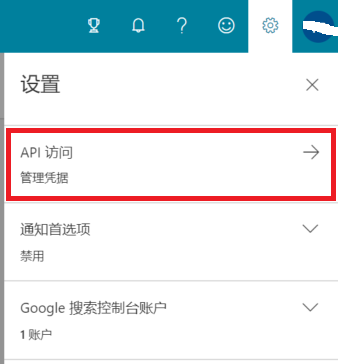
登录必应站长后台https://www.bing.com/webmasters,点右上角的设置按钮(齿轮⚙),找到你的key:
Step 1:
Step 2:
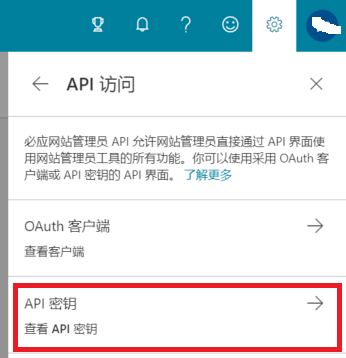
然后将上述代码中的xxx替换为你的key。
先保存文件为: bing-SingleSumbit.js,
然后在当前目录下打开命令行,输入 npm install request,
接下来改好key, siteurl, url等值后,就可以在命令行中运行:
node bing-SingleSumbit.js
必应API接口-批量提交
批量提交 - 版本1
var request = require('request');

var myJson = {

    "siteUrl": "http://geekplayers.com",

    "urlList": [

        "http://geekplayers.com/link.html",

        "http://geekplayers.com/about.html",

        "http://geekplayers.com/blog/"

    ]

};

request({

    url: 'https://ssl.bing.com/webmaster/api.svc/json/SubmitUrlbatch?apikey=' + 'xxx', /* xxx需替换为你的key */

    method: "POST",

    json: true,   // <--Very important!!!

    body: myJson

}, function (error, response, body) {

    console.log(body);

});
我记得这里有个跨域的问题, 设置 json: true 即可解决。
先将代码保存为: bing-BatchSumbit.js.
运行方法,同上~
批量提交 - 改进1
在上一版本的基础上可以改进,即:把多条url先按行放进link.txt中,然后读取处理~
var fs = require('fs');

var readline = require('readline');

var path = require('path')

function readFileToArr(fReadName, callback) {

    var arr = [];

    var readObj = readline.createInterface({

        input: fs.createReadStream(fReadName)

    });

    readObj.on('line', function (line) {

        arr.push(line);

    });

    readObj.on('close', function () {

        console.log('readLine close....');

        callback(arr);

    });

}

// var urlsFile = path.resolve(__dirname, 'links.txt').replace(/\\/g, '/');  // For Windows

var urlsFile = path.resolve(__dirname, '..', 'nodejs', 'links.txt'); /* 兼容 Windows/Linux, 这里nodejs为上级文件夹名 */

readFileToArr(urlsFile, function (arr) {

    var request = require('request');

    var myJson = {

        "siteUrl": "http://geekplayers.com",

        "urlList": arr

    };

    request({

        url: 'https://ssl.bing.com/webmaster/api.svc/json/SubmitUrlbatch?apikey=' + 'xxx',

        method: "POST",

        json: true,   // <--Very important!!!

        body: myJson

    }, function (error, response, body) {

        console.log(body);

    });

});
保存文件为: bing-BatchSumbit2.js,
命令行中用cd命令切换到当前目录,然后依次输入:
npm install fs

npm install readline

npm install path
改好key, siteurl, url等值后,并在当前目录创建文件links.txt并填入需要推送的多条url,就可以在命令行中运行:
node bing-BatchSumbit2.js
批量提交 - 改进2
上一版本的代码中,links.txt的内容是手动添加的,那我们可不可以从sitemap.xml获取并直接转换为.txt供后面使用呢?当然可以,于是另外写了一段node.js代码做这个事。
var fs = require('fs');

var request = require('request');

const cheerio = require('cheerio');

request('https://www.geekplayers.com/sitemap.xml', function (error, response, html) {

    if (!error && response.statusCode == 200) {

        var $ = cheerio.load(html, {

            xmlMode: true

        });

        textFile = 'myLink.txt';

        fs.open(textFile, 'wx', (err, fd) => {

            if (err) {

                if (err.code === 'EEXIST') {

                    console.error('myfile already exists');

                    fs.unlinkSync(textFile);  // Remove file

                }

            }

        });

        const nodes = $('loc');

        var arr = [];

        for (i = 0; i < nodes.length; i++) {

            arr[i] = nodes[i].firstChild.data;

            fs.appendFile(textFile, arr[i] + '\r\n', function (err) {

                if (err) {

                    console.error('One line converted failed.'); // append failed

                } else {

                    // console.error('One line converted done!');

                }

            })

        }

        console.error('Converted done!');

    }

});

// Reference: https://stackoverflow.com/a/25012834/6075331
先保存代码为: sitemapInXMLtoText.js,
命令行中用cd命令切换到当前目录,然后依次输入:
npm install fs

npm install request

npm install cheerio
改好key, siteurl, url等值后,就可以在命令行中运行:
node sitemapInXMLtoText.js
接下来只需将request调用时的第一个参数改为你的sitemap.xml的网址即可~
最后再到命令行中执行一次:
node bing-BatchSumbit2.js
Bing还提供了其他API接口
GetKeywordStats - Bing
https://ssl.bing.com/webmaster/api.svc/json/GetKeywordStats?q=dog%20beds&country=be&language=nl-BE&apikey=...
RSS Feed提交:
https://bing.com/webmaster/api.svc/json/SubmitFeed
获取用户验证后的站点信息:
https://ssl.bing.com/webmaster/api.svc/json/GetUserSites
有兴趣的朋友可以继续深入研究哈, 欢迎在评论区留言交流~
作 者: 极客玩家大白
首发于: 必应API接口nodejs版 - 极客玩家大白
必应API接口nodejs版的更多相关文章
- 基于Node和Electron开发了轻量版API接口请求调试工具——Post-Tool
Electron 是一个使用 JavaScript.HTML 和 CSS 构建桌面应用程序的框架. 嵌入 Chromium 和 Node.js 到 二进制的 Electron 允许您保持一个 Java ...
- hbase rest api接口链接管理【golang语言版】
# go-hbase-resthbase rest api接口链接管理[golang语言版]关于hbase的rest接口的详细信息可以到官网查看[http://hbase.apache.org/boo ...
- 网易短信接口集成 nodejs 版
/* name:网易短信服务集成nodejs版: author:zeq time:20180607 test: // checkValidCode('157****6954','284561').th ...
- Yii2 基于RESTful架构的 advanced版API接口开发 配置、实现、测试 (转)
环境配置: 开启服务器伪静态 本处以apache为例,查看apache的conf目录下httpd.conf,找到下面的代码 LoadModule rewrite_module modules/mod_ ...
- Yii2 基于RESTful架构的 advanced版API接口开发 配置、实现、测试
环境配置: 开启服务器伪静态 本处以apache为例,查看apache的conf目录下httpd.conf,找到下面的代码 LoadModule rewrite_module modules/mod_ ...
- Yii2 基于RESTful架构的 advanced版API接口开发 配置、实现、测试【转】
环境配置: 开启服务器伪静态 本处以apache为例,查看apache的conf目录下httpd.conf,找到下面的代码 LoadModule rewrite_module modules/mod_ ...
- 常用精品API接口汇总
下面列举了100多个国内常用API接口,并按照 笔记.出行.词典.电商.地图.电影.即时通讯.开发者网站.快递查询.旅游.社交.视频.天气.团队协作.图片与图像处理.外卖.消息推送.音乐.云.语义识别 ...
- 常用API接口汇总
下面列举了100多个国内常用API接口,并按照 笔记.出行.词典.电商.地图.电影.即时通讯.开发者网站.快递查询.旅游.社交.视频.天气.团队协作.图片与图像处理.外卖.消息推送.音乐.云.语义识别 ...
- 【转载】常用精品API接口汇总
原文链接戳这里~~ 下面列举了100多个国内常用API接口,并按照 笔记.出行.词典.电商.地图.电影.即时通讯.开发者网站.快递查询.旅游.社交.视频.天气.团队协作.图片与图像处理.外卖.消息推送 ...
随机推荐
- Node.js简易服务器,配合type="module" 实现html文件script标签 ES module引入模块
相信大家在测试type="module" 在html文件中直接模块化引入 js时,会出现一个跨域问题. 当我们将<script ></scirpt> 标签t ...
- PAT 2-10. 海盗分赃(25)
题目链接:http://www.patest.cn/contests/ds/2-10 解题思路:参考:http://blog.csdn.net/linsheng9731/article/details ...
- DFS【搜索1】
DFS模板 void dfs(int depth)//depth表示当前的层数(或深度) { if(depth>n)//到达叶子节点,该路已走到尽头 return; for(int i=;i&l ...
- 开发APP遇到的问题
1.代码尽量复用 2.调用高德地图,直辖市等,省字段一定有值,市可能为空(pro:'北京市',city:[]) 3.支付密码不用组件 <template> <view> < ...
- Jmeter 常用函数(8)- 详解 __MD5
如果你想查看更多 Jmeter 常用函数可以在这篇文章找找哦 https://www.cnblogs.com/poloyy/p/13291704.html 作用 将指定的字符串 MD5 加密并返回,加 ...
- JavaScript学习系列博客_26_JavaScript 数组的一些方法
数组的一些方法 - push() - 用来向数组的末尾添加一个或多个元素,并返回数组新的长度 - 语法:数组.push(元素1,元素2,元素N) - pop() - 用来删除数组的最后一个元素,并返回 ...
- 【测试技术分享】Liunx常用操作命令集合
Linux命令 ls 查看文件目录内容 ls -lha l:详细信息 h:人性化显示 a:查看隐藏目录 ls -目录名 查看指定目录 d rwx rwx rwx d:文件夹 -:文件 rwx:拥有 ...
- wsgi的environ变量
The environ dictionary is required to contain these CGI environment variables, as defined by the Com ...
- 微服务项目整合Ocelot+IdentityServer4
项目搭建肯定少不了认证和授权,传统的单体应用基于cookie和session来完成的. 因为http请求是无状态的,每个请求都是完全独立的,服务端无法确认当前请求之前是否登陆过.所以第一次请求(登录) ...
- Deep and Beautiful. The Reward Prediction Error Hypothesis of Dopamine
郑重声明:原文参见标题,如有侵权,请联系作者,将会撤销发布! Contents: Abstract 1. Introduction 2. Reward-Prediction Error Meets D ...