
[原][osgEarth]在osgearth中添加相机路径动画
在osg中添加相机动画路径请参考:http://www.cnblogs.com/lyggqm/p/8075277.html
这里的代码是在osgearth中添加相机动画路径漫游器:
#include <osg/Image>

#include <osgGA/StateSetManipulator>

#include <osgViewer/Viewer>

#include <osgViewer/ViewerEventHandlers>

#include <osgEarth/Map>

#include <osgEarth/MapNode>

#include <osgEarth/Registry>

#include <osgEarthSymbology/Geometry>

#include <osgEarthSymbology/GeometryRasterizer>

#include <osgEarthUtil/EarthManipulator>

#include <osgEarthUtil/AutoClipPlaneHandler>

#include <osgEarth/ImageToHeightFieldConverter>

#include <osgEarth/ImageUtils>

#include <osgEarth/FileUtils>

#include <osgEarth/Registry>

#include <osgEarth/MapFrame>

#include <osgDB/FileUtils>

#include <osgDB/FileNameUtils>

#include <osgDB/ReadFile>

#include <osgDB/WriteFile>

#include <osgEarthUtil/ExampleResources>

#include <math.h>

#include <osgGA/NodeTrackerManipulator>

#include <osgGA/AnimationPathManipulator>

#include <osgGA/KeySwitchMatrixManipulator>

using namespace osgEarth;

using namespace osgEarth::Util;

using namespace osgEarth::Symbology;

int main(int argc, char** argv)

{

    //正常的.earth文件加载

    osg::ArgumentParser arguments(&argc, argv);

    osgViewer::Viewer viewer(arguments);

    MapNode* s_mapNode = 0L;

    osg::Node* earthFile = MapNodeHelper().load(arguments, &viewer);

    if (earthFile)

        s_mapNode = MapNode::get(earthFile);

    if (!s_mapNode)

    {

        OE_WARN << "Unable to load earth file." << std::endl;

        return -;

    }

    osg::Group* root = new osg::Group();

    root->addChild(earthFile);

    viewer.setSceneData(root);

    //模型漫游器

    osgGA::NodeTrackerManipulator* nodeTrack = new osgGA::NodeTrackerManipulator();

    nodeTrack->setTrackNode(root);

    /*************************************动画漫游器**下*********************************/

    GeoPoint gPoint1(s_mapNode->getMap()->getSRS(), , , );

    osg::Matrix gMatrix1;

    gPoint1.createLocalToWorld(gMatrix1);//获取当前地球上的正确姿态

    //由于相机,自身向下看,所以在当前姿态基础上抬起60度,注意是前乘!

    gMatrix1.preMultRotate(osg::Quat(osg::DegreesToRadians(60.0), osg::X_AXIS));

    osg::Quat q1;    gMatrix1.get(q1);//获取当前矩阵姿态

    osg::Vec3d vPos1 = gMatrix1.getTrans();//获取当前矩阵位置

    GeoPoint gPoint2(s_mapNode->getMap()->getSRS(), 32.01, 118.01, );

    osg::Matrix gMatrix2;

    gPoint2.createLocalToWorld(gMatrix2);

    gMatrix2.preMultRotate(osg::Quat(osg::DegreesToRadians(60.0), osg::X_AXIS));

    osg::Quat q2;

    gMatrix2.get(q2);

    osg::Vec3d vPos2 = gMatrix2.getTrans();

    GeoPoint gPoint3(s_mapNode->getMap()->getSRS(), 32.02, 118.02, );

    osg::Matrix gMatrix3;

    gPoint3.createLocalToWorld(gMatrix3);

    osg::Quat q3;

    gMatrix3.get(q3);

    osg::Vec3d vPos3 = gMatrix3.getTrans();

    //获取相机之后再顺旋转,其实是错误的姿态

    osg::Quat qbuf(osg::DegreesToRadians(60.0), osg::X_AXIS);

    q3    *= qbuf;

    //使用动画漫游器

    osgGA::AnimationPathManipulator *animationPathMp = new osgGA::AnimationPathManipulator();

    //给动画漫游器添加关键帧

    osg::AnimationPath* _animationPath = new osg::AnimationPath;

    _animationPath->insert(0.0, osg::AnimationPath::ControlPoint(vPos1, q1));//姿态正确

    _animationPath->insert(3.0, osg::AnimationPath::ControlPoint(vPos2, q2));//姿态正确

    _animationPath->insert(6.0, osg::AnimationPath::ControlPoint(vPos3, q3));//姿态错误!

    _animationPath->setLoopMode(osg::AnimationPath::SWING);//设置路径是回摆的

    animationPathMp->setAnimationPath(_animationPath);

    /*************************************动画漫游器**上*********************************/

    //这里添加三个漫游器,使用一个控制漫游器选择,按键盘‘3’就切换到路径动画漫游器了

    osgGA::KeySwitchMatrixManipulator* keyPtr = new osgGA::KeySwitchMatrixManipulator();

    keyPtr->addMatrixManipulator('', "earthMan", new EarthManipulator());

    keyPtr->addMatrixManipulator('', "trakerMan", nodeTrack);

    keyPtr->addMatrixManipulator('', "animationPathMan", animationPathMp);

    viewer.setCameraManipulator(keyPtr);

    return viewer.run();

}
有几点要注意:
1.这个dome在vs运行时,需要添加外部earth文件参数:
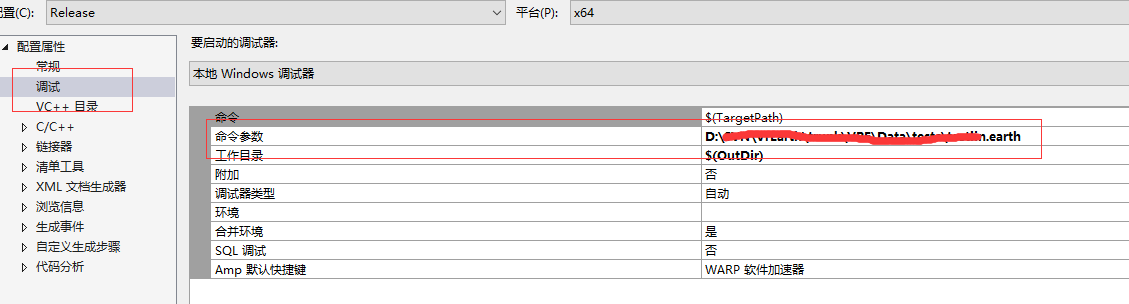
红色部分填写适合当前earth版本的‘.earth’文件
2.添加的其实是一个漫游器,基于路径点的相机漫游器
3.添加的路径点有两个姿态的变幻,展示一个正确相机姿态调整方式,一个错误的:
正确的:
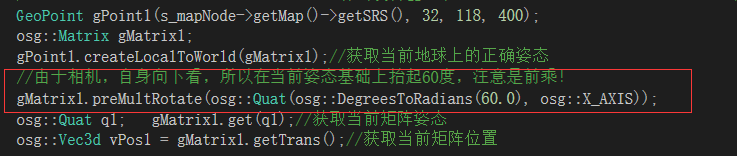
错误的:

[原][osgEarth]在osgearth中添加相机路径动画的更多相关文章
- PowerPoint 2013中创建自定义路径动画的方法
1.在幻灯片中选择对象,在“动画”选项卡的“高级动画”组中单击“添加动画”按钮,在打开的下拉列表中选择“自定义路径”选项,如图1所示. 图1 选择“自定义路径”选项 2.此时鼠标指针变为十字形,在幻灯 ...
- (原)visual studio 2015中添加dll路径
转载请注明出处: https://www.cnblogs.com/darkknightzh/p/9922033.html 使用vs2015调用opencv 3.4时,除了需要在“VC++目录”中”包含 ...
- HTML网页中添加音频视频动画...(转)
在网页中适当嵌入音频和视频能够充分显示网页的多媒体特性,特别是随着宽带网的普及,使得网络广播和网络视频成为现实,网页音频和视频的重要性也日益突显.具体来说,网页音频和视频的嵌入方法主要有三种: 一.b ...
- 有效解决js中添加border后动画bug问题
做了个demo发现如果一个div不加border属性,用对象的offsetWidth属性来控制width没问题,但是如果一旦加了border属性,问题就来了. 其实offsetWidth属性获取的的是 ...
- (原)netbeans中添加anaconda3安装的opencv
转载请注明出处: https://www.cnblogs.com/darkknightzh/p/9974310.html 新装了ubuntu16.04后,直接安装了anaconda3,调试c++程序时 ...
- Matlab中添加路径与去除路径
今天在使用Matlab调用内部的PCA函数的时候,报错: 错误使用 pca输入参数太多. 如下图所示: 网上查找原因之后发现是因为我之前下载过开源的工具包toolbox,并且将它的路径add到了Mat ...
- linux 中添加自己的库路径的方法 cannot open shared object file: No such file or directory
本文转自:http://blog.csdn.net/maotianwang/article/details/44619197 库文档在连接(静态库和共享库)和运行(仅限于使用共享库的程式)时被使用,其 ...
- VS中添加第三方库及相对路径设置
原文 VS中添加第三方库及相对路径设置 对于一些第三方的SDK,一般会包含头文件(*.h),静态库文件(*.lib)和动态库文件(*.dll). 1. 文件位置:为了提高程序的可移植性,将第三库放在 ...
- Eclipse中如何添加相对路径的外部jar包
在eclipse中进行java编程的时候,常常需要引用外部jar包.而采用相对路径引用jar包可以大大方便java工程的拷贝,这样使得java工程从一个路径转移到另一个路径时不用大费周章的修改外包ja ...
随机推荐
- 同级div设置display:inline-block,父级div强制不换行
同级div设置display:inline-block,父级div强制不换行 <html> <head></head> <body> <div i ...
- Java泛型中的标记符
E - Element (在集合中使用,因为集合中存放的是元素) T - Type(Java 类) K - Key(键) V - Value(值) N - Number(数值类型) ? - 表示不确 ...
- 标准库 time
go语言的time包 1. 组成 time.Duration(时长,耗时) time.Time(时间点)time.C(放时间点的管道)[ Time.C:=make(chan time.Time) ]t ...
- Python 人工智能之人脸识别 face_recognition 模块安装
Python人工智能之人脸识别face_recognition安装 face_recognition 模块使用系统环境搭建 系统环境 Ubuntu / deepin操作系统 Python 3.6 py ...
- HAProxy实现slave负载均衡[高可用]
下面要执行的是HAProxy部分 这是一个集群,其他的部分在: mysql-cluster 7.3.5安装部署 mysql主备部署[高可用] mysql主备切换[高可用] mysql读写分离[高可用] ...
- 第三周作业HAproxy文件操作
#coding:utf-8 #Author:Mr Zhi """ HAproxy配置文件操作: 1. 根据用户输入输出对应的backend下的server信息 2. 可添 ...
- 前端基础小标签5 H5的一些新标签属性
第二部分 部分图片和内容摘要于网络 二. formaction 属性规定当表单提交时处理输入控件的文件的 URL. formaction 属性覆盖 <form> 元素的 action 属性 ...
- 【专家坐堂Q&A】在 petalinux-config 中选择外部来源时,可将符号链路添加内核来源目录树
问题描述 作为 petalinux-config 菜单的一部分,现在可以将 Linux 内核指定为外部来源. 如果选择了该选项,可为内核来源目录树添加两个符号链路. 这会带来两个问题: 1. 符号链路 ...
- 16 级高代 II 思考题九的七种解法
16 级高代 II 思考题九 设 $V$ 是数域 $\mathbb{K}$ 上的 $n$ 维线性空间, $\varphi$ 是 $V$ 上的线性变换, $f(\lambda),m(\lambda)$ ...
- tp剩余未验证内容
new Image(宽度,高度) $(image).attr('src', ...).load(function(){....}) load表示浏览器从服务器下载(装载)对象完成, 这个load方法很 ...