
C# 进程的挂起与恢复
1. 源起:
仍然是模块化编程所引发的需求。产品经理难伺候,女产品经理更甚之~:p
纯属戏谑,技术方案与产品经理无关,芋头莫怪!
VCU10项目重构,要求各功能模块以独立进程方式实现,比如:音视频转换模块,若以独立进程方式实现,如何控制其暂停、继续等功能呢?
线程可以Suspend、Resume,c#内置的Process没有此类方法,咋整?
山穷水尽疑无路,柳暗花明又一村。情到浓时清转薄,此情可待成追忆!
前篇描述了进程间数据传递方法,此篇亦以示例演示其间控制与数据交互方法。
2、未公开的API函数:NtSuspendProcess、NtResumeProcess
此类函数在MSDN中找不到。
思其原因,概因它们介于Windows API和 内核API之间,威力不容小觑。怕二八耙子程序员滥用而引发事端,因此密藏。
其实还有个NtTerminateProcess,因Process有Kill方法,因此可不用。
但再隐秘的东西,只要有价值,都会被人给翻出来,好酒不怕巷子深么!
好,基于其,设计一个进程管理类,实现模块化编程之进程间控制这个需求。
3、ProcessMgr
直上代码吧,封装一个进程管理单元:
public static class ProcessMgr

    {

        /// <summary>

        /// The process-specific access rights.

        /// </summary>

        [Flags]

        public enum ProcessAccess : uint

        {

            /// <summary>

            /// Required to terminate a process using TerminateProcess.

            /// </summary>

            Terminate = 0x1,

            /// <summary>

            /// Required to create a thread.

            /// </summary>

            CreateThread = 0x2,

            /// <summary>

            /// Undocumented.

            /// </summary>

            SetSessionId = 0x4,

            /// <summary>

            /// Required to perform an operation on the address space of a process (see VirtualProtectEx and WriteProcessMemory).

            /// </summary>

            VmOperation = 0x8,

            /// <summary>

            /// Required to read memory in a process using ReadProcessMemory.

            /// </summary>

            VmRead = 0x10,

            /// <summary>

            /// Required to write to memory in a process using WriteProcessMemory.

            /// </summary>

            VmWrite = 0x20,

            /// <summary>

            /// Required to duplicate a handle using DuplicateHandle.

            /// </summary>

            DupHandle = 0x40,

            /// <summary>

            /// Required to create a process.

            /// </summary>

            CreateProcess = 0x80,

            /// <summary>

            /// Required to set memory limits using SetProcessWorkingSetSize.

            /// </summary>

            SetQuota = 0x100,

            /// <summary>

            /// Required to set certain information about a process, such as its priority class (see SetPriorityClass).

            /// </summary>

            SetInformation = 0x200,

            /// <summary>

            /// Required to retrieve certain information about a process, such as its token, exit code, and priority class (see OpenProcessToken, GetExitCodeProcess, GetPriorityClass, and IsProcessInJob).

            /// </summary>

            QueryInformation = 0x400,

            /// <summary>

            /// Undocumented.

            /// </summary>

            SetPort = 0x800,

            /// <summary>

            /// Required to suspend or resume a process.

            /// </summary>

            SuspendResume = 0x800,

            /// <summary>

            /// Required to retrieve certain information about a process (see QueryFullProcessImageName). A handle that has the PROCESS_QUERY_INFORMATION access right is automatically granted PROCESS_QUERY_LIMITED_INFORMATION.

            /// </summary>

            QueryLimitedInformation = 0x1000,

            /// <summary>

            /// Required to wait for the process to terminate using the wait functions.

            /// </summary>

            Synchronize = 0x100000

        }

        [DllImport("ntdll.dll")]

        private static extern uint NtResumeProcess([In] IntPtr processHandle);

        [DllImport("ntdll.dll")]

        private static extern uint NtSuspendProcess([In] IntPtr processHandle);

        [DllImport("kernel32.dll", SetLastError = true)]

        private static extern IntPtr OpenProcess(

            ProcessAccess desiredAccess,

            bool inheritHandle,

            int processId);

        [DllImport("kernel32.dll", SetLastError = true)]

        [return: MarshalAs(UnmanagedType.Bool)]

        private static extern bool CloseHandle([In] IntPtr handle);

        public static void SuspendProcess(int processId)

        {

            IntPtr hProc = IntPtr.Zero;

            try

            {

                // Gets the handle to the Process

                hProc = OpenProcess(ProcessAccess.SuspendResume, false, processId);

                if (hProc != IntPtr.Zero)

                    NtSuspendProcess(hProc);

            }

            finally

            {

                // Don't forget to close handle you created.

                if (hProc != IntPtr.Zero)

                    CloseHandle(hProc);

            }

        }

        public static void ResumeProcess(int processId)

        {

            IntPtr hProc = IntPtr.Zero;

            try

            {

                // Gets the handle to the Process

                hProc = OpenProcess(ProcessAccess.SuspendResume, false, processId);

                if (hProc != IntPtr.Zero)

                    NtResumeProcess(hProc);

            }

            finally

            {

                // Don't forget to close handle you created.

                if (hProc != IntPtr.Zero)

                    CloseHandle(hProc);

            }

        }

    }
4、进程控制
我权且主进程为宿主,它通过Process类调用子进程,得其ID,以此为用。其调用代码为:
private void RunTestProcess(bool hidden = false)

        {

            string appPath = Path.GetDirectoryName(Application.ExecutablePath);

            string testAppPath = Path.Combine(appPath, "TestApp.exe");

            var pi = new ProcessStartInfo();

            pi.FileName = testAppPath;

            pi.Arguments = this.Handle.ToString();

            pi.WindowStyle = hidden ? ProcessWindowStyle.Hidden : ProcessWindowStyle.Normal;

            this.childProcess = Process.Start(pi);

            txtInfo.Text = string.Format("子进程ID:{0}\r\n子进程名:{1}", childProcess.Id, childProcess.ProcessName);

            ...

        }
控制代码为:
private void btnWork_Click(object sender, EventArgs e)

        {

            if (this.childProcess == null || this.childProcess.HasExited)

                return;

            if ((int)btnWork.Tag == )

            {

                btnWork.Tag = ;

                btnWork.Text = "恢复";

                ProcessMgr.SuspendProcess(this.childProcess.Id);

            }

            else

            {

                btnWork.Tag = ;

                btnWork.Text = "挂起";

                ProcessMgr.ResumeProcess(this.childProcess.Id);

            }

        }
子进程以一定时器模拟其工作,向主进程抛进度消息:
private void timer_Tick(object sender, EventArgs e)

        {

            if (progressBar.Value < progressBar.Maximum)

                progressBar.Value += ;

            else

                progressBar.Value = ;

            if (this.hostHandle != IntPtr.Zero)

                SendMessage(this.hostHandle, WM_PROGRESS, , progressBar.Value);

        }
5、效果图:
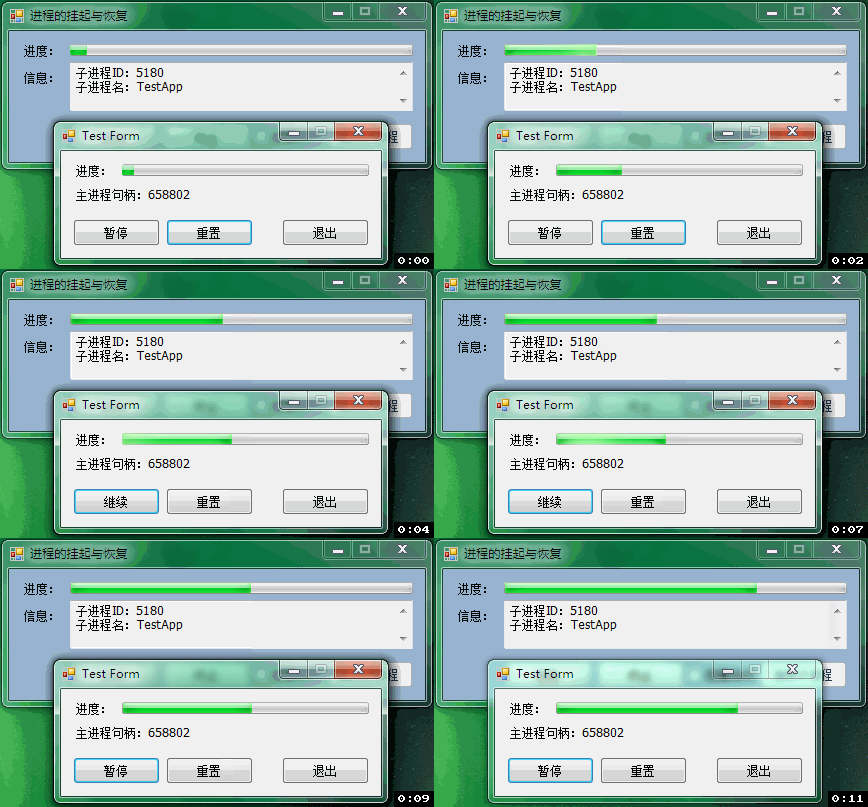
为示例,做了两个图,其一为显示子进程,其二为隐藏子进程。
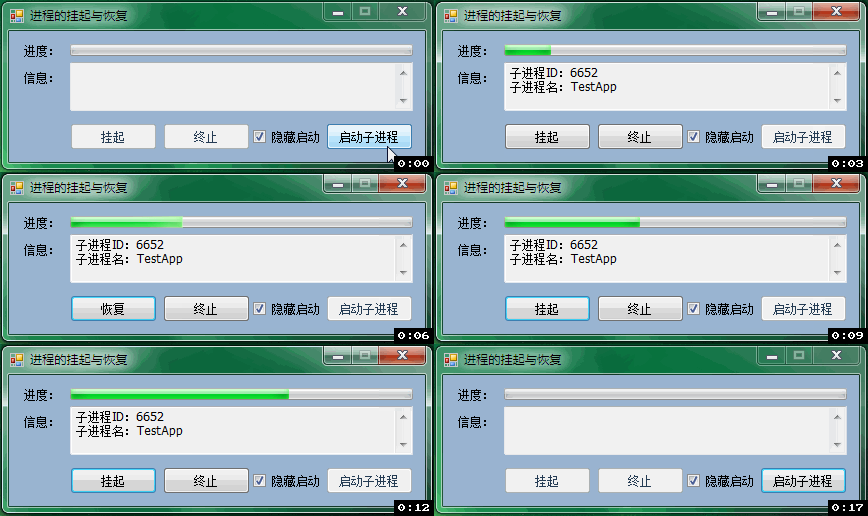
实际项目调用独立进程模块,是以隐藏方式调用的,以宿主展示其处理进度,如此图:
后记:
扩展思路,一些优秀的开源工具,如youtube_dl、ffmpeg等,都以独立进程方式存在,且可通过CMD管理通信。
以此进程控制原理,可以基于这些开源工具,做出相当不错的GUI工具出来。毕竟相对于强大的命令行,人们还是以简单操作为方便。
C# 进程的挂起与恢复的更多相关文章
- linux进程的挂起和恢复
进程的挂起及恢复 #ctrl+z:挂起,程序放到后台,程序没有结束. #jobs:查看被挂起的程序工作号 恢复进程执行时,有两种选择:fg命令将挂起的作业放回到前台执行:用bg命令将挂起的作业放到后台 ...
- Linux中线程的挂起与恢复(进程暂停)
http://www.linuxidc.com/Linux/2013-09/90156.htm 今天在网上查了一下Linux中对进程的挂起与恢复的实现,相关资料少的可怜,大部分都是粘贴复制.也没有完整 ...
- MFC任务管理器task manager----进程的挂起与恢复--NtSuspendProcess&&NtResumeProcess
http://hi.baidu.com/xbbsh/blog/item/b73d3125462201084c088db1.html ---------------------------------- ...
- 【C#】调度程序进程已挂起,但消息仍在处理中;
环境:WPF.弹窗,messageBox.show();错误信息:调度程序进程已挂起,但消息仍在处理中:解决方法:Dispatcher.BeginInvoke(new Action(()=>{ ...
- java并发编程(三)线程挂起,恢复和终止的正确方法
转载请注明出处:http://blog.csdn.net/ns_code/article/details/17095733 下面我们给出不用上述两个方法来实现线程挂起和恢复的策略--设置标志位. ...
- Windows 8 应用开发 - 挂起与恢复
原文:Windows 8 应用开发 - 挂起与恢复 Windows 8 应用通常涉及到两种数据类型:应用数据与会话数据.在上一篇提到的本地数据存储就是应用层面的数据,包括应用参数设置.用户重 ...
- 转: 【Java并发编程】之三:线程挂起、恢复与终止的正确方法(含代码)
转载请注明出处:http://blog.csdn.net/ns_code/article/details/17095733 挂起和恢复线程 Thread 的API中包含两个被淘汰的方法,它们用 ...
- Java知多少(65)线程的挂起、恢复和终止
有时,线程的挂起是很有用的.例如,一个独立的线程可以用来显示当日的时间.如果用户不希望用时钟,线程被挂起.在任何情形下,挂起线程是很简单的,一旦挂起,重新启动线程也是一件简单的事. 挂起,终止和恢复线 ...
- VMware Authorization Service不能启动 VMware虚拟机状态已挂起无法恢复解决方案
在网上看说在服务里面启动 但也是不能用 电脑上说是WINDOWS无法启动VMware Authorization Service服务(位于本地计算机上)错误:1068 依赖服务或组无法启动 这个很简单 ...
随机推荐
- linux ACL权限
利用这两个指令就可以了: getfacl:获取某個文件的 ACL 设置 setfacl:设置某個文件的 ACL 规范 [root@study ~]# setfacl [-bkRd] [{-m|-x} ...
- 微信access_token请求之简单缓存方法封装
还有东西要搞,就直接上代码 function.php <?php // 一个好玩的 curl 类 // https://github.com/metowolf/Meting/blob/maste ...
- Nginx, HTTPS的配置
server {listen 443; ####HTTPS指定端口server_name www.web.com; #####域名或者IP root /data/wwwroot/l ...
- 自学Aruba4.1-Aruba开机初始化
点击返回:自学Aruba之路 自学Aruba4.1-Aruba开机初始化 无线控制器刚启动的时候,是没有任何配置的,需要进行初始化配置才能进行管理. 通过无线控制器的console端口连接无线控制器, ...
- android第二课:运行你的应用
如果你按照前面课程创建了 Android 项目,它包含了可以立即运行的 "Hello World"源代码文件. 由两该条件来决定如何运行你的应用:你是否拥有运行着 Android ...
- GDB最常用的命令
为了调试我的指针LCT--我学会了如何使用gdb! 粘一个常用命令表(原文地址:https://blog.csdn.net/tzshlyt/article/details/53668885) gcc ...
- [hdu3966]Aragorn's Story
传送门 题目描述 Our protagonist is the handsome human prince Aragorn comes from The Lord of the Rings. One ...
- A1055. The World's Richest
Forbes magazine publishes every year its list of billionaires based on the annual ranking of the wor ...
- HashMap 与 ConcurrentHashMap 在初始化不同大小容量时,实际分配的空间情况
HashMap.java int capacity = 1; int initialCapacitys[] = {1,2,3,4,5,6,7,8,9,10,11,13,15,16,17,2 ...
- jar文件放在桌面上双击启动不了,但放在其它任何文件夹里都可以双击启动
今天本来是想尝试一下Java Network Launching Protocol (JNLP,java网络加载协议) 的,写了一个简单的窗口程序,打包成jar保存到桌面上,双击等了半天没显示出来. ...