
【Java】浅谈Java IO
注意
本文的代码,为了学习方便,简化代码复杂度,未考虑拆包、粘包等情况的处理。所以仅供学习使用,不能用于实际环境。
阻塞IO,BIO
Java1.1发布的IO是BIO。阻塞地连接之后,通过流进行同步阻塞地通讯。
同步阻塞连接
因同步阻塞地监听连接,如果服务端只有单线程进程处理,每个请求必须等待前一请求处理完毕才开始处理新请求。
所以,一般情况下,服务端每接收一个请求,可交派给一个线程处理这个请求,这样,在处理环节实现异步。其逻辑图如下:
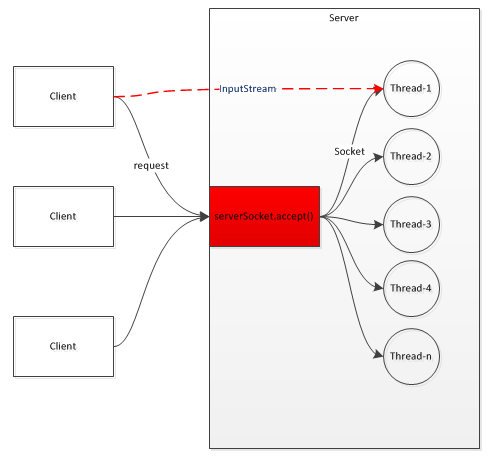
阻塞通讯
客户端与服务端之间的通讯是通过流进行传输的,而流是单向的、阻塞的,即通讯效率依赖于对方以及网络。其逻辑图如下:

代码实例
服务端:
import java.io.IOException;

import java.net.ServerSocket;

import java.net.Socket;

import org.slf4j.Logger;

import org.slf4j.LoggerFactory;

import com.nicchagil.ioexercise.Constant;

public class MyHelloServer {

    private static Logger logger = LoggerFactory.getLogger(MyHelloServer.class);

    public static void main(String[] args) {

        try (ServerSocket serverSocket = new ServerSocket(Constant.SERVER_PORT)) {

            while (true) {

                Socket socket = serverSocket.accept(); // 阻塞接收

                new HelloBusinessThread(socket).start();

            }

        } catch (IOException e) {

            logger.error("输入输出异常", e);

            // throw new RuntimeException(e);

        }

    }

}
服务端业务线程:
import java.io.BufferedReader;

import java.io.IOException;

import java.io.InputStream;

import java.io.InputStreamReader;

import java.io.OutputStream;

import java.io.PrintWriter;

import java.net.Socket;

import org.slf4j.Logger;

import org.slf4j.LoggerFactory;

public class HelloBusinessThread extends Thread {

    Logger logger = LoggerFactory.getLogger(HelloBusinessThread.class);

    Socket socket = null;

    public HelloBusinessThread(Socket socket) {

        super();

        this.socket = socket;

    }

    @Override

    public void run() {

        try {

            InputStream inputStream = socket.getInputStream();

            OutputStream outputStream = socket.getOutputStream();

            InputStreamReader inputStreamReader = new InputStreamReader(inputStream);

            BufferedReader bufferedReader = new BufferedReader(inputStreamReader);

            String result = bufferedReader.readLine();

            logger.info("接收一个请求:" + result);

            PrintWriter printWriter = new PrintWriter(outputStream);

            printWriter.println("hello");

            logger.info("发送一个响应");

            printWriter.flush();

        } catch (IOException e) {

            throw new RuntimeException(e);

        }

    }

}
客户端:
import java.io.BufferedReader;

import java.io.IOException;

import java.io.InputStream;

import java.io.InputStreamReader;

import java.io.OutputStream;

import java.io.PrintWriter;

import java.net.Socket;

import java.net.UnknownHostException;

import org.slf4j.Logger;

import org.slf4j.LoggerFactory;

import com.nicchagil.ioexercise.Constant;

public class MyHelloClient {

    private static Logger logger = LoggerFactory.getLogger(MyHelloClient.class);

    public static void main(String[] args) throws IOException {

        try (Socket socket = new Socket(Constant.SERVER_HOST, Constant.SERVER_PORT);) {

            OutputStream outputStream = socket.getOutputStream();

            PrintWriter printWriter = new PrintWriter(outputStream);

            printWriter.println("hi");

            logger.info("发送一个请求");

            printWriter.flush();

            InputStream inputStream = socket.getInputStream();

            InputStreamReader inputStreamReader = new InputStreamReader(inputStream);

            BufferedReader bufferedReader = new BufferedReader(inputStreamReader);

            String result = bufferedReader.readLine();

            logger.info("收到一个答复:" + result);

        } catch (UnknownHostException e) {

            logger.error("无法找到此主机", e);

            // throw new RuntimeException(e);

        } catch (IOException e) {

            logger.error("输入输出异常", e);

            // throw new RuntimeException(e);

        }

        System.in.read();

    }

}
非阻塞IO,NIO
JDK1.4后,推出了NIO,为非阻塞IO。
其在Unix中依赖select、poll、epoll调用,在JDK1.5 update10之后,使用的是epoll调用。
多路复用器,Selector
多路复用器,通过单线程轮询多条Channel是否就绪,如果就绪,则获取对应的SelectionKey,从中去获取就绪的Channel进行后续的IO操作。
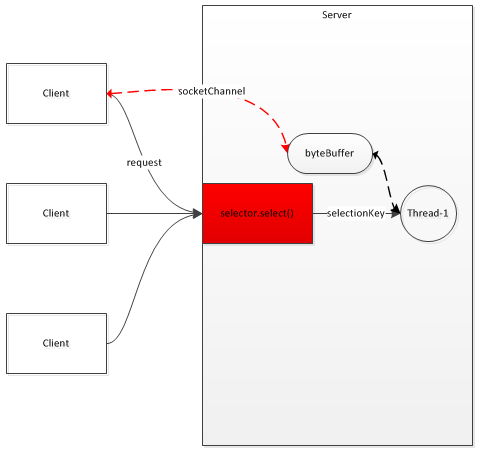
通道与缓冲区,Channel与Buffer
流,是单向的。而通道,是全双工的,即双向的。

缓冲区有3个属性,position、limit、capacity,分别表示位置、限制位、容量。
比如flip(),翻转缓冲区:
    public final Buffer flip() {

        limit = position; // 将原位置赋予限制位

        position = 0; // 位置置0

        mark = -1;

        return this;

    }
加入写入完毕是这样的:
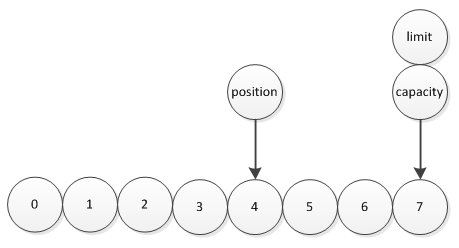
flip()后开始读取是这样的:

比如clear(),清除缓冲区:
    public final Buffer clear() {

        position = 0; // 位置置0

        limit = capacity; // 容量赋予限制位

        mark = -1;

        return this;

    }
比如rewind(),重绕缓冲区:
    public final Buffer rewind() {

        position = 0; // 位置置0

        mark = -1;

        return this;

    }
代码实例
先写一个工具类:
package com.nicchagil.ioexercise.nio.util;

import java.io.IOException;

import java.io.UnsupportedEncodingException;

import java.nio.ByteBuffer;

import java.nio.channels.SelectionKey;

import java.nio.channels.SocketChannel;

import org.slf4j.Logger;

import org.slf4j.LoggerFactory;

public class NIOUtil {

    private static Logger logger = LoggerFactory.getLogger(NIOUtil.class);

    /**

     * 将信息写入通道

     */

    public static void writeToChannel(SocketChannel socketChannel, String message) {

        if (message == null || message.trim().length() == 0) {

            return;

        }

        byte[] bytes = null;

        try {

            bytes = message.getBytes("UTF-8"); // 转换为字节数组

        } catch (UnsupportedEncodingException e1) {

            throw new RuntimeException(e1);

        }

        ByteBuffer byteBuffer = ByteBuffer.allocate(bytes.length); // 开辟缓冲区

        byteBuffer.put(bytes); // 放入缓冲区

        byteBuffer.flip(); // 切换读取缓冲区模式

        try {

            socketChannel.write(byteBuffer); // 写入通道

            // logger.info("发送 -> {}", message);

        } catch (IOException e) {

            throw new RuntimeException(e);

        }

    }

    /**

     * 读取并转换为String

     */

    public static String readToString(SocketChannel socketChannel, SelectionKey selectionKey) throws IOException {

        ByteBuffer byteBuffer = ByteBuffer.allocate(64); // 开辟缓冲区

        int readByteNum = socketChannel.read(byteBuffer); // 读取数据

        /* 有数据 */

        if (readByteNum > 0) {

            byteBuffer.flip();

            byte[] bytes = new byte[byteBuffer.remaining()];

            byteBuffer.get(bytes);

            String message = new String(bytes, "UTF-8");

            return message;

        }

        /* 无数据,无处理 */

        if (readByteNum == 0) {

        }

        /* 小于零,表示连接已关闭 */

        if (readByteNum < 0) {

            NIOUtil.cancelSelectionKey(selectionKey);

            socketChannel.close();

        }

        return null;

    }

    /**

     * 取消/关闭SelectionKey

     */

    public static void cancelSelectionKey(SelectionKey selectionKey) {

        if (selectionKey == null) {

            return;

        }

        selectionKey.cancel(); // 取消SelectionKey

        if (selectionKey.channel() != null) {

            try {

                selectionKey.channel().close(); // 关闭通道

            } catch (IOException e) {

                throw new RuntimeException(e);

            }

        }

    }

}
服务端:
package com.nicchagil.ioexercise.nio.server;

import java.io.IOException;

import java.net.InetSocketAddress;

import java.nio.channels.SelectionKey;

import java.nio.channels.Selector;

import java.nio.channels.ServerSocketChannel;

import java.nio.channels.SocketChannel;

import java.util.Iterator;

import java.util.Set;

import org.slf4j.Logger;

import org.slf4j.LoggerFactory;

import com.nicchagil.ioexercise.Constant;

import com.nicchagil.ioexercise.nio.util.NIOUtil;

public class NIOServer {

    private Logger logger = LoggerFactory.getLogger(this.getClass());

    private Selector selector;

    private ServerSocketChannel serverSocketChannel;

    public NIOServer() throws Exception {

        selector = Selector.open(); // 多路复用器

        /* 配置通道 */

        serverSocketChannel = ServerSocketChannel.open();

        serverSocketChannel.configureBlocking(false); // 非阻塞

        serverSocketChannel.socket().bind(new InetSocketAddress(Constant.SERVER_HOST, Constant.SERVER_PORT), 512); // 监听的主机、端口,和挂起的最大连接数

        serverSocketChannel.register(selector, SelectionKey.OP_ACCEPT); // 通道绑定多路复用器,并监听“连接”事件

        Set<SelectionKey> selectionKeys = null;

        Iterator<SelectionKey> iterator = null;

        SelectionKey selectionKey = null;

        while (true) {

            try {

                this.logger.info("polling...");

                selector.select(); // 阻塞轮询,当轮询通道中有IO就绪时,返回

                selectionKeys = selector.selectedKeys(); // 获取就绪通道的SelectionKey

                this.logger.info("当前就绪的通道数 -> {}", selectionKeys.size());

                iterator = selectionKeys.iterator();

                while (iterator.hasNext()) {

                    selectionKey = iterator.next();

                    iterator.remove();

                    try {

                        this.handle(selectionKey); // 处理该通道业务

                    } catch (IOException e) {

                        this.logger.error("通道{}出现异常:{}", selectionKey, e);

                        NIOUtil.cancelSelectionKey(selectionKey);

                    }

                }

            } catch (IOException e) {

                this.logger.error("多路复用监听出现异常", e);

                throw new RuntimeException(e);

            }

        }

    }

    /**

     * 处理通道业务

     */

    public void handle(SelectionKey selectionKey) throws IOException {

        if (!selectionKey.isValid()) { // 无效快速失败

            this.logger.info("连接无效");

            return;

        }

        /* 连接事件 */

        if (selectionKey.isAcceptable()) {

            this.accept(selectionKey);

        }

        /* 读取事件 */

        else if (selectionKey.isReadable()) {

            SocketChannel socketChannel = (SocketChannel)selectionKey.channel(); // 转换为连接Socket

            String message = NIOUtil.readToString(socketChannel, selectionKey);

            this.logger.info("message -> {}", message);

            if (message != null) {

                NIOUtil.writeToChannel(socketChannel, "hi, client");

            }

        }

    }

    /**

     * 接受连接

     */

    private void accept(SelectionKey selectionKey) throws IOException {

        this.logger.info("开始连接事件");

        ServerSocketChannel serverSocketChannel = (ServerSocketChannel)selectionKey.channel(); // 转换为服务器Socket

        SocketChannel socketChannel = serverSocketChannel.accept(); // 接收一个连接

        socketChannel.configureBlocking(false); // 非阻塞

        socketChannel.register(selector, SelectionKey.OP_READ); // 通道绑定多路复用器,并监听“读取”事件

    }

    public static void main(String[] args) throws Exception {

        new NIOServer();

    }

}
客户端:
package com.nicchagil.ioexercise.nio.client;

import java.io.IOException;

import java.net.InetSocketAddress;

import java.nio.channels.SelectionKey;

import java.nio.channels.Selector;

import java.nio.channels.SocketChannel;

import java.util.Iterator;

import java.util.Set;

import org.slf4j.Logger;

import org.slf4j.LoggerFactory;

import com.nicchagil.ioexercise.Constant;

import com.nicchagil.ioexercise.nio.util.NIOUtil;

public class NIOClient {

private Logger logger = LoggerFactory.getLogger(this.getClass());

    private Selector selector; // 多路复用器

    private SocketChannel socketChannel; // 通道

    public NIOClient() throws IOException {

        this.selector = Selector.open(); // 多路复用器

        /* 配置通道 */

        this.socketChannel = SocketChannel.open();

        this.socketChannel.configureBlocking(false); // 非阻塞

        /* 连接服务器 */

        this.connect();

        Set<SelectionKey> selectionKeys = null;

        Iterator<SelectionKey> iterator = null;

        SelectionKey selectionKey = null;

        while (true) {

            try {

                this.selector.select(); // 阻塞轮询,当轮询通道中有IO就绪时,返回

                selectionKeys = this.selector.selectedKeys(); // 获取就绪通道的SelectionKey

                iterator = selectionKeys.iterator();

                while (iterator.hasNext()) {

                    selectionKey = iterator.next();

                    iterator.remove();

                    try {

                        this.handle(selectionKey); // 处理该通道业务

                    } catch (IOException e) {

                        this.logger.error("通道{}出现异常:{}", selectionKey, e);

                        NIOUtil.cancelSelectionKey(selectionKey);

                    }

                }

            } catch (IOException e) {

                this.logger.error("多路复用监听出现异常", e);

                throw new RuntimeException(e);

            }

        }

    }

    /**

     * 连接服务器

     */

    public void connect() throws IOException {

        boolean connect = this.socketChannel.connect(new InetSocketAddress(Constant.SERVER_HOST, Constant.SERVER_PORT));

        if (connect) { // 连接成功

            socketChannel.register(selector, SelectionKey.OP_READ);

            NIOUtil.writeToChannel(socketChannel, "hi, server");

        } else { // 连接失败

            this.socketChannel.register(selector, SelectionKey.OP_CONNECT);

        }

    }

    /**

     * 处理通道业务

     */

    public void handle(SelectionKey selectionKey) throws IOException {

        if (!selectionKey.isValid()) { // 无效快速失败

            // this.logger.info("连接无效");

            return;

        }

        /* 连接事件 */

        if (selectionKey.isConnectable()) {

            this.connect(selectionKey);

        }

        /* 读取事件 */

        else if (selectionKey.isReadable()) {

            SocketChannel socketChannel = (SocketChannel)selectionKey.channel(); // 转换为连接Socket

            String message = NIOUtil.readToString(socketChannel, selectionKey);

            this.logger.info("message -> {}", message);

        }

    }

    /**

     * 连接

     */

    private void connect(SelectionKey selectionKey) throws IOException {

        if (socketChannel.finishConnect()) { // 完成连接

            socketChannel.register(selector, SelectionKey.OP_READ);

            NIOUtil.writeToChannel(socketChannel, "hi, server");

        }

    }

    public static void main(String[] args) throws Exception {

        new NIOClient();

    }

}
异步IO,AIO
JDK1.7提供了NIO 2.0,包含异步IO,对应UNIX网络编程的AIO。
它是真正的异步非阻塞IO,不需多路复用器轮询,操作完成回调CompletionHandler接口(从代码上可以看到,有好几个处理器实现CompletionHandler,比如连接处理器、读取处理器、发送处理器)。
代码实例
首先将一些重复的代码提到一个公用类中:
import java.io.IOException;

import java.nio.ByteBuffer;

import java.nio.channels.AsynchronousSocketChannel;

import org.slf4j.Logger;

import org.slf4j.LoggerFactory;

public class AIOUtil {

    private static Logger logger = LoggerFactory.getLogger(AIOUtil.class);

    /**

     * 通过通道发送消息

     * @param socketChannel 异步套接字通道

     * @param message 消息

     */

    public static void write(AsynchronousSocketChannel socketChannel, String message) {

        byte[] bytes = message.getBytes();

        ByteBuffer byteBuffer = ByteBuffer.allocate(bytes.length);

        byteBuffer.put(bytes);

        byteBuffer.flip();

        socketChannel.write(byteBuffer, byteBuffer, new WriteHandler(socketChannel)); // 写消息

    }

    /**

     * 关闭通道

     * @param socketChannel 异步套接字通道

     */

    public static void close(AsynchronousSocketChannel socketChannel) {

        try {

            socketChannel.close();

        } catch (IOException e) {

            logger.error("关闭套接字通道异常:{}", e);

            throw new RuntimeException(e);

        }

    }

}
服务器入口类:
import java.net.InetSocketAddress;

import java.nio.channels.AsynchronousServerSocketChannel;

import com.nicchagil.ioexercise.Constant;

public class Server {

    public static void main(String[] args) throws Exception {

        AsynchronousServerSocketChannel serverSocketChannel = AsynchronousServerSocketChannel.open(); // 服务器套接字通道

        serverSocketChannel.bind(new InetSocketAddress(Constant.SERVER_PORT)); // 监听端口

        /*

         * 接收一个连接,此方法初始一个异步操作来接收一个连接。

         * 处理器参数是一个完成处理器,当接收到连接或连接失败时被回调完成处理器。

         * 为了能并发处理新连接,完成处理器并不是被初始线程直接调用。

         */

        serverSocketChannel.accept(serverSocketChannel, new AcceptHandler()); // 接收一个连接

        System.in.read();

    }

}
接收连接处理器:
import java.nio.ByteBuffer;

import java.nio.channels.AsynchronousServerSocketChannel;

import java.nio.channels.AsynchronousSocketChannel;

import java.nio.channels.CompletionHandler;

import org.slf4j.Logger;

import org.slf4j.LoggerFactory;

/**

 * 接收连接处理器

 */

public class AcceptHandler implements CompletionHandler<AsynchronousSocketChannel, AsynchronousServerSocketChannel> {

    private Logger logger = LoggerFactory.getLogger(this.getClass());

    @Override

    public void completed(AsynchronousSocketChannel socketChannel, AsynchronousServerSocketChannel serverSocketChannel) {

        serverSocketChannel.accept(serverSocketChannel, this); // 服务器Socket继续接收请求

        ByteBuffer byteBuffer = ByteBuffer.allocate(1024);

        /*

         * 从通道中读取字节到缓冲区,此方法初始一个异步读取操作,从通道中读取字节到缓冲区。

         * 处理器参数是一个完成处理器,读取完成或失败时被调用。

         * 读取的字节数会传递给处理器,如没有可读取的字节,则传递-1。

         */

        socketChannel.read(byteBuffer, byteBuffer, new ReadHandler(socketChannel)); // 读取消息

    }

    @Override

    public void failed(Throwable exc, AsynchronousServerSocketChannel attachment) {

        this.logger.error("接收连接异常:{}", exc);

    }

}
读取消息处理器:
import java.io.UnsupportedEncodingException;

import java.nio.ByteBuffer;

import java.nio.channels.AsynchronousSocketChannel;

import java.nio.channels.CompletionHandler;

import org.slf4j.Logger;

import org.slf4j.LoggerFactory;

/**

 * 读取消息处理器

 */

public class ReadHandler implements CompletionHandler<Integer, ByteBuffer> {

    private Logger logger = LoggerFactory.getLogger(this.getClass());

    private AsynchronousSocketChannel socketChannel;

    public ReadHandler(AsynchronousSocketChannel socketChannel) {

        this.socketChannel = socketChannel;

    }

    /**

     * 读取消息

     */

    @Override

    public void completed(Integer result, ByteBuffer byteBuffer) {

        byteBuffer.flip(); // 翻转缓冲区

        byte[] bytes = new byte[byteBuffer.remaining()];

        byteBuffer.get(bytes);

        try {

            String message = new String(bytes, "UTF-8");

            this.logger.info("接收到消息 -> {}", message);

        } catch (UnsupportedEncodingException e) {

            this.logger.info("接收消息异常:{}", e);

        }

        // 向客户端发送消息

        AIOUtil.write(socketChannel, "hi, client");

    }

    @Override

    public void failed(Throwable exc, ByteBuffer attachment) {

        this.logger.info("接收消息异常");

        AIOUtil.close(socketChannel);

    }

}
发送消息处理器:
import java.nio.ByteBuffer;

import java.nio.channels.AsynchronousSocketChannel;

import java.nio.channels.CompletionHandler;

import org.slf4j.Logger;

import org.slf4j.LoggerFactory;

/**

 * 发送消息处理器

 */

public class WriteHandler implements CompletionHandler<Integer, ByteBuffer> {

    private Logger logger = LoggerFactory.getLogger(this.getClass());

    private AsynchronousSocketChannel socketChannel;

    public WriteHandler(AsynchronousSocketChannel socketChannel) {

        this.socketChannel = socketChannel;

    }

    @Override

    public void completed(Integer result, ByteBuffer buffer) {

        if (buffer.hasRemaining()) {

            socketChannel.write(buffer, buffer, this);

        }

    }

    @Override

    public void failed(Throwable exc, ByteBuffer attachment) {

        this.logger.info("发送消息异常");

        AIOUtil.close(socketChannel);

    }

}
Netty,NIO框架
NIO的API太过复杂,开发者极容易出错,所以如果有一个NIO框架对我们项目的开发有好处,而Netty是一个优秀的NIO框架。
代码实例
首先定义了些常量:
public interface Constant {

    String HOST = "127.0.0.1";

    Integer PORT = 60000;

    String DELIMITER = "<!#%&(@$^*)>";

}
服务端与服务端入口:
import org.slf4j.Logger;

import org.slf4j.LoggerFactory;

import com.nicchagil.nettyexercise.common.Constant;

import io.netty.bootstrap.ServerBootstrap;

import io.netty.buffer.ByteBuf;

import io.netty.buffer.Unpooled;

import io.netty.channel.ChannelFuture;

import io.netty.channel.ChannelInitializer;

import io.netty.channel.ChannelPipeline;

import io.netty.channel.EventLoopGroup;

import io.netty.channel.nio.NioEventLoopGroup;

import io.netty.channel.socket.SocketChannel;

import io.netty.channel.socket.nio.NioServerSocketChannel;

import io.netty.handler.codec.DelimiterBasedFrameDecoder;

import io.netty.handler.codec.string.StringDecoder;

public class MyServer {

    private Logger logger = LoggerFactory.getLogger(this.getClass());

    private Integer port;

    public MyServer(Integer port) {

        this.port = port;

    }

    public void start() throws Exception {

        EventLoopGroup eventLoopGroup = new NioEventLoopGroup(); // 事件循环群组

        try {

            ServerBootstrap serverBootstrap = new ServerBootstrap(); // 启动类

            serverBootstrap.group(eventLoopGroup) // 指定事件循环群组

                    .channel(NioServerSocketChannel.class) // 指定通道类型

                    .localAddress(this.port) // 指定监听端口

                    .childHandler(new ChannelInitializer<SocketChannel>() { // 指定通道初始化器

                        @Override

                        protected void initChannel(SocketChannel ch) throws Exception {

                            ChannelPipeline channelPipeline = ch.pipeline();

                            /* 分隔符方式分包 */

                            ByteBuf delimiterByteBuf = Unpooled.copiedBuffer(Constant.DELIMITER.getBytes());

                            ch.pipeline().addLast(new DelimiterBasedFrameDecoder(1024, delimiterByteBuf)); // 指定单条消息最大长度和分隔符

                            ch.pipeline().addLast(new StringDecoder());

                            channelPipeline.addLast(new MyServerHandler()); // 指定数据入站处理器

                        }

                    });

            ChannelFuture cf = serverBootstrap.bind().sync(); // 服务器同步绑定

            cf.channel().closeFuture().sync(); // 关闭服务器通道

        } finally {

            eventLoopGroup.shutdownGracefully().sync(); // 释放线程池资源

        }

    }

    public static void main(String[] args) throws Exception {

        new MyServer(Constant.PORT).start();

    }

}
服务端处理器:
import java.util.concurrent.atomic.AtomicInteger;

import org.slf4j.Logger;

import org.slf4j.LoggerFactory;

import io.netty.buffer.Unpooled;

import io.netty.channel.ChannelFuture;

import io.netty.channel.ChannelHandlerContext;

import io.netty.channel.ChannelInboundHandlerAdapter;

import io.netty.util.CharsetUtil;

public class MyServerHandler extends ChannelInboundHandlerAdapter {

    public static AtomicInteger counter = new AtomicInteger();

    private Logger logger = LoggerFactory.getLogger(this.getClass());

    @Override

    public void channelActive(ChannelHandlerContext ctx) throws Exception {

        this.logger.info("通道被激活");

    }

    @Override

    public void channelRead(ChannelHandlerContext ctx, Object msg) throws Exception {

        this.logger.info("第{}次读取信息 -> {}", counter.incrementAndGet(), msg);

    }

    @Override

    public void channelReadComplete(ChannelHandlerContext ctx) throws Exception {

        this.logger.info("读取完成");

        ChannelFuture channelFuture = ctx.writeAndFlush(Unpooled.copiedBuffer("ok...", CharsetUtil.UTF_8));

        // channelFuture.addListener(ChannelFutureListener.CLOSE);

    }

    @Override

    public void exceptionCaught(ChannelHandlerContext ctx, Throwable throwable) throws Exception {

        this.logger.error("出现异常 -> {}", throwable);

        ctx.close();

    }

}
客户端与客户端入口:
import java.net.InetSocketAddress;

import org.slf4j.Logger;

import org.slf4j.LoggerFactory;

import com.nicchagil.nettyexercise.common.Constant;

import io.netty.bootstrap.Bootstrap;

import io.netty.channel.ChannelFuture;

import io.netty.channel.ChannelInitializer;

import io.netty.channel.EventLoopGroup;

import io.netty.channel.nio.NioEventLoopGroup;

import io.netty.channel.socket.SocketChannel;

import io.netty.channel.socket.nio.NioSocketChannel;

public class MyClient {

    private Logger logger = LoggerFactory.getLogger(this.getClass());

    private final String host;

    private final int port;

    public MyClient(String host, int port) {

        this.host = host;

        this.port = port;

    }

    public void start() throws Exception {

        EventLoopGroup eventLoopGroup = new NioEventLoopGroup();

        try {

            Bootstrap bootstrap = new Bootstrap();

            bootstrap.group(eventLoopGroup)

                    .channel(NioSocketChannel.class)

                    .remoteAddress(new InetSocketAddress(this.host, this.port))

                    .handler(new ChannelInitializer<SocketChannel>() {

                        @Override

                        protected void initChannel(SocketChannel ch) throws Exception {

                            ch.pipeline().addLast(new MyClientHandler());

                        }

                    });

            ChannelFuture cf = bootstrap.connect().sync();

            cf.channel().closeFuture().sync();

        } finally {

            eventLoopGroup.shutdownGracefully().sync();

        }

    }

    public static void main(String[] args) throws Exception {

        new MyClient(Constant.HOST, Constant.PORT).start();

        System.in.read();

    }

}
客户端处理器:
import org.slf4j.Logger;

import org.slf4j.LoggerFactory;

import com.nicchagil.nettyexercise.common.Constant;

import io.netty.buffer.Unpooled;

import io.netty.channel.ChannelHandlerContext;

import io.netty.channel.ChannelInboundHandlerAdapter;

import io.netty.util.CharsetUtil;

public class MyClientHandler extends ChannelInboundHandlerAdapter {

    private Logger logger = LoggerFactory.getLogger(this.getClass());

    @Override

    public void channelActive(ChannelHandlerContext ctx) throws Exception {

        this.logger.info("通道被激活");

        for (int i = 0; i < 100; i++) {

            ctx.writeAndFlush(Unpooled.copiedBuffer("hello, Netty, abcdefghijklmnopqrstuvwsyz, 123456" + Constant.DELIMITER, CharsetUtil.UTF_8));

        }

    }

    @Override

    public void channelRead(ChannelHandlerContext ctx, Object msg) throws Exception {

        this.logger.info("读取信息 -> {}", msg);

    }

    @Override

    public void channelReadComplete(ChannelHandlerContext ctx) throws Exception {

        this.logger.info("读取完成");

    }

    @Override

    public void exceptionCaught(ChannelHandlerContext ctx, Throwable throwable) throws Exception {

        this.logger.error("出现异常 -> {}", throwable);

        ctx.close();

    }

}
【Java】浅谈Java IO的更多相关文章
- 浅谈Java的throw与throws
转载:http://blog.csdn.net/luoweifu/article/details/10721543 我进行了一些加工,不是本人原创但比原博主要更完善~ 浅谈Java异常 以前虽然知道一 ...
- !! 浅谈Java学习方法和后期面试技巧
浅谈Java学习方法和后期面试技巧 昨天查看3303回复33 部落用户大酋长 下面简单列举一下大家学习java的一个系统知识点的一些介绍 一.java基础部分:java基础的时候,有些知识点是非常重要 ...
- 浅谈JAVA中如何利用socket进行网络编程(二)
转自:http://developer.51cto.com/art/201106/268386.htm Socket是网络上运行的两个程序间双向通讯的一端,它既可以接受请求,也可以发送请求,利用它可以 ...
- 浅谈Java中的equals和==(转)
浅谈Java中的equals和== 在初学Java时,可能会经常碰到下面的代码: 1 String str1 = new String("hello"); 2 String str ...
- 浅谈Java中的对象和引用
浅谈Java中的对象和对象引用 在Java中,有一组名词经常一起出现,它们就是“对象和对象引用”,很多朋友在初学Java的时候可能经常会混淆这2个概念,觉得它们是一回事,事实上则不然.今天我们就来一起 ...
- 浅谈Java中的equals和==
浅谈Java中的equals和== 在初学Java时,可能会经常碰到下面的代码: String str1 = new String("hello"); String str2 = ...
- 浅谈JAVA集合框架
浅谈JAVA集合框架 Java提供了数种持有对象的方式,包括语言内置的Array,还有就是utilities中提供的容器类(container classes),又称群集类(collection cl ...
- 浅谈java性能分析
浅谈java性能分析,效能分析 在老师强烈的要求下做了效能分析,对上次写过的词频统计的程序进行分析以及改进. 对于效能分析:我个人很浅显的认为就是程序的运行效率,代码的执行效率等等. java做性能测 ...
- 浅谈Java中的深拷贝和浅拷贝(转载)
浅谈Java中的深拷贝和浅拷贝(转载) 原文链接: http://blog.csdn.net/tounaobun/article/details/8491392 假如说你想复制一个简单变量.很简单: ...
- 浅谈Java中的深拷贝和浅拷贝
转载: 浅谈Java中的深拷贝和浅拷贝 假如说你想复制一个简单变量.很简单: int apples = 5; int pears = apples; 不仅仅是int类型,其它七种原始数据类型(bool ...
随机推荐
- (转)final修饰基本类型和引用类型变量的区别
原文:http://blog.csdn.net/linhao19891124/article/details/52971045 当使用final修饰基本类型变量时,不能对基本类型变量重新赋值,因此基本 ...
- 最短路(Bellman)-Hdu1874畅通工程序
题目链接:http://acm.hdu.edu.cn/showproblem.php?pid=1874 题目: 某省自从实行了很多年的畅通工程计划后,终于修建了很多路.不过路多了也不好,每次要从一个城 ...
- 《Gradle权威指南》--Gradle构建脚本基础
No1: 设置文件默认名是setting.gradle,放在根目录下,大多数作用都是为了配置子工程 No2: 一个Project包含很多个Task.Task就是一个操作,一个原子性的操作.其实它是Pr ...
- 暴力破解工具hydra与Medusa
---恢复内容开始--- 暴力破解工具hydra与Medusa 内容 (一)hadry (二)Medusa (一)hydra 选项 -l LOGIN 指定破解的用户名称,对特定用户破解. -L FIL ...
- [Web安全] XXE漏洞攻防学习(上)
0x00.XXE漏洞 XXE漏洞全称XML External Entity Injection 即xml外部实体注入漏洞,XXE漏洞发生在应用程序解析XML输入时,没有禁止外部实体的加载,导致可加载恶 ...
- 未将对象引用设置到对象的实例 IIS
CMD C:\WINDOWS\Microsoft.NET\Framework\v4.0.30319\aspnet_regiis.exe -i
- Outlook错误代码
一般错误1 0x80004005 MISC The operation failed Virus Scanner Integration Issue Usually Related To Script ...
- python魔法方法-属性转换和类的表示
类型转换魔法 类型转换魔法其实就是实现了str.int等工厂函数的结果,通常这些函数还有类型转换的功能,下面是一些相关的魔法方法: __int__(self) 转换成整型,对应int函数. __lon ...
- 排序遇到问题 JDK7的Comparison method violates its general contract
图解JDK7的Comparison method violates its general contract异常 楼主分析的很详细,能力有限,我看得迷迷糊糊的,不过大致知道这个错误的起因了.学习了,谢 ...
- Python3高级基础(1)
目录 Introducing Python Object Types 对象类型的优势 Python的核心数据类型 数字 = Number 字符串 列表 = lists 字典 = dictionary ...