
pycharm开发工具,使用
在pycharm中,打的断点,仅在调试模式下,即debug 模式下,才有效
Use Alt + Shift + C to quickly review your recent changes to the project.
Use Basic Completion ( Ctrl + 空格 )with HTML,CSS and other files, for completing image file names
With a single keystroke,you can apply another code style / coloring scheme or keymap right from the editor.
Just press Ctrl + · (反引号) ( View | Quick Scheme ), to specify the scheme you want to change.
You can easily make column selection by dragging your mouse pointer while keeping the Alt key pressed.
if nothin is selected in the editor, and you press Ctrl + C, then the whole line and caret is copied to the clipboard.
If you don't want to commit some of your changes to the repository,you can set them aside for a while, by moving to a separate changelist, or by putting them to a shelf. Select such file in the local tab of the changes tool window,
and on the context menu choose Move to another changelist, or Shelve Changes.
You can move any files to a changelist of your choice. To do that, just choose Move to Changelist on the context menu in the local Changes tab of ther Version Control tool windows:
You can bring forward the list of usages of a class,method or variable across the whole project, and quickly jump to
the selected usage. To do that, place the caret at the symbol's name or at its usage in code and press Ctrl + Alt + F7(Edit | Find | Show Usages in the main menu ), scroll the list and click the desired usage.
To quickly find and run an inspection, press Ctrl + Alt + Shift + I and start typing the name of the inspection or its group. Choose the desired inspection from the suggestion list and then specify the desired scope.
It is possible to rename CSS selectors directly from HTML. Position the caret at the selector to be rename and press Shift + F6 (
Refactor | Rename )
PyCharm simplifies your work with colors in CSS files. The color properties have the icons of the corresponding color in the left gutter area of the editor.
Click color icons to choose the desired color from the color picker.
keep your source code typo-free with the help of the built-in Spellchecker.
All texts,including comments,textual string and literals, are inspected against the pre-defined dictionaries. All typos are highlighted, which leaves you with the task of choosing the correct word, accepting the current spelling,or disabling inspection.
Use Alt + Enter to see the list of available actions
If you lack words in the pre-defined dictionaries,you can create your own ones. A custom dictionary is a mere textural file with a .dic extension, with each word starting on a new line.
All you have to do is to point to the directories where your dictionaries are stored, in the Spelling page of the Editor Setings / Preferences.
Ctrl + Click (on windows) or Cmd + Click(on MacOs) a tab in the editor to navigate to any part of the file path.
Select the necessary element in the drop-down, and the corresponding file path opens in an external browser (e.g., in the Explorer ,if you OS is Windows).

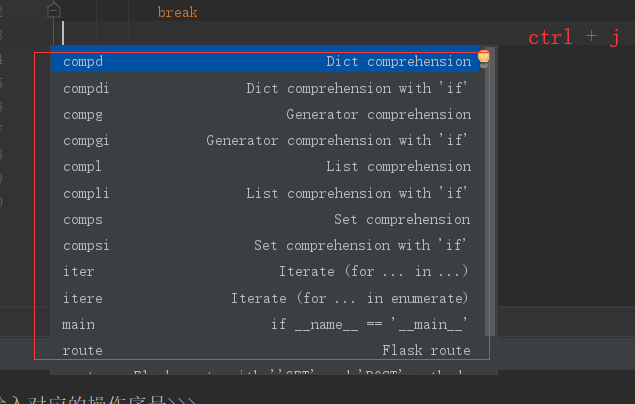
ctrl + j
===
==
===
===
PyCharm lets you jump from your check-in comment to an issue in your task tracker.
All you have to do is to define issue navigation patterns on the Version Control page of the Settings / Preferences dialog:
To open any class or file in the editor at the desired line, press Ctrl + Shift +N ( Navigate | File ), start typing the name,
and choose the one form the suggestion list. Then type the colon(:) and a line number.
When using basic code completion (Ctrl + 空格), you don't nee to type upper-case letters in CamelHump names. It is enough to type the initial letters fo the camel names in lower case, and they will be smartly recognized.
The keyboard shortcut Ctrl + K enables you to quickly to invoke the Commit Changes dialg.
This dialog show all modifications in project, gives summary information of file status and suggests improvements before check-in.
If there are too many run/debug configurations of the same type, you can group them into folders, and thus distinguish them visually.
If you are going to use Django live templates, make sure tha Django is selected as the default Python template language in the Settings / Preferences dialog:
Live Templates let you generate many typical code constructs in seconds. For example, type for in a Django template
When in the Code Completion lookup, you can ease the search by filtering the list with the help of the "camel words" prefixes.
You can switch between sorting completion variants by relevance or alphabetically by using an icon at the botton right
In PyCharm, you can have multiple cursors. Having pressed Alt, click left mouse button at the desired postition to set additional cursors in the editor.
Press Esc to remove all the additional cursors but one that resides at the line at caret.
When choosing a live template from a suggestion list, press Ctrl + Q to view quick documentation - to be sure you make a right choice.
Did you know that it's possible to copy rich text?
Make sure that the check box Copy rich text by default in the general page fo the Editor settings/preferences is selected:
A special variant of the Code Completion feature invoked by pressing Ctrl + 空格 twice allows you to complete XML tag names from namespaces
not declared in the current file. If the namespace is not declared yet the declaration is generated automatically.
If you have H2 or database files available locally, you can create data sources for them by dragging files to the Databases tool windows. The files cann be dragged from your file manager (e.g. Explorer or Finder), or from the Project tool window.
To protect your database from accidental modifications in the Table Editor and the database console, you can turn on the Read-only option for the corresponding data source ( Data Source Properties in the context menu of the Database tool window).
To open any class in the editor quickly, press Ctrl + N ( Navigate | Class ) and start typing the anme of the class. Choose the class from a drop-down list that appears.
The Code Completion feature lets you quickly complete different kinds of statements in the code. Fox example, start typing a class name
and press Ctrl + 空格 to complete it. When multiple choices are available, they are shown in the lookup list.
A special variant of the Code completion feature ivoked by pressing Ctrl + 空格 twice allow you to complete the name of any class
no matter if it was imported in the current file or not. If the class i s not imported yet, the import statement is generated automatically.
You can easily rename your local variables with automatic correction of places where ther are used。
To try it, place the caret at the variable you want to rename, and press shift + F6 ( Refactor | Rename ) . Type the new name in the popup window the appears, or select one of suggested names, and press Enter.
To quickly see the documentation for the symbol at caret, press Ctrl + Q ( View | Quick Documentation ).
Use Alt + 向上箭头 and Alt + 向下箭头 keys to quickly move between methods in the editor.
You can easily override the methods of the base class by pressing Ctrl + o ( Code | Override Methods )
If you lack words in the pre-defined dictionaries, you can create your own ones. A custom dictionary is a mere textual file with .dic extension , withe each word starting on a new line.
All you have to do is point to the directories wheree your dictionaries are stored , in the Spelling page of the Editor Settings/Preferences .
pycharm开发工具,使用的更多相关文章
- (1)PyCharm开发工具安装Flask并创建helloworld程序
一.环境描述 1.操作系统:windows7 2.编程语言:python3.6 下载地址:https://www.python.org/downloads/windows/ 3.虚拟化环境:virtu ...
- Python文件读取编码错误问题解决之(PyCharm开发工具默认设置的坑。。。)
刚接触Python学习,正准备做个爬虫的例子,谁知道代码一开始就遇到了一个大坑,狂汗啊. 问题是这样的:我通过代码爬取了博客园首页的HTML代码并存入到blog.txt文件当中,然后准备读取出来之后进 ...
- 安装PyCharm开发工具
1.进入PyCharm官网 http://www.jetbrains.com/pycharm/ 2.点击现在下载 3.选择windows版本 4.打开安装程序 5.下一步,选择安装路径,安装 6.安装 ...
- Python语言的PyCharm开发工具的简单使用
1.创建一个新的项目 创建一个目录或者文件夹 设置模板:制作一个常用的,模板 # @Author:lnx# @version V1.0# -*- coding:UTF-8 -*- 搜索/替换快捷键 代 ...
- 用JetBrains PyCharm 开发工具写一个简单python案例
import urllib.request import re #解析html的内容 def getHtml(url): page=urllib.request.urlopen(url) html=p ...
- 【Python从入门到精通】(二)怎么运行Python呢?有哪些好的开发工具(PyCharm)
您好,我是码农飞哥,感谢您阅读本文,欢迎一键三连哦. 这是Pyhon系列文章的第二篇,本文主要介绍如何运行Python程序以及安装PyCharm开发工具. 干货满满,建议收藏,需要用到时常看看. 小伙 ...
- (2)PyCharm开发Flash项目之蓝图构建
下面通过在PyCharm开发工具中创建一个简单的Flask项目来体会一下Flask的蓝图构建(Blueprint). 何谓蓝图:在Flask中蓝图就在大型应用中,将不同功能的模块(module)分开管 ...
- Python开发工具PyCharm个性化设置(图解)
Python开发工具PyCharm个性化设置,包括设置默认PyCharm解析器.设置缩进符为制表符.设置IDE皮肤主题等,大家参考使用吧. JetBrains PyCharm Pro 4.5.3 中文 ...
- Python开发工具PyCharm个性化设置
Python开发工具PyCharm个性化设置,包括设置默认PyCharm解析器.设置缩进符为制表符.设置IDE皮肤主题等,大家参考使用吧 1.设置默认PyCharm解析器: 操作如下: Pyt ...
随机推荐
- 03-python-装饰器
装饰器本质上是一个Python函数,它可以让其他函数在不需要做任何代码变动的前提下增加额外功能,装饰器的返回值也是一个函数对象.它经常用于有切面需求的场景,比如:插入日志.性能测试.事务处理.缓存.权 ...
- [C#]创建表格(.xlsx)的典型方法
Time:2017-10-11 10:12:13 利用EPPlus(4.1): 下载引用地址:http://epplus.codeplex.com/ --EPPlus is a .net libr ...
- 大数据-Hive 常用命令
Hive 启动 ~$ hive 退出 hive>quit; --退出hive or hive> exit; --exit会影响之前的使用,所以需要下一句kill掉hadoop的进程 > ...
- idataway_前端
一半架构,一半标准.---纯属个人意见 ----------------------------------------- 基本的插件:(尽量使用iviews) 1.传输图片. 2.下拉框.日期控件. ...
- 安卓自动化测试——rf
${a} Get Text //android.widget.TextView[contains(@text,"历史位置")]/../../../android.widget.Li ...
- Axure RP 8 下载 激活可以使用的授权码、用户名、秘钥等
百度云下载地址: 链接:https://pan.baidu.com/s/13z0IPsKbLdPktiCD5eUe-A 提取码: oxhw 用户名: axureuser 序列号: 8wFfIX7a8h ...
- JavaScript 第六章总结: Getting to know the DOM
前言 这一章节介绍 DOM, 使用 DOM 的目的是使的网页能够变得 dynamic,使得 pages that react, that respond, that update themselves ...
- Hibernate相关的查询 --Hibernate框架基础
接着上一篇博文:Hibernate第一个程序(最基础的增删改查) --Hibernate本例是对Hibernate查询的扩展,使用HQL语句查询 /** * HQL添加预先需要保存的测试数据 */ @ ...
- Mac 上搭建基于 Hexo + GitHub 个人博客
环境配置 本人电脑系统:macOS Node.js 生成静态页面.安装Node.js Git 用于将本地 Hexo 内容提交到 Github.Xcode自带Git(前提:macOS已经安装了Xcode ...
- webpack基础概念
中文文档:https://webpack.docschina.org/concepts/ 一个现代 JavaScript 应用程序的静态模块打包器(static module bundler). 在 ...