
mydumper下载安装
下载地址 https://github.com/maxbube/mydumper
[root@gg ~]#cd mydumper
[root@gg mydumper]# cmake .
-bash: cmake: command not found
[root@gg mydumper]# yum install -y cmake
[root@gg mydumper]# cmake .
-- The C compiler identification is GNU 4.4.7
-- The CXX compiler identification is GNU 4.4.7
-- Check for working C compiler: /usr/bin/cc
-- Check for working C compiler: /usr/bin/cc -- works
-- Detecting C compiler ABI info
-- Detecting C compiler ABI info - done
-- Check for working CXX compiler: /usr/bin/c++
-- Check for working CXX compiler: /usr/bin/c++ -- works
-- Detecting CXX compiler ABI info
-- Detecting CXX compiler ABI info - done
-- Using mysql-config: /usr/local/mysql/bin/mysql_config
-- Found MySQL: /usr/local/mysql/include, /usr/local/mysql/lib/libmysqlclient.so;/usr/lib64/libpthread.so;/usr/lib64/libm.so;/usr/lib64/librt.so;/usr/lib64/libdl.so
-- Found ZLIB: /usr/lib64/libz.so (found version "1.2.3")
-- Found PkgConfig: /usr/bin/pkg-config (found version "0.23")
-- checking for one of the modules 'glib-2.0'
CMake Error at /usr/share/cmake/Modules/FindPkgConfig.cmake:363 (message):
None of the required 'glib-2.0' found
Call Stack (most recent call first):
cmake/modules/FindGLIB2.cmake:10 (pkg_search_module)
CMakeLists.txt:10 (find_package)
-- checking for one of the modules 'gthread-2.0'
CMake Error at /usr/share/cmake/Modules/FindPkgConfig.cmake:363 (message):
None of the required 'gthread-2.0' found
Call Stack (most recent call first):
cmake/modules/FindGLIB2.cmake:11 (pkg_search_module)
CMakeLists.txt:10 (find_package)
-- checking for module 'libpcre'
-- found libpcre, version 7.8
-- Found PCRE: /usr/include
CMake Warning at docs/CMakeLists.txt:9 (message):
Unable to find Sphinx documentation generator
-- ------------------------------------------------
-- MYSQL_CONFIG = /usr/local/mysql/bin/mysql_config
-- CMAKE_INSTALL_PREFIX = /usr/local
-- BUILD_DOCS = ON
-- WITH_BINLOG = OFF
-- RUN_CPPCHECK = OFF
-- Change a values with: cmake -D<Variable>=<Value>
-- ------------------------------------------------
CMake Error: The following variables are used in this project, but they are set to NOTFOUND.
Please set them or make sure they are set and tested correctly in the CMake files:
GLIB2_LIBRARIES (ADVANCED)
linked by target "mydumper" in directory /root/mydumper
linked by target "myloader" in directory /root/mydumper
GTHREAD2_LIBRARIES (ADVANCED)
linked by target "mydumper" in directory /root/mydumper
linked by target "myloader" in directory /root/mydumper
-- Configuring incomplete, errors occurred!
See also "/root/mydumper/CMakeFiles/CMakeOutput.log".
缺少文件
[root@gg mydumper]# yum install glib2-devel mysql-devel zlib-devel pcre-devel openssl-devel
[root@gg mydumper]# cmake .
-- Using mysql-config: /usr/local/mysql/bin/mysql_config
-- Found MySQL: /usr/local/mysql/include, /usr/local/mysql/lib/libmysqlclient.so;/usr/lib64/libpthread.so;/usr/lib64/libm.so;/usr/lib64/librt.so;/usr/lib64/libdl.so
-- checking for one of the modules 'glib-2.0'
-- checking for one of the modules 'gthread-2.0'
CMake Warning at docs/CMakeLists.txt:9 (message):
Unable to find Sphinx documentation generator
-- ------------------------------------------------
-- MYSQL_CONFIG = /usr/local/mysql/bin/mysql_config
-- CMAKE_INSTALL_PREFIX = /usr/local
-- BUILD_DOCS = ON
-- WITH_BINLOG = OFF
-- RUN_CPPCHECK = OFF
-- Change a values with: cmake -D<Variable>=<Value>
-- ------------------------------------------------
-- Configuring done
-- Generating done
-- Build files have been written to: /root/mydumper
[root@gg mydumper]# make -j 4
Scanning dependencies of target myloader
Scanning dependencies of target mydumper
[ 12%] [ 25%] [ 37%] [ 50%] Building C object CMakeFiles/myloader.dir/myloader.c.o
Building C object CMakeFiles/myloader.dir/connection.c.o
Building C object CMakeFiles/myloader.dir/getPassword.c.o
Building C object CMakeFiles/mydumper.dir/mydumper.c.o
[ 62%] Building C object CMakeFiles/mydumper.dir/server_detect.c.o
[ 75%] Building C object CMakeFiles/mydumper.dir/g_unix_signal.c.o
[ 87%] Building C object CMakeFiles/mydumper.dir/connection.c.o
[100%] Building C object CMakeFiles/mydumper.dir/getPassword.c.o
Linking C executable myloader
[100%] Built target myloader
Linking C executable mydumper
[100%] Built target mydumper
[root@gg mydumper]# ls
binlog.c cmake_install.cmake connection.c g_unix_signal.c mydumper.c README.md
binlog.h CMakeLists.txt connection.h g_unix_signal.h mydumper.h server_detect.c
cmake common.h docs LICENSE myloader server_detect.h
CMakeCache.txt config.h getPassword.c Makefile myloader.c
CMakeFiles config.h.in getPassword.h mydumper myloader.h
[root@gg mydumper]# make install
[ 62%] Built target mydumper
[100%] Built target myloader
Install the project...
-- Install configuration: ""
-- Installing: /usr/local/bin/mydumper
-- Removed runtime path from "/usr/local/bin/mydumper"
-- Installing: /usr/local/bin/myloader
-- Removed runtime path from "/usr/local/bin/myloader"
安装完成
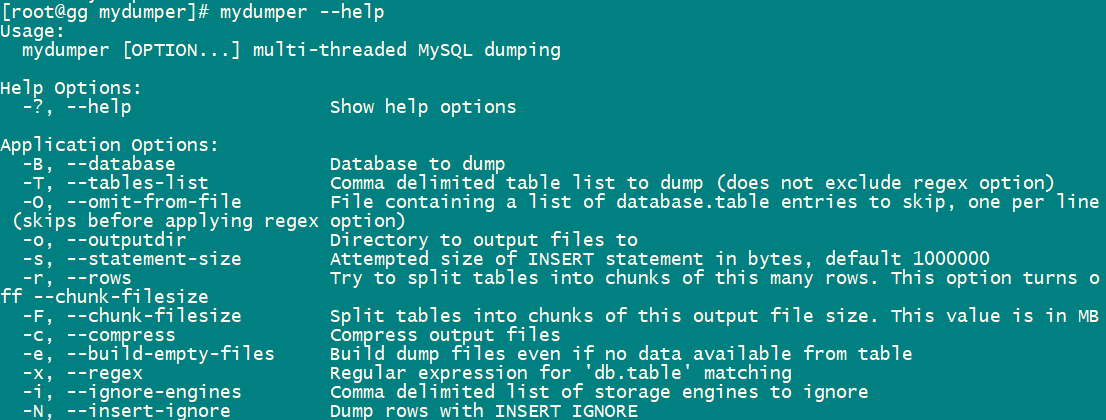
[root@gg ~]# mydumper -G -E -R --trx-consistency-only -t 4 -o backup_1029 -B test
** (mydumper:16747): WARNING **: Using trx_consistency_only, binlog coordinates will not be accurate if you are writing to non transactional tables.
[root@gg ~]# cd backup_1029/
[root@gg backup_1029]# ll
total 24
-rw-r--r--. 1 root root 136 Oct 19 11:12 metadata
-rw-r--r--. 1 root root 65 Oct 19 11:12 test-schema-create.sql
-rw-r--r--. 1 root root 278 Oct 19 11:12 test.test-schema.sql
-rw-r--r--. 1 root root 137 Oct 19 11:12 test.test.sql
-rw-r--r--. 1 root root 190 Oct 19 11:12 test.t-schema.sql
-rw-r--r--. 1 root root 135 Oct 19 11:12 test.t.sql
可以看出是基于每张表做的备份
[root@gg backup_1029]# more metadata
Started dump at: 2018-10-19 11:12:53
SHOW MASTER STATUS:
Log: mysql-bin.000004
Pos: 154
GTID:
Finished dump at: 2018-10-19 11:12:53
[root@gg backup_1029]# more test-schema-create.sql 创建库
CREATE DATABASE `test` /*!40100 DEFAULT CHARACTER SET latin1 */;
[root@gg backup_1029]# more test.t-schema.sql 创建表
/*!40101 SET NAMES binary*/;
/*!40014 SET FOREIGN_KEY_CHECKS=0*/;
/*!40103 SET TIME_ZONE='+00:00' */;
CREATE TABLE `t` (
`id` int(11) DEFAULT NULL
) ENGINE=InnoDB DEFAULT CHARSET=latin1;
[root@gg backup_1029]# more test.t.sql 插入数据
/*!40101 SET NAMES binary*/;
/*!40014 SET FOREIGN_KEY_CHECKS=0*/;
/*!40103 SET TIME_ZONE='+00:00' */;
INSERT INTO `t` VALUES
(1),
(2);
[root@gg backup_1029]# mydumper -G -E -R --trx-consistency-only -t 4 -o backup -B test --rows 500
** (mydumper:17405): WARNING **: Using trx_consistency_only, binlog coordinates will not be accurate if you are writing to non transactional tables.
[root@gg backup_1029]# cd backup/
[root@gg backup]# ll
total 44
-rw-r--r--. 1 root root 139 Oct 19 15:04 metadata
-rw-r--r--. 1 root root 65 Oct 19 15:04 test-schema-create.sql
-rw-r--r--. 1 root root 6730 Oct 19 15:04 test.test.00000.sql
-rw-r--r--. 1 root root 7059 Oct 19 15:04 test.test.00001.sql
-rw-r--r--. 1 root root 7436 Oct 19 15:04 test.test.00002.sql 多个线程同时备份一张表
-rw-r--r--. 1 root root 281 Oct 19 15:04 test.test-schema.sql
-rw-r--r--. 1 root root 190 Oct 19 15:04 test.t-schema.sql
-rw-r--r--. 1 root root 135 Oct 19 15:04 test.t.sql
恢复时利用myloader
将备份的文件恢复到t1库
[root@gg ~]# myloader -d backup_1029 -t 4 -B t1
root@localhost:mysql.sock [(none)]>show databases ;
+--------------------+
| Database |
+--------------------+
| information_schema |
| dbt3 |
| employees |
| employees_db |
| mysql |
| performance_schema |
| sys |
| t1 |
| test |
+--------------------+
9 rows in set (0.00 sec)
root@localhost:mysql.sock [(none)]>use t1
Reading table information for completion of table and column names
You can turn off this feature to get a quicker startup with -A
Database changed
root@localhost:mysql.sock [t1]>show tables ;
+--------------+
| Tables_in_t1 |
+--------------+
| t |
| test |
+--------------+
2 rows in set (0.00 sec)
mydumper单表的并行是如果做到的,同时要保持一致性
主线程执行: flush tables with read lock ;
线程1: start transaction with consistent snapshot ;
select ... limit 1-500
commit ;
线程2: start transaction with consistent snapshot ;
limit 501-1000
commit
线程3: start transaction with consistent snapshot ;
limit 1000-1500
commit
mydumper下载安装的更多相关文章
- Visual Studio for Mac Preview离线下载安装
Visual Studio for Mac离线下载安装. 环境:OS X EI Caption 10.11.2 .NET Core SDK 1.1 需预先安装 .NET Core 1.1 SDK ma ...
- jdk1.8下载安装
jdk8环境变量 jdk8图解安装 java8安装 1 2 3 4 5 6 7 分步阅读 JDK8 是JDK的最新版本,加入了很多新特性,如果我们要使用,需要下载安装: JDK8在windows ...
- Mac下载安装Android Studio教程
今天把公司闲置的一台Mac-mini重装了下系统感觉用着速度还不错,平时上班用的机器USB有些问题,所以打算用这台Mac.以往开发用Intellij Idea就够用,但是这次项目引用的jar包太多,遭 ...
- mac版 android破解软件下载安装
1 apktool下载安装 下载地址https://code.google.com/p/android-apktool/ [1].下载apktool.jar — 解压 [2].下载Mac上的辅助工具a ...
- 不通过App Store实现ios应用分发下载安装
最近公司的项目准备着手宣传工作了,宣传手册上要印制App的下载地址二维码,但是客户端应用还未上线,需要一种临时的方案解决应用分发下载问题,通常ios应用必须通过苹果应用商店才能下载安装,但是也可以看到 ...
- ERWin 7.2下载安装及注册机
ERWin 7.2下载安装及注册机 ERWin 7.2 下载地址: ftp://ftp.ca.com/CAproducts/erwin/ServicePacks/AFEDM72-b1644.exe ...
- cocoapod的下载安装解释
本文不提供cocoapod的下载安装的流程,因为那些只要百度一下就有的东西,而是对里面的代码进行解释,希望对iOS小白安装cocoapod有帮助: 一.cocoapod是什么? 开发过程中,我们会用到 ...
- 配置ActiveX控件在网页中下载安装
先检查客户端浏览器是否安装了ActiveX控件,如果没有安装ActiveX,就需要先给浏览器提示下载并允许安装.否则就直接使用该ActiveX控件.我们可以使用CodeBase来满足我们的要求:下面是 ...
- Xamarin Anroid开发教程之下载安装Xamarin
Xamarin Anroid开发教程之下载安装Xamarin Xamarin在过去安装时都会检查系统中是否安装了前面所提供的内容.而后来,Xamarin安装时只提供安装步骤,其它内容都需要读者自己下载 ...
随机推荐
- ms sqlserver2008r2 自动备份
日常工作中利用SQL SQLSERVER 2008 的维护计划对数据库进行定期的备份,这样一方面可以对数据库进行备份保证数据安全另一方面也可以减轻对维护人员的负担. 一般对于WEB 服务器进 行维护都 ...
- ubuntu16.04+anaconda的安装+解决conda不可用(配置路径)+卸载
首先一点,之前我一直自己安装python,然后直接在python环境下再安装第三方库,但自从另一台电脑重装系统之后,我当时在没有python的情况下直接安装的anaconda,觉得她超级好用(所以如果 ...
- oracle 行号和分页
1.行号是个伪列,rownum 永远按照默认的顺序生成 2.rownum 只能使用< <= 不能使用> >=(原因是oracle数据库是行式数据库,像盖楼一样,没有第一层就排 ...
- 【Python】多线程-线程池使用
1.学习目标 线程池使用 2.编程思路 2.1 代码原理 线程池是预先创建线程的一种技术.线程池在还没有任务到来之前,创建一定数量的线程,放入空闲队列中.这些线程都是处于睡眠状态,即均为启动,不消耗 ...
- GitHub:Awesome-Hacking(黑客技能列表-恶意代码)
0 初衷 GitHub这一份黑客技能列表很不错,包含了多个方向的安全.但目前我关注只有逆向工程与恶意代码,所以其他的被暂时略过. 虽然很感谢作者的辛勤付出,但并不打算复制粘贴全套转载.逐条整理是为了从 ...
- Pytorch 入门之Siamese网络
首次体验Pytorch,本文参考于:github and PyTorch 中文网人脸相似度对比 本文主要熟悉Pytorch大致流程,修改了读取数据部分.没有采用原作者的ImageFolder方法: ...
- 简述JavaScript全局对象
全局对象是JavaScript中非常重要的一类对象,它作为程序顶层(程序最顶端,不包括在任何函数之内)的上下文存在,JavaScript中的全局属性.全局函数都是通过全局对象来提供给程序的,比如 全局 ...
- Oracle11g的database 和client的区别是什么?
由于工作需要,刚开始接触oracle数据库,完全小白,下载的时候看到有database和client两种类型可供下载,一时不知如何是好,于是网上询问得知其中区别,在此记录一下自己的无知. “datab ...
- centos系统初始化脚本
#!/bin/bash #检测是否为root用户 ];then echo "Must be root can do this." exit fi #检测网络 echo " ...
- Python-百度经纬度转高德经纬度
import math def bdToGaoDe(lon,lat): """ 百度坐标转高德坐标 :param lon: :param lat: :return: &q ...