
vue2.0路由
现在用vue-cli搭建的环境里面vue-router是下载好的
vue2.0路由方式和以前也有些不同
没了了map和start方法
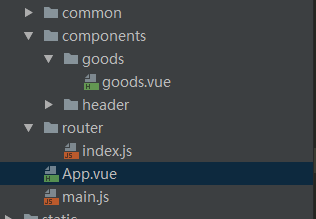
目录结构如上图
这里有三个文件,app.vue显示,main.js控制路由,goods.vue为跳转页面
app.vue
template>

  <div id="app">

    <v-header></v-header>

    <div class="tab">

      <div class="tab-item">

        <router-link to="/goods">商品</router-link>

      </div>

      <div class="tab-item">评论</div>

      <div class="tab-item">商家</div>

    </div>

    <router-view></router-view>

  </div>

</template>

<script>

  import header from './components/header/header.vue';

  export default{

      components:{

          'v-header':header

      }

  };

</script>

<style lang="stylus" rel="stylesheet/stylus">

  #app

     .tab

        display:flex

        width:100%

        height:40px

        line-height:40px

        .tab-item

          flex:1

          text-align center

</style>
main.js
// The Vue build version to load with the `import` command

// (runtime-only or standalone) has been set in webpack.base.conf with an alias.

import Vue from 'vue'

import VueRouter from 'vue-router'

import App from './App'

import goods from './components/goods/goods.vue';

import ratings from './components/ratings/ratings.vue';

import seller from './components/seller/seller.vue';

import "./common/stylus/index.styl";

Vue.use(VueRouter);

Vue.config.productionTip = false;

const routers=[

  {path:'/goods',component:goods},

  {path:'/ratings',component:ratings},

  {path:'/seller',component:seller}

]

const router=new VueRouter({

  linkActiveClass:"active",

  mode:"history",

  routes:routers

});

const app = new Vue({

  router

}).$mount('#app')

new Vue({

  template: '<App/>',

  components: { App },

  router: router

}).$mount('#app');

router.push('/goods')
// The Vue build version to load with the `import` command

// (runtime-only or standalone) has been set in webpack.base.conf with an alias.

import Vue from 'vue'

import VueRouter from 'vue-router'

import App from './App'

import goods from './components/goods/goods.vue';

import ratings from './components/ratings/ratings.vue';

import seller from './components/seller/seller.vue';

import "./common/stylus/index.styl";

Vue.use(VueRouter);

Vue.config.productionTip = false;

const routers=[

  {path:'/goods',component:goods},

  {path:'/ratings',component:ratings},

  {path:'/seller',component:seller}

]

const router=new VueRouter({

  linkActiveClass:"active",

  mode:"history",

  routes:routers

});

const app = new Vue({

  router

}).$mount('#app')

new Vue({

  template: '<App/>',

  components: { App },

  router: router

}).$mount('#app');

router.push('/goods')
vue2.0路由的更多相关文章
- vue2.0路由写法、传参和嵌套
前置知识请戳这里 vue-routerCDN地址:https://unpkg.com/vue-router@3.0.1/dist/vue-router.js vue-router下载地址:https: ...
- vue2.0路由变化1
路由的步骤 1.定义组件 var Home={ template:'<h3>我是主页</h3>' }; var News={ template:'<h3>我是新闻& ...
- vue2.0路由进阶
一.路由的模式 第一种用history方式实现,HTML5使用window.history.pushState()实现路由的切换而不刷新页面. 第二种使用hash值的方式来实现. vue2.0两种都可 ...
- vue2.0路由-路由嵌套
vue一个重要的方面就是路由,下面是自己写的一个路由的例子: 1.引入依赖库就不必再说 2.创建组件 两种写法 第一种:间接 <template id="home"> ...
- vue2.0 路由学习笔记
昨天温故了一下vue2.0的路由 做个笔记简单记录一下! 1.首相和vue1.0一样 要使用vuejs的路由功能需要先引入vue-router.js 2.然后修改原有a标签处代码 这里以一个ul li ...
- 解决vue2.0路由 TypeError: Cannot read property 'matched' of undefined 的错误问题
刚开始使用vue-router2.0,虽然也用了vux,用起来却发现一个问题--具体如下: 正常情况下使用脚手架跑完之后,然后修改源项目,首先在main.js入口里把该import进去的vuex,vu ...
- vue2.0路由切换后页面滚动位置不变BUG
最近项目中遇到这样一个问题,vue切换路由,页面到顶端的滚动距离仍会保持不变. 方法一: 监听路由 // app.vue export default { watch:{ '$route':func ...
- vue2.0路由写法
// 0. 如果使用模块化机制编程,導入Vue和VueRouter,要调用 Vue.use(VueRouter) // 1. 定义(路由)组件. // 可以从其他文件 import 进来 var Fo ...
- vue2.0 路由传参(router-link传过去)
<!DOCTYPE html> <html> <head> <meta charset="UTF-8"> <title> ...
随机推荐
- bzoj千题计划303:bzoj4827: [Hnoi2017]礼物
https://www.lydsy.com/JudgeOnline/problem.php?id=4827 式子化简一下,发现最后只跟 Σ xi*yi 有关 第二个序列反转,就可以用FFT优化 注意: ...
- python 代码模板
命令[python3 -m pydoc -p 1234] 通过http://localhost:1234来访问查看文档 # -*- coding: utf-8 -*-""&qu ...
- 010、base镜像 (2018-12-27 周四)
参考https://www.cnblogs.com/CloudMan6/p/6799197.html 什么是base镜像 不依赖其他镜像,从scratch构建.或者是其他可以作为基础镜 ...
- 在O(N)时间内求解 正数数组中 两个数相加的 最大值
一,问题描述 给定一个正数数组arr(即数组元素全是正数),找出该数组中,两个元素相加的最大值,其中被加数的下标大于加数的下标.由加法运算的可逆性,j >i 这个条件可以去掉. 即求出: max ...
- centos7 网卡命名
CentOS6 及之前以太网网卡进行顺序命名的:多网卡如:eth0,eth1 依次.Centos7 则不同,命名规则默认是基于固件.拓扑.位置信息来分配.一.网卡命名的策略systemd对网络设备的命 ...
- Java SE之字符串常量池
Reference Document: 什么是字符串常量池? http://www.importnew.com/10756.html[Recommend] Java常量池理解与总结 http: ...
- Centos7编译hadoop异常:Received fatal alert: handshake_failure
保持网络畅通 或者 配置代理 能够访问cdh的仓库 https://repository.cloudera.com/artifactory/cloudera-repos/ 编译hadoop版本 had ...
- 解决NO migrations to apply
创建表之后,遇到models模型变动,故当时做了删除应用文件夹下migrations文件,删除后重建,但重建后执行模型合并操作结果为No Changes,无法创建数据表 执行python3 manag ...
- Flask最强攻略 - 跟DragonFire学Flask - 第七篇 Flask 中路由系统
Flask中的路由系统其实我们并不陌生了,从一开始到现在都一直在应用 @app.route("/",methods=["GET","POST" ...
- jenkins配置sonarqube
jenkins配置sonarqube 下载插件SonarQube Scanner for Jenkins 在系统管理系统设置中选择 SonarQube servers 配置服务器名称.访问URL地址, ...