
Ubuntu遇到问题“Could not install packages due to an EnvironmentError: [Errno 13] 权限不够: ”
Ubuntu在使用一些pip的时候会遇到:“Could not install packages due to an EnvironmentError: [Errno 13] 权限不够:”的问题。
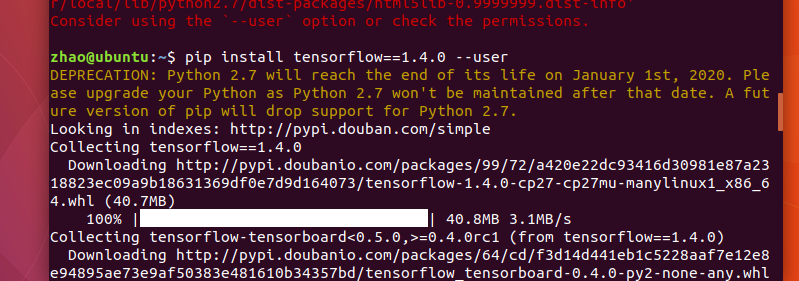
在正常的命令后面加一个 --user即可:
在使用pip的相关命令时,使用国内源的速度更快:如下是使用了清华的国内源。
pip install -r requirements.txt -i https://pypi.tuna.tsinghua.edu.cn/simple/ --user
这样会将Python 程序包安装到 $HOME/.local 路径下,其中包含三个字文件夹:bin,lib 和 share。
如果是配置了pip镜像源文件,则使用下面的命令:
Ubuntu遇到问题“Could not install packages due to an EnvironmentError: [Errno 13] 权限不够: ”的更多相关文章
- ERROR: Could not install packages due to an EnvironmentError: [Errno 13] Permission denied: '/Library/Python/2.7/site-packages/itsdangerous' Consider using the `--user` option or check the permissions
近期练习flask写个blog, 安装flask扩展时 pip install Flask-WTF 报ERROR: Could not install packages due to an Envir ...
- [已解决]报错: Could not install packages due to an EnvironmentError: [Errno 13] Permission denied: '/Users/mac/Ana
报错代码: pip3 install gerapy 报错内容: Could not install packages due to an EnvironmentError: [Errno 13] Pe ...
- 问题:Could not install packages due to an EnvironmentError: [Errno 13] Permission denied:
1.安装django 执行pip3 install --user django 2.解决方法:加--user 执行pip3 install --user django
- Could not install packages due to an EnvironmentError: [Errno 13] Permission denied: '/usr/local/bin/tensorboard'
使用pip install --user tensorflow-serving-api命令即可
- pip安装django出错 Could not install packages due to an EnvironmentError: [Errno 13]
pip install django 下载安装Django报错, 按照提示的建议改为 pip install --user django 安装完成
- [已解决]报错Could not install packages due to an EnvironmentError
安装OpenCV过程中出现错误 代码: pip-conda install -i https://pypi.douban.com/simple/ opencv-python 报错内容如下: Could ...
- python下载报错:Could not install packages due to an EnvironmentError: [WinError 5] 拒绝访问
更新pip模块的版本:python -m pip install --upgrade pip 但是遇到报错提示: Could not install packages due to an Enviro ...
- ERROR: Could not install packages due to an EnvironmentError: [WinError 5] 拒绝访问
报错:ERROR: Could not install packages due to an EnvironmentError: [WinError 5] 拒绝访问.: 'E:\\Anoconda\\ ...
- 安装xlrd包的时候,总是报错:ERROR: Could not install packages due to an EnvironmentError: HTTPConnectionPool (host='127.0.0.1', port=8888):。。。
安装xlrd包的时候,总是报错:ERROR: Could not install packages due to an EnvironmentError: HTTPConnectionPool (ho ...
随机推荐
- Linux3.10.0块IO子系统流程(3)-- SCSI策略例程
很长时间以来,Linux块设备使用了一种称为“蓄流/泄流”(plugging/unplugging)的技术来改进吞吐率.简单而言,这种工作方式类似浴盆排水系统的塞子.当IO被提交时,它被储存在一个队列 ...
- 6.3 C++修改字符串
参考:http://www.weixueyuan.net/view/6392.html 总结: string字符串同样可以像字符串数组那样按照下标逐一访问字符串中的每一个字符,string字符串的起始 ...
- 2.10 C++利用构造函数限制对象的创建
参考: http://www.weixueyuan.net/view/6342.html 总结: 限制对象的创建.限制创建对象时能够按照我们需要的那样创建,而不能随意的创建对象. 类中显示地声明了任意 ...
- 什么是Java优先级队列(Priority Queue)?
PriorityQueue是一个基于优先级堆的无界队列.它的元素是按照自然顺序排序的.在创建元素的时候,我们给它一个一个负责排序的比较器.PriorityQueue不允许null值,因为 它们没有自然 ...
- put请求
Action(){ int HttpRetCode; //定义一个变量,用于接收HTTP返回的状态码 web_add_header("Session-Id", "a3ff ...
- SAL-9 获取所有部门当前manager的当前薪水情况,给出dept_no, emp_no以及salary,当前表示to_date='9999-01-01'
题目描述 获取所有部门当前manager的当前薪水情况,给出dept_no, emp_no以及salary,当前表示to_date='9999-01-01'CREATE TABLE `dept_man ...
- CentOS7配置crate集群
一:编辑配置文件: 1.1配置文件: vim /etc/crate/crate.yml 1.2编辑crate.yml 的集群名称在166行附近: cluster.name: crate-xxx 1.3 ...
- POJ - 2823 Sliding Window (滑动窗口入门)
An array of size n ≤ 10 6 is given to you. There is a sliding window of size kwhich is moving from t ...
- 百度地图API示例:鼠标绘制点线面 控件修改
需求 :在使用地图API时,绘制工具栏控件想自己选择哪些要,哪些不要. 可以查看相应的类:官网地址: http://api.map.baidu.com/library/DrawingManager/1 ...
- Android SurfaceView内容获取
Android SurfaceView内容获取 这几天在做一个Android的小项目,项目中需要使用到SurfaceView来显示相机捕获的内容,同时还有一个SurfaceView用于绘制一些辅助线, ...