
Ubuntu遇到问题“Could not install packages due to an EnvironmentError: [Errno 13] 权限不够: ”
Ubuntu在使用一些pip的时候会遇到:“Could not install packages due to an EnvironmentError: [Errno 13] 权限不够:”的问题。
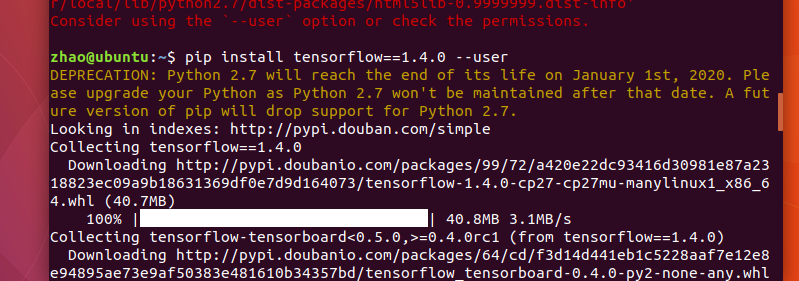
在正常的命令后面加一个 --user即可:
在使用pip的相关命令时,使用国内源的速度更快:如下是使用了清华的国内源。
pip install -r requirements.txt -i https://pypi.tuna.tsinghua.edu.cn/simple/ --user
这样会将Python 程序包安装到 $HOME/.local 路径下,其中包含三个字文件夹:bin,lib 和 share。
如果是配置了pip镜像源文件,则使用下面的命令:
Ubuntu遇到问题“Could not install packages due to an EnvironmentError: [Errno 13] 权限不够: ”的更多相关文章
- ERROR: Could not install packages due to an EnvironmentError: [Errno 13] Permission denied: '/Library/Python/2.7/site-packages/itsdangerous' Consider using the `--user` option or check the permissions
近期练习flask写个blog, 安装flask扩展时 pip install Flask-WTF 报ERROR: Could not install packages due to an Envir ...
- [已解决]报错: Could not install packages due to an EnvironmentError: [Errno 13] Permission denied: '/Users/mac/Ana
报错代码: pip3 install gerapy 报错内容: Could not install packages due to an EnvironmentError: [Errno 13] Pe ...
- 问题:Could not install packages due to an EnvironmentError: [Errno 13] Permission denied:
1.安装django 执行pip3 install --user django 2.解决方法:加--user 执行pip3 install --user django
- Could not install packages due to an EnvironmentError: [Errno 13] Permission denied: '/usr/local/bin/tensorboard'
使用pip install --user tensorflow-serving-api命令即可
- pip安装django出错 Could not install packages due to an EnvironmentError: [Errno 13]
pip install django 下载安装Django报错, 按照提示的建议改为 pip install --user django 安装完成
- [已解决]报错Could not install packages due to an EnvironmentError
安装OpenCV过程中出现错误 代码: pip-conda install -i https://pypi.douban.com/simple/ opencv-python 报错内容如下: Could ...
- python下载报错:Could not install packages due to an EnvironmentError: [WinError 5] 拒绝访问
更新pip模块的版本:python -m pip install --upgrade pip 但是遇到报错提示: Could not install packages due to an Enviro ...
- ERROR: Could not install packages due to an EnvironmentError: [WinError 5] 拒绝访问
报错:ERROR: Could not install packages due to an EnvironmentError: [WinError 5] 拒绝访问.: 'E:\\Anoconda\\ ...
- 安装xlrd包的时候,总是报错:ERROR: Could not install packages due to an EnvironmentError: HTTPConnectionPool (host='127.0.0.1', port=8888):。。。
安装xlrd包的时候,总是报错:ERROR: Could not install packages due to an EnvironmentError: HTTPConnectionPool (ho ...
随机推荐
- Cracking The Coding Interview 5.7
//An array A[1-n] contains all the integers from 0 to n except for one number which is missing. In t ...
- Centos7单主机部署 LAMP + phpmyadmin 服务
LAMP -> centos + apache + mysql + php + phpmyadmin 一:搭建yum仓库: 安装utils: yum -y install yum-utils c ...
- linux 下ftp几种上传和下载方式
1. ftp自动登录批量下载文件. 复制代码代码如下: #####从ftp服务器上的/home/data 到 本地的/home/databackup#####!/bin/bashftp -n<& ...
- Java语法基础学习DayTwo
一.数据类型补充问题 数据类型的自动转换等级: byte,short,char -- int -- long -- float -- double long是8个字节,float是4个字节,为什么是这 ...
- ylz外网连接ESB流程
先在指定目录下写Controller,在目录下com.ylzinfo.controller.zhizhi package com.ylzinfo.controller.zhizhi; import j ...
- Android UIAutomator 定位
AndroidUIAutomator:Android的源生测试框架的定位方式,定位速度快 一.组合定位 1.一般组合用id,class,text这三个属性会比较好一点,但也可以组合定位 2.id与te ...
- leetcode55:跳跃游戏
解题思路1: 从头往后找每一个为0的元素,判断这个0能够跳过,所有的0都能跳过,则返回True,否则返回False 解题思路2: 从前往后遍历数组,设置一个访问到当前位置i时最远可调到的距离maxle ...
- chromium ④
chromium的源码非常大,选择合适的点入手能省不少力气.在 win7下编译chromium中我曾提到学习chromium源码的一个小工程test_shell,代码目录在src/webkit/too ...
- Delphi和OutputDebugString
曾经想要实时监控您的Delphi应用程序,并能够查看日志消息吗?当然,您始终可以在RAD Studio IDE中以完全调试模式运行.另一种方法是输出日志消息,例如输出到文本文件.您还可以使用Outpu ...
- File类操作中的IOException异常
代码: File file= newFile("demo"+File.separator+"HelloWorld.txt"); file.createNe ...