
MVC与EF结合:Contoso大学
中文教程
1、通过 MVC 5 使用 Entity Framework 6 Code First 入门
2、通过 MVC 4 使用 Entity Framework 5 Code First 入门
3、通过 ASP.NET Core MVC 使用 Entity Framework Core 入门
https://docs.microsoft.com/zh-cn/aspnet/core/data/ef-mvc/?view=aspnetcore-2.1
示例源码下载
1、Contoso University - Entity Framework 6 and ASP.NET MVC 5
https://code.msdn.microsoft.com/ASPNET-MVC-Application-b01a9fe8
2、Contoso University - Entity Framework Core in an ASP.NET Core MVC
https://github.com/aspnet/Docs/tree/master/aspnetcore/data/ef-mvc/intro/samples/cu-final
一、Models:模型
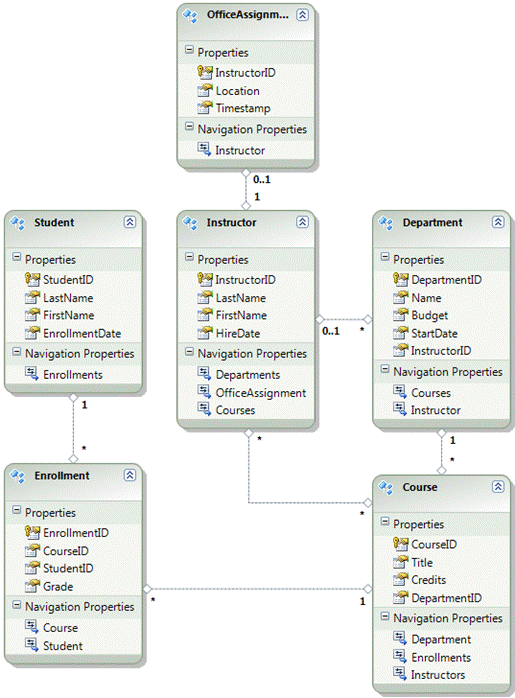
public abstract class Person

{

    [Key]

    public int PersonID { get; set; }

    [Required(ErrorMessage = "Last name is required.")]

    [Display(Name = "Last Name")]

    [MaxLength()]

    public string LastName { get; set; }

    [Required(ErrorMessage = "First name is required.")]

    [Column("FirstName")]

    [Display(Name = "First Name")]

    [MaxLength()]

    public string FirstMidName { get; set; }

    public string FullName

    {

        get

        {

            return LastName + ", " + FirstMidName;

        }

    }

}

public class Student : Person

{

    [Required(ErrorMessage = "Enrollment date is required.")]

    [DisplayFormat(DataFormatString = "{0:d}", ApplyFormatInEditMode = true)]

    [Display(Name = "Enrollment Date")]

    public DateTime? EnrollmentDate { get; set; }

    public virtual ICollection<Enrollment> Enrollments { get; set; }

}

public class Enrollment

{

    public int EnrollmentID { get; set; }

    public int CourseID { get; set; }

    public int PersonID { get; set; }

    [DisplayFormat(DataFormatString = "{0:#.#}", ApplyFormatInEditMode = true, NullDisplayText = "No grade")]

    public decimal? Grade { get; set; }

    public virtual Course Course { get; set; }

    public virtual Student Student { get; set; }

}

public class Course

{

    [DatabaseGenerated(DatabaseGeneratedOption.None)]

    [Display(Name = "Number")]

    public int CourseID { get; set; }

    [Required(ErrorMessage = "Title is required.")]

    [MaxLength()]

    public string Title { get; set; }

    [Required(ErrorMessage = "Number of credits is required.")]

    [Range(, , ErrorMessage = "Number of credits must be between 0 and 5.")]

    public int Credits { get; set; }

    [Display(Name = "Department")]

    public int DepartmentID { get; set; }

    public virtual Department Department { get; set; }

    public virtual ICollection<Enrollment> Enrollments { get; set; }

    public virtual ICollection<Instructor> Instructors { get; set; }

}

public class Department

{

    public int DepartmentID { get; set; }

    [Required(ErrorMessage = "Department name is required.")]

    [MaxLength()]

    public string Name { get; set; }

    [DisplayFormat(DataFormatString = "{0:c}")]

    [Required(ErrorMessage = "Budget is required.")]

    [Column(TypeName = "money")]

    public decimal? Budget { get; set; }

    [DisplayFormat(DataFormatString = "{0:d}", ApplyFormatInEditMode = true)]

    [Required(ErrorMessage = "Start date is required.")]

    public DateTime StartDate { get; set; }

    [Display(Name = "Administrator")]

    public int? PersonID { get; set; }

    [Timestamp]

    public Byte[] Timestamp { get; set; }

    public virtual Instructor Administrator { get; set; }

    public virtual ICollection<Course> Courses { get; set; }

}

public class Instructor : Person

{

    [DisplayFormat(DataFormatString = "{0:d}", ApplyFormatInEditMode = true)]

    [Required(ErrorMessage = "Hire date is required.")]

    [Display(Name = "Hire Date")]

    public DateTime? HireDate { get; set; }

    public virtual ICollection<Course> Courses { get; set; }

    public virtual OfficeAssignment OfficeAssignment { get; set; }

}

public class OfficeAssignment

{

    [Key]

    public int PersonID { get; set; }

    [MaxLength()]

    [Display(Name = "Office Location")]

    public string Location { get; set; }

    public virtual Instructor Instructor { get; set; }

}
二、控制器
public class InstructorController : Controller

{

    private SchoolContext db = new SchoolContext();

    public ActionResult Index(Int32? id, Int32? courseID)   // GET: /Instructor/

    {

        var viewModel = new InstructorIndexData();

        viewModel.Instructors = db.Instructors

            .Include(i => i.Courses.Select(c => c.Department))

            .OrderBy(i => i.LastName);

        if (id != null)

        {

            ViewBag.PersonID = id.Value;

            viewModel.Courses = viewModel.Instructors.Where(i => i.PersonID == id.Value).Single().Courses;

        }

        if (courseID != null)

        {

            ViewBag.CourseID = courseID.Value;

            var selectedCourse = viewModel.Courses.Where(x => x.CourseID == courseID).Single();

            db.Entry(selectedCourse).Collection(x => x.Enrollments).Load();

            foreach (Enrollment enrollment in selectedCourse.Enrollments)

            {

                db.Entry(enrollment).Reference(x => x.Student).Load();

            }

            viewModel.Enrollments = selectedCourse.Enrollments;

        }

        return View(viewModel);

    }

    public ViewResult Details(int id)  // GET: /Instructor/Details/5

    {

        Instructor instructor = db.Instructors.Find(id);

        return View(instructor);

    }

    public ActionResult Create()  // GET: /Instructor/Create

    {

        ViewBag.PersonID = new SelectList(db.OfficeAssignments, "PersonID", "Location");

        return View();

    }

    [HttpPost]

    public ActionResult Create(Instructor instructor) // POST: /Instructor/Create

    {

        if (ModelState.IsValid)

        {

            db.Instructors.Add(instructor);

            db.SaveChanges();

            return RedirectToAction("Index");

        }

        ViewBag.PersonID = new SelectList(db.OfficeAssignments, "PersonID", "Location", instructor.PersonID);

        return View(instructor);

    }

    public ActionResult Edit(int id) // GET: /Instructor/Edit/5

    {

        Instructor instructor = db.Instructors

            .Include(i => i.Courses)

            .Where(i => i.PersonID == id)

            .Single();

        PopulateAssignedCourseData(instructor);

        return View(instructor);

    }

    private void PopulateAssignedCourseData(Instructor instructor)

    {

        var allCourses = db.Courses;

        var instructorCourses = new HashSet<int>(instructor.Courses.Select(c => c.CourseID));

        var viewModel = new List<AssignedCourseData>();

        foreach (var course in allCourses)

        {

            viewModel.Add(new AssignedCourseData

            {

                CourseID = course.CourseID,

                Title = course.Title,

                Assigned = instructorCourses.Contains(course.CourseID)

            });

        }

        ViewBag.Courses = viewModel;

    }

    [HttpPost]

    public ActionResult Edit(int id, FormCollection formCollection, string[] selectedCourses) // POST: /Instructor/Edit/5

    {

        var instructorToUpdate = db.Instructors

            .Include(i => i.Courses)

            .Where(i => i.PersonID == id)

            .Single();

        if (TryUpdateModel(instructorToUpdate, "", null, new string[] { "Courses" }))

        {

            try

            {

                if (String.IsNullOrWhiteSpace(instructorToUpdate.OfficeAssignment.Location))

                {

                    instructorToUpdate.OfficeAssignment = null;

                }

                UpdateInstructorCourses(selectedCourses, instructorToUpdate);

                db.Entry(instructorToUpdate).State = EntityState.Modified;

                db.SaveChanges();

                return RedirectToAction("Index");

            }

            catch (DataException)

            {

                ModelState.AddModelError("", "Unable to save changes. Try again, and if the problem persists, see your system administrator.");

            }

        }

        PopulateAssignedCourseData(instructorToUpdate);

        return View(instructorToUpdate);

    }

    private void UpdateInstructorCourses(string[] selectedCourses, Instructor instructorToUpdate)

    {

        if (selectedCourses == null)

        {

            instructorToUpdate.Courses = new List<Course>();

            return;

        }

        var selectedCoursesHS = new HashSet<string>(selectedCourses);

        var instructorCourses = new HashSet<int>

            (instructorToUpdate.Courses.Select(c => c.CourseID));

        foreach (var course in db.Courses)

        {

            if (selectedCoursesHS.Contains(course.CourseID.ToString()))

            {

                if (!instructorCourses.Contains(course.CourseID))

                {

                    instructorToUpdate.Courses.Add(course);

                }

            }

            else

            {

                if (instructorCourses.Contains(course.CourseID))

                {

                    instructorToUpdate.Courses.Remove(course);

                }

            }

        }

    }

    public ActionResult Delete(int id)    // GET: /Instructor/Delete/5

    {

        Instructor instructor = db.Instructors.Find(id);

        return View(instructor);

    }

    [HttpPost, ActionName("Delete")]

    public ActionResult DeleteConfirmed(int id) // POST: /Instructor/Delete/5

    {

        Instructor instructor = db.Instructors.Find(id);

        db.Instructors.Remove(instructor);

        db.SaveChanges();

        return RedirectToAction("Index");

    }

    protected override void Dispose(bool disposing)

    {

        db.Dispose();

        base.Dispose(disposing);

    }

}
三、视图
Instructors:
@model ContosoUniversity.ViewModels.InstructorIndexData
@{ ViewBag.Title = "Instructors"; }
<h2> Instructors</h2>
<p> @Html.ActionLink("Create New", "Create")</p>
<table>
<tr> <th></th> <th>Last Name</th> <th>First Name</th><th>Hire Date</th><th>Office</th> <th>Courses</th> </tr>
@foreach (var item in Model.Instructors)
{
string selectedRow = "";
if (item.PersonID == ViewBag.PersonID)
{ selectedRow = "selectedrow"; }
<tr class="@selectedRow" valign="top">
<td>@Html.ActionLink("Select", "Index", new { id = item.PersonID })
| @Html.ActionLink("Edit", "Edit", new { id = item.PersonID })
| @Html.ActionLink("Details", "Details", new { id = item.PersonID })
| @Html.ActionLink("Delete", "Delete", new { id = item.PersonID }) </td>
<td>@item.LastName </td>
<td>@item.FirstMidName </td>
<td>@String.Format("{0:d}", item.HireDate) </td>
<td>
@if (item.OfficeAssignment != null)
{ @item.OfficeAssignment.Location }
</td>
<td>
@{ foreach (var course in item.Courses)
{ @course.CourseID @: @course.Title <br />
} }
</td>
</tr>
}
</table>
@if (Model.Courses != null)
{
<h3>
Courses Taught by Selected Instructor</h3>
<table>
<tr> <th></th><th>ID</th> <th>Title</th> <th>Department</th> </tr>
@foreach (var item in Model.Courses)
{
string selectedRow = "";
if (item.CourseID == ViewBag.CourseID)
{ selectedRow = "selectedrow"; }
<tr class="@selectedRow">
<td>@Html.ActionLink("Select", "Index", new { courseID = item.CourseID }) </td>
<td>@item.CourseID </td>
<td>@item.Title </td>
<td>@item.Department.Name </td>
</tr>
}
</table>
}
@if (Model.Enrollments != null)
{
<h3> Students Enrolled in Selected Course</h3>
<table>
<tr> <th>Name</th><th>Grade</th></tr>
@foreach (var item in Model.Enrollments)
{
<tr>
<td>@item.Student.FullName </td>
<td>@Html.DisplayFor(modelItem => item.Grade) </td>
</tr>
}
</table>
}
Edit:
@model ContosoUniversity.Models.Instructor
@{ ViewBag.Title = "Edit";}
<h2>Edit</h2>
<script src="@Url.Content("~/Scripts/jquery.validate.min.js")" type="text/javascript"></script>
<script src="@Url.Content("~/Scripts/jquery.validate.unobtrusive.min.js")" type="text/javascript"></script>
@using (Html.BeginForm()) {
@Html.ValidationSummary(true)
<fieldset>
<legend>Instructor</legend>
@Html.HiddenFor(model => model.PersonID)
<div class="editor-label"> @Html.LabelFor(model => model.LastName)
</div>
<div class="editor-field"> @Html.EditorFor(model => model.LastName)
@Html.ValidationMessageFor(model => model.LastName)
</div>
<div class="editor-label">
@Html.LabelFor(model => model.FirstMidName)
</div>
<div class="editor-field">
@Html.EditorFor(model => model.FirstMidName)
@Html.ValidationMessageFor(model => model.FirstMidName)
</div>
<div class="editor-label">
@Html.LabelFor(model => model.HireDate)
</div>
<div class="editor-field">
@Html.EditorFor(model => model.HireDate)
@Html.ValidationMessageFor(model => model.HireDate)
</div>
<div class="editor-label">
@Html.LabelFor(model => model.OfficeAssignment.Location)
</div>
<div class="editor-field">
@Html.EditorFor(model => model.OfficeAssignment.Location)
@Html.ValidationMessageFor(model => model.OfficeAssignment.Location)
</div>
<div class="editor-label">
@Html.LabelFor(model => model.OfficeAssignment.Location)
</div>
<div class="editor-field">
<table style="width: 100%">
<tr>
@{
int cnt = ;
List<ContosoUniversity.ViewModels.AssignedCourseData> courses = ViewBag.Courses;
foreach (var course in courses) {
if (cnt++ % == ) {
@: </tr> <tr>
}
@: <td>
<input type="checkbox"
name="selectedCourses"
value="@course.CourseID"
@(Html.Raw(course.Assigned ? "checked=\"checked\"" : "")) />
@course.CourseID @: @course.Title
@:</td>
}
@: </tr>
}
</table>
</div>
<p>
<input type="submit" value="Save" />
</p>
</fieldset>
}
<div>
@Html.ActionLink("Back to List", "Index")
</div>
MVC与EF结合:Contoso大学的更多相关文章
- Contoso 大学 - 1 - 为 ASP.NET MVC 应用程序创建 EF 数据模型
原文 Contoso 大学 - 1 - 为 ASP.NET MVC 应用程序创建 EF 数据模型 原文地址:Creating an Entity Framework Data Model for an ...
- Contoso 大学 - 使用 EF Code First 创建 MVC 应用
原文 Contoso 大学 - 使用 EF Code First 创建 MVC 应用 Contoso 大学 Web 示例应用演示了如何使用 EF 技术创建 ASP.NET MVC 应用.示例中的 Co ...
- Contoso 大学 - 使用 EF Code First 创建 MVC 应用,实例演练
Contoso 大学 Web 示例应用演示了如何使用 EF 技术创建 ASP.NET MVC 应用.示例中的 Contoso 大学是虚构的.应用包括了类似学生注册.课程创建以及教师分配等功能. 这个系 ...
- Contoso 大学 - 10 - 高级 EF 应用场景
原文 Contoso 大学 - 10 - 高级 EF 应用场景 By Tom Dykstra, Tom Dykstra is a Senior Programming Writer on Micros ...
- Contoso 大学 - 9 - 实现仓储和工作单元模式
原文 Contoso 大学 - 9 - 实现仓储和工作单元模式 By Tom Dykstra, Tom Dykstra is a Senior Programming Writer on Micros ...
- Contoso 大学 - 8 – 实现继承
原文 Contoso 大学 - 8 – 实现继承 By Tom Dykstra, Tom Dykstra is a Senior Programming Writer on Microsoft's W ...
- Contoso 大学 - 7 – 处理并发
原文 Contoso 大学 - 7 – 处理并发 By Tom Dykstra, Tom Dykstra is a Senior Programming Writer on Microsoft's W ...
- Contoso 大学 - 6 – 更新关联数据
原文 Contoso 大学 - 6 – 更新关联数据 By Tom Dykstra, Tom Dykstra is a Senior Programming Writer on Microsoft's ...
- Contoso 大学 - 5 – 读取关联数据
原文 Contoso 大学 - 5 – 读取关联数据 By Tom Dykstra, Tom Dykstra is a Senior Programming Writer on Microsoft's ...
- Contoso 大学 - 4 - 创建更加复杂的数据模型
原文 Contoso 大学 - 4 - 创建更加复杂的数据模型 原文地址:http://www.asp.net/mvc/tutorials/getting-started-with-ef-using- ...
随机推荐
- IE7,8纯css实现圆角效果
众所周知,IE7,8不支持border-radius效果.但我们同样有办法用css实现这个效果,方法就是用border来模拟. <!DOCTYPE html> <html lang= ...
- Compiler Principle
1.Einleitung 1.1 Der Überblick über Compiler 1.1.1 Lexikalische Analyse Die lexikalische Analyse zer ...
- SpringBoot 之Quartz的使用
对于Quartz的使用,还是想说一句,SpringBoot真的很好用啊! 第一步:当然是引入依赖啦 <parent> <groupId>org.springframework. ...
- Vim 技巧
:r 文件名 导入另一文件到当前文件中 :! 命令 可以不退出当前编辑的文本而能执行系统的命令 自定义快捷键 注意这里的^P这个是ctrl + V + P :map ^P I//<ESC> ...
- ssh 连接慢问题
连接先看报错: There were 11 failed login attempts since the last successful login. 先前有上百上千失败login,被攻击了,把短时 ...
- 最简单应用的时间日期选择插件---My97DatePicker
最简单的应用:http://www.my97.net/dp/demo/resource/2.1.asp
- Oracle中常用的命令,随着学习进度总结
原创作品,欢迎转载,转载请在文章显眼位置注明出处:https://www.cnblogs.com/sunshine5683/p/10016569.html 开始之前先注意:在linux中切换到sqlp ...
- 一款软件同时管理MySQL,MongoDB数据库
互联网应用开发日新月异,去年分布式应用都还大量使用springmvc+ zookeeper +dubbo,今年就被spring boot ,spring cloud微服务架构替换了,技术的更新换代太快 ...
- Linux 目录结构说明
根目录是整个系统最重要的一个目录,因为不但所有的目录都是由根目录衍生出来的,同时根目录也与开机/还原/系统修 复等动作有关. 由于系统开机时需要特定的开机软件.核心文件.开机所需程序.函数库等等文件数 ...
- 关于二进制和字符串及base64格式
字符串转二进制可以直接转,而二进制转字符串不可以,其中间包含的各种特殊符号,转成字符串时会出现问题,需要将二进制进行base64编码,并且需要在结尾加上#0表示结尾,然后转成字符串.