
[C#].NET中几种Timer的使用
这篇博客将梳理一下.NET中4个Timer类,及其用法。
1. System.Threading.Timer
public Timer(TimerCallback callback, object state, int dueTime, int period);
callback委托将会在period时间间隔内重复执行,state参数可以传入想在callback委托中处理的对象,dueTime标识多久后callback开始执行,period标识多久执行一次callback。
using System.Threading;

// System.Threading.Timer

Timer timer = new Timer(delegate

{

    Console.WriteLine($"Timer Thread: {Thread.CurrentThread.ManagedThreadId}");

    Console.WriteLine($"Is Thread Pool: {Thread.CurrentThread.IsThreadPoolThread}");

    Console.WriteLine("Timer Action.");

},

null,

,

);

Console.WriteLine("Main Action.");

Console.WriteLine($"Main Thread: {Thread.CurrentThread.ManagedThreadId}");

Console.ReadLine();
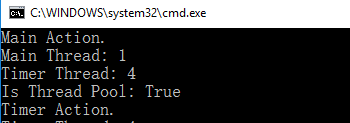
Timer回掉方法执行是在另外ThreadPool中一条新线程中执行的。
2. System.Timers.Timer
System.Timers.Timer和System.Threading.Timer相比,提供了更多的属性,
Interval 指定执行Elapsed事件的时间间隔;
Elapsed 指定定期执行的事件;
Enabled 用于Start/Stop Timer;
Start 开启Timer
Stop 停止Timer
System.Timers.Timer timer = new System.Timers.Timer();

timer.Interval = ;

timer.Elapsed += delegate

{

    Console.WriteLine($"Timer Thread: {Thread.CurrentThread.ManagedThreadId}");

    Console.WriteLine($"Is Thread Pool: {Thread.CurrentThread.IsThreadPoolThread}");

    Console.WriteLine("Timer Action");

    timer.Stop();

};

timer.Start();

Console.WriteLine("Main Action.");

Console.WriteLine($"Main Thread: {Thread.CurrentThread.ManagedThreadId}");

Console.ReadLine();

Timer Elapsed定期任务是在ThreadPool的线程中执行的。
3. System.Windows.Forms.Timer
Interval 指定执行Elapsed事件的时间间隔;
Tick 指定定期执行的事件;
Enabled 用于Start/Stop Timer;
Start 开启Timer
Stop 停止Timer
使用System.Windows.Forms.Timer来更新窗体中Label内时间,
using System.Windows.Forms;

public Form1()

{

    InitializeComponent();

    this.Load += delegate

    {

        Timer timer = new Timer();

        timer.Interval = ;

        timer.Tick += delegate

        {

            System.Diagnostics.Debug.WriteLine($"Timer Thread: {System.Threading.Thread.CurrentThread.ManagedThreadId}");

            System.Diagnostics.Debug.WriteLine($"Is Thread Pool: {System.Threading.Thread.CurrentThread.IsThreadPoolThread}");

            this.lblTimer.Text = DateTime.Now.ToLongTimeString();

        };

        timer.Start();

        System.Diagnostics.Debug.WriteLine($"Main Thread: {System.Threading.Thread.CurrentThread.ManagedThreadId}");

    };

}
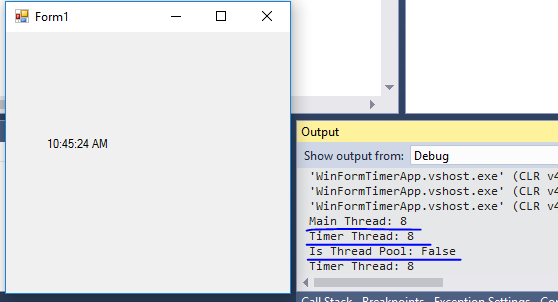
Timer Tick事件中执行的事件线程与主窗体的线程是同一个,并没有创建新线程(或者使用ThreadPool中线程)来更新UI。下面将代码做一个改动,使用System.Timers.Timer来更新UI上的时间,代码如下,
public Form1()

{

    InitializeComponent();

    this.Load += delegate

    {

        System.Timers.Timer timer = new System.Timers.Timer();

        timer.Interval = ;

        timer.Elapsed += delegate

        {

            System.Diagnostics.Debug.WriteLine($"Timer Thread: {System.Threading.Thread.CurrentThread.ManagedThreadId}");

            System.Diagnostics.Debug.WriteLine($"Is Thread Pool: {System.Threading.Thread.CurrentThread.IsThreadPoolThread}");

            this.lblTimer.Text = DateTime.Now.ToLongTimeString();

        };

        timer.Start();

        System.Diagnostics.Debug.WriteLine($"Main Thread: {System.Threading.Thread.CurrentThread.ManagedThreadId}");

    };

}
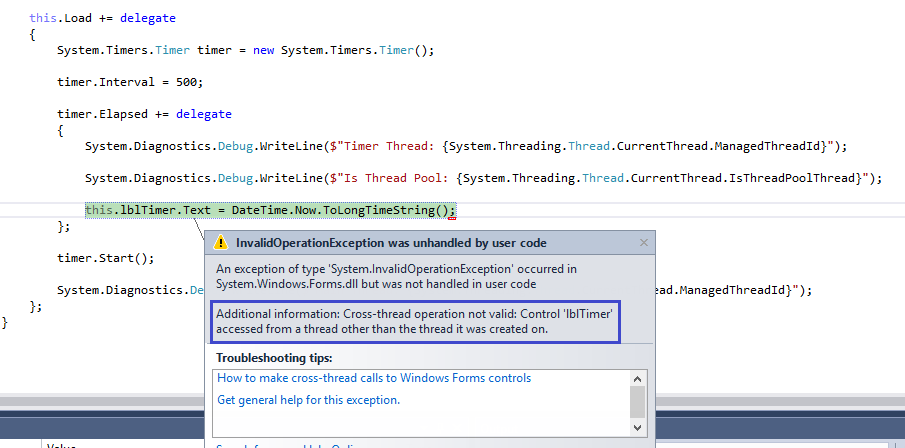
很熟悉的一个错误。因为Label是由UI线程创建的,所以对其进行修改需要在UI线程中进行。System.Timers.Timer中Elasped执行是在ThreadPool中新创建的线程中执行的。所以会有上面的错误。
4. System.Windows.Threading.DispatcherTimer
属性和方法与System.Windows.Forms.Timer类似。
using System.Windows.Threading;

public MainWindow()

{

    InitializeComponent();

    this.Loaded += delegate

    {

        //DispatcherTimer

        DispatcherTimer timer = new DispatcherTimer();

        timer.Interval = TimeSpan.FromSeconds();

        timer.Start();

        Debug.WriteLine($"Main Thread Id: {Thread.CurrentThread.ManagedThreadId}");

        timer.Tick += delegate

        {

            tbTime.Text = DateTime.Now.ToLongTimeString();

            Debug.WriteLine($"Timer Thread Id: {Thread.CurrentThread.ManagedThreadId}");

            timer.Stop();

        };

    };

}

DispatcherTimer中Tick事件执行是在主线程中进行的。
使用DispatcherTimer时有一点需要注意,因为DispatcherTimer的Tick事件是排在Dispatcher队列中的,当系统在高负荷时,不能保证在Interval时间段执行,可能会有轻微的延迟,但是绝对可以保证Tick的执行不会早于Interval设置的时间。如果对Tick执行时间准确性高可以设置DispatcherTimer的priority。例如:
DispatcherTimer timer = new DispatcherTimer(DispatcherPriority.Send);
感谢您的阅读。
[C#].NET中几种Timer的使用的更多相关文章
- .NET中的三种Timer的区别和用法(转)
最近正好做一个WEB中定期执行的程序,而.NET中有3个不同的定时器.所以正好研究研究.这3个定时器分别是: //1.实现按用户定义的时间间隔引发事件的计时器.此计时器最宜用于 Windows 窗 ...
- 转:.NET中的三种Timer的区别和用法(转)
//1.实现按用户定义的时间间隔引发事件的计时器.此计时器最宜用于 Windows 窗体应用程序中,并且必须在窗口中使用. System.Windows.Forms.Timer // 2.提供以指定的 ...
- 【转】.NET中的三种Timer的区别和用法
最近正好做一个WEB中定期执行的程序,而.NET中有3个不同的定时器.所以正好研究研究.这3个定时器分别是: //1.实现按用户定义的时间间隔引发事件的计时器.此计时器最宜用于 Windows 窗体应 ...
- C#中三种定时器对象的比较
·关于C#中timer类 在C#里关于定时器类就有3个1.定义在System.Windows.Forms里2.定义在System.Threading.Timer类里3.定义在System.Timers ...
- 关于js中两种定时器的设置及清除(转载)
1.JS中的定时器有两种: window.setTimeout([function],[interval]) 设置一个定时器,并且设定了一个等待的时间[interval],当到达时间后,执行对应的方法 ...
- [转]iOS 中几种定时器 - 控制了时间,就控制了一切
这篇文章是转载内容,原文地址:http://www.cocoachina.com/ios/20150519/11857.html?utm_source=tuicool 这里的知识点,其实在我们日常开发 ...
- C#中三种定时器对象的比较 【转】
https://www.cnblogs.com/zxtceq/p/5667281.html C#中三种定时器对象的比较 ·关于C#中timer类 在C#里关于定时器类就有3个1.定义在System.W ...
- Android中几种常用的定时器和延时方法
通过实际项目的练习,掌握了几种android基本定时器和延时的用法,这里我想总结一下作为自己的收获,下面列出的是比较简洁的模式,方便简单地在程序中直接调用. 一.三种常用的定时器 1.Handler类 ...
- asp.net mvc 中 一种简单的 URL 重写
asp.net mvc 中 一种简单的 URL 重写 Intro 在项目中想增加一个公告的功能,但是又不想直接用默认带的那种路由,感觉好low逼,想弄成那种伪静态化的路由 (别问我为什么不直接静态化, ...
随机推荐
- Swift中类与结构的初始化
前言:通过学习与研究swift3.0的官方文档关于初始化这部分可以总结为一句话:类与结构是确保一个类型的实例可以使用之前,其所有存储属性都得到了正确的赋值. 一,结构的初始化1 struct Firs ...
- ubuntu下非root用户下获得使用wireshark的权限
在非root用户下不能使用wireshark用来抓包,所以需要进行以下操作: sudo groupadd wireshark sudo chgrp wireshark /usr/bin/dumpcap ...
- 移动端自适应:flexible.js可伸缩布局使用
http://caibaojian.com/flexible-js.html 阿里团队开源的一个库.flexible.js,主要是实现在各种不同的移动端界面实现一稿搞定所有的设备兼容自适应问题. 实现 ...
- sqlserver数据库标注为可疑的解决办法(转)
前几天客户那边的服务器死机了,然后客户强制关机,重新启动服务器后,系统就没法正常使用,连接不上服务器,我远程操作后,看到数据库标注为可疑,由于客户之前没备份数据库,看来只能是修复了: 1:停止数据库服 ...
- Excel——使用OFFSET、MATCH、COUNTA实现二级菜单
如图所示,接下来提供两种办法实现: 1.将A.B.C.D定义为名称NAME. 2.设置一级菜单单元格数据有效性为NAME. 3.设置二级菜单格数据有效为: =OFFSET($A$1,MATCH($A6 ...
- JavaScript - 正则表达之二
正则表达式的大致匹配过程是:依次拿出表达式和文本中的字符比较,如果每一个字符都能匹配,则匹配成功:一旦有匹配不成功的字符则匹配失败. 正则表达式通常用于在文本中查找匹配的字符串.Python里数量词默 ...
- Linux开机自动登录(文本模式)
• Linux系统启动登录过程 以RedHat/CentOS为例,Linux系统Level3模式下从启动到登录的整个过程大致如下: 1> 加载BIOS信息:包含了CPU/显卡/内存/硬盘/网卡等 ...
- JSONKit在项目中使用设置(ARC与方法更新)
在项目中经常会遇到解析json的情况,如果有同学想要解析JSON,那么JSONKit可以是一个不错的选择. git中JSONKit 的地址为:https://github.com/johnezang/ ...
- EBS中加载FORM使用的JavaBean的JAR包
1.SSH端,APP用户登录: 2.输入env,确定环境变量名称FORMS_WEB_CONFIG_FILE: 3.定位模板文件: $AD_TOP/bin/adtmplreport.sh con ...
- .net一般处理程序(httphandler)实现文件下载功能
Handler文件代码如下: public class MDMExporterWeb : IHttpHandler { public void ProcessRequest(HttpContext c ...