
[C#].NET中几种Timer的使用
这篇博客将梳理一下.NET中4个Timer类,及其用法。
1. System.Threading.Timer
public Timer(TimerCallback callback, object state, int dueTime, int period);
callback委托将会在period时间间隔内重复执行,state参数可以传入想在callback委托中处理的对象,dueTime标识多久后callback开始执行,period标识多久执行一次callback。
using System.Threading;

// System.Threading.Timer

Timer timer = new Timer(delegate

{

    Console.WriteLine($"Timer Thread: {Thread.CurrentThread.ManagedThreadId}");

    Console.WriteLine($"Is Thread Pool: {Thread.CurrentThread.IsThreadPoolThread}");

    Console.WriteLine("Timer Action.");

},

null,

,

);

Console.WriteLine("Main Action.");

Console.WriteLine($"Main Thread: {Thread.CurrentThread.ManagedThreadId}");

Console.ReadLine();
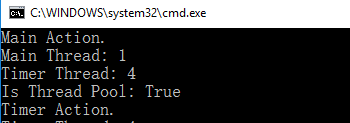
Timer回掉方法执行是在另外ThreadPool中一条新线程中执行的。
2. System.Timers.Timer
System.Timers.Timer和System.Threading.Timer相比,提供了更多的属性,
Interval 指定执行Elapsed事件的时间间隔;
Elapsed 指定定期执行的事件;
Enabled 用于Start/Stop Timer;
Start 开启Timer
Stop 停止Timer
System.Timers.Timer timer = new System.Timers.Timer();

timer.Interval = ;

timer.Elapsed += delegate

{

    Console.WriteLine($"Timer Thread: {Thread.CurrentThread.ManagedThreadId}");

    Console.WriteLine($"Is Thread Pool: {Thread.CurrentThread.IsThreadPoolThread}");

    Console.WriteLine("Timer Action");

    timer.Stop();

};

timer.Start();

Console.WriteLine("Main Action.");

Console.WriteLine($"Main Thread: {Thread.CurrentThread.ManagedThreadId}");

Console.ReadLine();

Timer Elapsed定期任务是在ThreadPool的线程中执行的。
3. System.Windows.Forms.Timer
Interval 指定执行Elapsed事件的时间间隔;
Tick 指定定期执行的事件;
Enabled 用于Start/Stop Timer;
Start 开启Timer
Stop 停止Timer
使用System.Windows.Forms.Timer来更新窗体中Label内时间,
using System.Windows.Forms;

public Form1()

{

    InitializeComponent();

    this.Load += delegate

    {

        Timer timer = new Timer();

        timer.Interval = ;

        timer.Tick += delegate

        {

            System.Diagnostics.Debug.WriteLine($"Timer Thread: {System.Threading.Thread.CurrentThread.ManagedThreadId}");

            System.Diagnostics.Debug.WriteLine($"Is Thread Pool: {System.Threading.Thread.CurrentThread.IsThreadPoolThread}");

            this.lblTimer.Text = DateTime.Now.ToLongTimeString();

        };

        timer.Start();

        System.Diagnostics.Debug.WriteLine($"Main Thread: {System.Threading.Thread.CurrentThread.ManagedThreadId}");

    };

}
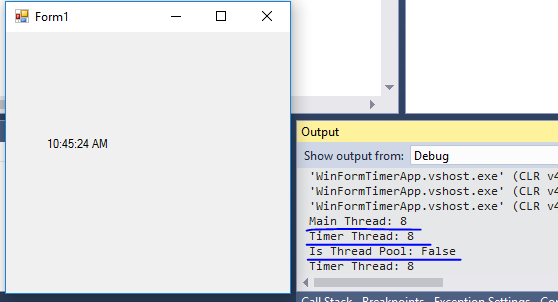
Timer Tick事件中执行的事件线程与主窗体的线程是同一个,并没有创建新线程(或者使用ThreadPool中线程)来更新UI。下面将代码做一个改动,使用System.Timers.Timer来更新UI上的时间,代码如下,
public Form1()

{

    InitializeComponent();

    this.Load += delegate

    {

        System.Timers.Timer timer = new System.Timers.Timer();

        timer.Interval = ;

        timer.Elapsed += delegate

        {

            System.Diagnostics.Debug.WriteLine($"Timer Thread: {System.Threading.Thread.CurrentThread.ManagedThreadId}");

            System.Diagnostics.Debug.WriteLine($"Is Thread Pool: {System.Threading.Thread.CurrentThread.IsThreadPoolThread}");

            this.lblTimer.Text = DateTime.Now.ToLongTimeString();

        };

        timer.Start();

        System.Diagnostics.Debug.WriteLine($"Main Thread: {System.Threading.Thread.CurrentThread.ManagedThreadId}");

    };

}
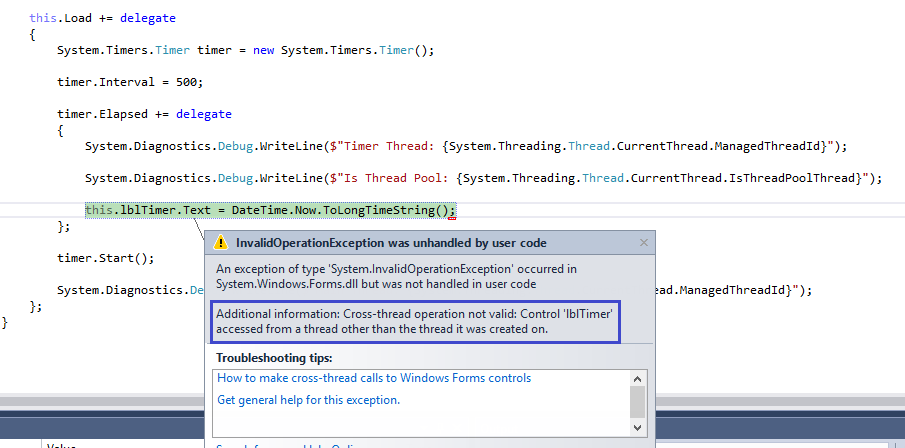
很熟悉的一个错误。因为Label是由UI线程创建的,所以对其进行修改需要在UI线程中进行。System.Timers.Timer中Elasped执行是在ThreadPool中新创建的线程中执行的。所以会有上面的错误。
4. System.Windows.Threading.DispatcherTimer
属性和方法与System.Windows.Forms.Timer类似。
using System.Windows.Threading;

public MainWindow()

{

    InitializeComponent();

    this.Loaded += delegate

    {

        //DispatcherTimer

        DispatcherTimer timer = new DispatcherTimer();

        timer.Interval = TimeSpan.FromSeconds();

        timer.Start();

        Debug.WriteLine($"Main Thread Id: {Thread.CurrentThread.ManagedThreadId}");

        timer.Tick += delegate

        {

            tbTime.Text = DateTime.Now.ToLongTimeString();

            Debug.WriteLine($"Timer Thread Id: {Thread.CurrentThread.ManagedThreadId}");

            timer.Stop();

        };

    };

}

DispatcherTimer中Tick事件执行是在主线程中进行的。
使用DispatcherTimer时有一点需要注意,因为DispatcherTimer的Tick事件是排在Dispatcher队列中的,当系统在高负荷时,不能保证在Interval时间段执行,可能会有轻微的延迟,但是绝对可以保证Tick的执行不会早于Interval设置的时间。如果对Tick执行时间准确性高可以设置DispatcherTimer的priority。例如:
DispatcherTimer timer = new DispatcherTimer(DispatcherPriority.Send);
感谢您的阅读。
[C#].NET中几种Timer的使用的更多相关文章
- .NET中的三种Timer的区别和用法(转)
最近正好做一个WEB中定期执行的程序,而.NET中有3个不同的定时器.所以正好研究研究.这3个定时器分别是: //1.实现按用户定义的时间间隔引发事件的计时器.此计时器最宜用于 Windows 窗 ...
- 转:.NET中的三种Timer的区别和用法(转)
//1.实现按用户定义的时间间隔引发事件的计时器.此计时器最宜用于 Windows 窗体应用程序中,并且必须在窗口中使用. System.Windows.Forms.Timer // 2.提供以指定的 ...
- 【转】.NET中的三种Timer的区别和用法
最近正好做一个WEB中定期执行的程序,而.NET中有3个不同的定时器.所以正好研究研究.这3个定时器分别是: //1.实现按用户定义的时间间隔引发事件的计时器.此计时器最宜用于 Windows 窗体应 ...
- C#中三种定时器对象的比较
·关于C#中timer类 在C#里关于定时器类就有3个1.定义在System.Windows.Forms里2.定义在System.Threading.Timer类里3.定义在System.Timers ...
- 关于js中两种定时器的设置及清除(转载)
1.JS中的定时器有两种: window.setTimeout([function],[interval]) 设置一个定时器,并且设定了一个等待的时间[interval],当到达时间后,执行对应的方法 ...
- [转]iOS 中几种定时器 - 控制了时间,就控制了一切
这篇文章是转载内容,原文地址:http://www.cocoachina.com/ios/20150519/11857.html?utm_source=tuicool 这里的知识点,其实在我们日常开发 ...
- C#中三种定时器对象的比较 【转】
https://www.cnblogs.com/zxtceq/p/5667281.html C#中三种定时器对象的比较 ·关于C#中timer类 在C#里关于定时器类就有3个1.定义在System.W ...
- Android中几种常用的定时器和延时方法
通过实际项目的练习,掌握了几种android基本定时器和延时的用法,这里我想总结一下作为自己的收获,下面列出的是比较简洁的模式,方便简单地在程序中直接调用. 一.三种常用的定时器 1.Handler类 ...
- asp.net mvc 中 一种简单的 URL 重写
asp.net mvc 中 一种简单的 URL 重写 Intro 在项目中想增加一个公告的功能,但是又不想直接用默认带的那种路由,感觉好low逼,想弄成那种伪静态化的路由 (别问我为什么不直接静态化, ...
随机推荐
- 浅谈Nginx负载均衡和F5的区别
前言 笔者最近在负责某集团网站时,同时用到了Nginx与F5,如图所示,负载均衡器F5作为处理外界请求的第一道"墙",将请求分发到web服务器后,web服务器上的Nginx再进行处 ...
- sqlserver 数据库索引建立原则
1.始终包含聚集索引 当表中不包含聚集索引时,表中的数据是无序的,这会降低数据检索效率.即使通过索引缩小了数据检索的范围,但由于数据本身是无序的,当从表中提取实际数据时,会产生频繁的定位问题,这也使得 ...
- apache_commons 之 双向Map DualHashBidiMap (使用及源码)
在项目当中,经常出现需要根据Key值获取value:而且要求根据value获取key值,其实在commons-collections包中已经提供了此集合类.就是DualHashBidiMap类. (官 ...
- 中国计算机学会CCF推荐国际学术会议
中国计算机学会推荐国际学术会议 (计算机系统与高性能计算) 一.A类 序号 会议简称 会议全称 出版社 网址 1 ASPLOS Architectural Support for Programmin ...
- shell条件判断与流程控制
一 条件判断式语句 1.按文件类型进行判断 测试类型 作用 -b 文件 判断文件是否存在,并且是否为块设备文件(是块设备文件为真) -c 文件 判断文件是否存在,并且是否为字符设备文件(是字符设备设备 ...
- DateUtils 学习记录1
开发过程中很多时候都需要处理各种各样的日期..有些项目可能还会有自己的DateUtil.... 其实apache commons lang3有一个很好用的日期处理工具类,叫DateUtils... 基 ...
- 美团HD(4)-二级联动效果
DJNavDropView.m #import "DJNavDropView.h" #import "DJCategory.h" #import "D ...
- Android:TextView文字跑马灯的效果实现
解决TextView文字显示不全的问题. 简单设置跑马灯的效果: <TextView android:id="@+id/textView" android:layout_wi ...
- DataTable to Excel(使用NPOI、EPPlus将数据表中的数据读取到excel格式内存中)
/// <summary> /// DataTable to Excel(将数据表中的数据读取到excel格式内存中) /// </summary> /// <param ...
- UnixBench-linux下的跑分软件
UnixBench是一款开源的测试 unix 系统基本性能的工具,是比较通用的测试VPS性能的工具.UnixBench会执行一系列的测试,包括2D和3D图形系统的性能,测试的结果不仅仅是CPU,内存, ...