
PHP-GD库开发手记
创建带有alpha通道的背景
$png = imagecreatetruecolor(800, 600);imagesavealpha($png, true);$trans_colour = imagecolorallocatealpha($png, 0, 0, 0, 127);imagefill($png, 0, 0, $trans_colour);
输出图像
$png = imagecreatetruecolor(800, 600);imagesavealpha($png, true);$trans_colour = imagecolorallocatealpha($png, 0, 0, 0, 127);imagefill($png, 0, 0, $trans_colour);
根据不同的图片格式,选择不同的函数
header("Content-type: image/png");imagepng($img);imagedestroy($img);
画中文字体
用ttftext函数即可,如果不是UTF8的编码,记得用iconv函数转码一次
imagettftext ( $img, 20, 0, 0, 20, imagecolorallocate ( $img, 255, 255, 255 ),'g:/msyhbd.ttf', '啊啊啊啊啊啊啊啊啊啊啊啊啊');
获取长宽
imagesx($tx);imagesy($tx);
等比例缩放图片,也可以用于裁切
$tx=imagecreatefromjpeg("G:/test.jpg" );$scaletx=imagecreatetruecolor(450, 450); //意思表示将tx图片的从0,0坐标长sx,宽sy的区域,重新采样改变大小复制到stx的0,0坐标,长宽为450的区域。imagecopyresampled($scaletx, $tx, 0, 0, 0, 0, 450, 450, imagesx($tx), imagesy($tx));
    private function resizeImage($src, $dest, $thumbWidth)
    {
        ini_set('memory_limit', '2048M');
        if (!file_exists($src)) {
            return;
        }
        $image = imagecreatefrompng($src);
        $srcWidth = imagesx($image); // 原始宽高
        $srcHeight = imagesy($image);

        $thumbHeight = ($srcHeight / $srcWidth) * $thumbWidth; // 处理后的高
        imagesavealpha($image, true);//这里很重要;
        $new = imagecreatetruecolor($thumbWidth, $thumbHeight);
        imagealphablending($new, false);//这里很重要,意思是不合并颜色,直接用$img图像颜色替换,包括透明色;
        imagesavealpha($new, true);//这里很重要,意思是不要丢了$thumb图像的透明色;
        imagecopyresampled($new, $image, 0, 0, 0, 0, $thumbWidth, $thumbHeight, $srcWidth, $srcHeight);
        imagepng($new, $dest);

        imagedestroy($new);
    }
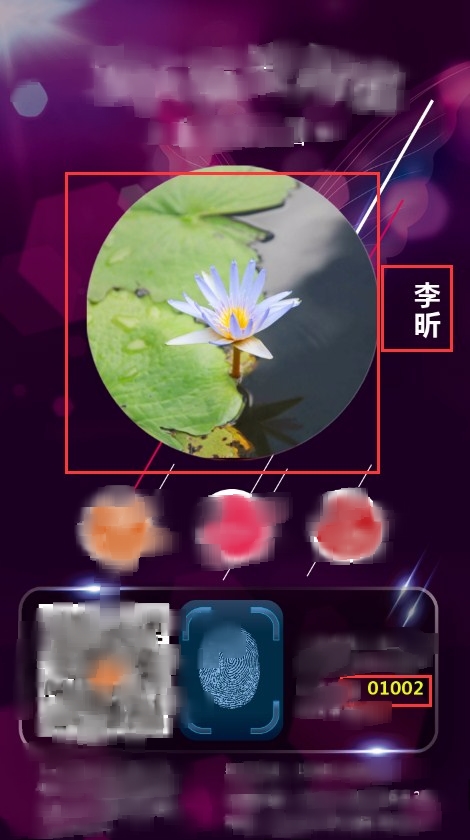
实例代码
        $img = imagecreatetruecolor ( 720, 1280 );
        imagesavealpha ( $img, true );//保留通道,不然不透明
        $trans_colour = imagecolorallocatealpha ( $img, 33, 0, 0, 33 );
        imagefill ( $img, 0, 0, $trans_colour );
        $tx = imagecreatefromjpeg ( "G:/Lotus.jpg" );
        // 设置头像居中
        $width = 450;
        $height = 450;
        $w = imagesx ( $tx );
        $h = imagesy ( $tx );
        // 原图尺寸小于缩略图尺寸则不进行缩略
        if ($w > $width || $h > $height) {
            // 计算缩放比例,选择优先让小的边放大到指定等比宽度,大的边随意,为了充满屏幕
            $scale = max ( $width / $w, $height / $h );
            $width = $w * $scale;
            $height = $h * $scale;
        }

        //缩放
        $scaletx = imagecreatetruecolor ( $width, $height );
        imagecopyresampled ( $scaletx, $tx, 0, 0, 0, 0, $width, $height, $w, $h );

        // 计算居中位置
        $cx = (720 - $width) / 2;
        $cy = (1280 - $height) / 2 - 170;

        //覆盖
        imagecopy ( $img, $scaletx, $cx, $cy, 0, 0, $width, $height );
        $bg = imagecreatefrompng ( "G:/test.png" );
        imagesavealpha ( $bg, true );
        imagecopy ( $img, $bg, 0, 0, 0, 0, imagesx ( $bg ), imagesy ( $bg ) );

        // 写名字
        $name = '李昕';
        $name_len = mb_strlen ( $name, 'utf8' );// 计算名字长度
        $name_y =510-(45*$name_len/2);//居中
        for($i = 0; $i < $name_len; $i ++) {
            imagettftext ( $img, 30, 0, 630, $name_y, imagecolorallocate ( $img, 255, 255, 255 ), 'msyhbd.ttf', mb_substr ( $name, $i, 1,'utf-8' ));
            $name_y += 45;
        }

        //写编号
        $vcode='01002';
        imagettftext ( $img, 20, 0, 560, 1050, imagecolorallocate ( $img, 232, 255, 0 ), 'msyhbd.ttf', $vcode);

        header ( "content-type: image/jpg" );
        imagejpeg ( $img, null, 100 );
imagesx($tx);imagesy($tx);
$tx=imagecreatefromjpeg("G:/test.jpg" );$scaletx=imagecreatetruecolor(450, 450);//意思表示将tx图片的从0,0坐标长sx,宽sy的区域,重新采样改变大小复制到stx的0,0坐标,长宽为450的区域。imagecopyresampled($scaletx, $tx, 0, 0, 0, 0, 450, 450, imagesx($tx), imagesy($tx));
private function resizeImage($src, $dest, $thumbWidth){ini_set('memory_limit', '2048M');if (!file_exists($src)) {return;}$image = imagecreatefrompng($src);$srcWidth = imagesx($image); // 原始宽高$srcHeight = imagesy($image);$thumbHeight = ($srcHeight / $srcWidth) * $thumbWidth; // 处理后的高imagesavealpha($image, true);//这里很重要;$new = imagecreatetruecolor($thumbWidth, $thumbHeight);imagealphablending($new, false);//这里很重要,意思是不合并颜色,直接用$img图像颜色替换,包括透明色;imagesavealpha($new, true);//这里很重要,意思是不要丢了$thumb图像的透明色;imagecopyresampled($new, $image, 0, 0, 0, 0, $thumbWidth, $thumbHeight, $srcWidth, $srcHeight);imagepng($new, $dest);imagedestroy($new);}
实例代码
$img = imagecreatetruecolor ( 720, 1280 ); imagesavealpha ( $img, true );//保留通道,不然不透明 $trans_colour = imagecolorallocatealpha ( $img, 33, 0, 0, 33 ); imagefill ( $img, 0, 0, $trans_colour ); $tx = imagecreatefromjpeg ( "G:/Lotus.jpg" ); // 设置头像居中 $width = 450; $height = 450; $w = imagesx ( $tx ); $h = imagesy ( $tx ); // 原图尺寸小于缩略图尺寸则不进行缩略 if ($w > $width || $h > $height) { // 计算缩放比例,选择优先让小的边放大到指定等比宽度,大的边随意,为了充满屏幕 $scale = max ( $width / $w, $height / $h ); $width = $w * $scale; $height = $h * $scale; } //缩放 $scaletx = imagecreatetruecolor ( $width, $height ); imagecopyresampled ( $scaletx, $tx, 0, 0, 0, 0, $width, $height, $w, $h ); // 计算居中位置 $cx = (720 - $width) / 2; $cy = (1280 - $height) / 2 - 170; //覆盖 imagecopy ( $img, $scaletx, $cx, $cy, 0, 0, $width, $height ); $bg = imagecreatefrompng ( "G:/test.png" ); imagesavealpha ( $bg, true ); imagecopy ( $img, $bg, 0, 0, 0, 0, imagesx ( $bg ), imagesy ( $bg ) ); // 写名字 $name = '李昕'; $name_len = mb_strlen ( $name, 'utf8' );// 计算名字长度 $name_y =510-(45*$name_len/2);//居中 for($i = 0; $i < $name_len; $i ++) { imagettftext ( $img, 30, 0, 630, $name_y, imagecolorallocate ( $img, 255, 255, 255 ), 'msyhbd.ttf', mb_substr ( $name, $i, 1,'utf-8' )); $name_y += 45; } //写编号 $vcode='01002'; imagettftext ( $img, 20, 0, 560, 1050, imagecolorallocate ( $img, 232, 255, 0 ), 'msyhbd.ttf', $vcode); header ( "content-type: image/jpg" ); imagejpeg ( $img, null, 100 );
$img = imagecreatetruecolor ( 720, 1280 );imagesavealpha ( $img, true );//保留通道,不然不透明$trans_colour = imagecolorallocatealpha ( $img, 33, 0, 0, 33 );imagefill ( $img, 0, 0, $trans_colour );$tx = imagecreatefromjpeg ( "G:/Lotus.jpg" );// 设置头像居中$width = 450;$height = 450;$w = imagesx ( $tx );$h = imagesy ( $tx );// 原图尺寸小于缩略图尺寸则不进行缩略if ($w > $width || $h > $height) {// 计算缩放比例,选择优先让小的边放大到指定等比宽度,大的边随意,为了充满屏幕$scale = max ( $width / $w, $height / $h );$width = $w * $scale;$height = $h * $scale;}//缩放$scaletx = imagecreatetruecolor ( $width, $height );imagecopyresampled ( $scaletx, $tx, 0, 0, 0, 0, $width, $height, $w, $h );// 计算居中位置$cx = (720 - $width) / 2;$cy = (1280 - $height) / 2 - 170;//覆盖imagecopy ( $img, $scaletx, $cx, $cy, 0, 0, $width, $height );$bg = imagecreatefrompng ( "G:/test.png" );imagesavealpha ( $bg, true );imagecopy ( $img, $bg, 0, 0, 0, 0, imagesx ( $bg ), imagesy ( $bg ) );// 写名字$name = '李昕';$name_len = mb_strlen ( $name, 'utf8' );// 计算名字长度$name_y =510-(45*$name_len/2);//居中for($i = 0; $i < $name_len; $i ++) {imagettftext ( $img, 30, 0, 630, $name_y, imagecolorallocate ( $img, 255, 255, 255 ), 'msyhbd.ttf', mb_substr ( $name, $i, 1,'utf-8' ));$name_y += 45;}//写编号$vcode='01002';imagettftext ( $img, 20, 0, 560, 1050, imagecolorallocate ( $img, 232, 255, 0 ), 'msyhbd.ttf', $vcode);header ( "content-type: image/jpg" );imagejpeg ( $img, null, 100 );
PHP-GD库开发手记的更多相关文章
- (转)php中GD库的配置,解决dedecms安装中GD不支持问题
了解gd库 在php中,使用gd库来对图像进行操作,gd库是一个开放的动态创建的图像的源代码公开的函数库,可以从官方网站http://www.boutell.com/gd处下载.目前,gd库支持gif ...
- (转)本地搭建环境wamp下提示不支持GD库的解决方法
转自:http://www.zzdp.net/local-wamp-gd GD库是什么?GD库,是php处理图形的扩展库,GD库提供了一系列用来处理图片的API,使用GD库可以处理图片,或者生成图片. ...
- cenos 上的php 支持GD库问题
---恢复内容开始--- thinkphp 开发的项目verify类无法引用,原因是没有开启gd库 环境:CentOS 6.4,php-5.3.3需求:php支持GD库解决方案:GD是Linux下的一 ...
- [转]Nodejs开发框架Express4.x开发手记
Express: ?web application framework for?Node.js? Express 是一个简洁.灵活的 node.js Web 应用开发框架, 它提供一系列强大的特性,帮 ...
- 一起学习PHP中GD库的使用(三)
上篇文章我们已经学习了一个 GD 库的应用,那就是非常常用的制作验证码的功能.不过在现实的业务开发中,这种简单的验证码已经使用得不多了,大家会制作出更加复杂的验证码来使用.毕竟现在的各种外挂软件已经能 ...
- Doris开发手记4:倍速性能提升,向量化导入的性能调优实践
最近居家中,对自己之前做的一些工作进行总结.正好有Doris社区的小伙伴吐槽向量化的导入性能表现并不是很理想,就借这个机会对之前开发的向量化导入的工作进行了性能调优,取得了不错的优化效果.借用本篇手记 ...
- PHP的GD库
GD库 PHP通过GD库,可以对JPG.PNG.GIF.SWF等图片进行处理.GD库常用在图片加水印,验证码生成等方面. 绘制线条 要对图形进行操作,首先要新建一个画布,通过imagecreatetr ...
- gd库
1.开启GD库扩展 去掉注释: extension=php_gd2.dll extension_dir='ext目录所在位置' 2.检测GD库是否开启 phpinfo(); //检测扩展是够开启 ex ...
- 已安装php 编译安装 gd库拓展模块
参考资料:http://wenku.baidu.com/link?url=EgXFShYxeJOZSYNQ_7RCBC-6X8OcRRCqVm4qCv49uBk57d6vLBoUpfYdQ-KqJRs ...
随机推荐
- 20155311 2016-2017-2 《Java程序设计》第8周学习总结
20155311 2016-2017-2 <Java程序设计>第8周学习总结 教材学习内容总结 通用API: •日志API • 日志: 日志对信息安全意义重大,审计.取证.入侵检测等都会用 ...
- 看图说话:关于BI那点事儿
[编者按]BI=DW+数据挖掘+业务分析+社会学?BI三部曲:管数据.看数据.源数据.BI有三种放法:技术部.业务部和独立部门.BI的工作=20%数据平台+30%数据支持+50%数据应用.
- typedef char int8; 这样定义的好处?
用typedef定义int8代表char:然后用int8去定义其他变量.一旦系统中char不再是占8位的数据时,可重新typedef新的占8位的类型为int8,而所有的用int8定义的8为类型数不用再 ...
- Shell编程-04-Shell中变量数值计算
目录 算术运算符 算术运算命令 数值运算用法 算术运算符 在任何一门形式的语言中均会存在算术运算的情况,Shell常见的运算符如下所示: 运算符 含义 + - * / % 加 减 乘 除 求余 ...
- 深入浅出 MappedByteBuffer
前言 java io操作中通常采用BufferedReader,BufferedInputStream等带缓冲的IO类处理大文件,不过java nio中引入了一种基于MappedByteBuffer操 ...
- HDU1233 还是畅通工程 2017-04-12 19:49 64人阅读 评论(0) 收藏
还是畅通工程 Time Limit : 4000/2000ms (Java/Other) Memory Limit : 65536/32768K (Java/Other) Total Submis ...
- zstu4273 玩具 2017-03-22 14:18 49人阅读 评论(0) 收藏
4273: 玩具 Time Limit: 1 Sec Memory Limit: 128 MB Submit: 700 Solved: 129 Description 商店有n个玩具,第i个玩具有 ...
- jsp request 获取路径
这篇教程不错:http://zjutsoft.iteye.com/blog/1084260 自己试验如下: System.out.println("-----------------serv ...
- Bug报告提交规范
首先声明,bug的测试规范应该在公司的正式文档建立.本建议非正式文档,有些内容可能不正确,有些内容可能需要继续商榷,甚至有些内容同公司规范有冲突.如果发现问题,直接忽略本文相应内容.本帖本意仅就工作中 ...
- C#文字转换语音朗读或保存MP3、WAV等格式
最近遇到一个需求,需要把文字转换语音,参考很多大佬写的方法,最后经过自己改造实现文字在线朗读.保存MP3.WAV等格式. //需要引用System.Speech程序集 //引用using System ...