
Spring MVC文件上传教程 commons-io/commons-uploadfile
Spring MVC文件上传教程 commons-io/commons-uploadfile
用到的依赖jar包:
commons-fileupload 1.3.1

commons-io 2.4
基于 Spring MVC来实现文件的上传功能,这里主要是实现两个功能:1、上传单个文件并将其移动到对应的上传目录;2、一次上传多个文件并将它们存储在指定文件夹下,接下来我们一步步地实现。
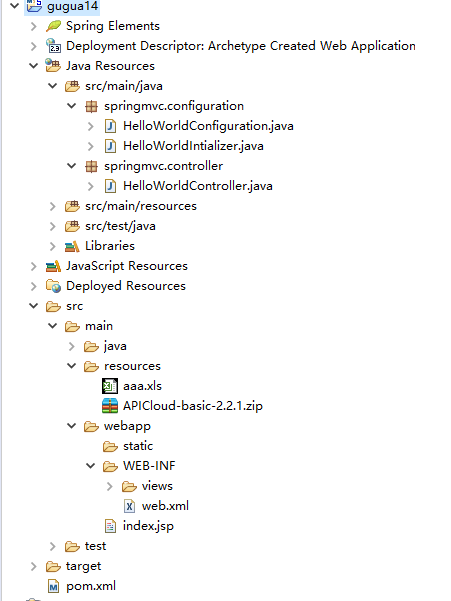
pom.xml
<project xmlns="http://maven.apache.org/POM/4.0.0" xmlns:xsi="http://www.w3.org/2001/XMLSchema-instance"

  xsi:schemaLocation="http://maven.apache.org/POM/4.0.0 http://maven.apache.org/maven-v4_0_0.xsd">

  <modelVersion>4.0.0</modelVersion>

  <groupId>gugua4</groupId>

  <artifactId>gugua17</artifactId>

  <packaging>war</packaging>

  <version>0.0.1-SNAPSHOT</version>

  <name>gugua17 Maven Webapp</name>

  <url>http://maven.apache.org</url>

  <properties>

  	<spring.version>4.3.5.RELEASE</spring.version>

  </properties>

  <dependencies>

     <!-- spring模块库 -->

    <dependency>

    	<groupId>org.springframework</groupId>

    	<artifactId>spring-beans</artifactId>

    	<version>${spring.version}</version>

    </dependency>

    <dependency>

    	<groupId>org.springframework</groupId>

    	<artifactId>spring-web</artifactId>

    	<version>${spring.version}</version>

    </dependency>

    <dependency>

    	<groupId>org.springframework</groupId>

    	<artifactId>spring-webmvc</artifactId>

    	<version>${spring.version}</version>

    </dependency>

	<!-- https://mvnrepository.com/artifact/org.springframework/spring-tx -->

	<!-- transaction事务 -->

	<dependency>

	    <groupId>org.springframework</groupId>

	    <artifactId>spring-tx</artifactId>

	    <version>${spring.version}</version>

	</dependency>

	<!-- Servlet dependencies -->

    <!-- servlet(HttpServletRequest,HttpServletResponse) -->

	<dependency>

		<groupId>javax.servlet</groupId>

		<artifactId>javax.servlet-api</artifactId>

		<version>3.1.0</version>

	</dependency>

	<!-- Jstl for jsp page -->

	<!-- https://mvnrepository.com/artifact/jstl/jstl -->

	<dependency>

	    <groupId>jstl</groupId>

	    <artifactId>jstl</artifactId>

	    <version>1.2</version>

	</dependency>

	<!-- JSP API -->

    <!-- http://mvnrepository.com/artifact/javax.servlet.jsp/jsp-api -->

    <dependency>

         <groupId>javax.servlet.jsp</groupId>

         <artifactId>jsp-api</artifactId>

         <version>2.2</version>

         <scope>provided</scope>

     </dependency>

    <!-- 文件上传 -->

	<!-- Apache Commons FileUpload -->

	<!-- https://mvnrepository.com/artifact/commons-fileupload/commons-fileupload -->

	<dependency>

	    <groupId>commons-fileupload</groupId>

	    <artifactId>commons-fileupload</artifactId>

	    <version>1.3.1</version>

	</dependency>

	 <!-- Apache Commons IO -->

     <!-- http://mvnrepository.com/artifact/commons-io/commons-io -->

     <dependency>

        <groupId>commons-io</groupId>

        <artifactId>commons-io</artifactId>

        <version>2.4</version>

    </dependency>

  </dependencies>

  <build>

    <finalName>gugua17</finalName>

    <pluginManagement>

    	<plugins>

    		<plugin>

    			<groupId>org.apache.maven.plugins</groupId>

    			<artifactId>maven-war-plugin</artifactId>

    			<version>2.6</version>

    		</plugin>

    	</plugins>

    </pluginManagement>

  </build>

</project>
web.xml
<web-app>

  <display-name>Archetype Created Web Application</display-name>

  <context-param>

  	<param-name>contextConfigLocation</param-name>

  	<param-value>/WEB-INF/applicationContext.xml</param-value>

  </context-param>

  <servlet>

  	<servlet-name>springmvc</servlet-name>

  	<servlet-class>

  		org.springframework.web.servlet.DispatcherServlet

  	</servlet-class>

  	<load-on-startup>1</load-on-startup>

  </servlet>

  <servlet-mapping>

  	<servlet-name>springmvc</servlet-name>

  	<url-pattern>/</url-pattern>

  </servlet-mapping>

  <listener>

  	<listener-class>

  		org.springframework.web.context.ContextLoaderListener

  	</listener-class>

  </listener>

</web-app>
spring-servlet.xml
<?xml version="1.0" encoding="UTF-8"?>

<beans

xmlns="http://www.springframework.org/schema/beans"

xmlns:xsi="http://www.w3.org/2001/XMLSchema-instance"

xmlns:mvc="http://www.springframework.org/schema/mvc"

xmlns:context="http://www.springframework.org/schema/context"

xsi:schemaLocation="http://www.springframework.org/schema/beans

					http://www.springframework.org/schema/beans/spring-beans.xsd

					http://www.springframework.org/schema/mvc

					http://www.springframework.org/schema/mvc/spring-mvc.xsd

					http://www.springframework.org/schema/context

					http://www.springframework.org/schema/context/spring-context.xsd">

<!-- 引入包  -->

<context:component-scan base-package="springmvc"/>

<!-- 自动装配 -->

<context:annotation-config/>

<!-- 视图 -->

<bean class="org.springframework.web.servlet.view.InternalResourceViewResolver">

	<property name="prefix">

		<value>/WEB-INF/views/</value>

	</property>

	<property name="suffix">

		<value>.jsp</value>

	</property>

</bean>

<!-- 上传文件配置 -->

<bean id="multipartResolver" class="org.springframework.web.multipart.commons.CommonsMultipartResolver">

	<!-- Maximum file size: 1MB -->

    <!-- 1MB = 125000 Byte -->

	<property name="maxUploadSize" value="125000"/>

</bean>

</beans>
applicationContext.xml
<?xml version="1.0" encoding="UTF-8"?>

<beans

xmlns="http://www.springframework.org/schema/beans"

xmlns:xsi="http://www.w3.org/2001/XMLSchema-instance"

xmlns:mvc="http://www.springframework.org/schema/mvc"

xmlns:context="http://www.springframework.org/schema/context"

xsi:schemaLocation="http://www.springframework.org/schema/beans

					http://www.springframework.org/schema/beans/spring-beans.xsd

					http://www.springframework.org/schema/mvc

					http://www.springframework.org/schema/mvc/spring-mvc.xsd

					http://www.springframework.org/schema/context

					http://www.springframework.org/schema/context/spring-context.xsd">

</beans>
jsp:
uploadOneFile.jsp
<%@ page language="java" contentType="text/html; charset=utf-8" pageEncoding="utf-8"%>

<!DOCTYPE html PUBLIC "-//W3C//DTD HTML 4.01 Transitional//EN" "http://www.w3.org/TR/html4/loose.dtd">

<html>

<head>

<meta http-equiv="Content-Type" content="text/html; charset=utf-8">

<title>upload one file</title>

</head>

<body>

<h3>upload one file</h3>

<form method="post" action="do" enctype="multipart/form-data">

	upload to file:<input type="file" name="file"><br>

	<input type="submit" value="upload">

</form>

</body>

</html>
uploadMultiFile.jsp
<%@ page language="java" contentType="text/html; charset=utf-8" pageEncoding="utf-8"%>

<!DOCTYPE html PUBLIC "-//W3C//DTD HTML 4.01 Transitional//EN" "http://www.w3.org/TR/html4/loose.dtd">

<html>

<head>

<meta http-equiv="Content-Type" content="text/html; charset=utf-8">

<title>upload multi file</title>

</head>

<body>

<h3>upload multi file</h3>

<form method="post" action="do" enctype="multipart/form-data">

	upload to file(1):<input type="file" name="file"><br>

	upload to file(2):<input type="file" name="file"><br>

	upload to file(3):<input type="file" name="file"><br>

	upload to file(4):<input type="file" name="file"><br>

	upload to file(5):<input type="file" name="file"><br>

	<input type="submit" value="upload">

</form>

</body>

</html>
uploadResult.xml
<%@ page language="java" contentType="text/html; charset=utf-8" pageEncoding="utf-8"%>

<%@ taglib prefix="c" uri="http://java.sun.com/jsp/jstl/core" %>

<!DOCTYPE html PUBLIC "-//W3C//DTD HTML 4.01 Transitional//EN" "http://www.w3.org/TR/html4/loose.dtd">

<html>

<head>

<meta http-equiv="Content-Type" content="text/html; charset=utf-8">

<title>upload result</title>

</head>

<body>

<h3>upload files:</h3>

<c:forEach items="${uploadFiles}" var="file">

	-${file}<br>

</c:forEach>

</body>

</html>
controller
MultipartUploadController.java
package springmvc.controller;

import java.io.BufferedOutputStream;

import java.io.File;

import java.io.FileOutputStream;

import java.io.IOException;

import java.util.ArrayList;

import java.util.Date;

import java.util.List;

import javax.servlet.http.HttpServletRequest;

import org.springframework.stereotype.Controller;

import org.springframework.ui.Model;

import org.springframework.web.bind.annotation.RequestMapping;

import org.springframework.web.bind.annotation.RequestMethod;

import org.springframework.web.bind.annotation.RequestParam;

import org.springframework.web.multipart.MultipartFile;

@Controller

public class MultipartUploadController {

	@RequestMapping(value="/upload/one", method=RequestMethod.GET)

	public String uploadOneFile()

	{

		return "uploadOneFile";

	}

	@RequestMapping(value="/upload/multi", method=RequestMethod.GET)

	public String uploadMultiFile()

	{

		return "uploadMultiFile";

	}

	@RequestMapping(value="/upload/do", method=RequestMethod.POST)

	public String uploadDo(HttpServletRequest request, Model model, @RequestParam("file") MultipartFile[] files)

	{

		//获取目录/创建路径

		String uploadRootPath = request.getServletContext().getRealPath("upload");

		System.out.println(uploadRootPath);

		//获取路径

		File uploadRootDir = new File(uploadRootPath);

		if(!uploadRootDir.exists())

		{

			uploadRootDir.mkdirs();

		}

		//用来存放上传后的路径地址的变量

		List<File> uploadFiles = new ArrayList<File>();

		for(int i = 0; i < files.length; i++)

		{

			MultipartFile file = files[i];

			//原文件名

			String name = file.getOriginalFilename();

			System.out.print(name);

			if(name != null && name.length() > 0)

			{

				try {

					//获取文件字节流

					byte[] bytes = file.getBytes();

					//新文件路径

					File serverFile = new File( uploadRootDir.getAbsolutePath() + File.separator + name );

					//将文件字节流输出到刚创建的文件上

					BufferedOutputStream stream = new BufferedOutputStream( new FileOutputStream( serverFile ) );

					stream.write(bytes);

					stream.close();

					//将文件路径添加到uploadFiles中

					uploadFiles.add( serverFile );

					System.out.println( serverFile );

				} catch (IOException e) {

					// TODO Auto-generated catch block

					//e.printStackTrace();

					System.out.println("error to file:" + name);

				}

			}

		}

		model.addAttribute("uploadFiles", uploadFiles);

		return "uploadResult";

	}

}
Spring MVC文件上传教程 commons-io/commons-uploadfile的更多相关文章
- Spring MVC文件上传教程
1- 介绍 这篇教程文章是基于 Spring MVC来实现文件的上传功能,这里主要是实现两个功能:1.上传单个文件并将其移动到对应的上传目录:2.一次上传多个文件并将它们存储在指定文件夹下,接下来我们 ...
- Spring MVC 笔记 —— Spring MVC 文件上传
文件上传 配置MultipartResolver <bean id="multipartResolver" class="org.springframework.w ...
- 【Java Web开发学习】Spring MVC文件上传
[Java Web开发学习]Spring MVC文件上传 转载:https://www.cnblogs.com/yangchongxing/p/9290489.html 文件上传有两种实现方式,都比较 ...
- Spring mvc文件上传实现
Spring mvc文件上传实现 jsp页面客户端表单编写 三个要素: 1.表单项type="file" 2.表单的提交方式:post 3.表单的enctype属性是多部分表单形式 ...
- Spring mvc 文件上传到文件夹(转载+心得)
spring mvc(注解)上传文件的简单例子,这有几个需要注意的地方1.form的enctype=”multipart/form-data” 这个是上传文件必须的2.applicationConte ...
- spring mvc 文件上传 ajax 异步上传
异常代码: 1.the request doesn't contain a multipart/form-data or multipart/mixed stream, content type he ...
- Spring MVC 文件上传 & 文件下载
索引: 开源Spring解决方案--lm.solution 参看代码 GitHub: pom.xml WebConfig.java index.jsp upload.jsp FileUploadCon ...
- Spring MVC文件上传处理
以下示例显示如何在使用Spring Web MVC框架的表单中上传文件和处理.首先使用Eclipse IDE来创建一个WEB工程,实现一个上传文件并保存的功能.并按照以下步骤使用Spring Web ...
- Spring MVC文件上传出现错误:Required MultipartFile parameter 'file' is not present
1.配置文件上传的解析器 首先需要在spring mvc的配置文件中(注意是spring mvc的配置文件而不是spring的配置文件:applicationContext.xml)配置: sprin ...
随机推荐
- 分布式锁的实现(java)
当对接第三方接口时,往往会碰到同一时间发送了大量相同的请求,这个时候或许就是第三方发送接口的失误了.而我们需要做的就是针对这个情况来强化我们的系统.这个时候就需要用到分布式锁.让这些请求只有一个能发送 ...
- You don't have permission to access
局域网内配置Discuz,web端访问server端,出现以下反馈: Forbidden You don't have permission to access / on this server. 网 ...
- 解决ORA-29857:表空间中存在域索引和/或次级对象 & ORA-01940:无法删除当前连接的用户问题 分类: oracle sde 2015-07-30 20:13 8人阅读 评论(0) 收藏
今天ArcGIS的SDE发生了一点小故障,导致系统表丢失,所以需要重建一下SDE数据库,在删除SDE用户和所在的表空间过程中遇到下面两个ORA错误,解决方法如下: 1)删除表空间时报错:ORA-298 ...
- 您好,前端使用https,后端使用https是会有冲突的情况,所以默认后端都是http 负载均衡即可管理证书,不需要在后端ECS上绑定证书。
您前端使用https,那么前端就是加密的,后端使用https就是会访问出现问题的,目前阿里云负载均衡默认的配置前端使用https,后端默认就是http,也是无法更改的. 前端使用https,目前只有一 ...
- Qt::QWidget 无默认标题栏边框的拖拽修改大小方式
开发环境:win10+vs2015+qt5.9.1 背景:开发过程中,一般很少会使用系统提供的标题栏和边框:往往都是自定义一个自己设计的方案.这时候在QWidget中需要加上flag:Qt::Fram ...
- MVC项目,bootstrap升级后index.d.ts编译出错
安装最新的Typescript组件 下载链接 https://www.microsoft.com/en-us/download/details.aspx?id=48593
- 【Python】接口自动化测试-Fidder的使用(未完待续……)
一.fidder一些一定需要掌握的知识. 1.工具简介 2.清屏操作(1中提到了,这里再着重说明下): 3.get和post请求参数相关: 4.会话框(Fidder左侧区域内容解析): 5.Reque ...
- 如何在python3.5环境下安装BeautifulSoup?
首先是安装: 1.到http://www.crummy.com/software/BeautifulSoup/网站上上下载 2.下载完成之后需要解压缩,假设放到D:/python下. 3.运行cmd, ...
- Spark2.0 shuffle service
Spark 的shuffle 服务是spark的核心,本文介绍了非ExternalShuffleClient的方式,看BlockService的整个架构.ShuffleClient是整个框架的基础,有 ...
- Spring boot 开发WebService遇到的问题之一
当pom.xml文件中的配置: <artifactId>spring-boot-starter-parent</artifactId><version>2.0.6. ...