
Android-自定义控件-继承View与ViewGroup的初步理解
继承View需要走的流程是:
1.构造实例化, public ChildView(Context context, @Nullable AttributeSet attrs)
2.测量自身的高和宽onMeasure-->setMeasuredDimension(宽,高)
3.onDraw绘制,需要X轴,Y轴
继承ViewGroup需要走的流程是:
1.构造实例化, public ChildView(Context context, @Nullable AttributeSet attrs)
2.onMeasure测量子控件的高和宽,子控件.measure(宽,高),而自己的高和宽交给父控件去测量,因为我是父控件的子控件
3.onLayout给子控件排版指定位置
布局文件,指定自定义类:
<!-- 继承View 与 继承ViewGroup的初步理解 -->

<RelativeLayout

    xmlns:android="http://schemas.android.com/apk/res/android"

    xmlns:myswitch="http://schemas.android.com/apk/res-auto"

    xmlns:tools="http://schemas.android.com/tools"

    android:layout_width="400dp"

    android:layout_height="500dp">

    <!-- 爷爷类,爷爷类有一个孩子(爸爸类) -->

    <custom.view.upgrade.view_viewgroup_theory.GrandpaViewGroup

        android:layout_width="300dp"

        android:layout_height="300dp"

        android:background="#3300cc"

        android:layout_centerInParent="true"

        > <!--

            虽然android:layout_centerInParent="true"属性可以去居中

            但这是Android RelativeLayout 对爷爷类进行了居中的排版固定位置处理

         -->

        <!-- 爸爸类,爸爸类有一个孩子(孩子类) -->

        <custom.view.upgrade.view_viewgroup_theory.FatherViewGroup

            android:layout_width="200dp"

            android:layout_height="200dp"

            android:background="#00ccff">

            <!-- 孩子类目前不包含孩子 -->

            <custom.view.upgrade.view_viewgroup_theory.ChildView

                android:layout_width="100dp"

                android:layout_height="100dp"

                android:background="#cc3300"/>

        </custom.view.upgrade.view_viewgroup_theory.FatherViewGroup>

    </custom.view.upgrade.view_viewgroup_theory.GrandpaViewGroup>

</RelativeLayout>
爷爷类,GrandpaViewGroup:
package custom.view.upgrade.view_viewgroup_theory;

import android.content.Context;

import android.util.AttributeSet;

import android.util.Log;

import android.view.View;

import android.view.ViewGroup;

/**

 * 爷爷类,爷爷类有自己的孩子(爸爸类) ----> 爸爸类有自己的孩子(孩子类)

 */

public class GrandpaViewGroup extends ViewGroup {

    private static final String TAG = GrandpaViewGroup.class.getSimpleName();

    /**

     * 此两个参数的构造方法,用于在xml布局指定初始化,并传入xml中的所有属性

     * @param context

     * @param attrs

     */

    public GrandpaViewGroup(Context context, AttributeSet attrs) {

        super(context, attrs);

    }

    // 爸爸类

    private View fatherViewGroup;

    /**

     * 当xml布局完成加载后,调用此方法

     */

    @Override

    protected void onFinishInflate() {

        super.onFinishInflate();

        // 获取子控件(爸爸类)

        fatherViewGroup = getChildAt(0);

    }

    /**

     * 由于当前是ViewGroup所以测量子控件的宽和高

     * ,如果当前是View就是此类自己的高和宽

     * @param widthMeasureSpec

     * @param heightMeasureSpec

     */

    @Override

    protected void onMeasure(int widthMeasureSpec, int heightMeasureSpec) {

        super.onMeasure(widthMeasureSpec, heightMeasureSpec);

        // 测量子控件(爸爸类)的宽和高

        // 宽和高就是 爸爸类在xml布局中设置的值

        fatherViewGroup.measure(fatherViewGroup.getLayoutParams().width, fatherViewGroup.getLayoutParams().height);

        // 想获取测量后子控件(爸爸类)的高和宽,是无法获取到的,因为子控件(爸爸类)是ViewGroup,拿到测量后的高和宽需要 View-->setMeasuredDimension()

        // 测试下:子控件(爸爸类)的高和宽

        Log.d(TAG, "fatherViewGroup.getMeasuredWidth():" + fatherViewGroup.getMeasuredWidth() +

                         " fatherViewGroup.getMeasuredHeight():" + fatherViewGroup.getMeasuredHeight());

    }

    /**

     * 排版 指定位置,只给子控件指定位置的

     * @param changed 当发生改变

     * @param l 左边线距离左边距离,注意:值是由父控件Layout后,处理了逻辑后传递过来的

     * @param t 上边线距离上边距离,注意:值是由父控件Layout后,处理了逻辑后传递过来的

     * @param r 右边线距离左边距离,注意:值是由父控件Layout后,处理了逻辑后传递过来的

     * @param b 底边线距离上边距离,注意:值是由父控件Layout后,处理了逻辑后传递过来的

     *

     * 父控件必须排版了layout此类的位置,此onLayout方法才会执行,否则不执行

     */

    @Override

    protected void onLayout(boolean changed, int l, int t, int r, int b) {

        // 测试下:获取自身当前GrandpaViewGroup测量后的宽和高

        int measuredWidth = getMeasuredWidth();

        int measuredHeight = getMeasuredHeight();

        Log.d(TAG, "measuredWidth:" + measuredWidth + " measuredHeight:" + measuredHeight);

        // 给子控件(爸爸类)指定位置

        // Y轴与X轴移动计算一样,X计算:移动X轴方向,得到自身(GrandpaViewGroup爷爷类)宽度的一半 减 子控件(爸爸类)的一半就居中了

        int fatherL = (measuredWidth / 2) - (fatherViewGroup.getLayoutParams().width / 2);

        int fatherT = (measuredHeight / 2) - (fatherViewGroup.getLayoutParams().height / 2);

        // L位置增加了,R位置也需要增加

        int fatherR = fatherViewGroup.getLayoutParams().width + fatherL;

        int fatherB = fatherViewGroup.getLayoutParams().height + fatherT;

        fatherViewGroup.layout(fatherL, fatherT, fatherR, fatherB);

    }

    /**

     * 为什么继承了ViewGroup就不需要onDraw绘制了,因为绘制都是在View中处理

     * 继承了ViewGroup需要做好测量-->排版固定位置就好了,绘制是交给View去处理

     */

}
爸爸类,FatherViewGroup:
package custom.view.upgrade.view_viewgroup_theory;

import android.content.Context;

import android.util.AttributeSet;

import android.util.Log;

import android.view.View;

import android.view.ViewGroup;

/**

 * 爸爸类,爸爸类有自己的孩子

 */

public class FatherViewGroup extends ViewGroup {

    private static final String TAG = FatherViewGroup.class.getSimpleName();

    /**

     * 此两个参数的构造方法,用于在xml布局指定初始化,并传入xml中的所有属性

     * @param context

     * @param attrs

     */

    public FatherViewGroup(Context context, AttributeSet attrs) {

        super(context, attrs);

    }

    // 子控件(孩子类)

    private View childView;

    /**

     * 当xml布局完成加载后,调用此方法

     */

    @Override

    protected void onFinishInflate() {

        super.onFinishInflate();

        childView = getChildAt(0);

    }

    private int w;

    private int h;

    /**

     * 测量子控件(孩子类)的高和宽

     * @param widthMeasureSpec 可以转变为模式,也可以转变为父类给当前自己传递过来的宽

     * @param heightMeasureSpec 可以转变为模式,也可以转变为父类给当前自己传递过来的高

     */

    @Override

    protected void onMeasure(int widthMeasureSpec, int heightMeasureSpec) {

        super.onMeasure(widthMeasureSpec, heightMeasureSpec);

        // 可以获取模式

        MeasureSpec.getMode(widthMeasureSpec);

        MeasureSpec.getMode(heightMeasureSpec);

        /**

         * 可以获取父类(爷爷类)在测量方法--->

         * fatherViewGroup.measure(fatherViewGroup.getLayoutParams()

         * .width, fatherViewGroup.getLayoutParams().height);

         * 传递过来的高和宽

         */

        w = MeasureSpec.getSize(widthMeasureSpec);

        h = MeasureSpec.getSize(heightMeasureSpec);

        Log.d(TAG, " w:" + w + " h:" + h);

        // 开始测量子控件(孩子类)

        // 宽高都是孩子类在xml布局设置的宽高

        childView.measure(childView.getLayoutParams().width, childView.getLayoutParams().height);

        // 测试下:子控件(孩子类)的高和宽

        /**

         * 注意:为什么在这里又可以获取到子控件的宽和高呢?

         *      因为子控件是View 并且这个View在测量方法中执行了 setMeasuredDimension(w, h);

         */

        Log.d(TAG, "childView.getMeasuredWidth():" + childView.getMeasuredWidth() +

                " childView.getMeasuredHeight():" + childView.getMeasuredHeight());

    }

    /**

     * 排版 指定位置,只给子控件指定位置的

     * @param changed 当发生改变

     * @param l 左边线距离左边距离

     * @param t 上边线距离上边距离

     * @param r 右边线距离左边距离

     * @param b 底边线距离上边距离

     */

    @Override

    protected void onLayout(boolean changed, int l, int t, int r, int b) {

        // 测试下:获取自身当前FatherViewGroup测量后的宽和高

        // 注意:在这里无法获取,还不知道是什么原因!!!,

        // 爷爷类可以获取到是因为爷爷类的父类控件是系统的RelativeLayout

        int measuredWidth = getMeasuredWidth();

        int measuredHeight = getMeasuredHeight();

        Log.d(TAG, "爸爸类 >>> measuredWidth:" + measuredWidth + " measuredHeight:" + measuredHeight);

        // 给子控件(爸爸类)指定位置

        // Y轴与X轴移动计算一样,X计算:移动X轴方向,得到自身(FatherViewGroup爸爸类)宽度的一半 减 子控件(孩子类)的一本就居中了

        int childL = (w / 2) - (childView.getMeasuredWidth() / 2);

        int childT = (h / 2) - (childView.getMeasuredHeight() / 2);

        // L位置增加了,R位置也需要增加

        int childR = childView.getMeasuredWidth() + childL;

        int childB = childView.getMeasuredHeight() + childT;

        childView.layout(childL, childT, childR, childB);

    }

    /**

     * 为什么继承了ViewGroup就不需要onDraw绘制了,因为绘制都是在View中处理

     * 继承了ViewGroup需要做好测量-->排版固定位置就好了,绘制是交给View去处理

     */

}
孩子类,ChildView:
package custom.view.upgrade.view_viewgroup_theory;

import android.content.Context;

import android.graphics.Canvas;

import android.graphics.Color;

import android.graphics.Paint;

import android.graphics.Rect;

import android.support.annotation.Nullable;

import android.util.AttributeSet;

import android.view.View;

/**

 * 孩子类,孩子类暂时还没有自己的孩子,所有是继承View

 */

public class ChildView extends View {

    private static final String CONTEXT = "child";

    // 创建画笔把文字画到画布中去

    private Paint mPaint;

    private Rect rect;

    /**

     * 此两个参数的构造方法,用于在xml布局指定初始化,并传入xml中的所有属性

     * @param context

     * @param attrs

     */

    public ChildView(Context context, @Nullable AttributeSet attrs) {

        super(context, attrs);

        mPaint =  new Paint();

        // 画笔防锯齿

        mPaint.setAntiAlias(true);

        // 画笔白色

        mPaint.setColor(Color.WHITE);

        mPaint.setTextSize(40);

        rect = new Rect();

    }

    /**

     * 此高宽是父控件(爸爸类)传递过来的高和宽

     */

    private int w;

    private int h;

    @Override

    protected void onMeasure(int widthMeasureSpec, int heightMeasureSpec) {

        super.onMeasure(widthMeasureSpec, heightMeasureSpec);

        w = MeasureSpec.getSize(widthMeasureSpec);

        h = MeasureSpec.getSize(heightMeasureSpec);

        setMeasuredDimension(w, h);

    }

    /**

     * 绘制的方法

     * @param canvas 画布

     */

    @Override

    protected void onDraw(Canvas canvas) {

        super.onDraw(canvas);

        // 拿到自身宽度的一半 减 文字宽度的一半

        mPaint.getTextBounds(CONTEXT, 0, CONTEXT.length(), rect);

        int x = (w / 2) - (rect.width() / 2);

        int y = (h / 2) - (rect.height() / 2) + rect.height();

        canvas.drawText(CONTEXT, x, y , mPaint);

    }

}
效果图:
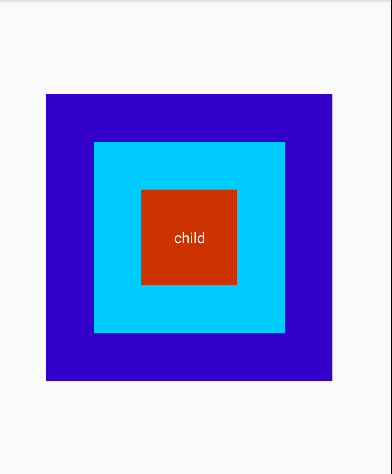
Android-自定义控件-继承View与ViewGroup的初步理解的更多相关文章
- Android 中的View与ViewGroup
Android重点知识--View和ViewGroup与自定义控件 作者:丁明祥 邮箱:2780087178@qq.com 一.基础 ViewGroup 参考资料: Android 手把手教您自定义V ...
- Android精通:View与ViewGroup,LinearLayout线性布局,RelativeLayout相对布局,ListView列表组件
UI的描述 对于Android应用程序中,所有用户界面元素都是由View和ViewGroup对象构建的.View是绘制在屏幕上能与用户进行交互的一个对象.而对于ViewGroup来说,则是一个用于存放 ...
- Android单独继承View类来实现自定义控件
一个单独继承view类来实现自定义控件,在该方法中,需要重写ondraw方法来绘制自己所需要的控件,下面也以一个简单的例子来说明如何实现自定义控件.该方法可以实现所需要的所有的自定义控件. 属性文件中 ...
- Android界面的View以及ViewGroup的区别
因为这个问题会经常成为面试的热点,所以我们来谈谈View以及ViewGroup的区别. 先看看View及ViewGroup类关系 Android View和ViewGroup从组成架构上看,似乎 ...
- Android之UI View与ViewGroup
1.基本概念 View:所有可视化控件的父类,Android App屏幕上用户可以交互的对象(例如 按钮 下拉框 文本框等). ViewGroup:View的子类,存放View和ViewGroup对象 ...
- android自定义控件(四) View中的方法
onFinishInflate() 当View中所有的子控件 均被映射成xml后触发 onMeasure(int, int) 确定所有子元素的大小 onLayout(boolean, int, int ...
- Android View和ViewGroup
View和ViewGroup Android的UI界面都是由View和ViewGroup及其派生类组合而成的. 其中,View是所有UI组件的基类,而 ViewGroup是容纳这些组件的容器,其本身也 ...
- android自定义控件一站式入门
自定义控件 Android系统提供了一系列UI相关的类来帮助我们构造app的界面,以及完成交互的处理. 一般的,所有可以在窗口中被展示的UI对象类型,最终都是继承自View的类,这包括展示最终内容的非 ...
- Android自定义控件1--自定义控件介绍
Android控件基本介绍 Android本身提供了很多控件比如我们常用的有文本控件TextView和EditText:按钮控件Button和ImageButton状态开关按钮ToggleButton ...
随机推荐
- log4net 极简配置
log4net的配置详解 分类: C#2013-10-01 22:45 5335人阅读 评论(4) 收藏 举报 log4net日志框架 前言:没买到1号回家的票,所以在祖国64岁生日之 ...
- GIT的安装及上传代码到码云
前言 昨天初次接触GIT及码云,虽然用了2个多小时才搞定,但是还是挺开心的.码云是一个可以储存我们写的代码的一个平台,而Git是一款免费.开源的分布式版本控制系统,可以敏捷高效地处理任何或小或大的项目 ...
- Mac上如何把图片中的文字转换成word/pdf文字
如何把图片文字转换成word文字? - 知乎 https://www.zhihu.com/question/25488536 在 OneNote for Mac 中插入的圖片複製文字 - OneNot ...
- java HttpClient 获取页面Cookie信息
HttpClient client = new HttpClient(); GetMethod get=new GetMethod("http://www.baidu.com"); ...
- 自己写了一个图片的马赛克消失效果(jQuery)
其中的一个效果: html代码: <h1>单击图片,产生效果</h1> <div class="box"></div> 插件代码: ...
- 小程序本作用域下怎么调用全局js
本地wxml文件 <view>app版本:{{version}}</view> 本地js文件 var app; Page({data:{ }, onLoad:function( ...
- Supervisor安装与配置
Supervisor(http://supervisord.org/)是用Python开发的一个client/server服务,是Linux/Unix系统下的一个进程管理工具,不支持Windows系统 ...
- 使用打印方法时,要先引用命名空间: Using System.Drawing.Pringing
使用打印方法时,要先引用命名空间: Using System.Drawing.Pringing PrintDocument类的重要属性和方法:属性:DocumentName 设置打印文档时要显示的文 ...
- Proxmox VE 添加软RAID
apt-get update; apt-get install mdadm 安装软件 mdadm -C <设备名字> 创建模式 -l raid等级,0,1,5之类的 -n 使用的磁 ...
- iOS开发者有价值的工具集
转载于:http://www.cocoachina.com/applenews/devnews/2014/0307/7936.html 我一直比较推崇聪明地工作要远胜于刻苦地工作.使用正确的工具可以帮 ...