
【转】Android Activity和Intent机制学习笔记----不错
原文网址:http://www.cnblogs.com/feisky/archive/2010/01/16/1649081.html
Activity
Android中,Activity是所有程序的根本,所有程序的流程都运行在Activity之中,Activity具有自己的生命周期(见http://www.cnblogs.com/feisky/archive/2010/01/01/1637427.html,由系统控制生命周期,程序无法改变,但可以用onSaveInstanceState保存其状态)。
对于Activity,关键是其生命周期的把握(如下图),其次就是状态的保存和恢复(onSaveInstanceState onRestoreInstanceState),以及Activity之间的跳转和数据传输(intent)。
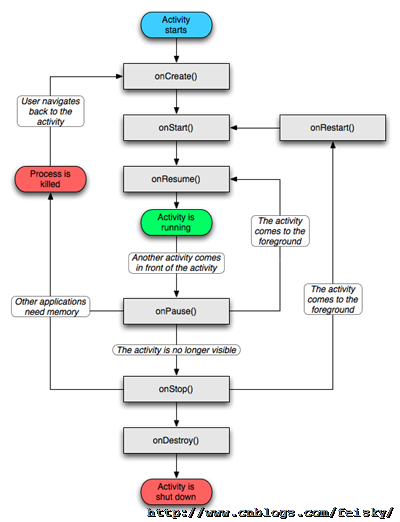
Activity中常用的函数有SetContentView() findViewById() finish() startActivity(),其生命周期涉及的函数有:
void onCreate(Bundle savedInstanceState)void onStart()void onRestart()void onResume()void onPause()void onStop()void onDestroy()
注意的是,Activity的使用需要在Manifest文件中添加相应的<Activity>,并设置其属性和intent-filter。
Intent
Android中提供了Intent机制来协助应用间的交互与通讯,Intent负责对应用中一次操作的动作、动作涉及数据、附加数据进行描述,Android则根据此Intent的描述,负责找到对应的组件,将 Intent传递给调用的组件,并完成组件的调用。Intent不仅可用于应用程序之间,也可用于应用程序内部的Activity/Service之间的交互。因此,Intent在这里起着一个媒体中介的作用,专门提供组件互相调用的相关信息,实现调用者与被调用者之间的解耦。在SDK中给出了Intent作用的表现形式为:
- 通过
Context.startActivity()Activity.startActivityForResult() - 通过
Context.startService()Context.bindService() - 通过广播方法(比如
Context.sendBroadcast()Context.sendOrderedBroadcast()Context.sendStickyBroadcast()
Intent属性的设置,包括以下几点:(以下为XML中定义,当然也可以通过Intent类的方法来获取和设置)
(1)Action,也就是要执行的动作
SDk中定义了一些标准的动作,包括
| onstant | Target component | Action |
|---|---|---|
ACTION_CALL |
activity | Initiate a phone call. |
ACTION_EDIT |
activity | Display data for the user to edit. |
ACTION_MAIN |
activity | Start up as the initial activity of a task, with no data input and no returned output. |
ACTION_SYNC |
activity | Synchronize data on a server with data on the mobile device. |
ACTION_BATTERY_LOW |
broadcast receiver | A warning that the battery is low. |
ACTION_HEADSET_PLUG |
broadcast receiver | A headset has been plugged into the device, or unplugged from it. |
ACTION_SCREEN_ON |
broadcast receiver | The screen has been turned on. |
ACTION_TIMEZONE_CHANGED |
broadcast receiver | The setting for the time zone has changed. |
当然,也可以自定义动作(自定义的动作在使用时,需要加上包名作为前缀,如"com.example.project.SHOW_COLOR”),并可定义相应的Activity来处理我们的自定义动作。
(2)Data,也就是执行动作要操作的数据
Android中采用指向数据的一个URI来表示,如在联系人应用中,一个指向某联系人的URI可能为:content://contacts/1。对于不同的动作,其URI数据的类型是不同的(可以设置type属性指定特定类型数据),如ACTION_EDIT指定Data为文件URI,打电话为tel:URI,访问网络为http:URI,而由content provider提供的数据则为content: URIs。
(3)type(数据类型),显式指定Intent的数据类型(MIME)。一般Intent的数据类型能够根据数据本身进行判定,但是通过设置这个属性,可以强制采用显式指定的类型而不再进行推导。
(4)category(类别),被执行动作的附加信息。例如 LAUNCHER_CATEGORY 表示Intent 的接受者应该在Launcher中作为顶级应用出现;而ALTERNATIVE_CATEGORY表示当前的Intent是一系列的可选动作中的一个,这些动作可以在同一块数据上执行。还有其他的为
| Constant | Meaning |
|---|---|
CATEGORY_BROWSABLE |
The target activity can be safely invoked by the browser to display data referenced by a link — for example, an image or an e-mail message. |
CATEGORY_GADGET |
The activity can be embedded inside of another activity that hosts gadgets. |
CATEGORY_HOME |
The activity displays the home screen, the first screen the user sees when the device is turned on or when the HOME key is pressed. |
CATEGORY_LAUNCHER |
The activity can be the initial activity of a task and is listed in the top-level application launcher. |
CATEGORY_PREFERENCE |
The target activity is a preference panel. |
(5)component(组件),指定Intent的的目标组件的类名称。通常 Android会根据Intent 中包含的其它属性的信息,比如action、data/type、category进行查找,最终找到一个与之匹配的目标组件。但是,如果 component这个属性有指定的话,将直接使用它指定的组件,而不再执行上述查找过程。指定了这个属性以后,Intent的其它所有属性都是可选的。
(6)extras(附加信息),是其它所有附加信息的集合。使用extras可以为组件提供扩展信息,比如,如果要执行“发送电子邮件”这个动作,可以将电子邮件的标题、正文等保存在extras里,传给电子邮件发送组件。
理解Intent的关键之一是理解清楚Intent的两种基本用法:一种是显式的Intent,即在构造Intent对象时就指定接收者;另一种是隐式的Intent,即Intent的发送者在构造Intent对象时,并不知道也不关心接收者是谁,有利于降低发送者和接收者之间的耦合。
对于显式Intent,Android不需要去做解析,因为目标组件已经很明确,Android需要解析的是那些隐式Intent,通过解析,将 Intent映射给可以处理此Intent的Activity、IntentReceiver或Service。
Intent解析机制主要是通过查找已注册在AndroidManifest.xml中的所有IntentFilter及其中定义的Intent,最终找到匹配的Intent。在这个解析过程中,Android是通过Intent的action、type、category这三个属性来进行判断的,判断方法如下:
- 如果Intent指明定了action,则目标组件的IntentFilter的action列表中就必须包含有这个action,否则不能匹配;
- 如果Intent没有提供type,系统将从data中得到数据类型。和action一样,目标组件的数据类型列表中必须包含Intent的数据类型,否则不能匹配。
- 如果Intent中的数据不是content: 类型的URI,而且Intent也没有明确指定它的type,将根据Intent中数据的scheme (比如 http: 或者mailto:) 进行匹配。同上,Intent 的scheme必须出现在目标组件的scheme列表中。
- 如果Intent指定了一个或多个category,这些类别必须全部出现在组建的类别列表中。比如Intent中包含了两个类别:LAUNCHER_CATEGORY 和 ALTERNATIVE_CATEGORY,解析得到的目标组件必须至少包含这两个类别。
Intent-Filter的定义
一些属性设置的例子:
<action android:name="com.example.project.SHOW_CURRENT" />
<category android:name="android.intent.category.DEFAULT" />
<data android:mimeType="video/mpeg" android:scheme="http" . . . />
<data android:mimeType="image/*" />
<data android:scheme="http" android:type="video/*" />
完整的实例
<activity android:name="NotesList" android:label="@string/title_notes_list">
            <intent-filter>
                <action android:name="android.intent.action.MAIN" />
                <category android:name="android.intent.category.LAUNCHER" />
            </intent-filter>
            <intent-filter>
                <action android:name="android.intent.action.VIEW" />
                <action android:name="android.intent.action.EDIT" />
                <action android:name="android.intent.action.PICK" />
                <category android:name="android.intent.category.DEFAULT" />
                <data android:mimeType="vnd.android.cursor.dir/vnd.google.note" />
            </intent-filter>
            <intent-filter>
                <action android:name="android.intent.action.GET_CONTENT" />
                <category android:name="android.intent.category.DEFAULT" />
                <data android:mimeType="vnd.android.cursor.item/vnd.google.note" />
            </intent-filter>
        </activity>
Intent用法实例
1.无参数Activity跳转
Intent it = new Intent(Activity.Main.this, Activity2.class);

startActivity(it);
2.向下一个Activity传递数据(使用Bundle和Intent.putExtras)
Intent it = new Intent(Activity.Main.this, Activity2.class);

Bundle bundle=new Bundle();

bundle.putString("name", "This is from MainActivity!");

it.putExtras(bundle);       // it.putExtra(“test”, "shuju”);

startActivity(it);            // startActivityForResult(it,REQUEST_CODE);
对于数据的获取可以采用:
Bundle bundle=getIntent().getExtras();

String name=bundle.getString("name");
3.向上一个Activity返回结果(使用setResult,针对startActivityForResult(it,REQUEST_CODE)启动的Activity)
        Intent intent=getIntent();

        Bundle bundle2=new Bundle();

        bundle2.putString("name", "This is from ShowMsg!");

        intent.putExtras(bundle2);

        setResult(RESULT_OK, intent);
4.回调上一个Activity的结果处理函数(onActivityResult)
@Override

    protected void onActivityResult(int requestCode, int resultCode, Intent data) {

        // TODO Auto-generated method stub

        super.onActivityResult(requestCode, resultCode, data);

        if (requestCode==REQUEST_CODE){

            if(resultCode==RESULT_CANCELED)

                  setTitle("cancle");

            else if (resultCode==RESULT_OK) {

                 String temp=null;

                 Bundle bundle=data.getExtras();

                 if(bundle!=null)   temp=bundle.getString("name");

                 setTitle(temp);

            }

        }

    }
下面是转载来的其他的一些Intent用法实例(转自javaeye)
显示网页
1. Uri uri = Uri.parse("http://google.com");
2. Intent it = new Intent(Intent.ACTION_VIEW, uri);
3. startActivity(it);
显示地图
1. Uri uri = Uri.parse("geo:38.899533,-77.036476");
2. Intent it = new Intent(Intent.ACTION_VIEW, uri);
3. startActivity(it);
4. //其他 geo URI 範例
5. //geo:latitude,longitude
6. //geo:latitude,longitude?z=zoom
7. //geo:0,0?q=my+street+address
8. //geo:0,0?q=business+near+city
9. //google.streetview:cbll=lat,lng&cbp=1,yaw,,pitch,zoom&mz=mapZoom
路径规划
1. Uri uri = Uri.parse("http://maps.google.com/maps?f=d&saddr=startLat%20startLng&daddr=endLat%20endLng&hl=en");
2. Intent it = new Intent(Intent.ACTION_VIEW, uri);
3. startActivity(it);
4. //where startLat, startLng, endLat, endLng are a long with 6 decimals like: 50.123456
打电话
1. //叫出拨号程序
2. Uri uri = Uri.parse("tel:0800000123");
3. Intent it = new Intent(Intent.ACTION_DIAL, uri);
4. startActivity(it);
1. //直接打电话出去
2. Uri uri = Uri.parse("tel:0800000123");
3. Intent it = new Intent(Intent.ACTION_CALL, uri);
4. startActivity(it);
5. //用這個,要在 AndroidManifest.xml 中,加上
6. //<uses-permission id="android.permission.CALL_PHONE" />
传送SMS/MMS
1. //调用短信程序
2. Intent it = new Intent(Intent.ACTION_VIEW, uri);
3. it.putExtra("sms_body", "The SMS text");
4. it.setType("vnd.android-dir/mms-sms");
5. startActivity(it);
1. //传送消息
2. Uri uri = Uri.parse("smsto://0800000123");
3. Intent it = new Intent(Intent.ACTION_SENDTO, uri);
4. it.putExtra("sms_body", "The SMS text");
5. startActivity(it);
1. //传送 MMS
2. Uri uri = Uri.parse("content://media/external/images/media/23");
3. Intent it = new Intent(Intent.ACTION_SEND);
4. it.putExtra("sms_body", "some text");
5. it.putExtra(Intent.EXTRA_STREAM, uri);
6. it.setType("image/png");
7. startActivity(it);
传送 Email
1. Uri uri = Uri.parse("mailto:xxx@abc.com");
2. Intent it = new Intent(Intent.ACTION_SENDTO, uri);
3. startActivity(it);
1. Intent it = new Intent(Intent.ACTION_SEND);
2. it.putExtra(Intent.EXTRA_EMAIL, "me@abc.com");
3. it.putExtra(Intent.EXTRA_TEXT, "The email body text");
4. it.setType("text/plain");
5. startActivity(Intent.createChooser(it, "Choose Email Client"));
1. Intent it=new Intent(Intent.ACTION_SEND);
2. String[] tos={"me@abc.com"};
3. String[] ccs={"you@abc.com"};
4. it.putExtra(Intent.EXTRA_EMAIL, tos);
5. it.putExtra(Intent.EXTRA_CC, ccs);
6. it.putExtra(Intent.EXTRA_TEXT, "The email body text");
7. it.putExtra(Intent.EXTRA_SUBJECT, "The email subject text");
8. it.setType("message/rfc822");
9. startActivity(Intent.createChooser(it, "Choose Email Client"));
1. //传送附件
2. Intent it = new Intent(Intent.ACTION_SEND);
3. it.putExtra(Intent.EXTRA_SUBJECT, "The email subject text");
4. it.putExtra(Intent.EXTRA_STREAM, "file:///sdcard/mysong.mp3");
5. sendIntent.setType("audio/mp3");
6. startActivity(Intent.createChooser(it, "Choose Email Client"));
播放多媒体
Uri uri = Uri.parse("file:///sdcard/song.mp3");
Intent it = new Intent(Intent.ACTION_VIEW, uri);
it.setType("audio/mp3");
startActivity(it);
Uri uri = Uri.withAppendedPath(MediaStore.Audio.Media.INTERNAL_CONTENT_URI, "1");
Intent it = new Intent(Intent.ACTION_VIEW, uri);
startActivity(it);
Market 相关
1. //寻找某个应用
2. Uri uri = Uri.parse("market://search?q=pname:pkg_name");
3. Intent it = new Intent(Intent.ACTION_VIEW, uri);
4. startActivity(it);
5. //where pkg_name is the full package path for an application
1. //显示某个应用的相关信息
2. Uri uri = Uri.parse("market://details?id=app_id");
3. Intent it = new Intent(Intent.ACTION_VIEW, uri);
4. startActivity(it);
5. //where app_id is the application ID, find the ID
6. //by clicking on your application on Market home
7. //page, and notice the ID from the address bar
Uninstall 应用程序
1. Uri uri = Uri.fromParts("package", strPackageName, null);
2. Intent it = new Intent(Intent.ACTION_DELETE, uri);
3. startActivity(it);
【转】Android Activity和Intent机制学习笔记----不错的更多相关文章
- Android Activity和Intent机制学习笔记
转自 http://www.cnblogs.com/feisky: Activity Android中,Activity是所有程序的根本,所有程序的流程都运行在Activity之中,Activity具 ...
- Android开源项目SlidingMenu本学习笔记(两)
我们已经出台SlidingMenu使用:Android开源项目SlidingMenu本学习笔记(一个),接下来再深入学习下.依据滑出项的Menu切换到相应的页面 文件夹结构: watermark/2/ ...
- JUC.Lock(锁机制)学习笔记[附详细源码解析]
锁机制学习笔记 目录: CAS的意义 锁的一些基本原理 ReentrantLock的相关代码结构 两个重要的状态 I.AQS的state(int类型,32位) II.Node的waitStatus 获 ...
- JAVA的反射机制学习笔记(二)
上次写JAVA的反射机制学习笔记(一)的时候,还是7月22号,这些天就瞎忙活了.自己的步伐全然被打乱了~不能继续被动下去.得又一次找到自己的节奏. 4.获取类的Constructor 通过反射机制得到 ...
- 浏览器中js执行机制学习笔记
浏览器中js执行机制学习笔记 RiverSouthMan关注 0.0772019.05.15 20:56:37字数 872阅读 291 同步任务 当一个脚本第一次执行的时候,js引擎会解析这段代码,并 ...
- Android总结篇——Intent机制详解及示例总结
最近在进行android开发过程中,在将 Intent传递给调用的组件并完成组件的调用时遇到点困难,并且之前对Intent的学习也是一知半解,最近特意为此拿出一些时间,对Intent部分进行 ...
- Android程序员的Flutter学习笔记
作为忠实与较资深的Android汪, 最近抽出了一些时间研究了一下Google的亲儿子Flutter, 尚属皮毛, 只能算是个简单的记录吧. Google自2017年第一次提出Flutter, 到20 ...
- .NET GC机制学习笔记
学习笔记内容来自网络资料摘录http://www.cnblogs.com/springyangwc/archive/2011/06/13/2080149.html 1.GC介绍 Garbage Col ...
- Java 基础 类加载器和双亲委派机制 学习笔记
转自博客:https://blog.csdn.net/weixin_38118016/article/details/79579657 文章不是我写的,但是感觉写的挺通俗易懂的,然后防止以后丢失,就转 ...
随机推荐
- [Flexbox] Using order to rearrange flexbox children
Using the order property we alter the order in which flexbox children appear on the page, without ma ...
- SVN Checkout 不包括源文件夹根目录(转)
SVN Checkout 不包括源文件夹根目录,比如我要checkout trunk/ 下面的所有文件,但是不包括trunk 文件夹 我们可以在svn文件夹后面打个空格,在加个“.”就行了 eg: ...
- [转] jquery 使用方法
jquery 使用方法 jQuery是目前使用最广泛的javascript函数库.据统计,全世界排名前100万的网站,有46%使用jQuery,远远超过其他库.微软公司 甚至把jQuery作为他们的官 ...
- Java基础知识强化之集合框架笔记13:Collection集合存储学生对象并遍历
1. Collection集合存储学生对象并遍历: 需求:存储自定义对象并遍历Student(name,age) 分析: (1)创建学生类 (2)创建集合对象 (3)创建学生对象 (4)把学生对象添加 ...
- 将JSON数组显示前台Table中
将JSON数组显示前台Table中 在最近的学习中遇到一个小问题,如何把JSON数组显示在前台的table中,经过一番借鉴和学习之后终于解决了这个问题.具体的代码如下: (前提:利用ajax获取过来的 ...
- okhttp 常用使用方式 封装 演示
工具介绍 使用: AndroidStudio:[compile 'com.squareup.okhttp3:okhttp:3.4.2']和[compile 'com.zhy:okhttputils:2 ...
- .net处理页面的抓取数据
//要抓取数据的页面路径 string url = "http://www.scedu.net/banshi/used-car/lower-secondary-education/middl ...
- c#利用WebClient和WebRequest获取网页源代码
C#中一般是可以利用WebClient类和WebRequest类获取网页源代码.下面分别说明这两种方法的实现. WebClient类获取网页源代码 WebClient类 WebClient ...
- 初涉JavaScript模式 (6) : 原型模式 【二】
原型与in操作符 有两种方式使用in操作符:单独使用和在for-in循环中使用. 在单独使用时,in操作符会遍历实例公开(可枚举)的属性,如果找到该指定属性则返回true,无论该指定属性是存在与实例中 ...
- sublime3 插件pylinter的安装
1.首先sublime需要安装package control,之后安装pylinter插件,并进行简单的属性配置(网上教程很多,略) 2.之后是pylint_path的配置,我参照网上的配置失败,su ...