
idea使用maven搭建ssm框架实现登陆商品增删改查
创建项目->maven->webapp->输入坐标->完成。
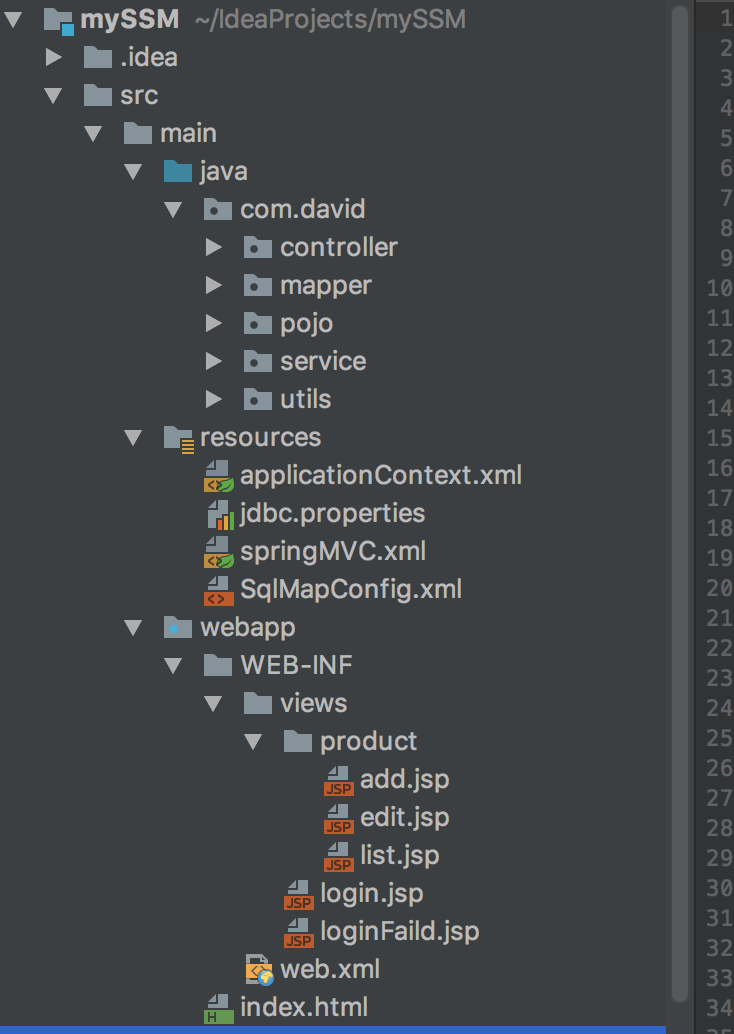

pom.xml
<project xmlns="http://maven.apache.org/POM/4.0.0"

         xmlns:xsi="http://www.w3.org/2001/XMLSchema-instance"

         xsi:schemaLocation="http://maven.apache.org/POM/4.0.0 http://maven.apache.org/maven-v4_0_0.xsd">

    <modelVersion>4.0.0</modelVersion>

    <groupId>com.david.mySSM</groupId>

    <artifactId>mySSM</artifactId>

    <packaging>war</packaging>

    <version>1.0-SNAPSHOT</version>

    <name>maven ssm</name>

    <url>http://maven.apache.org</url>

    <properties>

        <!-- 设置项目编码编码 -->

        <project.build.sourceEncoding>UTF-8</project.build.sourceEncoding>

        <project.reporting.outputEncoding>UTF-8</project.reporting.outputEncoding>

        <!-- spring版本号 -->

        <spring.version>4.3.5.RELEASE</spring.version>

        <!-- mybatis版本号 -->

        <mybatis.version>3.4.1</mybatis.version>

    </properties>

    <dependencies>

        <!-- java ee -->

        <dependency>

            <groupId>javax</groupId>

            <artifactId>javaee-api</artifactId>

            <version>7.0</version>

        </dependency>

        <!-- 单元测试 -->

        <dependency>

            <groupId>junit</groupId>

            <artifactId>junit</artifactId>

            <version>4.12</version>

        </dependency>

        <!-- 实现slf4j接口并整合 -->

        <dependency>

            <groupId>ch.qos.logback</groupId>

            <artifactId>logback-classic</artifactId>

            <version>1.2.2</version>

        </dependency>

        <!-- JSON -->

        <dependency>

            <groupId>com.fasterxml.jackson.core</groupId>

            <artifactId>jackson-databind</artifactId>

            <version>2.8.7</version>

        </dependency>

        <!-- 数据库 -->

        <dependency>

            <groupId>mysql</groupId>

            <artifactId>mysql-connector-java</artifactId>

            <version>5.1.41</version>

            <scope>runtime</scope>

        </dependency>

        <!-- 数据库连接池 -->

        <dependency>

            <groupId>com.mchange</groupId>

            <artifactId>c3p0</artifactId>

            <version>0.9.5.2</version>

        </dependency>

        <!-- MyBatis -->

        <dependency>

            <groupId>org.mybatis</groupId>

            <artifactId>mybatis</artifactId>

            <version>${mybatis.version}</version>

        </dependency>

        <!-- mybatis/spring整合包 -->

        <dependency>

            <groupId>org.mybatis</groupId>

            <artifactId>mybatis-spring</artifactId>

            <version>1.3.1</version>

        </dependency>

        <!-- Spring -->

        <dependency>

            <groupId>org.springframework</groupId>

            <artifactId>spring-core</artifactId>

            <version>${spring.version}</version>

        </dependency>

        <dependency>

            <groupId>org.springframework</groupId>

            <artifactId>spring-beans</artifactId>

            <version>${spring.version}</version>

        </dependency>

        <dependency>

            <groupId>org.springframework</groupId>

            <artifactId>spring-context</artifactId>

            <version>${spring.version}</version>

        </dependency>

        <dependency>

            <groupId>org.springframework</groupId>

            <artifactId>spring-jdbc</artifactId>

            <version>${spring.version}</version>

        </dependency>

        <dependency>

            <groupId>org.springframework</groupId>

            <artifactId>spring-tx</artifactId>

            <version>${spring.version}</version>

        </dependency>

        <dependency>

            <groupId>org.springframework</groupId>

            <artifactId>spring-web</artifactId>

            <version>${spring.version}</version>

        </dependency>

        <dependency>

            <groupId>org.springframework</groupId>

            <artifactId>spring-webmvc</artifactId>

            <version>${spring.version}</version>

        </dependency>

        <dependency>

            <groupId>org.springframework</groupId>

            <artifactId>spring-test</artifactId>

            <version>${spring.version}</version>

        </dependency>

        <!--jstl -->

        <dependency>

            <groupId>jstl</groupId>

            <artifactId>jstl</artifactId>

            <version>1.2</version>

        </dependency>

        <dependency>

            <groupId>taglibs</groupId>

            <artifactId>standard</artifactId>

            <version>1.1.2</version>

        </dependency>

    </dependencies>

    <build>

        <finalName>mySSM</finalName>

        <plugins>

            <plugin>

                <groupId>org.apache.maven.plugins</groupId>

                <artifactId>maven-compiler-plugin</artifactId>

                <configuration>

                    <!-- 设置JDK版本 -->

                    <source>1.8</source>

                    <target>1.8</target>

                </configuration>

            </plugin>

        </plugins>

        <!--打包设置 以下文件强行加入编译文件 -->

        <resources>

            <resource>

                <directory>src/main/java</directory>

            </resource>

            <resource>

                <directory>src/main/resources</directory>

            </resource>

        </resources>

    </build>

</project>
index.html
<html>

<head>

    <title>index</title>

</head>

<body>

<a href="/login">登陆</a>

<a href="/product/list">商品管理</a>

</body>

</html>
web.xml
<?xml version="1.0" encoding="UTF-8"?>

<web-app xmlns="http://xmlns.jcp.org/xml/ns/javaee"

         xmlns:xsi="http://www.w3.org/2001/XMLSchema-instance"

         xsi:schemaLocation="http://xmlns.jcp.org/xml/ns/javaee http://xmlns.jcp.org/xml/ns/javaee/web-app_3_1.xsd"

         version="3.1">

  <display-name>mySSM</display-name>

  <!--post乱码 -->

  <filter>

    <filter-name>encoding</filter-name>

    <filter-class>org.springframework.web.filter.CharacterEncodingFilter</filter-class>

    <init-param>

      <param-name>encoding</param-name>

      <param-value>UTF-8</param-value>

    </init-param>

    <init-param>

      <param-name>forceEncoding</param-name>

      <param-value>true</param-value>

    </init-param>

  </filter>

  <filter-mapping>

    <filter-name>encoding</filter-name>

    <url-pattern>/*</url-pattern>

  </filter-mapping>

  <!-- 配置前端控制器 -->

  <servlet>

    <servlet-name>SpringMVC</servlet-name>

    <servlet-class>org.springframework.web.servlet.DispatcherServlet</servlet-class>

    <!-- 配置springMVC需要加载的配置文件-->

    <init-param>

      <param-name>contextConfigLocation</param-name>

      <param-value>classpath:springMVC.xml</param-value>

    </init-param>

    <load-on-startup>1</load-on-startup>

  </servlet>

  <servlet-mapping>

    <servlet-name>SpringMVC</servlet-name>

    <url-pattern>/</url-pattern>

  </servlet-mapping>

  <!--spring监听器 -->

  <context-param>

    <param-name>contextConfigLocation</param-name>

    <param-value>classpath:applicationContext.xml</param-value>

  </context-param>

  <listener>

    <listener-class>org.springframework.web.context.ContextLoaderListener</listener-class>

  </listener>

  <welcome-file-list>

    <welcome-file>index.html</welcome-file>

  </welcome-file-list>

</web-app>
loginfaild.jsp
<%--

  Created by IntelliJ IDEA.

  User: baidawei

  Date: 2018/5/27

  Time: 下午9:47

  To change this template use File | Settings | File Templates.

--%>

<%@ page contentType="text/html;charset=UTF-8" language="java" %>

<html>

<head>

    <title>重试</title>

</head>

<body>

登陆失败啦,账号错误请重试<a href="/login">登陆</a>

</body>

</html>
login.jsp
<%--

  Created by IntelliJ IDEA.

  User: baidawei

  Date: 2018/5/27

  Time: 下午7:42

  To change this template use File | Settings | File Templates.

--%>

<%@ page contentType="text/html;charset=UTF-8" language="java" %>

<html>

<head>

    <title>login</title>

</head>

<body>

<form action="/doLogin" method="post">

    用户名:<input name="userName"><br>

    密码:<input name="passWord"><br>

    <button type="submit">提交</button>

</form>

</body>

</html>
product/list.jsp
<%@ page contentType="text/html;charset=UTF-8" language="java" %>

<%@ taglib uri="http://java.sun.com/jsp/jstl/core" prefix="c" %>

<html>

<head>

    <title>list</title>

    <link href="https://cdn.bootcss.com/bootstrap/3.3.7/css/bootstrap.min.css" rel="stylesheet">

</head>

<body>

<a href="/product/add" class="btn btn-primary">添加</a>

<table class="table table-hover table-bordered ">

    <tr>

        <td>id</td>

        <td>name</td>

        <td>price</td>

        <td>operation</td>

    </tr>

    <c:forEach items="${list}" var="p">

        <tr>

            <td>${p.id}</td>

            <td>${p.name}</td>

            <td>${p.price}</td>

            <td><a href="/product/edit/${p.id}" class="btn btn-danger">修改</a>|<a href="/product/delete/${p.id}" class="btn btn-info">删除</a></td>

        </tr>

    </c:forEach>

</table>

</body>

</html>
product/edit
<%@ page contentType="text/html;charset=UTF-8" language="java" %>

<html>

<head>

    <title>edit</title>

    <link href="https://cdn.bootcss.com/bootstrap/3.3.7/css/bootstrap.min.css" rel="stylesheet">

</head>

<body>

<form action="/product/editData" method="post">

    <div class="form-group">

        <label for="name">name</label>

        <input class="form-control" id="name" name="name"  value="${p.name}" placeholder="name">

    </div>

    <div class="form-group">

        <label for="price">price</label>

        <input class="form-control" id="price" name="price" value="${p.price}" placeholder="price">

    </div>

    <input name="id" value="${p.id}">

    <button type="submit" class="btn btn-default">提交</button>

</form>

</body>

</html>
product/add
<%@ page contentType="text/html;charset=UTF-8" language="java" %>

<html>

<head>

    <title>add</title>

    <link href="https://cdn.bootcss.com/bootstrap/3.3.7/css/bootstrap.min.css" rel="stylesheet">

</head>

<body>

<form action="/product/addData" method="post">

    <div class="form-group">

        <label for="name">name</label>

        <input class="form-control" id="name" name="name" placeholder="name">

    </div>

    <div class="form-group">

        <label for="price">price</label>

        <input class="form-control" id="price" name="price" placeholder="price">

    </div>

    <button type="submit" class="btn btn-default">提交</button>

</form>

</body>

</html>
SqlMapConfig.xml
<?xml version="1.0" encoding="UTF-8" ?>

<!DOCTYPE configuration

        PUBLIC "-//mybatis.org//DTD Config 3.0//EN"

        "http://mybatis.org/dtd/mybatis-3-config.dtd">

<configuration>

    <!-- 设置别名 -->

    <typeAliases>

        <package name="com.david.pojo"/>

    </typeAliases>

</configuration>
springMVC.xml
<?xml version="1.0" encoding="UTF-8"?>

<beans xmlns="http://www.springframework.org/schema/beans"

       xmlns:xsi="http://www.w3.org/2001/XMLSchema-instance"

       xmlns:context="http://www.springframework.org/schema/context"

       xmlns:mvc="http://www.springframework.org/schema/mvc"

       xsi:schemaLocation="http://www.springframework.org/schema/beans

       http://www.springframework.org/schema/beans/spring-beans.xsd

       http://www.springframework.org/schema/context

       http://www.springframework.org/schema/context/spring-context.xsd

       http://www.springframework.org/schema/mvc

       http://www.springframework.org/schema/mvc/spring-mvc-3.0.xsd">

    <!-- 扫描controller -->

    <context:component-scan base-package="com.david.controller"/>

    <!-- 扫描service -->

    <context:component-scan base-package="com.david.service"/>

    <!-- 开启注解模式 -->

    <mvc:annotation-driven/>

    <!-- 解决静态资源无法被springMVC处理的问题 -->

    <mvc:default-servlet-handler />

    <!-- 配置视图解析器-->

    <bean class="org.springframework.web.servlet.view.InternalResourceViewResolver">

        <property name="prefix" value="/WEB-INF/views/"/>

        <property name="suffix" value=".jsp"/>

    </bean>

    <!--登陆拦截器 -->

    <mvc:interceptors>

        <mvc:interceptor>

            <mvc:mapping path="/product/*"/>

            <bean class="com.david.utils.MyInterceptor"></bean>

        </mvc:interceptor>

    </mvc:interceptors>

</beans>
jdbc.properties
jdbc.driver=com.mysql.jdbc.Driver

jdbc.url=jdbc:mysql://localhost:3306/david2018_db?characterEncoding=utf-8

jdbc.username=root

jdbc.password=1234
applicationContext.xml
<?xml version="1.0" encoding="UTF-8"?>

<beans xmlns="http://www.springframework.org/schema/beans"

       xmlns:xsi="http://www.w3.org/2001/XMLSchema-instance"

       xmlns:context="http://www.springframework.org/schema/context"

       xmlns:tx="http://www.springframework.org/schema/tx"

       xsi:schemaLocation="http://www.springframework.org/schema/beans

       http://www.springframework.org/schema/beans/spring-beans.xsd

       http://www.springframework.org/schema/context

       http://www.springframework.org/schema/context/spring-context.xsd

       http://www.springframework.org/schema/tx

       http://www.springframework.org/schema/tx/spring-tx.xsd">

    <!-- 加载配置文件-->

    <context:property-placeholder location="classpath:jdbc.properties"/>

    <!-- 数据库连接池 -->

    <bean id="dataSource" class="com.mchange.v2.c3p0.ComboPooledDataSource">

        <property name="driverClass" value="${jdbc.driver}"/>

        <property name="jdbcUrl" value="${jdbc.url}"/>

        <property name="user" value="${jdbc.username}"/>

        <property name="password" value="${jdbc.password}"/>

    </bean>

    <!-- 配置SqlSessionFactory对象 -->

    <bean id="sqlSessionFactory" class="org.mybatis.spring.SqlSessionFactoryBean">

        <!--mybatis核心文件 -->

        <property name="configLocation" value="classpath:SqlMapConfig.xml"></property>

        <!-- 注入数据库连接池 -->

        <property name="dataSource" ref="dataSource"/>

    </bean>

    <!-- 配置Mapper扫描 -->

    <bean class="org.mybatis.spring.mapper.MapperScannerConfigurer">

        <property name="basePackage" value="com.david.mapper" />

    </bean>

    <!-- 配置事务管理器 -->

    <bean id="transactionManager" class="org.springframework.jdbc.datasource.DataSourceTransactionManager">

        <!-- 注入数据库连接池 -->

        <property name="dataSource" ref="dataSource"/>

    </bean>

    <!-- 配置基于注解的声明式事务 -->

    <tx:annotation-driven transaction-manager="transactionManager"/>

</beans>
MyInterceptor
package com.david.utils;

import org.springframework.web.servlet.HandlerInterceptor;

import org.springframework.web.servlet.ModelAndView;

import javax.servlet.http.HttpServletRequest;

import javax.servlet.http.HttpServletResponse;

public class MyInterceptor implements HandlerInterceptor {

    /**

     * controller执行前调用此方法

     * 返回true表示继续执行,返回false终止执行 这里可以加入登陆校验、权限拦截等

     */

    @Override

    public boolean preHandle(HttpServletRequest httpServletRequest, HttpServletResponse httpServletResponse, Object o) throws Exception {

        String userName = (String) httpServletRequest.getSession().getAttribute("userName");

        if(userName != "" && userName != null){

            return true;

        }

        httpServletResponse.sendRedirect("/login");

        return false;

    }

    /**

     * controller执行后但未返回视图前调用此方法

     * 这里可在返回用户前对模型数据进行加工处理 比如可以加入共用信息以便页面显示

     */

    @Override

    public void postHandle(HttpServletRequest httpServletRequest, HttpServletResponse httpServletResponse, Object o, ModelAndView modelAndView) throws Exception {

        System.out.print("postHandle");

    }

    /**

     * controller执行后且试图返回后调用此方法

     * 这里可得到执行controller时的异常信息 也可以记录日志

     */

    @Override

    public void afterCompletion(HttpServletRequest httpServletRequest, HttpServletResponse httpServletResponse, Object o, Exception e) throws Exception {

        System.out.print("afterCompletion");

    }

}
UserServiceImpl
package com.david.service;

import com.david.mapper.UserMapper;

import com.david.pojo.User;

import org.springframework.beans.factory.annotation.Autowired;

import org.springframework.stereotype.Service;

@Service

public class UserServiceImpl implements UserService {

    @Autowired

    private UserMapper mapper;

    @Override

    public User GetUserByNameAndPass(User user) {

        return mapper.GetUserByNameAndPass(user);

    }

}
UserService
package com.david.service;

import com.david.pojo.User;

public interface UserService {

    User GetUserByNameAndPass(User user);

}
ProductServiceImpl
package com.david.service;

import com.david.mapper.ProductMapper;

import com.david.pojo.Product;

import java.util.List;

import org.springframework.beans.factory.annotation.Autowired;

import org.springframework.stereotype.Service;

import javax.transaction.Transactional;

@Service

@Transactional

public class ProductServiceImpl implements ProductService {

    @Autowired

    private ProductMapper mapper;

    @Override

    public List<Product> GetProductList() {

        return mapper.GetProductList();

    }

    @Override

    public Product GetProductById(Integer id) {

        return mapper.GetProductById(id);

    }

    @Override

    public void addProduct(Product product) {

        mapper.addProduct(product);

    }

    @Override

    public void updateProduct(Product product) {

        mapper.updateProduct(product);

    }

    @Override

    public void deleteProduct(Integer id) {

        mapper.deleteProduct(id);

    }

}
ProductService
package com.david.service;

import com.david.pojo.Product;

import java.util.List;

public interface ProductService {

    List<Product> GetProductList();

    Product GetProductById(Integer id);

    void addProduct(Product product);

    void updateProduct(Product product);

    void deleteProduct(Integer id);

}
User
package com.david.pojo;

public class User {

    private Integer UserId;

    private String UserName;

    private String PassWord;

    public User() {

    }

    public Integer getUserId() {

        return UserId;

    }

    public void setUserId(Integer userId) {

        UserId = userId;

    }

    public String getUserName() {

        return UserName;

    }

    public void setUserName(String userName) {

        UserName = userName;

    }

    public String getPassWord() {

        return PassWord;

    }

    public void setPassWord(String passWord) {

        PassWord = passWord;

    }

}
Product
package com.david.pojo;

public class Product {

    private Integer id;

    private String name;

    private String price;

    public Product() {

    }

    public Product(Integer id, String name, String price) {

        this.id = id;

        this.name = name;

        this.price = price;

    }

    public Product(String name, String price) {

        this.name = name;

        this.price = price;

    }

    public Integer getId() {

        return id;

    }

    public void setId(Integer id) {

        this.id = id;

    }

    public String getName() {

        return name;

    }

    public void setName(String name) {

        this.name = name;

    }

    public String getPrice() {

        return price;

    }

    public void setPrice(String price) {

        this.price = price;

    }

}
UserMapper.xml
<?xml version="1.0" encoding="UTF-8" ?>

<!DOCTYPE mapper

        PUBLIC "-//mybatis.org//DTD Mapper 3.0//EN"

        "http://mybatis.org/dtd/mybatis-3-mapper.dtd">

<mapper namespace="com.david.mapper.UserMapper">

    <select id="GetUserByNameAndPass" resultType="User" parameterType="User">

        select * from User where userName = #{userName} and PassWord = #{PassWord}

    </select>

</mapper>
UserMappper
package com.david.mapper;

import com.david.pojo.User;

public interface UserMapper {

    User GetUserByNameAndPass(User user);

}
ProductMapper.xml
<?xml version="1.0" encoding="UTF-8" ?>

<!DOCTYPE mapper

        PUBLIC "-//mybatis.org//DTD Mapper 3.0//EN"

        "http://mybatis.org/dtd/mybatis-3-mapper.dtd">

<mapper namespace="com.david.mapper.ProductMapper">

    <select id="GetProductList" resultType="Product">

        select * from Product

    </select>

    <select id="GetProductById" parameterType="Integer" resultType="Product">

        select * from Product where id = #{id}

    </select>

    <insert id="addProduct" parameterType="Product">

        insert into product (name,price) values(#{name},#{price})

    </insert>

    <update id="updateProduct" parameterType="Product">

        update product set name = #{name},price = #{price} where id = #{id}

    </update>

    <delete id="deleteProduct" parameterType="Integer">

        delete from product where id = #{id}

    </delete>

</mapper>
ProductMapper
package com.david.mapper;

import com.david.pojo.Product;

import java.util.List;

public interface ProductMapper {

    List<Product> GetProductList();

    Product GetProductById(Integer id);

    void addProduct(Product product);

    void updateProduct(Product product);

    void deleteProduct(Integer id);

}
ProductController
package com.david.controller;

import com.david.pojo.Product;

import com.david.service.ProductService;

import org.springframework.beans.factory.annotation.Autowired;

import org.springframework.stereotype.Controller;

import org.springframework.ui.Model;

import org.springframework.web.bind.annotation.PathVariable;

import org.springframework.web.bind.annotation.RequestMapping;

import java.util.List;

@Controller

@RequestMapping("/product")

public class ProductController {

    @Autowired

    private ProductService productService;

    @RequestMapping("/list")

    public String list(Model model){

        List<Product> pro = productService.GetProductList();

        model.addAttribute("list",pro);

        return "product/list";

    }

    @RequestMapping("/add")

    public String add(){

        return "product/add";

    }

    @RequestMapping("/addData")

    public String addData(Product p){

        productService.addProduct(p);

        return "redirect:/product/list";

    }

    @RequestMapping("/edit/{id}")

    public String edit(@PathVariable() Integer id,Model model){

        Product p = productService.GetProductById(id);

        model.addAttribute("p",p);

        return "product/edit";

    }

    @RequestMapping("/editData")

    public String editData(Product p){

        productService.updateProduct(p);

        return "redirect:/product/list";

    }

    @RequestMapping("/delete/{id}")

    public String delete(@PathVariable() Integer id){

        productService.deleteProduct(id);

        return "redirect:/product/list";

    }

}
LoginController
package com.david.controller;

import com.david.pojo.User;

import com.david.service.UserService;

import org.springframework.beans.factory.annotation.Autowired;

import org.springframework.stereotype.Controller;

import org.springframework.web.bind.annotation.RequestMapping;

import javax.servlet.http.HttpServletRequest;

@Controller

public class LoginController {

    @Autowired

    private UserService userService;

    @RequestMapping("/login")

    public String login(){

        return "login";

    }

    @RequestMapping("/doLogin")

    public String doLogin(HttpServletRequest request){

        String userName = request.getParameter("userName");

        String passWord = request.getParameter("passWord");

        User u = new User();

        u.setUserName(userName);

        u.setPassWord(passWord);

        User user = userService.GetUserByNameAndPass(u);

        if(user != null){

            request.getSession().setAttribute("userName",userName);

            return "redirect:/product/list";

        }else{

            return "redirect:/loginFaild";

        }

    }

    @RequestMapping("/loginFaild")

    public String loginFaild(){

        return "loginFaild";

    }

}
jdbc.properties
jdbc.driver=com.mysql.jdbc.Driver

jdbc.url=jdbc:mysql://localhost:3306/david2018_db?characterEncoding=utf-8

jdbc.username=root

jdbc.password=1234
idea使用maven搭建ssm框架实现登陆商品增删改查的更多相关文章
- IDEA+Maven 整合SSM框架实现简单的增删改查(新手入门,傻瓜操作)
原博客地址:https://blog.csdn.net/khxu666/article/details/79851070 选用SSM框架的原因在目前的企业级Java应用中,Spring框架是必须的.S ...
- Maven+SSM框架实现简单的增删改查
Spring介绍: spring 使用基本的 JavaBean 来完成以前只可能由 EJB 完成的事情.然而, Spring的用途不仅限于服务器端的开发.从简单性.可测试性和松耦合的角度而言,任何Ja ...
- ABP实践(4)-abp前端vue框架之简单商品增删改查(帮助刚入门的新手快速了解怎么才能加入自己的功能并运行起来)
提示:如有不明白的地方请先查看前3篇ABP实践系列的文章 1,下载及启动abp项目前后端分离(netcore+vue) 2,修改abp数据库为mysql 3,商品系列api接口(本文主要依赖在这个商品 ...
- 使用maven搭建ssm框架环境
1.前言 因为经常换环境,在搭ssm框架的时候老是出错,所以记录一下最近搭建的环境,以供参考. 本文讲解如何使用maven搭建ssm框架,并能用于简单的登录注册. IDE:IDEA,JDK版本:1.8 ...
- Maven项目搭建(二):Maven搭建SSM框架
上一章给大家讲解了如何使用Maven搭建web项目. 这次给大家介绍一下怎么使用Maven搭建SSM框架项目. 首先我们来看一下pom.xml的属性介绍: project: pom的xml根元素. p ...
- Eclipse中使用Maven搭建SSM框架
Eclipse中不使用Maven搭建SSM框架:https://www.cnblogs.com/xuyiqing/p/9569459.html IDEA中使用Maven搭建SSM框架:https:// ...
- 使用maven搭建ssm框架的javaweb项目
目前主流的javaweb项目,常会用到ssm(Spring+Spring MVC+Mybatis)框架来搭建项目的主体框架,本篇介绍搭建SSM框架的maven项目的实施流程.记之共享! 一.SSM框架 ...
- 使用maven搭建SSM框架
使用maven搭建SSM框架,首先得准备好maven环境. 搭建maven环境 第一步:下载maven http://maven.apache.org/download.cgi 下载后解压就可以了. ...
- 使用Maven搭建SSM框架(Eclipse)
今天学习一下使用Maven搭建SSM框架,以前都是用别人配置好的框架写代码,今天试试自己配置一下SSM框架. 这里我的参数是Windows7 64位,tomcat9,eclipse-jee-neon- ...
随机推荐
- 【转载】文件上传Expected MultipartHttpServletRequest: is a MultipartResolver错误解决
引入包commons-fileupload-*.jar,版本号可以根据项目情况调整: 在spring mvc配置文件中增加配置,文件大小限制可根据项目情况调整: <!-- 上传文件拦截,设置最大 ...
- 多目标跟踪笔记一:Finding the Best Set of K Paths Through a Trellis With Application to Multitarget Tracking
Abstract 本文提出一种寻找K最优路径的方法. k最优路径的定义:1.the sum of the metrics of all k paths in the set is minimized. ...
- iOS 中plist文件中配置key值冲突的现象
iOS开发一些特殊的软件需要在项目中配置对应的key值,然而近期在项目中发现一个有意思的现象,苹果官方文档中提供的key值很多,但其实有一些彼此可能有冲突,当你同时配置了彼此冲突的key值,可能会出现 ...
- JS练习:替换式图片自动轮播
代码: <!DOCTYPE html> <html> <head> <meta charset="UTF-8"> <title ...
- PAT 1057. Stack
Stack is one of the most fundamental data structures, which is based on the principle of Last In Fir ...
- [bzoj2783][JLOI2012]树_树的遍历
树 bzoj2783 JLOI2012 题目大意:给定一棵n个点的树.求满足条件的路径条数.说一个路径是满足条件的,当且仅当这条路径上每个节点深度依次递增且点权和为S. 注释:$1\le n\le 1 ...
- [bzoj1704][Usaco2007 Mar]Face The Right Way 自动转身机_贪心
Face The Right Way 自动转身机 bzoj-1704 Usaco-2007 Mar 题目大意:不想描述题意系列++... ...题目链接 注释:略. 想法:我们直接枚举k,然后从左往右 ...
- Java中处理线程同步
引自:http://blog.csdn.net/aaa1117a8w5s6d/article/details/8295527和http://m.blog.csdn.net/blog/undoner/1 ...
- Oracle Internals 相关站点
http://oracle-internals.com/blog/links/ http://coll15.mapyourshow.com/6_0/sessions/session-details.c ...
- 【Anroid界面实现】WindowManager类使用具体解释——用户首次打开APP的使用教学蒙板效果实现
转载请注明出处:http://blog.csdn.net/zhaokaiqiang1992 在上一篇的文章中,我们介绍了怎样实现桌面悬浮窗体,在这个效果的实现过程中.最重要的一个类就是WindowMa ...