
Windows Phone 8.1 后台任务
Windows Phone 8.1 应用可以添加多个后台任务,以辅助应用完成某些任务。
(1)新建前台应用
后台任务是依托于前台应用的,所以必须拥有一个前台应用。
该前台应用的功能很简单,就是读取文件中保存的文本;而后台任务就是将当前时间写入文件中。
前台界面:
<Grid>

    <Grid.RowDefinitions>

        <RowDefinition Height="*"/>

        <RowDefinition Height="auto"/>

    </Grid.RowDefinitions>

    <Viewbox Margin="20,0">

        <TextBlock x:Name="timeTextBlock"

                   Text="Time"/>

    </Viewbox>

    <Grid Grid.Row="1" Margin="20,0">

        <Grid.ColumnDefinitions>

            <ColumnDefinition Width="*"/>

            <ColumnDefinition Width="*"/>

        </Grid.ColumnDefinitions>

        <Button x:Name="registerButton"

                Content="Register Task"

                Margin="0,0,5,0"

                HorizontalAlignment="Stretch"

                Click="registerButton_Click"/>

        <Button x:Name="unregisterButton" Grid.Column="1"

                Content="Unregister Task"

                Margin="5,0,0,0"

                HorizontalAlignment="Stretch"

                Click="unregisterButton_Click"/>

    </Grid>

</Grid>
打开应用时就读取文本信息:
protected override async void OnNavigatedTo(NavigationEventArgs e)

{

    await ShowFileText();

}

private async Task ShowFileText()

{

    file = await ApplicationData.Current.LocalFolder.CreateFileAsync("Time.txt", CreationCollisionOption.OpenIfExists);

    timeTextBlock.Text = await FileIO.ReadTextAsync(file);

}
(2)添加一个 Windows Runtime Component 项目
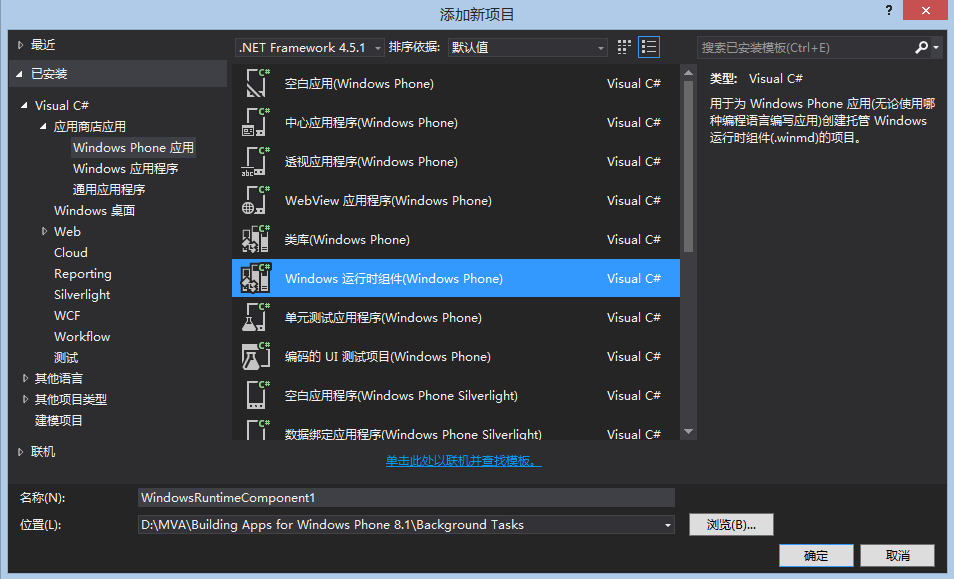
后台任务必须为 Windows Runtime Component。
(3)编写一个继承自 IBackgroundTask 接口的类
在后台任务的项目中新建一个类,并继承 IBackgroundTask 接口,实现 Run 方法,该类还必须为 sealed:
public sealed class WritingTask: IBackgroundTask

{

    public async void Run(IBackgroundTaskInstance taskInstance)

    {

        var deferral = taskInstance.GetDeferral();

        await WriteTimeToFile("Time.txt");

        deferral.Complete();

    }

  private async Task WriteTimeToFile(string path)

  {

        var file = await ApplicationData.Current.LocalFolder.CreateFileAsync(path, CreationCollisionOption.ReplaceExisting);

        await FileIO.WriteTextAsync(file, DateTimeOffset.Now.ToString());

    }

}
Run 方法就是后台任务执行时的方法。
(4)前台应用 Manifest 中添加后台任务
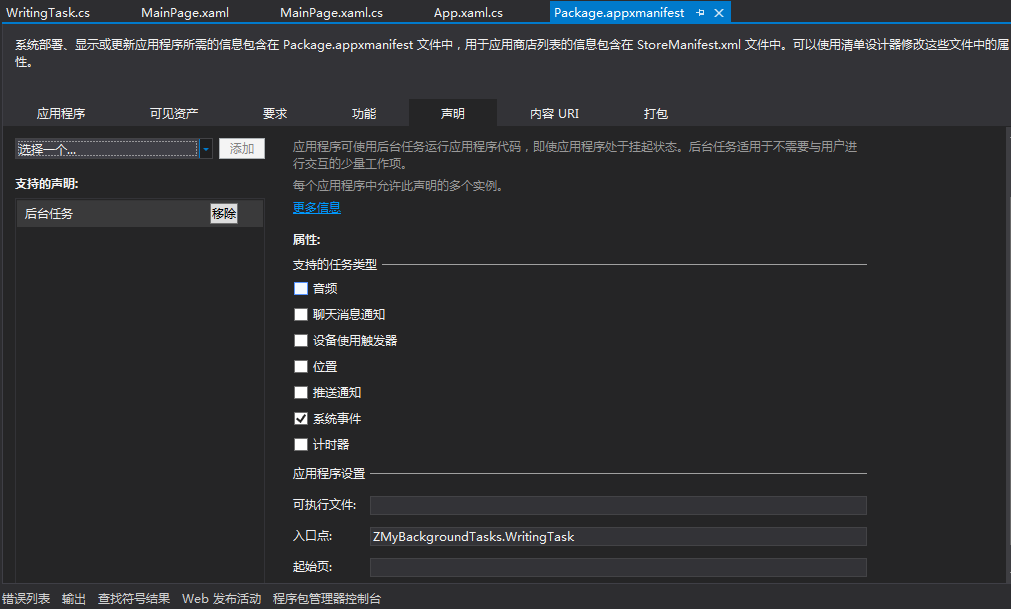
可以设置触发器的类型,记得设置后台任务的入口点。
然后前台应用添加后台任务项目的引用。
(5)前台应用对后台任务进行注册与解除注册
最后的一步也就是在前台应用中对后台任务进行注册了:
private async void registerButton_Click(object sender, RoutedEventArgs e)

{

    BackgroundExecutionManager.RemoveAccess();

    await BackgroundExecutionManager.RequestAccessAsync();

    RegisterTask();

}

private static void RegisterTask()

{

    SystemTrigger triger = new SystemTrigger(SystemTriggerType.TimeZoneChange, false);

    BackgroundTaskBuilder taskBuilder = new BackgroundTaskBuilder();

    taskBuilder.Name = "WritingTask";

    taskBuilder.SetTrigger(triger);

    taskBuilder.TaskEntryPoint = typeof(ZMyBackgroundTasks.WritingTask).FullName;

    taskBuilder.Register();

}
这里选择的触发器为“当时区改变时”,这只是为了方便测试,你可以根据需要自行选择。
解除注册的方法为:
private void unregisterButton_Click(object sender, RoutedEventArgs e)

{

    var task = BackgroundTaskRegistration.AllTasks.Values.First();

    task.Unregister(true);

    BackgroundExecutionManager.RemoveAccess();

}
Windows Phone 8.1 后台任务的更多相关文章
- Windows 8.1 应用开发后台任务概述(Windows XAML)
说到后台任务,这是在和许多 Android 开发者聊天的时候,经常被提起的话题之一, Windows 移动平台的后台任务的形式有别与 Android 的后台 service,简单的说在 Windows ...
- windows phone 8.1 开发:后台任务详解
原文出自:http://www.bcmeng.com/backtask/ 小梦今天给大家分享一下windows phone 8.1中的后台任务如何实现,许多应用都会用到后台任务,所以我们必须得掌握. ...
- WPF 后台任务 等待动画 样例 && C# BackgroundWorker 详解
运行效果: 前台代码: <Window x :Class="Waiting.Window1" xmlns="http://schemas.microsoft.com ...
- WP8.1开发:后台任务详解(求推荐)
小梦今天给大家分享一下windows phone 8.1中的后台任务如何实现,许多应用都会用到后台任务,所以我们必须得掌握. 新建后台任务类: 首先我们先新建一个windows phone 8.1空白 ...
- 重新想象 Windows 8 Store Apps (64) - 后台任务: 开发一个简单的后台任务
[源码下载] 重新想象 Windows 8 Store Apps (64) - 后台任务: 开发一个简单的后台任务 作者:webabcd 介绍重新想象 Windows 8 Store Apps 之 后 ...
- 重新想象 Windows 8 Store Apps (65) - 后台任务: 音乐的后台播放和控制
[源码下载] 重新想象 Windows 8 Store Apps (65) - 后台任务: 音乐的后台播放和控制 作者:webabcd 介绍重新想象 Windows 8 Store Apps 之 后台 ...
- 重新想象 Windows 8 Store Apps (66) - 后台任务: 下载和上传
[源码下载] 重新想象 Windows 8 Store Apps (66) - 后台任务: 下载和上传 作者:webabcd 介绍重新想象 Windows 8 Store Apps 之 后台任务 后台 ...
- 重新想象 Windows 8 Store Apps (67) - 后台任务: 推送通知
[源码下载] 重新想象 Windows 8 Store Apps (67) - 后台任务: 推送通知 作者:webabcd 介绍重新想象 Windows 8 Store Apps 之 后台任务 推送通 ...
- 重新想象 Windows 8 Store Apps (68) - 后台任务: 控制通道(ControlChannel)
[源码下载] 重新想象 Windows 8 Store Apps (68) - 后台任务: 控制通道(ControlChannel) 作者:webabcd 介绍重新想象 Windows 8 Store ...
随机推荐
- linux设置tab键的宽度为4
先cd 到~目录 ~$ cd ~$ vi .vimrc set nu
- numpy_basic
一.Numpy是什么 Numerical Python,数值的Python,补充了Python语言所欠缺的数值计算能力. Numpy是其它数据分析及机器学习库的底层库. Numpy完全标准C语言实现, ...
- 不是IT圈人的IT创业优劣势!
不是IT圈人的IT创业优势: 1)更尊重市场导向而非技术 2)更关注产品细节而非技术 3)更关注企业平衡而非技术 不是IT圈人的IT创业劣势: 1)因营销而放弃技术规划 2)因需求而丧失技术 ...
- BPX-tree
写的匆忙 估计有BUG 修改后 会去掉这个 说明 /** * @author shuly * @date 2017/6/5. */ // hint 一日为叶,终身为叶, 最后还是要转换成 <链 ...
- perl模块 Compress::Raw::Lzma 的安装
perl模块 Compress::Raw::Lzma 的安装 用 cpan 安装任意perl模块总是提示 Couldn't untar Compress-Raw-Lzma-2.070.tar: 'Ca ...
- matlab 辅助函数 —— 文件下载与文件解压
0. 可读性的提升 为了提升代码的交互友好性,可在代码执行一些耗时操作时,显示地输出一些文本信息,以显示进度: fprintf('Downloading xxfilename...\n') urlwr ...
- Intent传递对象的几种方式
原创文章.转载请注明 http://blog.csdn.net/leejizhou/article/details/51105060 李济洲的博客 Intent的使用方法相信你已经比較熟悉了,Inte ...
- c编程:僵尸吃大脑
第一行输入一个正整数n 以下每一行输入僵尸已经吃了的大脑数量a,和需要生存必需要吃的大脑数量b.总共n行. 例子输入 3 4 5 3 3 4 3 例子输出 NO BRAINS MMM BRAINS M ...
- 1.6 Python基础知识 - for循环
在循环语句中,除了while循环外,还有一种循环叫for循环的循环语句,for循环语句用于遍历可迭代(什么是迭代?以及迭代的相关知识,我们到后面再进行阐述,这里只要记住就可以了.)对象集合中的元素,并 ...
- 学习笔记:Vue——混入
前言: 到现在用Vue做了不少项目了,用到的都是初阶的功能,很多高阶能力都没有用到.仅用初级阶段也能做项目,甚至是复杂项目,可见vue之强大,果然是渐进式开发方式. 但是本着虚心学习的态度,还是要抽空 ...