
MVC架构之delegate
Qt的MVC架构可以实现很多数据显示的功能,本次主要对代理进行一个总结:
重实现QStyledItemDelegate类,实现自定义类。
(1)ComboxDelegate.h
#ifndef COMBODELEGATE_H

#define COMBODELEGATE_H

#include <QStyledItemDelegate>

class ComboDelegate : public QStyledItemDelegate

{

public:

    ComboDelegate(QObject *parent = NULL);

protected:

    QWidget *createEditor(QWidget *parent, const QStyleOptionViewItem &option, const QModelIndex &index) const;

    void setEditorData(QWidget *editor, const QModelIndex &index) const;

    void setModelData(QWidget *editor, QAbstractItemModel *model, const QModelIndex &index) const;

    void updateEditorGeometry(QWidget *editor, const QStyleOptionViewItem &option, const QModelIndex &index) const;

};

#endif // COMBODELEGATE_H
(2)ComboDelegate.cpp
#include "ComboDelegate.h"

#include <QComboBox>

ComboDelegate::ComboDelegate(QObject *parent)

    : QStyledItemDelegate(parent)

{}

QWidget *ComboDelegate::createEditor(QWidget *parent, const QStyleOptionViewItem &option, const QModelIndex &index) const

{

    Q_UNUSED(option);

    Q_UNUSED(index);

    QStringList list;

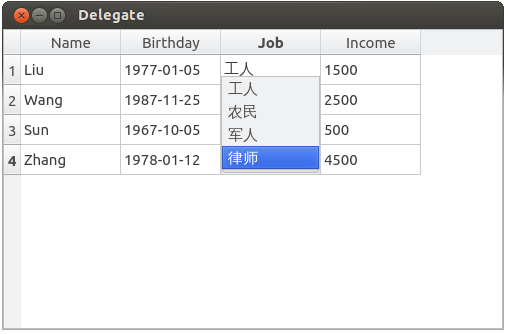
    list << "工人" << "农民" << "军人" << "律师";

    QComboBox *pEditor = new QComboBox(parent);

    pEditor->addItems(list);

    pEditor->installEventFilter(const_cast<ComboDelegate*>(this));

    return pEditor;

}

void ComboDelegate::setEditorData(QWidget *editor, const QModelIndex &index) const

{

    QString strText = index.model()->data(index).toString();

    QComboBox *pCombox = NULL;

    pCombox = static_cast<QComboBox*>(editor);

    if (pCombox != NULL)

    {

        int nIndex = pCombox->findText(strText);

        pCombox->setCurrentIndex(nIndex);

    }

}

void ComboDelegate::setModelData(QWidget *editor, QAbstractItemModel *model, const QModelIndex &index)const

{

    QComboBox *pCombox = NULL;

    pCombox = static_cast<QComboBox*>(editor);

    if (pCombox != NULL)

    {

        QString strText = pCombox->currentText();

        model->setData(index, strText);

    }

}

void ComboDelegate::updateEditorGeometry(QWidget *editor, const QStyleOptionViewItem &option, const QModelIndex &index)const

{

    Q_UNUSED(index);

    editor->setGeometry(option.rect);

}
(3)DateDelegate.h
#ifndef DATEDELEGATE_H

#define DATEDELEGATE_H

#include <QStyledItemDelegate>

class DateDelegate : public QStyledItemDelegate

{

public:

    DateDelegate(QObject *parent = NULL);

protected:

    QWidget *createEditor(QWidget *parent, const QStyleOptionViewItem &option, const QModelIndex &index) const;

    void setEditorData(QWidget *editor, const QModelIndex &index) const;

    void setModelData(QWidget *editor, QAbstractItemModel *model, const QModelIndex &index) const;

    void updateEditorGeometry(QWidget *editor, const QStyleOptionViewItem &option, const QModelIndex &index) const;

};

#endif // DATEDELEGATE_H
(4)DateDelegate.cpp
#include "DateDelegate.h"

#include <QDateTimeEdit>

DateDelegate::DateDelegate(QObject *parent)

    : QStyledItemDelegate(parent)

{}

// 首先创建要进行代理的窗体

QWidget *DateDelegate::createEditor(QWidget *parent, const QStyleOptionViewItem &option, const QModelIndex &index) const

{

    Q_UNUSED(option);

    Q_UNUSED(index);

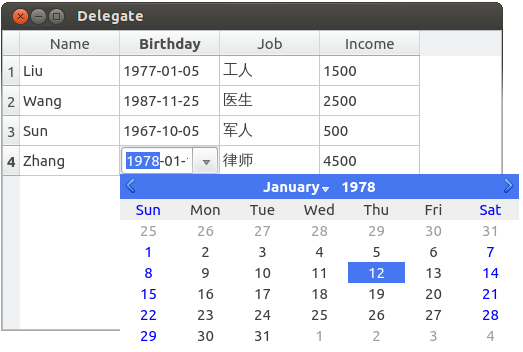
    QDateTimeEdit *pEditor = new QDateTimeEdit(parent);      // 一个日历的控件

    pEditor->setDisplayFormat("yyyy-MM-dd");   // 日期时间的显示格式

    pEditor->setCalendarPopup(true);   // 以下拉的方式显示

    pEditor->installEventFilter(const_cast<DateDelegate*>(this));  // 调用这个函数安装事件过滤器,使这个对象可以捕获QDateTimeEdit对象的事件

    return pEditor;

}

// 这个是初始化作用,初始化代理控件的数据

void DateDelegate::setEditorData(QWidget *editor, const QModelIndex &index) const

{

  // 先用这个index返回这个model然后用这个model得到index对应的数据

  QString strDate = index.model()->data(index).toString();

  QDate date = QDate::fromString(strDate, Qt::ISODate);     // 根据QString类型得到相应的时间类型

  QDateTimeEdit *pEditor = NULL;

  pEditor = static_cast<QDateTimeEdit*>(editor);    // 强转为QDateTimeEdit*类型

  if (pEditor != NULL)

  {

      pEditor->setDate(date);      // 设置代理控件的显示数据

  }

}

// 将代理控件里面的数据更新到视图控件中

// void setModelData(QWidget *editor, QAbstractItemModel *model, const QModelIndex &index) const;

void DateDelegate::setModelData(QWidget *editor, QAbstractItemModel *model, const QModelIndex &index) const

{

  QDateTimeEdit *pEditor = NULL;

  pEditor = static_cast<QDateTimeEdit*>(editor);    // 得到时间

  if (pEditor != NULL)

  {

      QDate date = pEditor->date();    // 得到时间

      model->setData(index, QVariant(date.toString(Qt::ISODate)));    // 把值放到相应的index里面

  }

}

// 代理中数据的改变放到model中

// void updateEditorGeometry(QWidget *editor, const QStyleOptionViewItem &option, const QModelIndex &index) const;

void DateDelegate::updateEditorGeometry(QWidget *editor, const QStyleOptionViewItem &option, const QModelIndex &index) const

{

    Q_UNUSED(index);

    editor->setGeometry(option.rect);

}
(5)SpinDelegate.h
#ifndef SPINDELEGATE_H

#define SPINDELEGATE_H

#include <QStyledItemDelegate>

class SpinDelegate : public QStyledItemDelegate

{

public:

    SpinDelegate(QObject *parent = NULL);

protected:

    QWidget *createEditor(QWidget *parent, const QStyleOptionViewItem &option, const QModelIndex &index) const;

    void setEditorData(QWidget *editor, const QModelIndex &index) const;

    void setModelData(QWidget *editor, QAbstractItemModel *model, const QModelIndex &index) const;

    void updateEditorGeometry(QWidget *editor, const QStyleOptionViewItem &option, const QModelIndex &index) const;

};

#endif // SPINDELEGATE_H
(6)SpinDelegate.cpp
#include "SpinDelegate.h"

#include <QSpinBox>

SpinDelegate::SpinDelegate(QObject *parent)

    : QStyledItemDelegate(parent)

{

}

QWidget *SpinDelegate::createEditor(QWidget *parent, const QStyleOptionViewItem &option, const QModelIndex &index) const

{

    Q_UNUSED(option);

    Q_UNUSED(index);

    QSpinBox *pEditor = new QSpinBox(parent);

    pEditor->setRange(, );

    pEditor->installEventFilter(const_cast<SpinDelegate*>(this));

    return pEditor;

}

void SpinDelegate::setEditorData(QWidget *editor, const QModelIndex &index) const

{

    int value = index.model()->data(index).toInt();

    QSpinBox *pSpinbox = NULL;

    pSpinbox = static_cast<QSpinBox*>(editor);

    if (pSpinbox != NULL)

    {

        pSpinbox->setValue(value);

    }

}

void SpinDelegate::setModelData(QWidget *editor, QAbstractItemModel *model, const QModelIndex &index) const

{

    QSpinBox *pSpinbox = NULL;

    pSpinbox = static_cast<QSpinBox*>(editor);

    if (pSpinbox != NULL)

    {

        int value = pSpinbox->value();

        model->setData(index, value);

    }

}

void SpinDelegate::updateEditorGeometry(QWidget *editor, const QStyleOptionViewItem &option, const QModelIndex &index) const

{

    Q_UNUSED(index);

    editor->setGeometry(option.rect);

}
(7)main.cpp
#include <QApplication>

#include <QFile>

#include <QDebug>

#include <QWidget>

#include <QTableView>

#include <QTextStream>

#include <QStandardItemModel>

#include "DateDelegate.h"

#include "ComboDelegate.h"

#include "SpinDelegate.h"

int main(int argc, char *argv[])

{

    QApplication a(argc, argv);

    QStandardItemModel model(, );

    model.setHeaderData(, Qt::Horizontal, QLatin1String("Name"));

    model.setHeaderData(, Qt::Horizontal, QLatin1String("Birthday"));

    model.setHeaderData(, Qt::Horizontal, QLatin1String("Job"));

    model.setHeaderData(, Qt::Horizontal, QLatin1String("Income"));

    QFile file(QLatin1String("/mnt/liuy/info"));

    if (!file.open(QIODevice::ReadOnly | QIODevice::Text))

    {

        qDebug() << "open the file failed...";

        return -;

    }

    QTextStream out(&file);

    QString line;

    model.removeRows(, model.rowCount(QModelIndex()), QModelIndex());

    int row = ;

    do

    {

        line = out.readLine();

        if (!line.isEmpty())

        {

            model.insertRows(row, , QModelIndex());

            QStringList pieces = line.split(",", QString::SkipEmptyParts);

            model.setData(model.index(row, , QModelIndex()), pieces.value());

            model.setData(model.index(row, , QModelIndex()), pieces.value());

            model.setData(model.index(row, , QModelIndex()), pieces.value());

            model.setData(model.index(row, , QModelIndex()), pieces.value());

            ++row;

        }

    } while(!line.isEmpty());

    file.close();

    QTableView tableView;

    tableView.setModel(&model); // 绑定Model

    tableView.setWindowTitle(QLatin1String("Delegate"));

    DateDelegate dateDelegate;

    tableView.setItemDelegateForColumn(, &dateDelegate); // 第一列代理

    ComboDelegate comboDelegate;

    tableView.setItemDelegateForColumn(, &comboDelegate);// 第二列代理

    SpinDelegate spinDelegate;

    tableView.setItemDelegateForColumn(, &spinDelegate); // 第三列代理

    tableView.resize(, ); // 重置大小

    tableView.show();

    return a.exec();

}
信息文件
文件info 内容如下(注意:文件格式):
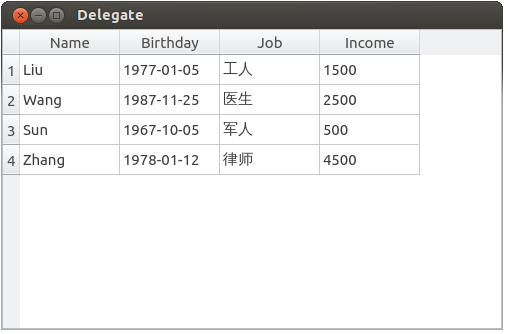
Liu,1977-01-05,工人,1500

Wang,1987-11-25,医生,2500

Sun,1967-10-05,军人,500

Zhang,1978-01-12,律师,4500
运行效果图如下:
第二列编辑图(时间日期控件):
第三列编辑图(下拉框控件):
第四列编辑图(微调框控件):

引用:http://www.cnblogs.com/Braveliu/p/7488250.html
未完待续...
MVC架构之delegate的更多相关文章
- MVC架构杂谈
来源:伯乐在线专栏作者 - 林欣达 链接:http://ios.jobbole.com/86895/ 点击 → 了解如何加入专栏作者 前言 MVC是软件工程中的一种软件架构模式,它把软件系统分为三个基 ...
- 【JAVA】基于MVC架构Java技术荟萃案例演练
基于JAVA-MVC技术的顾客管理项目案例总结 作者 白宁超 2016年6月9日22:47:08 阅读前瞻:本文源于对javaweb相关技术和资料汇总,涉及大量javaweb基础技术诸如:Servle ...
- Android 四大组件 与 MVC 架构模式
作为一个刚从JAVA转过来的Android程序员总会思考android MVC是什么样的? 首先,我们必须得说Android追寻着MVC架构,那就得先说一下MVC是个啥东西! 总体而来说MVC不能说是 ...
- MVC架构模式分析与设计(一)---简单的mvc架构
首先 我要感谢慕课网的老师提供视频资料 http://www.imooc.com/learn/69 下面我来进行笔记 我们制作一个简单的mvc架构 制作第一个控制器 testController.cl ...
- IntelliMVCCode智能MVC架构的代码助手使用方法
智能代码生成工具,快速帮助开发者提升开发速度,通过工具自动生成MVC架构的大量源代码,节省更多的开发时间. 工具使用的框架:.net4.0,通过工具连接到数据库自动提取数据表或视图中的结构,生成对应的 ...
- 从MVC框架看MVC架构的设计
尽管MVC早已不是什么新鲜话题了,但是从近些年一些优秀MVC框架的设计上,我们还是会发现MVC在架构设计上的一些新亮点.本文将对传统MVC架构中的一些弊病进行解读,了解一些优秀MVC框架是如何化解这些 ...
- 【PHP小项目使用MVC架构】
小项目名称是雇员管理系统. mvc是一种项目的开发模式,中文名称为模式视图控制器,是强制程序员将数据的输入.处理.输出分开的一种开发模式. 在这个小项目中,控制器使用service作为后缀名. 项目u ...
- 一个初学者对于MVC架构的理解
我很早之前就开始接触.NET开发,一直都在2.0的框架下,所以对于MVC这种架构,听说过,但没有具体使用过,近期和外部朋友接触时,有了解到他们公司在使用MVC这种架构,所以自己就找来相关资料了解一下M ...
- java MVC架构-spring mvc,struct2(理解)
MVC架构实现基础: 基于filter或者servlet实现请求地址分析,如果需要控制类处理请求,则调用相应的控制类.调用控制类时,根据配置文件初始化控制类相关的参数.数据库连接可持久化存在.控制类处 ...
随机推荐
- [bzoj2631]tree_LCT
tree bzoj-2631 题目大意:给定一个n个点的树,每个点的初始权值为1,支持:删边加边(这两个操作同时进行,保证操作之后还是一棵树),路径加,路径乘,查询路径和. 注释:$1\le n,q\ ...
- maven 自动部署到tomcat
使用maven的自动部署功能可以很方便的将maven工程自动部署到远程tomcat服务器,减少部署时间,方便快捷. 一.配置tomcat manager 1.编辑tomcat目录下,conf/tomc ...
- SPOJ 1811LCS Longest Common Substring
后缀自己主动机裸题.... Longest Common Substring Time Limit: 2000MS Memory Limit: Unknown 64bit IO Format: ...
- android 点击返回键退出程序的方法
android 点击返回键退出程序的方法 第一种: 再按一次返回键退出程序 private long exitTime = 0; @Override public boolean onKeyDown( ...
- Effective JavaScript Item 31 优先使用Object.getPrototypeOf,而不是__proto__
本系列作为Effective JavaScript的读书笔记. 在ES5中引入了Object.getPrototypeOf作为获取对象原型对象的标准API.可是在非常多运行环境中.也提供了一个特殊的_ ...
- Ralink5350开发环境搭建
一.安装虚拟机(Oracle VM VirtualBox 或 VMware Workstation) 二.在虚拟机中安装linux操作系统(当前使用的是Ubuntu1204桌面版) 三.配置linu ...
- POJ 1679 The Unique MST(推断最小生成树_Kruskal)
Description Given a connected undirected graph, tell if its minimum spanning tree is unique. Defini ...
- CH Round #46A 磁力块
还是一道好题的 对于一个磁石是否被吸引,有两个关键字:距离和质量.(二维偏序??) 好像是很厉害的分块姿势,先按第一关键字排序,在块中按第二关键字排 进行bfs,对于当前磁石,有1~k-1个块是第一关 ...
- (Go)02.go 安装delve调试工具测试
安装调试工具 go get github.com/derekparker/delve/cmd/dlv 增加断点调试 调试--->启动调试
- 44.Qt通过子类化qstyle实现自定义外观
main.cpp #include <QtGui> #include "brozedialog.h" #include "bronzestyle.h" ...