
solr的增删改查
solr的配置请查看:http://www.cnblogs.com/byteworld/p/5898651.html
创建Core:(可以复制模版到solrhome\test\conf文件夹中)
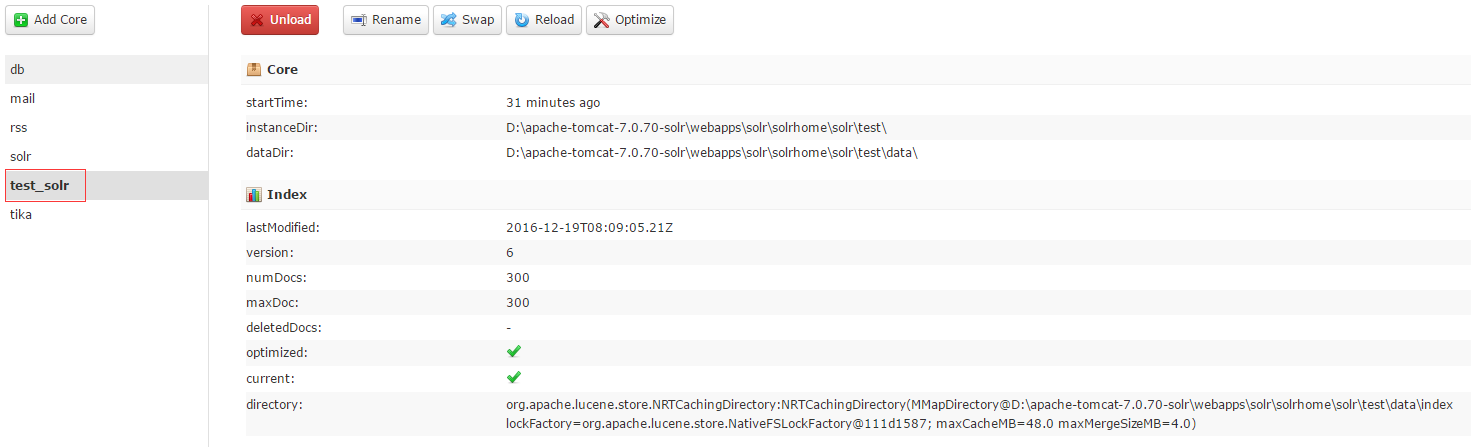
简化了(schema.xml配置文件)
<?xml version="1.0" encoding="UTF-8" ?>

<schema name="test_solr" version="1.5">

    <!--版本这个也需要加-->

    <field name="_version_" type="long" indexed="true" stored="true"/>

    <field name="_root_" type="string" indexed="true" stored="false"/>

	<field name="id" type="string" stored="true" indexed="true"/>

	<field name="name" type="string" stored="true" indexed="true" omitNorms="false"/>

	<field name="price" type="string" stored="true" indexed="true"/>

	<fieldType name="string" class="solr.StrField" sortMissingLast="true" />

	<!-- 这个主键必须加不然报错 -->

	<uniqueKey>id</uniqueKey>

    <!-- boolean type: "true" or "false" -->

    <fieldType name="boolean" class="solr.BoolField" sortMissingLast="true"/>

    <fieldType name="int" class="solr.TrieIntField" precisionStep="0" positionIncrementGap="0"/>

    <fieldType name="float" class="solr.TrieFloatField" precisionStep="0" positionIncrementGap="0"/>

    <fieldType name="long" class="solr.TrieLongField" precisionStep="0" positionIncrementGap="0"/>

    <fieldType name="double" class="solr.TrieDoubleField" precisionStep="0" positionIncrementGap="0"/>

</schema>
java代码:
jar包下载:链接: http://pan.baidu.com/s/1kUIRWRt 密码: xvtu
package demo;

import java.io.IOException;

import java.util.ArrayList;

import org.apache.solr.client.solrj.SolrServerException;

import org.apache.solr.client.solrj.impl.HttpSolrClient;

import org.apache.solr.client.solrj.impl.HttpSolrServer;

import org.apache.solr.common.SolrInputDocument;

/**

 * @Description:solr添加

 * @author byte-zbs

 * @date 2016年12月19日 下午2:28:33

 */

public class AddDemo

{

    public static final String SOLR_URL = "http://localhost:8090/solr/test_solr";

    public static void main(String[] args)

    {

        addDoc();

    }

    public static void addDoc()

    {

        String[] words = {"Document是Solr索引(动词,indexing)和搜索的最基本单元","它类似于关系数据库表中的一条记录","可以包含一个或多个字段(Field","每个字段包含一个name和文本值","字段在被索引的同时可以存储在索引中","搜索时就能返回该字段的值"};

        long start = System.currentTimeMillis();

        ArrayList<SolrInputDocument> docs = new ArrayList<SolrInputDocument>();

        for(int i = 0;i < 300; i++)

        {

            SolrInputDocument input = new SolrInputDocument();

            input.addField("id", "id"+i,1.0f);

            input.addField("name",words[i % 21], 1.0f);

            input.addField("price",10*i);

            docs.add(input);

        }

        @SuppressWarnings("resource")

        HttpSolrClient client = new HttpSolrClient(SOLR_URL);

        try

        {

            client.add(docs.iterator());

        }

        catch (SolrServerException e)

        {

            e.printStackTrace();

        }

        catch (IOException e)

        {

            e.printStackTrace();

        }

        System.out.println(System.currentTimeMillis() - start);

    }

}
/**

     * @Description:查询

     * @param

     * @return void 返回类型

     */

    public static void query()

    {

        HttpSolrClient client = new HttpSolrClient(SOLR_URL);

        client.setMaxRetries(1);

        client.setConnectionTimeout(60*1000);

        client.setSoTimeout(60*1000);

        client.setDefaultMaxConnectionsPerHost(100);

        client.setMaxTotalConnections(1000);

        client.setFollowRedirects(false);

        client.setAllowCompression(true);

        client.setRequestWriter(new BinaryRequestWriter());

        SolrQuery query = new SolrQuery();

        query.setQuery("id:id*");

        query.setFields("name","id","price");

        query.setSort("price", ORDER.asc);

        query.setStart(0);

        query.setRows(20);

        try

        {

            QueryResponse res = client.query(query);

            SolrDocumentList DocumentList = res.getResults();

            for (SolrDocument document:DocumentList)

            {

                String value = document.getFieldValue("id").toString();

                String price = document.getFieldValue("price").toString();

                System.out.println(value + "====" +price);

            }

        }

        catch (SolrServerException e)

        {

            e.printStackTrace();

        }

        catch (IOException e)

        {

            e.printStackTrace();

        }

    }

    /**

     * @Description:集合插入对象

     * @param

     * @return void 返回类型

     */

    public static void pojoDocAll()

    {

        Goods good1 = new Goods("pojo_commit1", "苹果", 12.0);

        Goods good2 = new Goods("pojo_commit2", "橘子", 12.0);

        Goods good3 = new Goods("pojo_commit3", "香蕉", 12.0);

        ArrayList<Goods> list = new ArrayList<Goods>();

        list.add(good1);

        list.add(good2);

        list.add(good3);

        HttpSolrClient client = new HttpSolrClient(SOLR_URL);

        try

        {

            client.addBeans(list);

            client.commit();

        }

        catch (SolrServerException e)

        {

            e.printStackTrace();

        }

        catch (IOException e)

        {

            e.printStackTrace();

        }

    }

    /**

     * @Description:插入对象

     * @param

     * @return void 返回类型

     */

    public static void pojoDoc()

    {

        Goods good = new Goods("pojo_commit", "苹果", 12.0);

        HttpSolrClient Client = new HttpSolrClient(SOLR_URL);

        Client.setRequestWriter(new RequestWriter());

        try

        {

            Client.addBean(good);

            //Client.optimize();

            Client.commit();

        }

        catch (IOException e)

        {

            e.printStackTrace();

        }

        catch (SolrServerException e)

        {

            e.printStackTrace();

        }

    }

    /**

     * @Description:删除文档

     * @param

     * @return void 返回类型

     */

    public static void delDoc()

    {

        HttpSolrClient client = new HttpSolrClient(SOLR_URL);

        try

        {

            client.deleteById("id_update");

            client.commit();

        }

        catch (SolrServerException e)

        {

            e.printStackTrace();

        }

        catch (IOException e)

        {

            e.printStackTrace();

        }

    }

    /**

     * @Description:添加的第一种方式

     * @param

     * @return void 返回类型

     */

    public static void addone()

    {

        SolrInputDocument doc = new SolrInputDocument();

        doc.addField("id", "id_double");

        doc.addField("name", "呵呵呵呵");

        doc.addField("price", 100.0);

        HttpSolrClient client = new HttpSolrClient(SOLR_URL);

        try

        {

            client.add(doc);

            client.commit();

        }

        catch (SolrServerException e)

        {

            e.printStackTrace();

        }

        catch (IOException e)

        {

            e.printStackTrace();

        }

    }

    /**

     * @Description:添加第二种方式

     * @param

     * @return void 返回类型

     */

    public static void addoneOther()

    {

        SolrInputDocument doc = new SolrInputDocument();

        doc.addField("id", "id_update");

        doc.addField("name", "来个测试");

        doc.addField("price", 100.0);

        UpdateRequest request = new UpdateRequest();

        request.setAction(ACTION.COMMIT,false, false);

        request.add(doc);

        HttpSolrClient client = new HttpSolrClient(SOLR_URL);

        try

        {

            UpdateResponse resp = request.process(client);

            System.out.println(resp);

        }

        catch (SolrServerException e)

        {

            e.printStackTrace();

        }

        catch (IOException e)

        {

            e.printStackTrace();

        }

    }
package demo.dao;

import org.apache.solr.client.solrj.beans.Field;

public class Goods

{

    @Field

    private String id;

    @Field(value = "name")

    private String goodsname;

    @Field

    private double price;

    public Goods(String id, String name, double price)

    {

        super();

        this.id = id;

        this.goodsname = name;

        this.price = price;

    }

    public String getId()

    {

        return id;

    }

    public void setId(String id)

    {

        this.id = id;

    }

    public String getName()

    {

        return goodsname;

    }

    public void setName(String name)

    {

        this.goodsname = name;

    }

    public double getPrice()

    {

        return price;

    }

    public void setPrice(double price)

    {

        this.price = price;

    }

}
项目完整:链接: http://pan.baidu.com/s/1pLq9Kdt 密码: f558
solr的增删改查的更多相关文章
- 【Solr】solr的增删改查
目录 创建工程 增 删 改 查 高量查询 回到顶部 创建工程 普通的java web工程即可,我采用的是spring mvc! 回到顶部 增 @Autowired private SolrServer ...
- 【ES】ElasticSearch初体验之使用Java进行最基本的增删改查~
好久没写博文了, 最近项目中使用到了ElaticSearch相关的一些内容, 刚好自己也来做个总结. 现在自己也只能算得上入门, 总结下自己在工作中使用Java操作ES的一些小经验吧. 本文总共分为三 ...
- Dapper逆天入门~强类型,动态类型,多映射,多返回值,增删改查+存储过程+事物案例演示
Dapper的牛逼就不扯蛋了,答应群友做个入门Demo的,现有园友需要,那么公开分享一下: 完整Demo:http://pan.baidu.com/s/1i3TcEzj 注 意 事 项:http:// ...
- ASP.NET从零开始学习EF的增删改查
ASP.NET从零开始学习EF的增删改查 最近辞职了,但是离真正的离职还有一段时间,趁着这段空档期,总想着写些东西,想来想去,也不是很明确到底想写个啥,但是闲着也是够 ...
- 构建ASP.NET MVC4+EF5+EasyUI+Unity2.x注入的后台管理系统(9)-MVC与EasyUI结合增删改查
系列目录 文章于2016-12-17日重写 在第八讲中,我们已经做到了怎么样分页.这一讲主要讲增删改查.第六讲的代码已经给出,里面包含了增删改,大家可以下载下来看下. 这讲主要是,制作漂亮的工具栏,虽 ...
- 通过Java代码实现对数据库的数据进行操作:增删改查
在写代码之前,依然是引用mysql数据库的jar包文件:右键项目-构建路径-设置构建路径-库-添加外部JAR 在数据库中我们已经建立好一个表xs :分别有xuehao xingming xue ...
- Hibernate全套增删改查+分页
1.创建一个web工程 2.导入jar包 3.创建Student表 4.创建实体类 package com.entity; public class Student { private Integer ...
- 使用 Json.Net 对Json文本进行 增删改查
JSON 已经成为当前主流交互格式, 如何在C#中使用 Json.Net 对Json文本进行 增删改查呢?见如下代码 #region Create (从零创建) public static strin ...
- yii2 增删改查
自己总结的yii2 advanced 版本的简单的增删改查,希望对大家有所帮助 1.gii生成的actionCreate()方法中 获取插入语句的id $id = $model->attribu ...
随机推荐
- Hash工具下载地址
因为经常要在非常用电脑使用,这里放一个链接,方便下载: http://files.cnblogs.com/files/cxun/Hash.zip HASH计算工具,可计算MD5.SHA-1.CRC32 ...
- .NET委托和事件
.net学习之委托和事件 1.什么是委托 通俗的说:委托就是一个能够存储符合某种格式(方法签名)的方法的指针的容器 上传图片: 2.委托语法 准备一个方法:string Hello(string ...
- Window Azure ServiceBus Messaging消息队列技术系列1-基本概念和架构
前段时间研究了Window Azure ServiceBus Messaging消息队列技术,搞了很多技术研究和代码验证,最近准备总结一下,分享给大家. 首先,Windows Azure提供了两种类型 ...
- Unable to execute dex: GC overhead limit exceeded
Android打包时下面的错误: Unable to execute dex: GC overhead limit exceeded GC overhead limit exceeded 解决的方法: ...
- TCP/IP协议与UDP协议的区别
TCP(Transmission Control Protocol,传输控制协议)是面向连接的协议,也就是说,在收发数据前,必须和对方建立可靠的连接.一个TCP连接必须要经过三次“对话”才能建立起来, ...
- IOS 7 风格Checkbox
Switchery Switchery is a simple component that helps you turn your default HTML checkbox inputs into ...
- Hibernate框架简述 内部资料 请勿转载 谢谢合作
Hibernate的核心组件在基于MVC设计模式的JAVA WEB应用中,Hibernate可以作为模型层/数据访问层.它通过配置文件(hibernate.properties或hibernate.c ...
- linux git的安装与使用
一. Git安装. sudo apt-get install git 二.Git提交到远程仓. 1.到github或其coding(提供免费的私有仓)创建项目. 2.项目目录下初始化git. sudo ...
- Codeforces617 E . XOR and Favorite Number(莫队算法)
XOR and Favorite Number time limit per test: 4 seconds memory limit per test: 256 megabytes input: s ...
- centos常用操作
文件夹赋权chmod -R 777 文件夹 zip压缩和unzip解压缩命令详解以下命令均在/home目录下操作cd /home #进入/home目录1.把/home目录下面的mydata目录压缩为m ...